Author Archives: Robins

fatal error: libusb.h: No such file or directory [How to Solve]

1. Error Messages:
In file included from /home/joes/jiao/ROS_Project/09_catkin_laser_Project/src/laser_myself/src/sick_tim310_1130000m01.cpp:2:0:
/home/joes/jiao/ROS_Project/09_catkin_laser_Project/src/laser_myself/include/laser_myself/sick_tim_common_mockup.h:42:20: fatal error: libusb.h: No such file or directory
compilation terminated.


2. Solution:
The original program header file is: #include <libusb.h>
Modify to: #include <libusb-1.0/libusb.h>

[Solved] nacos Startup Error: nested exception is java.lang.RuntimeException: java.lang.RuntimeException: [db-load-error

1. Error reporting steps
I. Download nacos official package
Nacos Quick Start
2. decompress

3. to open
startup.cmd
4. report an error

org.springframework.context.ApplicationContextException: Unable to start web server; nested exception is org.springframework.boot.web.server.WebServerException: Unable to start embedded Tomcat
        at org.springframework.boot.web.servlet.context.ServletWebServerApplicationContext.onRefresh(ServletWebServerApplicationContext.java:156)
        at org.springframework.context.support.AbstractApplicationContext.refresh(AbstractApplicationContext.java:544)
        at org.springframework.boot.web.servlet.context.ServletWebServerApplicationContext.refresh(ServletWebServerApplicationContext.java:141)
        at org.springframework.boot.SpringApplication.refresh(SpringApplication.java:744)
        at org.springframework.boot.SpringApplication.refreshContext(SpringApplication.java:391)
        at org.springframework.boot.SpringApplication.run(SpringApplication.java:312)
        at org.springframework.boot.SpringApplication.run(SpringApplication.java:1215)
        at org.springframework.boot.SpringApplication.run(SpringApplication.java:1204)
        at com.alibaba.nacos.Nacos.main(Nacos.java:35)
        at sun.reflect.NativeMethodAccessorImpl.invoke0(Native Method)
        at sun.reflect.NativeMethodAccessorImpl.invoke(NativeMethodAccessorImpl.java:62)
        at sun.reflect.DelegatingMethodAccessorImpl.invoke(DelegatingMethodAccessorImpl.java:43)
        at java.lang.reflect.Method.invoke(Method.java:498)
        at org.springframework.boot.loader.MainMethodRunner.run(MainMethodRunner.java:49)
        at org.springframework.boot.loader.Launcher.launch(Launcher.java:108)
        at org.springframework.boot.loader.Launcher.launch(Launcher.java:58)
        at org.springframework.boot.loader.PropertiesLauncher.main(PropertiesLauncher.java:467)
Caused by: org.springframework.boot.web.server.WebServerException: Unable to start embedded Tomcat
      ......

Caused by: org.springframework.beans.factory.BeanCreationException: Error creating bean with name 'authFilterRegistration' defined in class path resource [com/alibaba/nacos/core/auth/AuthConfig.class]: Bean instantiation via factory method failed; nested exception is org.springframework.beans.BeanInstantiationException: Failed to instantiate [org.springframework.boot.web.servlet.FilterRegistrationBean]: Factory method 'authFilterRegistration' threw exception; nested exception is org.springframework.beans.factory.UnsatisfiedDependencyException: Error creating bean with name 'authFilter': Unsatisfied dependency expressed through field 'authManager'; nested exception is org.springframework.beans.factory.UnsatisfiedDependencyException: Error creating bean with name 'nacosAuthManager': Unsatisfied dependency expressed through field 'authenticationManager'; nested exception is org.springframework.beans.factory.UnsatisfiedDependencyException: Error creating bean with name 'nacosAuthConfig': Unsatisfied dependency expressed through field 'userDetailsService'; nested exception is org.springframework.beans.factory.UnsatisfiedDependencyException: Error creating bean with name 'nacosUserDetailsServiceImpl': Unsatisfied dependency expressed through field 'userPersistService'; nested exception is org.springframework.beans.factory.UnsatisfiedDependencyException: Error creating bean with name 'externalUserPersistServiceImpl': Unsatisfied dependency expressed through field 'persistService'; nested exception is org.springframework.beans.factory.BeanCreationException: Error creating bean with name 'externalStoragePersistServiceImpl': Invocation of init method failed; nested exception is java.lang.RuntimeException: java.lang.RuntimeException: [db-load-error]load jdbc.properties error
 
          ......
     
Caused by: java.lang.RuntimeException: [db-load-error]load jdbc.properties error
        at com.alibaba.nacos.config.server.service.datasource.ExternalDataSourceServiceImpl.init(ExternalDataSourceServiceImpl.java:109)
        at com.alibaba.nacos.config.server.service.datasource.DynamicDataSource.getDataSource(DynamicDataSource.java:55)
        ... 166 common frames omitted


2. Solution
1. look at the official documentation (or have to look at the official documentation), use
startup.cmd -m standalone to perform a stand-alone startup
2. Cluster deployment

error: resource android:attr/lStar not found? [How to Solve]

Solution

// The module created before, by default, is appcompat:1.3.1, which corresponds to androidx.core:core:1.5.0
implementation 'androidx.appcompat:appcompat:1.3.1'

// The module created today, the template of the idea was changed to 1.4.0, corresponding to core:1.7.0
implementation 'androidx.appcompat:appcompat:1.4.0'

Change back to 1.3 1 can run

[Solved] error: Unexpected console statement (no-console)

Solution:

Modify package Eslintconfig in JSON: “rules”: {} in {}, add a line of code: “no console”: “off”

NPM install after saving

module.exports = {
  root: true,
  env: {
    node: true
  },
  extends: [
    'plugin:vue/essential',
    '@vue/standard'
  ],
  parserOptions: {
    parser: 'babel-eslint'
  },
  rules: {
    'no-console': process.env.NODE_ENV === 'production' ?'warn' : 'off',
    'no-debugger': process.env.NODE_ENV === 'production' ?'warn' : 'off',
    "no-console":"off"
  }
}

Or directly use:

window.console.log(“…”) (I haven’t tried)

[Solved] Starting MySQL… ERROR The server quit without updating PID file

An error is reported when starting MySQL after the Linux server is restarted. The error information is as follows:

Starting MySQL… ERROR! The server quit without updating PID file (/usr/local/mysql/data/VM_0_9_centos.pid).

Solution:

1. Modify the MySQL configuration file in/etc/my cnf。 Add the following configuration:

basedir = /usr/local/mysql
datadir = /usr/local/mysql/data
log-error = /usr/local/mysql/error.log
pid-file = /usr/local/mysql/mysql.pid
user = mysql
tmpdir = /tmp

2. Initialize and execute some commands in/usr/local/MySQL/scripts:

./mysql_install_db --user=mysql --basedir=/usr/local/mysql --datadir=/usr/local/mysql/data --pid-file=/usr/local/mysql/data/mysql.pid --tmpdir=/tmp

This database can be started normally.

However, due to the reinitialization of the database, you will be prompted that you do not have permission when accessing the previous database.

Two commands are required:

chown -R mysql:mysql /usr/local/mysql/
chmod -R 755 /usr/local/mysql/

Tip: the directories here are all my real MySQL installation directories. The directories installed by each person may be different.

IIS Web Deploy Website Error: HTTP error 500.19 – Internal Server Error

HTTP error 500.19-Internal Server Error
The requested page cannot be accessed because the relevant configuration data for the page is invalid.

Detailed error information:

Module: IIS Web Core
Notice: BeginRequest
error code: 0x800700b7
Configuration error: When the unique key attribute “name” is set to “ScriptHandlerFactory”, duplicate collection items of type “add” cannot be added
Because the child site inherits the web.config of the parent site

Because the child site inherits the web.config of the parent site

  <location path="." allowOverride="true" inheritInChildApplications="false">
  /* Wrap <system.web> with location in the web.config file
    </system.web>
*/
// If it doesn't work, wrap all configurations with the <add> attribute in location
 
  </location>

For example: system.web, system.webServer, ApplicationConfiguration and other configuration
locations with add attributes only need to be written once

Make the subsite not inherit the web.config of the parent site

[Solved] BeanCreationNotAllowedException Error: Error creating bean with name ‘rabbitConnectionFactory‘

org.springframework.beans.factory.BeanCreationNotAllowedException:

Error creating bean with name ‘rabbitConnectionFactory’:

Singleton bean creation not allowed while singletons of this factory are in destruction (Do not request a bean from a BeanFactory in a destroy method implementation!)

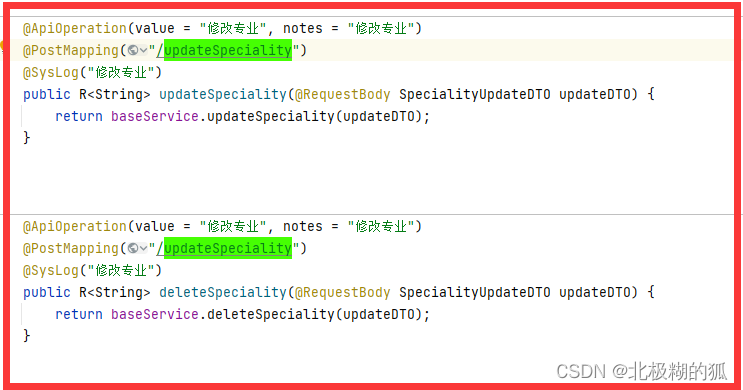
Once the project reports this error, in most cases, the sub paths in the control layer are repeated, and non unique channels appear during compilation, as shown below

After copying, the sub path of the control layer access path has been changed accordingly

[Solved] docker: Error response from daemon: OCI runtime create failed: container_linux.go:380

docker: Error response from daemon: OCI runtime create failed: container_ linux. Go: 380 error reporting solution

Docker installs mysql5.0 7 fails to run and reports OCI runtime create failed

Pull mysql5 on docker 7 no problem
execute the code and report an error

docker run -p 3306:3306 --name mysql \
-v /mydata/mysql/log:/var/log/mysql \
-v /mydata/mysql/data:/var/lib/mysql \
-v /mydata/mysql/conf:/etc/mysql \
-e MYSQL_ROOT_PASSWORD=root \
-d mysql:5.7

CD goes to/mydata/MySQL/conf and finds that it is not mounted correctly, and there is no file path of/etc/MySQL

Error reason: the docker version needs to be downgraded or reinstalled because of the compatibility between Linux and docker

There are two solutions:

Reinstall the docker of the specified version and demote the docker to the specified version

The first method: uninstall and reinstall:

//Step 1: Uninstall docker

//List the packages downloaded by docker
sudo yum list installed | grep docker

//remove all the above related installed packages sudo yum -y remove "above show related packages"
sudo yum -y remove docker-ce.x86_64
sudo yum -y remove docker-ce-cli.x86_64

// Remove related images and containers
sudo rm -rf /var/lib/docker

sudo yum remove docker \
                  docker-client \
                  docker-client-latest \
                  docker-common \
                  docker-latest \
                  docker-latest-logrotate \
                  docker-logrotate \
                  docker-selinux \
                  docker-engine-selinux \
                  docker-engine
                 
// Test for deletion of
docker -v


// Step 2: reinstall the specified version of docker

// Install some necessary system tools.
sudo yum install -y yum-utils device-mapper-persistent-data lvm2

// Add software source information: sudo yum-config -y
sudo yum-config-manager --add-repo http://mirrors.aliyun.com/docker-ce/linux/centos/docker-ce.repo

//Update the yum cache.
sudo yum makecache fast

//View the available versions of Docker-ce: sudo yum list docker-ce
yum list docker-ce --showduplicates | sort -r

// If you need to show only table versions, you can turn off the list for test versions: yum list
sudo yum-config-manager --enable docker-ce-edge
sudo yum-config-manager --enable docker-ce-test

//Update the yum package index
yum makecache fast

//Install the specified version of docker-ce: sudo yum install -y docker-ce
sudo yum install -y docker-ce-17.03.2.ce-1.el7.centos 

// Error: If the installation of the specified version of docker shows that the specified version of the docker-ce-selinux dependency package needs to be installed, please install.
yum install -y https://download.docker.com/linux/centos/7/x86_64/stable/Packages/docker-ce-selinux-17.03.2.ce-1.el7.centos.noarch.rpm 

Then pull MySQL again

docker pull mysql:5.7

The second method: downgrade docker to the specified version:

//Stop docker
sudo systemctl stop docker
//Enter the downgrade command
yum downgrade --setopt=obsoletes=0 -y docker-ce-17.03.2.ce-1.el7 docker-ce-selinux-17.03.2.ce-1.el7 containerd.io
//Checking the docker version
docker -v

Recreate the container and start

docker run -p 3306:3306 --name mysql \
-v /mydata/mysql/log:/var/log/mysql \
-v /mydata/mysql/data:/var/lib/mysql \
-v /mydata/mysql/conf:/etc/mysql \
-e MYSQL_ROOT_PASSWORD=root \
-d mysql:5.7

success!!

[Solved] ssm Error: Error creating bean with name ‘employeeController’: Injection of autowired dependencies failed

08-Dec-2021 12:08:06.572 Warning [RMI TCP Connection(3)-127.0.0.1] org.springframework.web.servlet.DispatcherServlet.initServletBean Context initialization failed
org.springframework.beans.factory.BeanCreationException: Error creating bean with name ‘employeeController’: Injection of autowired dependencies failed; nested exception is org.springframework.beans.factory.BeanCreationException: Could not autowire field: private com.lyq.ssm.service.EmployeeService com.lyq.ssm.controller.EmployeeController.employeeService; nested exception is org.springframework.beans.factory.BeanCreationException: Error creating bean with name ‘employeeService’: Injection of autowired dependencies failed; nested exception is org.springframework.beans.factory.BeanCreationException: Could not autowire field: private com.lyq.ssm.dao.EmployeeMapper com.lyq.ssm.service.EmployeeService.employeeMapper; nested exception is org.springframework.beans.factory.NoSuchBeanDefinitionException: No qualifying bean of type [com.lyq.ssm.dao.EmployeeMapper] found for dependency: expected at least 1 bean which qualifies as autowire candidate for this dependency. Dependency annotations: {@org.springframework.beans.factory.annotation.Autowired(required=true)}
at org.springframework.beans.factory.annotation.AutowiredAnnotationBeanPostProcessor.postProcessPropertyValues(AutowiredAnnotationBeanPostProcessor.java:292)

1.Scanning whether the annotation is open
Opened

<context:component-scan base-package="com.lyq.ssm">
        <context:exclude-filter type="annotation" expression="org.springframework.stereotype.Controller"></context:exclude-filter>
</context:component-scan>

2. Whether spring listener is configured
if it is not configured:

    <!--Configure spring's listener to load only the files in the WEB-INFO directory by default-->
<listener>
        <listener-class>org.springframework.web.context.ContextLoaderListener</listener-class>
</listener>

After the configuration is completed, it runs successfully