Eclipse turns off English spell checking and XML validation
To solve the problem, the servlet can run, but the XML file is red
Mode 1:
Windows–> Preferences–> XML –> XML Files –> Validate
Find validate and uncheck build
Mode 2:
Windows–> Preferences–> XML(Wild Web Developer)-> Validate& Resolution
Cancel enable validate
Or change both enable namespaces validate and enable schema based} validate to never
Then click apply and it will be OK
The first one, I don’t know whether it’s my eclipse version or something. I didn’t find that one. The second one can solve this problem. I hope it can help you!!
Author Archives: Robins
python3 Execute except Exception, e Error [How to Solve]
During code execution, an error except timeoutexception is found. E:
the reasons are as follows:
This code is only available in python2 X is available, and python 3 no longer uses this method
Solution:
Switch the corresponding version to python2
Modify except Exception e: to except Exception as e:
How to Solve Vscode terminal error (ts -v)

Solution: (test available)
run PowerShell as an administrator and execute the command set-ExecutionPolicy RemoteSigned to change the execution policy of PowerShell to RemoteSigned
1. Win + X: select windows PowerShell to open the shell
2. Run set-ExecutionPolicy RemoteSigned command and enter y
3. Run get-ExecutionPolicy command to see that the execution policy of the script has been changed to RemoteSigned
4. Return to the vscode terminal and enter the command TSC – V to stop reporting errors, TS files can also be compiled
[Solved] NPM run build package error: Ineffective mark-compacts near heap limit Allocation failed – JavaScript heap out of memory
1. Phenomenon
It has always been normal. Suddenly one day, an error is reported when packing. The key information is as follows:
ineffective mark compacts near heap limit allocation failed - Javascript heap out of memory
the details are as follows:
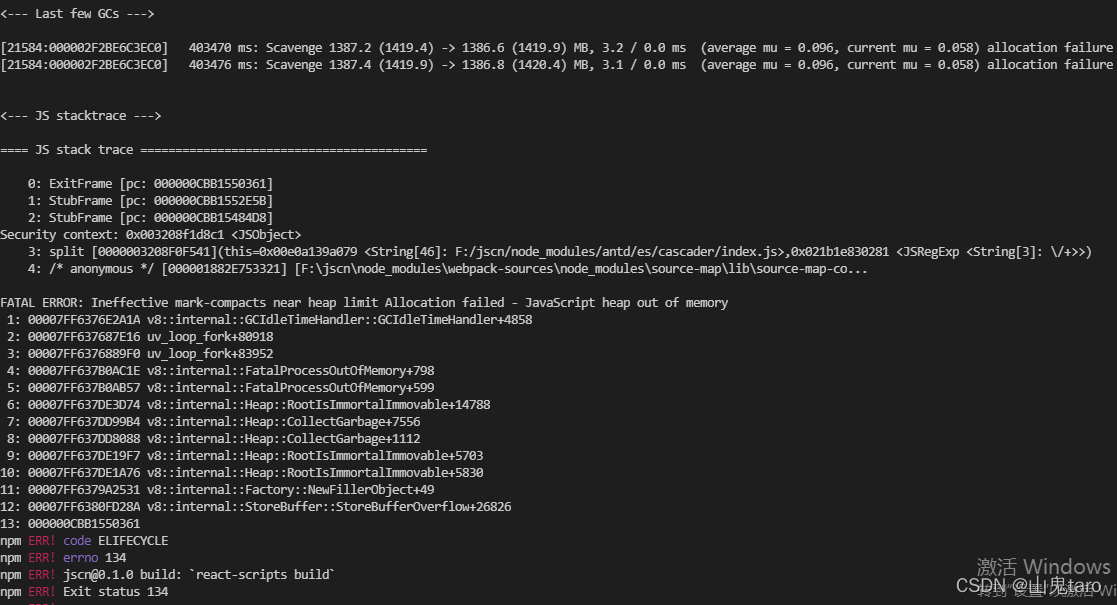
2. Solution
All kinds of data say that node memory overflow , and solutions are also given,
for example: – max_old_space_Size = 4096 and so on, but it doesn’t work for me. (if you refer to mine, it doesn’t work, you can look at the other methods mentioned above)
later, I saw a solution, which worked
1, CMD Global install increase memory limit
NPM install -g increase memory limit

2, CD enter the project directory and execute:
increase memory limit
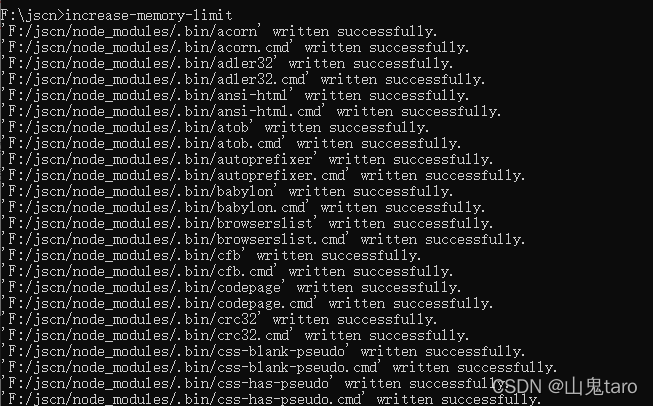
3. Repack
NPM run build
[Solved] activiti integrate error: GlobalAuthenticationConfigurerAdapter.class does not exist
@EnableSwagger2
@SpringBootApplication(scanBasePackages = {"cn.com.ten"} ,exclude = {org.activiti.spring.boot.SecurityAutoConfiguration.class})
@MapperScan(basePackages = {"cn.com.ten.**.dao"})
public class SystemEtlApplication {

    public static void main(String[] args) {
        SpringApplication.run(SystemEtlApplication.class, args);
    }

}
Springboot integration activiti reported an error
Caused by: java.io.FileNotFoundException: class path resource [org/springframework/security/config/annotation/authentication/configurers/GlobalAuthenticationConfigurerAdapter.class]
cannot be opened because it does not exist
Solution:
Add springbootapplication on the startup class
exclude = {org.activiti.spring.boot.SecurityAutoConfiguration.class}
[Solved] weblogic12c start the project error: BeanFactoryAware is missing
1. The project is not a spring project and does not reference any spring related packages
2. No error is reported when starting under Tomcat
3. No error is reported in weblogic10g and no error is reported in 12C
the error information is as follows:
weblogic.management.DeploymentException: java.lang.ClassNotFoundException: org.springframework.beans.factory.BeanFactoryAware
 at weblogic.application.internal.BaseDeployment.throwAppException(BaseDeployment.java:131)
 at weblogic.application.internal.BaseDeployment.prepare(BaseDeployment.java:245)
 at weblogic.application.internal.SingleModuleDeployment.prepare(SingleModuleDeployment.java:53)
 at weblogic.application.internal.DeploymentStateChecker.prepare(DeploymentStateChecker.java:158)
 at weblogic.deploy.internal.targetserver.AppContainerInvoker.prepare(AppContainerInvoker.java:61)
 Truncated. see log file for complete stacktrace
Caused By: java.lang.ClassNotFoundException: org.springframework.beans.factory.BeanFactoryAware
 at weblogic.utils.classloaders.GenericClassLoader.findLocalClass(GenericClassLoader.java:981)
 at weblogic.utils.classloaders.GenericClassLoader.findClass(GenericClassLoader.java:942)
 at weblogic.utils.classloaders.ChangeAwareClassLoader.findClass(ChangeAwareClassLoader.java:83)
 at weblogic.utils.classloaders.GenericClassLoader.doFindClass(GenericClassLoader.java:564)
 at weblogic.utils.classloaders.GenericClassLoader.loadClass(GenericClassLoader.java:500)
 Truncated. see log file for complete stacktrace
Through the error message, it is judged that it is caused by a spring bean, but my project does not reference spring at all. It is suspected that it is caused by jar package conflict
Solution:
If Druid’s jar package is referenced in your project, it’s probably the problem. Upgrade the Druid jar package or downgrade the version of the Druid jar package in the project. We are from druid-1.0.10 upgrade to druid-1.0.3 problem solving. Druid’s jar package download address is attached.
https://archive.apache.org/dist/druid/
NUXT Run generate error: is not in cwd [How to Solve]
Record errors every day
Recently, I took over a nuxtjs project, which was the secondary development bought by the company. I had a little side dishes and played a little foolishly, but it was solved.
When the project was to be delivered online two days ago, I found that I reported an error when running NPM run generate to package, but running build and dev were normal. The whole face was confused. I didn’t find a similar problem in Baidu for a long time. Then I had to go to the official problem of GitHub. It was all English, which made me feel numb. Finally, I really found that when generating applications, I will jump into the virtual Linux machine to obtain dist, that is, this problem may occur in the windows system, and then the Linux system obtains the path. Different from windows, it needs to standardize the path. The error is in the node_modules@nuxt\cli\dist\cli-generate.js
export async function snapshot ({ globbyOptions, ignore, rootDir }) {
  const snapshot = {}

  const files = await globby('**/*.*', {
    ...globbyOptions,
    ignore,
    cwd: rootDir,
    absolute: true
  })
Change cwd :rootDir to cwd : upath . normalize ( rootDir ).
const  files  =  await  globby__default [ 'default' ] ( '**/*.*' ,  {
    ... globbyOptions ,
    ignore ,
    cwd : upath . normalize ( rootDir ) ,
    absolute : true
} ) ;[Solved] Hadoop root directory Cancell the quota restriction Error
When we use the directory quota limit, it acts on the root directory of the HDFS instance
hdfs dfsadmin -setQuota 2 /
Setting can be successful, but an error will be reported when you want to cancel
hdfs dfsadmin -clrQuota  /
clrQuota: Cannot clear namespace quota on root.
Current version 2.9.2 cannot be solved. Adding a patch to the HDP release version can solve this problem
How to Solve program install error 0x80070660
When installing Python and VC runtime library, the errors reported by many software are 0x80070660, saying that the temporary folder has no space or permission.
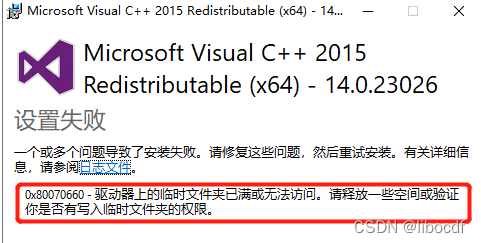
After detection, it is found that there is permission and space. Next solution
Solution:
Create the installer folder in the %windir% directory.
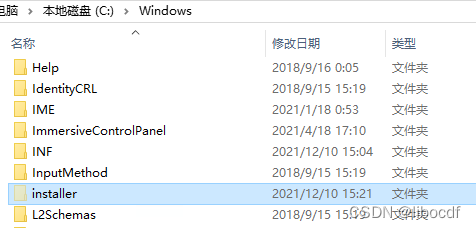
The following methods are from YouTube. I’ve tried them and they’re useless. They may be useful to others. Let’s put them here for the time being
Method 1: win10 system, run “troubleshooting” and restart
Method 2: run the following command and restart
net stop wuauserv
net stop cryptSvc
net stop bits
net stop msiserver
ren C:\Windows\SoftwareDistribution SoftwareDistribution.old
ren C:\Windows\System32\catroot2 catroot2.old
net start wuauserv
net start cryptSvc
net start bits
net start msiserver
Method 3: rmdir/S/Q C: \ windows \ softwaredistribution \ download \ sharedfilecache
Method 4: Windows Update – & gt; Advanced options} turn off the “provide additional Microsoft product updates when updating windows” option and restart

Method 5: install VC runtime library_ redist. x[Arch]. exe
[Solved] Python operate Kafka error: SyntaxError: invalid syntax
Python operation Kafka reports an error: return ‘& lt; SimpleProducer batch=%s>’ %self.async
return ‘< SimpleProducer batch=%s>’ % self. async
^^^^^
SyntaxError: invalid syntax
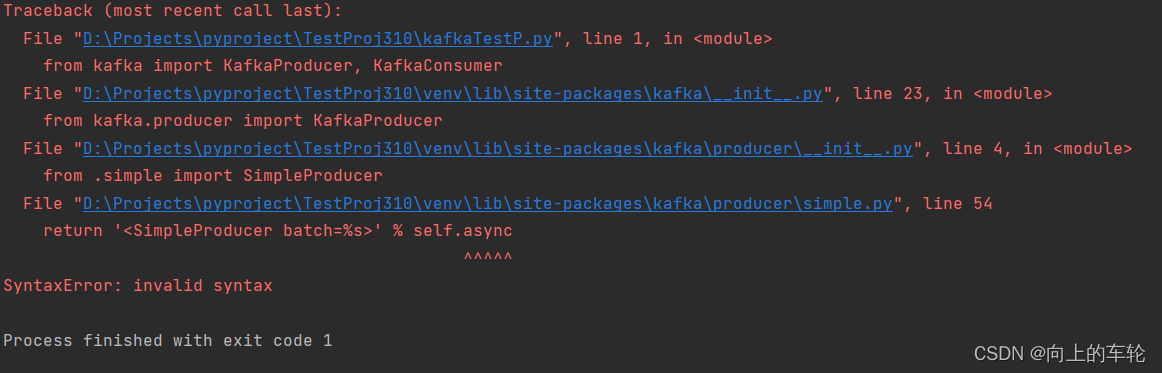
reason:
Because PY3 Async has become a keyword in 7. This leads to incompatibility.
Solution:
Method 1:
The latest Kafka version is used, but the Kafka on pypi has not been replaced with the latest one. You can upgrade Kafka Python using the following method
PIP install Kafka python
Method 2:
Just switch to version 3.6 and wait for subsequent upgrades

VScode integrate terminal input node error [How to Solve]
At the beginning, an error is reported when NPM install XXX is entered in vscode:
NPM: the ‘NPM’ entry cannot be recognized as the name of a cmdlet, function, script file, or runnable program. Check the spelling of the name. If you include a path, make sure the path is correct, and then try again
location line: 1 character: 1
+ NPM install unip
+ ~ ~
+ categoryinfo: objectnotfound: (NPM: String) [], commandnotfoundexception
+ fullyqualified errorid: commandnotfoundexception
After that, I input node – V and NPM – V on CMD, which are not internal commands. Then I input node on windows PowerShell to execute. Then I checked the environment variables and found that I used node The installation directory of JS was moved, but the path of the environment variable was not modified. After the modification, everything was normal, but the vscode integration terminal still didn’t work. I checked a lot of data.
Solution:
Right click the vscode icon – properties – compatibility – run as administrator
How to Solve Log4j 2.5 upgrade to 2.15 error
Question
Log4j2 is used in the project. Due to the use of global asynchronous log printing, it is also necessary to introduce the dependency of disruptor. The version dependency of log4j2 and disruptor used last is as follows:
<dependency>
    <groupId>org.apache.logging.log4j</groupId>
    <artifactId>log4j-core</artifactId>
    <version>2.11.1</version>
</dependency>
<!-- log4j2 AsyncLogger need disruptor-->
<dependency>
    <groupId>com.lmax</groupId>
    <artifactId>disruptor</artifactId>
    <version>3.2.0</version>
</dependency>
At the beginning of the project (before the logger of log4j2 is used for the first time), enable global asynchronous log printing through code:
// use asyncLogger for log4j2 framework
System.setProperty("Log4jContextSelector", "org.apache.logging.log4j.core.async.AsyncLoggerContextSelector");
However, the errors reported after starting the project are as follows:
java.lang.NoSuchMethodError: com.lmax.disruptor.dsl.Disruptor.<init>(Lcom/lmax/disruptor/EventFactory;ILjava/util/concurrent/ThreadFactory;Lcom/lmax/disruptor/dsl/ProducerType;Lcom/lmax/disruptor/WaitStrategy;)V
        at org.apache.logging.log4j.core.async.AsyncLoggerDisruptor.start(AsyncLoggerDisruptor.java:97)
        at org.apache.logging.log4j.core.async.AsyncLoggerContext.start(AsyncLoggerContext.java:75)
	at .......
Solution:
The problem is caused by the lower version of the disruptor. Just change the version to the newer version:
<dependency>
    <groupId>com.lmax</groupId>
    <artifactId>disruptor</artifactId>
    <version>3.4.2</version>
</dependency>