Author Archives: Robins

[Solved] error: mongoosserverselectionerror: connect econnreused 127.0 0.1:27017

Mongodb suddenly reported an error, the foreground could not get the data, and the mongodb software could not be opened

node:22368) UnhandledPromiseRejectionWarning: MongooseServerSelectionError: connect ECONNREFUSED 127.0.0.1:27017
    at NativeConnection.Connection.openUri (D:\HBuilder work place\huaRui\2.0\serve\node_modules\mongoose\lib\connection.js:797:32)

Solution: Task Manager — Service — mongodb — Open

Springboot2.6X version integrate knife4j error [How to Solve]

org.springframework.context.ApplicationContextException: Failed to start bean 'documentationPluginsBootstrapper'; nested exception is java.lang.NullPointerException
	at org.springframework.context.support.DefaultLifecycleProcessor.doStart(DefaultLifecycleProcessor.java:181) ~[spring-context-5.3.13.jar:5.3.13]
	at org.springframework.context.support.DefaultLifecycleProcessor.access$200(DefaultLifecycleProcessor.java:54) ~[spring-context-5.3.13.jar:5.3.13]
	at org.springframework.context.support.DefaultLifecycleProcessor$LifecycleGroup.start(DefaultLifecycleProcessor.java:356) ~[spring-context-5.3.13.jar:5.3.13]
	at java.base/java.lang.Iterable.forEach(Iterable.java:75) ~[na:na]
	at org.springframework.context.support.DefaultLifecycleProcessor.startBeans(DefaultLifecycleProcessor.java:155) ~[spring-context-5.3.13.jar:5.3.13]
	at org.springframework.context.support.DefaultLifecycleProcessor.onRefresh(DefaultLifecycleProcessor.java:123) ~[spring-context-5.3.13.jar:5.3.13]
	at org.springframework.context.support.AbstractApplicationContext.finishRefresh(AbstractApplicationContext.java:935) ~[spring-context-5.3.13.jar:5.3.13]
	at org.springframework.context.support.AbstractApplicationContext.refresh(AbstractApplicationContext.java:586) ~[spring-context-5.3.13.jar:5.3.13]
	at org.springframework.boot.web.servlet.context.ServletWebServerApplicationContext.refresh(ServletWebServerApplicationContext.java:145) ~[spring-boot-2.6.1.jar:2.6.1]
	at org.springframework.boot.SpringApplication.refresh(SpringApplication.java:730) ~[spring-boot-2.6.1.jar:2.6.1]
	at org.springframework.boot.SpringApplication.refreshContext(SpringApplication.java:412) ~[spring-boot-2.6.1.jar:2.6.1]
	at org.springframework.boot.SpringApplication.run(SpringApplication.java:302) ~[spring-boot-2.6.1.jar:2.6.1]
	at org.springframework.boot.SpringApplication.run(SpringApplication.java:1301) ~[spring-boot-2.6.1.jar:2.6.1]
	at org.springframework.boot.SpringApplication.run(SpringApplication.java:1290) ~[spring-boot-2.6.1.jar:2.6.1]
	at com.fern.hfet.HfetApplication.main(HfetApplication.java:14) ~[classes/:na]
Caused by: java.lang.NullPointerException: null
	at springfox.documentation.spring.web.WebMvcPatternsRequestConditionWrapper.getPatterns(WebMvcPatternsRequestConditionWrapper.java:56) ~[springfox-spring-webmvc-3.0.0.jar:3.0.0]
	at springfox.documentation.RequestHandler.sortedPaths(RequestHandler.java:113) ~[springfox-core-3.0.0.jar:3.0.0]
	at springfox.documentation.spi.service.contexts.Orderings.lambda$byPatternsCondition$3(Orderings.java:89) ~[springfox-spi-3.0.0.jar:3.0.0]
	at java.base/java.util.Comparator.lambda$comparing$77a9974f$1(Comparator.java:469) ~[na:na]
	at java.base/java.util.TimSort.countRunAndMakeAscending(TimSort.java:355) ~[na:na]
	at java.base/java.util.TimSort.sort(TimSort.java:220) ~[na:na]
	at java.base/java.util.Arrays.sort(Arrays.java:1515) ~[na:na]
	at java.base/java.util.ArrayList.sort(ArrayList.java:1750) ~[na:na]
	at java.base/java.util.stream.SortedOps$RefSortingSink.end(SortedOps.java:392) ~[na:na]
	at java.base/java.util.stream.Sink$ChainedReference.end(Sink.java:258) ~[na:na]
	at java.base/java.util.stream.Sink$ChainedReference.end(Sink.java:258) ~[na:na]
	at java.base/java.util.stream.Sink$ChainedReference.end(Sink.java:258) ~[na:na]
	at java.base/java.util.stream.Sink$ChainedReference.end(Sink.java:258) ~[na:na]
	at java.base/java.util.stream.AbstractPipeline.copyInto(AbstractPipeline.java:485) ~[na:na]
	at java.base/java.util.stream.AbstractPipeline.wrapAndCopyInto(AbstractPipeline.java:474) ~[na:na]
	at java.base/java.util.stream.ReduceOps$ReduceOp.evaluateSequential(ReduceOps.java:913) ~[na:na]
	at java.base/java.util.stream.AbstractPipeline.evaluate(AbstractPipeline.java:234) ~[na:na]
	at java.base/java.util.stream.ReferencePipeline.collect(ReferencePipeline.java:578) ~[na:na]
	at springfox.documentation.spring.web.plugins.WebMvcRequestHandlerProvider.requestHandlers(WebMvcRequestHandlerProvider.java:81) ~[springfox-spring-webmvc-3.0.0.jar:3.0.0]
	at java.base/java.util.stream.ReferencePipeline$3$1.accept(ReferencePipeline.java:195) ~[na:na]
	at java.base/java.util.ArrayList$ArrayListSpliterator.forEachRemaining(ArrayList.java:1655) ~[na:na]
	at java.base/java.util.stream.AbstractPipeline.copyInto(AbstractPipeline.java:484) ~[na:na]
	at java.base/java.util.stream.AbstractPipeline.wrapAndCopyInto(AbstractPipeline.java:474) ~[na:na]
	at java.base/java.util.stream.ReduceOps$ReduceOp.evaluateSequential(ReduceOps.java:913) ~[na:na]
	at java.base/java.util.stream.AbstractPipeline.evaluate(AbstractPipeline.java:234) ~[na:na]
	at java.base/java.util.stream.ReferencePipeline.collect(ReferencePipeline.java:578) ~[na:na]
	at springfox.documentation.spring.web.plugins.AbstractDocumentationPluginsBootstrapper.withDefaults(AbstractDocumentationPluginsBootstrapper.java:107) ~[springfox-spring-web-3.0.0.jar:3.0.0]
	at springfox.documentation.spring.web.plugins.AbstractDocumentationPluginsBootstrapper.buildContext(AbstractDocumentationPluginsBootstrapper.java:91) ~[springfox-spring-web-3.0.0.jar:3.0.0]
	at springfox.documentation.spring.web.plugins.AbstractDocumentationPluginsBootstrapper.bootstrapDocumentationPlugins(AbstractDocumentationPluginsBootstrapper.java:82) ~[springfox-spring-web-3.0.0.jar:3.0.0]
	at springfox.documentation.spring.web.plugins.DocumentationPluginsBootstrapper.start(DocumentationPluginsBootstrapper.java:100) ~[springfox-spring-web-3.0.0.jar:3.0.0]
	at org.springframework.context.support.DefaultLifecycleProcessor.doStart(DefaultLifecycleProcessor.java:178) ~[spring-context-5.3.13.jar:5.3.13]
	... 14 common frames omitted

Disconnected from the target VM, address: '127.0.0.1:65104', transport: 'socket'

Process finished with exit code 1

The reason for this problem is: springboot2.6.x and the previous version use PATH_PATTERN_PARSER by default, while knife4j’s springfox uses ANT_PATH_MATCHER. Springboot’s yml file configures url matching rules

spring:
  mvc:
    pathmatch:
      matching-strategy: ant_path_matcher

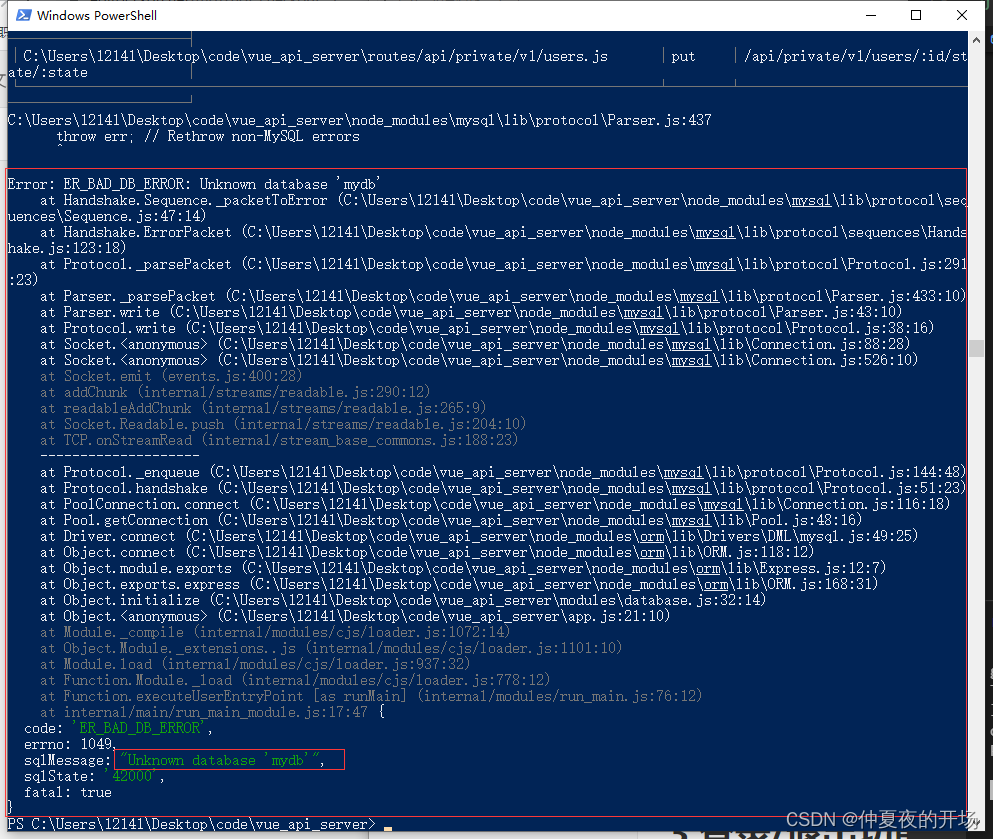
[Solved] ‘node’ command failed to start the project, with an error: “unknown database’ mydb ‘”

[error]
node the command failed to start the project and reported an error: “unknown database ‘mydb'”

[other features]
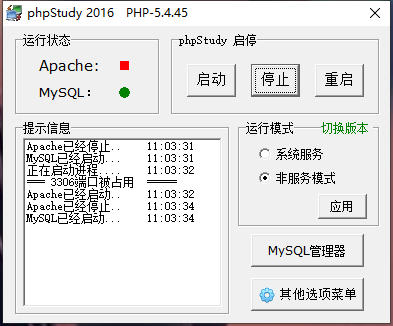
at this time, view phpstudy and display “port occupied”.

[solution]
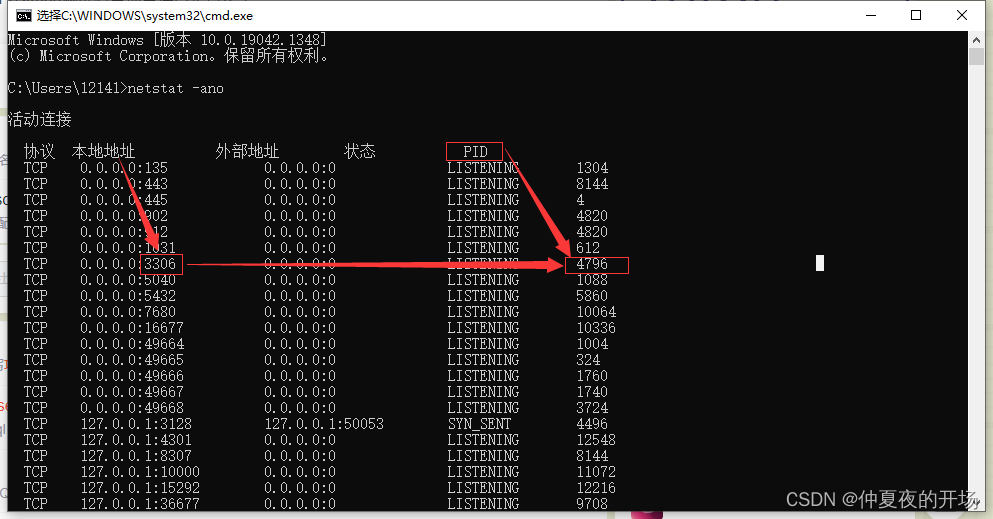
Start Run CMD, enter netstat - ano , look at the first column, followed by the port, find 3306, and remember the corresponding PID

Then open the task manager to view -> Select column -> Tick PID (process identifier) -> determine

Find the PID process in the task manager, check what program occupies the port, and close it

If you restart MySQL again, you will not report the error that the port is occupied. ⑤ use postman to test whether the background project interface is normal

[Solved] jedis Connect redis Error: connect timed out

1. First check whether we are in redis.Conf or not and enter redis.conf if not.

(1) Find bind 127.0.0.1 under network and comment out this line.

(2) Find protected mode yes under network and change yes to No.

2. If this modification has not been solved, check the firewall.

systemctl status firewalld

If it’s like this, we can turn off the firewall

systemctl stop firewalld

Then we’ll test it again

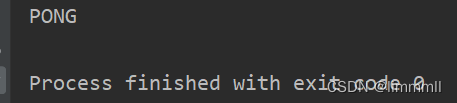
After running, Pong solves the problem.

[Solved] JMETER pressure measure with a lot of Ports Error: 504GATEWAY TIMEOUT

1. First check the test environment

2. Check the test script for problems, such as the failure of the previous request and the error caused by the subsequent request

3. Niginx work_Connection configuration

4. Due to system limits open files restrictions

One. When the number of threads under pressure test is too large, or the threads are not released in time, the open TCP/IP connection port of the system has reached the maximum limit, and JMeter will directly report an error
[error message]: java.net.bindexception: address ready in use.
[cause analysis]: Windows provides 1024-5000 ports for TCPIP connection, and it takes about four minutes to recycle, which leads to that when we frequently call a large number of requests in a short time, the port will be full.
[solution]:

1. Open the registry: CMD (Win + R) enter regedit to open the registry;
2. Set the system parameter: the maximum number of port connections.
① find the system parameter setting item: \hkey_local_machine\system\currentcontrolset\services\TCPIP\parameters
② right click parameters to add a new DWORD with the parameter name maxuserport;
③ double click maxmaxuserport, and the entered value is 65534 Select decimal
④ restart the computer! Restart the computer! Restart the computer
2. Socket closed
[cause analysis]: the number of threads has reached the bottleneck.
[solution]

1. When creating a thread in a loop, check keep alive to reuse the thread
2. Expand the thread pool size of the program under test. (when the program has a bottleneck)
III. insufficient memory
[exception]: a large number of. Hprof files are generated in the JMeter installation directory.
[cause analysis]: the generation of such. Hprof files is caused by memory leakage.
[solution]:

1. Upgrade the hardware configuration of JMeter pressure measuring machine to increase memory space
2. Modify the system parameters of JMeter
① open JMeter Bat file
② modify the memory usage size of JMeter pressure tester:
set heap = – xms3g – xmx3g – XX: maxmetaspacesize = 768m (1g by default, modified to 3G)
3. Detect the tested program and find out whether there is memory leakage in the tested software program.
IV. bandwidth bottleneck
[phenomenon]: a large number of request timeouts occur in JMeter execution results, but the server of the tested program does not have error protection log.
[analysis]: it may be that the bandwidth of the master computer has reached the bottleneck.
[solution]:

1. Upgrade the hardware configuration of the main control computer and expand the bandwidth value, such as from 100MB → 500MB
2. Divide multiple main controllers equally to avoid too many remote actuators of a single main controller. It is best to control within 10
distributed testing has some basic limitations. The following items are mentioned in the official documents:

1. RMI cannot communicate across subnets without an agent; Therefore, during distributed pressure measurement, all actuators of JMeter should be placed in the same network segment
2. Starting from version 2.9, JMeter sends all test results of stripping response data to the console, which can reduce the impact on network io. Ensure that network traffic is monitored to avoid traffic contention
3. When a single JMeter client runs on a host with a 2-3 GHz CPU, it can process 1000-2000 threads, depending on the type of test
(this also depends on the complexity of the business process. If a long connection is involved in the business process, the measured single JMeter client can only better support 800-1000 threads)
VI. it is recommended to
restart the piezoelectric machine regularly, and it is best to restart the computer before each pressure test.
regularly clean the log file generated by JMeter: jmeter.log & jmeter-server.log (under the installation directory).
during distributed deployment, it is better for one master computer to control only less than 10 executors to avoid the bottleneck of bandwidth and memory of the master computer.
during pressure measurement, it is necessary to monitor the resource usage of CPU, memory, network and IO of the lower pressure measurement machine.
Solve the error of panda index unalignable Boolean series provided as indexer

Complete error reports are as follows: pandas core.indexing.IndexingError: Unalignable boolean Series provided as indexer (index of the boolean Series and of the indexed object do not match).

Solution:

There are two indexing methods, one of which can be selected:

Solution 1

dataframe[pd.Series([True, True, True], index=dataframe.index)]

Solution 2:

dataframe.loc[pd.Series([True, True], index=['a', 'b']).index]

Problem analysis

An error will appear in the following code:

import pandas as pd
import numpy as np


dataframe = pd.DataFrame(data=np.random.random(size=(3, 5)), index=['a', 'b', 'c'])

Error codes are as follows:

dataframe[pd.Series([True, True], index=['a', 'b'])]

You can see that the original dataframe includes 3 lines, but there are only two true values here, so an error is reported. The correct method is:

dataframe[pd.Series([True, True, True], index=['a', 'b', 'c'])]
dataframe.loc[pd.Series([True, True], index=['a', 'b']).index]

EasyConnect linux (ubuntu 20.04) Run Error [How to Solve]

(EasyConnect:67186): Pango-ERROR **: 10:01:20.576: Harfbuzz version too old (1.3.1)

Error reason: the version of the dependent package is higher than that required by easyconnect due to the local system update.

Solution: download the low version dependency package and rebuild an easyconnect operation dependency environment

libpango-1.0-0_1.42.4-7_amd64.deb
libpangocairo-1.0-0_1.42.4-7_amd64.deb
libpangoft2-1.0-0_1.42.4-7_amd64.deb

It is decompression rather than installation. If the installation will overwrite the original high-level dependent library, the system will have unknown errors, and the system will not start seriously.

Execute the dpkg unzip command to unzip the library and put it into the installation directory of easyconnect (/usr/share/sangfor/easyconnect),

sudo dpkg -X libpango-1.0-0_ 1.42. 4-7_ amd64. deb  /usr/share/sangfor/EasyConnect
sudo dpkg -X libpangoft2-1.0-0_ 1.42. 4-7_ amd64. deb  /usr/share/sangfor/EasyConnect
sudo dpkg -X libpangocairo-1.0-0_ 1.42. 4-7_ amd64. deb  /usr/share/sangfor/EasyConnect

Then mv the library files in the /usr/share/sangfor/EasyConnect/usr/lib/x86_64- linux- gnu directory with the link directly to the directory /usr/share/sangfor/EasyConnect/, and then start EasyConnect Normal start.

[Solved] Swagger request error: error:getaddrinfo ENOTFOUND

Swagger request error: error: getaddrinfo enotfound

This is the problem I encountered. Maybe everyone encountered it in different ways. I just said the problems I encountered and my solutions
my problem is that when I create a new data table and put it in the test environment, the data table does not move to the test environment, so this error is reported:
solution: import the newly created data table in the test environment (formal environment), and the interface access is normal.

[Solved] Vue route jumps to the same page many times error: Navigationduplicated

Vue route jumps to the same page and reports an error many times. Navigationduplicated

The error report does not affect the program operation, but it is annoying to be popular. It needs to be solved.
the reason for the error report is this$ router. Push returns promise
just like

function push(){
	return new  Promise((resolve,reject)=>{
	})
}

Solution 1: capture success value and error value (treat symptoms but not root causes)

this.$router.push({
          name: "project",
          params: { projectPattern: this.projectPattern },
        },()=>{},()=>{ });

Solution 2: Rewrite push
and use it the same as before

this.$router.push({
          name: "project",
          params: { projectPattern: this.projectPattern },
        });

In router/index JS file, write a process by judging whether there are resolve and reject incoming values

let originPush = VueRouter.prototype.push;
VueRouter.prototype.push = function (location, resolve, reject) {
  if (resolve && reject) {
    originPush.call(this,location,resolve,reject)
  }else{
    originPush.call(this,location,()=>{},()=>{})
  }
}```