https://blog.51cto.com/u_15084467/2647749
CTRL + N: find driver interface
CTRL + H: displays all the methods that implement the interface
Hive implementation class hivedriver
Reason: it is important to change the name of the driver
https://blog.51cto.com/u_15084467/2647749
CTRL + N: find driver interface
CTRL + H: displays all the methods that implement the interface
Hive implementation class hivedriver
Reason: it is important to change the name of the driver
When using the thymeleaf template for the first time, the following error is reported when starting:
The following method did not exist:
org.thymeleaf.spring5.SpringTemplateEngine.setRenderHiddenMarkersBeforeCheckboxes(Z)V
The reason for this error is that the version of springboot is incompatible with the version of thymeleaf template. Add the following content to the <properties> tag:
<thymeleaf-spring5.version>3.0.9.RELEASE</thymeleaf-spring5.version>
<thymeleaf-layout-dialect.version>2.2.2</thymeleaf-layout-dialect.version>
After adding, you can start springboot
Question:
Because the project uses microservices, a service is created in the microservices to write mybatis plus in order to save trouble. However, a null pointer error occurs when JUnit tests after writing according to the official website documents.
Test class of official website document: 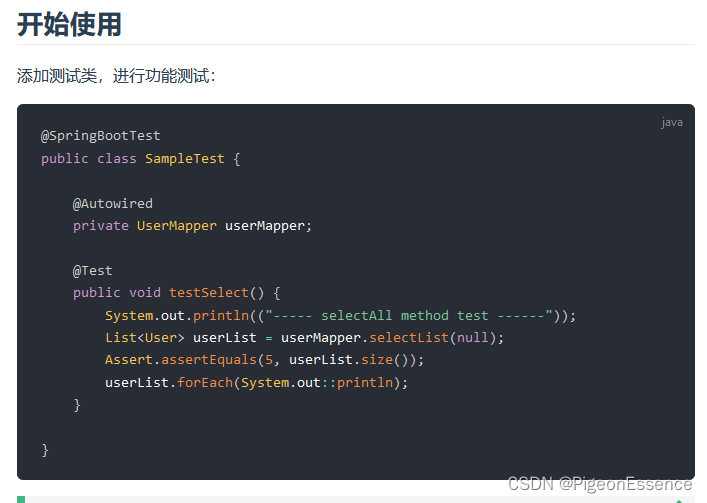
An error occurred:

The value of usermapper was found to be empty
By checking the data, it is found that this is because ordinary classes can’t use springbeans, so ordinary test classes can’t get beans, so they report null pointers. Therefore, we need to make the test class get the bean.
Solution:
Add test dependency:
        <dependency>
            <groupId>junit</groupId>
            <artifactId>junit</artifactId>
            <scope>test</scope>
        </dependency>

        <dependency>
            <groupId>org.springframework.boot</groupId>
            <artifactId>spring-boot-starter-test</artifactId>
            <scope>test</scope>
        </dependency>
And add notes on the test class:
@SpringBootTest
@RunWith(SpringJUnit4ClassRunner.class)
solve the problem
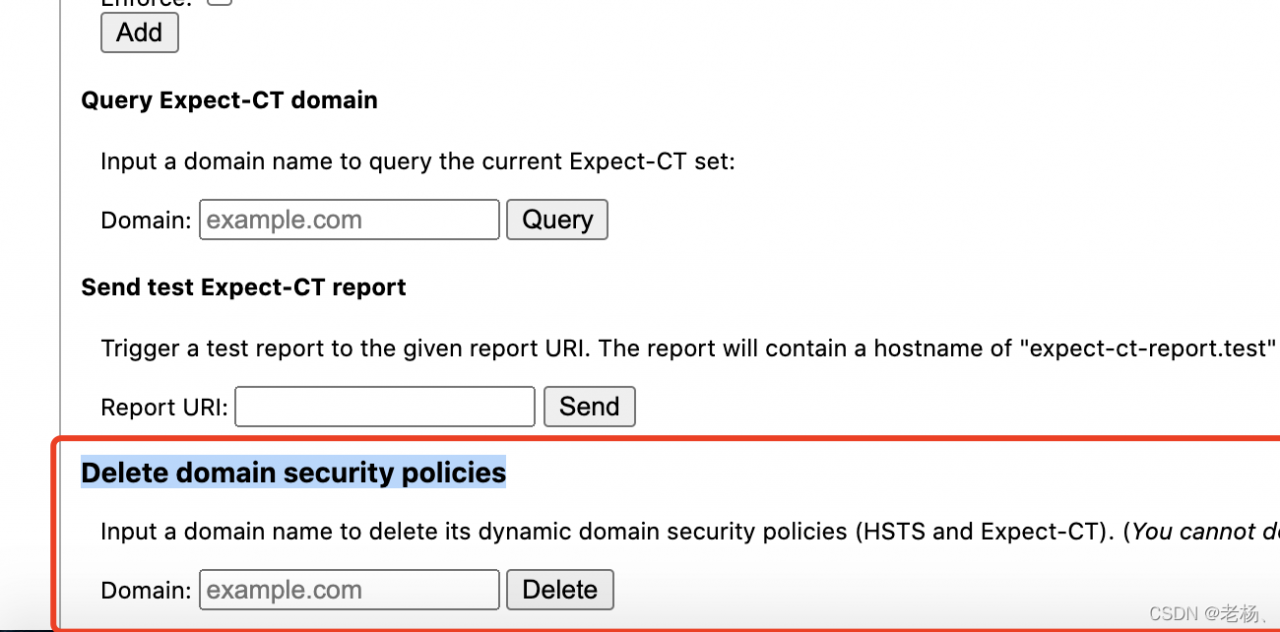
An error is reported in the request. The provisioning headers are shown. The MAC browser automatically converts HTTP to HTTPS
Remember the steps to solve the problem
1 Address field input: chrome://net-internals/#hsts
2. Scroll to the bottom to find delete domain security policies, enter the web address and click delete
Error: In the shell script, execute the file with sh and report source: not found
Reason: sh and bash are different shells, there is no source command in sh. So when running with sh or ./, this error will be prompted.
Solution: replace sh with bash, eg. bash test.sh
is to use bash to execute it.
An error is reported when packaging with NPX webpack serve
the following error is displayed
static heartbeat interval = 1000;
SyntaxError: Unexpected token =
Information about installing webpack
“webpack”: “^ 5.64.4”,
“webpack cli”: “^ 4.9.1”,
“webpack dev server”: “^ 4.6.0”
reason
node version is too low
Solution
install the latest node version
because webpack dev server v4 0.0 + node >= v12.13.0, webpack >= v4.37.0
The Java runtime reports an error
the postman test reports an error of 500. The exception information is displayed as follows:

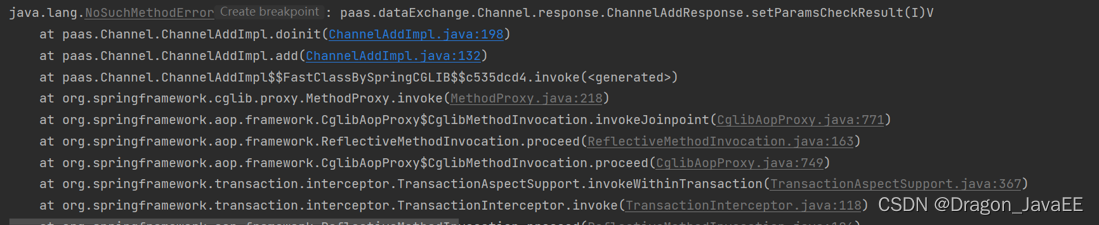
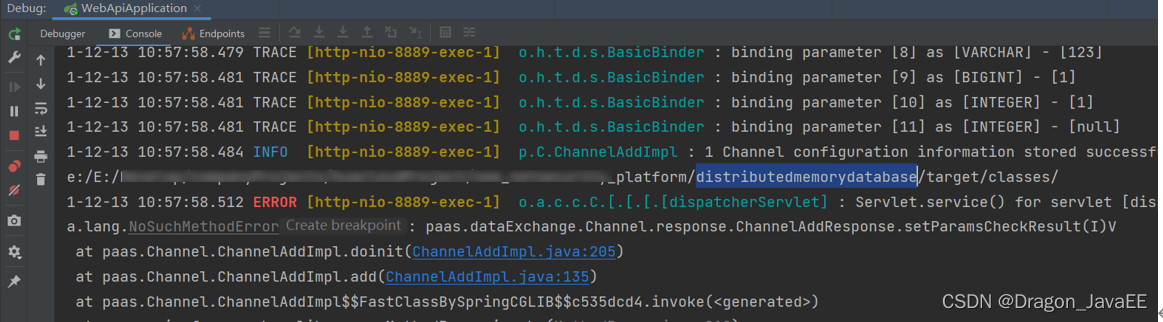
reason: first, check whether there is a method of this attribute in the previous class. If so, it is mostly a problem of dependency conflict. In general, it may be that classes with the same package name and class name are introduced. The order in which dependencies are introduced in the POM file of the project is inconsistent, resulting in the use of other people’s classes with the same package and the same name, and there is no corresponding entity class attribute paramscheckresult. An error will be reported in the result. Query the full path name of the class you introduced.
Methods:
ProtectionDomain pd = Response.class.getProtectionDomain();
CodeSource cs = pd.getCodeSource();
System.out.println(cs.getLocation().toString());
Print result: the full path name of the imported class will be displayed
The phenomena are as follows:
Error: Command failed: java -jar  "/var/task/node_modules/easy-pdf-merge/jar/pdfbox.jar" PDFMerger "samplepdf1.pdf" "samplepdf2.pdf" "merged.pdf"
/bin/sh: java: command not found

    at ChildProcess.exithandler (child_process.js:294:12)
    at ChildProcess.emit (events.js:198:13)
    at maybeClose (internal/child_process.js:982:16)
    at Socket.stream.socket.on (internal/child_process.js:389:11)
    at Socket.emit (events.js:198:13)
    at Pipe._handle.close (net.js:607:12)
  killed: false,
  code: 127,
  signal: null,
  cmd:
   'java -jar  "/var/task/node_modules/easy-pdf-merge/jar/pdfbox.jar" PDFMerger "samplepdf1.pdf" "samplepdf2.pdf" "merged.pdf"' }
Solution: java: command not found, install jdk to solve it, or configure the green version of jdk to environment variables
Question:
1. This problem occurs first because it is not handled properly during type conversion, and non null judgment is required
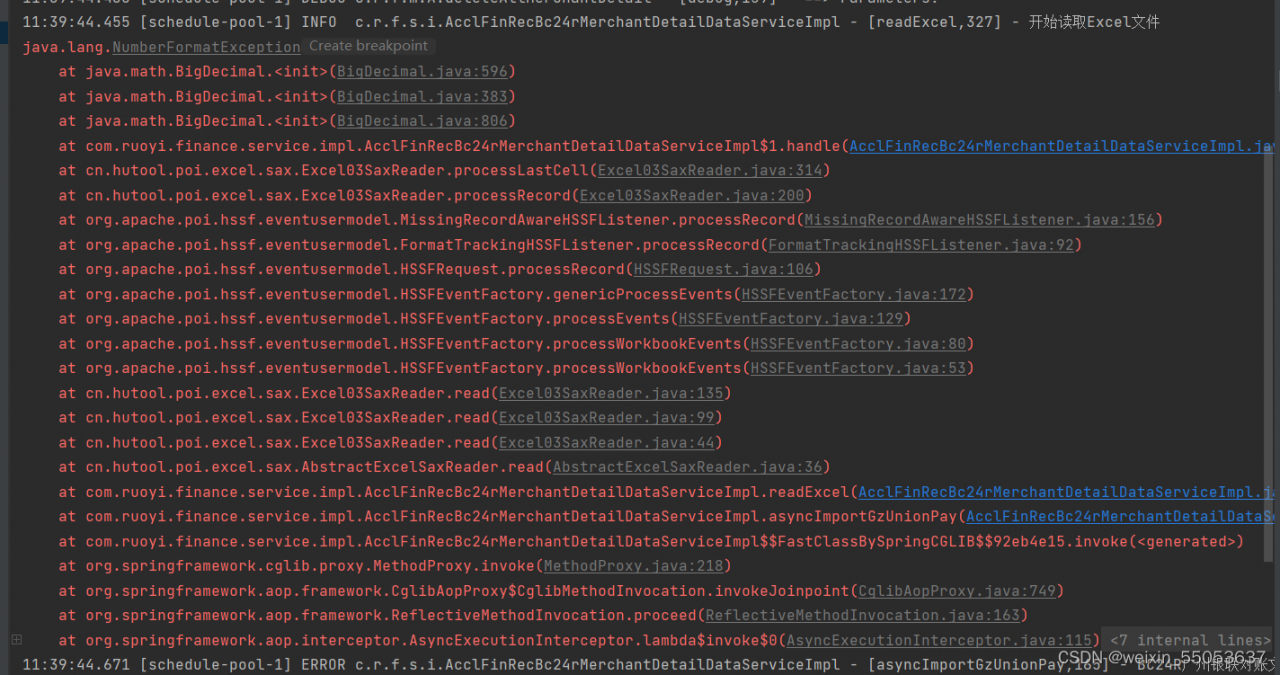
Solution:
String val =””;
if (val!=null && !val.equals("")){
merchantDetailData.setTransactionAmount(new BigDecimal(StringUtils.nvl(list.get(9))));
}
Only when the judgment value is not equal to null and not equal to “”
Specific error
As shown in the figure:

do you operate according to the methods provided by other bloggers (method details), or some errors are reported:
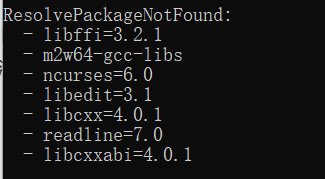
Solution:
Continue to solve the remaining error reports above and open Yaml file, just open Notepad. Move the packages listed in the error report to PIP: to solve the problem
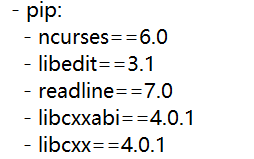
Error reporting prompt
The following specifications were found to be in conflict
Solution:
conda install xxx -c conda-forge
An error is reported when installing the go plug-in for vscode under Windows:
...
Installing golang.org/x/tools/gopls@latest FAILED
{
 "killed": false,
 "code": 1,
 "signal": null,
 "cmd": "D:\\Program Files\\Go\\bin\\go.exe install -v golang.org/x/tools/gopls@latest",
 "stdout": "",
 "stderr": "go install: golang.org/x/tools/gopls@latest: module golang.org/x/tools/gopls: Get \"https:///goproxy.cn/golang.org/x/tools/gopls/@v/list\": http: no Host in request URL\n"
}
...
Most people can’t go to GitHub, but I can go up here. The report here is no host
after a lot of queries, it is found that most of them are agents, and then go to GitHub to download them, and then execute them. I still report an error after downloading
the solution is recorded here.
Method 1: update the environment variable and configure the download agent address
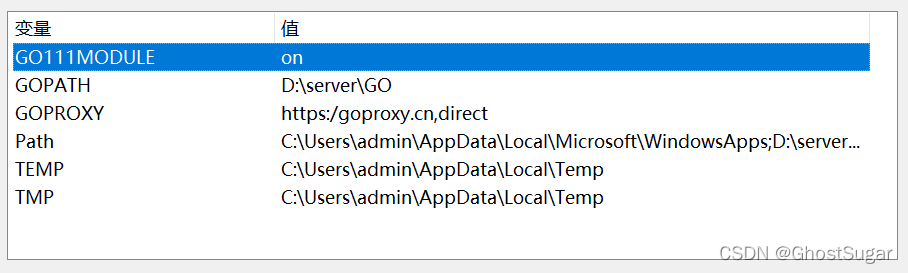
Or open PowerShell and enter:
$env:GO111MODULE="on"
$env:GOPROXY="https://goproxy.io"
go env -w GOPROXY=https://goproxy.cn,direct
//go env -w GOPROXY=https://goproxy.io,direct
go env -w GOPRIVATE=*.corp.example.com
goproxy.IO and goproxy.Cn is OK
Executing the following command in the terminal will output go Evn configuration
go env

set GO111MODULE=on
set GOARCH=amd64
set GOBIN=D:\Program Files\Go\bin
set GOCACHE=C:\Users\admin\AppData\Local\go-build
set GOENV=C:\Users\admin\AppData\Roaming\go\env
set GOEXE=.exe
set GOEXPERIMENT=
set GOFLAGS=
set GOHOSTARCH=amd64
set GOHOSTOS=windows
set GOINSECURE=
set GOMODCACHE=D:\server\GO\pkg\mod
set GONOPROXY=*.corp.example.com
set GONOSUMDB=*.corp.example.com
set GOOS=windows
set GOPATH=D:\server\GO
set GOPRIVATE=*.corp.example.com
set GOPROXY=https://goproxy.io
set GOROOT=D:\Program Files\Go
set GOSUMDB=sum.golang.org
set GOTMPDIR=
set GOTOOLDIR=D:\Program Files\Go\pkg\tool\windows_amd64
set GOVCS=
set GOVERSION=go1.17.5
set GCCGO=gccgo
set AR=ar
set CC=gcc
set CXX=g++
set CGO_ENABLED=1
set GOMOD=NUL
set CGO_CFLAGS=-g -O2
set CGO_CPPFLAGS=
set CGO_CXXFLAGS=-g -O2
set CGO_FFLAGS=-g -O2
set CGO_LDFLAGS=-g -O2
set PKG_CONFIG=pkg-config
set GOGCCFLAGS=-m64 -mthreads -fno-caret-diagnostics -Qunused-arguments -fmessage-length=0 -fdebug-prefix-map=C:\Users\admin\AppData\Local\Temp\go-build957788953=/tmp/go-build -gno-record-gcc-switches
Note that gopath is the dependent package directory of go, and goroot is the installation directory of go
If it is executed in the vscode terminal, the update will not be seen until the terminal is closed and then output. Only restart the vscode terminal, and the configuration displayed here will not change!
Then, Ctrl + Shift + P in vscode to call up the search term, enter go install, select go: Install/update tools, and then select all to execute
Here I see that many people have successfully implemented it, but I don’t think it will work.
Method 2: manually download the plug-in project (clone)
Create a folder in the% gopath% Directory:
Src/golang org/x/
Open the terminal and switch to% gopath%/SRC/golang Under org/X/directory, execute clone:
 cd $env:GOPATH/src/golang.org/x/
 git clone https://github.com/golang/tools.git
 git clone https://github.com/golang/lint.git
My% gopath% directory is D:\server\go, and the current directory is as follows:
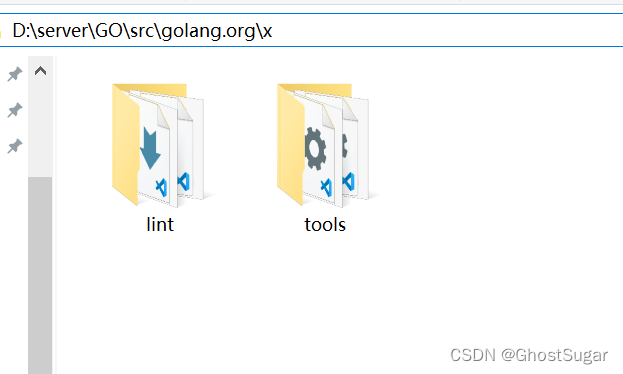
Then switch to% gopath%\SRC\golang. In the terminal Org\x\
go install -v golang.org/x/tools/gopls
But I still failed here. Hint:
PS D:\server\GO\src> go  install -v golang.org/x/tools/gopls
go install: version is required when current directory is not in a module
        Try 'go install golang.org/x/tools/gopls@latest' to install the latest version
After adding the @latest version, the installation succeeded:
PS D:\server\GO\src> go install -v golang.org/x/tools/gopls@latest
...
PS D:\server\GO\src> go install -v github.com/haya14busa/goplay/cmd/goplay@latest
...
PS D:\server\GO\src> go install -v github.com/go-delve/delve/cmd/dlv@latest
...
PS D:\server\GO\src> go install -v github.com/uudashr/gopkgs/v2/cmd/gopkgs@latest
PS D:\server\GO\src> go install -v github.com/cweill/gotests/gotests@latest
PS D:\server\GO\src> go install -v github.com/fatih/gomodifytags@latest
PS D:\server\GO\src> go install -v github.com/josharian/impl@latest
PS D:\server\GO\src> go install -v github.com/haya14busa/goplay/cmd/goplay@latest
In front of this is the directory used, followed by GitHub COM, because my local error is vs automatic installation, I reported both addresses, so I tried to install both
above.