Author Archives: Robins

MP Error: ‘getBaseMappe ServiceImpl’ clashes [How to Solve]

ServiceImp error:

‘getBaseMapper()’ in ‘com.baomidou.mybatisplus.extension.service.impl.ServiceImpl’ clashes with ‘getBaseMapper()’ in ‘com.baomidou.mybatisplus.extension.service.IService’; attempting to use incompatible return type

In MyBatis-plus, the general reference package is

com.baomidou.mybatisplus.core.mapper;

Looking at the source code, we can see that both the IService and its implementation class ServiceImpl require the Mapper

<M extends BaseMapper<T>, T>
ServiceImpl<M extends BaseMapper<T>, T> implements IService<T>

Problem solving: check whether the mapper used in the self-defined xxservicei is a subclass of basemapper, and

Mapper generic reference should be consistent with iservice.
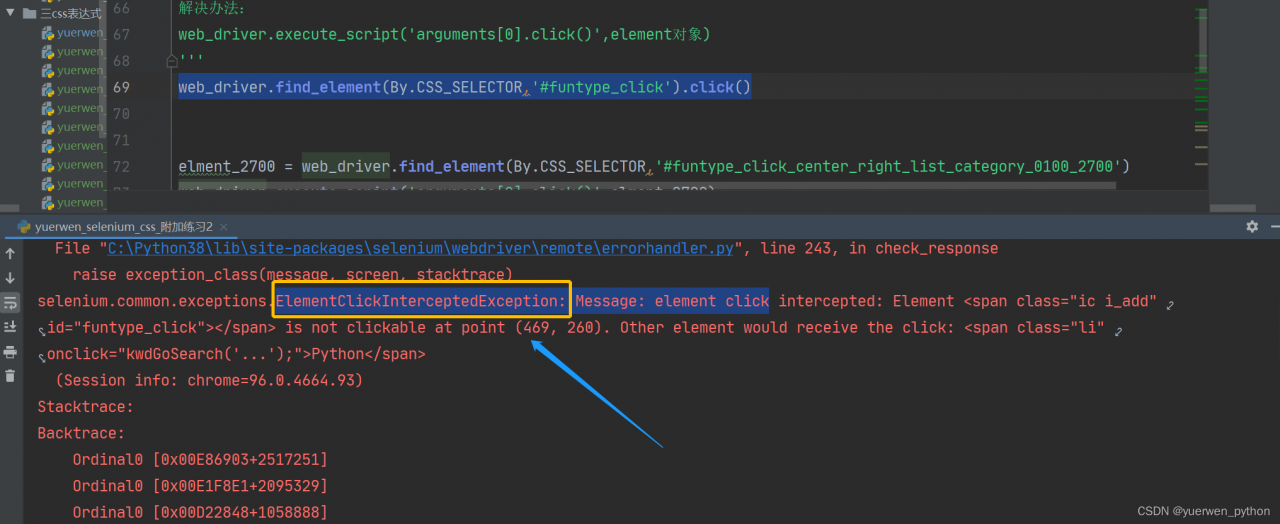
[Solved] Python-selenium locates an element cannot be clicked error: ElementClickInterceptedException

Problem Description:

prompt: elementclickinterceptedexception: Message: element click
when performing selenium UI automation test, you may encounter the situation that elements can be located but cannot be clicked. The following error is:

When writing an automatic program, you will encounter a new window pop-up, and the program always locates the element on the first window page by default. In this way, the element will not be located, and the program will report an error.

For example, when locating an element, the UI is covered by the pop-up window in the list. If an element cannot be located, the program reports an error
click the code of the located element:

web_driver.find_element(By.CSS_SELECTOR,'#funtype_click').click()

Cause analysis:

prompt: elementclickinterceptedexception
when locating an element, the UI is covered by the pop-up window in the list. If an element cannot be located, the element click has been blocked</ font>


Solution:

Error code:

# Click on the function category
web_driver.find_element(By.CSS_SELECTOR,'#funtype_click').click()

Resolved Code:

# Functional Category
funtype_click = web_driver.find_element(By.CSS_SELECTOR,'#funtype_click')
web_driver.execute_script('arguments[0].click()',funtype_click)

[Solved] proxy Configure Error: Error occured while trying to proxy to:

The project uses the create react app scaffold to build
before configuring the local proxy, the following

the following projects need to proxy HTTPS, configure the proxy to report an error of 500, and respond to error occurred while trying to proxy to:
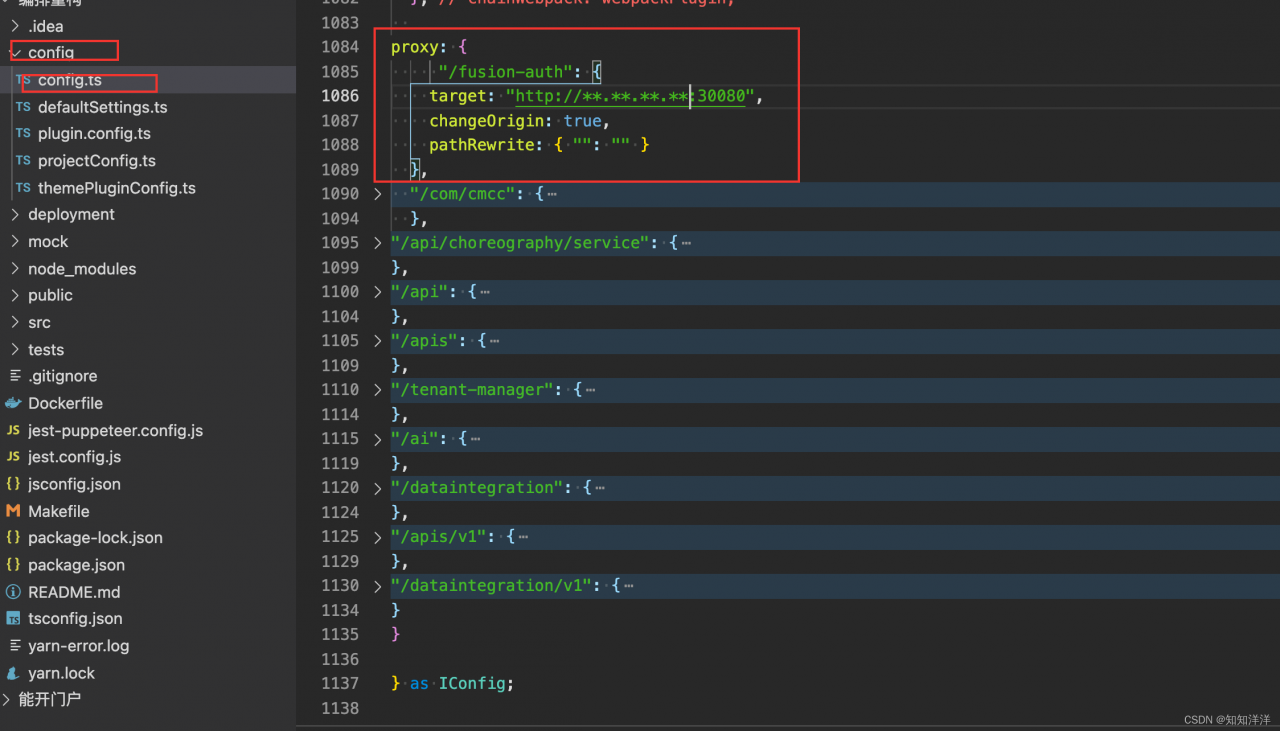
find and reconfigure, and add changeorigin: true

proxy: {
    '/cas': {
      target: 'https://**.**.**.**:30090',
      secure: false,
      changeOrigin: true,
      pathRewrite: { "": "" }
    },
  },```

[Solved] Vue-cli3 running or packaging error: JS memory overflow

Error Messages: FATAL ERROR: CALL_AND_RETRY_LAST Allocation failed – JavaScript heap out of memory
Solution:
Step 1.
Install the npm packages increase-memory-limit and cross-env
npm install increase-memory-limit cross-env -g
Step 2.
Add to package.json.
“fix-memory-limit”: “cross-env LIMIT=4096 increase-memory-limit”

"scripts": {
	"serve": "vue-cli-service serve",
	"build": "vue-cli-service build",
	"fix-memory-limit": "cross-env LIMIT=10000 increase-memory-limit"
},

Step 3:

Execute fix memory limit:

npm run fix-memory-limit

Step 4:

Error message: node — Max old space size = 4096 is not an internal or external command

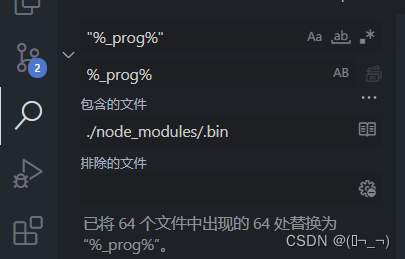
Solution: on node_modules/.Modify “% _prog%” under bin to%_prog%

After the replacement, restart NPM run serve to execute successfully. If the error is still reported and the memory overflows, you can try to increase the 4096

[Solved] Gbase Install Error: service cgconfig is not exist on hosts

Gbase8a install Error:

Environmental Checking on gcluster nodes.
Cgconfig service is not exist on host [‘192.168.48.18’, ‘192.168.48.19’, ‘192.168.48.20’], resource manangement can not be used, continue ([Y,y]/[N,n])?

Check whether the following installation packages are installed, if they are missing, please install

yum list installed | grep libcgroup
yum list installed | grep libcgroup-tools

Install if missing

yum -y install libcgroup
yum -y install libcgroup-tools

Set CGroup service startup after installation

systemctl enable cgconfig.service

Start cgconfig service

systemctl start cgconfig.service 

Here if the execution reports an error.

Job for cgconfig.service failed because the control process exited with error code. See “systemctl status cgconfig.service” and “journalctl -xe” for details.

Then use the command to check the cause of the error

systemctl status cgconfig.service

If the reasons are as follows.

Error: cannot mount cpu to /cgroup/cpu: Device or resource busy
or
Failed to start Control Group configuration service.

then execute

cgclear - unload the cgroup filesystem
systemctl start cgconfig.service

Then restart the installer.

[Solved] Project Upgrade Gradle error (Bugly is integrated)

What went wrong: A problem occurred configuring project ‘:app’.
Failed to notify project evaluation listener.
No signature of method: org.gradle.api.internal.file.DefaultFilePropertyFactory$DefaultDirectoryVar.getFiles() is applicable for argument types: () values: [] Possible solutions: getAsFile(), getOrElse(java.lang.Object), getOrElse(java.lang.Object), getClass(), getType(), file(java.lang.String) > can’t find tinkerProcessReleaseManifest, you must init tinker plugin first!

Solution:
Go back to the original Gradle setup
Check the build.gradle file in the project

    dependencies {
        classpath 'com.android.tools.build:gradle:3.5.2'
        classpath "com.tencent.bugly:tinker-support:1.1.5"
    }

Put classpath “classpath ‘com.android.tools.build:gradle:3.5.2’’ is modified to the original version [modified at this time]
bugly is not compatible with the higher version of gradle. Basically, it should be in 3 X version
also, check the gradle folder under the app directory, open the wrapper folder, and find the gradle-wrapper.properties file
changes the distributionurl to the original version.

[Solved] mybatisplus BaseMapper Error: required a single bean, but 2 were found

1. Error reporting

Two classes inherit com baomidou. mybatisplus. mapper. BaseMapper

Service startup error:

Field baseMapper in com.baomidou.mybatisplus.service.impl.ServiceImpl required a single bean, but 2 were found:

- UserDao: defined in file [D:\projects\test\UserDao.class]

- DepartmentDao: defined in file [D:\projects\test\DepartmentDao.class]

The code is as follows

public interface UserDao extends BaseMapper<UserInfo>{ }

public interface DepartmentDao extends BaseMapper{ }

2. Error reporting reason

Departmentdao did not specify a generic type when inheriting basemapper

3. Solution:

Specifying generics when departmentdao inherits basemapper

public interface DepartmentDao extends BaseMapper<DepartmentInfo>{ }

Nuxt integrate with qiankun as the main application Error: SKIP_BECAUSE_BROKEN

Almost all online tutorials are directly connected to micro applications in the home page, which is in the default of layout Vue is labeled with container, and other reference official websites are OK. However, if the sub route is embedded as a page, the first page can be loaded successfully. When you go back and enter the sub route, you will report an error that the micro page cannot be mounted

Target container with #subapp-viewport not existed while sub-vue mounting!

After searching the Internet for a long time, I found this sentence on the official website:

How to load micro applications on a routing page of the main application

It must be ensured that the routing page of the main application is also loaded when the micro application is loaded.

There is a problem with the sub routing of nuxt. Qiankun listens to the change of URL to load micro applications, and nuxt is the same, and the page generated by nuxt is slower than that of Qiankun. Therefore, when Qiankun loads the micro page, the container tag is not generated.

Many methods have been tried to solve the problem in an elegant way, but they can’t. finally, the same solution that nuxt also reports an error when there is no change in the jump route address is adopted. A bridging page is added between the jump page and the target page. The layout of the bridging page is the same as that of the target page, so that the label of the container is loaded. Because the bridging page and the target are the same layout, The container tag is not lost.

The code is as follows:

<template>
  <div>
  </div>
</template>
<script>
/**
 * qiankun bridge, qiankun listen to url changes to load the sub-application, but nuxt is also, can qiankun in advance, will lead to the layout in the container tag has not been loaded, the micro application can not be injected.
 * Use this bridge to load the layout, and container tags in advance.
 */
export default {
  name:'Bridge',
  layout:'subapp',
  created(){
    this.$router.replace(this.$route.query.to)
  }
}
</script>

The jump event of the jump page (home page) is changed to:

 goto(item){
      this.$router.push('/subapp/bridge?to='+this.appid)
    }

Appid is the name of the micro application.

[Solved] Stream Error: stream has already been operated upon or closed

public class StreamTest {
    public static void main(String[] args) {
        //Generate a Stream of type String
        Stream<String> stringStream = Stream.of("1", "2", "3", "4", "5");
        // Convert string type in stream to int type using map method
        stringStream.map(
                (String s) ->{
                    return Integer.parseInt(s);
                });
        stringStream.forEach(i -> System.out.println(i));
    }
}

As shown in the figure, the code runs with an error:

The stream has been used or closed

This is a feature of streams: a stream can only be used once!

[Solved] MYSQL Command Execute Error: Can ‘t connect to local MySQL server through socket ‘/tmp/mysql.sock ‘(2) “

Description

Today, when adding a MySQL slave node to the online production environment, the following error was reported when executing the command to back up MySQL data:

Can 't connect to local MySQL server through socket '/tmp/mysql.sock '(2) "

The general meaning of error reporting is that MySQL under TMP cannot be found Sock file

Solution:

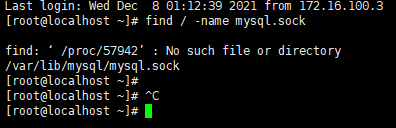
1. First find mysql Directory where the sock is located

find/-name mysql.sock

2. Create/TMP/MySQL Sock soft connect to the file
establish a soft connection (write an absolute path):

ln -s /var/lib/mysql/mysql.sock /tmp/mysql.sock

If the manual residual soft connection is wrong, you can delete it with the following command:

rm -rf /tmp/mysql.sock

Re-execute MySQL command, perfect solution!!

[Solved] SpringBoot Error: HttpMediaTypeNotSupportedException: Content type ‘application/json‘ not supported

HttpMediaTypeNotSupportedException: Content type ‘application/json;charset=UTF-8’ not supported
Error:

{
    "timestamp": "2021-12-13T11:49:33.305+00:00",
    "status": 415,
    "error": "Unsupported Media Type",
    "path": "/api/v1/product/add"
}

If you are sure that there is no problem with your parameters, it is likely that the problem lies in your @requestbody AAA a
the problem I encounter here is that protobuf is used, but no corresponding bean is injected, resulting in an error. Just add the following code to the application:

PS: protobufmodule is our own extended com fasterxml.jackson.databind.Module class, it’s inconvenient to put it out. You can consult the data by yourself

    @Bean
    ProtobufJsonFormatHttpMessageConverter protobufHttpMessageConverter() {
        return new  ProtobufJsonFormatHttpMessageConverter();
    }

    @Bean
    public Jackson2ObjectMapperBuilderCustomizer jsonCustomizer() {
        return builder -> builder.serializationInclusion(JsonInclude.Include.NON_NULL)
                .modules(new ProtobufModule(), new JavaTimeModule());
    }