When Android studio develops Android projects, the error “CreateProcess error = 206” is easy to appear every time it runs. The console error message says that the file name or extension is too long. I used openjdk to solve this problem. I found many ways to solve it. For a long time, I can only restart Android studio or forcibly end the JDK process in the application manager. Later, I just changed the open JDK to Oracle JDK.
Author Archives: Robins
[Solved] Paramiko error: AttributeError: ‘NoneType’ object has no attribute ‘time’
Error message:
Exception ignored in: <function BufferedFile.__del__ at 0x1104b7d30>
Traceback (most recent call last):
  File "/Users/jerrylin/.conda/envs/pythonProject/lib/python3.8/site-packages/paramiko/file.py", line 66, in __del__
  File "/Users/jerrylin/.conda/envs/pythonProject/lib/python3.8/site-packages/paramiko/channel.py", line 1392, in close
  File "/Users/jerrylin/.conda/envs/pythonProject/lib/python3.8/site-packages/paramiko/channel.py", line 991, in shutdown_write
  File "/Users/jerrylin/.conda/envs/pythonProject/lib/python3.8/site-packages/paramiko/channel.py", line 967, in shutdown
  File "/Users/jerrylin/.conda/envs/pythonProject/lib/python3.8/site-packages/paramiko/transport.py", line 1846, in _send_user_message
AttributeError: 'NoneType' object has no attribute 'time'
Program code:
import paramiko
import sys
import time
# Instantiate SSHClient
client = paramiko.SSHClient()

# Auto add policy to save server's host name and key information, if not added, then hosts no longer recorded in local know_hosts file will not be able to connect
client.set_missing_host_key_policy(paramiko.AutoAddPolicy())

# Connect to the SSH server and authenticate with username and password
client.connect()

# Open a Channel and execute commands
stdin, stdout, stderr = client.exec_command('ls data/data_target') # stdout is the correct output, stderr is the error output, and there is one variable with a value

# Print the execution result
print(stdout.read().decode('utf-8'))

# Close SSHClient

client.close()
Solution:
The reason for the error is that the output print conflicts with the close executed by the program. You only need to add a time before the close Sleep (1) is OK
[Solved] minio Failed to Upload File Error: The difference between the request time and the server‘s time is too large.
Problem Description:
Minio upload failed. The background controller reports an error. The error information is as follows:
The difference between the request time and the server's time is too large.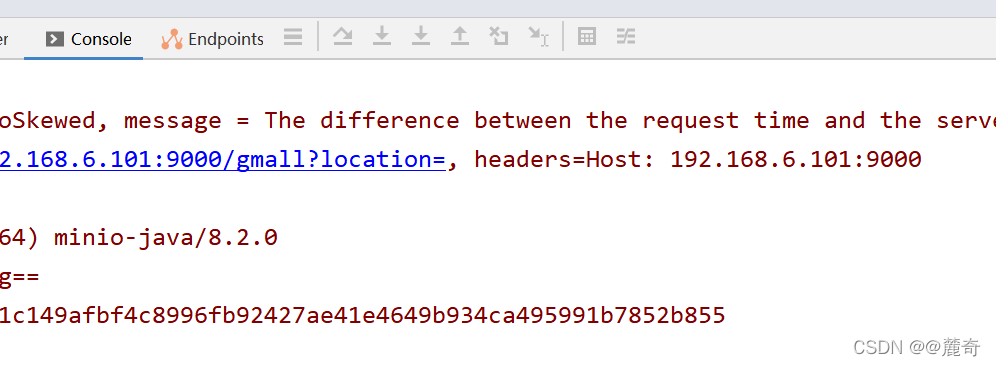
Cause analysis:
The system time zone is inconsistent with the hardware time zone
Solution:
Note: when uploading files, you need to adjust the time of Linux server to be consistent with that of windows!
Step 1: install NTP service
yum -y install ntp
Step 2: start the startup service
systemctl enable ntp
Step 3: start the service
systemctl start ntpq
Step 4: change the time zone
timedatectl set-timezone Asia/Shanghai
Step 5: enable NTP synchronization
timedatectl set-ntp yes
Step 6: synchronize time
ntpq -p
Finally, you can try to enter the command} on the console to check whether it is consistent with the windows system time
date

Hive: Hive partition sorting error [How to Solve]
First, the error information is as follows:
Number of reduce tasks not specified. Estimated from input data size: 1
In order to change the average load for a reducer (in bytes):
  set hive.exec.reducers.bytes.per.reducer=<number>
In order to limit the maximum number of reducers:
  set hive.exec.reducers.max=<number>
In order to set a constant number of reducers:
  set mapreduce.job.reduces=<number>
java.io.IOException: org.apache.hadoop.yarn.exceptions.InvalidResourceRequestException: Invalid resource request, requested resource type=[memory-mb] < 0 or greater than maximum allowed allocation. Requested resource=<memory:1536, vCores:1>, maximum allowed allocation=<memory:256, vCores:4>, please note that maximum allowed allocation is calculated by scheduler based on maximum resource of registered NodeManagers, which might be less than configured maximum allocation=<memory:256, vCores:4>
It can be seen from the error message that the main reason is that the maximum memory of MR is less than the requested content. Here, we can find it on the yarn site Configure RM data information in XML:
   <property>
    <name>yarn.nodemanager.resource.memory-mb</name>
    <value>2548</value>
    <discription>Available memory per node, units MB</discription>
  </property>

  <property>
    <name>yarn.scheduler.minimum-allocation-mb</name>
    <value>128</value>
    <discription>Minimum memory that can be requested for a single task, default 1024MB</discription>
  </property>

  <property>
    <name>yarn.scheduler.maximum-allocation-mb</name>
    <value>2048</value>
    <discription>Maximum memory that can be requested for a single task, default 8192MB</discription>
  </property>
When we restart the Hadoop cluster and run the partition again, an error is reported:
Diagnostic Messages for this Task:
[2021-12-19 10:04:27.042]Container [pid=5821,containerID=container_1639879236798_0001_01_000005] is running 253159936B beyond the 'VIRTUAL' memory limit. Current usage: 92.0 MB of 1 GB physical memory used; 2.3 GB of 2.1 GB virtual memory used. Killing container.
Dump of the process-tree for container_1639879236798_0001_01_000005 :
        |- PID PPID PGRPID SESSID CMD_NAME USER_MODE_TIME(MILLIS) SYSTEM_TIME(MILLIS) VMEM_USAGE(BYTES) RSSMEM_USAGE(PAGES) FULL_CMD_LINE
        |- 5821 5820 5821 5821 (bash) 0 0 9797632 286 /bin/bash -c /opt/module/jdk1.8.0_161/bin/java -Djava.net.preferIPv4Stack=true -Dhadoop.metrics.log.level=WARN   -Xmx820m -Djava.io.tmpdir=/opt/module/hadoop-3.1.3/data/nm-local-dir/usercache/atguigu/appcache/application_1639879236798_0001/container_1639879236798_0001_01_000005/tmp -Dlog4j.configuration=container-log4j.properties -Dyarn.app.container.log.dir=/opt/module/hadoop-3.1.3/logs/userlogs/application_1639879236798_0001/container_1639879236798_0001_01_000005 -Dyarn.app.container.log.filesize=0 -Dhadoop.root.logger=INFO,CLA -Dhadoop.root.logfile=syslog org.apache.hadoop.mapred.YarnChild 192.168.17.42 42894 attempt_1639879236798_0001_m_000000_3 5 1>/opt/module/hadoop-3.1.3/logs/userlogs/application_1639879236798_0001/container_1639879236798_0001_01_000005/stdout 2>/opt/module/hadoop-3.1.3/logs/userlogs/application_1639879236798_0001/container_1639879236798_0001_01_000005/stderr
        |- 5833 5821 5821 5821 (java) 338 16 2498220032 23276 /opt/module/jdk1.8.0_161/bin/java -Djava.net.preferIPv4Stack=true -Dhadoop.metrics.log.level=WARN -Xmx820m -Djava.io.tmpdir=/opt/module/hadoop-3.1.3/data/nm-local-dir/usercache/atguigu/appcache/application_1639879236798_0001/container_1639879236798_0001_01_000005/tmp -Dlog4j.configuration=container-log4j.properties -Dyarn.app.container.log.dir=/opt/module/hadoop-3.1.3/logs/userlogs/application_1639879236798_0001/container_1639879236798_0001_01_000005 -Dyarn.app.container.log.filesize=0 -Dhadoop.root.logger=INFO,CLA -Dhadoop.root.logfile=syslog org.apache.hadoop.mapred.YarnChild 192.168.17.42 42894 attempt_1639879236798_0001_m_000000_3 5
It can be seen from the above information that the physical memory data is too small, but in fact our virtual memory is enough, so we can configure here not to check the physical memory:
<property>
    <name>yarn.nodemanager.vmem-check-enabled</name>
    <value>false</value>
</property>
Then restart the cluster: run SQL
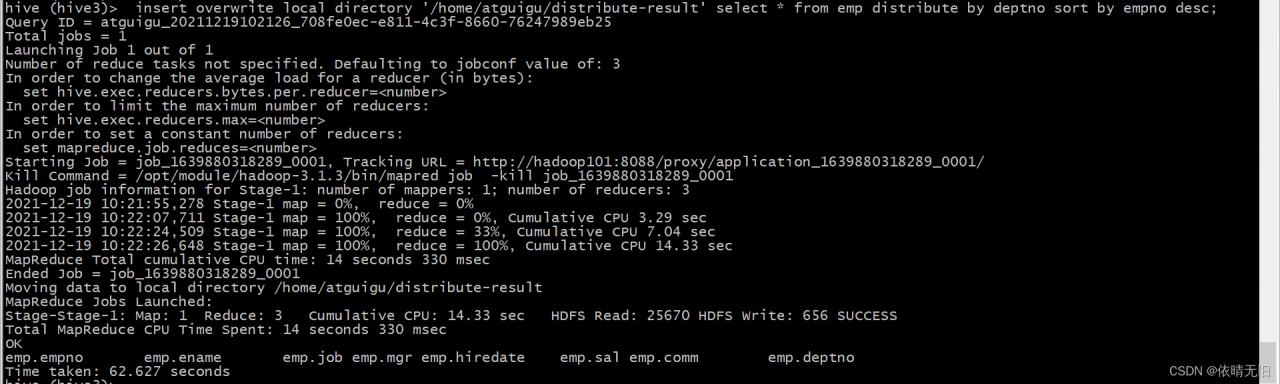
The results can be output normally.
How to Solve Vue-devtool Package Error
Error in installing Vue devtool
An error occurs when NPM run build is packaged:
lerna ERR! yarn run build exited 1 in '@vue/devtools-api'
lerna ERR! yarn run build stdout:
yarn run v1.22.17
$ rimraf lib && yarn build:esm && yarn build:cjs
$ tsc --module es2015 --outDir lib/esm -d
info Visit https://yarnpkg.com/en/docs/cli/run for documentation about this command.
info Visit https://yarnpkg.com/en/docs/cli/run for documentation about this command.
lerna ERR! yarn run build stderr:
'tsc' �����ڲ����ⲿ���Ҳ���ǿ����еij���
���������ļ���
error Command failed with exit code 1.
error Command failed with exit code 1.
lerna ERR! yarn run build exited 1 in '@vue/devtools-api'
npm ERR! code ELIFECYCLE
npm ERR! [email protected] build: `lerna run build`
npm ERR! Exit status 1
npm ERR!
npm ERR! Failed at the [email protected] build script.
npm ERR! This is probably not a problem with npm. There is likely additional logging output above.
npm ERR! A complete log of this run can be found in:
npm ERR! C:\Users\cy\AppData\Roaming\npm-cache\_logs\2021-12-17T01_31_16_860Z-debug.log
PS D:\Download\devtools-main\devtools-main> yarn build
yarn run v1.22.17
$ lerna run build
lerna notice cli v4.0.0
lerna info Executing command in 9 packages: "yarn run build"
lerna ERR! yarn run build exited 1 in '@vue/devtools-api'
lerna ERR! yarn run build stdout:
$ rimraf lib && yarn build:esm && yarn build:cjs
$ tsc --module es2015 --outDir lib/esm -d
info Visit https://yarnpkg.com/en/docs/cli/run for documentation about this command.
info Visit https://yarnpkg.com/en/docs/cli/run for documentation about this command.
lerna ERR! yarn run build stderr:
'tsc' �����ڲ����ⲿ���Ҳ���ǿ����еij���
���������ļ���
error Command failed with exit code 1.
error Command failed with exit code 1.
lerna ERR! yarn run build exited 1 in '@vue/devtools-api'
error Command failed with exit code 1.
info Visit https://yarnpkg.com/en/docs/cli/run for documentation about this command.
Solution:
Windows cannot use RM
The
RM -RFcommand underlinuxis used, and your computer iswindows
solution: replace theRM -RFcommand with therimrafcommandThe rimraf` package is a `nodejs` package that recursively deletes files, the same as `rm -rf under `Linux`.
Install rimraf, NPM install rimraf — save dev
Search RM – RF to find the package in two locations json :
Replace RM -rf with rimraf
Finally, yarn install, yarn build
It worked~
webpack 5.64.2 compiled successfully in 104506 ms
lerna success run Ran npm script 'build' in 9 packages in 146.2s:
lerna success - @vue/devtools-api
lerna success - @vue-devtools/app-backend-api
lerna success - @vue-devtools/app-backend-core
lerna success - @vue-devtools/app-backend-vue1
lerna success - @vue-devtools/app-backend-vue2
lerna success - @vue-devtools/app-backend-vue3
lerna success - @vue-devtools/shared-utils
lerna success - @vue-devtools/shell-chrome
lerna success - @vue/devtools
Done in 153.65s.
How to Solve Clickhouse restart error: Cannot obtain value of path from config file…
1. Clickhouse service restart
sudo service clickhouse-server start
2. Error message
Start clickhouse-server service: Poco::Exception. Code: 1000, e.code() = 0,
e.displayText() = Exception: Failed to merge config with '/etc/clickhouse-server/config.d/metric_log.xml':
Exception: Root element doesn't have the corresponding root element as the config file.
It must be <yandex> (version 21.3.4.25 (official build))
Cannot obtain value of path from config file: /etc/clickhouse-server/config.xml
3. Problem analysis
Exception starting Clickhouse server service. Unable to merge configuration with ‘/ etc/Clickhouse server/config’. The root element does not have a corresponding root element as a configuration file. It must be (version 21.3.4.25 (official version)). The path value cannot be obtained from the configuration file:/etc/Clickhouse server/config.xml
translated as/etc/Clickhouse server/config d/metric_log. The content in the XML configuration file, XML, cannot be parsed correctly. The official version is 21.3 4.25 it is required that the content of the configuration file should be in the label
4. Solutions
# open files /etc/clickhouse-server/config.d/metric_log.xml
vi /etc/clickhouse-server/config.d/metric_log.xml

# Mofdify the content of metric_log.xml file
<clickhouse>
    <metric_log>
        <database>system</database>
        <table>metric_log</table>
        <flush_interval_milliseconds>7500</flush_interval_milliseconds>
        <collect_interval_milliseconds>1000</collect_interval_milliseconds>
    </metric_log>
</clickhouse>
# Modify the file content and put it in <yandex> tag
# Contents of the modified metric_log.xml file
<yandex>
	<clickhouse>
	    <metric_log>
	        <database>system</database>
	        <table>metric_log</table>
	        <flush_interval_milliseconds>7500</flush_interval_milliseconds>
	        <collect_interval_milliseconds>1000</collect_interval_milliseconds>
	    </metric_log>
	</clickhouse>
</yandex>

# save and restart
sudo service clickhouse-server start
# Prompt after execution
Start clickhouse-server service: Path to data directory in /etc/clickhouse-server/config.xml: /data/clickhouse/
DONE
[Solved] Springcloud Add Eureka to Startup Error
1.Error Messages:
Correct the classpath of your application so that it contains a single, compatible version of com.google.gson.GsonBuilder
Description:

An attempt was made to call a method that does not exist. The attempt was made from the following location:
    java.lang.invoke.MethodHandleNatives.resolve(Native Method)
The following method did not exist:
    com.google.gson.GsonBuilder.setLenient()Lcom/google/gson/GsonBuilder;
The method's class, com.google.gson.GsonBuilder, is available from the following locations:
    jar:file:/E:/smallTools/maven/rep/com/google/code/gson/gson/2.1/gson-2.1.jar!/com/google/gson/GsonBuilder.class
The class hierarchy was loaded from the following locations:
    com.google.gson.GsonBuilder: file:/E:/smallTools/maven/rep/com/google/code/gson/gson/2.1/gson-2.1.jar
Action:
Correct the classpath of your application so that it contains a single, compatible version of com.google.gson.GsonBuilder
Process finished with exit code 1
2. Solution
Add gson dependency
<dependency>
    <groupId>com.google.code.gson</groupId>
    <artifactId>gson</artifactId>
    <version>2.6</version>
</dependency>[Solved] Element form method Error: TypeError: Cannot read properties of undefined (reading ‘resetFields’)
use:
      /**
       * rebuild sheet
       */
      resetForm(formName){
          this.$refs[formName].resetFields();
      },
report errors:
TypeError: Cannot read properties of undefined (reading 'resetFields')
    at VueComponent.resetForm (index.vue?6ced:501)
    at VueComponent.addColumn (index.vue?6ced:487)
    at click (index.vue?5d22:653)
    at invokeWithErrorHandling (vue.runtime.esm.js?2b0e:1854)
    at VueComponent.invoker (vue.runtime.esm.js?2b0e:2179)
    at invokeWithErrorHandling (vue.runtime.esm.js?2b0e:1854)
    at VueComponent.Vue.$emit (vue.runtime.esm.js?2b0e:3888)
    at VueComponent.handleClick (element-ui.common.js?5c96:9441)
    at invokeWithErrorHandling (vue.runtime.esm.js?2b0e:1854)
    at HTMLButtonElement.invoker (vue.runtime.esm.js?2b0e:2179)
Solution:
      /**
       * rebuild sheet
       */
      resetForm(formName) {
        //The purpose of adding if judgment condition is to solve the problem that the console prompt object does not exist
        if (this.$refs[formName] !== undefined) {
          this.$refs[formName].resetFields();
        }
},[Solved] jenkins-deleteDir Error (FilePath is missing)
Today’s development feedback has been using the good Jenkins compilation service, but it reported an error
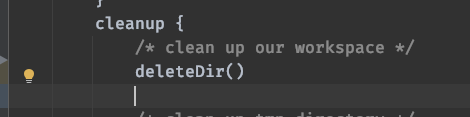
Look at the log and say something is wrong with deletedir
org.jenkinsci.plugins.workflow.steps.MissingContextVariableException: Required context class hudson.FilePath is missing
Perhaps you forgot to surround the code with a step that provides this, such as: node
Then after development and adjustment
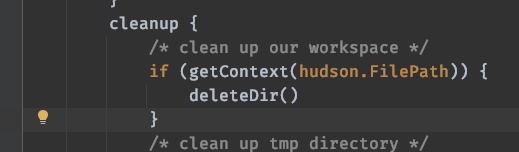
Start reporting another error
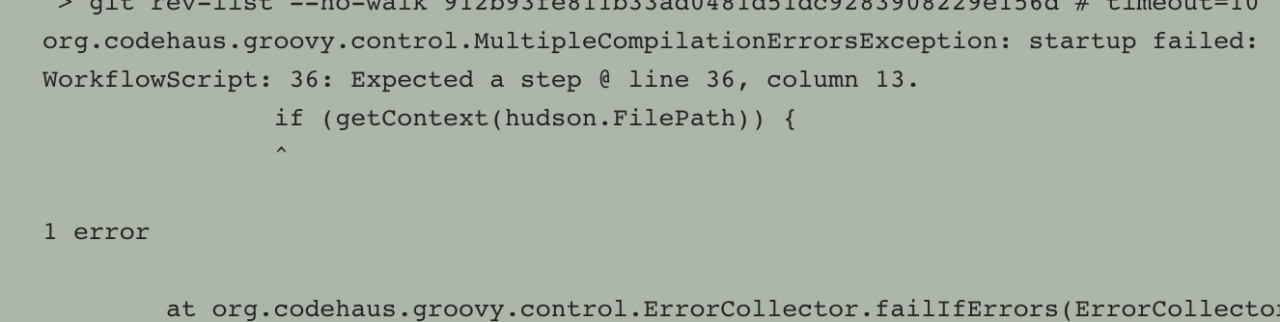
After developing no solution, he found me
I looked at the pipeline
pipeline {
    agent{ label 'qa-gpu016.test.cn' }
    parameters {
        string(defaultValue: '0.0.0', description: '版本号', name: 'version', trim: false)
    }
......
The discovery task is scheduled to · qa-gpu016 test.cn , and then log in to qa-gpu016 test.cn View
It was found that the disk was full. Because I didn’t know who to clean, I could only clean some unused images and containers
root@qa-gpu016:/# docker system df
TYPE                TOTAL               ACTIVE              SIZE                RECLAIMABLE
Images              12                  5                   21.67GB             20.58GB (94%)
Containers          6                   6                   4.765MB             0B (0%)
Local Volumes       544                 2                   197.3GB             197.1GB (99%)
Build Cache         0                   0                   0B                  0B
root@qa-gpu016:/home# docker system prune -a
WARNING! This will remove:
        - all stopped containers
        - all networks not used by at least one container
        - all images without at least one container associated to them
        - all build cache
Are you sure you want to continue?[y/N] y
Deleted Containers:
e0a493a142c680033c0bce6eed8e2ee3538b6e967077c6d8e27110d992ae543e
d0283ada7950f92dbf43f02a543a12eb4efc0a1a285516500ae2ccbd87ad58f7
fbaba3555782cace190c5d8c471ab302b0a9ed8372f881899c3c421aaac96a32
facab655ec5f0bc7a1737ced60353be2c6a51a79f80cfcec04bc2b63c802fe5f
095d2f0c22483c7515c2a17bb19489fe4f52cd7251ff865bd23893ae7064e015
db4614f42fe72795335af99b64fbac7f3b41311631d349511b593b186acb6e53
4fc5b1870cb1fb4ddd5197d70b0f80ef8be224229417d0ea7b5e5f3ce94da214
53d9edf531c88c27cb31b0039427cb0bc9f7a5d8806ebda608f7bb604252fcb5
8d150da1189ba204d318cb8e028c47d71df4be0ff23a69bb1fe6a0403e938313

Deleted Images:
untagged: be510_test:0.0.217
deleted: sha256:cc9822c1c293e75b5a2806c2a84b34b908b3768f92b246a7ff415cf7f0ec0f37
deleted: sha256:f21a13c9453fb0a846c57c285251ece8d8fc95b803801e9f982891659217527a
deleted: sha256:38c1da0485daa7b5593dff9784da12af855290da40ee20600bc3ce864fb43fc0
......
root@qa-gpu016:/#
Then inform the developer to remove the judgment and keep it as it is
......
        cleanup {
            /* clean up our workspace */
                deleteDir()

            /* clean up tmp directory */
            dir("${workspace}@tmp") {
                deleteDir()
            }
            /* clean up script directory */
            dir("${workspace}@script") {
                deleteDir()
            }
        }
......
Reconstruction, development feedback, pulling an image, and now entering the compilation process. Before, an error was reported on the outside
So far, the problem has been solved
[Solved] bin/hive Startup Error: Operation category READ is not supported in state standby
The specific error information is as follows:
[sonkwo@sonkwo-bj-data001 hive-3.1.2]$ bin/hive

which: no hbase in (/usr/local/bin:/usr/bin:/usr/local/sbin:/usr/sbin:/opt/module/jdk1.8.0_212/bin:/opt/module/ha/hadoop-3.1.3/bin:/opt/module/ha/hadoop-3.1.3/sbin:/opt/module/zookeeper-3.5.7/bin:/opt/module/hive-3.1.2/bin:/home/sonkwo/.local/bin:/home/sonkwo/bin)
Hive Session ID = cb685500-b6ba-42be-b652-1aa7bdf0e134

Logging initialized using configuration in jar:file:/opt/module/hive-3.1.2/lib/hive-common-3.1.2.jar!/hive-log4j2.properties Async: true
Exception in thread "main" java.lang.RuntimeException: org.apache.hadoop.ipc.RemoteException(org.apache.hadoop.ipc.StandbyException): Operation category READ is not supported in state standby. Visit https://s.apache.org/sbnn-error
        at org.apache.hadoop.hdfs.server.namenode.ha.StandbyState.checkOperation(StandbyState.java:98)
        at org.apache.hadoop.hdfs.server.namenode.NameNode$NameNodeHAContext.checkOperation(NameNode.java:2017)
        at org.apache.hadoop.hdfs.server.namenode.FSNamesystem.checkOperation(FSNamesystem.java:1441)
        at org.apache.hadoop.hdfs.server.namenode.FSNamesystem.getFileInfo(FSNamesystem.java:3125)
        at org.apache.hadoop.hdfs.server.namenode.NameNodeRpcServer.getFileInfo(NameNodeRpcServer.java:1173)
        at org.apache.hadoop.hdfs.protocolPB.ClientNamenodeProtocolServerSideTranslatorPB.getFileInfo(ClientNamenodeProtocolServerSideTranslatorPB.java:973)
        at org.apache.hadoop.hdfs.protocol.proto.ClientNamenodeProtocolProtos$ClientNamenodeProtocol$2.callBlockingMethod(ClientNamenodeProtocolProtos.java)
        at org.apache.hadoop.ipc.ProtobufRpcEngine$Server$ProtoBufRpcInvoker.call(ProtobufRpcEngine.java:527)
        at org.apache.hadoop.ipc.RPC$Server.call(RPC.java:1036)
        at org.apache.hadoop.ipc.Server$RpcCall.run(Server.java:1000)
        at org.apache.hadoop.ipc.Server$RpcCall.run(Server.java:928)
        at java.security.AccessController.doPrivileged(Native Method)
        at javax.security.auth.Subject.doAs(Subject.java:422)
        at org.apache.hadoop.security.UserGroupInformation.doAs(UserGroupInformation.java:1729)
        at org.apache.hadoop.ipc.Server$Handler.run(Server.java:2916)

        at org.apache.hadoop.hive.ql.session.SessionState.start(SessionState.java:651)
        at org.apache.hadoop.hive.ql.session.SessionState.beginStart(SessionState.java:591)
        at org.apache.hadoop.hive.cli.CliDriver.run(CliDriver.java:747)
        at org.apache.hadoop.hive.cli.CliDriver.main(CliDriver.java:683)
        at sun.reflect.NativeMethodAccessorImpl.invoke0(Native Method)
        at sun.reflect.NativeMethodAccessorImpl.invoke(NativeMethodAccessorImpl.java:62)
        at sun.reflect.DelegatingMethodAccessorImpl.invoke(DelegatingMethodAccessorImpl.java:43)
        at java.lang.reflect.Method.invoke(Method.java:498)
        at org.apache.hadoop.util.RunJar.run(RunJar.java:318)
        at org.apache.hadoop.util.RunJar.main(RunJar.java:232)
Caused by: org.apache.hadoop.ipc.RemoteException(org.apache.hadoop.ipc.StandbyException): Operation category READ is not supported in state standby. Visit https://s.apache.org/sbnn-error
        at org.apache.hadoop.hdfs.server.namenode.ha.StandbyState.checkOperation(StandbyState.java:98)
        at org.apache.hadoop.hdfs.server.namenode.NameNode$NameNodeHAContext.checkOperation(NameNode.java:2017)
        at org.apache.hadoop.hdfs.server.namenode.FSNamesystem.checkOperation(FSNamesystem.java:1441)
        at org.apache.hadoop.hdfs.server.namenode.FSNamesystem.getFileInfo(FSNamesystem.java:3125)
        at org.apache.hadoop.hdfs.server.namenode.NameNodeRpcServer.getFileInfo(NameNodeRpcServer.java:1173)
        at org.apache.hadoop.hdfs.protocolPB.ClientNamenodeProtocolServerSideTranslatorPB.getFileInfo(ClientNamenodeProtocolServerSideTranslatorPB.java:973)
        at org.apache.hadoop.hdfs.protocol.proto.ClientNamenodeProtocolProtos$ClientNamenodeProtocol$2.callBlockingMethod(ClientNamenodeProtocolProtos.java)
        at org.apache.hadoop.ipc.ProtobufRpcEngine$Server$ProtoBufRpcInvoker.call(ProtobufRpcEngine.java:527)
        at org.apache.hadoop.ipc.RPC$Server.call(RPC.java:1036)
        at org.apache.hadoop.ipc.Server$RpcCall.run(Server.java:1000)
        at org.apache.hadoop.ipc.Server$RpcCall.run(Server.java:928)
        at java.security.AccessController.doPrivileged(Native Method)
        at javax.security.auth.Subject.doAs(Subject.java:422)
        at org.apache.hadoop.security.UserGroupInformation.doAs(UserGroupInformation.java:1729)
        at org.apache.hadoop.ipc.Server$Handler.run(Server.java:2916)

        at org.apache.hadoop.ipc.Client.getRpcResponse(Client.java:1545)
        at org.apache.hadoop.ipc.Client.call(Client.java:1491)
        at org.apache.hadoop.ipc.Client.call(Client.java:1388)
        at org.apache.hadoop.ipc.ProtobufRpcEngine$Invoker.invoke(ProtobufRpcEngine.java:233)
        at org.apache.hadoop.ipc.ProtobufRpcEngine$Invoker.invoke(ProtobufRpcEngine.java:118)
        at com.sun.proxy.$Proxy28.getFileInfo(Unknown Source)
        at org.apache.hadoop.hdfs.protocolPB.ClientNamenodeProtocolTranslatorPB.getFileInfo(ClientNamenodeProtocolTranslatorPB.java:904)
        at sun.reflect.NativeMethodAccessorImpl.invoke0(Native Method)
        at sun.reflect.NativeMethodAccessorImpl.invoke(NativeMethodAccessorImpl.java:62)
        at sun.reflect.DelegatingMethodAccessorImpl.invoke(DelegatingMethodAccessorImpl.java:43)
        at java.lang.reflect.Method.invoke(Method.java:498)
        at org.apache.hadoop.io.retry.RetryInvocationHandler.invokeMethod(RetryInvocationHandler.java:422)
        at org.apache.hadoop.io.retry.RetryInvocationHandler$Call.invokeMethod(RetryInvocationHandler.java:165)
        at org.apache.hadoop.io.retry.RetryInvocationHandler$Call.invoke(RetryInvocationHandler.java:157)
        at org.apache.hadoop.io.retry.RetryInvocationHandler$Call.invokeOnce(RetryInvocationHandler.java:95)
        at org.apache.hadoop.io.retry.RetryInvocationHandler.invoke(RetryInvocationHandler.java:359)
        at com.sun.proxy.$Proxy29.getFileInfo(Unknown Source)
        at org.apache.hadoop.hdfs.DFSClient.getFileInfo(DFSClient.java:1661)
        at org.apache.hadoop.hdfs.DistributedFileSystem$29.doCall(DistributedFileSystem.java:1577)
        at org.apache.hadoop.hdfs.DistributedFileSystem$29.doCall(DistributedFileSystem.java:1574)
        at org.apache.hadoop.fs.FileSystemLinkResolver.resolve(FileSystemLinkResolver.java:81)
        at org.apache.hadoop.hdfs.DistributedFileSystem.getFileStatus(DistributedFileSystem.java:1589)
        at org.apache.hadoop.fs.FileSystem.exists(FileSystem.java:1683)
        at org.apache.hadoop.hive.ql.exec.Utilities.ensurePathIsWritable(Utilities.java:4486)
        at org.apache.hadoop.hive.ql.session.SessionState.createRootHDFSDir(SessionState.java:760)
        at org.apache.hadoop.hive.ql.session.SessionState.createSessionDirs(SessionState.java:701)
        at org.apache.hadoop.hive.ql.session.SessionState.start(SessionState.java:627)
        ... 9 more
reason:
The status of the three namenodes is standby
Overview ‘sonkwo-bj-data001:8020’ (standby)
Overview ‘sonkwo-bj-data002:8020’ (standby)
Overview ‘sonkwo-bj-data003:8020’ (standby)
Solution:
1) Close the HDFS cluster
stop DFS SH
2) start zookeeper cluster
ZK SH start
3) initialize ha status in zookeeper
HDFS zkfc – formatzk
4) start HDFS service
start DFS sh
Re execute bin/hive link successfully:
hive>
[1]+  Stopped                 hive
[sonkwo@sonkwo-bj-data001 hive-3.1.2]$ hive
which: no hbase in (/usr/local/bin:/usr/bin:/usr/local/sbin:/usr/sbin:/opt/module/jdk1.8.0_212/bin:/opt/module/ha/hadoop-3.1.3/bin:/opt/module/ha/hadoop-3.1.3/sbin:/opt/module/zookeeper-3.5.7/bin:/opt/module/hive-3.1.2/bin:/home/sonkwo/.local/bin:/home/sonkwo/bin)
Hive Session ID = 698d0919-f46c-42c4-b92e-860f501a7711

Logging initialized using configuration in jar:file:/opt/module/hive-3.1.2/lib/hive-common-3.1.2.jar!/hive-log4j2.properties Async: true
Hive-on-MR is deprecated in Hive 2 and may not be available in the future versions. Consider using a different execution engine (i.e. spark, tez) or using Hive 1.X releases.
hive>
How to Solve kaldi Gstreamer worker Run Error
INTEL MKL ERROR: /opt/intel/mkl/lib/intel64/libmkl_avx2.so: undefined symbol: mkl_sparse_optimize_bsr_trsm_i8.
Intel MKL FATAL ERROR: Cannot load libmkl_avx2.so or libmkl_def.so.
Add in the command:
export LD_PRELOAD=~/anaconda3/lib/libmkl_core.so:~/anaconda3/lib/libmkl_sequential.so
ERROR: Couldn’t create the kaldinnet2onlinedecoder element!
Couldn’t find kaldinnet2onlinedecoder element at /home/cs_hsl/kaldi/src/gst-plugin. If it’s not the right path, try to set GST_PLUGIN_PATH to the right one, and retry. You can also try to run the following command: ‘GST_PLUGIN_PATH=/home/cs_hsl/kaldi/src/gst-plugin gst-inspect-1.0 kaldinnet2onlinedecoder’.
Enter the installation directory of gst-kaldi-nnet2-online
export GST_PLUGIN_PATH=/home/cs_hsl/kaldi/tools/gst-kaldi-nnet2-online/src
Python Connect database error: command listdatabases requires authentication
Python reports an error when connecting to the database. Command listdatabases requires authentication, full error: {OK ‘: 0.0,’ errmsg ‘:’ command listdatabases requires authentication ‘,’ code ‘: 13,’ codename ‘:’ unauthorized ‘}
The reason for the error is that authentication is required, indicating that user name and password authentication are required to connect to mongodb database.
Connect mongodb without password. The code is as follows:
from pymongo import MongoClient
class MongoDBConn:
    def __init__(self, host, port, db_name, user, password):
        """
        Establishing database connections
        """
        self.conn = MongoClient(host, port)
        self.mydb = self.conn[db_name]
With password authentication, connect to Mongo database, and the code is as follows:
from pymongo import MongoClient

class MongoDBConn:

    def __init__(self, host, port, db_name, user, password):
        """
        Establishing database connections
        """
        self.conn = MongoClient(host, port)
        self.db = self.conn.admin
        self.db.authenticate(user, password)
        self.mydb = self.conn[db_name]
Pit record
In fact, an error was reported in the middle:
Authentication failed., full error: {‘ok’: 0.0, ‘errmsg’: ‘Authentication failed.’, ‘code’: 18, ‘codeName’: ‘AuthenticationFailed’}
Originally used directly in the code:
self.db = self.conn[db_name]
self.db.authenticate(user, password)
If you directly use the target database for link authentication, you will report the above error. Instead, first connect to the system default database admin, use admin for authentication, and you will succeed, and then do the corresponding operation for the target database.