Author Archives: Robins

[Solved] AttributeError: ‘module‘ object has no attribute ‘CALIB_HAND_EYE_PARK‘

ubuntu18.04 ROS:melodic python2.7

 File "/home/bionic/yuxiangROS_handeye/catkin_ws/src/handeye-calib-master/src/handeye-calib/src/handeye/handeye_calibration_backend_opencv.py", line 29, in HandeyeCalibrationBackendOpenCV
    'Park': cv2.CALIB_HAND_EYE_PARK,
AttributeError: 'module' object has no attribute 'CALIB_HAND_EYE_PARK'
[base_hand_on_eye_calib-1] process has died [pid 15724, exit code 1, cmd /home/bionic/yuxiangROS_handeye/catkin_ws/src/handeye-calib-master/src/handeye-calib/src/handeye/base_hand_on_eye_calib.py __name:=base_hand_on_eye_calib __log:=/home/bionic/.ros/log/600b94f2-660e-11ec-93c4-94c691a2c1c1/base_hand_on_eye_calib-1.log].
log file: /home/bionic/.ros/log/600b94f2-660e-11ec-93c4-94c691a2c1c1/base_hand_on_eye_calib-1*.log
all processes on machine have died, roslaunch will exit
shutting down processing monitor...
... shutting down processing monitor complete

It should be the opencv version

I used the Q2 command and succeeded

Q1.pip install transforms3d
Q2.python -m pip install opencv-contrib-python, and then follow @yangbenbo 's advice, this problem is done(thank you).
Q3.after the two qusetion, Q3 is normal automaticaly.I just want to test the single node to debug(rqt_easy_handeye), thanks for your advice, it works.

[Solved] Cause: org.apache.ibatis.builder.BuilderException: Error parsing SQL Mapper Configuration

org.apache.ibatis.exceptions.PersistenceException: 
### Error building SqlSession.
### The error may exist in mappers/user.xml
### Cause: org.apache.ibatis.builder.BuilderException: Error parsing SQL Mapper Configuration. Cause: org.apache.ibatis.builder.BuilderException: Error parsing Mapper XML. The XML location is 'mappers/user.xml'. Cause: org.apache.ibatis.builder.BuilderException: Error resolving class. Cause: org.apache.ibatis.type.TypeException: Could not resolve type alias ''.  Cause: java.lang.ClassNotFoundException: Cannot find class: 

This error occurs in the mybatis test for many reasons,
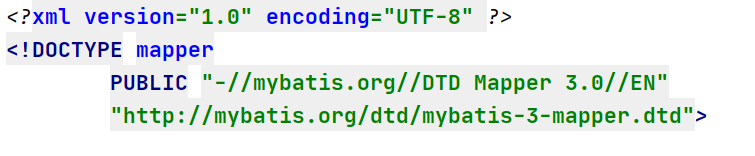
1: it may be the header information error of the mapping file. Correct:
2: there may also be an error in the label of the mapping file. Most of the errors reported in the mapping file are code errors. Just check the code
3: I made an error today because I wrote an extra tag, but the content in the tag was not written

4: The same type of error I encountered yesterday is because I wrote a comment in the where tag

<select>
	<where>
		Write comment here. This error has been encountered twice, as soon as a comment is written inside a tag, an error is reported
	</where>
</select>

These are the mistakes and solutions I met in learning mybatis.

[Solved] Keil5 burn STM32F chip Error: error: Flash download failed – “cortex-m4″“

Load “…\Obj\Laliji.axf”
Set JLink Project File to “F:\01MCU\STM32F429\TestProgram\Project\JLinkSettings.ini”
JLink Info: Device “STM32F429IG” selected.

JLink info:
DLL: V4.98e, compiled May 5 2015 11:00:52
Firmware: J-Link V10 compiled Oct 15 2018 16:40:35
Hardware: V10.10
S/N : 260106173
Feature(s) : FlashBP, GDB, FlashDL, JFlash, RDI
JLink Info: Found SWD-DP with ID 0x2BA01477JLink Info: Found SWD-DP with ID 0x2BA01477JLink Info: Found Cortex-M4 r0p1, Little endian.JLink Info: FPUnit: 6 code (BP) slots and 2 literal slotsJLink Info: CoreSight components:JLink Info: ROMTbl 0 @ E00FF000JLink Info: ROMTbl 0 [0]: FFF0F000, CID: B105E00D, PID: 000BB00C SCSJLink Info: ROMTbl 0 [1]: FFF02000, CID: B105E00D, PID: 003BB002 DWTJLink Info: ROMTbl 0 [2]: FFF03000, CID: B105E00D, PID: 002BB003 FPBJLink Info: ROMTbl 0 [3]: FFF01000, CID: B105E00D, PID: 003BB001 ITMJLink Info: ROMTbl 0 [4]: FFF41000, CID: B105900D, PID: 000BB9A1 TPIUJLink Info: ROMTbl 0 [5]: FFF42000, CID: B105900D, PID: 000BB925 ETM
ROMTableAddr = 0xE00FF003

Target info:
Device: STM32F429IG
VTarget = 3.270V
State of Pins:
TCK: 0, TDI: 1, TDO: 1, TMS: 1, TRES: 1, TRST: 1
Hardware-Breakpoints: 6
Software-Breakpoints: 8192
Watchpoints: 4
JTAG speed: 5000 kHz
No Algorithm found for: 08000000H - 08001073H
Erase skipped!
Error: Flash Download failed - “Cortex-M4”
Flash Load finished at 14:46:07


Solution:
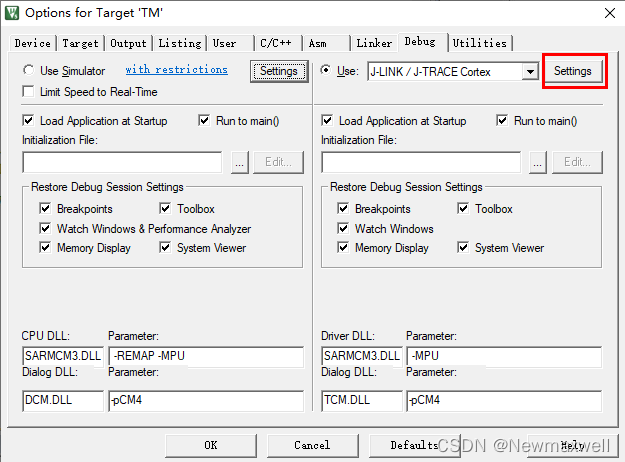
1, click the magic wand of keil interface (Alt + F7)
2, Settings

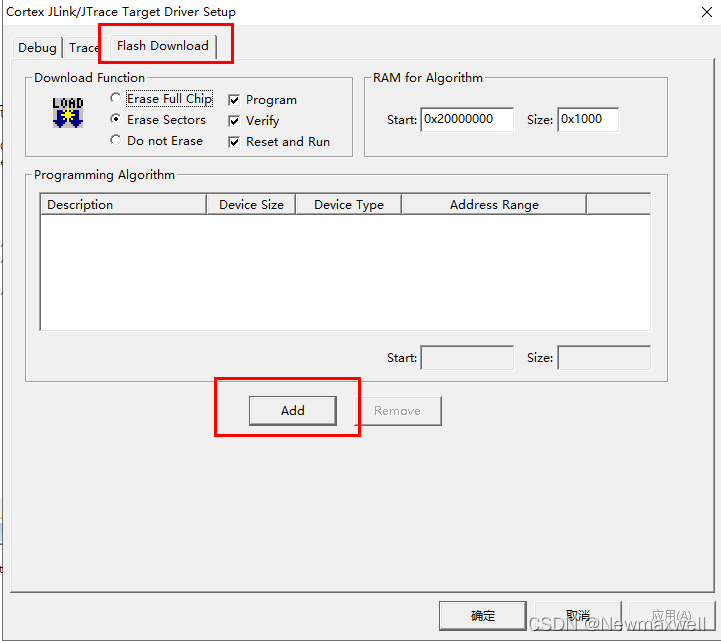
3, Flash Download -> add

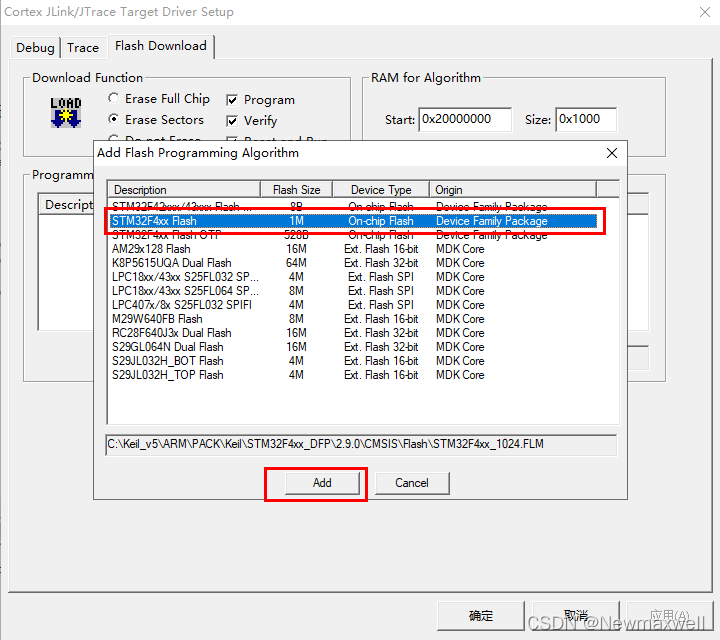
4, choose the type of chip-> add

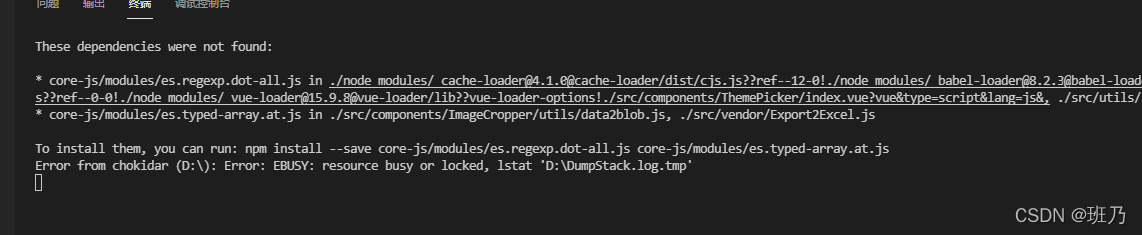
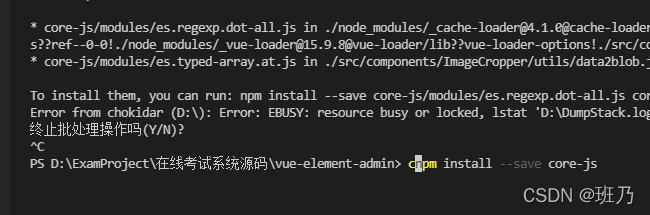
[Solved] Error: EBUSY: resource busy or locked, lstat ‘D:\DumpStack.log.

Error: EBUSY: resource busy or locked, lstat ‘D:\DumpStack.log

If there is a SaaS like field in your vscade error report, one reason is that the version number does not match.

cnpm i -D [email protected] --save

I won’t let go of the screenshot that reported an error. At that time, the error mentality collapsed. I may have forgotten the screenshot. I don’t want to make a similar error in the whole. I’m tired. (later found)

In a word, it is much faster to correct the version number first and then change it. The errors caused by other problems will be much faster.

I found the wrong screenshot of the * *

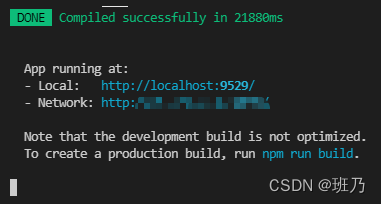
After the two commands are run, the following error reports are much kinder. It’s just that there is no dependency. The problem is not big. Just install it.


Done!

[Solved] IDEA Start Maven Project Error: “Error starting ApplicationContext. To display the conditions report …”

When IDEA starts a maven project, it fails to start and displays an error reporting:

Error starting ApplicationContext. To display the conditions report re-run your application with ‘debug’ enabled.
2021-12-22 09:21:42.183 ERROR 14964 — [           main] o.s.b.d.LoggingFailureAnalysisReporter   :
***************************
APPLICATION FAILED TO START
***************************
Description:
Failed to configure a DataSource: ‘url’ attribute is not specified and no embedded datasource could be configured.
Reason: Failed to determine a suitable driver class

Action:
Consider the following:
If you want an embedded database (H2, HSQL or Derby), please put it on the classpath.
If you have database settings to be loaded from a particular profile you may need to activate it (the profiles local are currently active).

Cause:
The datasource related package environment is referenced, but no related configuration is performed

Solution:
1, start the class to add automatic configuration parameters: (exclude = {DataSourceAutoConfiguration.class})

@SpringBootApplication(exclude = {DataSourceAutoConfiguration.class})
public class ApiserviceApplication {

    public static void main(final String[] args) {
        SpringApplication.run(ApiserviceApplication.class, args);
    }
}

2. If the code does not use the relevant package environment, the relevant Maven package can be deleted

<!--        <dependency>-->
<!--            <groupId>org.springframework.boot</groupId>-->
<!--            <artifactId>spring-boot-starter-data-cassandra-jpa</artifactId>-->
<!--        </dependency>-->

3. If used, add relevant configurations

[Solved] Raspberry Pi Error: VNC error “No configured security type is supported by 3.3 VNC Viewer“

Raspberry Pi Error: VNC error “No configured security type is supported by 3.3 VNC Viewer”

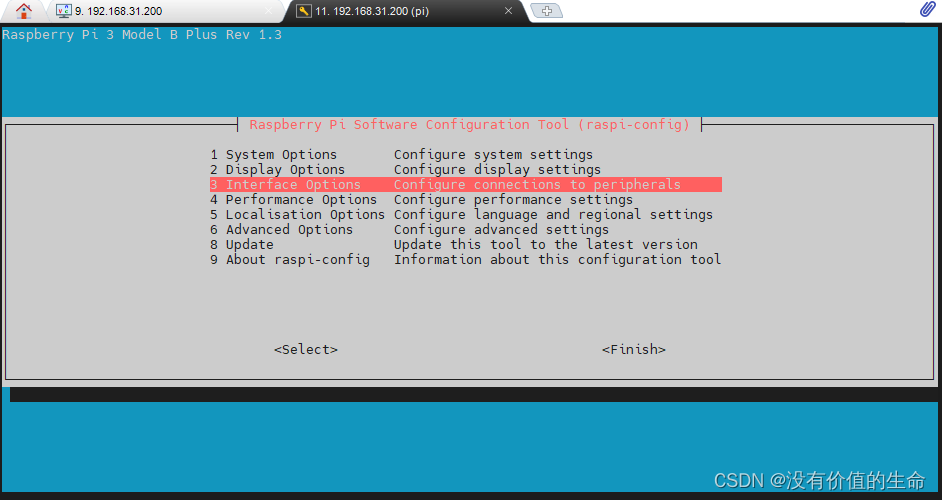
# Command Line Configuration Startup
sudo raspi-config 

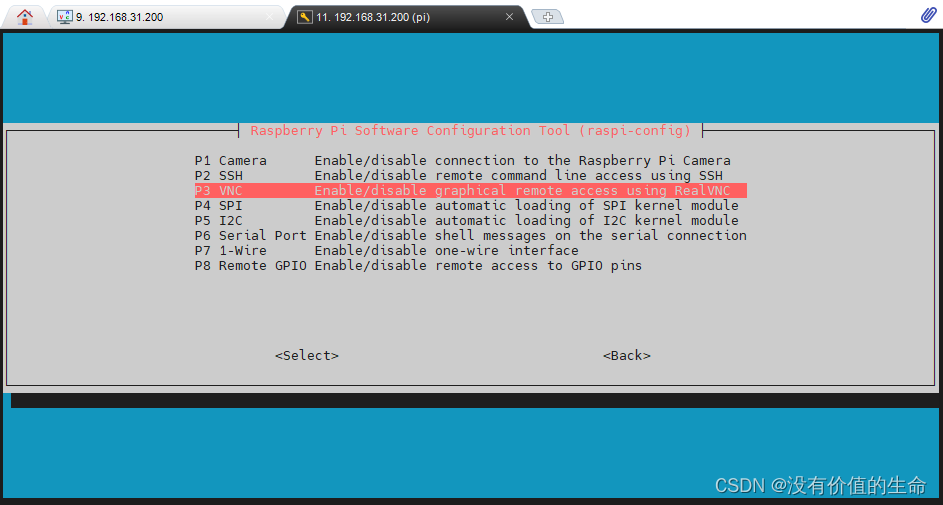
Enter interface options

there are VNC options inside. Enter enable

Step 2: modify VNC configuration (Note: the following command lines are executed)

# Note: Here the first step of the change password command line is also executed, change the password to the same password as your original start on the line
# Do not ask why, just change it
$ sudo passwd
passwd: password updated successfully
$ su root
$ sudo echo 'Authentication=VncAuth' >> /root/.vnc/config.d/vncserver-x11
$ sudo vncpasswd -service
# Execute here to enter the password (occasionally you have to wait a few seconds), here is to set the password to log in to VNC
Successfully set "Password" VNC parameter in /root/.vnc/config.d/vncserver-x11
$ sudo cat /root/.vnc/config.d/vncserver-x11
_AnlLastConnTime=int64:0000000000000000
_LastUpdateCheckSuccessTime=int64:01d7d31e1f95ea36
_LastUpdateCheckTime=int64:01d7d31e1f95ea36
Authentication=VncAuth
Password=c3abbea3b003a0b231737c0541892d72

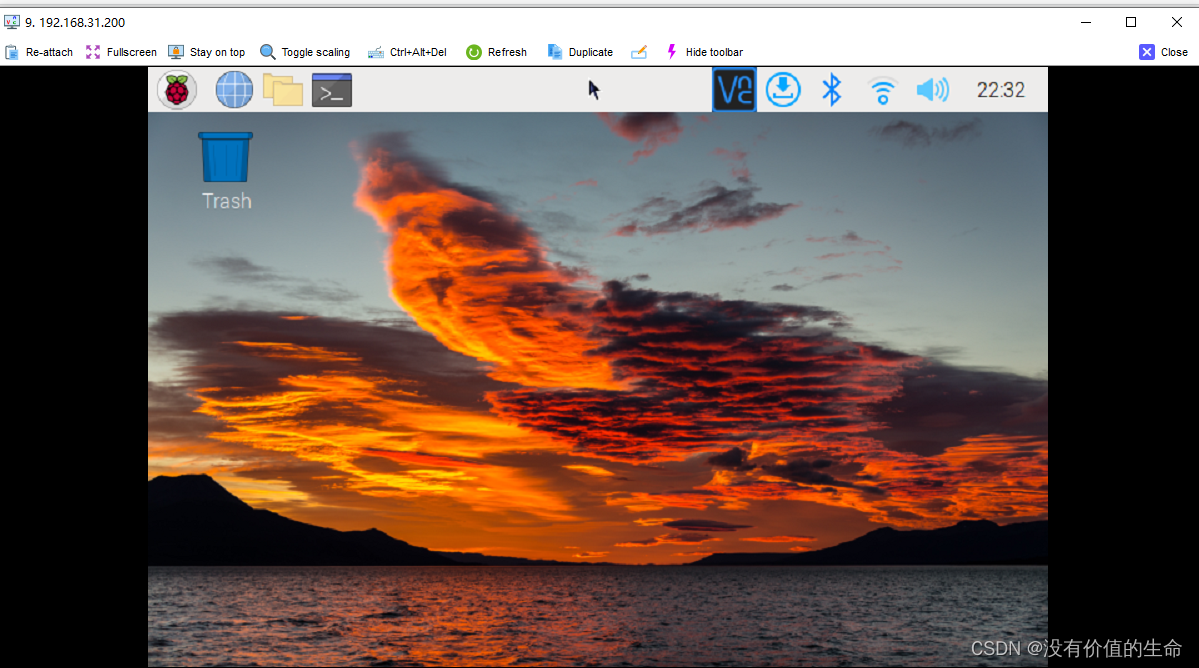
Start VNC/mobaxterm again to connect normally

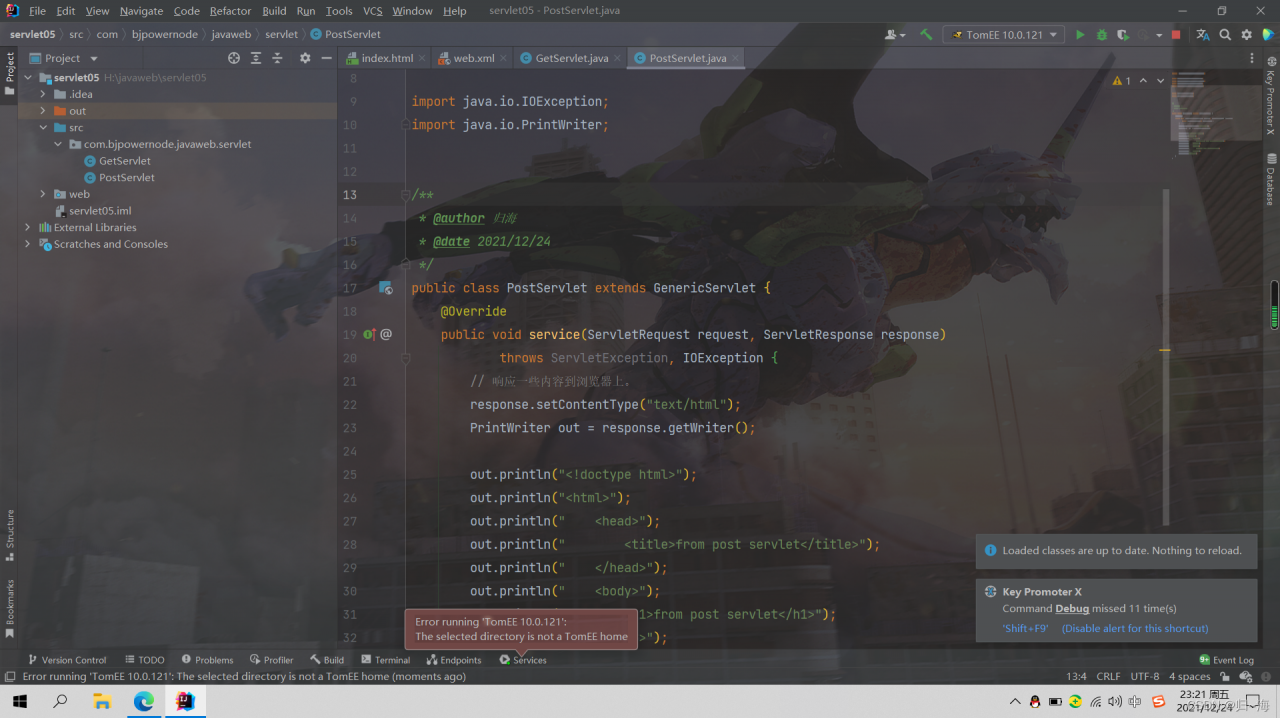
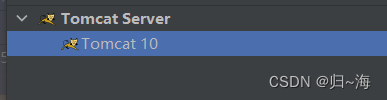
[Solved] Error running ‘TomEE 10.0.121‘: The selected directory is not a TomEE hom

Today, I watched the video of Lao Du’s servlet and tried to start the Tomcat server after typing the code. I found this: error running ‘tomee 10.0.121 ‘: the selected directory is not a tomee Hom error.

Then I didn’t look at the error carefully. Subconsciously, I thought my Tomcat path was wrong. I looked it up and found that there was no problem

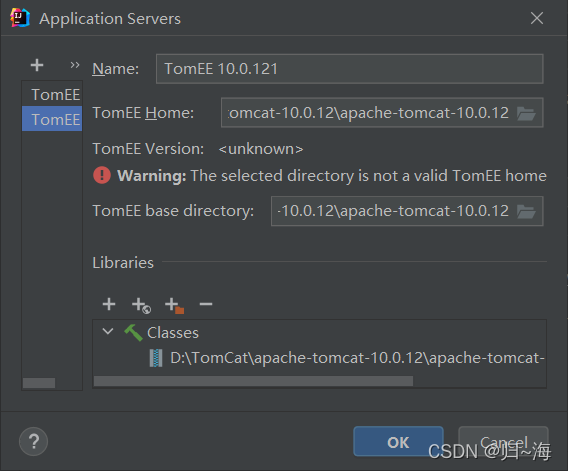
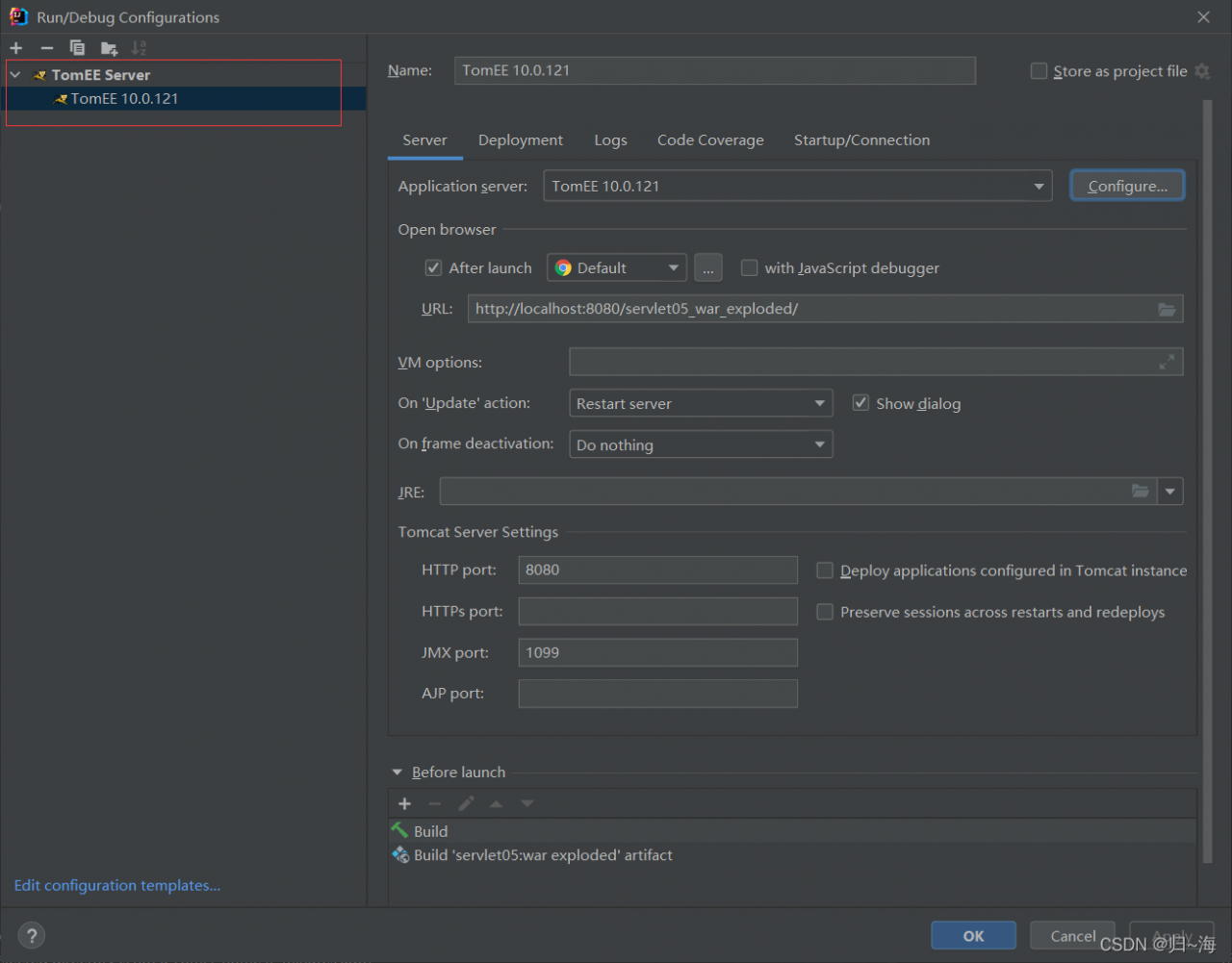
Finally, take a closer look at the good guy Tomcat created to tomcatee. No wonder it can’t be started.

Solution:

Just change back to normal Tomcat

Finally, click the servlet according to the old Du code