Author Archives: Robins

kakfa Create topic Error: java.util.concurrent.ExecutionException: org.apache.kafka.common.errors.InvalidReplicationFactorException: Replication factor: 3 larger than available brokers: 2.

Error message:

java. util. concurrent. ExecutionException: org. apache. kafka. common. errors. InvalidReplicationFactorException: Replication factor: 3 larger than available brokers: 2.

According to the error message, the number of copies of topic to be created is 3 and the number of brokers is 2. Indicates that Kafka did not get the stored brokers information in zookeeper.

Check:

Whether the Kafka cluster is enabled normally. At the same time, it should be noted that the number of topic replicas created cannot be greater than the number of surviving brokers in the cluster

Lsof – I check whether each Kafka node is normal

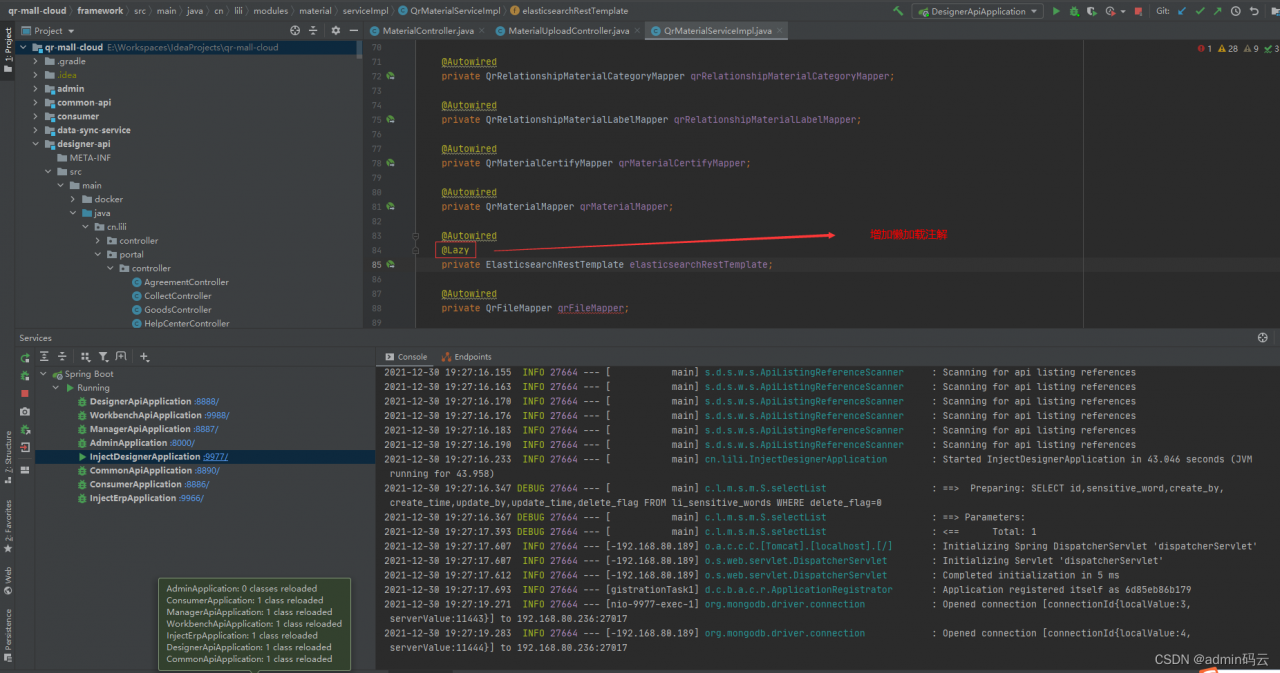
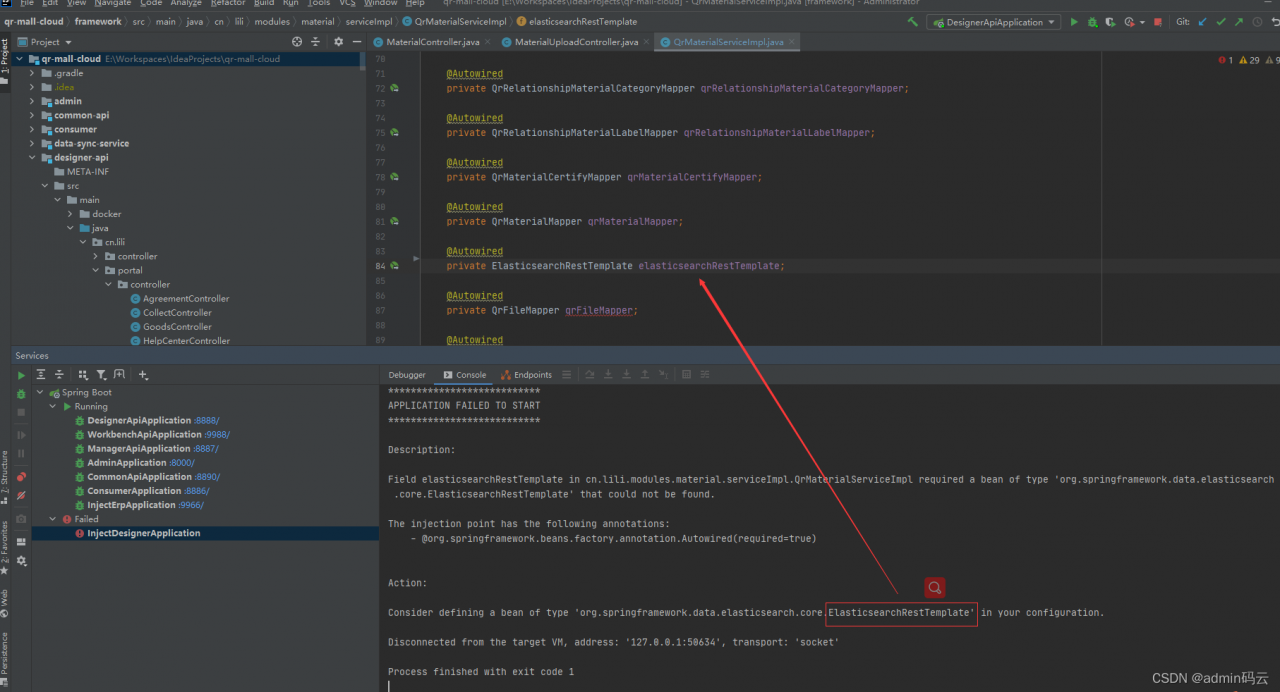
Springboot startup error: Field elasticsearchRestTemplate in cn.lili.modules.material.serviceImpl.QrMaterialServiceImpl required a bean of type


Description:

Field elasticsearchRestTemplate in cn.lili.modules.material.serviceImpl.QrMaterialServiceImpl required a bean of type ‘org.springframework.data.elasticsearch.core.ElasticsearchRestTemplate’ that could not be found.
The injection point has the following annotations:
- @org.springframework.beans.factory.annotation.Autowired(required=true)
Action:
Consider defining a bean of type ‘org.springframework.data.elasticsearch.core.ElasticsearchRestTemplate’ in your configuration.
Process finished with exit code 1

Solution:

Add lazy loading annotation: @Lazy

Spring MVC project error: Namespace in turns red

Namespace in <mapper namespace> turns red

Solution:

The XML file header language should be changed to the mapper mapping instead of the config
previously used as follows:

<!DOCTYPE mapper
        PUBLIC "-//mybatis.org//DTD Config 3.0//EN"
        "http://mybatis.org/dtd/mybatis-3-config.dtd">

Change to

<!DOCTYPE mapper
        PUBLIC "-//mybatis.org//DTD Mapper 3.0//EN"
        "http://mybatis.org/dtd/mybatis-3-mapper.dtd">

Create folders with different functions

Linux Error: audit: backlog limit exceeded [How to Solve]

Phenomenon description:

Linux SSH cannot be connected and can be pinged. The login interface will give an error prompt audit: backlog limit exceeded

audit:backlog limit exceeded audit:backlog limit exceeded audit:backlog limit exceeded audit:backlog limit exceeded audit:backlog limit exceeded audit:backlog limit exceeded audit:backlog limit exceeded audit:backlog limit exceeded ...

Cause analysis:

The error is Linux kernel logs. The reason for the problem is that the audit service performs audit event operations in a busy system, and there is a bottleneck in the buffer, resulting in the system near crash.

Background:

Audit is a service used to record the user’s underlying calls in Linux system. It is used to record the user’s open, exit and other system calls, and write the records to the log file. Audit can add or delete audit rules by using the auditctl command. You can set recording for a user or for a process.

Main command: auditctl audit rules & amp; The system management tool is used to obtain status, add and delete monitoring rules, audit search query audit log tool, and audit report output audit system report

Solution:

You can try to increase the audit buffer to solve this problem.

The default memory page size for Linux is 4096 bytes. You can obtain the page size through the following command: getconf page_ Size, which can be set to N times of paging

View help auditctl – H

View the current default configuration auditctl – S

backlog_ Limit 320 # my centos7 1 only 320 by default

Optimize the audit service and modify the buffer size auditctl – B 8192. If not set, the system defaults to 64bytes

Settings take effect permanently:

Method 1) modify the rule configuration VIM/etc/audit/audit Rules - D - B 8192 - F 1 Parameter Description: – D delete all rules – B set the audit buffer size. If the buffer is full, the kernel will issue a failure flag – f [0|1|2] set the level of audit acquisition error. There are three values of 0/1/2. 0 is no log output; 1 is the output printk log; 2 is the highest level and will output a large amount of log information -e [0|1] enable/disable audit

Method 2) you can also set CHMOD U + X/etc/rc d/rc. local vim /etc/rc. d/rc. local auditctl -b 8192

[Solved] asp.NETCORE connect to MySQL error: encoding 1252

The error information is as follows:

System.NotSupportedException:“No data is available for encoding 1252. For information on defining a custom encoding, see the documentation for the Encoding.RegisterProvider method.”

Solution:

Add system.Through.nuget.Text.Encoding and system.Text.Encoding.References to codepages

Then add the following code to the code

System.Text.EncodingProvider ppp = System.Text.CodePagesEncodingProvider.Instance;
Encoding.RegisterProvider(ppp);

OK solve the problem

After Vue is packaged to the server, the static resource path reports an error

The error reporting path is:
http: domain name/CSS/XX css

In fact, it should be:
http: domain name/dist/CSS/XX/CSS

Method:
ensure that the value of publicpath is: publicpath: ‘. /’

ps:config.js or Vue-config.js file, according to the actual situation, if the editor cannot be found, search publicpath globally

Springboot startup error: err config is disabled command (Redis Disables Config command)

1. Background description

The project belongs to spring boot, which is always normal. Due to the recent security activity disabling redis’s config command, an error is reported when the project is restarted:

org.springframework.beans.factory.BeanCreationException: Error creating bean with name 'enableRedisKeyspaceNotificationsInitializer' defined in class path resource [org/springframework/boot/autoconfigure/session/RedisSessionConfiguration$SpringBootRedisHttpSessionConfiguration.class]: Invocation of init method failed; 
nested exception is org.springframework.data.redis.connection.ClusterCommandExecutionFailureException: ERR config is disabled command; 
nested exception is redis.clients.jedis.exceptions.JedisDataException: ERR config is disabled command; 
nested exception is org.springframework.dao.InvalidDataAccessApiUsageException: ERR config is disabled command; 
nested exception is redis.clients.jedis.exceptions.JedisDataException: ERR config is disabled command

2. Analysis

Check the source code of redishttpsessionconfiguration class (as shown below), and find the input parameter to enable the keyspace notifications function: configurereredisaction.configurereredisaction accepts the injection. The default is new configurenotifykeyspaceeventsaction() in the constructor. Looking at the source code of this class (not posted here), we find that this class is used to configure the “notify keyspace events” function. Then, redis’s config command will be used in the static internal class enablererediskeyspacenotificationsinitializer, Since the config command is disabled, the above exception is reported.

Look at the post-processing condition if (this.configure! =configurereredisaction.no_op) in the static internal class. The solution is obvious here.

The solution is to inject configurereredisaction.NO_OP, do not receive the default configurenotifykeyspaceeventsaction.configureRedisAction.NO_op itself does not do any processing.

private ConfigureRedisAction configureRedisAction;

......

public RedisHttpSessionConfiguration() {
        this.redisFlushMode = RedisFlushMode.ON_SAVE;
        this.cleanupCron = "0 * * * * *";
        this.configureRedisAction = new ConfigureNotifyKeyspaceEventsAction();
    }

......

@Autowired(
        required = false
    )
    public void setConfigureRedisAction(ConfigureRedisAction configureRedisAction) {
        this.configureRedisAction = configureRedisAction;
    }

......

@Bean
    public InitializingBean enableRedisKeyspaceNotificationsInitializer() {
        return new RedisHttpSessionConfiguration.EnableRedisKeyspaceNotificationsInitializer(this.redisConnectionFactory, this.configureRedisAction);
    }
......

static class EnableRedisKeyspaceNotificationsInitializer implements InitializingBean {
        private final RedisConnectionFactory connectionFactory;
        private ConfigureRedisAction configure;

        EnableRedisKeyspaceNotificationsInitializer(RedisConnectionFactory connectionFactory, ConfigureRedisAction configure) {
            this.connectionFactory = connectionFactory;
            this.configure = configure;
        }

        public void afterPropertiesSet() throws Exception {
            if (this.configure != ConfigureRedisAction.NO_OP) {
                RedisConnection connection = this.connectionFactory.getConnection();

                try {
                    this.configure.configure(connection);
                } finally {
                    try {
                        connection.close();
                    } catch (Exception var8) {
                        LogFactory.getLog(this.getClass()).error("Error closing RedisConnection", var8);
                    }

                }

            }
        }
    }

3. Solutions

Inject the default object configurereredisaction.NO_OP, add a configuration item switch to keep unchanged and respond to changes.

package com.abc.test.config;

import org.springframework.boot.autoconfigure.condition.ConditionalOnProperty;
import org.springframework.context.annotation.Bean;
import org.springframework.context.annotation.Configuration;
import org.springframework.session.data.redis.config.ConfigureRedisAction;

/**
 * After disabling Redis' config command.
 * Here when the configuration file redis.disableConfig=true inject ConfigureRedisAction.NO_OP to solve the problem, otherwise it is handled by default
 * @author test
 * @version 1.0
 * @date 2021/12/29 15:44
 */
@Configuration
@ConditionalOnProperty(value = "redis.disableConfig", havingValue = "true")
public class HttpSessionConfig {

    @Bean
    public static ConfigureRedisAction configureRedisAction(){
        return ConfigureRedisAction.NO_OP;
    }
}

Time is pressing, over!