Author Archives: Robins

[Solved] electron-builder Package mac Error: panic: runtime error: index out of range

An error is reported in the packaging mac of electron builder. The detailed error information is as follows:

goroutine 1 [running]:
github.com/develar/app-builder/pkg/icons.ConvertIcnsToPng(0xc0000ca630, 0x2d, 0x7ffd9f40874a, 0x2e, 0x2, 0x2, 0xc0000ca630, 0x2d, 0xe53320)
	/Volumes/data/Documents/app-builder/pkg/icons/icns-to-png.go:60 +0x4ab
github.com/develar/app-builder/pkg/icons.doConvertIcon(0xc00012a400, 0x5, 0x8, 0xc00025ec20, 0x2, 0x2, 0x7ffd9f4086ec, 0x3, 0x7ffd9f40874a, 0x2e, ...)
	/Volumes/data/Documents/app-builder/pkg/icons/icon-converter.go:226 +0xa0d
github.com/develar/app-builder/pkg/icons.ConvertIcon(0xc0000ad3c0, 0x97, 0x0, 0xf6400f7800000000)
	/Volumes/data/Documents/app-builder/pkg/icons/icon-converter.go:56 +0xd6
github.com/develar/app-builder/pkg/icons.ConfigureCommand.func1(0xc0002375f0, 0x40b705, 0xc2b0e0)
	/Volumes/data/Documents/app-builder/pkg/icons/icon-converter.go:33 +0x7f
github.com/alecthomas/kingpin.(*actionMixin).applyActions(0xc000124d98, 0xc0002375f0, 0x0, 0x0)
	/Volumes/data/go/pkg/mod/github.com/alecthomas/[email protected]+incompatible/actions.go:28 +0x6d
github.com/alecthomas/kingpin.(*Application).applyActions(0xc0000e8780, 0xc0002375f0, 0x0, 0x0)
	/Volumes/data/go/pkg/mod/github.com/alecthomas/[email protected]+incompatible/app.go:557 +0xdc
github.com/alecthomas/kingpin.(*Application).execute(0xc0000e8780, 0xc0002375f0, 0xc00021b150, 0x1, 0x1, 0x0, 0x0, 0x0, 0x904545)
	/Volumes/data/go/pkg/mod/github.com/alecthomas/[email protected]+incompatible/app.go:390 +0x90
github.com/alecthomas/kingpin.(*Application).Parse(0xc0000e8780, 0xc0000ae010, 0xf, 0xf, 0xc0000e8780, 0xc00008a058, 0x0, 0x0)
	/Volumes/data/go/pkg/mod/github.com/alecthomas/[email protected]+incompatible/app.go:222 +0x213

Solution:
put 512×512 in the icons directory of the icon Png icon to complete packaging
for example:
dist/icons/512x512.png

[Solved] Python Keras Error: AttributeError: ‘Sequential‘ object has no attribute ‘predict_classes‘

This article is about using Keras in Python to execute yhat_classes = model.predict_classes(X_test) code with an error: AttributeError: ‘Sequential’ object has no attribute ‘predict_classes’ solution.

model = Sequential()
model.add(Dense(24, input_dim=13, activation='relu'))
model.add(Dense(18, activation='relu'))
model.add(Dense(6, activation='softmax'))
model.compile(loss='categorical_crossentropy', optimizer='adam', metrics=['accuracy'])
-
history = model.fit(X_train, y_train, batch_size = 256, epochs = 10, verbose = 2, validation_split = 0.2)
-
score, acc = model.evaluate(X_test, y_test,verbose=2, batch_size= 256)
print('test accuracy:', acc)
-
yhat_classes = model.predict_classes(X_test)

Cause of problem:

This predict was removed in tensorflow version 2.6_ Classes function.

Reference documents: https://keras.rstudio.com/reference/predict_proba.html#details

The following codes can be used:

predict_x=model.predict(X_test) 
classes_x=np.argmax(predict_x,axis=1)

Or

You can also try tensorflow 2.5 or other versions to solve this problem.

Using tensorflow version 2.5, there may be the following warning messages:

tensorflow\python\keras\engine\sequential.py:455: UserWarning: model.predict_classes() is deprecated and will be removed after 2021-01-01. Please use instead:* np.argmax(model.predict(x), axis=-1), if your model does multi-class classification (e.g. if it uses a softmax last-layer activation).* (model.predict(x) > 0.5).astype("int32"), if your model does binary classification (e.g. if it uses a sigmoid last-layer activation).


[Solved] ERROR: No matching distribution found for torch-cluster==x.x.x

Refer to the configuration of others and configure py36 in CONDA virtual environment

conda create -n py36 python=3.6

The default is Python 3 6.0. Later, pytorch = 1.8.0 and cudatoolkit = 11.1.1 are installed successfully, and then pip is used to install
– torch cluster = = 1.5.9
– torch scatter = = 2.0.6
– torch spark = = 0.6.9
– torch spline conv = = 1.2.1

ERROR: No matching distribution found for torch-cluster==1.5.9

After trying various methods on the Internet, it still doesn’t work. Even if you remove the version limit, you still report an error
later, I checked the environment configuration of others I referred to. It was the wrong version of Python I used. I should use Python 3 6.10
then execute in this virtual environment:

conda install python=3.6.10=hcf32534_1

Then execute it

pip install torch-xxxx==x.x.x

You can install it successfully

RuntimeError: Exporting the operator uniform to ONNX opset version 12 is not supported.

Pt to onnx error:

RuntimeError: Exporting the operator uniform to ONNX opset version 12 is not supported. 
Please open a bug to request ONNX export support for the missing operator.

The reason is that during conversion, you can’t dynamically obtain the value in forward for operation, but complete the corresponding operation in init..

[Solved] RuntimeError: An attempt has been made to start a new process before the current process…

When running the Pytorch expression recognition code during hands-on training, the following error occurred:

RuntimeError:
        An attempt has been made to start a new process before the
        current process has finished its bootstrapping phase.
 
        This probably means that you are not using fork to start your
        child processes and you have forgotten to use the proper idiom
        in the main module:
 
            if __name__ == '__main__':
                freeze_support()
                ...
 
        The "freeze_support()" line can be omitted if the program
        is not going to be frozen to produce an executable.


Here is to take multi-threaded tasks, using a single thread to complete, the solution is also very simple, there are the following two.
1. remove the num_workers parameter


train_dataloader = torch.utils.data.DataLoader(train_dataset,batch_size=batchsize,shuffle=True,num_workers=0)
val_dataloader = torch.utils.data.DataLoader(val_dataset,batch_size=100,shuffle=False,num_workers=0)

2. Add if __name__=='__main__' before epoch :

if __name__ == '__main__':
    for epoch in range(epochs):
        loss = 0.0
        acc = 0.0
        n = 0
        for image,label in train_dataloader:

Then it can run normally.

[Solved] lto1: fatal error: bytecode stream..generated with LTO version 6.2 instead of the expected 8.1 compi

ubuntu Compile libxml2-2.9.1
./configure & make & make install
Error Messages:

lto1: fatal error: bytecode stream in file ‘/home/…/anaconda3/envs/rasa/lib/python3.6/config-3.6m-x86_64-linux-gnu/libpython3.6m.a’ generated with LTO version 6.2 instead of the expected 8.1
compilation terminated.
lto-wrapper: fatal error: gcc returned 1 exit status
compilation terminated.
/usr/bin/ld: error: lto-wrapper failed
collect2: error: ld returned 1 exit status
make[4]: *** [Makefile:519: libxml2mod.la] Error 1
make[4]: Leaving directory ‘/home/…/libxml2-2.9.1/python’
make[3]: *** [Makefile:607: all-recursive] Error 1
make[3]: Leaving directory ‘/home/…/libxml2-2.9.1/python’
make[2]: *** [Makefile:450: all] Error 2
make[2]: Leaving directory ‘/home/…/libxml2-2.9.1/python’
make[1]: *** [Makefile:1304: all-recursive] Error 1
make[1]: Leaving directory ‘/home/…/libxml2-2.9.1’
make: *** [Makefile:777: all] Error 2


Solution:
conda install -c anaconda gcc_linux-64

VSCode Unable to find custom header file directory: fatal error: no such file or directory

The solution is as follows:

First, add the path of the folder where your header file is located in "includepath":[] of C_cpp_properties.json.

Of course, this step is only to tell the vscode header file where it is for debugging, but it is not known when GCC compiles. We know that if you use G + + main.CPP - I library_path - O main can be compiled successfully directly, so we just need to tell vscode to use our own defined commands

There are generally two methods. The first is to add “- I header_file_path” to the args key in tasks.json, as follows:

	"args": [
		"-g",
		"${workspaceFolder}\\src\\*.cpp",
		"-o",
		"${fileDirname}\\src\\${fileBasenameNoExtension}.exe",
		"-I",
		"header_file_path"
	],

But it doesn’t seem to work well in some cases.

The second method is to directly set in setting.json:

  "code-runner.executorMap": {
    "cpp": "cd $dir && g++ $fileName -o $fileNameWithoutExt -I 'header_file_path' && $dir$fileNameWithoutExt",
  }

[Solved] jar file Execute Error: power shell error: unable to access jarfile


Problem description

When using the configuration task of vscode, there are problems in executing the jar file, so there are the following solutions.

preparation

Software: vscode
environment: windows10

How to configure

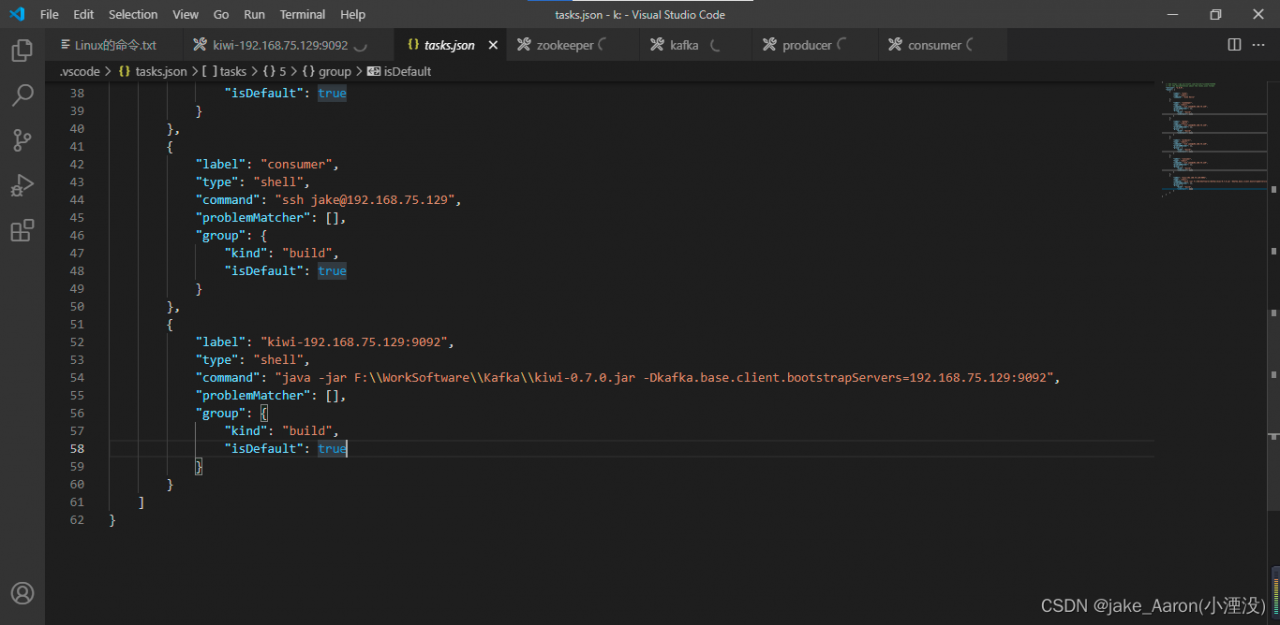
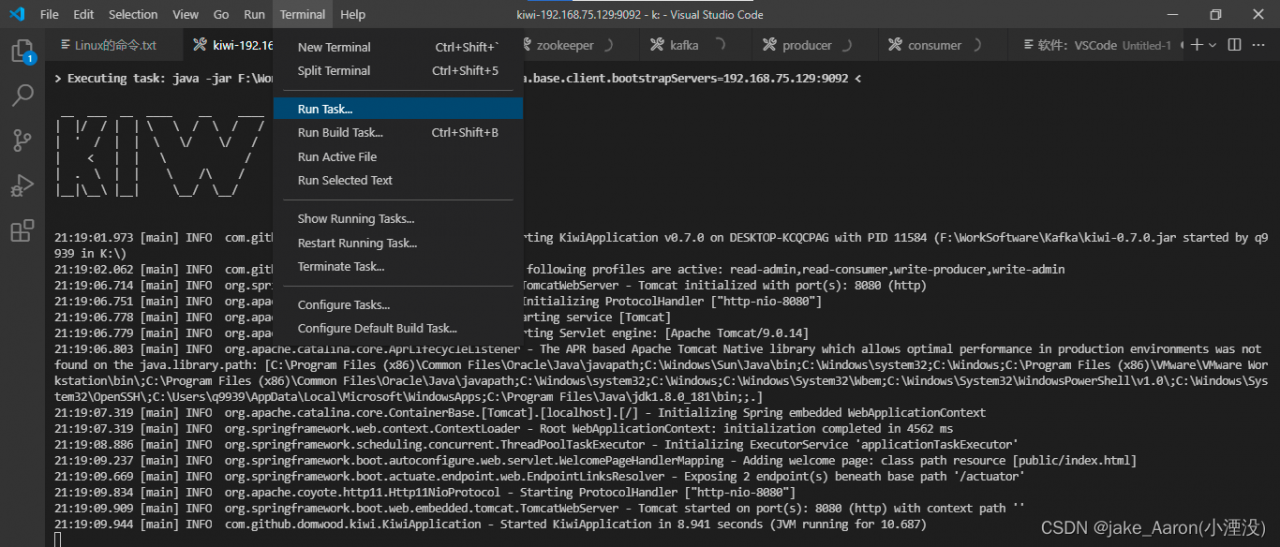
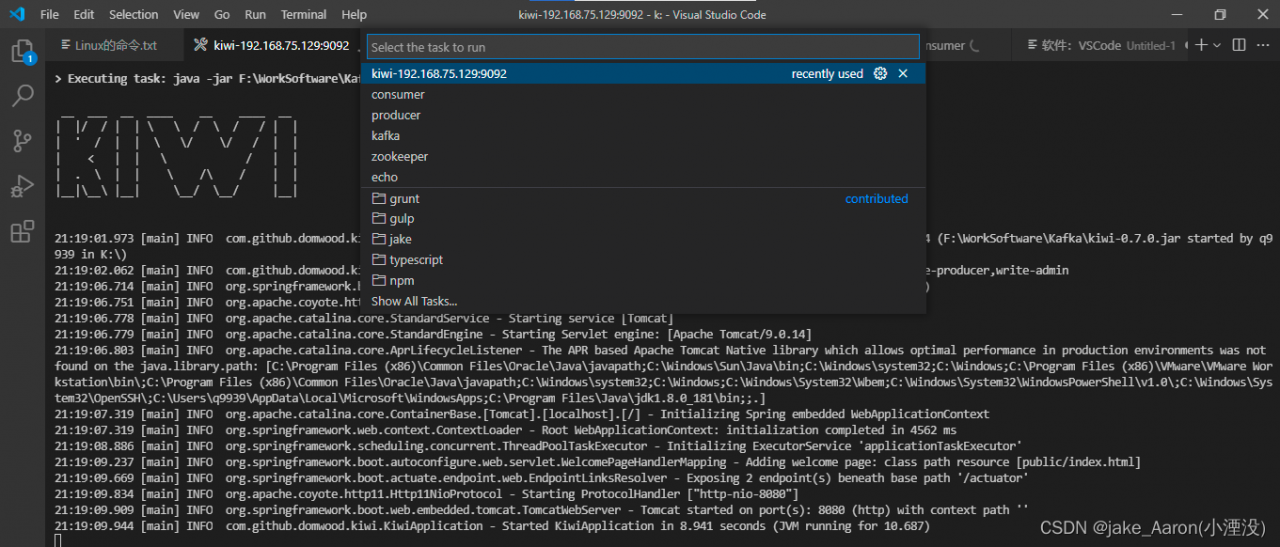
1. Create a task and execute the jar file:

2. Configurable parameters must be placed later

-Dkafka.base.client.bootstrapServers=192.168.75.129:9092

How does it work

1. Run profile location

2. Find the executable file name

More

Building Java code
You can use Maven to perform multiple build lifecycle goals, including compiling project code, creating library packages (such as JAR files), and installing libraries in a local Maven dependency repository
To attempt a build, issue the following command from the command line.
mvn compile

This will run Maven and tell it to perform a compile of the target. When it is done, you should find the compiled .class file in the target/classes directory.
Since you are unlikely to want to distribute or use the .class files directly, you may want to run the package target instead:
mvn package

The package target will compile the Java code, run any tests, and package the code up in the completion target directory via an internal JAR file. the name of the JAR file will be based on the project's <artifactId> and <version>.
For example, given the previous minimal pom.xml file, the JAR file will be named kiwi-0.7.0.jar.

To execute the JAR file, run.
java -jar F:\WorkSoftware\Kafka\kiwi-0.7.0.jar -Dkafka.base.client.bootstrapServers=192.168.75.129:9092

If you change the value of <packaging> "jar" to "war", the result will be a WAR file in the target directory instead of a JAR file.

[Solved] Ubuntu tab Error: _complete:96: bad math expression: operand expected at end of string

Error content

_complete:96: bad math expression: operand expected at end of string

Cause: Zsh folder permission error

Solution:

    1. view the location of the Zsh folder
compaudit
# my path is:
/usr/local/share/zsh/site-functions
/usr/local/share/zsh

Set folder user group and its user

sudo su
chown -R user.user /usr/local/share/zsh

Set folder permissions

# root
chmod g-w -R zsh/

Restart the command window