Author Archives: Robins

Chrome Broswer V98 Can not manually add cookies locally, refresh cannot be retained, and the cookie item is red

Solution for Chrome 91 after SameSite by default cookies were removed, solution for cross-domain POST requests in Chrome that can’t carry cookies

Yesterday after work to start the project, Google Chrome automatically upgraded to version 98, because the previous project is required to manually add a cookie in the local development debugging, now it is impossible to manually add a cookie, and the high version removed SameSite by default cookies, resulting in the previous method can not be used, manually set after the cookie also reported red, as follows:

Now just open Chrome and visit the address chrome://flags/ and search for Partitioned cookies and change the setting to Enabled, restart the browser, manually adding cookies will be retained and will not b

[Solved] matplotlib.units.ConversionError: Failed to convert value(s) to axis units: ‘LiR‘


solve the problem


No handles with labels found to put in legend.

Traceback (most recent call last):
  File "D:\ProgramData\Anaconda3\lib\site-packages\matplotlib\backends\backend_qt5.py", line 508, in _draw_idle
    self.draw()
  File "D:\ProgramData\Anaconda3\lib\site-packages\matplotlib\backends\backend_agg.py", line 388, in draw
    self.figure.draw(self.renderer)
  File "D:\ProgramData\Anaconda3\lib\site-packages\matplotlib\artist.py", line 38, in draw_wrapper
    return draw(artist, renderer, *args, **kwargs)
  File "D:\ProgramData\Anaconda3\lib\site-packages\matplotlib\figure.py", line 1709, in draw
    renderer, self, artists, self.suppressComposite)
  File "D:\ProgramData\Anaconda3\lib\site-packages\matplotlib\image.py", line 135, in _draw_list_compositing_images
    a.draw(renderer)
  File "D:\ProgramData\Anaconda3\lib\site-packages\matplotlib\artist.py", line 38, in draw_wrapper
    return draw(artist, renderer, *args, **kwargs)
  File "D:\ProgramData\Anaconda3\lib\site-packages\matplotlib\axes\_base.py", line 2647, in draw
    mimage._draw_list_compositing_images(renderer, self, artists)
  File "D:\ProgramData\Anaconda3\lib\site-packages\matplotlib\image.py", line 135, in _draw_list_compositing_images
    a.draw(renderer)
  File "D:\ProgramData\Anaconda3\lib\site-packages\matplotlib\artist.py", line 38, in draw_wrapper
    return draw(artist, renderer, *args, **kwargs)
  File "D:\ProgramData\Anaconda3\lib\site-packages\matplotlib\text.py", line 670, in draw
    bbox, info, descent = textobj._get_layout(renderer)
  File "D:\ProgramData\Anaconda3\lib\site-packages\matplotlib\text.py", line 276, in _get_layout
    key = self.get_prop_tup(renderer=renderer)
  File "D:\ProgramData\Anaconda3\lib\site-packages\matplotlib\text.py", line 831, in get_prop_tup
    x, y = self.get_unitless_position()
  File "D:\ProgramData\Anaconda3\lib\site-packages\matplotlib\text.py", line 813, in get_unitless_position
    x = float(self.convert_xunits(self._x))
  File "D:\ProgramData\Anaconda3\lib\site-packages\matplotlib\artist.py", line 180, in convert_xunits
    return ax.xaxis.convert_units(x)
  File "D:\ProgramData\Anaconda3\lib\site-packages\matplotlib\axis.py", line 1553, in convert_units
    f'units: {x!r}') from e
matplotlib.units.ConversionError: Failed to convert value(s) to axis units: 'LiR'
Traceback (most recent call last):
  File "D:\ProgramData\Anaconda3\lib\site-packages\matplotlib\axis.py", line 1550, in convert_units
    ret = self.converter.convert(x, self.units, self)
  File "D:\ProgramData\Anaconda3\lib\site-packages\matplotlib\category.py", line 52, in convert
    'Missing category information for StrCategoryConverter; '
ValueError: Missing category information for StrCategoryConverter; this might be caused by unintendedly mixing categorical and numeric data
The above exception was the direct cause of the following exception:
Traceback (most recent call last):
  File "D:\ProgramData\Anaconda3\lib\site-packages\matplotlib\backends\backend_qt5.py", line 508, in _draw_idle
    self.draw()
  File "D:\ProgramData\Anaconda3\lib\site-packages\matplotlib\backends\backend_agg.py", line 388, in draw
    self.figure.draw(self.renderer)
  File "D:\ProgramData\Anaconda3\lib\site-packages\matplotlib\artist.py", line 38, in draw_wrapper
    return draw(artist, renderer, *args, **kwargs)
  File "D:\ProgramData\Anaconda3\lib\site-packages\matplotlib\figure.py", line 1709, in draw
    renderer, self, artists, self.suppressComposite)
  File "D:\ProgramData\Anaconda3\lib\site-packages\matplotlib\image.py", line 135, in _draw_list_compositing_images
    a.draw(renderer)
  File "D:\ProgramData\Anaconda3\lib\site-packages\matplotlib\artist.py", line 38, in draw_wrapper
    return draw(artist, renderer, *args, **kwargs)
  File "D:\ProgramData\Anaconda3\lib\site-packages\matplotlib\axes\_base.py", line 2647, in draw
    mimage._draw_list_compositing_images(renderer, self, artists)
  File "D:\ProgramData\Anaconda3\lib\site-packages\matplotlib\image.py", line 135, in _draw_list_compositing_images
    a.draw(renderer)
  File "D:\ProgramData\Anaconda3\lib\site-packages\matplotlib\artist.py", line 38, in draw_wrapper
    return draw(artist, renderer, *args, **kwargs)
  File "D:\ProgramData\Anaconda3\lib\site-packages\matplotlib\text.py", line 670, in draw
    bbox, info, descent = textobj._get_layout(renderer)
  File "D:\ProgramData\Anaconda3\lib\site-packages\matplotlib\text.py", line 276, in _get_layout
    key = self.get_prop_tup(renderer=renderer)
  File "D:\ProgramData\Anaconda3\lib\site-packages\matplotlib\text.py", line 831, in get_prop_tup
    x, y = self.get_unitless_position()
  File "D:\ProgramData\Anaconda3\lib\site-packages\matplotlib\text.py", line 813, in get_unitless_position
    x = float(self.convert_xunits(self._x))
  File "D:\ProgramData\Anaconda3\lib\site-packages\matplotlib\artist.py", line 180, in convert_xunits
    return ax.xaxis.convert_units(x)
  File "D:\ProgramData\Anaconda3\lib\site-packages\matplotlib\axis.py", line 1553, in convert_units
    f'units: {x!r}') from e
matplotlib.units.ConversionError: Failed to convert value(s) to axis units: 'LiR'

Error:
matplotlib.units.Conversion error: failed to convert value to axis unit: ‘LiR’

Solution:
matplotlib version is low, update the matplotlib library to version 3.3.2 or higher!

How to Solve no module fcntl Error in Windows

This library is specific to Linux, if you use this library in Windows system development, it will generate some errors, how to solve it?
Create a new fcntl.py file

DN_ACCESS = 1
DN_ATTRIB = 32
DN_CREATE = 4
DN_DELETE = 8
DN_MODIFY = 2
DN_MULTISHOT = 2147483648
DN_RENAME = 16

FASYNC = 8192

FD_CLOEXEC = 1

F_ADD_SEALS = 1033

F_DUPFD = 0

F_DUPFD_CLOEXEC = 1030

F_EXLCK = 4
F_GETFD = 1
F_GETFL = 3
F_GETLEASE = 1025
F_GETLK = 5
F_GETLK64 = 5
F_GETOWN = 9
F_GETSIG = 11

F_GET_SEALS = 1034

F_NOTIFY = 1026
F_RDLCK = 0

F_SEAL_GROW = 4
F_SEAL_SEAL = 1
F_SEAL_SHRINK = 2
F_SEAL_WRITE = 8

F_SETFD = 2
F_SETFL = 4
F_SETLEASE = 1024
F_SETLK = 6
F_SETLK64 = 6
F_SETLKW = 7
F_SETLKW64 = 7
F_SETOWN = 8
F_SETSIG = 10
F_SHLCK = 8
F_UNLCK = 2
F_WRLCK = 1

LOCK_EX = 2
LOCK_MAND = 32
LOCK_NB = 4
LOCK_READ = 64
LOCK_RW = 192
LOCK_SH = 1
LOCK_UN = 8
LOCK_WRITE = 128

def fcntl(fd, op, arg=0):
    return 0


def ioctl(fd, op, arg=0, mutable_flag=True):
    if mutable_flag:
        return 0
    else:
        return ""


def flock(fd, op):
    return


def lockf(fd, operation, length=0, start=0, whence=0):
    return

Just find your Python path and put it in

C:\Users\{Username}\AppData\Local\Programs\Python\Python38\Lib\fcntl.py

Done!

How to Solve Arduino IDE Crash Issue

When I open Arduino, the start screen only shows “Initialize Package” and “Prepare Board”, then the start screen message and Arduino does not work.

Solution:

add the
C:\Users\your username\AppData\Local\Arduino15 folder
Delete it.

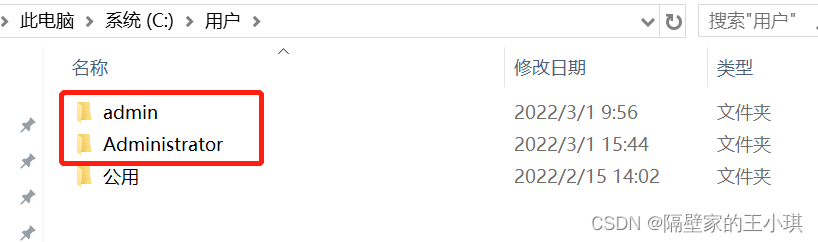
Note that some computers have two accounts, for example, my computer has two accounts, admin and Administrator, try both, mine only has the Arduino15 folder inside admin, delete it.

How to Solve gtid master-slave replication connecting Issue

Project scenario:

Master slave connection method


Problem Description:

Last_IO_Errno: 2003 Last_IO_Error: error connecting to master '[email protected]:3306' - retry-time: 60 retries: 7

Cause analysis:

    1. when trying to log in to the master database to copy users from the server, an error of 113 is found

[ root@localhost mysql]# mysql -urepl -p123 -h 192.168.8.131 -P 3306 mysql: [Warning] Using a password on the command line interface can be insecure. Error 2003 (HY000): can't connect to MySQL server on '192.168.8.131' (113)

    1. check whether the main server firewall is closed. It is found that it is closed. It is speculated that the port is not open

systemctl status firewalld service

    1. 3. Check whether the 3306 port of the main database is open to the public. It is found that it is no

firewall CMD -- zone = public -- Query port = 3306/TCP

    1. 4 Open 3306 port

firewall CMD -- zone = public -- add port = 3306/TCP -- permanent

    1. 5 Update firewall

firewall CMD -- reload


Solution:

The master-slave replication connecting problem is mainly caused by the master and slave libraries can not be connected, after this problem found that although the firewall has been closed, but the port is not necessarily open to the public state, you need to set their own.

npm ERR code ELIFECYCLE [How to Solve]

npm ERR! Code elifecycle solution

1. Problems

npm ERR! code ELIFECYCLE
npm ERR! errno 1
npm ERR! [email protected] build: webpack --config config/webpack. config. js
npm ERR! Exit status 1
npm ERR!
npm ERR! Failed at the [email protected] build script.

The reason for this is the webpack.config.js configuration error, which is actually a path configuration error. Some path configurations in webpack.config.js are configured according to the package.json file location, and some are configured according to the current file location, and people tend to get confused when configuring them.

2. Solutions
2.1 Solution 1
Fill in the correct path, this problem is often caused by the path configuration error. Refer to the following template, I will decipher the path configuration.

entry:’. /src/js/index.js’ // this path is based on the package.json file as the base file path (not the webpack.config.js file)

template in plugins: ‘src/index.html’ //this is also based on the package.json file as the base file path

and path:path.resolve(__dirname,’…/dist’) // is based on the webpack.config.js file path

const path=require(‘path’); // call the path in node.js
const HtmlWebpackPlugin = require(‘html-webpack-plugin’);
module.exports={undefined
entry:’. /src/js/index.js’, // the file to be packaged (this path is written according to the package.json location)
output:{undefined
filename:’bundle.js’, //the name of the package file
path:path.resolve(__dirname,’…/dist’) //specify the generated file directory (written by the current file location)
},
module: {undefined
rules: [
{undefined
test: /.css$/,
use: [ ‘style-loader’, ‘css-loader’ ]
}
]
},
plugins: [
new HtmlWebpackPlugin({undefined
template: ‘src/index.html’ //configure html template (by package.json location)
})
]
}

2.2 Solution 2
Direct reinstallation, but personally do not recommend, indeed some files reinstallation is possible to solve the problem, but sometimes reinstallation is very slow, which is annoying. Reinstallation steps are as follows.

(Do not delete package.json, delete package-lock.json)

npm cache clean --force
rm -rf node_modules
rm -rf package-lock.json
npm install

MPU6050 initialize failure [How to Solve]

1. 6050 initialization failed

If 6050 fails to initialize, first check whether the read address is wrong

res=MPU_Read_Byte(MPU_DEVICE_ID_REG);
	printf("mpu addr=%x\r\n",res);
	if(res==MPU_ADDR)//Device ID is correct
	{
		MPU_Write_Byte(MPU_PWR_MGMT1_REG,0X01); //set CLKSEL,PLL X-axis as reference
		MPU_Write_Byte(MPU_PWR_MGMT2_REG,0X00); //Acceleration and gyroscope both work
		MPU_Set_Rate(50); //Set the sampling rate to 50Hz
 	}
	else return 1;

I read out here is 0x68, different connection will also lead to different ID, if the address is correct, that is return 0, here for the initialization of the 6050 initialized through.

2, mpu initialization failure
Mpu initialization failure is common to return error code 8, you can step by step into the source code to analyze.

Solution I.
mpu_dmp_init() -> run_self_test() Here is the self-test, jump into the function can be seen, meaning that it needs to be placed horizontally in order to self-test successfully, so only the module can be placed horizontally, if not directly mask this part of the code can be.

Solution two.
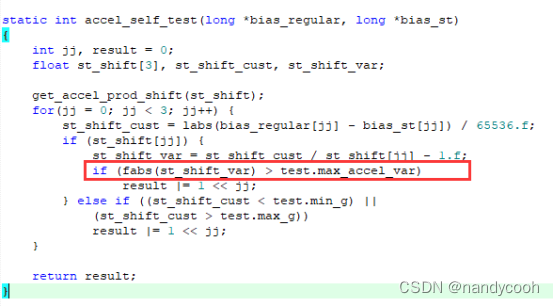
Trace the source code: mpu_dmp_init() -> run_self_test() -> mpu_run_self_test(gyro, accel) -> accel_self_test(accel, accel_st)

Both the initialization is successful only when the absolute value of st_shift_var < the value of test.max_accel_var. And the absolute value of st_shift_var is different for different positions of MPU6050 modules. Only when the module is placed horizontally, the absolute value of st_shift_var is closest to the value of test.max_accel_var, if this parameter is not modified, the module needs to be placed horizontally according to method 1 for testing

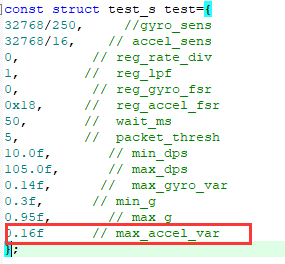
Here you can print out the absolute value of st_shift_var and the value of test.max_accel_var when debugging, my solution here is to change the initialization value of test.max_accel_var from 0.14 to 0.16. Then the module will be initialized successfully when the module is placed horizontally. This is shown in the figure below:

3. Initialization passed, but the data is 0

Another situation is that all initialization passes, but the Euler angle data is all 0. This situation is because there is a hard delay in the code or the processing of other modules affects 6050, so the data is all 0. The personal test is to mask the data processing screen of a module after the test.

Android studio NDK setting is gray and cannot be solved

Android studio NDK is set to gray

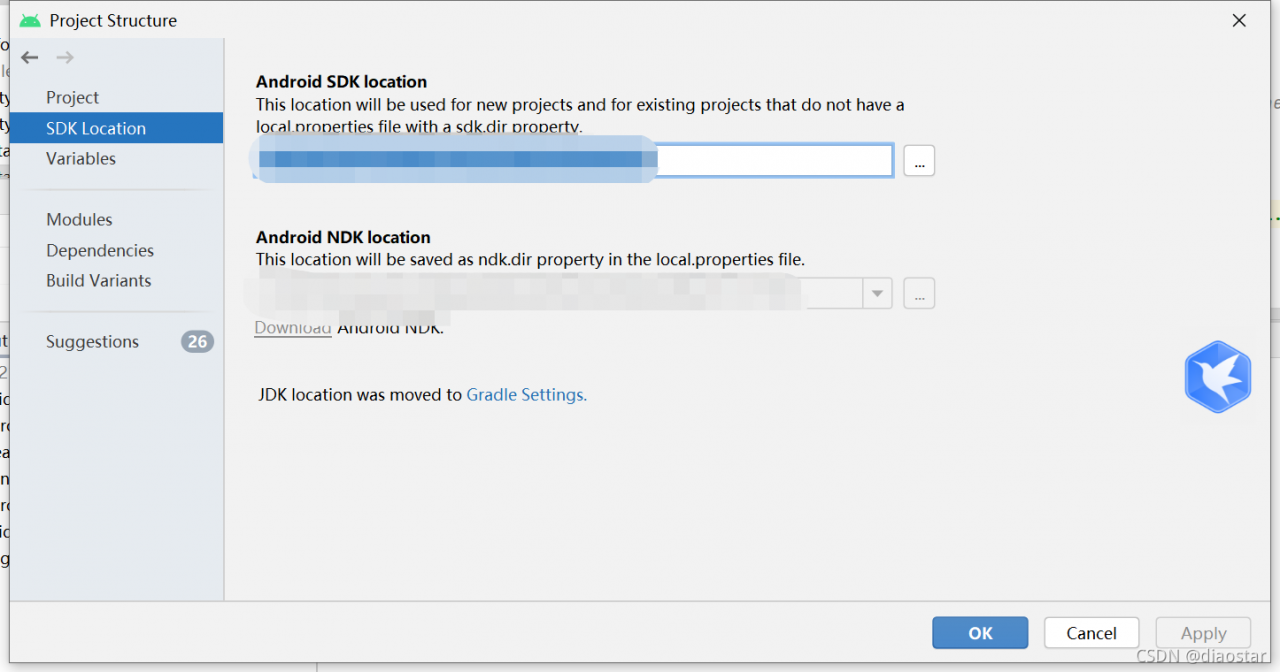
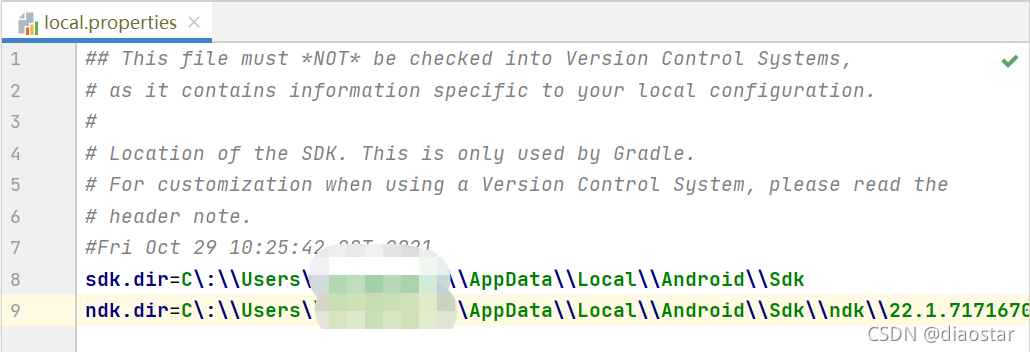
After clicking File->Project Structure, the screen that opens cannot be configured with NDK localtion

The solution is to configure the ndk path directly in local.properties

My settings path:

sdk.dir=E\:\\thirdparty\\Android\\Sdk
ndk.dir=E\:\\thirdparty\\Android\\android-ndk-r21e-windows-x86_64\\android-ndk-r21e

How to Solve Yolox Training C Disk Full Issue

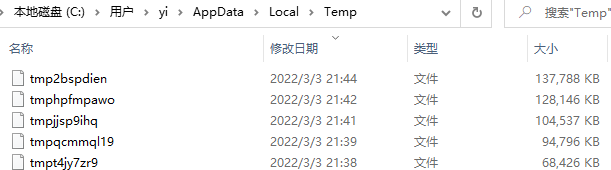
0. Problem description: COCO dataset training to half suddenly interrupted, look at the C disk shows red, there is not much memory (training, generated in AppData/Temp in the temporary file too much)
As shown in the figure: as the epoch increases, the file is getting bigger and bigger (the figure is still yolox-tiny), if we use yolox-x, the C drive is directly full!

1. Problem Cause.
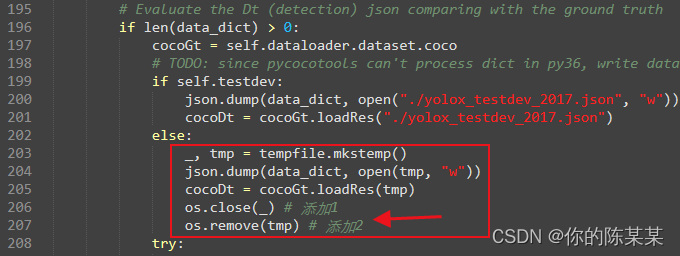
YOLOX-main/yolox/evaluators/coco_evaluator.py in line 203 or so **tempfile.mkstemp()** after creating the file, no close() and remove() operations are performed
The following figure.

2. Solution methods
(1) Method 1
As shown above, add os.close(_) and os.remove(tmp) two lines of code, directly delete the file just created after use. Note: import os module at the beginning]
(2) Method 2
The problem is already known, you can use with…as… to create, automatically delete and close the file.
(3) Method 3
If you want to keep each temporary file, and do not want to C drive blow up, then directly change the save location to a custom path.
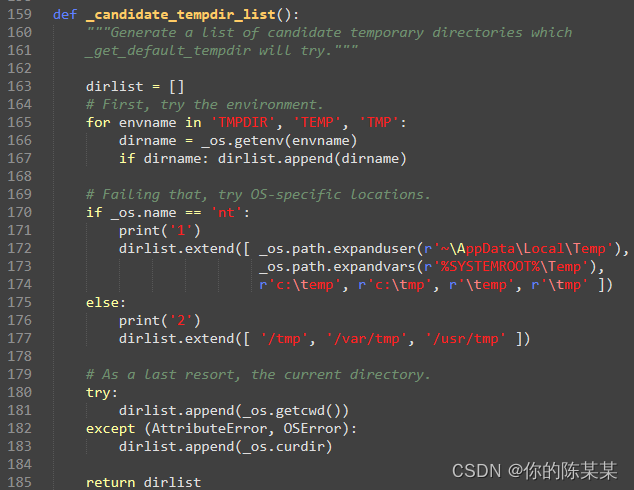
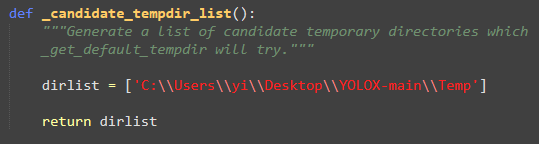
Code location: Anoconda/envs/using-environment/Lib/tempfile.py in line 159-185.
directly change the direct dirlist operation to the user-defined folder location, as follows:

(4) Method 4
Manually clean up files in temp at regular intervals
Note: VOC format dataset training, no temporary files are generated because it uses the with…as… file creation method. For details, please refer to the end of voc_evaluater.py

How to Solve forEach cannot exit the loop Issue

The forEach loop in the array will report an error if you want to exit the whole loop using break, and return will not jump out of the loop. In other words, the forEach traversal cannot be terminated.

Solution:

Iterate through for to achieve

    let arr = ['1', '2', '3', '4', '5'];
     for(let i=0; i<arr.length; i++) {
       if(arr[i] == '3') break;
       console.log(arr[i]) // 1 2
     }

Implemented by try--catch throwing exceptions

    let arr = ['1', '2', '3', '4', '5'];
    try {
      arr.forEach((item, index) => {
        if (item === '3') {
          throw new Error('End')
        }
        console.log(item) // 1 2 
      })
    } catch (e) {
      if (e.message === 'End') throw e;
    }

Implemented via reduce iteration, with an interrupt flag set

    let arr = ['1', '2', '3', '4', '5'];
    arr.reduce(function (p, c) {
      if (c == '3') {
        this.break = true
      }
      if (this.break) {
        return
      }
      console.log(c) // 1 2
    }, '') 

Macos: How to Solve cocoapods Install Error

Executing “sudo gem install -n /usr/local/bin cocoapods” gave me an error: “Failed to build gem native extension”.
Followed the online method, confirmed the ruby version 2.6.3, and installed rvm also reported an error (443 error), in short, tried everything I could find on stackoverflow

The final solution: specify a lower version when installing cocoapods: sudo gem install cocoapods
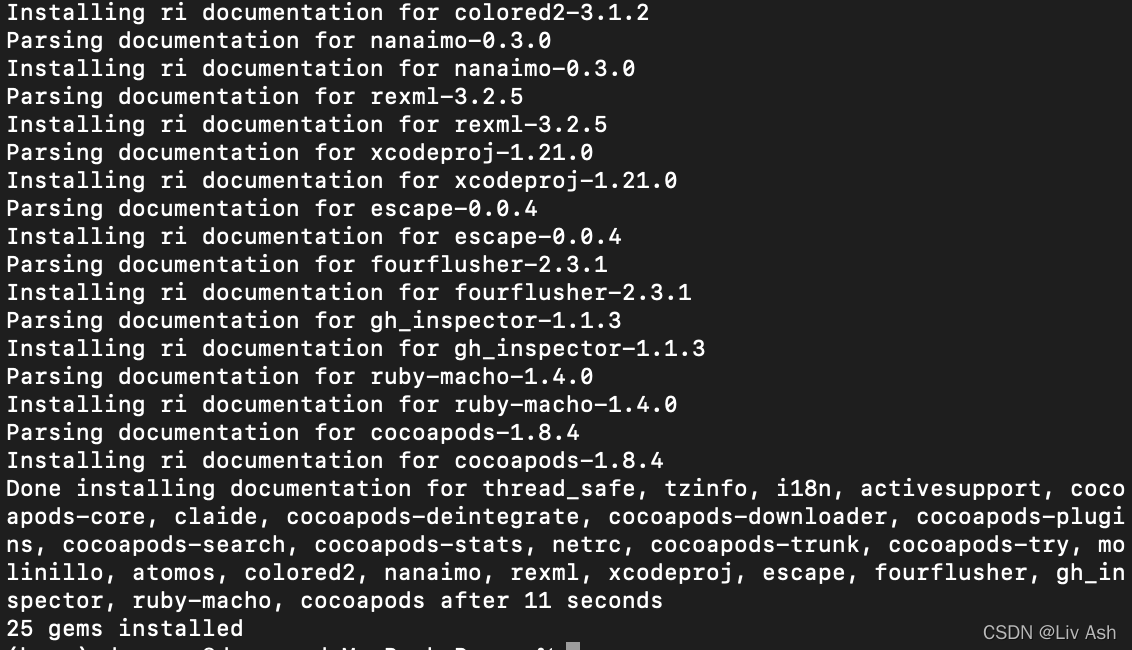
sudo gem install cocoapods -v 1.8.4

Directly solved.

[Solved] MATLAB Error: Wrong use of commLTETurboDecoder/step

Incorrect use of commlteturbodecoder/step solution

When learning Chapter 4 of “comprehensive and detailed explanation of LTE: MATLAB modeling, simulation and implementation”, run chap4_ex04_performanceBER.m. Matlab reports the following errors:

Wrong use of commLTETurboDecoder/step
Method 'stepImpl' is not defined for class 'commLTETurboDecoder', or the method has been removed from MATLAB's search path.

Error TurboDecoder_crc (line 10)
[y, flag, iters] = step(TurboCrc, u, intrlvrIndices);

Error chap4_ex05_rate (line 28)
    [y, ~, iters] = TurboDecoder_crc(-r2, Indices); % Turbo Deocder

Error chap4_ex05_performanceBER (line 13)
    ber_third(n)=chap4_ex05_rate(EbNo, maxNumErrs, maxNumBits, CodingRate);

unction commLTETurboDecoder used in “Understanding LTE with Matlab” is missing

Reason: Because the version of matlab is too high, the official matlab has abandoned the commLTETurboDecoder function after the 2016 version, so it will report an error when running this program.

Solution: Install communications system toolbox 6.1 in matlab2015b, and find the function under this path

/Applications/MATLAB_R2015b.app/toolbox/comm/commdemos/commLTETurboDecoder.m

After downloading and installing MATLAB_R2015b software, find the commLTETurboDecoder.m file under the corresponding path, place it under the current folder, and it will run normally.

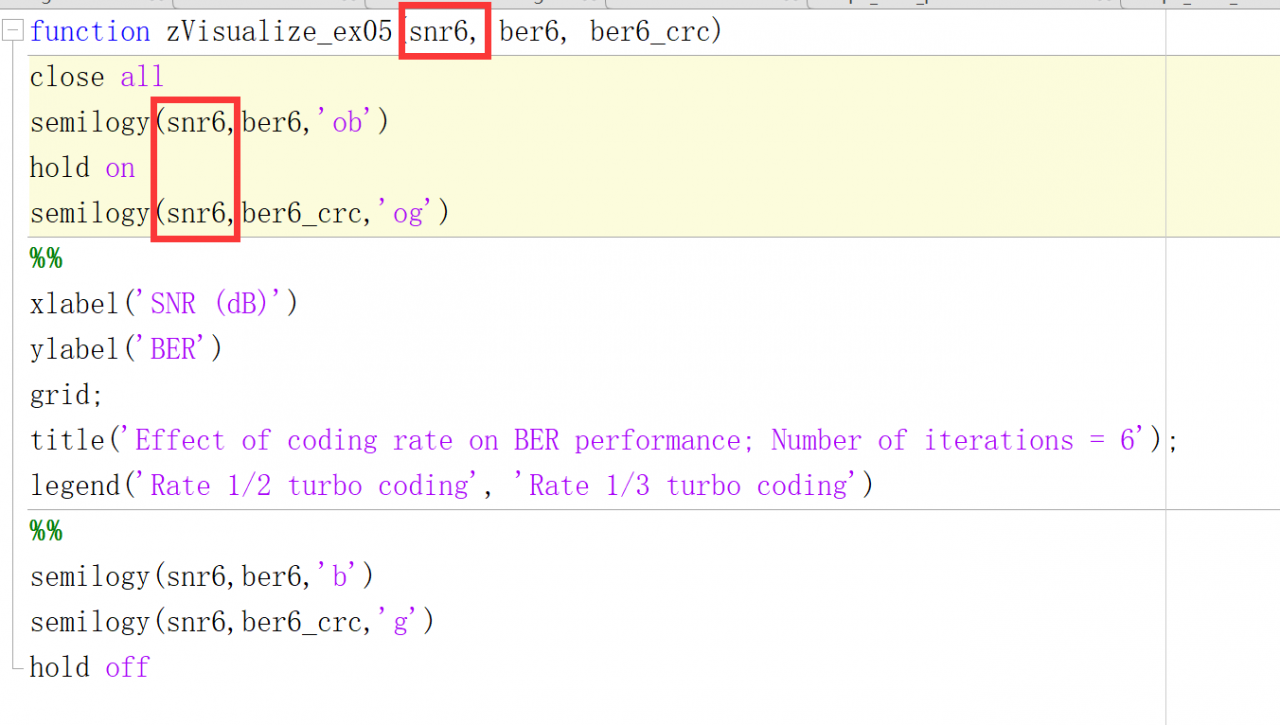
In addition, this function also has a defect, the following error will be reported in the run: change snr to snr6 in the zVisualize_ex05.m file, as shown in the figure.

Wrong use of snr (line 87)
Insufficient number of input parameters.

Error zVisualize_ex05 (line 3)
semilogy(snr,ber6,'ob')

Error chap4_ex05_performanceBER (line 28)
zVisualize_ex05(snr, ber_third,  ber_half);

Solution: Change the snr in the zVisualize_ex05.m file to snr6, as shown in the figure.

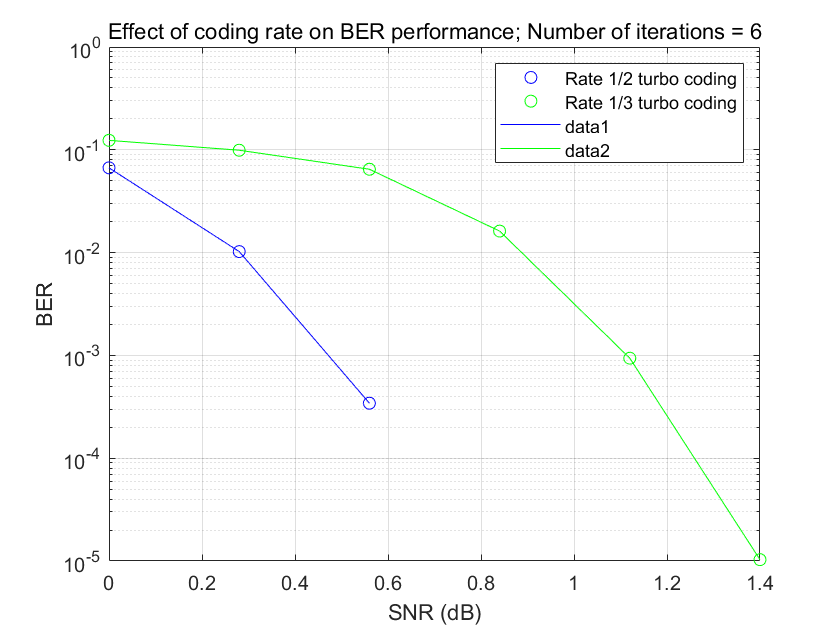
Modify the above two places to operate normally and draw the image, as shown in the figure: