Author Archives: Robins

How to Fix Taro SwipeAction Not Working Issue

Invalid reason:

Because two attributes of the official document are not written, and we have not written them, it will not take effect
1 The maximum sliding distance of maxdistance slider is generally the number of buttons multiplied by the button width
2 Areawidth component width (if no reference causes the component occupancy width to be 0, the page will not be displayed)

be careful:

Here, the width in option must use PX, if you use rpx, there will be UI problems on different devices, maxDistance= the width length of two options, maxDistance is the type of number

Correct code:

<AtSwipeAction
  maxDistance={140} // Button width * number of buttons
  areaWidth={Taro.getSystemInfoSync().windowWidth * 1} //Dynamically get the width of different devices
  autoClose //click the button to close it automatically
  onClick={(option, btnIndex) => { }} //Click to cancel Triggered after deleting the button, one parameter is the currently clicked option item, the second parameter is the index of the button 0 1
  options={[
    {
      text: 'cancel',
      style: {
        justifyContent: 'center',
        width: '70px',
        padding: 0,
      }
    },
    {
      text: 'Delete',
      style: {
        justifyContent: 'center',
        width: '70px',
        padding: 0,
      }
    }
  ]}>
  <View>
    Content
  </View>
</AtSwipeAction>
How to Solve Win 10 Kb5008212 can’t share printer Issue

Recently, because the update of kb5008212 is automatically installed in win10, the printer cannot be shared. At present, it is the way to modify the registry to solve the problem. Because you can’t uninstall successfully by uninstalling the update, unless you try with the command or the update uninstall tool. I’m not sure whether the update can be uninstalled successfully now because I can’t uninstall the update successfully. Now it is time to modify the registry to solve this problem.

1. First, right-click the blank space of the desktop and “create” a “text document”

2. Then enter the following code and save it:

Windows Registry Editor Version 5.00

[HKEY_LOCAL_MACHINE\SYSTEM\CurrentControlSet\Control\Print]

"RpcAuthnLevelPrivacyEnabled"=dword:00000000

[HKEY_LOCAL_MACHINE\Software\Policies\Microsoft\Windows NT\Printers\PointAndPrint]

"RestrictDriverInstallationToAdministrators"=dword:00000000

3. After saving, close the file and rename it to a file in “PrintShareRepair.reg” format.

4. Finally, double click to run the file to solve the problem that the printer cannot be shared.

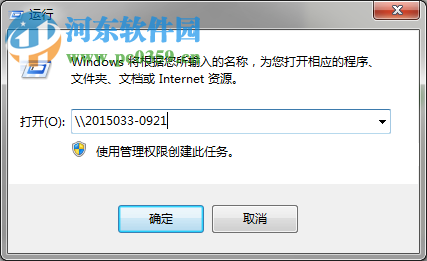
5. Open the Run screen using \\192.168.1.10\ to access the shared printer when the error 0X00000709 occurs, use the computer name for shared printer access for example: \\PC-HP001\ to see the shared printer connection can be.

Android Studio Cannot resolve symbol [How to Solve]

Problem:
Previously the project is normal, one day suddenly appeared red exception, the code is prompted in many places “Cannot resolve symbol xxxx” Log

Analysis:
The problem is caused by the failure of the three-party library dependency, the guide package can not be found

Solution (you can follow the following process to try):
1, Build->Clean Project and then Build->Rebuild Project to see if it is OK, not continue
2,File->Sync Project With Gradle Files to see if it’s OK, if not, continue
3,File->Invalidate Caches/Restart (check Clear Cache or Files) to see if it’s OK, or not.
4, close AS, manually enter the project to delete the .gradle and .idea files, reopen AS build to see if it is OK, not continue
5, downgrade the AS version, keep the settings and uninstall the current version, download and install the old version without problems before

The above five steps will basically solve the problem, which step is OK, just follow the order.
My problem is to the fifth step, from AS Bumblebee directly downgrade to AS4.2.1 before the problem is solved, the middle of the Arctic fox also have problems, specifically ignore.

Translated with www.DeepL.com/Translator (free version)

[Solved] R Language Error: Discrete value supplied to continuous scale

Error: discrete value supplied to continuous scale

#Simulation data

set.seed(123)
my_df1 <- data.frame(a=rnorm(100), b=runif(100), c=rep(1:10, 10))
my_df2 <- data.frame(a=rnorm(100), b=runif(100), c=factor(rep(LETTERS[1:5], 20)))

#Error: Discrete value supplied to continuous scale

ggplot() +
  geom_point(data=my_df1, aes(x=a, y=b, color=c)) +
  geom_polygon(data=my_df2, aes(x=a, y=b, color=c), alpha=0.5)

#Solution:

Use the fill parameter;

ggplot() +
  geom_point(data=my_df1, aes(x=a, y=b, color=c)) +
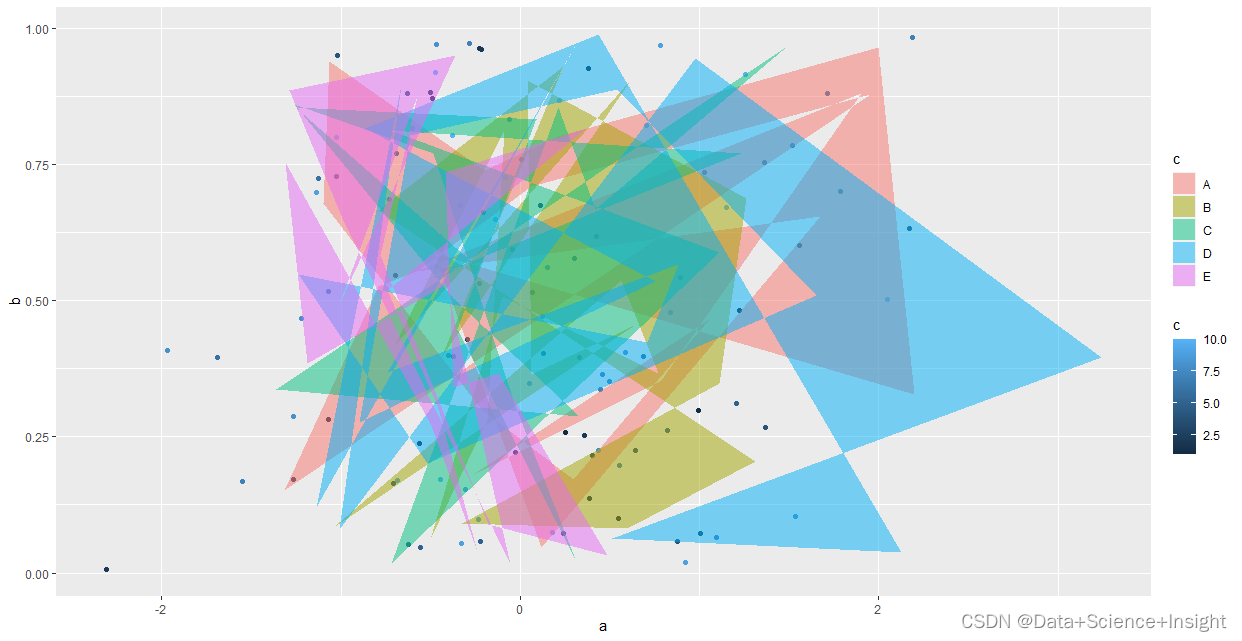
  geom_polygon(data=my_df2, aes(x=a, y=b, fill=c), alpha=0.5)

Redis Delete dump.rdb Mistakenly [How to Solve]

1. Log in to redis database

[ root@localhost ~]# redis-cli -h 192.168.1.19
2. View redis configuration information

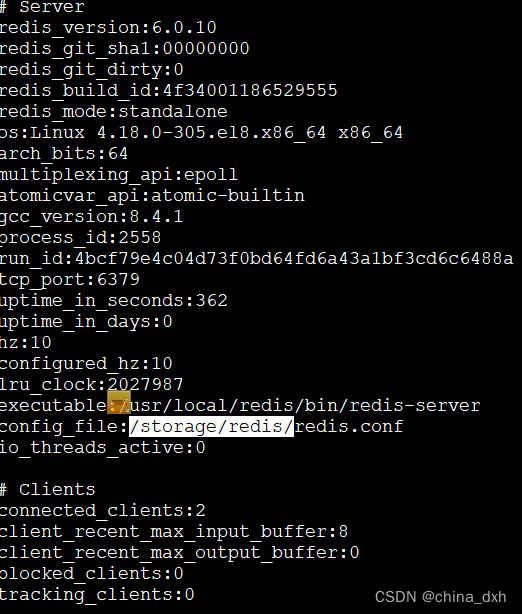
192.168.1.19:6379> info

2. According the path of config_file to set dump.rdb file storage path, or you can customize the path

192.168.1.19:6379> config set dir /storage/redis/

3. Save and exit

192.168.1.19:6379> save

192.168.1.19:6379> exit

4. Restart redis service

[ root@localhost ~]# service redis stop

[ root@localhost ~]# service redis start

Postman Error: Could not send request [How to Solve]

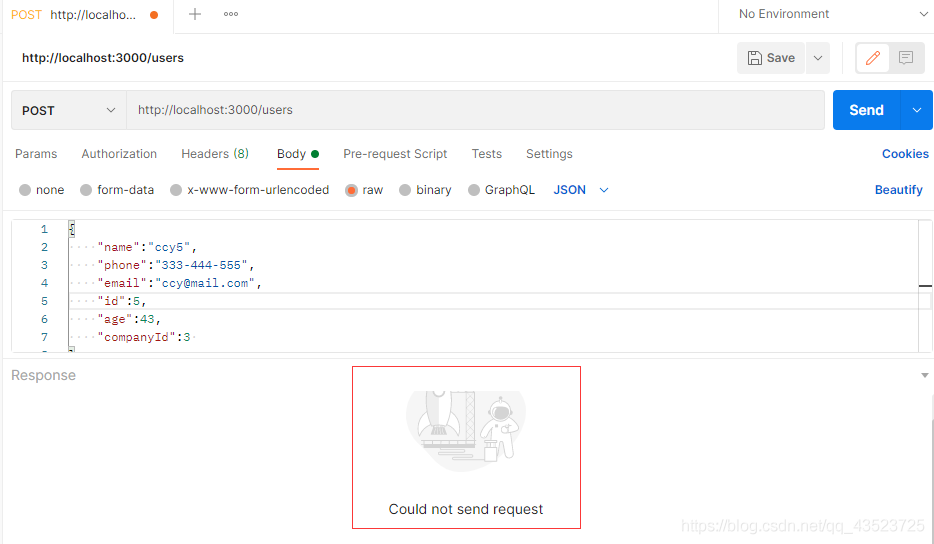
Error reporting:

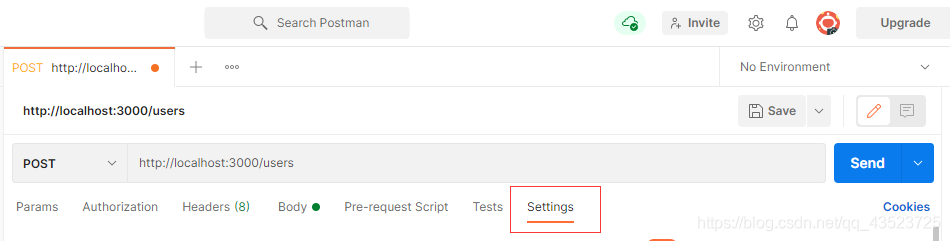
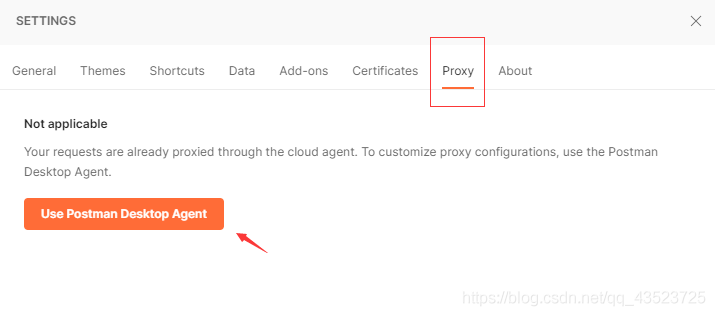
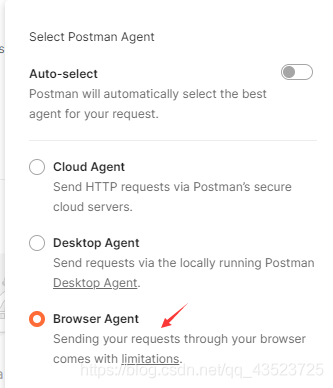
Solution: enable agent and select the available agent
setting – proxy – use postman desktop agent – Bowser agent


In addition:
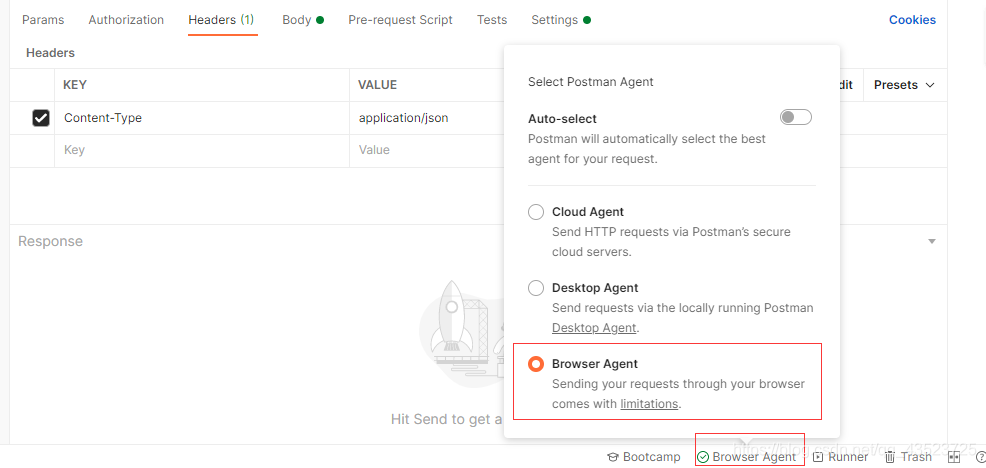
if the selected agent is available, there will be a green tick about agent selection in the lower right corner. Here the Bowser agent is available:

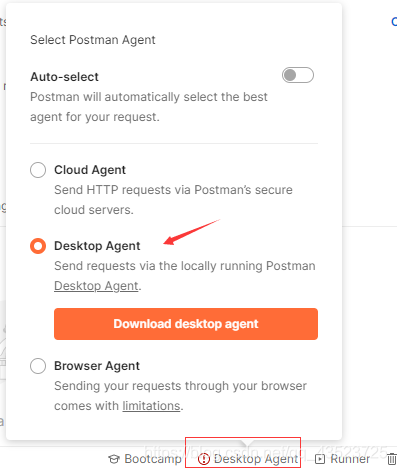
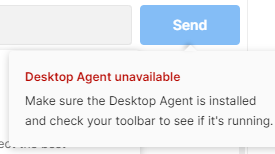
if the selected agent is not available, it will turn into a red exclamation mark and prompt at send that the agent is not available:
Desktop agent is not available here:

[Fixed] Chrome Browser Cannot Edit Cookies Issue

I accidentally found that chrome can’t add cookies by itself. After adding cookies, it won’t be refreshed.

reason

The latest Chrome browser version has been automatically blocking this function.

Solution:

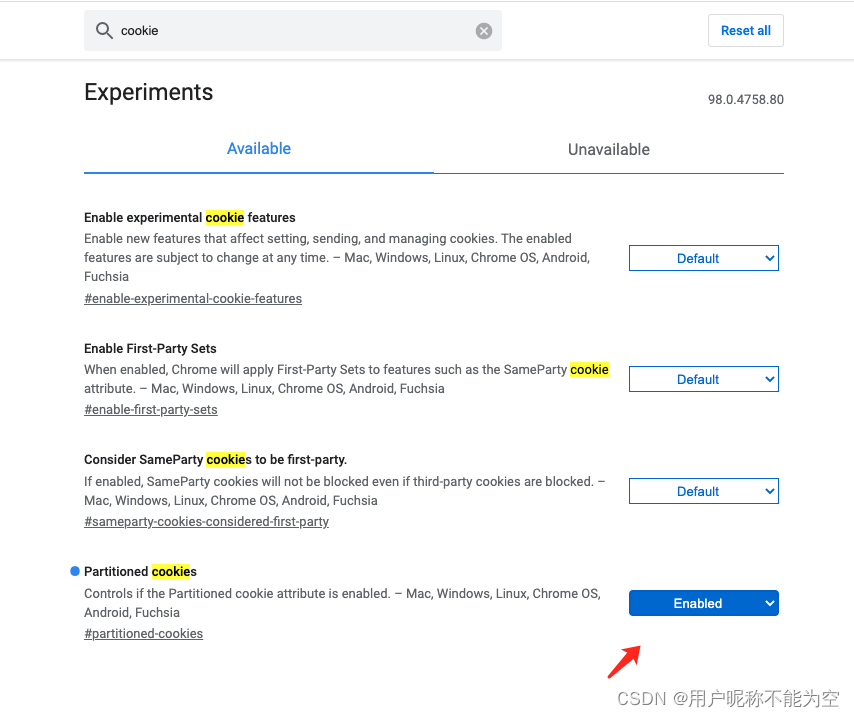
Open chrome://flags/ , search cookies , find partitioned cookies , select enabled
and then click relaunch in the lower right corner. The browser will restart automatically and take effect!

How to Solve Vue & Django Cross-domain Issue

1. Install the package to solve cross-domain related problems at the terminal

python -m pip install django-cors-headers

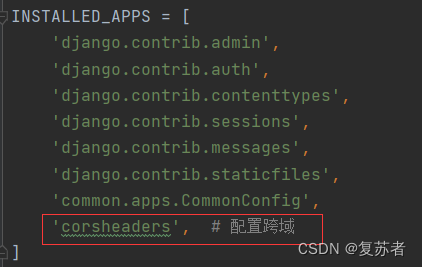
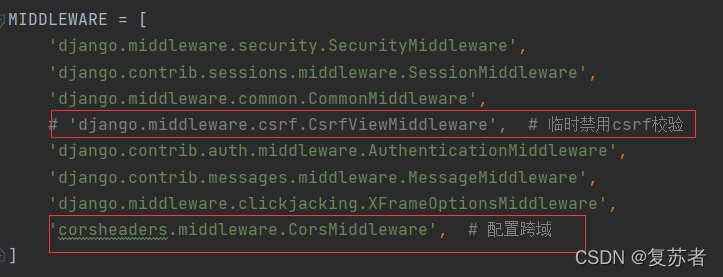
2. Add the following configuration to the setting.py file clock in the django project

‘corsheaders’,

comment csrf out and add  ‘corsheaders.middleware.CorsMiddleware’,

finally add these two lines of configuration

How to Solve MVC Error: Build failed.

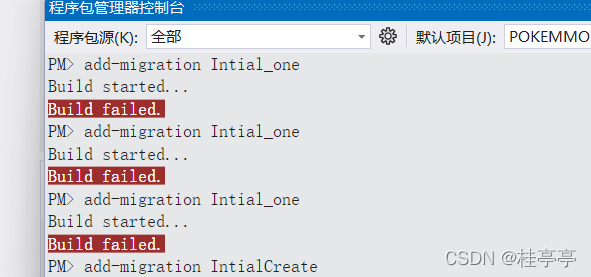
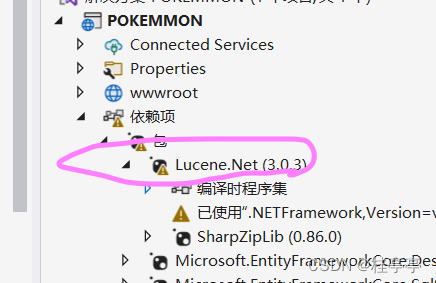
The situation shown in the figure appears

Solution:

Step 1:

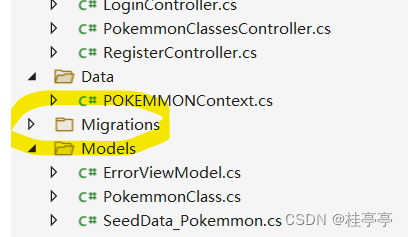
Delete all files in the migrations directory in the figure

Step 2:

Delete this package and reinstall it!!

PM> add-migration Intial_one
Build started...
Build failed.
PM> add-migration Intial_one
Build started...
Build failed.
PM> add-migration Intial_one
Build started...
Build failed.
PM> add-migration IntialCreate
Build started...
Build failed.
PM> 
PM> 
PM> 
PM> 
PM> add-migration IntialCreate
Build started...
Build succeeded.
Microsoft.EntityFrameworkCore.Infrastructure[10403]
      Entity Framework Core 6.0.2 initialized 'POKEMMONContext' using provider 'Microsoft.EntityFrameworkCore.SqlServer:6.0.2' with options: None
To undo this action, use Remove-Migration.
PM> add-

OK