Author Archives: Robins

[Solved] Arcpy: RuntimeError: ERROR 999998: Unexpected Error.

Summarize the reasons why individuals encounter such errors when using arcpy to batch process raster data:

1. Because the supporting python of ArcGIS is 2.7, sometimes the file name is read in some hexadecimal codes with many slashes, resulting in the wrong naming of the output file name and unable to output

Solution: carefully check whether the input and output file names are correct

2. There are many files with different suffixes (for example, raster data also has files with .DBF suffix) in addition to the files that can be seen in ArcMap, so it is inevitable to make mistakes when reading in and reading out some suffix files in batch processing.

Solution: when batch processing, sort out the folders in advance, and put all kinds of or similar data together. Don’t mix them.

EsgynDB Troubleshooting-ERROR[8837] Internal error occurred.

Phenomenon

When an environment suddenly finds that it cannot connect to the database, it uses JDBC or trafci to connect to the database. The error is as follows:

*** ERROR[8837] Internal error occurred. User: XXX

Analysis

Error [8837] internal error occurred Generally, there is a problem with the authentication of the connection between the database and LDAP
therefore, after encountering this error, first, we can use the LDAP check command to check whether the database user can be queried from LDAP normally. The command is:

ldapcheck --username=trafodion

If the above command returns result 2, it indicates that trafodion accesses LDAP abnormally,

Lookup request: externalName trafodion, configNmae 'not available' (ConfigNumber -2), result 2(Unexpected error returned from LDAP)

After encountering the above errors, the next step is to check whether the LDAP service is normal
first, we need to find out which machine the LDAP service is on
This can be found through the .traf_authentication_config file in the cdc directory, which can be viewed by executing the following command using the trafodion user.

cdc
cat .traf_authentication_config

The value of the LDAPHostName parameter in the .traf_authentication_config configuration file is the LDAP node used by the database.
Once we find the node where LDAP is located, we can log in to the corresponding node to check if the LDAP service is working.

service slapd status

If it is found that the slapd service is not opened, we can open the LDAP service with the following command,

service slapd start

Of course, another is that the LDAP service is started, but the reason for the exception is that there are too many open files. For this scenario, you can modify Max open files to modify the number of open files of LDAP.

[Solved] Springboot Connect MongoDB Error: UncategorizedMongoDbException: Command failed with error 13 (Unauthorized)

[phenomenon]

failed; nested exception is org.springframework.data.mongodb.UncategorizedMongoDbException: Command failed with error 13 (Unauthorized): 'command insert requires authentication' on server localhost:27017. The full response is {"ok": 0.0, "errmsg": "command insert requires authentication", "code": 13, "codeName": "Unauthorized"}; nested exception is com.mongodb.MongoCommandException: Command failed with error 13 (Unauthorized): 'command insert requires authentication' on server localhost:27017. The full response is {"ok": 0.0, "errmsg": "command insert requires authentication", "code": 13, "codeName": "Unauthorized"}] with root cause

com.mongodb.MongoCommandException: Command failed with error 13 (Unauthorized): 'command insert requires authentication' on server localhost:27017. The full response is {"ok": 0.0, "errmsg": "command insert requires authentication", "code": 13, "codeName": "Unauthorized"}
	at com.mongodb.internal.connection.ProtocolHelper.getCommandFailureException(ProtocolHelper.java:175) ~[mongodb-driver-core-4.2.3.jar:na]
	at com.mongodb.internal.connection.InternalStreamConnection.receiveCommandMessageResponse(InternalStreamConnection.java:358) ~[mongodb-driver-core-4.2.3.jar:na]
	at com.mongodb.internal.connection.InternalStreamConnection.sendAndReceive(InternalStreamConnection.java:279) ~[mongodb-driver-core-4.2.3.jar:na]
	at com.mongodb.internal.connection.UsageTrackingInternalConnection.sendAndReceive(UsageTrackingInternalConnection.java:100) ~[mongodb-driver-core-4.2.3.jar:na]
	at com.mongodb.internal.connection.DefaultConnectionPool$PooledConnection.sendAndReceive(DefaultConnectionPool.java:490) ~[mongodb-driver-core-4.2.3.jar:na]
	at com.mongodb.internal.connection.CommandProtocolImpl.execute(CommandProtocolImpl.java:71) ~[mongodb-driver-core-4.2.3.jar:na]
	at com.mongodb.internal.connection.DefaultServer$DefaultServerProtocolExecutor.execute(DefaultServer.java:253) ~[mongodb-driver-core-4.2.3.jar:na]
	at com.mongodb.internal.connection.DefaultServerConnection.executeProtocol(DefaultServerConnection.java:202) ~[mongodb-driver-core-4.2.3.jar:na]
	at com.mongodb.internal.connection.DefaultServerConnection.command(DefaultServerConnection.java:118) ~[mongodb-driver-core-4.2.3.jar:na]
	at com.mongodb.internal.operation.MixedBulkWriteOperation.executeCommand(MixedBulkWriteOperation.java:431) ~[mongodb-driver-core-4.2.3.jar:na]
	at com.mongodb.internal.operation.MixedBulkWriteOperation.executeBulkWriteBatch(MixedBulkWriteOperation.java:251) ~[mongodb-driver-core-4.2.3.jar:na]
	at com.mongodb.internal.operation.MixedBulkWriteOperation.access$700(MixedBulkWriteOperation.java:76) ~[mongodb-driver-core-4.2.3.jar:na]
	at com.mongodb.internal.operation.MixedBulkWriteOperation$1.call(MixedBulkWriteOperation.java:194) ~[mongodb-driver-core-4.2.3.jar:na]
	at com.mongodb.internal.operation.MixedBulkWriteOperation$1.call(MixedBulkWriteOperation.java:185) ~[mongodb-driver-core-4.2.3.jar:na]
	at com.mongodb.internal.operation.OperationHelper.withReleasableConnection(OperationHelper.java:621) ~[mongodb-driver-core-4.2.3.jar:na]
	at com.mongodb.internal.operation.MixedBulkWriteOperation.execute(MixedBulkWriteOperation.java:185) ~[mongodb-driver-core-4.2.3.jar:na]
	at com.mongodb.internal.operation.MixedBulkWriteOperation.execute(MixedBulkWriteOperation.java:76) ~[mongodb-driver-core-4.2.3.jar:na]
	at com.mongodb.client.internal.MongoClientDelegate$DelegateOperationExecutor.execute(MongoClientDelegate.java:187) ~[mongodb-driver-sync-4.2.3.jar:na]
	at com.mongodb.client.internal.MongoCollectionImpl.executeInsertMany(MongoCollectionImpl.java:498) ~[mongodb-driver-sync-4.2.3.jar:na]
	at com.mongodb.client.internal.MongoCollectionImpl.insertMany(MongoCollectionImpl.java:480) ~[mongodb-driver-sync-4.2.3.jar:na]
	at com.mongodb.client.internal.MongoCollectionImpl.insertMany(MongoCollectionImpl.java:475) ~[mongodb-driver-sync-4.2.3.jar:na]
	at org.springframework.data.mongodb.core.MongoTemplate.lambda$insertDocumentList$17(MongoTemplate.java:1490) ~[spring-data-mongodb-3.2.6.jar:3.2.6]
	at org.springframework.data.mongodb.core.MongoTemplate.execute(MongoTemplate.java:553) ~[spring-data-mongodb-3.2.6.jar:3.2.6]
	at org.springframework.data.mongodb.core.MongoTemplate.insertDocumentList(MongoTemplate.java:1483) ~[spring-data-mongodb-3.2.6.jar:3.2.6]
	at org.springframework.data.mongodb.core.MongoTemplate.doInsertBatch(MongoTemplate.java:1346) ~[spring-data-mongodb-3.2.6.jar:3.2.6]
	at org.springframework.data.mongodb.core.MongoTemplate.insert(MongoTemplate.java:1280) ~[spring-data-mongodb-3.2.6.jar:3.2.6]

[solution]

Add the following configuration:

spring.data.mongodb.username=admin
spring.data.mongodb.password=admin

Modify the application.properties file as below:

spring.data.mongodb.host=localhost
spring.data.mongodb.port=27017
spring.data.mongodb.username=admin
spring.data.mongodb.password=admin
spring.data.mongodb.database=user

How to Solve Uncaught (in promise) Error (Two Solutions)

Reporting an uncaught (in promise) error. The solution
There are two Solutions:

1. when using Axios to request an interface, add catch() behind then():

  1. export function stopMCUMixTranscode(params) {
    return new Promise((resolve, reject) => {
    axios
    .post(********, params)
    .then((res) => {
    resolve(res)
    })
    .catch((err) => {
    reject(err)
    })
    })
    }


2. Use return promise Reject (new error (res.msg | ‘error’)) to catch and handle exceptions. It needs to be use .catch(err=>{console.log(err)}) to catch exceptions when the request comes back,

return Promise.reject(error).catch(err=>{console.log(err)}) // Return the error message returned by the interface

app:kaptDebugKotlin no error message [How to Solve]

Execution failed for task ‘:app:kaptDebugKotlin’.
> A failure occurred while executing org.jetbrains.kotlin.gradle.internal.KaptExecution
> java.lang.reflect.InvocationTargetException (no error message)


Solution:
Run your application with ./gradlew clean build command to see what’s exactly wrong with your code. Just paste it into the Terminal in Android Studio.
Run gradlew clean build in Terminal to verify the compilation. If there are errors, the detailed code information will be listed here and then you can fix it.

[Solved] New MAC Unity Develop Error: error installing cocoapods

The new MAC system is 11.4, and the installed Xcode version is 13.2.1
after opening a unity project and switching to IOS platform, cocoapods is installed in the background, but an error is reported indicating that the installation fails:

ERROR: Error installing cocoapods:
       ERROR: Failed to build gem native extension.
   current directory: /Library/Ruby/Gems/2.6.0/gems/ffi-1.15.5/ext/ffi_c/System/Library/Frameworks/Ruby.framework/Versions/2.6/usr/bin/ruby -I /System/Library/Framewoks/Ruby.framework/Versions/2.6/usr/lib/ruby/2.6.0 -r ./siteconf20220311-4106-wxounc.rb extconf.rb
   mkmf.rb can't find header files for ruby at /System/Library/Framewoks/Ruby.framework/Versions/2.6/usr/lib/ruby/include/ruby.h

You might have to install separate package for the ruby development environment,ruby-dev or ruby-devel for example.

According to the error prompt and query from the network, it should be that a new Ruby Version needs to be installed, and the ruby provided by the system cannot be used
installing Ruby requires RVM, and installing RVM requires homebrew

Install homebrew

Use the command /usr/bin/Ruby - e" $(curl - fssl) is not used here https://raw.githubusercontent.com/Homebrew/install/master/install )"

After installation, execute brew update update.

Then execute brew -vto see the installed version

Install RVM

Install RVM curl -L https://get.rvm.io | bash -s stable

reload RVM environment source ~/.rvm/scripts/rvm

View RVM version RVM -v

Install Ruby

Check the known version of ruby RVM list known

check the installed version of ruby RVM list

Install a ruby version. I chose 2.6.5 RVM install 2.6.5

After installation, check the Ruby Version Ruby -v. If it is not the version just downloaded, I need to use the command to cut the version

Install cocoapods

After the above installation, execute sudo gem install cocoapods -n/usr/local/bin to install cocoapods
after the installation, execute pod --version to view the version of cocoapods

Here, for unit packaging, cocoapods are not completely installed. You need to continue to follow the following steps.

Command + Shift + G, open to the folderpop-up window, and enter ~/.cocoapods, after opening the cocoapods folder, delete all the contents under it, create a new repos folder, open the command line tool, and execute the following three commands in turn

1) cd ~/.cocoapods/repos
2) git clone --depth 1 https://github.com/CocoaPods/Specs.git master
3) pod repo update

In this way, the Xcode project exported by unity will have Xcworkspace file (in case of problems in cocoapods environment, the exported Xcode project only has .xcodeproj file, and there are many exceptions when using this file for packaging press conference), and then open the file with Xcode for subsequent publishing
[Solved] fastjson Error: write javaBean error, fastjson version 1.2.76, class io.undertow.servlet.xx

Error message:

com. alibaba. fastjson. JSONException:

write javaBean error, fastjson version 1.2.76, class io. undertow. servlet. spec.HttpServletResponseImpl, fieldName : 0,

write javaBean error, fastjson version 1.2.76, class io. undertow. server. HttpServerExchange, fieldName : exchange,

UT010034: Stream not in async mode

code:

    @ApiOperation(value = "TEST",notes = "")
    @PostMapping("/abccc")
    @ResponseBody
    public void test( HttpServletResponse response) {
        //service
    }

Solution:

Remove this swagger comment.

@ApiOperation(value = "TEST",notes = "")

Notes of swagger, @ apioperation (value = “interface description”, httpmethod = “interface request method”, response = “interface return parameter type”, notes = “interface release description”);

That’s right!!!!! There are no bugs!!!!!

Complete error reporting information:

2021-09-01 11:14:36.911 [XNIO-1 task-1] ERROR x.x.x.framework.exception.GlobalExceptionHandler - url=http://xxx.x.x.x:xxxxx/shell/abccc,errormsg=com.alibaba.fastjson.JSONException: write javaBean error, fastjson version 1.2.76, class io.undertow.servlet.spec.HttpServletResponseImpl, fieldName : 0, write javaBean error, fastjson version 1.2.76, class io.undertow.server.HttpServerExchange, fieldName : exchange, UT010034: Stream not in async mode
	at com.alibaba.fastjson.serializer.JavaBeanSerializer.write(JavaBeanSerializer.java:544)
	at com.alibaba.fastjson.serializer.JavaBeanSerializer.write(JavaBeanSerializer.java:154)
	at com.alibaba.fastjson.serializer.JSONSerializer.writeWithFieldName(JSONSerializer.java:360)
	at com.alibaba.fastjson.serializer.JSONSerializer.writeWithFieldName(JSONSerializer.java:338)
	at com.alibaba.fastjson.serializer.ObjectArrayCodec.write(ObjectArrayCodec.java:118)
	at com.alibaba.fastjson.serializer.JSONSerializer.write(JSONSerializer.java:312)
	at com.alibaba.fastjson.JSON.toJSONString(JSON.java:793)
	at com.alibaba.fastjson.JSON.toJSONString(JSON.java:731)
	at com.alibaba.fastjson.JSON.toJSONString(JSON.java:688)
	at com.xxxxx.xxxxx.xxxxx.controller.xxxxxController.test(ShellInfoController.java:40)
	at sun.reflect.NativeMethodAccessorImpl.invoke0(Native Method)
	at sun.reflect.NativeMethodAccessorImpl.invoke(NativeMethodAccessorImpl.java:62)
	at sun.reflect.DelegatingMethodAccessorImpl.invoke(DelegatingMethodAccessorImpl.java:43)
	at java.lang.reflect.Method.invoke(Method.java:498)
	at org.springframework.web.method.support.InvocableHandlerMethod.doInvoke(InvocableHandlerMethod.java:190)
	at org.springframework.web.method.support.InvocableHandlerMethod.invokeForRequest(InvocableHandlerMethod.java:138)
	at org.springframework.web.servlet.mvc.method.annotation.ServletInvocableHandlerMethod.invokeAndHandle(ServletInvocableHandlerMethod.java:104)
	at org.springframework.web.servlet.mvc.method.annotation.RequestMappingHandlerAdapter.invokeHandlerMethod(RequestMappingHandlerAdapter.java:892)
	at org.springframework.web.servlet.mvc.method.annotation.RequestMappingHandlerAdapter.handleInternal(RequestMappingHandlerAdapter.java:797)
	at org.springframework.web.servlet.mvc.method.AbstractHandlerMethodAdapter.handle(AbstractHandlerMethodAdapter.java:87)
	at org.springframework.web.servlet.DispatcherServlet.doDispatch(DispatcherServlet.java:1039)
	at org.springframework.web.servlet.DispatcherServlet.doService(DispatcherServlet.java:942)
	at org.springframework.web.servlet.FrameworkServlet.processRequest(FrameworkServlet.java:1005)
	at org.springframework.web.servlet.FrameworkServlet.doPost(FrameworkServlet.java:908)
	at javax.servlet.http.HttpServlet.service(HttpServlet.java:665)
	at org.springframework.web.servlet.FrameworkServlet.service(FrameworkServlet.java:882)
	at javax.servlet.http.HttpServlet.service(HttpServlet.java:750)
	at io.undertow.servlet.handlers.ServletHandler.handleRequest(ServletHandler.java:74)
	at io.undertow.servlet.handlers.FilterHandler$FilterChainImpl.doFilter(FilterHandler.java:129)
	at org.springframework.boot.actuate.web.trace.servlet.HttpTraceFilter.doFilterInternal(HttpTraceFilter.java:88)
	at org.springframework.web.filter.OncePerRequestFilter.doFilter(OncePerRequestFilter.java:109)
	at io.undertow.servlet.core.ManagedFilter.doFilter(ManagedFilter.java:61)
	at io.undertow.servlet.handlers.FilterHandler$FilterChainImpl.doFilter(FilterHandler.java:131)
	at org.springframework.web.filter.RequestContextFilter.doFilterInternal(RequestContextFilter.java:99)
	at org.springframework.web.filter.OncePerRequestFilter.doFilter(OncePerRequestFilter.java:109)
	at io.undertow.servlet.core.ManagedFilter.doFilter(ManagedFilter.java:61)
	at io.undertow.servlet.handlers.FilterHandler$FilterChainImpl.doFilter(FilterHandler.java:131)
	at org.springframework.web.filter.FormContentFilter.doFilterInternal(FormContentFilter.java:92)
	at org.springframework.web.filter.OncePerRequestFilter.doFilter(OncePerRequestFilter.java:109)
	at io.undertow.servlet.core.ManagedFilter.doFilter(ManagedFilter.java:61)
	at io.undertow.servlet.handlers.FilterHandler$FilterChainImpl.doFilter(FilterHandler.java:131)
	at org.springframework.web.filter.HiddenHttpMethodFilter.doFilterInternal(HiddenHttpMethodFilter.java:93)
	at org.springframework.web.filter.OncePerRequestFilter.doFilter(OncePerRequestFilter.java:109)
	at io.undertow.servlet.core.ManagedFilter.doFilter(ManagedFilter.java:61)
	at io.undertow.servlet.handlers.FilterHandler$FilterChainImpl.doFilter(FilterHandler.java:131)
	at org.springframework.boot.actuate.metrics.web.servlet.WebMvcMetricsFilter.filterAndRecordMetrics(WebMvcMetricsFilter.java:114)
	at org.springframework.boot.actuate.metrics.web.servlet.WebMvcMetricsFilter.doFilterInternal(WebMvcMetricsFilter.java:104)
	at org.springframework.web.filter.OncePerRequestFilter.doFilter(OncePerRequestFilter.java:109)
	at io.undertow.servlet.core.ManagedFilter.doFilter(ManagedFilter.java:61)
	at io.undertow.servlet.handlers.FilterHandler$FilterChainImpl.doFilter(FilterHandler.java:131)
	at org.springframework.web.filter.CharacterEncodingFilter.doFilterInternal(CharacterEncodingFilter.java:200)
	at org.springframework.web.filter.OncePerRequestFilter.doFilter(OncePerRequestFilter.java:109)
	at io.undertow.servlet.core.ManagedFilter.doFilter(ManagedFilter.java:61)
	at io.undertow.servlet.handlers.FilterHandler$FilterChainImpl.doFilter(FilterHandler.java:131)
	at io.undertow.servlet.handlers.FilterHandler.handleRequest(FilterHandler.java:84)
	at io.undertow.servlet.handlers.security.ServletSecurityRoleHandler.handleRequest(ServletSecurityRoleHandler.java:62)
	at io.undertow.servlet.handlers.ServletChain$1.handleRequest(ServletChain.java:68)
	at io.undertow.servlet.handlers.ServletDispatchingHandler.handleRequest(ServletDispatchingHandler.java:36)
	at io.undertow.servlet.handlers.security.SSLInformationAssociationHandler.handleRequest(SSLInformationAssociationHandler.java:132)
	at io.undertow.servlet.handlers.security.ServletAuthenticationCallHandler.handleRequest(ServletAuthenticationCallHandler.java:57)
	at io.undertow.server.handlers.PredicateHandler.handleRequest(PredicateHandler.java:43)
	at io.undertow.security.handlers.AbstractConfidentialityHandler.handleRequest(AbstractConfidentialityHandler.java:46)
	at io.undertow.servlet.handlers.security.ServletConfidentialityConstraintHandler.handleRequest(ServletConfidentialityConstraintHandler.java:64)
	at io.undertow.security.handlers.AuthenticationMechanismsHandler.handleRequest(AuthenticationMechanismsHandler.java:60)
	at io.undertow.servlet.handlers.security.CachedAuthenticatedSessionHandler.handleRequest(CachedAuthenticatedSessionHandler.java:77)
	at io.undertow.security.handlers.AbstractSecurityContextAssociationHandler.handleRequest(AbstractSecurityContextAssociationHandler.java:43)
	at io.undertow.server.handlers.PredicateHandler.handleRequest(PredicateHandler.java:43)
	at io.undertow.server.handlers.PredicateHandler.handleRequest(PredicateHandler.java:43)
	at io.undertow.servlet.handlers.ServletInitialHandler.handleFirstRequest(ServletInitialHandler.java:292)
	at io.undertow.servlet.handlers.ServletInitialHandler.access$100(ServletInitialHandler.java:81)
	at io.undertow.servlet.handlers.ServletInitialHandler$2.call(ServletInitialHandler.java:138)
	at io.undertow.servlet.handlers.ServletInitialHandler$2.call(ServletInitialHandler.java:135)
	at io.undertow.servlet.core.ServletRequestContextThreadSetupAction$1.call(ServletRequestContextThreadSetupAction.java:48)
	at io.undertow.servlet.core.ContextClassLoaderSetupAction$1.call(ContextClassLoaderSetupAction.java:43)
	at io.undertow.servlet.handlers.ServletInitialHandler.dispatchRequest(ServletInitialHandler.java:272)
	at io.undertow.servlet.handlers.ServletInitialHandler.access$000(ServletInitialHandler.java:81)
	at io.undertow.servlet.handlers.ServletInitialHandler$1.handleRequest(ServletInitialHandler.java:104)
	at io.undertow.server.Connectors.executeRootHandler(Connectors.java:364)
	at io.undertow.server.HttpServerExchange$1.run(HttpServerExchange.java:830)
	at java.util.concurrent.ThreadPoolExecutor.runWorker(ThreadPoolExecutor.java:1149)
	at java.util.concurrent.ThreadPoolExecutor$Worker.run(ThreadPoolExecutor.java:624)
	at java.lang.Thread.run(Thread.java:748)
Caused by: com.alibaba.fastjson.JSONException: write javaBean error, fastjson version 1.2.76, class io.undertow.server.HttpServerExchange, fieldName : exchange, UT010034: Stream not in async mode
	at com.alibaba.fastjson.serializer.JavaBeanSerializer.write(JavaBeanSerializer.java:544)
	at com.alibaba.fastjson.serializer.JavaBeanSerializer.write(JavaBeanSerializer.java:154)
	at com.alibaba.fastjson.serializer.FieldSerializer.writeValue(FieldSerializer.java:318)
	at com.alibaba.fastjson.serializer.JavaBeanSerializer.write(JavaBeanSerializer.java:475)
	... 81 more
Caused by: java.lang.IllegalStateException: UT010034: Stream not in async mode
	at io.undertow.servlet.spec.ServletOutputStreamImpl.isReady(ServletOutputStreamImpl.java:757)
	at com.alibaba.fastjson.serializer.ASMSerializer_11_ServletOutputStreamImpl.write(Unknown Source)
	at com.alibaba.fastjson.serializer.FieldSerializer.writeValue(FieldSerializer.java:318)
	at com.alibaba.fastjson.serializer.JavaBeanSerializer.write(JavaBeanSerializer.java:475)
	... 84 more

How to Solve Android jetpack Room Schema export Error

1. When using the Android Room database, the following error occurs:

Schema export directory is not provided to the annotation processor so we cannot export the schema. You can either provide room.schemaLocation annotation processor argument OR set exportSchema to false.

2. There are two kinds of solutions.
1). Set the exportSchema annotation to false for RoomDatabase. default is true

@Database(entities = [TableItem::class], version = 1,exportSchema = false)
abstract class AppDataBase : RoomDatabase() {
    abstract fun tableItemDao(): TableItemDao

2) Add in the build.gradle of the app (recommended)
There are different configuration syntaxes for java environment and kotlin environment. Depending on the personal environment configuration, only one way of writing can exist for both. My environment is a kotlin environment, so use the kotlin environment writing method. At the beginning, I used the java environment writing method, and the result kept reporting errors, and only after changing to kotlin did it work.

    defaultConfig {
        applicationId "XXX"
        minSdkVersion 21
        targetSdkVersion 30
        versionCode 1
        versionName "1.0"

        testInstrumentationRunner "androidx.test.runner.AndroidJUnitRunner"

        //Specify the path to the file generated by room.schemaLocation, java environment (choose one of the two, depending on the project environment)
        javaCompileOptions {
            annotationProcessorOptions {
                arguments = ["room.schemaLocation": "$projectDir/schemas".toString()]
            }
        }

        //Specify the path to the file generated by room.schemaLocation, kotlin environment (choose one of the two, depending on the project environment)
        kapt {
            arguments {
                arg("room.schemaLocation", "$projectDir/schemas")
            }
        }
    }

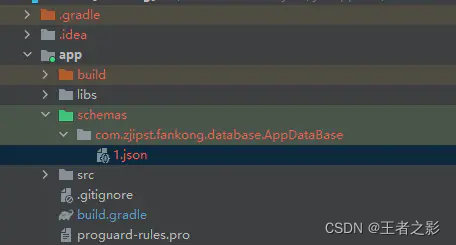
3. After configuration and compilation, JSON structure files of data will be generated in the following directory:

[Solved] ERROR OGG-01232 Receive TCP params error: TCP/IP error 104 (Connection reset by peer), endpoint:

Solution 1:
due to the inconsistency between the ports of the source end and the destination end,
the error message of the source end is error ogg-01232 receive TCP params error: TCP/IP error 104 (connection reset by peer), endpoint: 10.238.83.44:7847

Edit the process and view the configured ports

edit params 42P3  42P3 is the port number

The information configured in the discovery process is rmthost 10.238.83.44 mgrport 7839, compress

It is inconsistent with the port reporting an error. Modify the port Edit params 42p3 to prompt port 7847. Then restart the process start 42p3

Solution 2:
after modifying the port or starting the process, it indicates that the previous port is normal (the port of the destination end is the same as that of the source end)

Just delete the line of port and write it again Edit params 42p3 , and restart start 42p3 after writing

Solution 3:
roll forward the source side delivery process to a file and generate a new file point

alter extract 42P3, etrollover

[Solved] error: (-2:Unspecified error) The function is not implemented. Rebuild the library with Windows,

Error return

terminate called after throwing an instance of 'cv::Exception'
  what():  OpenCV(3.4.3) /home/chen/Downloads/opencv-3.4.3/modules/highgui/src/window.cpp
  :632: error: (-2:Unspecified error) The function is not implemented. Rebuild the library 
  with Windows, GTK+ 2.x or Carbon support. If you are on Ubuntu or Debian, install 
  libgtk2.0-dev and pkg-config, then re-run cmake or configure script in function 
  'cvShowImage'

Aborted (core dumped)

Error resolution

Execute the command according to the solution given by the system

sudo apt-get install libgtk2.0-dev
sudo apt-get install pkg-config

It doesn’t solve the problem

Cause of problem

The problem is that there is a problem with the compilation configuration when installing opencv
I execute cmake…
and the correct command is

cmake -D CMAKE_BUILD_TYPE=RELEASE -D CMAKE_INSTALL_PREFIX=/usr/local -D WITH_TBB=ON -D BUILD_NEW_PYTHON_SUPPORT=ON -D WITH_V4L=ON -D WITH_QT=ON -D WITH_OPENGL=ON ..

Solution:

Locate the folder where opencv is installed

cd /home/chen/Downloads/opencv-3.4.3
mkdir release
cd release
cmake -D CMAKE_BUILD_TYPE=RELEASE -D CMAKE_INSTALL_PREFIX=/usr/local -D WITH_TBB=ON -D BUILD_NEW_PYTHON_SUPPORT=ON -D WITH_V4L=ON -D WITH_QT=ON -D WITH_OPENGL=ON ..
sudo make
sudo make install 

Problem-solving…