
Solution:
1. Back up CentOS Linux baseos Repo file
mv CentOS-Linux-BaseOS.repo CentOS-Linux-BaseOS.repo.backup
2. Update baseos Repo file
curl -o /etc/yum.repos.d/CentOS-Base.repo3. Generate new Yum cache
yum makecache
Solution:
1. Back up CentOS Linux baseos Repo file
mv CentOS-Linux-BaseOS.repo CentOS-Linux-BaseOS.repo.backup
2. Update baseos Repo file
curl -o /etc/yum.repos.d/CentOS-Base.repo3. Generate new Yum cache
yum makecacheSolution: Debug configuration -> target -> Uncheck Use FSBL flow for initialization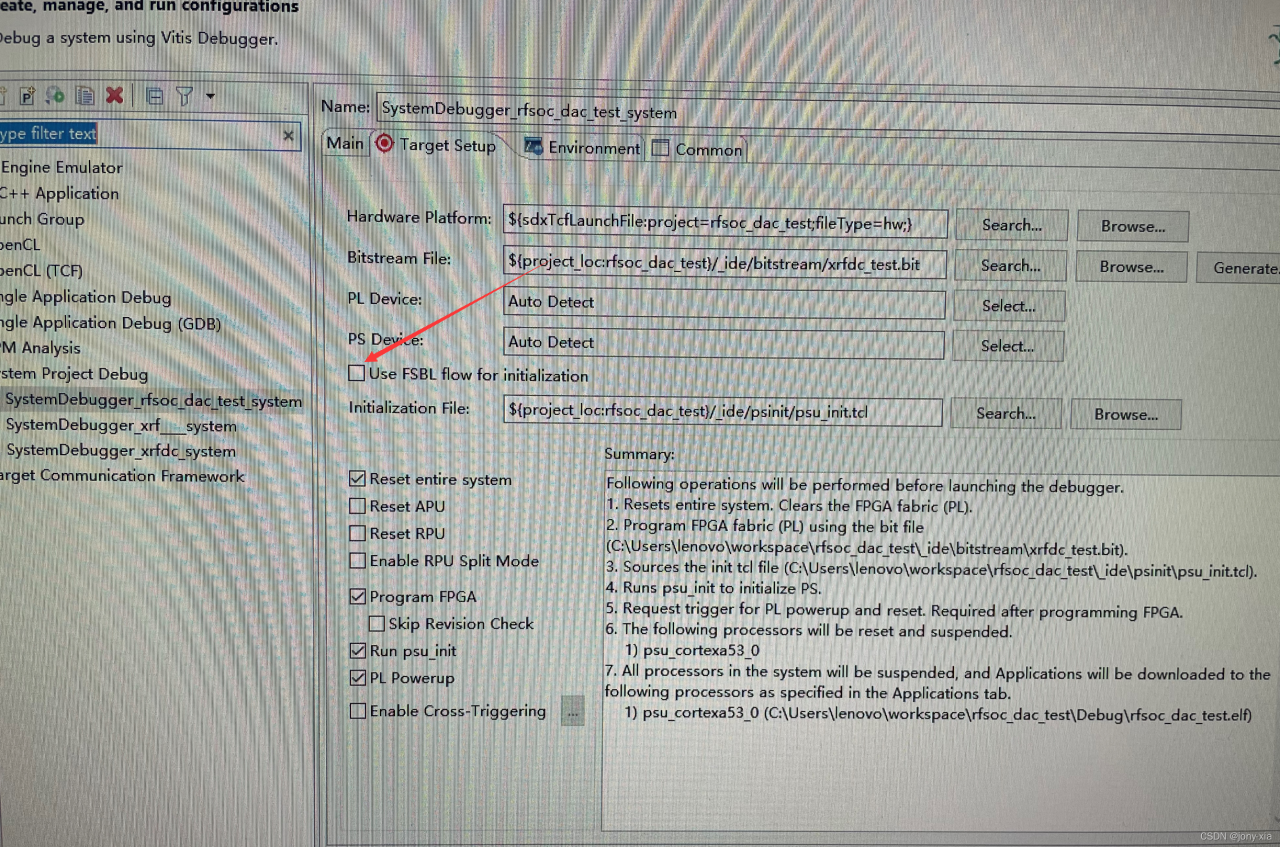
This bug should only appear in idea2020
Error:(3, 46) java: Program Package org.springframework.context.annotation does not exist

First, open the file in the upper left corner of the idea, and then click settings
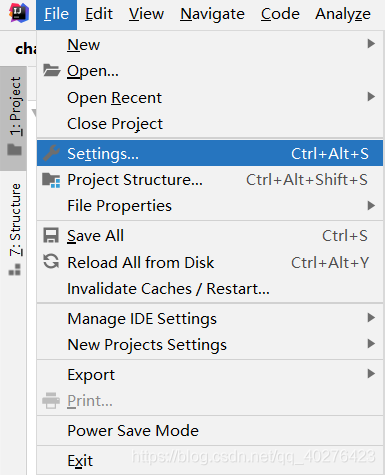
Then click build, execution, deployment > Build Tools > Maven > Runner
check delegate ide build/run actions to Maven
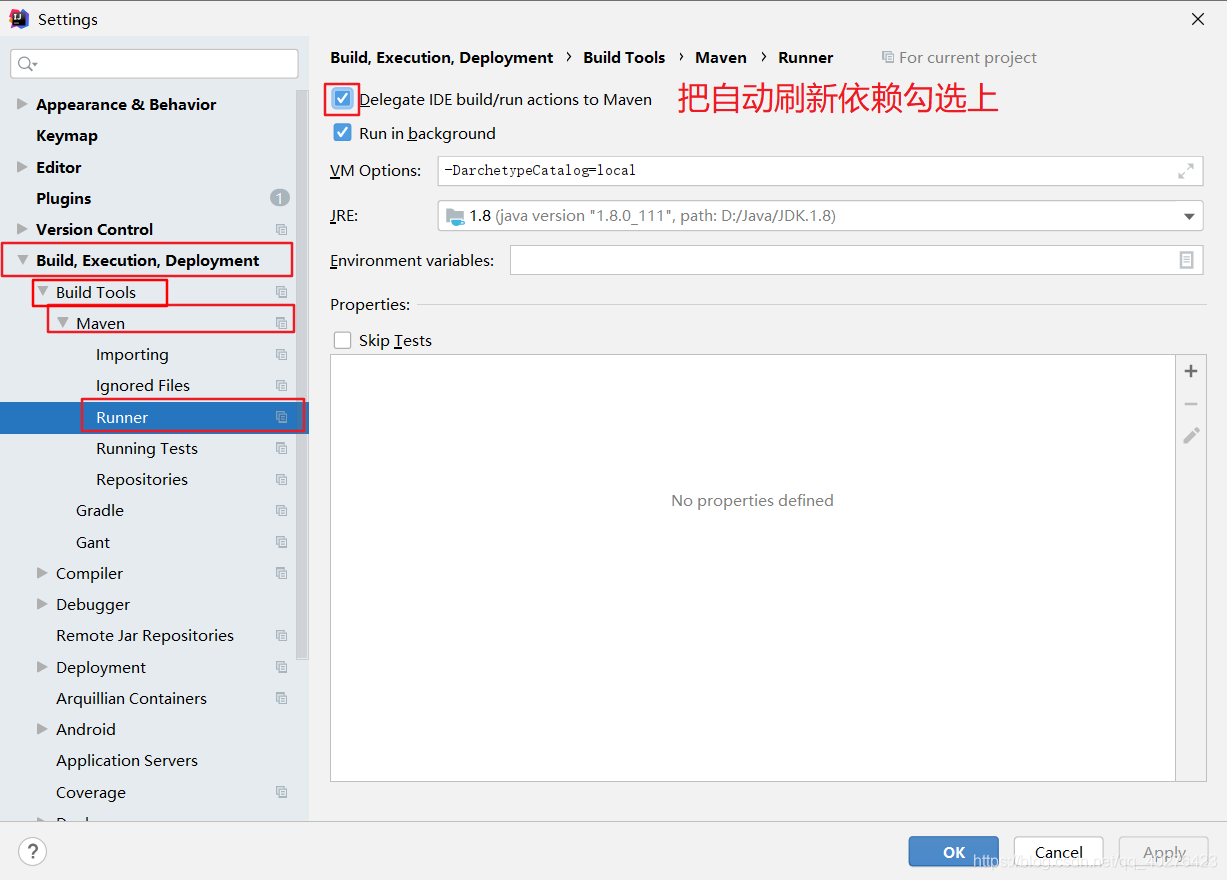
The problem will be solved easily
in addition, warm tips: only idea2020 will have this error, and there are many hidden bugs in 2020. It is recommended to upgrade to idea2021 as soon as possible
The project runs normally on H5. When it is debugged and opened with the real machine, the app reports an error and a white screen appears.

Scene reproduction:
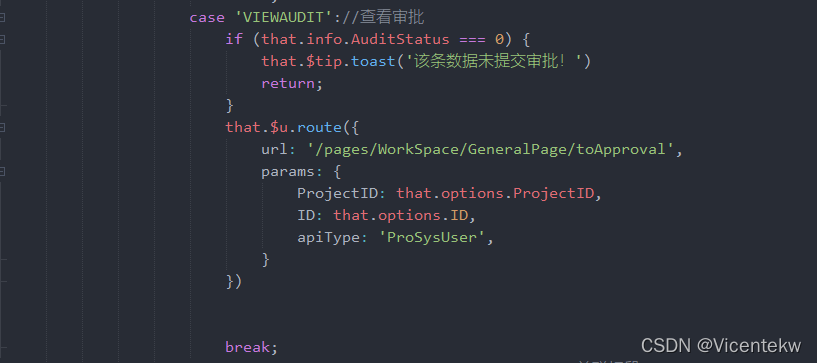
If the route jumps to the toapproval page, the above problem will occur.
Troubleshooting:
After step-by-step positioning and troubleshooting, the problem appears in the component of toapproval page
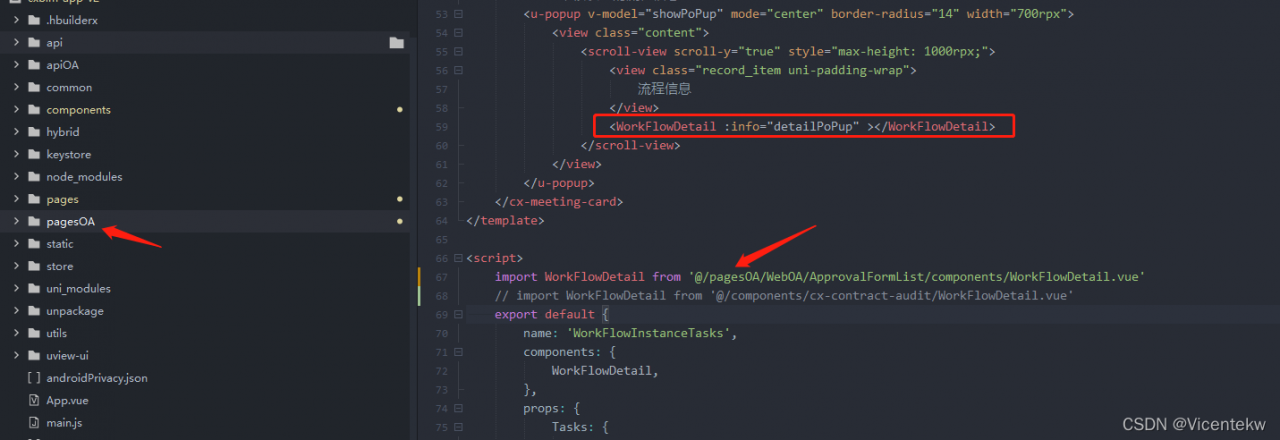
Firstly, the toapproval page is under the main business pages folder, but the workflowdetail component of this page is imported from the subcontracting pagesoa folder. This leads to a white screen in the business jump during real machine debugging. However, it is not so strict in H5 browser, so this problem will not occur and it is not easy to locate the problem.
Solution:
If you find the problem, you can easily solve it. You can change the name of this component, copy it to the components folder, and import it from the components folder again.

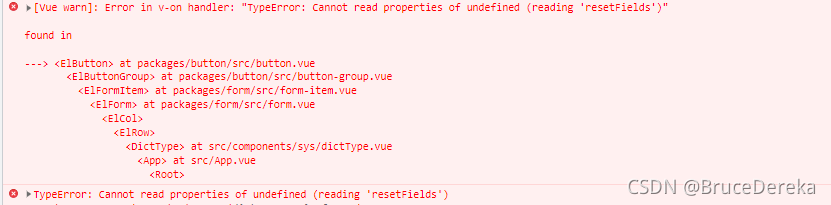
In the Vue element project, a new pop-up box function is added. I want to reset the form item every time I click Add
1.
this is used KaTeX parse error: Undefined control sequence:
atposition5:refs\–[–formName
Reset… Refs does not get the dom element, resulting in ‘resetfields’ of undefined
3. Solution:
Add code
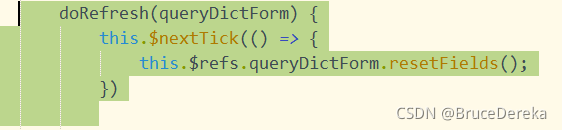
this.$nextTick(()=>{
  this.$refs.addForm.resetFields();
})
When starting tomcat, the following error is reported:
war exploded: Error during artifact deployment. See server log for details.
Solution:
Step 1: See someone online said that generally under WEB-INF, there should be applicationContext.xml file, even if not, the context should be specified in web.xml, so add the following code in web.xml:

Step 2: Be sure to write the bean in applicationContext.xml. (This is my own careless mistake, only used to remind everyone)
In short
This error has plagued me for a long time, I checked a lot of methods on the Internet but they do not apply, so this article is only used to help you troubleshoot, but also according to their own actual procedures to determine.
There is an error when using git to pull the GitHub code base
LibreSSL SSL_connect: SSL_ERROR_SYSCALL in connection to github.com:443
The solution is as follows:
1 Cancel global proxy first:
git config --global --unset https.proxy
git config --global --unset http.proxy
2. Configure global agent:
git config --global http.https://github.com.proxy socks5://127.0.0.1:1080
git config --global https.https://github.com.proxy socks5://127.0.0.1:1080
Note that 1080 is changed to the port number of its own proxy service
After including winnt.h, the compiler reports a lot of syntax errors, Error C2146, C4430, C2059, C2062, etc., which occur with various versions of visual studio, including vc6, 2010, 2017, 2019. But the compilation result has no other error location except winnt.h.
If you can’t try many methods, you can try the following:
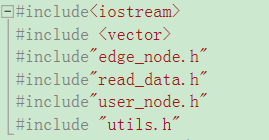
Note the order of header files:
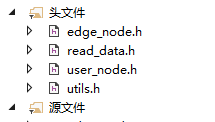
When importing files, it needs to be consistent with the running logic of the main program as follows:
Unhandled error during execution of scheduler flush. This is likely a Vue internals bug. Please open an issue at https://new-issue.vuejs.org/?repo=vuejs/vue -next
Error reason
An error is reported when vue2 turns to vue3
Error reporting reason
Nested functions are used in the way of global variables. When functions are executed, errors are reported and vue3 direct errors are reported

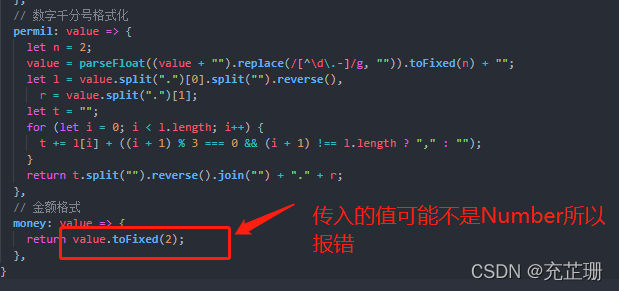
Check the error position
On the page with problems, correct the errors by commenting the code and quickly find the error location
Solution
The code in the function is written correctly
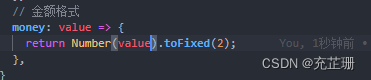
No error reported!
When running yolov5, run the script after installing pytorch
import torch
a=torch.cuda.is_available()
print(torch.__version__)
print(a)
An error occurred:
UserWarning: CUDA initialization: CUDA unknown error - this may be due to an incorrectly set up environment,
e.g. changing env variable CUDA_VISIBLE_DEVICES after program start. Setting the available devices to be zero.
 (Triggered internally at  /opt/conda/conda-bld/pytorch_1623448255797/work/c10/cuda/CUDAFunctions.cpp:115.)
  return torch._C._cuda_getDeviceCount() > 0
First, check whether the versions of the graphics card driver, CUDA, cudnn and pytorch match. If not, uninstall and reinstall the corresponding version.
CUDA10.2 Python3.8 pytorch1.8 no mistake.
If the versions are correct, you need to set the environment variable and enter sudo vim ~/.bashrc, add at the end:
# The first three lines are required when installing CUDA
export PATH=/usr/local/cuda/bin${PATH:+:${PATH}}
export LD_LIBRARY_PATH=/usr/local/cuda/lib64${LD_LIBRARY_PATH:+:${LD_LIBRARY_PATH}}
export CUDA_HOME=/usr/local/cuda/bin

export CUDA_VISIBLE_DEVICES=0
Save and exit. Try whether you can use CUDA.
If not, enter apt-get install NVIDIA-modprobe, and there should be no problem.
It will be OK when you installed apt-get install NVIDIA-modprobe
1. Description
Project started, Logback configuration error (FileNamePattern format and timeBasedFileNamingAndTriggeringPolicy did not correspond to it).
environment
IDE: 2021.3
spring boot: 2.5.6 (spring-boot-starter-logging: 2.5.6 --- logback-classic: 1.2.6)
Configuration 1:
	<FileNamePattern>${LOG_HOME}/info${LOG_NAME}_%d{yyyy-MM-dd}.part_%i.log</FileNamePattern>
    <timeBasedFileNamingAndTriggeringPolicy class="ch.qos.logback.core.rolling.DefaultTimeBasedFileNamingAndTriggeringPolicy" />
Configuration 2:
	<FileNamePattern>${LOG_HOME}/info${LOG_NAME}_%d{yyyy-MM-dd}.log</FileNamePattern>
    <timeBasedFileNamingAndTriggeringPolicy class="ch.qos.logback.core.rolling.SizeAndTimeBasedFNATP">
        <maxFileSize>10KB</maxFileSize>
    </timeBasedFileNamingAndTriggeringPolicy>
2. Problems
Question 1:
Logging system failed to initialize using configuration from 'null'
java.lang.IllegalStateException: Logback configuration error detected:
ERROR in c.q.l.core.rolling.DefaultTimeBasedFileNamingAndTriggeringPolicy - Filename pattern [/var/demo_log_logback_%d{yyyy-MM-dd}.part_%i.log] contains an integer token converter, i.e. %i, INCOMPATIBLE with this configuration. Remove it.
	at org.springframework.boot.logging.logback.LogbackLoggingSystem.loadConfiguration(LogbackLoggingSystem.java:179)
	at org.springframework.boot.logging.AbstractLoggingSystem.initializeWithConventions(AbstractLoggingSystem.java:80)
Question 2:
Logging system failed to initialize using configuration from 'null'
java.lang.IllegalStateException: Logback configuration error detected:
ERROR in ch.qos.logback.core.rolling.SizeAndTimeBasedFNATP@56cdfb3b - Missing integer token, that is %i, in FileNamePattern [/var/demo_log_logback_%d{yyyy-MM-dd}.log]
ERROR in ch.qos.logback.core.rolling.SizeAndTimeBasedFNATP@56cdfb3b - See also http://logback.qos.ch/codes.html#sat_missing_integer_token
	at org.springframework.boot.logging.logback.LogbackLoggingSystem.loadConfiguration(LogbackLoggingSystem.java:179)
	at org.springframework.boot.logging.AbstractLoggingSystem.initializeWithConventions(AbstractLoggingSystem.java:80)
reason:
DefaultTimeBasedFileNamingAndTriggeringPolicy: Do not Support %i
SizeAndTimeBasedFNATP: Need %i
3. Solution
Adjust the parameter value format of FileNamePattern.
4. Information
Logback manual appender label: https://logback.qos.ch/manual/appenders.html
ERROR SparkContext: Error initializing SparkContext.
org.apache.spark.SparkException: Could not parse Master URL: ‘<pyspark.conf.SparkConf object at 0x7fb5da40a850>’
Error Messages:
22/03/14 10:58:26 WARN NativeCodeLoader: Unable to load native-hadoop library for your platform... using builtin-java classes where applicable
Using Spark's default log4j profile: org/apache/spark/log4j-defaults.properties
22/03/14 10:58:26 INFO SparkContext: Running Spark version 3.0.0
22/03/14 10:58:26 INFO ResourceUtils: ==============================================================
22/03/14 10:58:26 INFO ResourceUtils: Resources for spark.driver:

22/03/14 10:58:26 INFO ResourceUtils: ==============================================================
22/03/14 10:58:26 INFO SparkContext: Submitted application: Spark01_FindWord.py
22/03/14 10:58:26 INFO SecurityManager: Changing view acls to: root
22/03/14 10:58:26 INFO SecurityManager: Changing modify acls to: root
22/03/14 10:58:26 INFO SecurityManager: Changing view acls groups to:
22/03/14 10:58:26 INFO SecurityManager: Changing modify acls groups to:
22/03/14 10:58:26 INFO SecurityManager: SecurityManager: authentication disabled; ui acls disabled; users  with view permissions: Set(root); groups with view permissions: Set(); users  with modify permissions: Set(root); groups with modify permissions: Set()
22/03/14 10:58:27 INFO Utils: Successfully started service 'sparkDriver' on port 44307.
22/03/14 10:58:27 INFO SparkEnv: Registering MapOutputTracker
22/03/14 10:58:27 INFO SparkEnv: Registering BlockManagerMaster
22/03/14 10:58:27 INFO BlockManagerMasterEndpoint: Using org.apache.spark.storage.DefaultTopologyMapper for getting topology information
22/03/14 10:58:27 INFO BlockManagerMasterEndpoint: BlockManagerMasterEndpoint up
22/03/14 10:58:27 INFO SparkEnv: Registering BlockManagerMasterHeartbeat
22/03/14 10:58:27 INFO DiskBlockManager: Created local directory at /tmp/blockmgr-a4554f81-46f5-4499-b6fd-2d5a9005552b
22/03/14 10:58:27 INFO MemoryStore: MemoryStore started with capacity 366.3 MiB
22/03/14 10:58:27 INFO SparkEnv: Registering OutputCommitCoordinator
22/03/14 10:58:27 WARN Utils: Service 'SparkUI' could not bind on port 4040. Attempting port 4041.
22/03/14 10:58:27 WARN Utils: Service 'SparkUI' could not bind on port 4041. Attempting port 4042.
22/03/14 10:58:27 WARN Utils: Service 'SparkUI' could not bind on port 4042. Attempting port 4043.
22/03/14 10:58:27 WARN Utils: Service 'SparkUI' could not bind on port 4043. Attempting port 4044.
22/03/14 10:58:27 WARN Utils: Service 'SparkUI' could not bind on port 4044. Attempting port 4045.
22/03/14 10:58:27 INFO Utils: Successfully started service 'SparkUI' on port 4045.
22/03/14 10:58:27 INFO SparkUI: Bound SparkUI to 0.0.0.0, and started at http://node01:4045
22/03/14 10:58:27 ERROR SparkContext: Error initializing SparkContext.
org.apache.spark.SparkException: Could not parse Master URL: '<pyspark.conf.SparkConf object at 0x7fb5da40a850>'
	at org.apache.spark.SparkContext$.org$apache$spark$SparkContext$$createTaskScheduler(SparkContext.scala:2924)
	at org.apache.spark.SparkContext.<init>(SparkContext.scala:528)
	at org.apache.spark.api.java.JavaSparkContext.<init>(JavaSparkContext.scala:58)
	at sun.reflect.NativeConstructorAccessorImpl.newInstance0(Native Method)
	at sun.reflect.NativeConstructorAccessorImpl.newInstance(NativeConstructorAccessorImpl.java:62)
	at sun.reflect.DelegatingConstructorAccessorImpl.newInstance(DelegatingConstructorAccessorImpl.java:45)
	at java.lang.reflect.Constructor.newInstance(Constructor.java:423)
	at py4j.reflection.MethodInvoker.invoke(MethodInvoker.java:247)
	at py4j.reflection.ReflectionEngine.invoke(ReflectionEngine.java:357)
	at py4j.Gateway.invoke(Gateway.java:238)
	at py4j.commands.ConstructorCommand.invokeConstructor(ConstructorCommand.java:80)
	at py4j.commands.ConstructorCommand.execute(ConstructorCommand.java:69)
	at py4j.GatewayConnection.run(GatewayConnection.java:238)
	at java.lang.Thread.run(Thread.java:748)
22/03/14 10:58:27 INFO SparkUI: Stopped Spark web UI at http://node01:4045
22/03/14 10:58:27 INFO MapOutputTrackerMasterEndpoint: MapOutputTrackerMasterEndpoint stopped!
22/03/14 10:58:27 INFO MemoryStore: MemoryStore cleared
22/03/14 10:58:27 INFO BlockManager: BlockManager stopped
22/03/14 10:58:28 INFO BlockManagerMaster: BlockManagerMaster stopped
22/03/14 10:58:28 WARN MetricsSystem: Stopping a MetricsSystem that is not running
22/03/14 10:58:28 INFO OutputCommitCoordinator$OutputCommitCoordinatorEndpoint: OutputCommitCoordinator stopped!
22/03/14 10:58:28 INFO SparkContext: Successfully stopped SparkContext
Traceback (most recent call last):
  File "/ext/servers/spark3.0/MyCode/Spark01_FindWord.py", line 4, in <module>
    sc = SparkContext(conf)
  File "/ext/servers/spark3.0/python/lib/pyspark.zip/pyspark/context.py", line 131, in __init__
  File "/ext/servers/spark3.0/python/lib/pyspark.zip/pyspark/context.py", line 193, in _do_init
  File "/ext/servers/spark3.0/python/lib/pyspark.zip/pyspark/context.py", line 310, in _initialize_context
  File "/ext/servers/spark3.0/python/lib/py4j-0.10.9-src.zip/py4j/java_gateway.py", line 1569, in __call__
  File "/ext/servers/spark3.0/python/lib/py4j-0.10.9-src.zip/py4j/protocol.py", line 328, in get_return_value
py4j.protocol.Py4JJavaError: An error occurred while calling None.org.apache.spark.api.java.JavaSparkContext.
: org.apache.spark.SparkException: Could not parse Master URL: '<pyspark.conf.SparkConf object at 0x7fb5da40a850>'
	at org.apache.spark.SparkContext$.org$apache$spark$SparkContext$$createTaskScheduler(SparkContext.scala:2924)
	at org.apache.spark.SparkContext.<init>(SparkContext.scala:528)
	at org.apache.spark.api.java.JavaSparkContext.<init>(JavaSparkContext.scala:58)
	at sun.reflect.NativeConstructorAccessorImpl.newInstance0(Native Method)
	at sun.reflect.NativeConstructorAccessorImpl.newInstance(NativeConstructorAccessorImpl.java:62)
	at sun.reflect.DelegatingConstructorAccessorImpl.newInstance(DelegatingConstructorAccessorImpl.java:45)
	at java.lang.reflect.Constructor.newInstance(Constructor.java:423)
	at py4j.reflection.MethodInvoker.invoke(MethodInvoker.java:247)
	at py4j.reflection.ReflectionEngine.invoke(ReflectionEngine.java:357)
	at py4j.Gateway.invoke(Gateway.java:238)
	at py4j.commands.ConstructorCommand.invokeConstructor(ConstructorCommand.java:80)
	at py4j.commands.ConstructorCommand.execute(ConstructorCommand.java:69)
	at py4j.GatewayConnection.run(GatewayConnection.java:238)
	at java.lang.Thread.run(Thread.java:748)

22/03/14 10:58:28 INFO ShutdownHookManager: Shutdown hook called
22/03/14 10:58:28 INFO ShutdownHookManager: Deleting directory /tmp/spark-32987338-486b-448a-b9f4-3cf4d68aa85d
22/03/14 10:58:28 INFO ShutdownHookManager: Deleting directory /tmp/spark-2160f024-2430-4ab1-b5ed-5c3afc402351
(Spark_python) root@node01:/ext/servers/spark3.0/MyCode# spark-submit Spark01_FindWord.py
Modification method
error code
from pyspark import SparkConf, SparkContext

conf = SparkConf().setMaster("local").setAppName("MyApp")
sc = SparkContext(conf)
hdfs_file = "hdfs://node01:/user/hadoop/test06.txt"
hdfs_rdd = sc.textFile(hdfs_file).count()
print(hdfs_rdd)
Modified code
from pyspark import SparkConf, SparkContext

conf = SparkConf().setMaster("local").setAppName("MyApp")
sc = SparkContext(conf=conf)
hdfs_file = "hdfs://node01:/user/hadoop/test06.txt"
hdfs_rdd = sc.textFile(hdfs_file).count()
print(hdfs_rdd)
Summary
The first is the parameter transfer of the sparkcontext method. If we don’t specify it, you can’t write conf directly for default parameter transfer, so an error will be reported later, so we need to specify the parameters