Author Archives: Robins

[Solved] element-plus Error: Failed to resolve component

vue3 & element-plus Project Error:

Failed to resolve component: el-form If this is a native custom element, make sure to exclude it
Failed to resolve component el-form-item
Failed to resolve component Descriptions
Component inside <Transition> renders non-element root node that cannot be animated.

Reason:
On-demand introduction of element

Solution:
1. Enter in the page script

import { ElForm } from "element-plus";

2. Add commonly used ones to element-plus files

import {
    ElForm,
}

const components = [
    ElForm,
]

Done!

Errorjava Compilation failed internal java compiler error [Solved]

Error phenomenon

When using idea to import a new project or upgrade idea or create a new project, the following exception message will appear:

Error:java: Compilation failed: internal java compiler error 

Cause of error

This error is mainly caused by the JDK version. There are two reasons: the compiled version does not match, and the current project JDK version does not support.

View the JDK of the project

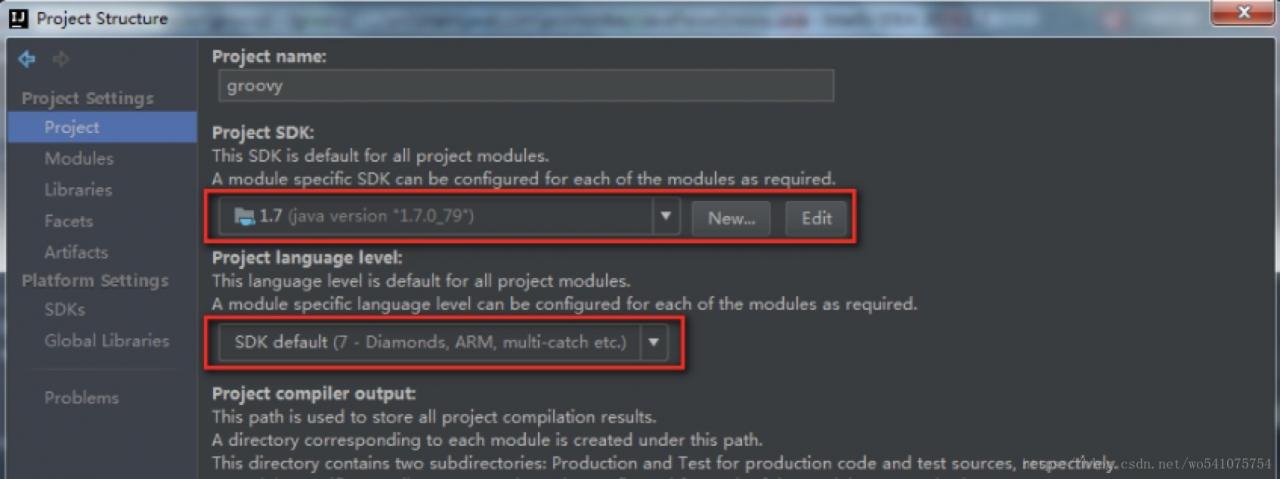
File -> Project Structure-> Project Settings -> Project or use the shortcut Ctrl + Alt + Shift + s to open the JDK configuration of the project:

Check whether these two points are consistent with the target JDK.

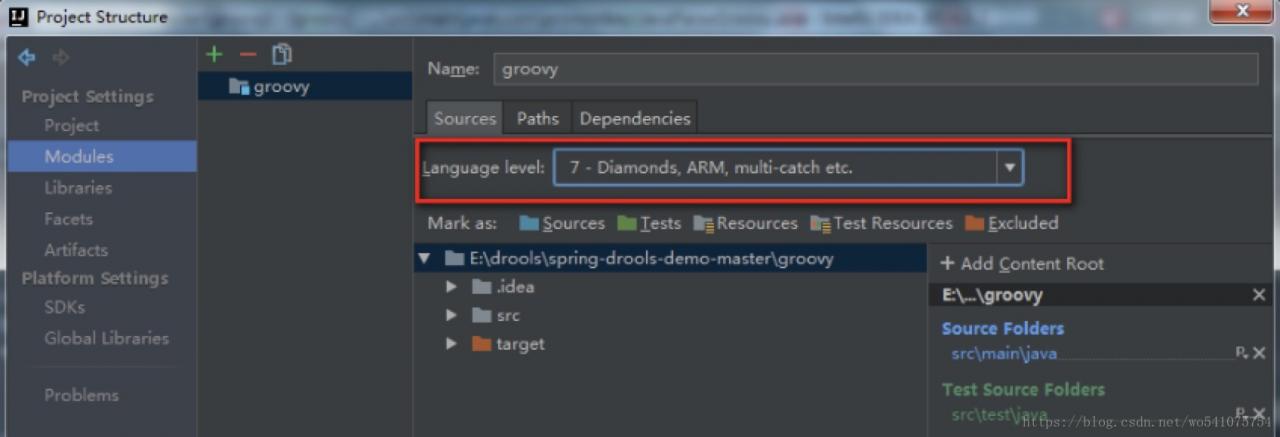
View the JDK of the project

Click modules in the figure above to view the corresponding JDK version:

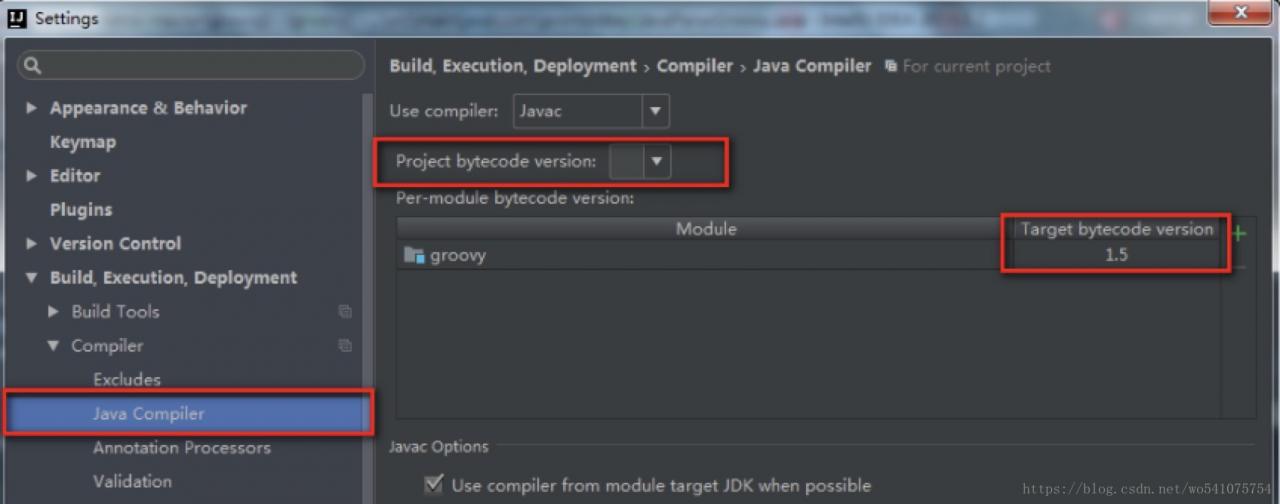
View java compiler version

When importing Java projects, the probability of this problem is high.

To solve this problem, reopening or modifying the contents of the pom file (Maven project) is likely to cause the JDK version to change back to 1.5. If the project is a pojd file, you can specify the relevant information:

<build>
        <plugins>
            <plugin>
                <groupId>org.apache.maven.plugins</groupId>
                <artifactId>maven-compiler-plugin</artifactId>
                <configuration>
                    <source>1.7</source>
                    <target>1.7</target>
                </configuration>
            </plugin>
        </plugins>
    </build>

[Solved] Execution failed for task ‘:app:mergeDebugJavaResource‘.

Execution failed for task ‘:app:mergeDebugJavaResource’.

> A failure occurred while executing com.android.build.gradle.internal.tasks.MergeJavaResWorkAction
   > 2 files found with path 'META-INF/library_release.kotlin_module' from inputs:
      - C:\Users\pc5\.gradle\caches\transforms-2\files-2.1\ce2b46fc1c5f5af8ed7abfa332710f84\zoomlayout-1.9.0\jars\classes.jar
      - C:\Users\pc5\.gradle\caches\transforms-2\files-2.1\a562c978ea1815ba0e02c6c6a3c46b97\egloo-0.6.1\jars\classes.jar
     Adding a packagingOptions block may help, please refer to
     https://google.github.io/android-gradle-dsl/current/com.android.build.gradle.internal.dsl.PackagingOptions.html
     for more information

* Try:
Run with --stacktrace option to get the stack trace. Run with --info or --debug option to get more log output. Run with --scan to get full insights.

When Importing the zoomlayou third-party library, the installation reports an error, Clean Project, clearing the cache and restarting are also invalid

Solution:
Add the following code to the module’s build.gradle under the android tab

android {
	packagingOptions {
      	pickFirst "META-INF/library_release.kotlin_module"
	}
}
or
android {
	packagingOptions {
      	exclude "META-INF/library_release.kotlin_module"
	}
}

Reference:
https://stackoverflow.com/questions/60684730/error-execution-failed-for-task-appmergedebugjavaresource.

ElasticsearchStatusException[Elasticsearch exception [type=search_phase_execution_exception, reason=all shards failed]]

Phenomenon
When doing a position search using elasticsearch, an error is reported.
ElasticsearchStatusException[Elasticsearch exception [type=search_phase_execution_exception, reason=all shards failed]]

I am using GeoDistanceQueryBuilder for ElasticSearch’s geolocation search and sorting

Searching
Later, I logged in to the elasticsearch server to check the error logs and found the following errors.
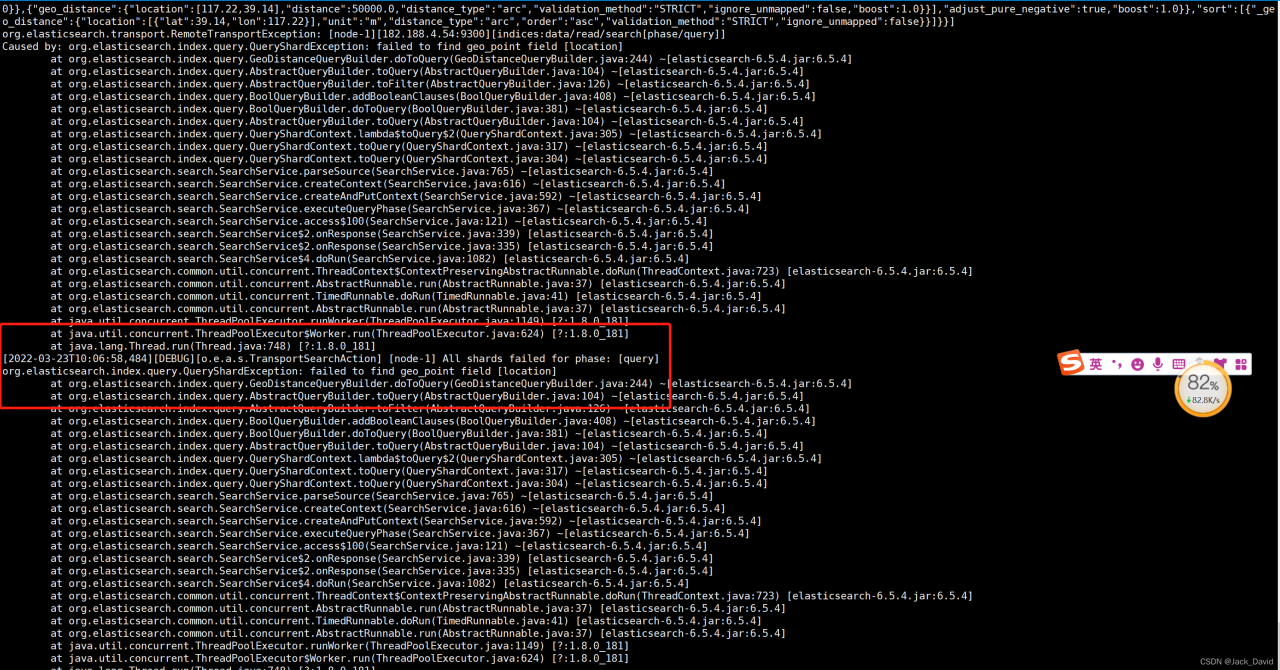
That is, my location is not of the geo_point type, and this problem has been troubleshooting for quite a while.
The reason for the problem is simple, it is because my index is automatically created by IndexRequest and there will be problems.

For example.

 String string = JSONObject.fromObject(entity).toString();
            IndexRequest indexRequest = new IndexRequest(INDEX).type(DOC).id(INDEX + "_" + entity.getId()).source(string, XContentType.JSON);

            bulkRequest.add(indexRequest);

Solution:
Create the index manually, or through Java code. Be sure to note that the type of the attribute corresponding to the mapping must be geo_point to work

Here I change the index, position means position information
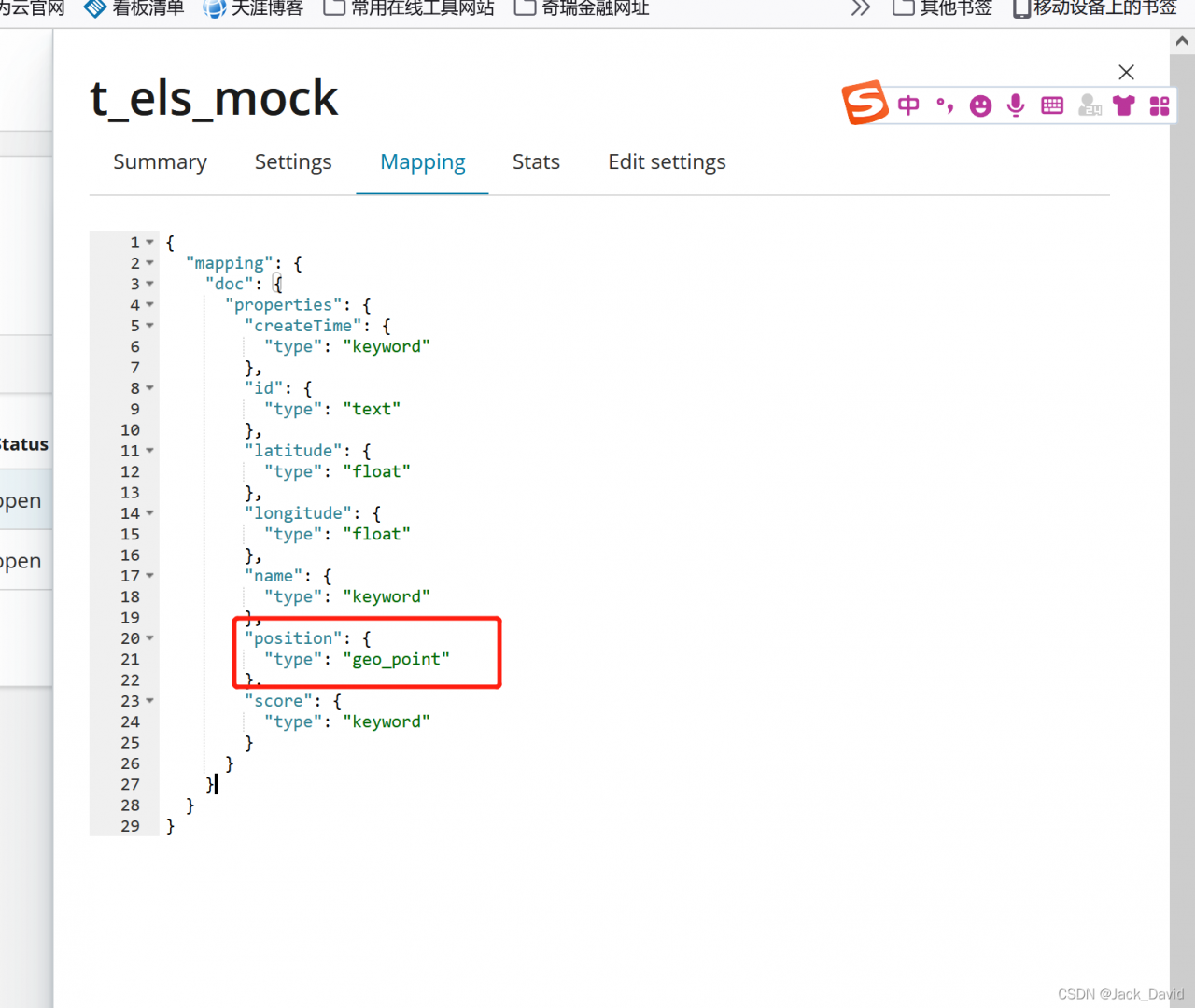
# use java to manually create the index

public class CreateElsIndexMain {

    static final String INDEX_NAME = "t_els_mock";

    @Test
    public void test() throws Exception {
        RestHighLevelClient client = new RestHighLevelClient(RestClient.builder(
                new HttpHost(
                        "127.0.0.1",
                        9200,
                        "http"
                )));
        boolean exists = checkExists(client);
        if (exists) {
            deleteIndex(client);
        }
        createIndex(client);

    }

    public static boolean checkExists(RestHighLevelClient client) throws Exception {
        GetIndexRequest existsRequest = new GetIndexRequest();
        existsRequest.indices(INDEX_NAME);
        boolean exists = client.indices().exists(existsRequest, RequestOptions.DEFAULT);
        return exists;
    }

    public static void createIndex(RestHighLevelClient client) throws Exception {
        Settings.Builder setting = Settings.builder().put("number_of_shards", "5").put("number_of_replicas", 1);
        XContentBuilder mappings = JsonXContent.contentBuilder().
                startObject().startObject("properties").startObject("id").field("type", "text").endObject().
                startObject("name").field("type", "keyword").endObject().
                startObject("createTime").field("type", "keyword").endObject().
                startObject("score").field("type","keyword").endObject().
                startObject("longitude").field("type","float").endObject().
                startObject("latitude").field("type","float").endObject().
                startObject("position").field("type","geo_point").endObject().endObject().endObject();
        CreateIndexRequest request = new CreateIndexRequest(INDEX_NAME).settings(setting).mapping("doc",mappings);
        CreateIndexResponse createIndexResponse = client.indices().create(request, RequestOptions.DEFAULT);
        System.out.println(createIndexResponse);
    }


    public static void deleteIndex(RestHighLevelClient client) throws Exception {
        DeleteIndexRequest deleteIndexRequest = new DeleteIndexRequest();//To delete an index, also create an object to accept the index name
        deleteIndexRequest.indices(INDEX_NAME);//pass the index name
        //execute the delete method for deletion.
        AcknowledgedResponse delete = client.indices().delete(deleteIndexRequest, RequestOptions.DEFAULT);
    }

}

Kibana data

We can use the test data to put the data into es and view the data of the index through kibana’s dev tools, as shown in the following example:
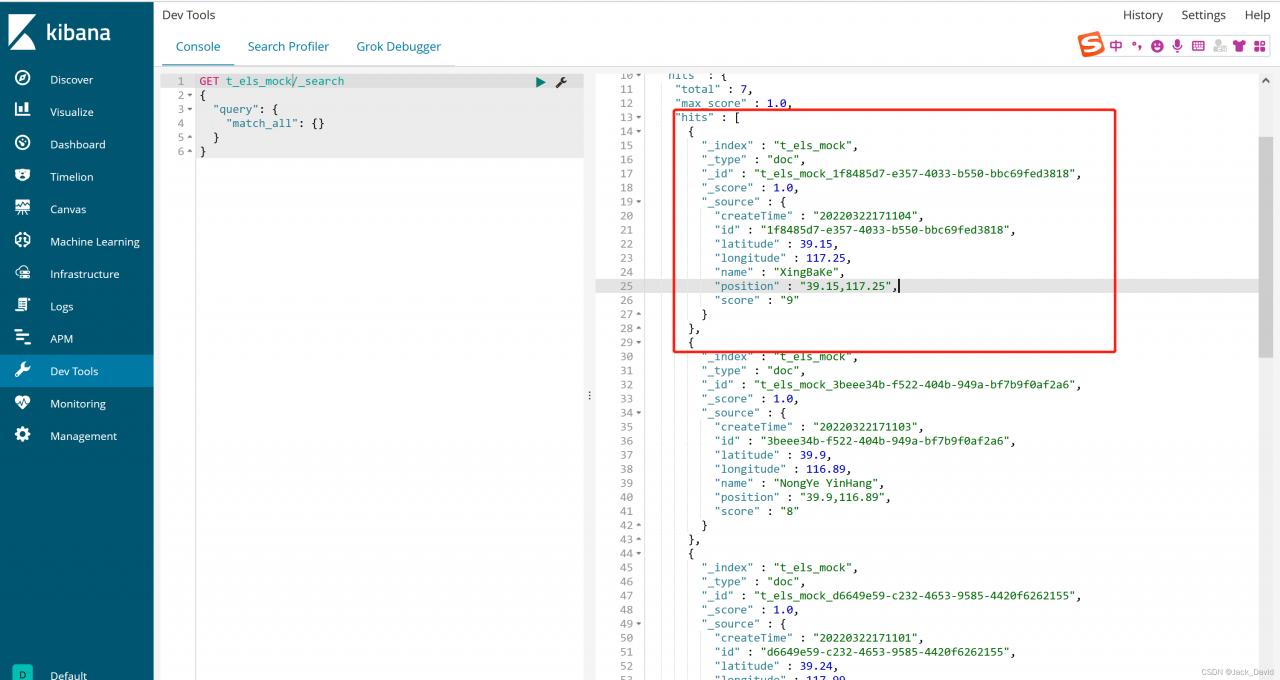
Code to add data to es


 @Autowired
    private RestHighLevelClient client;

    private static final String INDEX = "t_els_mock";

    String DOC = "doc";

public void addData(){
        BulkRequest bulkRequest = new BulkRequest();
        List<MockLocationEntity> entities = getEntities();
        for (MockLocationEntity entity : entities){
            String string = JSONObject.fromObject(entity).toString();
            IndexRequest indexRequest = new IndexRequest(INDEX).type(DOC).id(INDEX + "_" + entity.getId()).source(string, XContentType.JSON);

            bulkRequest.add(indexRequest);
        }
        try {
            BulkResponse bulk = client.bulk(bulkRequest, RequestOptions.DEFAULT);
            
        } catch (IOException e) {
        }
    }

    private static List<MockLocationEntity> getEntities(){
        List<MockLocationEntity> list = new ArrayList<>();

        MockLocationEntity one = new MockLocationEntity();
        one.setId(UUID.randomUUID().toString());
        one.setName("YuanYan GuoJi");
        one.setScore("10");
        one.setCreateTime("20220322145900");
        one.setLongitude(117.20);
        one.setLatitude(38.14);
        one.setPosition(one.getLatitude() + "," +one.getLongitude());


        MockLocationEntity two = new MockLocationEntity();
        two.setId(UUID.randomUUID().toString());
        two.setName("WenGuang DaSha");
        two.setScore("9");
        two.setCreateTime("20220322171100");
        two.setLongitude(116.01);
        two.setLatitude(38.89);
        two.setPosition(two.getLatitude() + "," +two.getLongitude());


        MockLocationEntity three = new MockLocationEntity();
        three.setId(UUID.randomUUID().toString());
        three.setName("NeiMengGu JiuDian");
        three.setScore("8");
        three.setCreateTime("20220322171101");
        three.setLongitude(117.99);
        three.setLatitude(39.24);
        three.setPosition(three.getLatitude() + "," +three.getLongitude());


        MockLocationEntity four = new MockLocationEntity();
        four.setId(UUID.randomUUID().toString());
        four.setName("GuoXianSheng");
        four.setScore("10");
        four.setCreateTime("20220322171102");
        four.setLongitude(117.20);
        four.setLatitude(39.50);
        four.setPosition(four.getLatitude() + "," +four.getLongitude());
        Location fourLocation = new Location();


        MockLocationEntity five = new MockLocationEntity();
        five.setId(UUID.randomUUID().toString());
        five.setName("NongYe YinHang");
        five.setScore("8");
        five.setCreateTime("20220322171103");
        five.setLongitude(116.89);
        five.setLatitude(39.90);
        five.setPosition(five.getLatitude() + "," +five.getLongitude());
        Location fiveLocation = new Location();

        MockLocationEntity six = new MockLocationEntity();
        six.setId(UUID.randomUUID().toString());
        six.setName("XingBaKe");
        six.setScore("9");
        six.setCreateTime("20220322171104");
        six.setLongitude(117.25);
        six.setLatitude(39.15);
        six.setPosition(six.getLatitude() + "," +six.getLongitude());


        MockLocationEntity seven = new MockLocationEntity();
        seven.setId(UUID.randomUUID().toString());
        seven.setName("JuFuYuan");
        seven.setScore("6");
        seven.setCreateTime("20220322171104");
        seven.setLongitude(117.30);
        seven.setLatitude(39.18);
        seven.setPosition(seven.getLatitude() + "," +seven.getLongitude());

        list.add(one);
        list.add(two);
        list.add(three);
        list.add(four);
        list.add(five);
        list.add(six);
        list.add(seven);

        return list;
    }


[Solved] Docker Staratup Error: Failed to start Docker Application Container Engineadsafdsad.

I’ve been learning k8s recently. The docker container needs to be installed in it. It can’t be started after installation. Record the solution

Because the docker here is in the form of compressed package, and it is not installed by yum. The solution is not necessarily universal

When I execute: systemctl restart docker, it will report an error

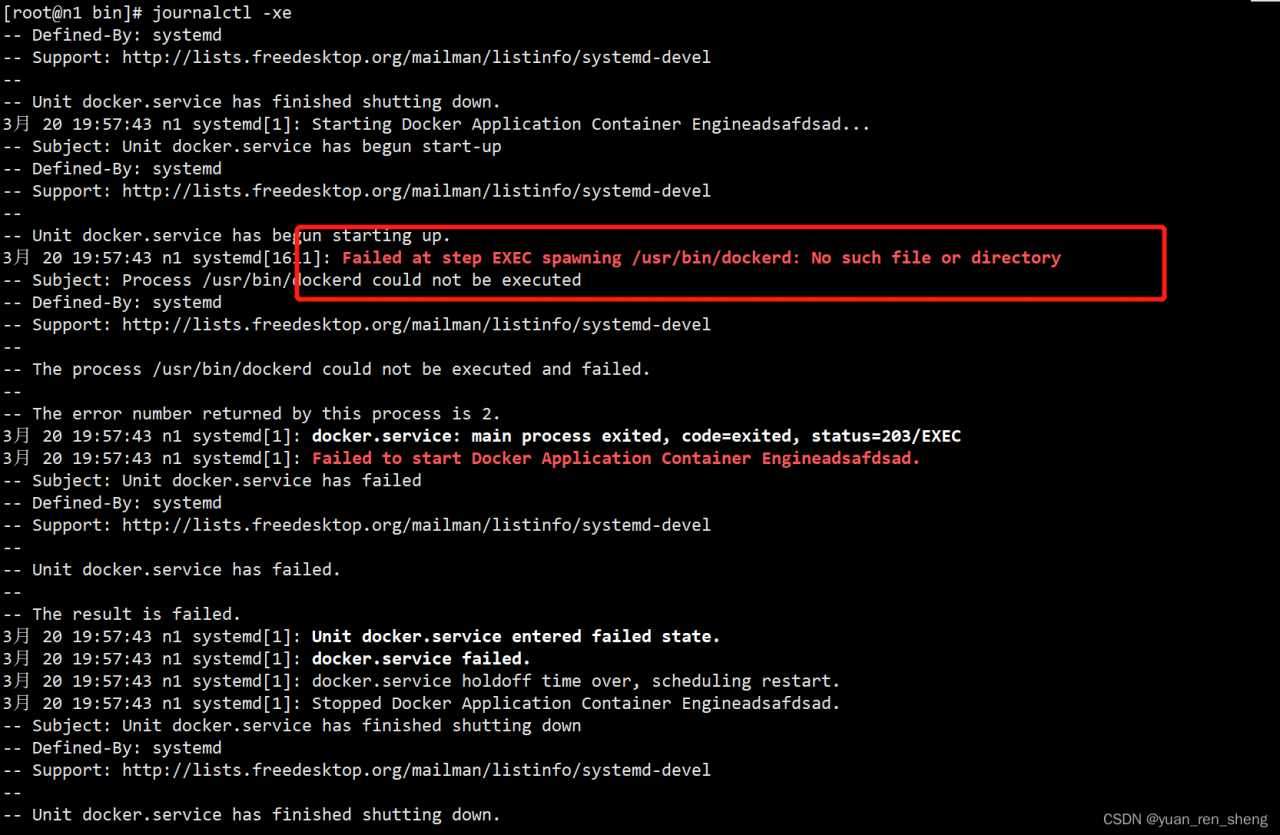
Then I followed the prompt that he reported an error: journalctl – Xe

He didn’t find the executable file in usr/bin. In the docker folder I unzipped, I directly moved the docker folder to /usr/bin/ directory. As a result,

Solution: remove the folder in the outer layer of docker and copy the executable file directly to the /usr/bin directory.

[Solved] Matlab Code generate error: failed to generate all binary outputs

When generating Matlab code, the following error is sometimes reported: Failed to generate all binary outputs

You can check if there are any problems as follows.

1. Check if the path of the executed model has spaces in it, if so, delete the spaces or replace them with underscores.
Reason: Sometimes the compiler will remove the space key from the path by default, resulting in incorrect path identification.
2. check whether the compiler path is executed with spaces, if so, reinstall it under the path without spaces
Cause: the same as above.
3. Modify the configuration: Configure–Code Generation–Templates–Generate an exanmple program (check), this option will generate the ert_main.c file after the check.
4. modify the configuration: Configure—Code Generation—Generate code only (check), this option will not execute the makefile when the code is generated.

If it still cannot be solved, please refer to:
https://www.mathworks.com/matlabcentral/answers/474572-failed-to-generate-all-binary-outputs-works-externally-but-will-not-deploy

[Solved] Failed loading positionFile: /opt/module/flume/taildir_position.json

Error Message: 2022-03-22 15:55:57,000 (lifecycleSupervisor-1-0) [ERROR – org.apache.flume.source.taildir.ReliableTaildirEventReader.loadPositionFile(ReliableTaildirEventReader.java:147)] Failed loading positionFile: /opt/module/flume/taildir_position.json

use flume1.9 tildir source, memory channel, hdfs sink to write a configuration file, use in hdfs no file into, and then I look at the log file, found the above error


My profile

Profile:

a3.sources = r3
a3.sinks = k3
a3.channels = c3

a3.sources.r3.type = TAILDIR
a3.sources.r3.positionFile = /opt/module/flume/taildir_position.json
a3.sources.r3.filegroups = f1 f2
a3.sources.r3.filegroups.f1 = /opt/module/flume/files/.*log.*
a3.sources.r3.filegroups.f2 = /opt/module/flume/files2/.*file.*


# Describe the sink
a3.sinks.k3.type = hdfs
a3.sinks.k3.hdfs.path = hdfs://hadoop102:8020/flume/test2/%Y%m%d/%H
#Prefix of the uploaded file
a3.sinks.k3.hdfs.filePrefix = upload-
# whether to scroll the folder according to time
a3.sinks.k3.hdfs.round = true
# how many time units to create a new folder
a3.sinks.k3.hdfs.roundValue = 1
# redefine the units of time
a3.sinks.k3.hdfs.roundUnit = hour
# whether to use the local timestamp
a3.sinks.k3.hdfs.useLocalTimeStamp = true
# accumulate how many Event before flush to HDFS once
a3.sinks.k3.hdfs.batchSize = 100
# set the file type, can support compression
a3.sinks.k3.hdfs.fileType = DataStream
# how often to generate a new file
a3.sinks.k3.hdfs.rollInterval = 600
# set the scrolling size of each file is about 128M
a3.sinks.k3.hdfs.rollSize = 134217700
# file scrolling and the number of Event has nothing to do with
a3.sinks.k3.hdfs.rollCount = 0
#Minimum number of redundancies
a3.sinks.k3.hdfs.minBlockReplicas = 1

# Use a channel which buffers events in memory
a3.channels.c3.type = memory
a3.channels.c3.capacity = 1000
a3.channels.c3.transactionCapacity = 100

# Bind the source and sink to the channel
a3.sources.r3.channels = c3
a3.sinks.k3.channel = c3

Solution:

Modify
a3.sources.r3.positionFile = /opt/module/flume/taildir_position.json,
to
a3.sources.r3.positionFile = /opt/module/flume/taildir.json

a3.sources = r3
a3.sinks = k3
a3.channels = c3

a3.sources.r3.type = TAILDIR
a3.sources.r3.positionFile = /opt/module/flume/taildir_position.json
a3.sources.r3.filegroups = f1 f2
a3.sources.r3.filegroups.f1 = /opt/module/flume/files/.*log.*
a3.sources.r3.filegroups.f2 = /opt/module/flume/files2/.*file.*


# Describe the sink
a3.sinks.k3.type = hdfs
a3.sinks.k3.hdfs.path = hdfs://hadoop102:8020/flume/test2/%Y%m%d/%H
#Prefix of the uploaded file
a3.sinks.k3.hdfs.filePrefix = upload-
# whether to scroll the folder according to time
a3.sinks.k3.hdfs.round = true
# how many time units to create a new folder
a3.sinks.k3.hdfs.roundValue = 1
# redefine the units of time
a3.sinks.k3.hdfs.roundUnit = hour
# whether to use the local timestamp
a3.sinks.k3.hdfs.useLocalTimeStamp = true
# accumulate how many Event before flush to HDFS once
a3.sinks.k3.hdfs.batchSize = 100
# set the file type, can support compression
a3.sinks.k3.hdfs.fileType = DataStream
# how often to generate a new file
a3.sinks.k3.hdfs.rollInterval = 600
# set the scrolling size of each file is about 128M
a3.sinks.k3.hdfs.rollSize = 134217700
# file scrolling and the number of Event has nothing to do with
a3.sinks.k3.hdfs.rollCount = 0
#Minimum number of redundancies
a3.sinks.k3.hdfs.minBlockReplicas = 1

# Use a channel which buffers events in memory
a3.channels.c3.type = memory
a3.channels.c3.capacity = 1000
a3.channels.c3.transactionCapacity = 100

# Bind the source and sink to the channel
a3.sources.r3.channels = c3
a3.sinks.k3.channel = c3

Failed to restart redis-server.service Unit not found [How to Solve]

Failed to restart redis-server. service: Unit not found.

1. Problem description

Redis-5.0.5 is compiled and installed on CentOS 7.8. The port is 6579. The following error occurs when restarting:

# systemctl start redis
Redirecting to /bin/systemctl restart redis-server.service
Failed to restart redis-server.service: Unit not found.

2. Cause analysis

This is because during compilation and installation, redis registers the service name redis_6579, and the full service name is required for startup.

3. Correct startup mode

# systemctl start redis_6579
or
# service redis_6579 start

Android connection to cloud MySQL error: java.lang.NoClassDefFoundError Failed resolution of LjavasqlSQLType

The error information is as follows:

E/AndroidRuntime: FATAL EXCEPTION: Thread-4
    Process: com.example.NCEPU, PID: 19597
    java.lang.NoClassDefFoundError: Failed resolution of: Ljava/sql/SQLType;
        at com.mysql.cj.jdbc.DatabaseMetaData.getInstance(DatabaseMetaData.java:746)
        at com.mysql.cj.jdbc.ConnectionImpl.getMetaData(ConnectionImpl.java:1170)
        at com.mysql.cj.jdbc.ConnectionImpl.<init>(ConnectionImpl.java:447)
        at com.mysql.cj.jdbc.ConnectionImpl.getInstance(ConnectionImpl.java:246)
        at com.mysql.cj.jdbc.NonRegisteringDriver.connect(NonRegisteringDriver.java:197)
        at java.sql.DriverManager.getConnection(DriverManager.java:580)
        at java.sql.DriverManager.getConnection(DriverManager.java:218)
        at com.example.NCEPU.Utils.MySQLUtil$1.run(MySQLUtil.java:20)
        at java.lang.Thread.run(Thread.java:929)
     Caused by: java.lang.ClassNotFoundException: Didn't find class "java.sql.SQLType" on path: DexPathList[[zip file "/data/app/com.example.NCEPU-ONfkLzQBKVHb0mVXKR3p5g==/base.apk"],nativeLibraryDirectories=[/data/app/com.example.NCEPU-ONfkLzQBKVHb0mVXKR3p5g==/lib/arm64, /data/app/com.example.NCEPU-ONfkLzQBKVHb0mVXKR3p5g==/base.apk!/lib/arm64-v8a, /system/lib64, /system/product/lib64, /hw_product/lib64, /system/product/lib64]]
        at dalvik.system.BaseDexClassLoader.findClass(BaseDexClassLoader.java:196)
        at java.lang.ClassLoader.loadClass(ClassLoader.java:379)
        at java.lang.ClassLoader.loadClass(ClassLoader.java:312)
        at com.mysql.cj.jdbc.DatabaseMetaData.getInstance(DatabaseMetaData.java:746) 
        at com.mysql.cj.jdbc.ConnectionImpl.getMetaData(ConnectionImpl.java:1170) 
        at com.mysql.cj.jdbc.ConnectionImpl.<init>(ConnectionImpl.java:447) 
        at com.mysql.cj.jdbc.ConnectionImpl.getInstance(ConnectionImpl.java:246) 
        at com.mysql.cj.jdbc.NonRegisteringDriver.connect(NonRegisteringDriver.java:197) 
        at java.sql.DriverManager.getConnection(DriverManager.java:580) 
        at java.sql.DriverManager.getConnection(DriverManager.java:218) 
        at com.example.NCEPU.Utils.MySQLUtil$1.run(MySQLUtil.java:20) 
        at java.lang.Thread.run(Thread.java:929) 
W/libEGL: EGLNativeWindowType 0x6f3882b950 disconnect failed
I/Process: Sending signal. PID: 19597 SIG: 9

Problem analysis: the jar package version of MySQL is too high. I used the latest version: mysql-connector-java-8.0.21.jar, loading driver:

Class.forName("com.mysql.cj.jdbc.Driver");
String url = "jdbc:mysql://yourip:port/sheetname?useSSL=false&allowPublicKeyRetrieval=true&serverTimezone=UTC";
connection = DriverManager.getConnection(url, user, password);

Problem solved: jar version lower, here I used the official website to download mysql-connector-java-5.1.49.jar, note that after changing to a lower version to load the driver to become.

Class.forName("com.mysql.jdbc.Driver");

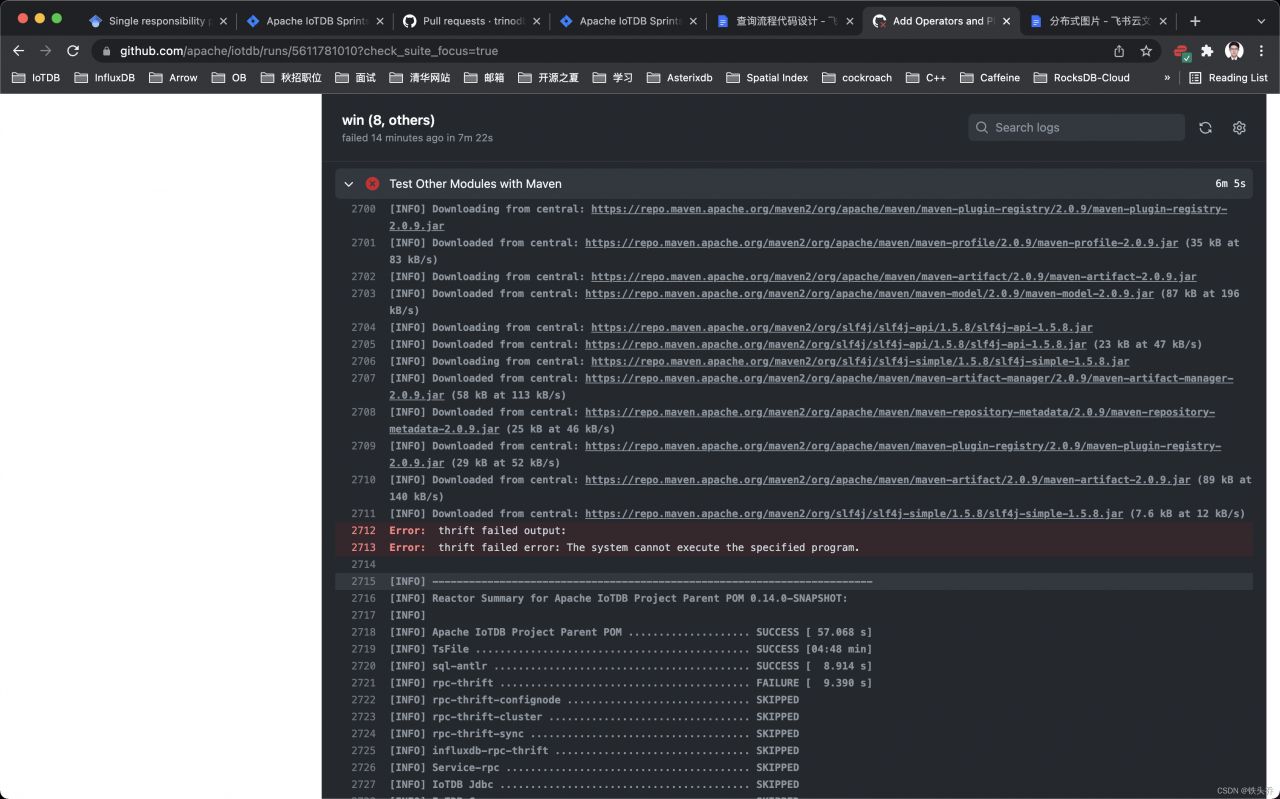
[Solved] thrift failed error: The system cannot execute the specified program.

Error:
Apache IoTDB CI Error:
thrift failed output:
thrift failed error: The system cannot execute the specified program.

Reason:

		<profile>
            <id>windows</id>
            <activation>
                <os>
                    <family>windows</family>
                </os>
            </activation>
            <properties>
                <os.classifier>windows-x86_64</os.classifier>
                <thrift.download-url>http://artfiles.org/apache.org/thrift/${thrift.version}/thrift-${thrift.version}.exe</thrift.download-url>
                <thrift.executable>thrift-${thrift.version}-win-x86_64.exe</thrift.executable>
                <thrift.skip-making-executable>true</thrift.skip-making-executable>
                <thrift.exec-cmd.executable>echo</thrift.exec-cmd.executable>
                <thrift.exec-cmd.args>"Do nothing"</thrift.exec-cmd.args>
            </properties>
        </profile>

The reason is that thrift has changed the download link, thrift.download-url no executable file found:

http://artfiles.org/apache.org/thrift/${thrift.version}/thrift-${thrift.version}.exe

Solution:

Just update the link

http://archive.apache.org/dist/thrift/${thrift.version}/thrift-${thrift.version}.exe

https://github.com/apache/iotdb/pull/5293/files

[Solved] OpenCV Import Error: ImportError: numpy.core.multiarray failed to import

cv2 import Error:

(paddle) C:\Windows\system32>python
Python 3.8.12 (default, Oct 12 2021, 03:01:40) [MSC v.1916 64 bit (AMD64)] :: Anaconda, Inc. on win32
Type “help”, “copyright”, “credits” or “license” for more information.
>>> import cv2
ImportError: numpy.core.multiarray failed to import
Traceback (most recent call last):
File “<stdin>”, line 1, in <module>
File “D:\anaconda3\envs\paddle\lib\site-packages\cv2\__init__.py”, line 8, in <module>
from .cv2 import *
ImportError: numpy.core.multiarray failed to import
>>> exit()

Solution:

pip install -U numpy 

New problems,

(paddle) C:\Windows\system32>pip install -U numpy
Requirement already satisfied: numpy in d:\anaconda3\envs\paddle\lib\site-packages (1.19.3)
Collecting numpy
  Downloading numpy-1.22.3-cp38-cp38-win_amd64.whl (14.7 MB)
     |████████████████████████████████| 14.7 MB 547 kB/s
Installing collected packages: numpy
  Attempting uninstall: numpy
    Found existing installation: numpy 1.19.3
    Uninstalling numpy-1.19.3:
      Successfully uninstalled numpy-1.19.3
ERROR: pip's dependency resolver does not currently take into account all the packages that are installed. This behaviour is the source of the following dependency conflicts.
paddlepaddle-gpu 2.2.2 requires numpy<=1.19.3,>=1.13; python_version >= "3.5" and platform_system == "Windows", but you have numpy 1.22.3 which is incompatible.
openvino 2021.4.2 requires numpy<1.20,>=1.16.6, but you have numpy 1.22.3 which is incompatible.
openvino-dev 2021.4.2 requires numpy<1.20,>=1.16.6, but you have numpy 1.22.3 which is incompatible.
Successfully installed numpy-1.22.3

However, I tested it and found that this new error has not caused too many problems.

To meet compatibility, if you want to change back to the version, you can

pip install numpy==1.19.3
pip uninstall opencv-contrib-python
conda install opencv

Note that the following instructions will install (uninstall) the latest version of OpenCV,

pip (un)install opencv-contrib-python


Reference:

https://stackoverflow.com/questions/20518632/importerror-numpy-core-multiarray-failed-to-import