Author Archives: Robins

Failed to get convolution algorithm. This is probably because cuDNN failed to initialize,

For my personal situation, just add the following code

os.environ["CUDA_DEVICE_ORDER"] = "PCI_BUS_ID"
os.environ["CUDA_VISIBLE_DEVICES"] = "0"  

gpus = tf.config.experimental.list_physical_devices("GPU")
if gpus:
    try:
        for gpu in gpus:
            tf.config.experimental.set_memory_growth(gpu, True)
    except RuntimeError as e:
        print(e)
        exit(-1)

Reference:

https://stackoverflow.com/questions/53698035/failed-to-get-convolution-algorithm-this-is-probably-because-cudnn-failed-to-in

[Solved] Manifest merger failed with multiple errors, see logs

Manifest merge failed with multiple errors, see logs solution

In component-based development, when testing a single component, such problems sometimes occur in compilation


Simulate with my project:

The current test is lib_news
lib_news requires webView of lib_web

lib_news build gradle

if (isRelease) {
    apply plugin: 'com.android.library'
} else {
    apply plugin: 'com.android.application'
}

apply plugin: 'org.jetbrains.kotlin.android'
apply plugin: 'kotlin-android'
apply plugin: 'kotlin-kapt'
apply plugin: 'kotlin-parcelize'

android{
	……
	defaultConfig {
       ……
        kapt {
            arguments {
                arg("AROUTER_MODULE_NAME", project.getName())
            }
        }
        buildConfigField("boolean", "isRelease", String.valueOf(isRelease))

    }
	sourceSets{
        main {
            if (isRelease) {
                //if library,then compile AndroidManifest.xml in manifest
                manifest.srcFile 'src/main/manifest/AndroidManifest.xml'
            } else {
                //if application, then compile theAndroidManifest.xml in the home directory.
                manifest.srcFile 'src/main/AndroidManifest.xml'
            }
        }
    }
    ……
	dependencies{
		……
		implementation project(path: ':lib_web') //import lib_web
	}
	
}

project config.gradle

ext{
    isRelease = false
    //isUseWeb = true Comment first, the general configuration file is only configured with isRelease
	……
}

lib_web build.gradle

if (isRelease) {
    apply plugin: 'com.android.library'
} else {
    apply plugin: 'com.android.application'
}

apply plugin: 'org.jetbrains.kotlin.android'
apply plugin: 'kotlin-android'
apply plugin: 'kotlin-kapt'
apply plugin: 'kotlin-parcelize'

android{
	……
	defaultConfig {
       ……
        kapt {
            arguments {
                arg("AROUTER_MODULE_NAME", project.getName())
            }
        }
        buildConfigField("boolean", "isRelease", String.valueOf(isRelease))

    }
	sourceSets{
        main {
            if (isRelease) {
                manifest.srcFile 'src/main/manifest/AndroidManifest.xml'
            } else {
                manifest.srcFile 'src/main/AndroidManifest.xml'
            }
        }
    }
    ……
	dependencies{
		……
	}
	
}

In general, we only set isrelease to determine whether a single component test or integrated compilation
so the test lib_news, directly change isrelease to false, and also lib_web will also become Application, which is equivalent to us in lib_news importing Application instead of Library, will involve the problem of  androidmanifest.xml

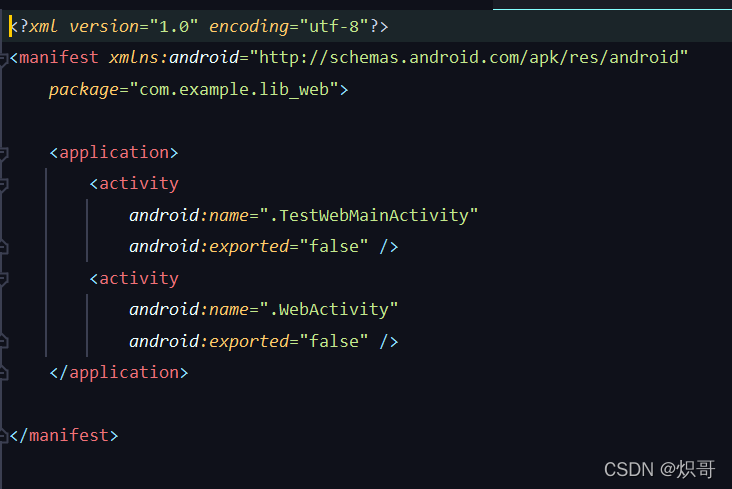
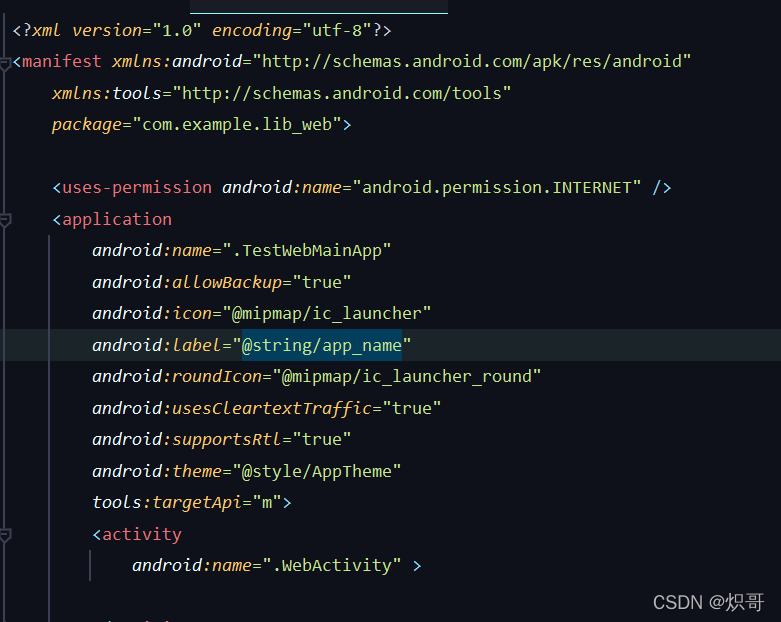
Show me androidmanifest.xml
lib_web component mode
Lib_ Web integration mode


Solution:

project config.gradle
add a isuseweb to identify the lib_web to be used in the componentization mode

ext{
    isRelease = false
    isUseWeb = true 
	……
}

Modify lib_webbuild.gradle

if (isUseWeb) {
    apply plugin: 'com.android.library'
} else {
    apply plugin: 'com.android.application'
}
android {
	……
	defaultConfig {
		……
		buildConfigField("boolean", "isUseWeb", String.valueOf(isUseWeb))
	}
	……
	sourceSets{
        main {
            if (isUseWeb) {
                manifest.srcFile 'src/main/manifest/AndroidManifest.xml'
            } else {
                manifest.srcFile 'src/main/AndroidManifest.xml'
            }
        }
    }
	
}

Springboot Integrate Swagger2 Error: Failed to start bean ‘documentationPluginsBootstrapper‘;

The springboot integration swagger2 reported an error. The attempt to reduce the springboot version is invalid

Solution: Configuration in application.properties:

spring.mvc.pathmatch.matching-strategy=ant_path_matcher

Because the path matching used by Springfox is based on AntPathMatcher, while Spring Boot 2.6.X uses PathPatternMatcher.

[Solved] Error:java: Compilation failed: internal java compiler error

Error phenomenon

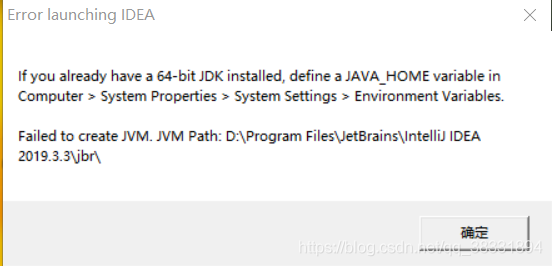
When using idea to import a new project or upgrade idea or create a new project, the following exception message will appear:

Error:java: Compilation failed: internal java compiler error 

Cause of error

This error is mainly caused by the JDK version. There are two reasons: the compiled version does not match, and the current project JDK version does not support.

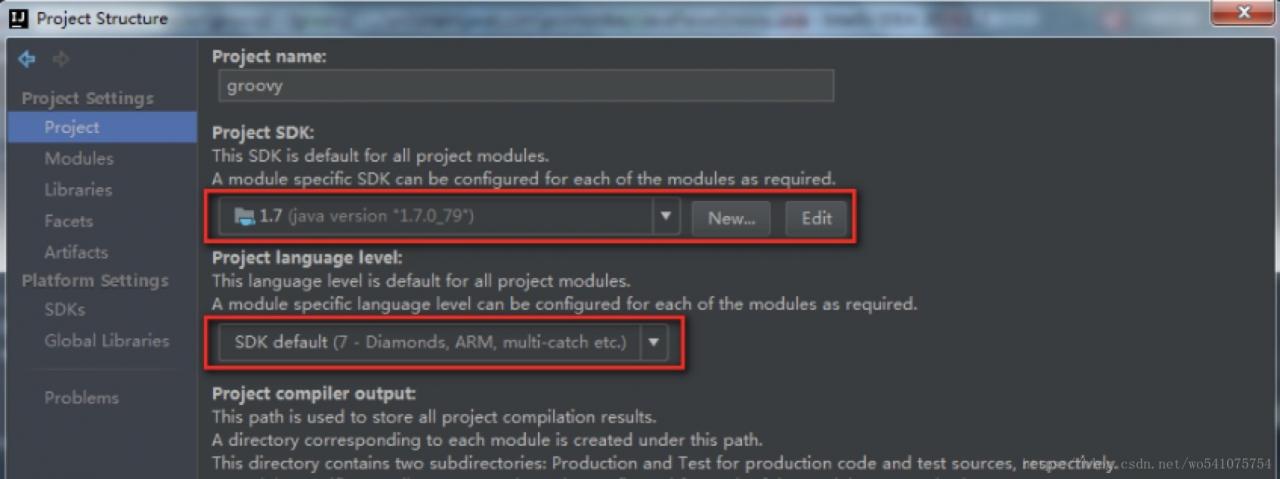
View the JDK of the project

File -> Project Structure-> Project Settings -> Project or use the shortcut Ctrl+Alt+shift+S to open the JDK configuration of the project:

Check whether these two points are consistent with the target JDK.

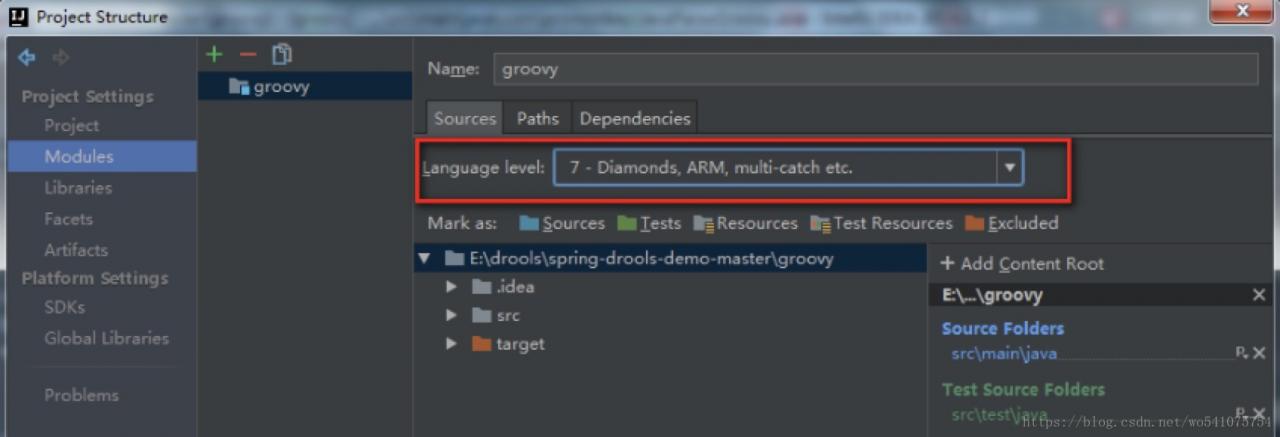
View the JDK of the project

Click modules in the figure above to view the corresponding JDK version:

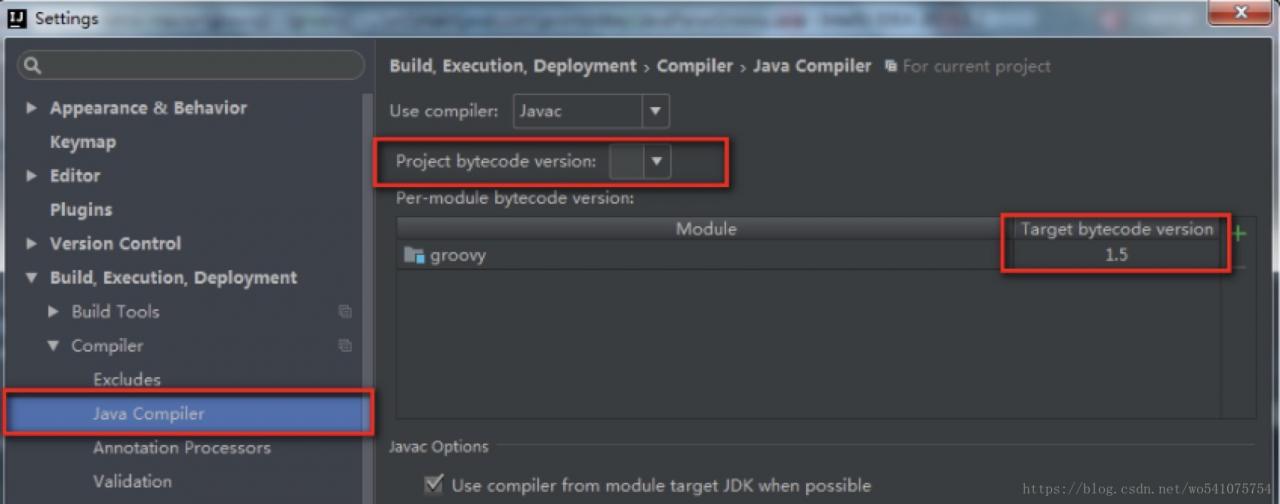
View java compiler version

When importing Java projects, the probability of this problem is high.

To solve this problem, reopening or modifying the contents of the POM file (Maven project) is likely to cause the JDK version to change back to 1.5. If it is a maven project, you can specify JDK related information in the POM file:

<build>
        <plugins>
            <plugin>
                <groupId>org.apache.maven.plugins</groupId>
                <artifactId>maven-compiler-plugin</artifactId>
                <configuration>
                    <source>1.7</source>
                    <target>1.7</target>
                </configuration>
            </plugin>
        </plugins>
    </build>

Failed to execute ‘setRequestHeader’ on ‘XMLHttpRequest’: String contains non ISO-8859-1 code point.

When the front-end page sends a request to the background, non-english is put into the request header, so there will be coding format problems

Error message:

Failed to execute ‘setRequestHeader’ on ‘XMLHttpRequest’: String contains non ISO-8859-1 code point.


Solution:

Encoding: encodeURIComponent(str)
decoding: decodeURIComponent(str)

[Solved] Heroku Error: Web process failed to bind to $PORT within 60 seconds of launch

Error description

If the set port number is less than 1000, an error will be reported, and there is no permission

2022-03-29T10:23:16.651636+00:00 heroku[web.1]: State changed from crashed to starting
2022-03-29T10:23:28.994173+00:00 heroku[web.1]: Starting process with command `python /code/server3.py`
2022-03-29T10:23:30.091143+00:00 app[web.1]: Traceback (most recent call last):
2022-03-29T10:23:30.091204+00:00 app[web.1]: File "/code/server3.py", line 247, in <module>
2022-03-29T10:23:30.091205+00:00 app[web.1]: serverSocket.bind(("127.0.0.1", serverPort))
2022-03-29T10:23:30.091208+00:00 app[web.1]: PermissionError: [Errno 13] Permission denied
2022-03-29T10:23:30.234919+00:00 heroku[web.1]: Process exited with status 1
2022-03-29T10:23:30.279569+00:00 heroku[web.1]: State changed from starting to crashed

If you set the port number to 8080, you will not be connected within 60 seconds

2022-03-29T10:53:34.400924+00:00 heroku[web.1]: State changed from crashed to starting
2022-03-29T10:53:49.432473+00:00 heroku[web.1]: Starting process with command `python /code/server3.py`
2022-03-29T10:53:33.432308+00:00 app[api]: Release v9 created by user ***@icloud.com
2022-03-29T10:53:33.432308+00:00 app[api]: Deployed web (350d1bd5740a) by user ***@icloud.com
2022-03-29T10:54:49.500818+00:00 heroku[web.1]: Error R10 (Boot timeout) -> Web process failed to bind to $PORT within 60 seconds of launch
2022-03-29T10:54:49.587777+00:00 heroku[web.1]: Stopping process with SIGKILL
2022-03-29T10:54:49.800462+00:00 heroku[web.1]: Process exited with status 137

If the port number in the environment variable is referenced dynamically, the acquisition fails

2022-03-29T11:12:03.984493+00:00 heroku[web.1]: State changed from crashed to starting
2022-03-29T11:12:19.984320+00:00 heroku[web.1]: Starting process with command `python /code/server3.py`
2022-03-29T11:12:21.706887+00:00 heroku[web.1]: Process exited with status 1
2022-03-29T11:12:21.536737+00:00 app[web.1]: Traceback (most recent call last):
2022-03-29T11:12:21.536756+00:00 app[web.1]: File "/code/server3.py", line 248, in <module>
2022-03-29T11:12:21.536757+00:00 app[web.1]: serverSocket.bind(("0.0.0.0", serverPort))
2022-03-29T11:12:21.536757+00:00 app[web.1]: TypeError: an integer is required (got type NoneType)
2022-03-29T11:12:21.769096+00:00 heroku[web.1]: State changed from starting to crashed

No matter the local address is not written,
ServerSocket Bind ((“”, serverport))
or 127.0.0.1
ServerSocket Bind ((“127.0.0.1”, serverport))
or write 0.0.0
ServerSocket Bind ((“0.0.0.0”, serverport))
doesn’t work


Solution (Python Project):

Dynamic binding port number is required

To write this in dockerfile, pass in $post

#Base image based on
FROM python:3.4

#code added to code folder
ADD . /pythonProject /code

# Set the code folder to be the working directory
WORKDIR /code

# Install support
#RUN pip install -r requirements.txt

CMD python /code/server3.py $PORT

Python file writing format,  obtain through parameters in server.py

serverPort = int(sys.argv[1])

The complete structure is as follows

if __name__ == '__main__':
    serverSocket = socket(AF_INET, SOCK_STREAM)
    serverPort = int(sys.argv[1])
    serverSocket.setsockopt(SOL_SOCKET, SO_REUSEADDR, 1)
    serverSocket.bind(("", serverPort))

    serverSocket.listen(5)
    print('The server is running')
    # Main web server loop. It simply accepts TCP connections, and get the request processed in seperate threads.
    while True:
        # Set up a new connection from the client
        connectionSocket, addr = serverSocket.accept()
        # Clients timeout after 60 seconds of inactivity and must reconnect.
        connectionSocket.settimeout(600)
        # start new thread to handle incoming request
        _thread.start_new_thread(process, (connectionSocket,))

Solution (Nodejs Project):

// production
config.port = process.env.PORT

app.listen(config.port, () => {
  logger.info('Listening on port %d', config.port);
});

or

.listen(process.env.PORT || 5000)

or

production: {
    server: {
        host: '0.0.0.0',
        port: process.env.PORT
    }
}
Mac Vscode C++ Customize Header File Error: linker command failed

Project scenario:

Customized a swap header file and failed to compile


Cause analysis:

Tip: C_cpp_properties.json and tasks.json only the current file is compiled by default. If only main.cpp is selected, it will only compile this one file.

Solution:

Tip: modify C_cpp_properties.json and tasks.json configuration file, which compiles the source files in the specified directory.

c_cpp_properties.json Modify:

“includePath”: [
“${workspaceFolder}/**”
"configurations": [
        {
            "name": "Mac",
            "includePath": [
                "${workspaceFolder}/**"
            ],
            "defines": [],
            "macFrameworkPath": [
                "/Library/Developer/CommandLineTools/SDKs/MacOSX10.14.sdk/System/Library/Frameworks"
            ],
            "compilerPath": "/usr/bin/clang++",
            "cStandard": "c11",
            "cppStandard": "c++98",
            "intelliSenseMode": "macos-clang-x64"
        }
    ],
    "version": 4
}


Modify tasks.json

“-g”,
“${fileDirname}/*.cpp”
{
	"version": "2.0.0",
	"tasks": [
    {
      "type": "cppbuild",
      "label": "C/C++: clang++ files",
      "command": "/usr/bin/clang++",
      "args": [
        "-fdiagnostics-color=always",
        "-g",
        "${fileDirname}/*.cpp",
        "-o",
        "${fileDirname}/${fileBasenameNoExtension}"
      ],
      "options": {
        "cwd": "${fileDirname}"
      },
      "problemMatcher": [
        "$gcc"
      ],
      "group": {
        "kind": "build",
        "isDefault": true
      },
      "detail": "Compiler: /usr/bin/clang++"
    }
  ]
}

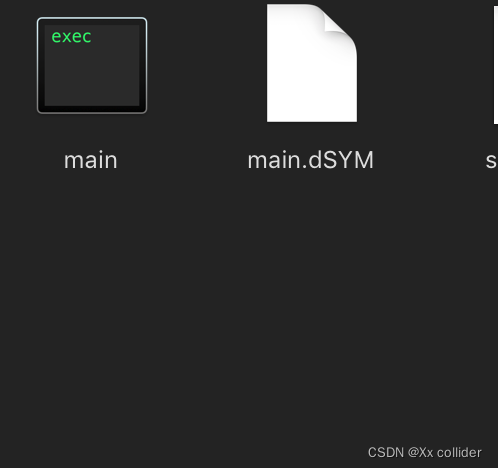
After saving, return to the project folder, click Shift + Command + B in the blank space to compile, and then execute the compiled program ./main in terminal.

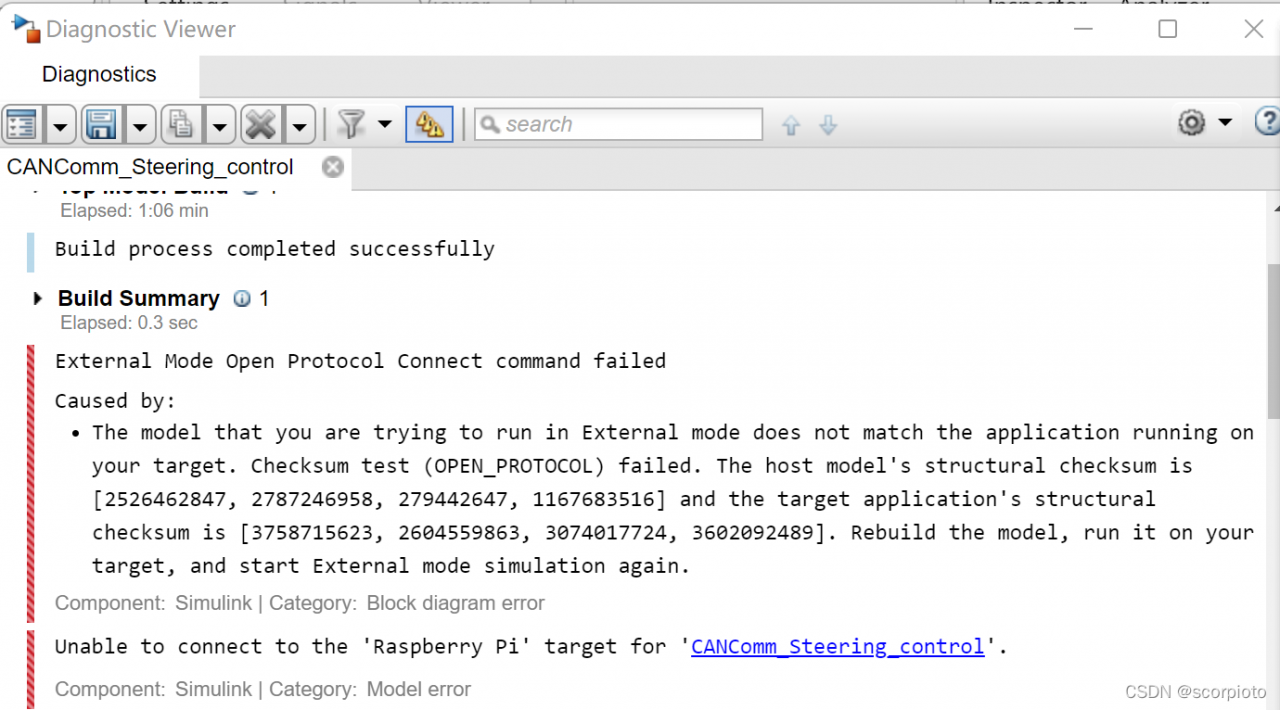
Matlab Raspberry Pi Error: External Mode Open Protocol Connect command failed

External Mode Open Protocol Connect command failed
Caused by:
The model that you are trying to run in External mode does not match the application running on your target. Checksum test (OPEN_PROTOCOL) failed. The host model’s structural checksum is [2526462847, 2787246958, 279442647, 1167683516] and the target application’s structural checksum is [3758715623, 2604559863, 3074017724, 3602092489]. Rebuild the model, run it on your target, and start External mode simulation again.
Component:Simulink | Category:Block diagram error
Unable to connect to the ‘Raspberry Pi’ target for


Solution: Delete the related files of the model in the Raspberry Pi
(1) View the file directory

ls /home/pi/

(2) Open the matlab file directory in the raspberry pie

cd MATLAB_ws/R2020b

(3) Delete the elf and log related to the model
for example:

rm -f CANComm_Gear_control.log

Eclipse Godson Error: Makefile:recipe for target ‘clean‘ failed

report errors

Error in environment when running Godson development in Eclipse:
Godson makefile: 66: recipe for target 'clean' failed
makefile: 66: recipe for target 'clean' failed
makefile: recipe for target 'clean' failed

Error reporting reason

Reason one

Error making when writing kernel module. When the error message “recipe for target XXX” is still displayed after the syntax error and path error of makefile are eliminated, maybe you should doubt the code used by your makefile. (if your makefile is copied directly from the Internet, first use the WordPad under the window to see if there is any garbled code. The garbled code of “space” is likely to lead to your error)

reason

If you do not run as an administrator under windows10 system, the above error will be reported

Solution:

Run eclipse as an administrator and run the files will be OK!