Author Archives: Robins

write error in swap file problem solving

An error


write error in swap file


The solution


This error is simply an alert, not the cause of the problem, and is usually due to the current open file in the block, disk space used up


Log in using the sappers and find that a test cloud host cannot log in, use the administrator rights to enter the cloud server at the accessed end to see if it is caused by problems in the configuration of TCP_wrapper, open the file and find a write error in swap file, and the rules in the configuration file are correct. Next, I look at the disk space and see that the disk space is full and there is no public key account pushed by JumpServer under home.
Reason: The cloud host disk space is small, the tester did not clean the log in time, resulting in disk full


< 1> View disk
df-th


< 2> Clean disk space


< 3> Jumpserver re-pushes the account and public key for this asset


It’s too watery… But there’s really nothing to say.


The seahorse play simulator failed to start, start machine failed! error code = 3 and error code = 21

Ssdwin7 installed Visual Studio 2019, opened the web page, finally crashed at the last minute…
Then ghost reinstall, a few times plug and unplug and then SSD disappeared…
Repurchase SSDS and reinstall them.
… It’s all foreplay…
Today, I opened the seahorse inside the Ghost to play the simulator, and the result was wrong:
start machine failed! Error code = 3.
Search all kinds of methods, find the official forum, it is no good.
Turn on the BIOS and turn on Virtual Technology. I can’t.
On the official website of Haima Apple community, search start Machine Failed! Error code = 3,
http://forum.droid4x.cn/search.php?mod=forum& searchid=10& orderby=lastpost& ascdesc=desc& searchsubmit=yes& kw=start+machine+failed%21+error+code+%3D+21
It doesn’t work any way.
Delete c disk program files under Oracle is also not good.
Control panel unloading virtual Box does not work either.
The repair tool won’t work.
After reloading the official full version of the Virtual Box, and then reloading the Haima, the error code changed to 21.
http://forum.droid4x.cn/forum.php?mod=viewthread& tid=43521& highlight=start%2Bmachine%2Bfailed%21%2Berror%2Bcode%2B%3D%2B21
start machine failed! For users with errpr cpde = 21 problem resolution
Win+7 or above, press Win+R to open the run dialog and then run the following command to fix it.
%SystemRoot%\ InfDefaultInstall. Exe “%programfiles%\Oracle\VirtualBox\drivers\vboxdrv\ vboxdrv. inf”
XP user or not doing the above, please open this path: % programFiles %\Oracle\VirtualBox\ Drivers \vboxdrv\, then right-click “Vboxdrv. inf” and select “Install” from the right-click menu.
With respect to OK
 

Error C2065 ‘cout’: undeclared identifier

1 [problem background] Error C2065 appears in C++/MFC, that is, XXX is not defined, and the XXX you use is the base class library, do you think it may not exist?Except, of course, for your spelling mistakes, which I won’t discuss.
2 [Analysis] Check that the basic class library of VS/VC has no problem in loading and platform setting; This is usually due to placing certain header files in front of stdafx.h header files.
3 [Example of solution]
3.1 Question of the above title: Error C2065 ‘cout’: Undeclared Identifier. This is due to placing the header file “iostream.h” in the implementation file as follows:
// The following is the implementation of XXXX. CPP
# include & lt; iostream.h>
# include “stdafx. H”
/ /…
Int xxx_fun ()
{
STD: : cout< < somevar< < std::endl;
}
3.1.1 [Results] The above error C2065 will occur;
3.2 [Modification method] Put stdafx.h in the first place, and do not let the words of other header files come before it.
// The following is the implementation of XXXX. CPP
# include “stdafx. H”
# include & lt; iostream.h>
/ /…
Int xxx_fun ()
{
STD: : cout< < somevar< < std::endl;
}
3.2.1 [Results] There will be no Error C2065 above;
3.3 [Summary] If the library and platform are correctly configured, the above methods can be basically solved. This is a small mistake that is easy to overlook because we don’t usually feel the need to prioritize header files. Well, the devil is in the details, and the difference between first and second place in the arena is sometimes 0.001 seconds, so don’t make any small mistakes.

error MSB6006: “mt.exe” exited with code 31 solution

First, problems arise
Error MSB6006: “mt. Exe “exited with code 31 is always encountered when compiling the project with VS. That’s the question.
The specific error was

Second, solutions
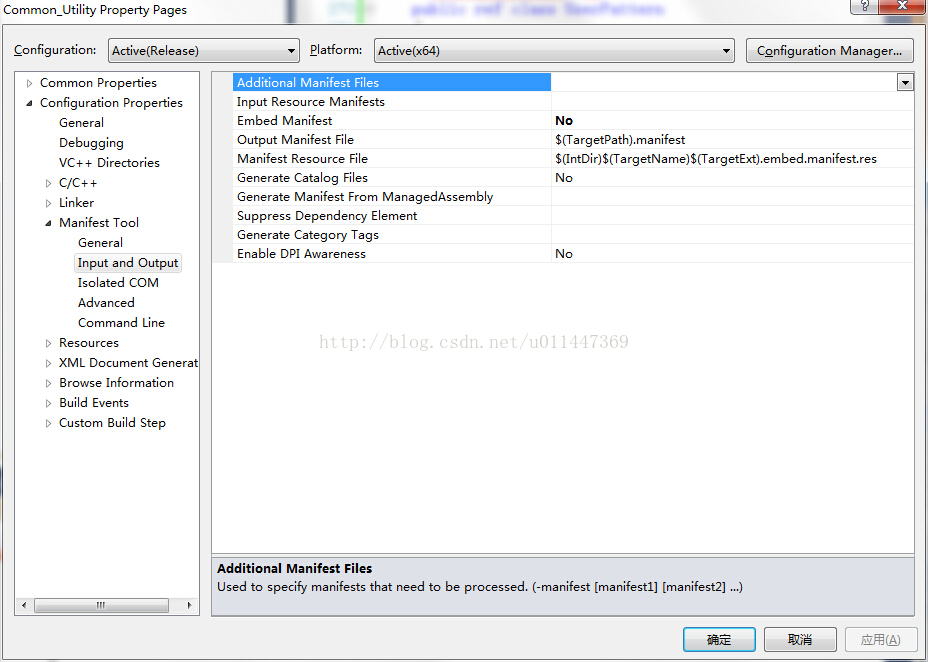
Set the project property Manifest Tool, and set the “Embed Manifest” in “Input and Output” to No, the specific operation is shown in the figure below:

Third, the cause of the problem
The reason has to do with manifest, seeing the explanation in someone else’s blog:
According to Microsoft’s documentation, 3. Mt. Exe is “a tool that generates signed files and catalogs”. Mt. Exe is used in the manifest generation process. “A manifest is an XML document that can be an external XML file or a resource embedded inside an application or an assembly. The manifest of an isolated application is used to manage the names and versions of shared side-by-side assemblies to which the application should bind at run time. The manifest of a side-by-side assembly specifies its dependencies on names, versions, resources, and other assemblies.”
According to Microsoft documentation, MT.EXE is “a tool for generating signed files and directories.” MT.EXE USES the listing generation process. If you don’t know what’s obvious, more documentation explains: “Manifest is an XML document, which can be an external XML file or a resource embedded within an application or assembly. The list of isolated Applications is used to manage the names and versions of the Shared parallel assemblies that the application should bind to at run time. The list of side-by-side assemblies specifies the assembly’s dependencies on name, version, resources, and other assemblies. ”

Ask for help

# for help! (R language novice)
to carry out summary(lm(change~AQI,data=dat)) operation, the system will report an error, the content is as follows:
Error in quantile.default(resid) : factors are not allowed
Warning messages:
1:
using type = “numeric” with a factor response will be ignored
2: In Ops. Factor (y, z$residuals) : ‘-‘ not meaningful for factors
3: In Ops. Factor (r, 2) : ‘^ not meaningful for factors
, I hope you can help me!!

How to Fix Error in module RSQL of the database interface

keywords
Error in module RSQL of the database interface error key: RFC_ERROR_SYSTEM_FAILUREdbtran ERROR (set_input_da_spec): statement too big[dbtran.c#4854] marker count = 18655 > max. marker count = 16000 [dbtran.c#4854] sap note:13607


Problem description
[Problem] After EP was tested by the development machine, the EP was executed after it was released to the production machine, and this Problem occurred:
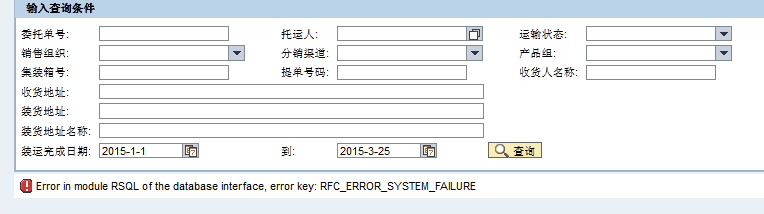
Error message:
Error in module RSQL of the database interface, Error key: RFC_ERROR_SYSTEM_FAILURE
Problem analysis
You can first try the following operations:
1, check, test the RFC, and transfer the related requests to the production environment; 2. Reimport RFC in NWDS and republish the project (note that the operation of production environment release is different from that of development machine); 3. Restart EP;
if the problem is still unresolved, read on.
Check the ABAP Runtime Error log

through the transport code ST22. Double-click the corresponding Error log to enter the Runtime Error Long Text interface, where there are detailed Error reports.
Some of the error messages I picked:
Kategorie (category) : ABAP Programming Error
Laufzeitfehler (runtime Error) : DBIF_RSQL_INVALID_RSQL
Ausnahme (exception) : CX_SY_OPEN_SQL_DB
ABAP Programm: SAPLZEWM_RFC2
【Kurztext】 (German, meaning category)
Error in module RSQL of the database interface

Error in the ABAP Application Program
the current ABAP Program “SAPLZEWM_RFC2” had to be terminated because it has come across a statement that unfortunately cannot be executed.

An exception that is explained in detail below once again occurred.
The Exception, which is assigned to class ‘CX_SY_OPEN_SQL_DB’, was not caught in procedure “ZTM_RFC_YSQSD_GETORDER_V2” (FUNCTION) “, nor was it propagated by a RAISING clause.
Since the caller of the procedure could not have anticipated that the exception would occur, the current program is terminated.
The reason for the exception is:
The SQL statement generated from the SAP Open SQL statement violates a restriction imposed by the underlying database system of the ABAP system.
Possible error causes:
o The maximum size of an SQL statement was exceeded.
o The statement contains too many input variables.
o The input data requires more space than is available.
You can generally find details in the system log (SM21) and in the developer trace of the relevant work process (ST11).
Cause analysis,
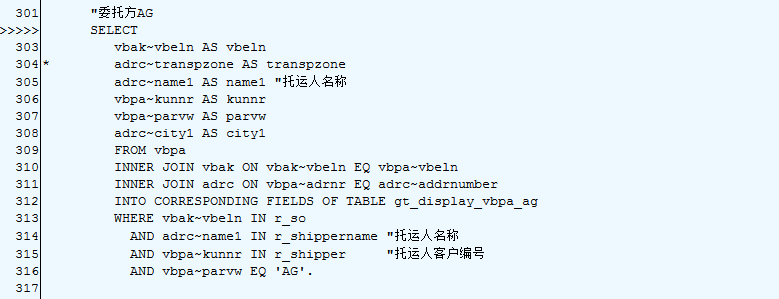
1. In the ABAP Select statement, when range Table is used in the WHERE clause, the type of range Table exceeds the maximum limit of the database (the maximum value is determined by DB).
2. The source code location is already listed above the error message:
The solution
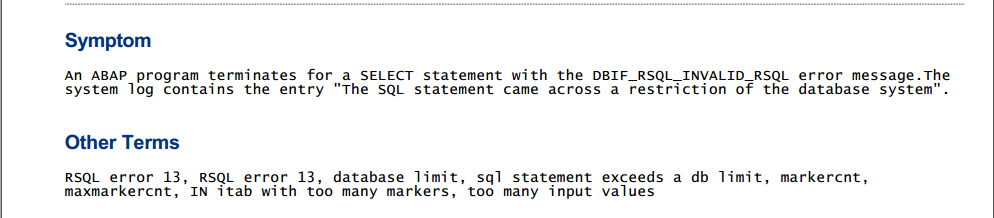
1. Search SAP Note: 13607. Extract the contents of Note
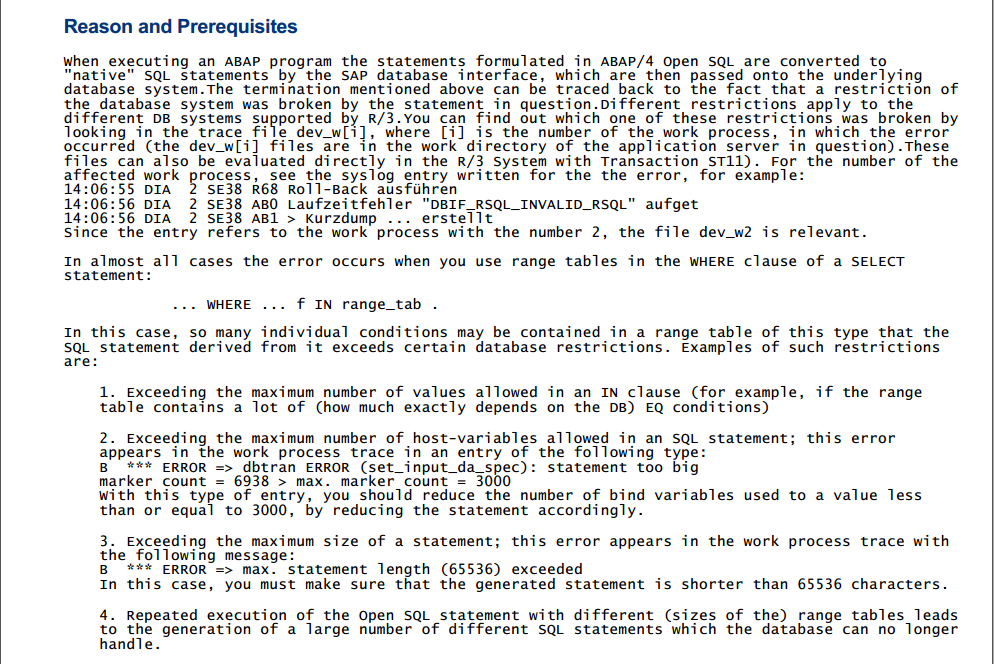
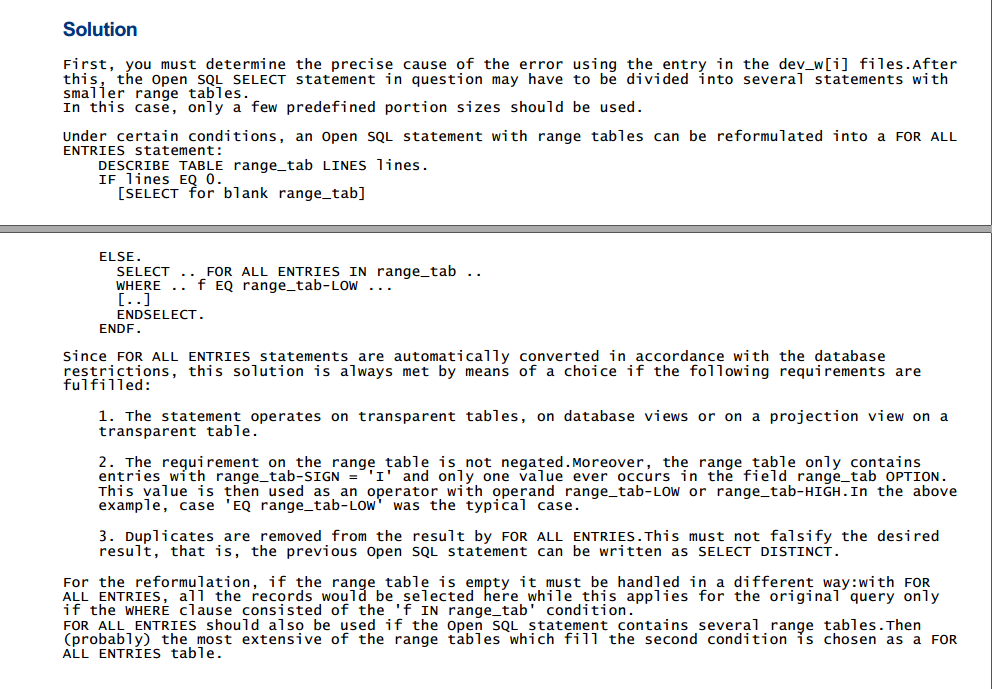
2. So I modified my code:

DATA r_so LIKE RANGE OF vbak-vbeln WITH HEADER LINE. 
DATA lines LIKE LINE OF r_so.
DESCRIBE TABLE r_so LINES lines.
IF lines EQ 0.
    SELECT
      vbak~vbeln AS vbeln
      adrc~name1 AS name1 
      vbpa~kunnr AS kunnr
      vbpa~parvw AS parvw
      adrc~city1 AS city1
      FROM vbpa
      INNER JOIN vbak ON vbak~vbeln EQ vbpa~vbeln
      INNER JOIN adrc ON vbpa~adrnr EQ adrc~addrnumber
      INTO CORRESPONDING FIELDS OF TABLE gt_display_vbpa_ag
      WHERE adrc~name1 IN r_shippername 
        AND vbpa~kunnr IN r_shipper     
        AND vbpa~parvw EQ 'AG'.
...
ELSE.
    TRY.
      SELECT
         vbak~vbeln AS vbeln
         adrc~name1 AS name1
         vbpa~kunnr AS kunnr
         vbpa~parvw AS parvw
         adrc~city1 AS city1
         FROM vbpa
         INNER JOIN vbak ON vbak~vbeln EQ vbpa~vbeln
         INNER JOIN adrc ON vbpa~adrnr EQ adrc~addrnumber
         INTO CORRESPONDING FIELDS OF TABLE gt_display_vbpa_ag
         FOR ALL ENTRIES IN r_so 
         WHERE vbak~vbeln EQ r_so-low
           AND adrc~name1 IN r_shippername 
           AND vbpa~kunnr IN r_shipper     
           AND vbpa~parvw EQ 'AG'.

   CATCH cx_sy_open_sql_db.
   ENDTRY.
...
ENDIF.

3. After modifying the RFC, it is necessary to re-import Model
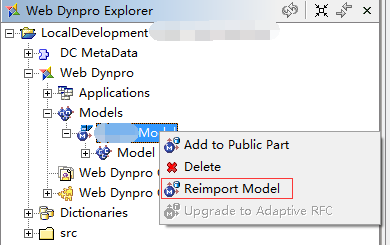
in WD4J
4. Re-transmit the Request to production and re-publish it to EP. Problem solved
Summarize the ideas for solving THE SAP problem
1, do not do hand party, do not ask a mistake, be sure to read the error message, analysis of the possible part of the error, is RFC error or WD4J error; 2. Error messages can be viewed through Tcode ST22 or ST11 or sm21; 3. About search engines:
SAP search: http://search.sap.com/ (this SAP note the number 13607 is found in the above) SAP note: https://websmp206.sap-ag.de/NOTES (search keywords are provided in the error log)

SAP custom Google search engine, https://cse.google.com/cse/home?cx=013447253335410278659:k8ob9ipscwg

Error building Player because scripts had compiler errors when packaging ab package

The Error Building Player because scripts had Compiler errors occurred when packing AB packages

Generally occur when the problem mostly using UnityEditor namespace, solution is new and the Editor folder put the script in the space, but for ab to check the packaging can be more than just a namespace, please note that the Editor folder you script the macro definition of whether to use the UNITY_EDITOR or UNITY_EDITOR_WIN two macro definition, if you are using the macro definition is then packaged ab package when also can appear similar problem.
Just try UNITY_STANDALONE_WIN Windows and UNITY_STANDALONE_OSX or just UNITY_STANDALONE_OSX alone if you just want to test it on the Win or Mac platform

How to solve the problem of Cannot find module’npmlog’ when installing nodejs under Linux

I used Ubuntu version of Linux, downloaded nodeJS6 executable file compression package from nodeJS official website, extracted it into folder under the Window, and uploaded it to Linux server through WinSCP.
Configure environment variables:
Add a nodejs.sh script under /etc/profile.d/, which reads as follows:

export NODE_HOME=/home/TECS/nodejs/node-v6.11.1-linux-x64
export PATH=$PATH:$NODE_HOME/bin
export NODE_PATH=$NODE_HOME/lib/node_modules

If you want to make the configuration work without restarting the machine, repeat the three commands from the command line.
Running NPM-V at this time Cannot find Module ‘NPMLOG’ error.
The solution
CD command enter /home/TECS/nodejs/node-v6.11.1-linux-x64/bin then execute the following command to establish the soft connection:

ln -s ../lib/node_modules/npm/bin/npm-cli.js

The generated NPM-cli.JS soft connection is then renamed to NPM. The original NPM file is not available.

mv npm-cli.js npm

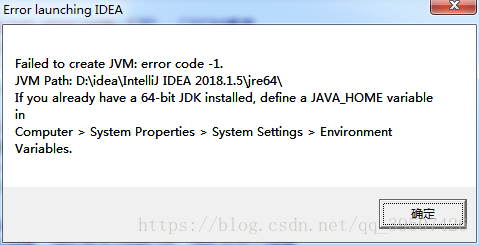
Idea startup prompt failed to create jvm: error code -1 jvm path solution


I modified ideA64. Exe. Vmoptions file of IDEA before, but when I restarted it prompted a problem similar to the above one, and deleted the parameters also prompted this one. Baidu searched for the solution, reloaded IDEA and reloaded JDK, but all of them failed to solve the problem.
This file does not have to exist, idea can still work without this file, but when custom parameters are needed, this file will be created for the first time.
Again this problem might as well delete C:\Users\ name \.IntelliJIdea2018.1\config vmoption file, simple and crude