Author Archives: Robins

PHP parse error: syntax error, unexpected ‘use’

After a long search, I finally found the reason, not the PHP version [], that I wrote use in the methods of the class.
This thing cannot be used independently of the class, otherwise it would be considered a namespace.
The test example is as follows

// Trait.php

trait CustomerFunctionsTrait {

    public function plus ( $a = 1, $b = 1 ) { 
        echo $a + $b; 
    }   

    public function minus ( $a = 5, $b = 1 ) { 
        echo $a - $b; 
    }   

}


// Test.php
include './Trait.php';
class MyTest {
    use CustomerFunctionsTrait;
    public function plus () {
        // use CustomerFunctionsTrait;  //This is where I made a mistake, writing use into the method body -!!!!
        echo 'str';
    }
}

$n = new MyTest;
$n->minus();

How To Fix Windows Java Error 1723

Just recently I experienced a problem with both installing or uninstalling Java (the JRE) on a Windows 2003 system. I had to research this quite a bit and there were no clear answers anywhere, so I though I’d post here on how I was able to fix it. In my case, I was using Windows Server 2003 64-bit, but this should apply to other Windows versions as well.
The error I was getting was as follows:
“Error 1723. There is a problem with this Windows Installer package. A DLL required for this install to complete could not be run. Contact your support personnel or package vendor.”
This error is caused when you delete the JRE directory without running the uninstallation program. The reason this causes a problem is due to the registry entries that the installer creates when the JRE is installed. There is a DLL that the installer uses to make (and remove during an uninstall) the registry entries. Without this DLL, both the install and the uninstall will fail. This error may also prevent you from installing updated versions of the JRE to your system – which is a security risk.
You can find the path to the DLL that the installer (or uninstaller) is looking for in your Application log. You can get to your Application log (at least on a Windows Server 2003 system) by going to Start – Administrative Tools – Event Viewer, and then selecting Application from the list on the left.
Once you’re looking at the Application log, find the error message generated from the “MSI Installer” (It’s probably the most recent error there if you just encountered the error.) and bring it up. In the “Description” text area, you should be able to see where the installer or uninstaller was looking for the DLL file it needs. This is important because it will tell you how to fix it.

The FIX:
The Fix for this is to give the uninstaller what it wants, and replace the deleted DLL files with ones that can be used by the install/uninstall process to edit the registry, etc. For convenience, I’ve uploaded a bin zip file that can be used for this purpose.
DOWNLOAD: => bin. zip  (md5: b2594fa66d12a9e8fafb0a1ba3ca555f)
In my case above, you can see where I installed the JRE to the desktop (and then probably deleted it to remove the clutter). Only later, when I tried to install a new version, did it become a problem. So, I downloaded the above zip file, extracted it to my desktop, created a “jdk” directory and moved the “bin” folder inside it, then ran the uninstaller again. I got a few more errors about other files that couldn’t be found, but the uninstaller worked and I was able to install an updated version like I wanted to afterwards.
So… the next time you install the JRE or JDK, remember that you can’t delete it by hand without problems!
Hope this helps!
-Jordan

Matlab shows license manager error – 103

[Problem Description]
Remote login and open Matlab, prompt the following information:
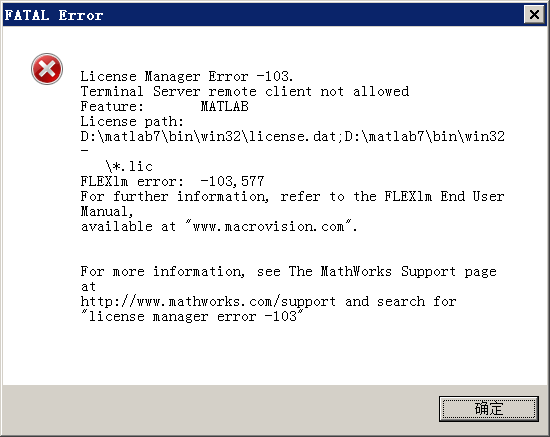
License Manager error-103.
Terminal Server remote client not allowed
Feature: MATLAB
License path: D:\Program files\TLAB71\bin\win32\license.dat;
D:\Program files\MATLAB71\bin\win32\*. Lic
FLEXlm error: -103,577
For further information, refer to the FLEXlm End User Manual,
available at “www.macrovision.com”.
For more information, see The MathWorks Support page at
http://www.mathworks.com/supportand search for
“license manager error -103”
[Version Information]
Matlab2006Ra
[Solution]
Through Baidu search, it is found that many people have encountered the same problem, some say it is the problem of remote login, some say it is the problem of non-legal version, as for the solution, some advocate reinstallation, some even restore the system. Below is from http://www.mathworks.com/support/solutions/data/32791.shtml
turned to writing

———————–
Problem Description
Why do I get license manager error-103?
License Manager error-103
Terminal Server remote client not allowed

Solution:
Contrary to the Error message text, this Error may be the result of changing u
sernames using the Sw Itch User feature in Windows xp. This feature can be enab
led on Windows XP computers that are not connected to a domain. It allows User
s to switch usernames without logging out or closing appl Tides.
If a user logs in under one username, MATLAB, and switches to another us
ername without closing MATLAB, they will receive license manager error-103 After usernames does not resolve the problem.
common, switching usernames to the original username does not resolve the I
ssue. The only way to resolve this issue is to do a clean Reboot of the system
nwindows xp.
This error also occurs on systems using Terminal Services, which is unsupporte
d in This release of matlab. There are no current plans to provide support for
Wind Ows Terminal Services. For more information please see:
What errors will I receive if I run MATLAB on a Windows Terminal Server?http://www.mathworks.com/support/solutions/data/26440.shtml

— — — — — — — — — — — — — — — — — — — — — — — — — –

As described in the overview, the problem may be due to multi-user switching or “Windows Terminal Server” (such as remote service?). As a result, there should be no need to reinstall or system restore. Remote let the computer restart, login again or not open Matlab, the error message still exists. Consider the question of remote login. Because the remote login was used to use Matlab, Matlab was opened before the login, rather than after the remote login, which may be the reason why there was no error before and now there is an error. On the Internet to see someone said, “use remote desktop login to the server using Matlab, in the remote host must have a local user login. This is a FLEXlm bug, “which, it seems, is probably due to the remote.
Next test step: log in the computer locally and open Matlab to see if there is an error message.
Results: After opening Matlab on the local machine, there was no prompt message again, and the problem was solved.
[conclusion]
Matlab this error message, usually caused by remote login. The reason is probably a bug in FLEXlm. Any software that USES FLEXlm must have a local user login when it is opened, otherwise the remote login will be wrong. The same error can occur with Ansys, Solidworks, Proe, and some EDA software. Therefore, if you want to use the software on the remote computer, you must first open the program on the remote computer, or you may run into this problem if you open it directly from the remote desktop.

Sendmail config error: mail loops back to me (MX problem?) solution

Yesterday, I didn’t have this problem. After one night, Sendmail reported this error by sending an internal email. Remember yesterday, it just added SMTP authentication, so it has nothing to do with this loops back.
 
Add the local domain name in local-host-Names, don’t bring mail, restart the Sendmail service, and everything is fine. Many online solutions require changes to your HOSTS, and I haven’t changed either.

the digital signature for this file couldn’t be verified

recovery
your pc/device needs to repaired
the digital signature for this file couldn’t be verified
file:\windows\system32\winload.efi
error code:0x0000428
you’ll needto use recovery tools. if you don’t installation media(like a disc or usb device),contact your pc adaministrator or pc/device manufacturer.
press the windows key for uefi firmware settings.
General installation of Win8, if the download of someone else modified the compression package copy to the U disk installation, there may be this problem.
Only return the system to reinstall.
On the other hand, this problem occurs when you reboot after installation. At this point, do one thing before the reboot shuts down the digital signature.
The administrator runs CMD and enters BCdedit. Exe /set NointegrityChecks on after the prompt
 

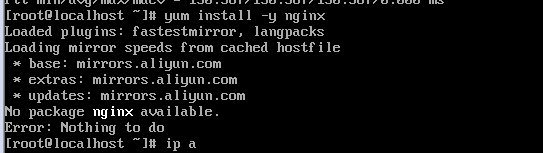
Yum installation error Error:Nothing to Do

Error message

No package nginx available
Error:Nothing to do


solution:
method one,
replacement source
backup

mv /etc/yum.repos.d/CentOS-Base.repo /etc/yum.repos.d/CentOS-Base.repo.backup

CentOS 7

wget -O /etc/yum.repos.d/CentOS-Base.repo http://mirrors.aliyun.com/repo/Centos-7.repo

Run Yum Makecache to generate the cache
Method 2:
use EPEL to install nginx:
sudo yum install epel-release
yum update
yum install nginx

Java was started but returned exit code = 13 problem solving

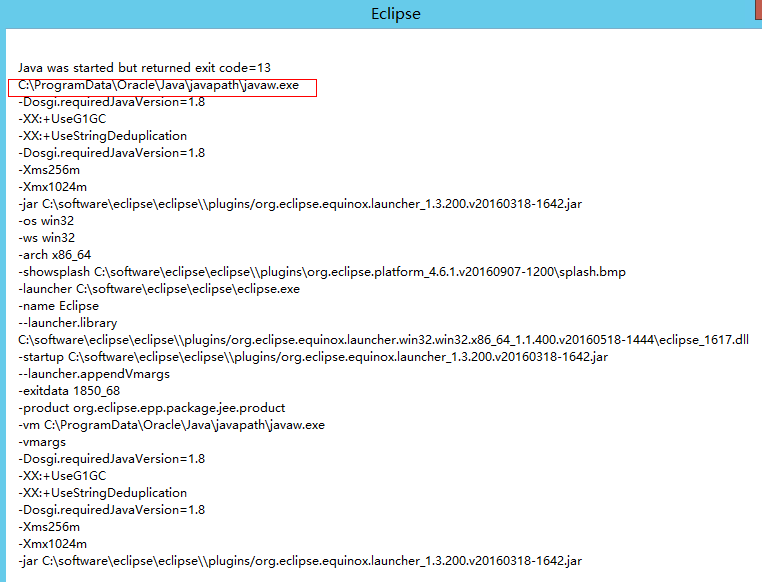
I also configured the environment after installing the JDK, and the configuration of the environment was fine. Finally, I downloaded Eclipse and opened it and found the error shown in the following figure:
Java was started but returned exit code=13
C:\ProgramData\Oracle\Java\javapath\javaw.exe

 
I searched the Internet first, and the answers I got were mostly unreliable. Then I checked over the wall geogel, and the answers I got were roughly in two aspects:
(1) There is a problem with the JDK environment
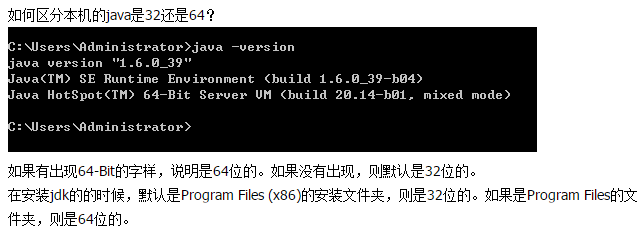
(2) The Jdk version is not consistent with the Eclipse version (Jdk is 32bit, Eclipse is 64bit or vice versa)
 
If a JDK environment error occurs, the general solution is to add the following sentence to the eclipse.ini (the same folder as Eclipse) file:
-vm
C: \ Program Files \ Java \ jdk1.7.0 _60 \ bin \ avaw exe
It’s not adding
-vm
C:\ProgramData\Oracle\Java\javapath\javaw.exe
 
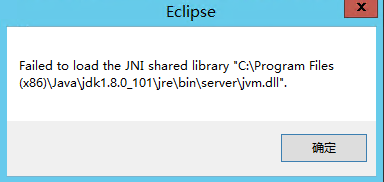
After the above sentence is added, restart Eclipse, and the following error is found:
Failed to load the JNI Shared Library “C:\Program Files (x86)\Java\ JDk1.8.0_101 \ JRE \bin\ Server
\jvm.dll

 
Therefore, I looked for errors such as Failed to load the JNI Shared Library. Generally, there are two cases:
1. There is a problem with the environment configuration of the JDK
2. JDK version not consistent with Eclispe (32-bit/64-bit)
 
So from our results above we can see that we have changed the configuration in Eclipse.ini and still can’t fix the problem. There is a new problem, which is probably the JDK and eclipse version.

According to the above methods, it turned out that the inconsistency between the version of my JDK and eclipse caused our initial problems. My operating system was 64-bit, eclipse was 64-bit, while the JDK was 32-bit. Finally, I downloaded a 64-bit JDK and started Eclipse as normal.
 
 
Resources from:
http://stackoverflow.com/questions/4587518/eclipses-error-on-startup-in-windows-7
http://www.myexception.cn/program/2036913.html


Error connecting to master, – retry time: 60 retries: 86400

Two virtual machines configured MySQL master slave when the virtual machine input
> show slave status\G;
Displays the following error
Last_IO_Error: error connecting to master ‘[email protected]:3307’ – Retry time: 60 Retry: 86400
I. Screening:
1. The username and password are correct
2. The port number of master is correct
3. Master authorization

# cat/data/mysql2/hostname. Err “to view the error log”

Slave I/O: ERROR connecting to master ‘[email protected]:3306’ – retry-time: 60 retry: 86400, Error_code: 2013
You don’t see anything. Error messages have no value.

Mysql – uslavelaowang – h192.168.32.133 – ppasswd
ERROR 2003 (HY000): Can’t connect to MySQL Server on ‘192.168.32.133’ (113)

# perror 113
OS Error code 113: No Route to host
【 Consider network reasons 】

# ping 192.168.32.133 [from the main ping] # Ping 192.168.32.132 [from the main ping] both have the return result, indicating network connection. Iptables -Fservice Iptables Save [Master Cleaning Firewall Rules]
Slave operation

# mysql – uslavelaowang h192.168.32.133 — ppasswd

ERROR 2003 (HY000): Can’t connect to MySQL Server on ‘192.168.32.133’ (111)

# perror 111
OS Error code 111: Connection union (union (union))
# mysql [Enter mysql under]
> slave stop;
> slave start;
> show slave status;
Slave_IO_Running: Yes
Slave_SQL_Running: Yes
Return two Yes’s

Reason: Iptalbes firewall rules are not cleared.

【error】postgresql relation does not exist

There have been a lot of problems with PostgresQL lately.
postgresql relation does not exist
When querling AAA tables using PostgresQL, postgresQL relation does not exist, but

SELECT   tablename   FROM   pg_tables;

AAA tables exist. It’s weird.
The search turned out to be a problem with quotes. PostgreSQL itself is not case sensitive, so if you want to create a new table with uppercase letters, you must use quotation marks, and if you want to query it, you must use quotation marks.

select * from "AAA";

The following from: http://blog.csdn.net/dream20nn/article/details/51790106
A recently developed ETL tool for the WEB requires different data sources. The first time POSTGRESQL has found a problem with double quotes:
standard SQL is case-insensitive. But PostgreSQL allows case-sensitive definition and reference methods for the names of objects in the database. This is done by enclosing the name of the object you want to support size in double quotes in the DDL. For example, you want to create a table called AAA. If you use CREATE TABLE AAA (…) ; So the table that you create is actually aaa.
CREATE TABLE “AAA” (…) if you want to CREATE an upper case AAA TABLE. ; This is the double quote way of defining the object name. The disadvantage of writing
is that the query must also refer to the object name in double quotes. SELECT * FROM “AAA”; PostgreSQL doesn’t need to go to the AAA object and return an error that aaa doesn’t exist. It is important to note that not only tables can be defined and referenced in this way, but any object (column name, index name, etc.) in PostgreSQL is valid.
In fact, traditional SQL is case-insensitive, so there is no problem as long as DDL and DLLS manipulate database objects in the traditional (without double quotes) way. The problem is that if tables are created through PostgreSQL’s pgAdmin III tool, objects are created with double quotes by default, so the DLL must also be used with double quotes. However, this is not standard and is not supported if the database is accessed through some common library function.
Recommendation:
1. The tool pgAdmin III is not recommended for creating database objects. You should still write DDL statements by hand. 2. Double quotation marks in DDL are not recommended for creating case-sensitive objects. PostgreSQL recommends using uppercase for SQL key word and lowercase for all other names.

error code 11 – Administrative Limit Exceeded

The problem is ldap server has limitation for the user about numbers of entries searched.

Open your directory server (name), Configuration Folder, Performance. On right panel check Client Control folder. You may see:

Size limit

Look-through limit

Time limit

Idle timeout

The look-through limit specifies the maximum number of entries that will be examined for a search operation.

The size limit specifies the maximum number of entries the server returns to the client application in response to a search operation.

The time limit specifies the maximum time the server spends processing a search operation.

The idle timeout specifies the time a client connection to the server can be idle before the server drops the connection.

Change these options to “unlimited” can resolve this problem.

MySQL error: starting MySQL… The server quit without updating PID file

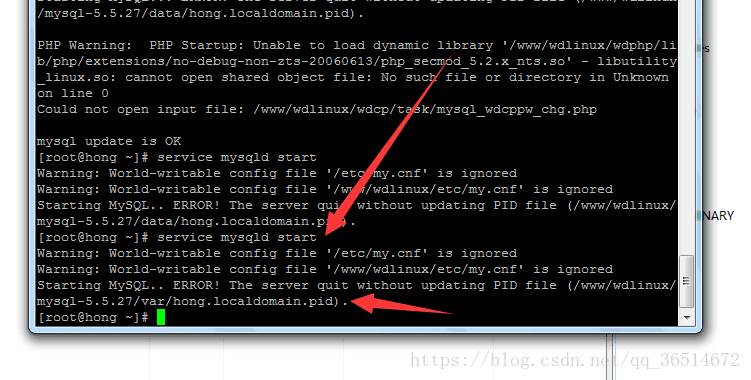
Today I updated MySql on the server. After the update, MySql started up and suddenly reported an error:
Then there are all kinds of Baidu, some say mysql directory permission is not given, some say the process already exists mysql and so on… Then I followed the experience of the big guys to try one by one, but, no effect! So toss about a morning, really have no way, finally reinstalled mysql. Thought this under the total should be good, there are any problems are reinstalled can not solve (proud). But as it turned out, I was still too young. Once again, he looks like the bird above!
If you look in the error directory, there is no hong.localdomain.pid. And then I hit on the idea, isn’t there a file called Hong.localdomain.pid?I copied a copy from my local computer, uploaded it to the server, and started mysql again. There you go! I kind of admire myself.
However, in order to be assured that I restart it again after mysql, ok, with reference to above, it is double Look again/WWW/wdLinux /mysql-5.5.27/var/ under hong. Localdomain. pid this file disappeared!
Calm down and think carefully, the file Hong.localdomain. pid actually records the PID of mysql installation, and the PID of my local mysql is definitely different from that of the server.
Edit /etc/init.d/mysql, find the start module, and add –user=root to mysqld_safe to