Author Archives: Robins

Typeerror in Python: ‘nonetype’ object is not Iterable

For example:

def contain():
        score = 4    
        if score in num:                                          
            return True,score;
        
num = [1,2,3,0]
iscontain,score = contain()  
print iscontain,score

Results:

>>> 

Traceback (most recent call last):
  File "D:\Program Files\python\chengxu\temp.py", line 8, in <module>
    iscontain,score = contain()
TypeError: 'NoneType' object is not iterable</span>
>>> 

Note: When there is only an if condition and multiple variables are returned, an exception will occur if the if condition is not satisfied

Solution: Add an else statement

def contain():
        score = 4    
        if score in num:                                          
            return True,score;
        else:
            return False,score;
num = [1,2,3,0]
iscontain,score = contain()  
print iscontain,score

Results:

>>> 
False 4

Reference article:
http://blog.csdn.net/dataspark/article/details/9953225
IIS “Bad Request – Request Too Long. HTTP Error 400. The size of the request headers is too long.”

The size of The Request Headers is Too Long. If The length of The Request headers received in IIS7/7.5 exceeds 16K (The default value), an Error is raised.
I wrote a blog post about this problem (Bad Request-Request Too Long caused by statistics code of CNZZ). The reason for the problem is that the statistics code of third-party statistics service CNZZ writes a large number of cookies, which are carried when requested, resulting in the Request header length exceeding the limit.
I thought this was a problem only for Chrome, but then I got feedback from friends that it was also a problem for Firefox. So, to solve this problem, you have to start at the server end, and this article shares how to start at the server end.
where
According to The IIS forum post (HTTP 400. The size of The Request Headers is Too long), The 16K request header/request length limit is determined by two Parameters in the registry (HKEY_LOCAL_MACHINE\System\ Services\HTTP\Parameters) MaxFieldLength (request header) and MaxRequestBytes (request header and request body). So, you start with these two parameters.
Know your target
Through the Microsoft official documentation (http://support.microsoft.com/kb/820129) to learn more about MaxRequestBytes and MaxFieldLength:
MaxFieldLength – Sets an upper limit for each header.
Used to set the maximum number of bytes per request header (default 16K).
MaxRequestBytes – Determines the upper limit for the total size of the Request line and the headers.
Used to set the maximum total number of bytes between the request line (the body of the request) and the request header (16K by default).
How to start
Start by adjusting the values of MaxFieldLength and MaxRequestBytes (assuming 32K) to take effect.
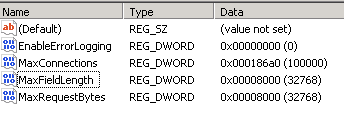
Run regedit, go to HKEY_LOCAL_MACHINE\System\ Services\HTTP\Parameters,
1. Add an item of type DWORD(32-bit) with the name MaxFieldLength and the value decimal 32768;
2. Add items of type DWORD(32-bit), named MaxRequestBytes, value decimal 32768.

Ok, so how do we get them to work?The easiest thing to do is reboot, but the last thing you want to do with a server is reboot.
Fortunately, the solution to this problem is mentioned in the Official Microsoft documentation. You need to run four commands:

Net stop HTTP
net start HTTP
net stop iisadmin /y
net start servicename

But the third command, NET Stop iISadmin, will disable all services related to IIS, and the fourth command will start all services related to IIS one by one.
Although there is no need to restart the server, I don’t like the solution of these four commands… I couldn’t find a better solution on the Internet…
Then, by trial and error, I found an even simpler method that required only three commands:

net stop http
net start http
iisreset

This method has been validated in practice on the server.

SSIS Error Code DTS_E_OLEDB_EXCEL_NOT_SUPPORTED

The following errors occurred when importing data from the database to Excel using SSIS:
 
SSIS Error Code DTS_E_OLEDB_EXCEL_NOT_SUPPORTED: The Excel Connection Manager is not supported in the 64-bit version of SSIS, as no OLE DB provider is available.
 
This is because the machine is 64-bit and there is no 64-bit OLE DB Provider.
Solution: Select Properties from the Project menu and Degugging on the left to set the Run64BitRuntime property to False. Then Execute Package, succeed.
 
Reference link: http://wenku.it168.com/d_000602554.shtml

Excel VBA: cell error value

The cell error value can be inserted into the cell, or the CVErr function can be used to test whether the cell value is an error value. The cell error value can be one of the following XlCVError constants.

constant

error number

cell error values

xlErrDiv0

2007

0 # DIV /!
xlErrNA 2042 #N/A
xlErrName 2029 #NAME?
xlErrNull 2000 #NULL!
xlErrNum 2036 #NUM!
xlErrRef 2023 #REF!
xlErrValue 2015 #VALUE!

Excel VBA tutorial: Cell error values · Examples
This example inserts seven cell error values into the A1:A7 cell area of Sheet1.


myArray = Array(xlErrDiv0, xlErrNA, xlErrName, xlErrNull, _
    xlErrNum, xlErrRef, xlErrValue)
For i = 1 To 7
    Worksheets("Sheet1").Cells(i, 1).Value = CVErr(myArray(i - 1))
Next i

This example checks whether the active cell in Sheet1 contains a cell error value and, if so, displays a message. This example serves as a model structure for error handlers for cell error values.


Worksheets("Sheet1").Activate
If IsError(ActiveCell.Value) Then
    errval = ActiveCell.Value
    Select Case errval
        Case CVErr(xlErrDiv0)
            MsgBox "#DIV/0! error"
        Case CVErr(xlErrNA)
            MsgBox "#N/A error"
        Case CVErr(xlErrName)
            MsgBox "#NAME?error"
        Case CVErr(xlErrNull)
            MsgBox "#NULL! error"
        Case CVErr(xlErrNum)
            MsgBox "#NUM! error"
        Case CVErr(xlErrRef)
            MsgBox "#REF! error"
        Case CVErr(xlErrValue)
            MsgBox "#VALUE! error"
        Case Else
            MsgBox "This should never happen!!"
    End Select
End If

MySQL failed to add foreign key error 1452

MySQL failed to add foreign keys, error 1452
For example:
Two tables user table: User class table: Grade
Each user in the user table corresponds to a class ID, namely gradeId
Namely: The primary key of the User table gradeId is the Id in the Grade table
The user table is called the primary table and the Grade table is called the slave table
[SQL]

alter table user

Add Foreign Key (gradeId) References Grade (Id);  

[error]

ERROR 1452 : Cannot add or update a child row: a foreign key constraint fails

“Why”
Some gradeId in the User table do not belong to the ID in the Grade table
【 Solution 】
Modify the data so that all gradeId in the User table belong to ids in the Grade table

Pxe-e51 “no DHCP or DHCP proxy offers received” error appears when PXE windows img under Linux client starts

1. Check whether the DHCP service is started
2. The MAC address and fixed IP of the client can be written into the file of /etc/dhcpd.conf similar to:

allow booting;
allow bootp;

option routers                  10.10.10.1;
option subnet-mask              255.255.255.0;
option domain-name              "company.com";
option domain-name-servers      10.10.10.1;

ddns-update-style ad-hoc;

subnet 10.10.10.0 netmask 255.255.255.0 {
        range dynamic-bootp 10.10.10.2 10.10.10.6;
        default-lease-time 21600;
        max-lease-time 43200;
	 filename "/pxelinux.0";
        next-server 10.10.10.1;

host client7 {
        ### NOTE: CHANGE THIS TO THE MALWARE CLIENT'S MAC ADDR
        hardware ethernet 00:0C:29:34:8A:4E;
        fixed-address 10.10.10.7;
}


# please don't delete this last squirrely brace.
}

Windows Visual C + + 2005 redistributable error 1935 solution

The reason: in the control panel, the wrong operation has deleted the vcredist_x86 2005
phenomenon: QQ2010 cannot be used, Nero 10 cannot be used, installation Arcgis10 failed!
solution, downloaded the vcredist_x86 sp1 installation on the Internet, the problem then appeared, the installation process is also very slow ~~~ finally appeared “Error 1935. PublicKeytoken =”1fc8b3b9a1e18e3b”,processirArchitecture=”x86″

, it turned out that the Windows service “Windows Installer service” did not start properly.
solve “Windows Installer service” launch exception, “error 1450: system resources insufficient, unable to complete the requested service”,
After analysis and search, it was found that it was caused by the residual installation of Arcgis9.3. The main reason was that the registration space was limited
error modification method after installation of Arcgis9.3:
1, in the run enter regedit to open registry editor
2, find HKEY_LOCAL_MACHINE\System\CurrentControlSet\Control
3, change the RegistrySizeLimit (REG_DWORD type) value to FFFFFFFF (base 10 is 4294967295)
4, restart the computer
Start the “Windows Installer Service” again, OK
Run vcredist_x86 2005 SP1 as administrator again (be careful not to put it in the Chinese directory and clear the contents of the TEMP folder), OK
QQ, Nero, Arcgis and other software, due to the VCR caused by abnormal start, need to delete clean (use makeup removal software to clear the cache), and then install it is OK

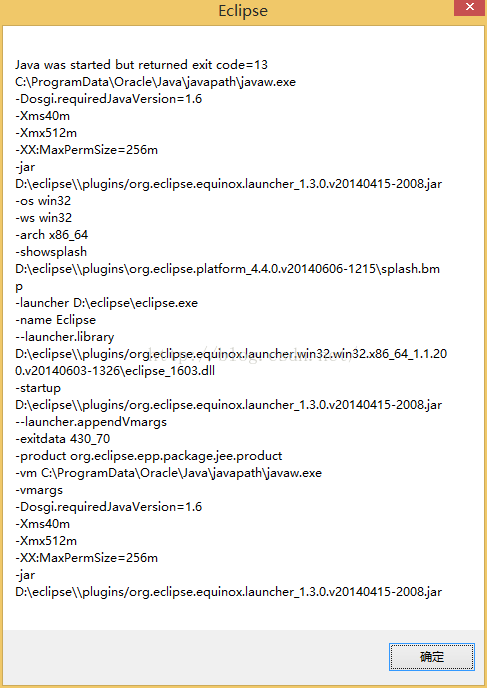
Java was started but returned exit code = 13

Java was started but returned exit code=13
As is shown in

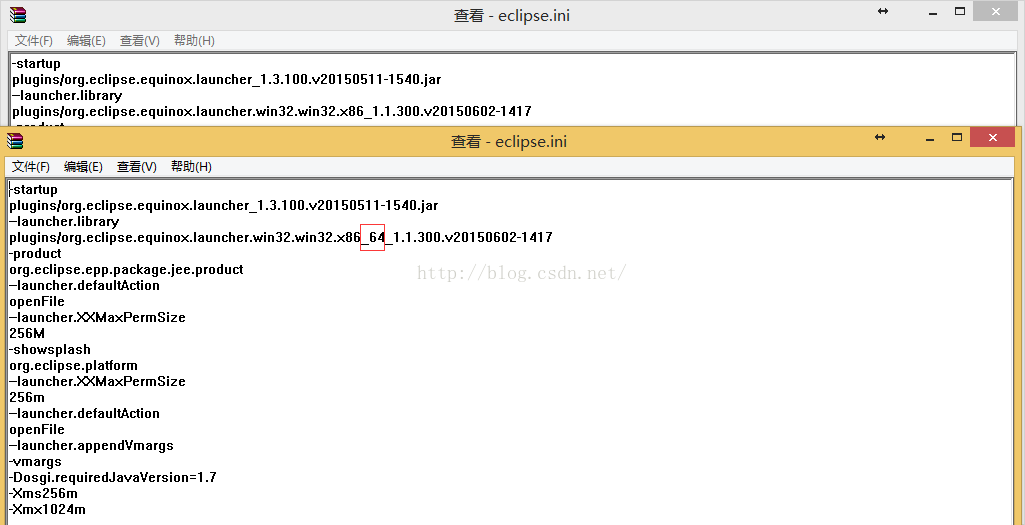
The reason is that when you update the JRE through a third party, the third party installs a 32-bit JRE that doesn’t match the 64-bit Eclipse. (The error message — Launcher. Library has x86_64 to show that eclipse is 64-bit.)
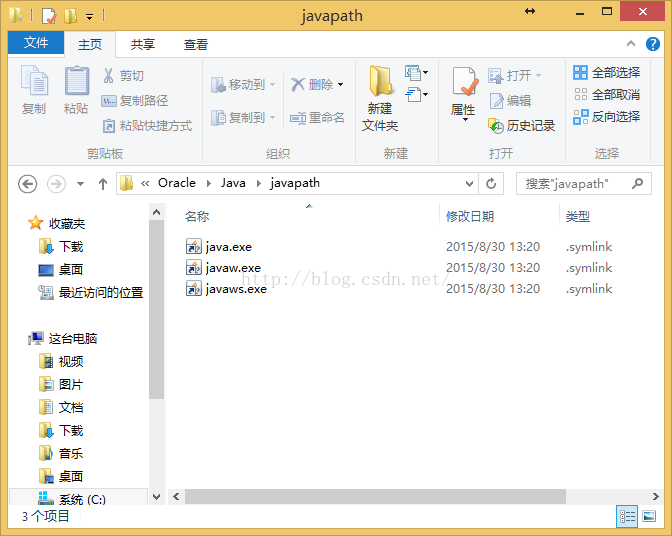
After installation JDK8/JRE8 adds an environment variable C:\ProgramData\Oracle\Java\ Javapath
The environment variable is three shortcuts, java.exe.lnk javaw.exe.lnk javaws.exe.lnk. Every time you install the JDK/JRE, these three shortcuts will update the path to the last JRE path

Cause found, reinstall the 64-bit JDK to fix the problem
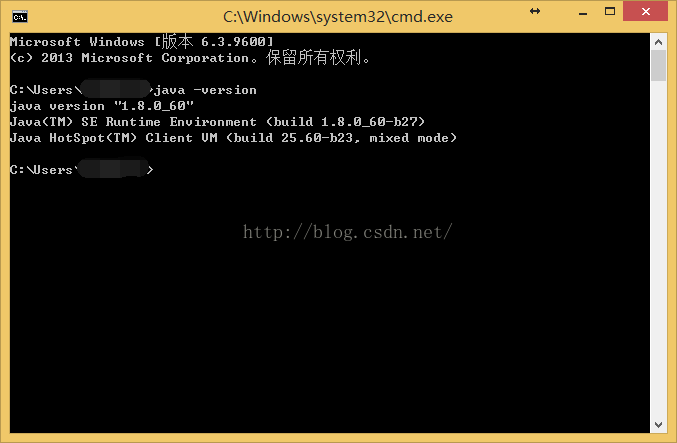
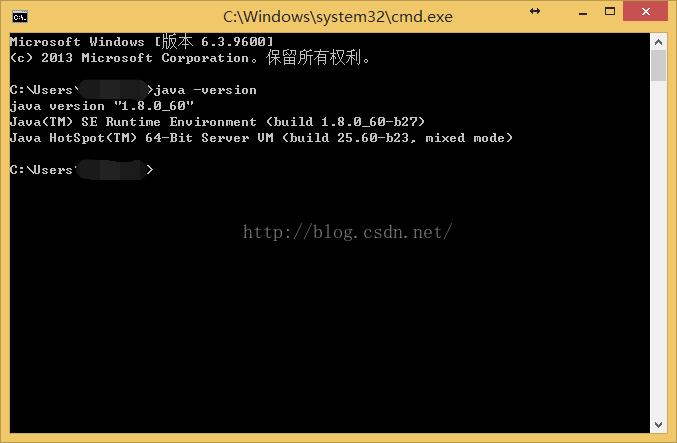
Attached is a comparison of the 1:32 bit 64-bit running java-Version commands
32 bit

C:\>java -version
java version "1.8.0_60"
Java(TM) SE Runtime Environment (build 1.8.0_60-b27)
Java HotSpot(TM) Client VM (build 25.60-b23, mixed mode)

A 64 – bit

C:\>java -version
java version "1.8.0_60"
Java(TM) SE Runtime Environment (build 1.8.0_60-b27)
Java HotSpot(TM) 64-Bit Server VM (build 25.60-b23, mixed mode)

you can see that 64 is 64 Bit, 32 Bit is not
Annex 2: Determine whether Eclipse is 32-bit or 64-bit through eclipse directory specific files
The directory structure of eclipse32-bit and 64-bit is similar. We can look at the Eclipse.ini file after unziping and compare it with -launcher. Library to find if there is x86_64
As shown in the figure, the top is 32 bits and the bottom is 64 bits

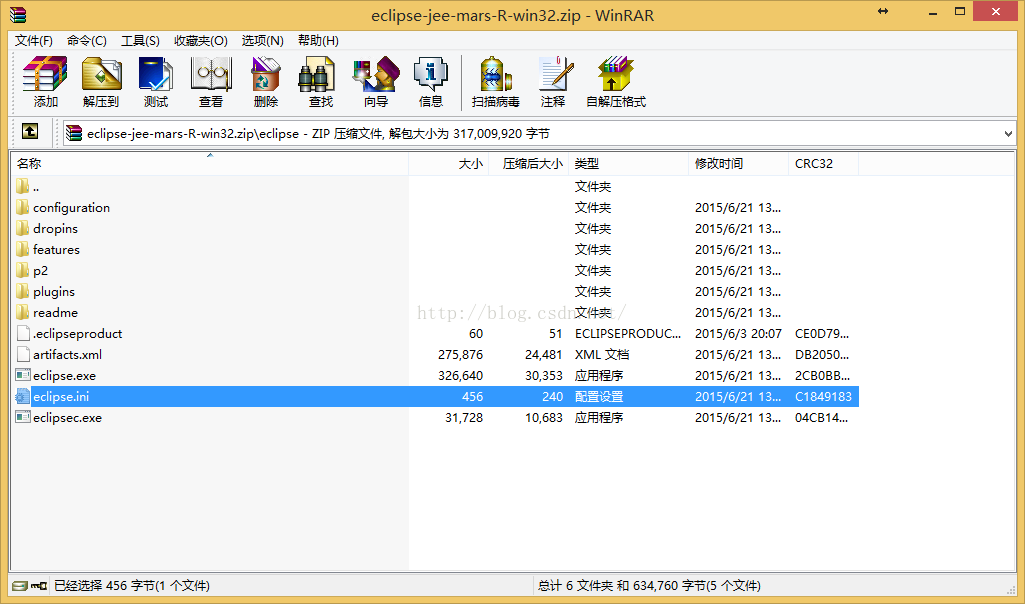
Eclipse directory structure

yum install Transaction Check Error

Transaction Check Error occurs when using Yum Install because of software conflicts. The following red part is the conflicting software. If it is installed by RPM, you can directly uninstall it by RPM and re-install yum Install.
. Total 39 kB/s | 5.0 MB 02:11

Running rpm_check_debug

Running Transaction Test

Finished Transaction Test

Transaction Check Error:

the file/usr/share/man/man3/Bundle: : DBD: : mysql. 3 PM. Gz from the install of perl – DBD – mysql 3.0007-2. El5. X86_64 conflicts with the file from the package
Perl – DBD – MySQL 3.0007-2. El5. I386

Error Summary

ACPI BIOS error resolution

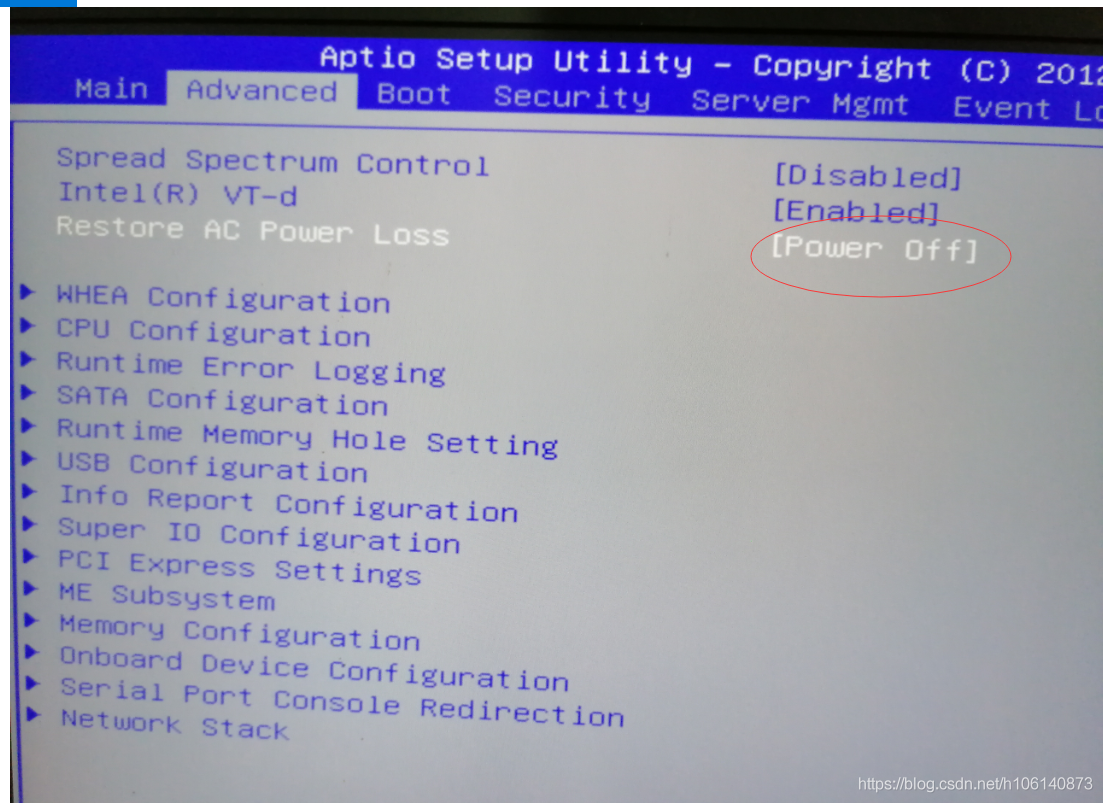
Yesterday, my computer acpi BIOS error, could not be win10/win10PE/winserver2016/Windows server 2019. This error does not occur in Win2003PE.
The computer motherboard is Inventec’s B810G, which finally solved the problem after much trouble.


INT 19 loads 512 bytes of MBR into memory 0x7c00, then jumps to 0x7c00 to execute the MBR executable (master booter). Master booter at least needs to do these things:

checks whether MAGIC (Signature) is a valid value (hexadecimal 55 AA);
moves itself to another location (usually 0x0600), leaving 0x7C00 to 0x7C00 +512K, in case a boot sector program is subsequently loaded at that location. This is the same as loading a boot sector program directly from a diskette. According to the design, it can be moved to any non-conflict position (that is, not reserved for other programs). But in general, one end space is found between 0X000800 and 0X0A0000.

view the partition table. Load 0X7C00 at the first Sector of the partition that is set to be active. Normally, this Sector will be the boot Sector. Finally, the master booter jumps to 0X7C00 and executes boot sector.
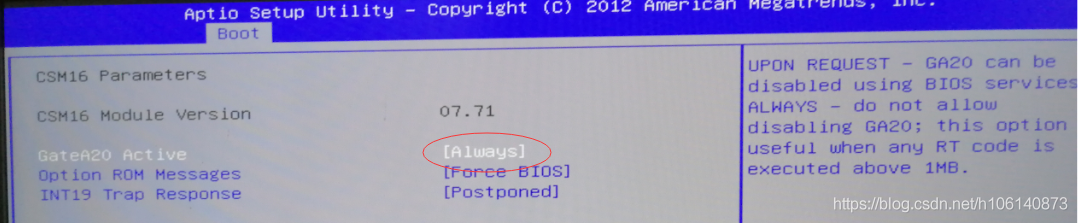
Gate A20 Option
function: set the control mode of A20 address line
set value :Fast or Normal
A20 address line control mode refers to how the system accesses the part of the memory space above 1MB. Because of history, early computers had only 1MB of memory, and software could use up to 1MB. Later, due to technological advances, software required more memory, so the system was required to provide more memory space. The A20 signal was created to solve this problem.
when this option is set to “Normal”, the system USES the keyboard controller chip to control the A20 signal; When this option is set to “Fast”, the system USES a chip on the motherboard to control the A20 signal. When using the motherboard chip to control the A20 signal, the memory access speed can be improved, thus improving the performance of the system. Therefore, it is recommended to set this option to “Fast”.