Author Archives: Robins

HTTP Error 401.3 – Unauthorized Error – While creating IIS 7.0 web site on Windows 7

After Migrating the application to work with the Integrated .NET mode, you might come across a problem: Server Error in Application “WebSiteName” – HTTP Error 401.3 – Unauthorized


HTTP Error 401.3 – Unauthorized


Resolving HTTP Error 401.3 – Unauthorized Error

Click on Authentication and click edit after choosing Anonymous Authentication. In the opening window select Application Pool identity and click OK.


Resolving HTTP Error 401.3 – Unauthorized Error – Application Pool Identity

How to Fix win10 video dxgkrnl fatal error

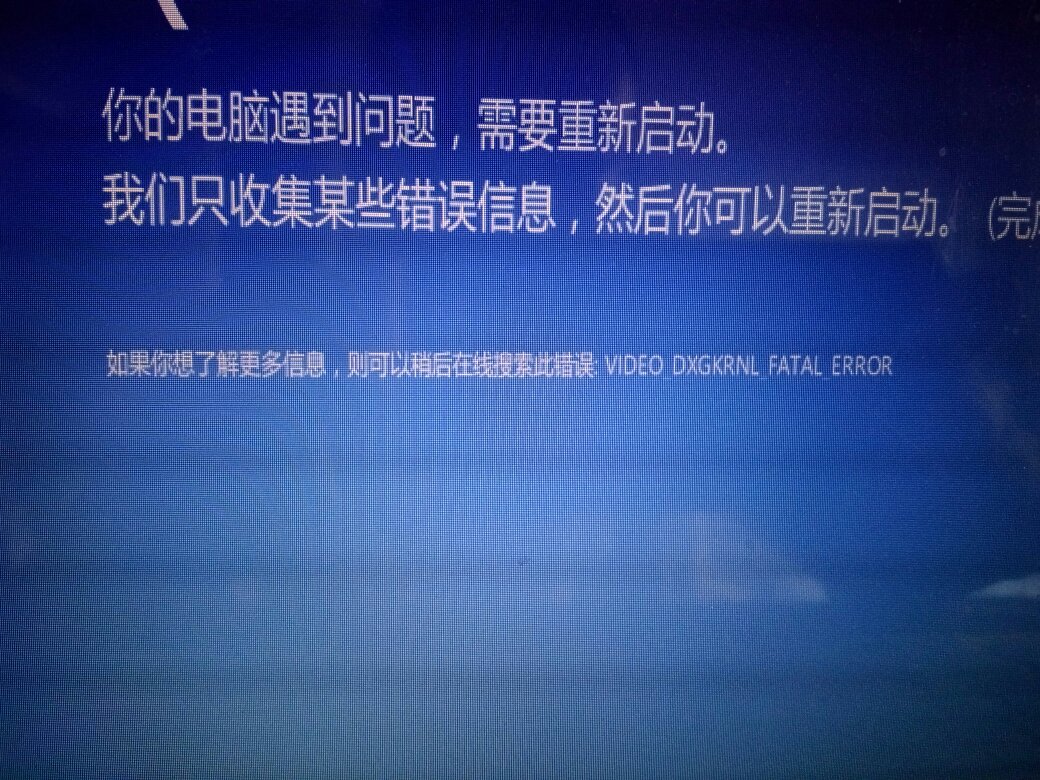
Today, when I use lenovo’s own update driver and system software update, the machine starts the dead cycle of blue screen — restart — restart after reboot, the machine automatically installs the driver — blue screen — restart.
blue screen error message is as follows:

So in the pop-up CMD, prompt is installing the driver, close the CMD, the machine will not restart.
then search the Internet for a solution:

The blue screen problem is usually due to driver and system incompatibility.
1. It is recommended to uninstall the newly installed drivers or network card and video card drivers.
2. Restart
3. Enter the system normally again, go to the official website to download the driver corresponding to your machine and the current system.
You can also perform a clean boot to block some third-party software from interfering with your system and help you troubleshoot the problem.
1. Press Win+R at the same time, type msconfig, enter
2. On the Services tab of the System Configuration dialog box, tap or click to check the "Hide all Microsoft services" check box, and then tap or Click on "Disable all". (If you have enabled fingerprint recognition, do not turn off the service)
On the Startup tab of the System Configuration dialog box, click Open Task Manager.
On the Startup tab of the Task Manager, for each startup item, select the startup item and click Disable.
Close the Task Manager.
On the Startup tab of the System Configuration dialog box, click OK, and then restart the computer.
The following are the steps to revert to normal startup.
1. Press Win+R at the same time, type msconfig, enter
On the General tab, tap or click on the Start normally option.
3. Tap or click on the Services tab and clear the check box beside "Hide all Microsoft services", and then tap or click on "Enable all".
Next, tap or click on the Startup tab, and then tap or click to open Task Manager.
In the Task Manager, enable all startup programs, and then tap or click OK.
If you are prompted to restart your computer, tap or click Restart.

The above solution from: http://answers.microsoft.com/zh-hans/windows/forum/windows8_1-hardware/video-dxgkrnl-fatal-error/e9a5c7bb-d2fd-443c-87be-418c01432bf6?auth=1
The measures I take are:
1. After starting up, press Win +R at the same time, enter msconfig, and enter
2. On the Services TAB in the System Configuration dialog box, click or click to select the Hide All Microsoft Services check box, and then click or click Disable All. (If you have enabled fingerprint identification, please do not turn off the relevant services)
Restart to find the problem solved, and then uninstall lenovo’s various system software, in case the next my hand is out of control update the system or driver.
Found a phenomenon is, in the machine just installed the system, with a variety of driver software to install the driver, this is rarely a problem; However, if the machine is used for a period of time, you then go to work on the installation, update the driver, prone to blue screen problems.

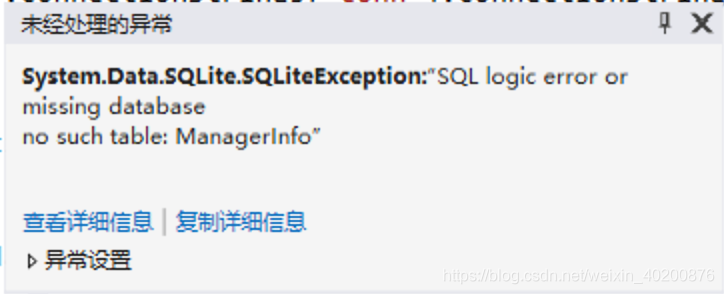
C# System.Data.SQLite.SQLiteException:“SQL logic error or missing database no such table: XX”

System. Data. SQLite. SQLiteException: “SQL logic error or missing the database no to the table: XX”

new SQLiteConnection(“Data Source=xxx.sqlite; Version=3;” );

solution: specify absolute path of database file
new SQLiteConnection(“Data Source=D:\111\222\333\xxx.sqlite; Version=3;” );

Xdoc generates API documents based on Java annotations

XDoc generates API documentation based on Java comments

<!--Adding maven dependencies-->
<dependency>
    <groupId>com.github.treeleafj</groupId>
    <artifactId>spring-boot-starter-xDoc</artifactId>
    <version>1.1.0</version>
</dependency>
@EnableXDoc //<--- Add this note to enable XDOC online HTML documents
@SpringBootApplication
public class TestApplication {

    public static void main(String[] args) {
        SpringApplication.run(TestApplication.class, args);
    }
}
#在application.propertiesConfigure the location of the project source code, directly in the project start, if it is a single module of the maven project, the default can not be configured
xdoc.enable=true #Start XDoc or not, default is true, production environment suggest change to false.
xdoc.sourcePath=F:/java/project/xDoc/samples/sample-springboot/src/main/java # sourcePath, multiple paths separated by commas
xdoc.title=User Center Interface Document #For configuring document page title
xdoc.version=1.0 #Identifies the version number of the interface document

Test code (Controller)

/**
 * User Moudle
 *
 * @author treeleaf
 * @date 2017-03-03 10:11
 */
@Controller
@RequestMapping("api/user")
public class UserController {

    /**
     * Login
     *
     * @param username Usernaem|compulsory fields
     * @param password password
     * @return Basic information of current registered users
     * @resp code Return code(0000 means successful login,others means failed)|string|Required
     * @resp msg login info|string
     * @resp username The username returned after successful login|string
     */
    @ResponseBody
    @PostMapping("login")
    public Map<String, String> login(String username, String password) {
        Map<String, String> model = new HashMap<>();
        model.put("code", "0000");
        model.put("msg", "Login success");
        model.put("username", username);
        return model;
    }


    /**
     * 用户注册
     *
     * @param user :username Username|Required
     * @param user :password Password
     * @return Basic information of the user generated after registration
     * @respbody {"id":"123","password":"123456","username":"admin"}
     * @see User
     */
    @ResponseBody
    @RequestMapping(value = "register", method = {RequestMethod.POST, RequestMethod.PUT})
    User register(User user) {
        user.setId(UUID.randomUUID().toString());
        return user;
    }
}

The last visit http://localhost:8080/xdoc/index.html directly
Two: Offline documentation
html:

/**
 * Generate offline interface files in HTML format
 */
@Test
public void buildHtml() throws Exception {
    /**NOTICE!!!! The path must be able to scan the source code project path, the implementation of the file generated to open the interface directory does not indicate that not scanned, please prioritize to confirm their own incoming path is correct!!!! */
    FileOutputStream out = new FileOutputStream(new File(userDir, "api.html"));
    XDoc xDoc = new XDoc(new File("F:/java/project/xDoc/samples/sample-springboot/src/main/java"), new SpringWebHttpFramework());
    xDoc.build(out, new HtmlForamt());
}

Markdown:

/**
 * Generate offline interface files in Markdown format.
 */
@Test
public void buildMarkdown() {
    /**Note!!!! The path must be able to scan the source code project path, the implementation of the generated markdown if there is no interface content, that is not scanned, please prioritize to confirm that their incoming path is correct!!!!*/
	
    ByteArrayOutputStream out = new ByteArrayOutputStream();
    XDoc xDoc = new XDoc(new File("F:/java/project/xDoc/samples/sample-springboot/src/main/java"), new SpringWebHttpFramework());
    
    xDoc.build(out, new MarkdownFormat());

    System.out.println(out.toString());
}

Usage of comment tag:
The @title interface title. If you don’t add this, the default is to read the description on the first line of the interface comment
“Parameter name parameter describes |(parameter type)|(mandatory)”, in which “parameter type” is optional and default is String, “mandatory” is optional and default is non-mandatory. The values of “mandatory” include mandatory (Y) and non-mandatory (N), and the commonly used format is as follows: Username username username username username username username username username username username username | is required or username username username |Y username username | is not required or username username |N username username |String username username |String| is required
For IDEA, using Java’s own @param annotation is an error if the parameter name above is not on the current method argument. To solve this problem,XDoc supports putting a colon before the annotation parameter name to avoid detection of IDEA, such as: :username username or user :username username
When @paramobj feel that the parameter itself is in a Dto, but it is troublesome to add @param one by one, we can use @paramobj to specify the Dto object. The usage is the same as @see, but @paramobj supports multiple interface methods. At the same time,@param is mixed with @paramobj, when some attribute name in @paramobj object conflicts with the parameter name of @param, it will take the @param first. Accountcontroller.java in samples that can be referenced is used
@resp specifies the parameters to return in the same format as @param
@Respbody specifies the demo that will return the data, supports formatting json data only for presentation purposes, and USES userController.java in reference samples
@see specifies the returned reference object, similar to @paramobj, but one is incoming and one is out, only one @see can appear in a method, meanwhile, when mixed with @resp, the attribute name conflicts, which is @resp, accountcontroller.Java in reference samples is used
@return returns a description of the information, which is plain text and used for presentation only
@ IgnoreApi this annotation, not on the annotation, used to indicate which interfaces do not need to generate documentation
SQL statement to calculate the distance between two coordinates

The article directories
Preface one, the code is as follows


preface
how to quickly calculate the distance between two coordinates in SQL native statement?


One, the code is as follows
code as follows (example) :


$lng=input('longtitude'); //Enter the vertical coordinates
$lat=input('latitude'); //Horizontal coordinates of the input
 
$distance="ACOS(SIN(( $lat * 3.1415)/180 ) *SIN((latitude * 3.1415)/180 ) +COS(( $lat* 3.1415)/180 ) * COS((latitude * 3.1415)/180 ) *COS(( $lng* 3.1415)/180 - (longtitude * 3.1415)/180 ) ) * 6380";

$fds=Db::table('activity')
->field($distance.' as distance')
->select();


composer Error while processing content unencoding: Unknown failure within decompression softwar

On Composer download file Error [Composer\Downloader\TransportException] Error while Processing content unencoding: Unknown failure within decompression Software. After checking the results returned after running the command, it was found that the problem was not due to compression expansion. The package information was loaded from the local cache and may be out of date. So you can just clear the Composer local cache

Composer clears the cache: Composer ClearCache

Application of call, apply and bind methods

1. call
Effect: Changes this point to call the function to pass in an argument.
Grammar:

function.call(this, arg1, arg2, ...)

Application: The child constructor inherits the properties of the parent constructor

function Father (surname) {
    this.surname = surname;
}
function Son (surname) {
    // Changes this in the parent constructor to this in the child constructor, and passes a value to this attribute.
    Father.call(this, surname);
}
var xiaoming = new Son('xiao');

2. apply
Effect: Changes this point to call the function to pass in an argument.
Grammar:

function.apply(this, [arg1, arg2, ...])

Application: Call a method in Math

var arr = [1, 2, 3];
Math.max.apply(Math, arr);

3. bind
Effect: Change this point to pass in parameter.
Grammar:

function.bind(this, arg1, arg2, ...)

Application: Change the this pointer in setTimeout

var obj = {
    data: 'first',
    init: function () {
        setTimeout(function(){
            this.data = 'last';
        }.bind(this), 3000)
    }
}
obj.init();

Server hardware and RAID configuration

Playing with server hardware and RAID configuration
RAID disk Array Introduction TO RAID 0 Disk Array Introduction to RAID 5 Disk Array Introduction to RAID 6 Disk Array Introduction to RAID 1+0 Disk Array Introduction to the disk array experiment

An introduction to RAID disk arrays
1, it is an abbreviated Independent Redundant disk Array
; 2, it combines several Independent physical hard Disks in a variety of ways to form a disk group (logical hard disk). To provide higher than a single hard disk storage performance and provide the data backup technology
3, known as the way of disk array of different RAID Levels (RAID Levels) commonly used RAID level

RAID 0, RAID 1, RAID5, RAID 6, RAID 1 + 0, etc
An introduction to RAID 0 disk arrays
RAID 0, RAID 0
1 continuous segmentation data bits or bytes as a unit, parallel read/write on multiple disks, so has the very high data rate, but it has no data redundancy
2, RAID 0 is just simply increase performance, did not provide guarantee for the reliability of data, and one of the disk failure will affect all data
3, RAID 0 cannot be applied to data security demanding situations
An introduction to RAID 1 disk arrays
RAID 1 (2)
1, through the disk image data to realize data redundancy, each other in pairs of independent disk backup data
2, when the original data is busy, can be directly read data from the mirror copy, so the RAID 1 can improve read performance
3, RAID 1 is the cost per unit of the highest in the disk array, but provides high data security and usability. When a disk fails, the system can automatically switch to read and write on the mirror disk instead of reorganizing the failed data
An introduction to RAID 5 disk arrays
RAID 5
1, N (N> = 3) piece of disk array, a data N – 1 stripe, 1 and check the data at the same time, a total of N copies of data on the N drive cycle balance store
2, N piece of disk read and write at the same time, the read performance is very high, but due to problems have check mechanism, write performance is relatively high,
3, (N – 1)/N
4 disk utilization, high reliability, allow bad 1 piece of plate, do not affect all the data
An introduction to RAID 6 disk arrays
RAID 6
N. = 4) piece of disk array, (N – 2)/N disk utilization
compared with RAID 5, RAID 6 added a second independent parity information block
two independent parity system using different algorithms, even though the disk failure will not affect the use of the data at the same time
relative to RAID 5 more “loss”, so write performance is poorer
Introduction to RAID 1+0 disk arrays
RAID 1+0
N (even, N> =4) after two mirror blocks, then combined into a RAID 0
N/2 disk utilization
N/2 block read and write at the same time, N block disk read
performance is high, high reliability
Disk array experiment

1、Find the process number: fuser /data
(process number)
2. kill process: kill-9 (process number) 
3、Uninstall: sumount /data
Check raid: mdama-Dsv.
4, Create raid5: mdadm -C md0 -l 5 -n 3 -x 1 /dev/sd/[b-e]
Check raid status information: mdadm -D /dev/mad/md0
5、Generate raid configuration file: madadm -Dsv > /etc/mdadm.conf
Formatted: mkfs.ext4 /dev/md/md0
6, create mount point: mkdir -pv/data
7. Permanent RAID mount
(1) Get the UUID of the RAID.
mdadm --detail /dev/md/md0 | grep -i uuid
(2) Start setting up mdadm.conf.
vim /etc/mdadm.conf
ARRAY /dev/md0 UUID=.......
(3) Get test information
blkid /dev/md0(this uuid is the global uuid, used to uniquely represent this device)
(4) Set boot-up
vi /etc/fstab
UUID=....... /data ext4 defaults 0 0
(5) Let the /etc/fstab configuration take effect.
mount -a
(6) Testing
df -Th

JS uses onerror to automatically catch exceptions

Catch exceptions

    1. use try catch use window.onerror to automatically catch exceptions.
//No need to use try catch to automatically catch error messages on every line.
// (error message, source code, in which line, in which column, error thrown)
window.onerror = function (message, source, lineNom, colNom, error) {
     // First, for cross-domain js, such as CDN's, there will be no detailed error message.
     // Second, for compressed js, but also with the sourceMap backtrack to the uncompressed code rows and columns
}

Take the following example

<script>
    window.onerror = function (message, source, lineNom, colNom, error) {
        console.log('Error')
        console.log(message)
        console.log(source)
        console.log(lineNom)
        console.log(colNom)
        console.log(error)
        return true //By returning true, the red error message will not be displayed on the console.
    }
    function aa() {
        console.log('aa')
        console.log(aa.nme.dsa)
        console.log('aa')
    }
    aa()
</script>
// ouput
aa
error
Uncaught TypeError: Cannot read property 'dsa' of undefined
http://127.0.0.1:5500/test.html
25
32
TypeError: Cannot read property 'dsa' of undefined
    at aa (test.html:25)
    at test.html:28
      1. first, for cross-domain js such as CDN, there will be no detailed error information
      1. For the error in the introduced js file, onerror will only know that there is an exception. If you want to locate the error, first set the server to support cross-domain,

access-control-allow-origin :*

      1. . Then, set the crossorigin attribute in the srcipt tag of the introduced js.
 ```

 For example, audio img link script video tag, their src attribute can be any link from any source, and all of them can be loaded. With the addition of the corssorigin property, the resources will not be loaded in the default cross-domain way, but in the **CORS** way, so that the onerror can listen to it.
      1. second, for compressed js, it is necessary to cooperate with sourceMap to reverse check the rows and columns of uncompressed code, which can only catch the errors of js runtime. Syntax error can’t catch
        window.addEventListener('error', function(e) {
            console.log('chucuole')
            e.preventDefault() //Error messages are not displayed on the console
        }, false)//default to false, bubbling state, capture state when set to true
    1. is the state of the capture (the third parameter is true) can catch js execution error, also can catch the tag element with SRC load error. When is bubble state (the third parameter is false), js execution errors can be caught, but loading errors of tag elements with SRC cannot be caught. PreventDefault

[Fixed] Disgusting bug Error:Failed to Load project configuration: cannot parse filemessage: content is not allowed in the preface.

Error details:

Error:Failed to load project configuration: cannot parse file D:\Work\demo\.idea\libraries\Maven___com_test.e_caseapi_1_0_SNAPSHOT.xml: ParseError at [row,col]:[1,1]
Message: No content is allowed in the preface.

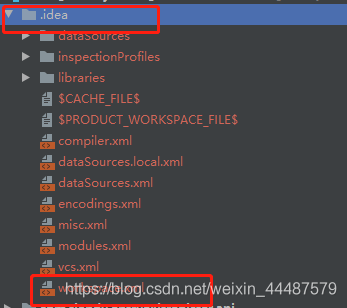
I copied a project and reopened a new workspace and threw this exception when I started. The analysis of this exception was caused by the fact that every workspace you imported IDEA generated a.idea file, because your current path did not match the workspace.
Solutions:
Find idea workspace. XML file, delete it, close idea

find your project workspace file, delete. Idea folder, then reopen idea and re-import the project into idea.

JS native implementation Promise.all

I met an interesting interview question today, which asked me to implement promise.all
with js native. Since I was not familiar with this API, I only realized the function of “resolve” and “callback”
Promise. All description

    promise.all (iterable) method returns a Promise instance in which all promises in the iterable parameter are “resolved” or arguments containing no Promise. If the Promise has a rejected in the parameter, the instance will call back reject because of the result of the first failed Promise

JS implements the all method

function all(iterableArr) {
    //Returns a PROMISE instance (satisfying the first rule)
    return new Promise((resolve,reject)=>{
        //resArr is used to store all the resolve promises of the resolve
        let resArr = [];
        // iterate through all elements of the array.
        for(let i in iterableArr){  
            let cur = iterableArr[i];
            // If the current object is of type promises
            if(typeof cur === 'object' && typeof cur.then ==='function'){ 
                cur.then((res)=>{
                    resArr[i] = res;
                    //If all resolve, the length of the stored resArr is the same as the length of the incoming iterableArr, and the entire promise is then resolve (in accordance with the second rule).
                    if(resArr.length === iterableArr.length){
                        resolve(resArr);
                    }
                // If the state of the current instance of promise is reject, then the entire promise will be reject. (The third rule is met.)
                },reject) 
            }else{
                resArr[i] = cur
            }
        }
    })
}

//Test
all([
    Promise.reject(100),//Promise.resolve(100)
    123,
    new Promise((resolve,reject)=>{
        setTimeout(()=>{
            resolve("DD")
        },5000)
    })
]).then((res)=>{
    console.log(res)
}).catch((err)=>{
    console.log(err)
})

The above