Error 0x8024401c
Execute the command prompt as a system administrator and then execute the following three lines of instructions:
net stop wuauserv
reg delete HKEY_LOCAL_MACHINE\SOFTWARE\Policies\Microsoft\Windows\WindowsUpdate
net start wuauserv
Operation is as follows:
C:\Windows\system32> Net stop wuauserv
Windows Update service is being stopped.
Windows Update service was successfully stopped.
C:\Windows\system32> Reg delete HKEY_LOCAL_MACHINE\SOFTWARE\Policies\Microsoft\Windows supdate
do you want to permanently delete the login machine code HKEY_LOCAL_MACHINE\SOFTWARE\Policies\Microsoft\Windows\WindowsUpdate (yes/no)?Y
operation completed successfully.
C:\Windows\system32>
C:\Windows\system32> Net start wuauserv
Windows Update service is starting.
Windows Update service has started successfully.
Author Archives: Robins
Twitter share failed, HTTP 403 error
Twitter shares frequently. Due to the small change in the content of the Shared copy, sharing failure is easy to occur. HTTP 403 error is prompted, and Exception information and “Status is a duplicate” are seen through the breakpoint.
Check: It’s because Twitter thinks you’re sharing content over and over again
The official documentation at https://developer.twitter.com/en/docs/tweets/post-and-engage/api-reference/post-statuses-update
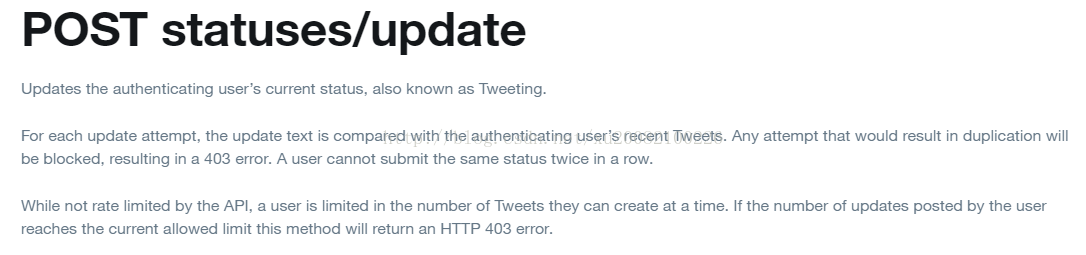
A question on the Twitter developer forum asked how long it would take for the judgment to be repeated, but the official response did not make the rule public, presumably to prevent it from being exploited
https://twittercommunity.com/t/duplicate-tweets/13264
Check: It’s because Twitter thinks you’re sharing content over and over again
The official documentation at https://developer.twitter.com/en/docs/tweets/post-and-engage/api-reference/post-statuses-update
A question on the Twitter developer forum asked how long it would take for the judgment to be repeated, but the official response did not make the rule public, presumably to prevent it from being exploited
https://twittercommunity.com/t/duplicate-tweets/13264
Visual Studio 2005 — Error code 1603 for this component means “Fatal error during installation.
Visual Studio 2005 — Error code 1603 for this component means “Fatal error during installation.
These days, because a project needs and want to install VS2005, Do not know how to return a responsibility, install to Microsoft Document Explorer 2005 prompt installation failure, how also continue not to go down, looked up a lot of data on the Internet, tried a lot of methods did not solve, on the difference reinstall the system, ha ha. In the last ready to give up suddenly because of a Qihoo 360 accidental system vulnerability repair installation failed to think of the reason, and then try, always successfully installed!
Now on the Internet on the installation of VS2005 Microsoft Document Explorer 2005 installation failure reasons and their own experience experience summary, previous lessons, hope to help others:
Before you start, please make sure that you have carefully reviewed the installation instructions of MS and tried the method. The official documentation is still very important.
The first recruit:
1. Empty all previous installations (including components from all previous versions), including the contents of the Windows /temp folder. 2. Open a vs cd-rom, have a file of Windows granted entry into the vs/wcu/msi31 folder, and install it. 3. Restart the computer and close the anti-virus software and firewall. 4. Modify the programe file and temp folders so that the programe program has sufficient permissions — in fact, you can login in and install 2005 with administrator.
5, now you can directly install.
(If this doesn’t work, see below)
The second recruit:
1. Open the VS2005 installation disk and enter the directory VS/WCU /DExplore
2. Manually run DExplorer. Exe
3. Run the VS2005 installation program again.
Three recruit:
1. Fix the.NET Framework 2.0
2. Remove a file named rgstrtn. LCK, which may be in
“%APPDATA%/Microsoft Help” or %temp% or directory under %temp% or
“/Documents and Settings/All Users{.windows}/Application Data/Microsoft Help”.
3, Then, see if ANY directories exist under “APPDATA%/Microsoft Help” or
“/Documents and Settings/All Users{Windows}/Application Data/Microsoft Help”, they need to be moved to another directory for this error to go away, a rename to another name will not work, The code is checking the Existance of ANY Directory of Name and the directories “APPDATA%/Microsoft Help” or “/Documents and Settings/All Users/Application Data/Microsoft Help” having ANY directory under it will not resolve this error.
All folders under Microsoft Help will be removed or renamed, pay attention to the path is good.
4. Ensure that you log in as Administrator and have sufficient permissions to operate the installation.
5. Install VS2005 again
(The above three tips are basically enough to solve most of these problems, if you are not good, you may be in the same situation as me, then try the following tips, hehe)
The fourth recruit:
1. Open your installer’s temp directory. Mine is /Documents and Settings/ Luocl (the username you logged in to) /Local Settings/ temp.
2. Remove the Temp folder’s encryption attribute: Click the Temp file’s attribute — & GT; Conventional – & gt; Advanced, uncheck the “encrypt Content to Protect Data” TAB, and click OK.
3. Reinstall VS2005.
Error in ffmpeg decoding real-time stream “non existing PPS 0 referenced, decode”_ slice_ header error,no frame!”
Ffmpeg decoded H264 real-time outflow error, prompt the following error:
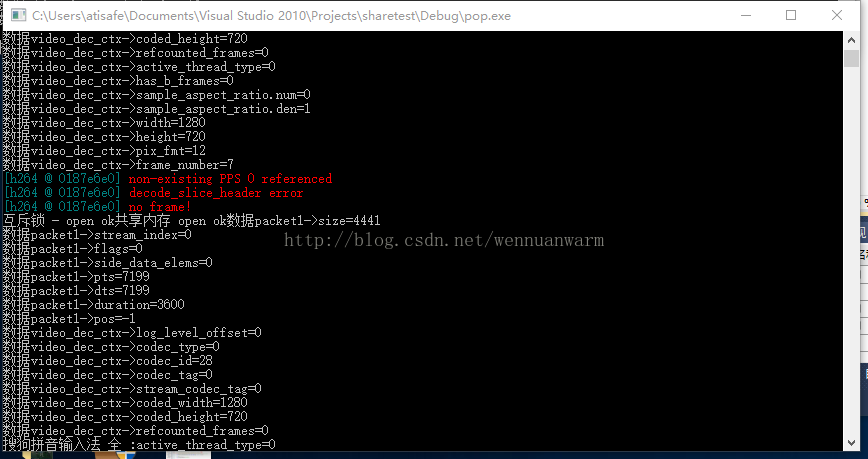
Reason analysis: keyframes can be decoded, but when decoding non-keyframes, the error above is reported
1) If we directly take frame by frame from the RTSP stream and transcode YUV from frame by frame, there is no special requirement for AVpacket and AVframe, and the integrity is fine.
2) If the H264 real-time stream is stored in the Shared memory and AVpacket of one frame is read from the Shared memory, the AVframe should not be cycled clean. It is better to make it a member variable, otherwise the non-key frame cannot be decoded, which will cause the above error.
Solution: Make AVframe a member variable. You can’t clean it up once.
Reason analysis: keyframes can be decoded, but when decoding non-keyframes, the error above is reported
1) If we directly take frame by frame from the RTSP stream and transcode YUV from frame by frame, there is no special requirement for AVpacket and AVframe, and the integrity is fine.
2) If the H264 real-time stream is stored in the Shared memory and AVpacket of one frame is read from the Shared memory, the AVframe should not be cycled clean. It is better to make it a member variable, otherwise the non-key frame cannot be decoded, which will cause the above error.
Solution: Make AVframe a member variable. You can’t clean it up once.
Runtime error 5 Invalid procedure call or argument
Runtime error 5 Invalid procedure call or argument
VB compiler must have VB runtime support, most VB programs are not pure green software, can not directly copy the compiled program to the operating system without VB operating environment to run. The solution is to package the installer with VB and install it once on that computer.
Label: Runtime Error, VB
Solution windowserror: [error 193]% 1 is not a valid Win32 Application
WindowsError: [Error 193] %1 is not an valid Win32 application
- Python 3.5.4 rc1-2017-07-25
- Download Windows x86 executable installer
- Python 2.7.14 rc1-2017-08-27
- Download Windows x86 MSI installer
Specific solutions:
This is because your computer is 64-bit
But your file is 32-bit, so you have this conflict
By this point, you should know that you have deleted the 32-bit Python download
There’s a similar answer on StackOverflow, you can click on it and see
Python Download interface portal, click to access
Python3 is best downloaded
Python2 is best downloaded
Afterword.
Finally, the old formula, publicity a wave of their own public number! (Attention!)
I in the big house, welcome everyone to pay attention, please sweep the following two-dimensional code (‘ ▽ ‘ ‘”)

If you feel helpful, you can scan the code, praise and encourage! Thank you very much!

Java common errors < identifier > expected
Case 1:
public class line1{
int test1=666;
line2 l2=new line2();
l2.ShowIt(test1);
}
Example 2:
public class line1{
int test1=666;
line2 l2=new line2();
line1(){
l2.ShowIt(test1);
}}
Compiling the former results in the following error:
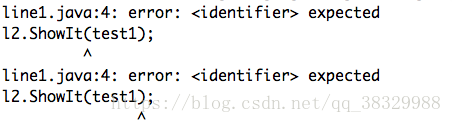
The reason is that the statement written to call a method is not in the right place in the class and must be placed in a method.
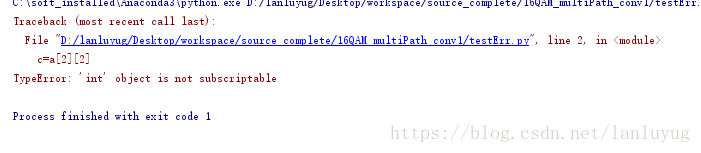
Python reported error: typeerror:’int’object is not subscriptable
Check the error line, the error is generally in the integer subscript:
Such as:
Such as:
a = 4
c=a[2]
Error: line 2, in < module>
c = a [2]
TypeError: ‘int’ object is not subscriptable
Take the more complicated one: two dimensions
a = [1,2,3,4]
c=a[2][2]
It’s a one-dimensional array, but it takes an array index, and then it adds a index, same problem.
Error resolution of win7 “ClassFactory cannot supply requested class” in vs 2008
Right-click on the vS2008 executable menu or shortcut property compatibility to remove the disabled Visual Theme marquee
Zip to decompress the jar package, like the add file in the jar package
1. A JAR is just a ZIP package that can be unzip, and the possible path of unzip files is exactly the same.
2. If the JAR package contains exactly the same file, the ZIP add will not be used and a zip error will be reported: zip file structure invalid
3. Add classes to a JAR package, such as classes from the compiled classes, go to the classes directory and use the command zip-r your. Jar./*
4. The FAT JAR packaged with assembly may not contain its own classes, so use the methods in 3 to ensure that the JAR contains its own classes
2. If the JAR package contains exactly the same file, the ZIP add will not be used and a zip error will be reported: zip file structure invalid
3. Add classes to a JAR package, such as classes from the compiled classes, go to the classes directory and use the command zip-r your. Jar./*
4. The FAT JAR packaged with assembly may not contain its own classes, so use the methods in 3 to ensure that the JAR contains its own classes
Solution of gitlab 502 problem I encountered
GitLab was configured on Ali Cloud today, but the error 502 error kept coming up.
502
GitLab is not responding.
Please contact your GitLab administrator if this problem persists.
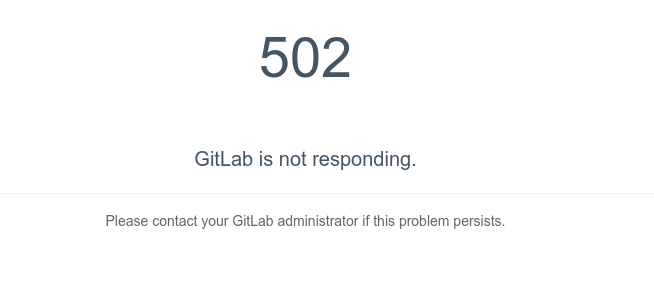
After searching for one afternoon, a mistake was finally found. It turned out that a Tomcat service was opened on the server and occupied port 8080, which made the Unicorn service of GitLab unable to be opened.
is finally modified as follows in /etc/gitlab/gitlab.rb
unicorn['port'] = 9090Then gitlab-ctl reconfigure restart the configuration so that the gitlab server is up and running.
Here, write down the general process of solving the problem, and count it as a good experience for yourself.
install GitLab, start service, 502 error found. This is the beginning of the search for solutions to various Baidu.
1. Find the /var/log/gitlab/nginx in the error log file, found the following error /var/opt/gitlab/gitlab - rails/sockets/gitlab socket failed (2: No such file or directory), and then use the nc command to create the socket file, the final permission is set to SRWXRWXRWX , users and groups are set to git:git, but found that this method does not work.
2. When I ran to the GitLab website to find a solution, https://gitlab.com/gitlab-org/omnibus-gitlab/blob/master/README.md
CTRL + f 502 find the official tutorial says 502 problems
Note that on a single-core server it may take up to a minute to restart Unicorn and Sidekiq. Your GitLab instance will give a 502 error until Unicorn is up again.
It is also possible to start, stop or restart individual components.
sudo gitlab-ctl restart sidekiq
Unicorn supports zero-downtime reloads. These can be triggered as follows:
sudo gitlab-ctl hup unicorn
Note that you cannot use a Unicorn reload to update the Ruby runtime.
Try using the above two commands and find that it doesn't work. When I got angry, I kept typing gitlab-ctl status until I found that unicorn pid was getting bigger all the time. The PID for the other services has not changed.
3. Now we've almost found the problem -- unicorn's question. For the official tutorial, you can use gitlab-ctl tail unicorn to track the unicorn's status. Unfortunately, when we discovered that port 8080 was occupied, the unicorn's status was reported to have been captured
E, [2015-02-11T17:27:57.818492 #26687] ERROR -- : adding listener failed addr=127.0.0.1:8080 (in use)
E, [2015-02-11T17:27:57.818621 #26687] ERROR -- : retrying in 0.5 seconds (4 tries left)
E, [2015-02-11T17:27:58.318902 #26687] ERROR -- : adding listener failed addr=127.0.0.1:8080 (in use)
E, [2015-02-11T17:27:58.318998 #26687] ERROR -- : retrying in 0.5 seconds (3 tries left)
E, [2015-02-11T17:27:58.819309 #26687] ERROR -- : adding listener failed addr=127.0.0.1:8080 (in use)
E, [2015-02-11T17:27:58.819423 #26687] ERROR -- : retrying in 0.5 seconds (2 tries left)
E, [2015-02-11T17:27:59.319954 #26687] ERROR -- : adding listener failed addr=127.0.0.1:8080 (in use)
E, [2015-02-11T17:27:59.320076 #26687] ERROR -- : retrying in 0.5 seconds (1 tries left)
4. Well, here's the problem. The choice then became whether to kill the original 8080 port service or to change the unicorn port. This depends on your specific needs. I've changed the unicorn port to 9090, and the method is the one described at the beginning.
Apache failed to start due to SSL library certificate has expired
1. Check the service log and see the following error from the /var/log/ HTTPD /nss_error_log file:
[Sat Aug 20 08:17:49 2016] [error] NSS_Initialize failed. Certificate database: /etc/httpd/alias.
[Sat Aug 20 08:17:49 2016] [error] SSL Library Error: -8038 SEC_ERROR_NOT_INITIALIZED
[Sat Aug 20 08:17:49 2016] [error] NSS_Initialize failed. Certificate database: /etc/httpd/alias.
[Sat Aug 20 08:17:49 2016] [error] SSL Library Error: -8038 SEC_ERROR_NOT_INITIALIZED
It says certificate problem. Check the certificate: Discovery time expired
“Certutil-d /etc/httpd/ Alia-L-n Server-CERT”
2. The default time of installation of the certificate is 4 years.
3. Treatment:
1. If you don’t need to use mod_nss module, that the/etc/HTTPD/conf. Directly to the d/NSS. The conf file renaming or deletion; 2. Do not verify certificate expiration time, add nssenforcidcerts off configuration in nss.conf;
3. Is to regenerate the new certificate; Be sure to delete the old certificate database file before generating a new certificate
CD/etc/HTTPD/alias
The rm -f *. The db
The/usr/sbin/gencert/etc/HTTPD/alias & gt; /etc/httpd/alias/install.log 2> & 1
Certutil-d /etc/httpd/ Alia-L-n Server-CERT
Chmod 750 *.db (because it operates under root, it generates permissions that are root permissions)
Restart the HTTPD
Reproduced in: https://www.cnblogs.com/Fle-x/articles/5789614.html