Tag Archives: python

Python AttributeError: module ‘tensorflow‘ has no attribute ‘InteractiveSession‘

Error occurred while running tensorflow:

AttributeError: module 'tensorflow' has no attribute 'InteractiveSession'

This is not the first mock exam error in the package, because the module Session has been removed in the new Tensorflow 2 version, and the code is changed to:

sess = tf.InteractiveSession()

Replace with:

sess = tf.compat.v1.InteractiveSession()

Similarly, if there are similar “TF. * *” codes in the code, you should add “compat. V1.” after them.

If you are not used to it, you can reduce the version of tensorflow

pip install tensorflow==1.14


Python PIP Fatal error in launcher: Unable to create process using ‘“e:\program files\programdata

Error content

Fatal error in launcher: Unable to create process using '"e:\program 
files\programdata\python3.9\python.exe"  "E:\Program Files\ProgramData
\Python39\Scripts\pip.exe" ': ???????????

Solution

python -m pip install --upgrade pip

Problem solving
there is a problem with PIP. Updating PIP through Python will delete the wrong PIP and install the updated pip

Python writes DICOM file (attributeerror: ‘filemetadataset’ object has no attribute ‘transfersyntax uid’ solution)

Write to DICOM file

import numpy as np
import matplotlib.pyplot as plt
import pydicom
import sys

def InitDicomFile():
    infometa = pydicom.dataset.Dataset()
    infometa.TransferSyntaxUID = pydicom.uid.ImplicitVRLittleEndian
    infometa.ImplementationVersionName = 'Python ' + sys.version
    infometa.MediaStorageSOPClassUID = 'CT Image Storage'
    infometa.FileMetaInformationVersion = b'\x00\x01'
    return infometa
    
filename = r'E:\34.dcm'
# ds = pydicom.dcmread(filename) # Read Tags from dicom image
ds = pydicom.read_file(filename) # Read Tags of the dicom image
info = pydicom.dataset.FileDataset({},ds) 
temp = pydicom.dcmread(filename).pixel_array # read in DICOM image and convert to numpy
img = temp.astype('uint16')
info.PixelData = img.tobytes()
infometa = InitDicomFile() # must be initialized otherwise read in will prompt an error
info = pydicom.dataset.FileDataset({},info,is_implicit_VR =True, file_meta=infometa)
# info = pydicom.dataset.FileDataset({},info) # Read without file_meta=infometa will prompt an error
info.save_as(r'M:\result.dcm')
# Verify that the newly stored DICOM can be read in
f = pydicom.dcmread(r'M:\result.dcm',force=True)
plt.imshow(f.pixel_array,'gray')
plt.show()

If there are not the following two lines, reading the stored DICOM file will prompt the following error:

infometa = InitDicomFile()
info = pydicom.dataset.FileDataset({},info,is_implicit_VR =True, file_meta=infometa)

AttributeError: ‘FileMetaDataset’ object has no attribute ‘TransferSyntaxUID’

Windows10 DOTA_devkit Error: TypeError: ‘>=‘ not supported between instances of ‘NoneType‘ and ‘str‘

1. The system configuration is: windows10 + python3.6 + anaconda3 + swig4.0.2. Swig needs to add environment variables to the system environment manually.

2. According to the official readme file, execute the command [swig – C + + – Python polyiou. I], basically no problem.

3. When executing the command [Python setup. Py build]_ The error [if self. LD] appears when “ext — inplace”_ version >= ” 2.10.90″: TypeError: ‘>=’ not supported between instances of ‘NoneType’ and ‘str’】。 In the python installation path of the virtual environment, find the file of  lib  distutils  distutils.cfg, open it and find the following content: [build] compiler = mingw32, the content of the file is correct.

4. Solution: after exploration and research, we need to configure GCC, install mingw-w64 compiler, command is [CONDA install libpython m2w64 toolchain – C msys2], and then execute the command [Python setup. Py build]_ Ext — inplace], run successfully, and you will find that the_ polyiou.cp36-win_ Amd64.pyd file.

After the new video card rtx3060 arrives, configure tensorflow and run “TF. Test. Is”_ gpu_ The solution of “available ()” output false

First of all, install according to the normal installation method:
the necessary conditions for success are:
1. The version number should be correct, that is, CUDA should be installed above 11.1 (because CUDA version supported by 30 AMP architecture graphics card starts from 11.1)
link: https://developer.nvidia.com/zh-cn/cuda-downloads
2. Cudnn needs to install the, Link (to register and log in to NVIDIA account) https://developer.nvidia.com/zh-cn/cudnn
If you haven’t installed it, you can see other posts https://so.csdn.net/so/search/all?q=3060%20tensorflow& t=all& p=1& s=0& tm=0& lv=-1& ft=0& l=& U =
after installation, enter the created environment and run tf.test.is_ gpu_ available()。
if the computer can detect the graphics card, it can display the number of cores, computing power and other parameters of each graphics card, but the final answer is false
if the command line shows that cusolver64 cannot be found_ 10 documents

, at the following address C:// program files/NVIDIA GPU computing toolkit/CUDA/V11.1/bin

Will cusolver64_ 11. DLL renamed to cusolver64_ 10. Dll
and then run tf.test.is again_ gpu_ available()

Your uncle made it!

raise ValueError(‘Expected input batch_size ({}) to match target batch_size ({}).‘

raise ValueError(‘Expected input batch_ size ({}) to match target batch_ size ({}).’

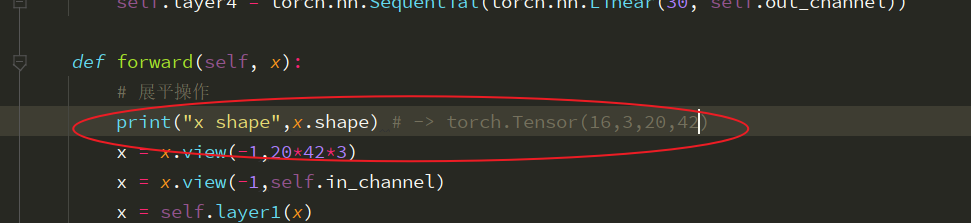
Remember to print the size of the picture before forward propagation. I didn’t notice that all the pictures come in RGB three channel data this time. When using the . View function, I remember to look at it first. When I used it, I calculated the size of the picture directly according to a single channel. Generally, this is the phenomenon that the size of the picture does not match

The phenomenon of mating

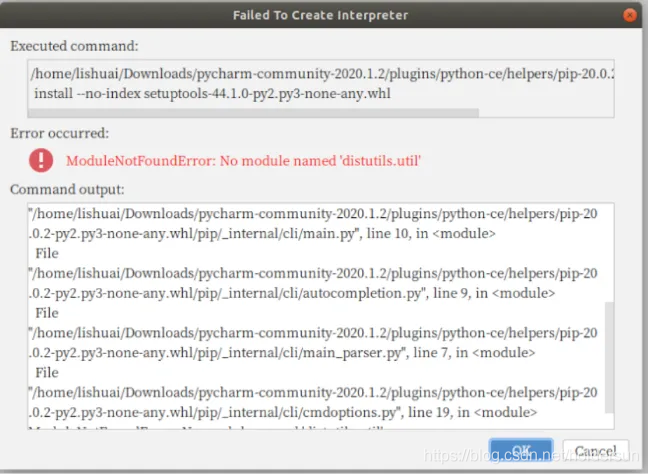
Create a new project in pycharm: modulenotfounde rror:No module named ‘distutils.util‘

The error is as follows:

Don’t panic. It’s not a big problem

When installing pycharm in the Ubuntu system and creating a new project, prompt

ModuleNotFoundError: No module named ‘distutils.util’

The reason is that Ubuntu 18.04 does not install PIP by default, so you need to install python3 pip,

Enter the command in the terminal:

sudo apt-get install python3-pip

When you create a new project again, the problem can be solved