Tag Archives: python

Python implements inserting content in the specified position of text

1. scene
The

production environment requires writing to a large number of json files, inserting an attribute in the specified node. As follows:

{
    "dataSources":{
        "test_dataSource_hod":{
            "spec":{
                "dataSchema":{
                    "dataSource":"test_dataSource_hod",
                    "parser":{
                        "type":"string",
                        "parseSpec":{
                            "timestampSpec":{
                                "column":"timestamp",
                                "format":"yyyy-MM-dd HH:mm:ss"
                            },
                            "dimensionsSpec":{
                                "dimensions":[
                                    "method",
                                    "key"
                                ]
                            },
                            "format":"json"
                        }
                    },
                    "granularitySpec":{
                        "type":"uniform",
                        "segmentGranularity":"hour",
                        "queryGranularity":"none"
                    },
                    "metricsSpec":[
                        {
                            "name":"count",
                            "type":"count"
                        },
                        {
                            "name":"call_count",
                            "type":"longSum",
                            "fieldName":"call_count"
                        },
                        {
                            "name":"succ_count",
                            "type":"longSum",
                            "fieldName":"succ_count"
                        },
                        {
                            "name":"fail_count",
                            "type":"longSum",
                            "fieldName":"fail_count"
                        }
                    ]
                },
                "ioConfig":{
                    "type":"realtime"
                },
                "tuningConfig":{
                    "type":"realtime",
                    "maxRowsInMemory":"100000",
                    "intermediatePersistPeriod":"PT10M",
                    "windowPeriod":"PT10M"
                }
            },
            "properties":{
                "task.partitions":"1",
                "task.replicants":"1",
                "topicPattern":"test_topic"
            }
        }
    },
    "properties":{
        "zookeeper.connect":"zookeeper.com:2015",
        "druid.discovery.curator.path":"/druid/discovery",
        "druid.selectors.indexing.serviceName":"druid/overlord",
        "commit.periodMillis":"12500",
        "consumer.numThreads":"1",
        "kafka.zookeeper.connect":"kafkaka.com:2181,kafka.com:2181,kafka.com:2181",
        "kafka.group.id":"test_dataSource_hod_dd"
    }
}

needs to be at the end of the properties node to add a "druidBeam. RandomizeTaskId" : "true" property.

2. Ideas

the general idea is as follows:

  1. scan all files to be changed
  2. confirm the position to be changed
  3. insert new character

in the file

where I find it a little bit harder is where I confirm the insertion location. We know is "druid. Selectors. Indexing. The serviceName" : "druid/overlord", this thing must be in the node, that as long as I can find this stuff, and then in his behind with respect to OK.
ok, we've got the idea, let's write the code.

#!/usr/bin/python
# coding:utf-8

import os


old_string = '"druid/overlord"'
new_string = ('"druid/overlord",' +
              '\n        ' +
              '"druidBeam.randomizeTaskId":"true",')


def insertrandomproperty(file_name):
    if '.json' in file_name:
        with open(file, 'r') as oldfile:
            content = oldfile.read()
            checkandinsert(content, file)

    else:
        pass


def checkandinsert(content, file):
    if 'druidBeam.randomizeTaskId' not in content:
       # to avoid ^M appear in the new file because of different os
       # we replace \r  with '' 
        new_content = content.replace(old_string, new_string).replace('\r', '')

        with open(file, 'w') as newfile:
            newfile.write(new_content)
    else:
        pass


if __name__ == '__main__':
    files = os.listdir('/home/tranquility/conf/service_bak')
    os.chdir('/home/tranquility/conf/service_bak')
    for file in files:
        insertrandomproperty(file)

is just updating the content in memory, and then rewriting it back to the file. The code is just a rough representation of the idea and can be modified and optimized as needed.
Error: can’t locate revision identified by ‘xxx’

Flask migration using sqlalchemy database error:

Error: Can't locate revision identified by 'xxxxxx'

error reason: the database version is wrong, maybe migrations file is changed, but the original database table is still used.

solution:

  1. delete migrations folder + alembic_version table in the database table, re-initialize the database and update;
  2. delete the entire database table, then you can directly do the database initialization update operation. (migrations folders can also be deleted, equivalent to recreating the database table, the original data will not exist)

Python string prefix

string prefix

meaning

  • u stands for unicode and can store Chinese characters.
  • b for bytes, can not store Chinese.
  • r represents raw and does not recognize escape characters.
  • f format.

Use

print(r"tes\nt")

sys.path.append(), os.path.exists(), os.path.join() and os.makedirs() meaning

When we import a module: import XXX, by default the python parser will search the current directory, installed built-in modules and third-party modules. The search path is stored in the path of the sys module:

import sys
sys.path

output:

['d:\\program\\anaconda3\\envs\\learn_py36\\python36.zip',
 'd:\\program\\anaconda3\\envs\\learn_py36\\DLLs',
 'd:\\program\\anaconda3\\envs\\learn_py36\\lib',
 'd:\\program\\anaconda3\\envs\\learn_py36',
 '',
 'd:\\program\\anaconda3\\envs\\learn_py36\\lib\\site-packages',
 'd:\\program\\anaconda3\\envs\\learn_py36\\lib\\site-packages\\win32',
 'd:\\program\\anaconda3\\envs\\learn_py36\\lib\\site-packages\\win32\\lib',
 'd:\\program\\anaconda3\\envs\\learn_py36\\lib\\site-packages\\Pythonwin',
 'd:\\program\\anaconda3\\envs\\learn_py36\\lib\\site-packages\\IPython\\extensions',
 'C:\\Users\\DELL\\.ipython']

can see that the result is a list, that is, we use import to import the module, in the list of these contents to search. So sys.path.append() brackets fill in the path to import the module, and then you can import the module using the import module.

os.path. Exists () :
OS operating system (operating system), Python OS module encapsulates the system files and file paths. The
os.path module is mainly used for obtaining file properties. Exists means “exists”, so os.path. Exists () is used to determine the existence of a file in parentheses. For all files in the system and their paths, you can determine.
returns: True or False

OS. Path. The join () : </ strong>
OS. The path. The join (” father “, “subset”)
the returned result is:
father set subset \ ‘
meaning to add “subset” to “father” after the path.

os.makedirs() :
create folders under the current path: subset
can also write absolute paths:
os.makedirs(‘C:\Users\DELL\Desktop\ subset)
create folders named as subsets on the Desktop.

Edge detection: two methods

  • Laplace algorithm gives edge
import cv2
import numpy
from scipy import ndimage
def strokeEdges(src,dst,blurksize,edgeKsize):
    src=numpy.array(src)
    yuansrc=src
    dst=numpy.array(dst)
    if blurksize>=3:
        blurredSrc=cv2.medianBlur(src,blurksize)
        graySrc=cv2.cvtColor(blurredSrc,cv2.COLOR_BGR2GRAY)
    else:
        graySrc=cv2.cvtColor(blurksize,cv2.COLOR_BGR2GRAY)
    ##以上操作是对图片模糊化然后边缘灰化 是否模糊化的标准就是blurksize是否小于3
    ##
    cv2.Laplacian(graySrc,cv2.CV_8U,graySrc,edgeKsize)
    ##拉普拉斯算法 第一个参数是原图 第二个参数是深度 也就是和图片形式有关例如 RGB分别由8位
    ##那么深度就是2的24次方 这里的cv2.CV_8U具体看下面
    ##第三个参数dest是结果的图片 Ksize是核的大小 为奇数 (并不是数字越大或者越小就越好 这个好不好原因还未知)
    #此时这里的边缘检测已经是完成了
    normalizedInverseAlpah=(1.0/255)*(255-graySrc)
    channels=cv2.split(src)
    #通道拆分
    for channel in channels:
        channel[:]=channel*normalizedInverseAlpah
    cv2.merge(channels,dst)
    cv2.imshow('dst',dst)
    cv2.imshow('graySrc',graySrc)
    cv2.imshow('shouw',yuansrc)
    cv2.waitKey()
    cv2.destroyAllWindows()
src=cv2.imread('D:\\pycharm\\text.jpg')
dst=src
strokeEdges(src,dst,7,5)

as for the above code there are two points which you won’t find if you don’t look at it the first question is why do we use numpy.array to 2d the second question is why do we change the channels when there is no change in the for loop but then the channels change at the end
Question the answer is in the loop and strokeEdges normalizedInverseAlpah = (1.0/255) of the * (255 – graySrc) this operation numpy array for the concrete operation of operation rules will give the answer in the code snippet below
problem two answers will give the answer in the code snippet below if I go back to review or future readers see the trouble knock code of your answer to see what problem we have appeared in

import numpy
gray=[2]
channels=[[1,2,3],[1,2,3],[1,2,3]]
for channel in channels:
    channel[:]=channel*2
print(channels)
print('____________________________')
channels=[[1,2,3],[1,2,3],[1,2,3]]
channels=numpy.array(channels)
for channel in channels:
    channel[:]=channel*[1,2,3]
print(channels)
print('____________________________')
channels=[[1,2,3],[1,2,3],[1,2,3]]
channels=numpy.array(channels)
for channel in channels:
    channel[:]=channel*2
print(channels)
  • Canny algorithm obtained the edge
import cv2
img=cv2.imread('D:\\pycharm\\text.jpg')
cv2.imshow('canny',cv2.Canny(img,0,100))
cv2.waitKey()
cv2.destroyAllWindows()

canny function itself and not for image noise reduction operation so if you want to use canny must advance using low channel filtering denoising
cv2, canny is the first parameter to the natural images in the second and the third parameter is respectively on the threshold and the threshold is simple to understand is the edge of the small number will appear more but the same risk is likely to take noise as edges or appeared on the edge of the following is not big number will edge if too less will appear the edges as not

Solve the problem of unable to locate package python3.6 when upgrading from python3.5 to python3.6 in ubantu16.04

error as follows:

Reading package lists... Done
Building dependency tree       
Reading state information... Done
E: Unable to locate package python3.6
E: Couldn't find any package by glob 'python3.6'
E: Couldn't find any package by regex 'python3.6'

The ppa used by

is the old version:

sudo add-apt-repository ppa:jonathonf/python-3.6

needs to update ppa:

sudo add-apt-repository ppa:deadsnakes/ppa

and then system update:

sudo apt-get update

Finally, python3.6

is installed

sudo apt-get install python3.6

Python 3 install pyqt5

Python3.8
version: Python3.8
PyQt5 5.15.1
Anaconda has been installed
finds the article by following the steps:
pip3 install Sip
pip3 install PyQt5
pip install PyQt5-tools -i http://pypi.douban.com/simple –trusted-host=pypi.douban.com

adds pyqt5-tools to the global environment variable (Path). Mine is:
C:\Users**\AppData\Local\Programs\Python\ python38-32 \Lib\site-packages\pyqt5_tools

test code

import sys
from PyQt5 import QtWidgets
app = QtWidgets.QApplication(sys.argv)
widget = QtWidgets.QWidget()
widget.resize(360, 360)
widget.setWindowTitle("hello, pyqt5")
widget.show()
sys.exit(app.exec())

:
: this application failed to start because no Qt platform plugincould be initialized may fix thisproblem

reinstalled PyQt5 also not

qt_qqpa_platform_plugin_path
C:\Users**\AppData\Local\Programs\Python\ python38-32 \Lib\site-packages\PyQt5\Qt\plugins

and then restart the computer, to take effect, appear successful problem solving


reference articles:
https://www.cnblogs.com/yclizq/p/11192128.html
https://blog.csdn.net/zjm12343/article/details/79707275?utm_medium=distribute.pc_relevant.none-task-blog-BlogCommendFromMachineLearnPai2-3.channel_param& depth_1-utm_source=distribute.pc_relevant.none-task-blog-BlogCommendFromMachineLearnPai2-3.channel_param

Pytorch — nn.Sequential () module

In short, nn.Sequential() packs a series of operations into , which could include Conv2d(), ReLU(), Maxpool2d(), etc., which could be packaged to be invoked at any point, but would be a black box, which would be invoked at forward().

extract part of the AlexNet code to understand sequential:

class AlexNet(nn.Module):
    def __init__(self, num_classes=1000, init_weights=False):
        super(AlexNet, self).__init__()
        
        self.features = nn.Sequential(
            nn.Conv2d(3, 48, kernel_size=11, stride=4, padding=2),
            nn.ReLU(inplace=True),
            nn.MaxPool2d(kernel_size=3, stride=2), 
            nn.Conv2d(48, 128, kernel_size=5, padding=2),
            nn.ReLU(inplace=True),
            nn.MaxPool2d(kernel_size=3, stride=2),
            nn.Conv2d(128, 192, kernel_size=3, padding=1),
            nn.ReLU(inplace=True),
            nn.Conv2d(192, 192, kernel_size=3, padding=1),
            nn.ReLU(inplace=True),
            nn.Conv2d(192, 128, kernel_size=3, padding=1),
            nn.ReLU(inplace=True),
            nn.MaxPool2d(kernel_size=3, stride=2),
        )
        ......
        
    def forward(self, x):
        x = self.features(x)
        ......
        return x

init__, self. Features = nn.Sequential(…)

in forward() just use self.features(x) to

Visualization of training process based on tensorboard on Python

we know that pytorch itself comes with a data visualization tool, but when I used the visualization tool, I found that when I trained to use it, it would suddenly get stuck. It turned out that Pytorch incorporated the Tensorboard feature, and I read some blogs that said it was very easy to implement, so It took me some time to research and implement the change, so I Shared it again.

1. Configure the environment:

since we used pytorch to train the model before, tensorflow has never been installed, but if we use tensorboard, it will report an error if only tensorboard is installed. Also, note that the version to be installed should be at least version 1.14.
conda install tensorflow==1.14 will install the tensorboard

2. Tensorboard programming

from torch.utils.tensorboard import SummaryWriter
writer = SummaryWriter()
writer add_scalar(‘ Loss/train ‘, train_loss.avg, epoch)
writer.add_scalar(‘ lr ‘, lr, (‘ images’, grid, epoch)
grid = vutils.make_grid(image)
self.write.add_image (‘ images’, grid, epoch)

3. Visualize

, if done correctly, will generate a run folder under the current folder, which contains a file with many English letters.
at this point you in the terminal input tensorboard – logdir = runs will be
at this point, you can click on the url into the HTTP. But when I used it, I found that it didn’t work.
tensorboard –logdir=run absolute path, this is ok, you can try both!

ImportError: dlopen: cannot load any more object with static TLS

The

problem occurs when using import torch.

is a very weird problem that has been discussed a lot on github, but there is no fundamental solution, and it is not just a problem with torch, but also with tensorflow.

solution:

1, switch the order of the call package, for example:

import cv2
import torch # 报错
# different order
import torch
import cv2   # ok

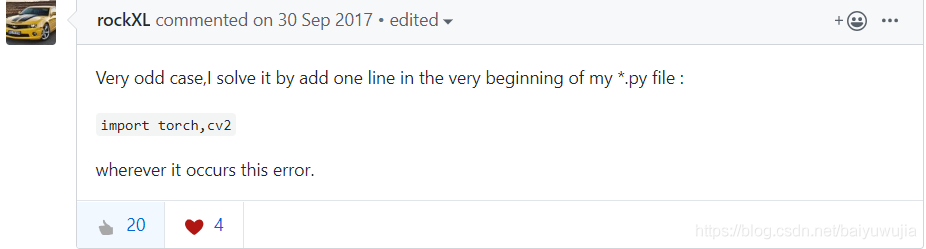
2. However, the above method does not work for me:

reference: https://github.com/pytorch/pytorch/issues/2083

using the old brother’s method, which still makes no sense, but it works for me

CONDA failed to create environment (collecting package metadata(repodata.json): failed)

conda command can refer to: [conda commonly used command collation]

1, problem

failed to create environment using conda creation-name py3.6.8 python==3.6.8. At the first step: Collecting package metadata (repodata.json): failed has failed.

below is the related log:

Collecting package metadata (repodata.json): failed

# >>>>>>>>>>>>>>>>>>>>>> ERROR REPORT <<<<<<<<<<<<<<<<<<<<<<

    Traceback (most recent call last):
      File "/usr/local/anaconda3/lib/python3.7/site-packages/urllib3/contrib/pyopenssl.py", line 453, in wrap_socket
        cnx.do_handshake()
      File "/usr/local/anaconda3/lib/python3.7/site-packages/OpenSSL/SSL.py", line 1915, in do_handshake
        self._raise_ssl_error(self._ssl, result)
      File "/usr/local/anaconda3/lib/python3.7/site-packages/OpenSSL/SSL.py", line 1639, in _raise_ssl_error
        raise SysCallError(errno, errorcode.get(errno))
    OpenSSL.SSL.SysCallError: (104, 'ECONNRESET')

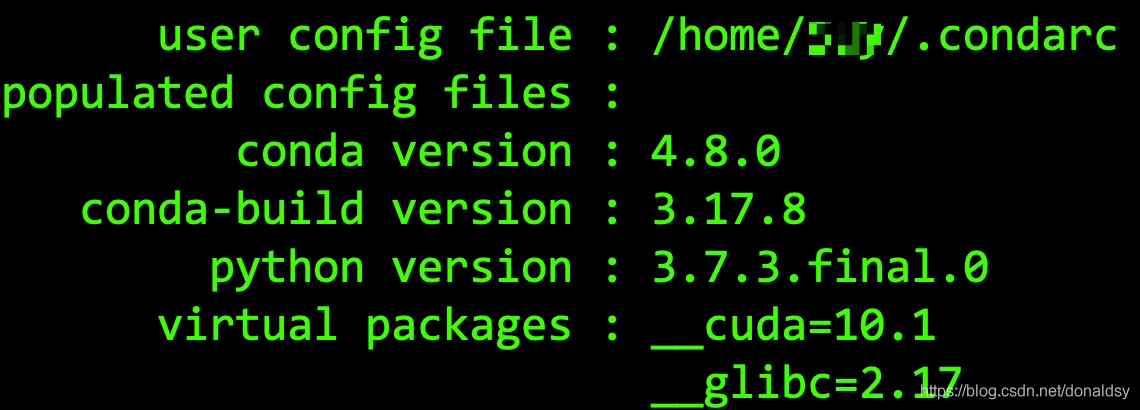
version information for:

2, Solution

search data, guess and conda version may be related, this idea comes from [conda issues-9004]. Conda is degraded with the command

conda config --set allow_conda_downgrades true
conda install conda=4.6.14

after the downgrade, the conda creation-name py3.6.8 python==3.6.8 environment was created successfully. The problem was solved successfully.

other

several frequently used conda commands, more can refer to [conda commonly used command consolidation]

  • conda install -n py3.6 python==3.6
  • conda activate py3.6.8
  • 0 conda deactivate1

    2

  • 3 4 conda install nb_conda5 // install Conda -envs conda info –envs // view all conda environments
  • conda list // view conda’s existing installation packages