Tag Archives: python

Problem solving module ‘ tensorflow.compat . V2 ‘has no attribute’ contrib ‘and importerror cannot import name’ auto ‘

Error:
The current version of tensorflow is 1.13.1 and 2.0.0b1 report errors module ‘tensorflow.compat.v2’ has no attribute ‘contrib’,

try to import tensorflow.compat.v1 as tf instead of import tensorflow as tf,

But ImportError cannot import name ‘auto’

Solution:

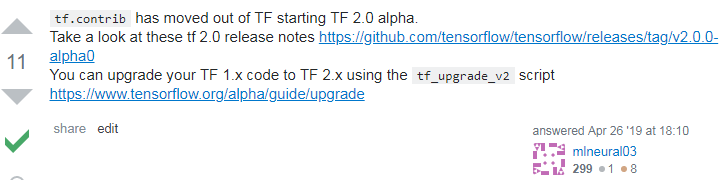
as shown in the figure below, refer to article 1 to point out that tf2.0 alpha began to remove tf.contrib and needed to be upgraded.

therefore, upgrade to tensorflow 2.1.0 using PIP install –upgrade tensorflow.

reference article:

1. https://stackoverflow.com/questions/55870127/module-tensorflow-has-no-attribute-contrib

Python: How to Fix “Ord() expected string of length 1, but int found”

code as follows:

import base64

def decode(ciphertext):
	plaintext = ''
	ciphertext = base64.b64decode(ciphertext)
	for i in ciphertext:
		s = ord(i)-16 ######################
		s = s^32
		plaintext += chr(s)
	return plaintext

cipher = 'XlNkVmtUI1MgXWBZXCFeKY+AaXNt'
flag = decode(cipher)
print(flag)

In python3, running

with a hash sign will fail and python2 won’t, because in python3 the ord() accepts a string of length 1, whereas in python3 the I is already an integer, and you can just use i-16 to do the operation

Python3 ord() expected string of length 1, but int found

Get picture captcha with Python + Chrome

.

we’ll start by importing some libraries that we’ll use in our code:

import re  # 正则
import time  # 代码停顿执行
from selenium import webdriver  # 打开访问的网站
from PIL import Image  # 图片 安装PIL --> Pillow
import pytesseract  # 图片转文字

(if the above some library file is not installed, can be used in the terminal PIP command to install, or for installation in pyCharm oh, you can refer to https://blog.csdn.net/YuanLiYin079/article/details/108726138, the installation method of selenium in the article to try)

to get the captcha, we need to go to the browser we are going to visit (in this case, using the Google browser)

# chromedriver.exe文件放置的路径(根据自己的路径做适当的修改)
chrome_driver = r"C:\Users\Admin\AppData\Local\Programs\Python\Python37\Lib\site-packages\selenium\webdriver\chrome\chromedriver.exe"
driver = webdriver.Chrome(executable_path=chrome_driver)
driver.maximize_window()
driver.implicitly_wait(3)  # 等待3秒
login_url = 'https://我们要访问的登录页面的地址写在这里哦.com'
# 进入访问地址的登录页面
driver.get(login_url)
time.sleep(3)

enter the page, start to get the captcha!

# 获取图片验证码
# 1、全屏截图,设置要将图片放置的路径
driver.save_screenshot('D:\Python_work\images\image.png')
# 2、获取图片验证码坐标和大小
code_image = driver.find_element_by_class_name('verifyCodeImg')
code_location = code_image.location
code_image_size = code_image.size
time.sleep(2)
print("验证码的坐标为:", code_location)  # 控制台查看{'x': 716, 'y': 475}
print("验证码的大小为:", code_image_size)  # 图片大小{'height': 48, 'width': 140}

# 3、图片4个点的坐标位置
left = code_image.location['x']  # x点的坐标
top = code_image.location['y']  # y点的坐标
right = left + code_image.size['width']  # 上面右边点的坐标
Rdown = top + code_image.size['height']   # 下面右边点的坐标
image = Image.open('D:\Python_work\images\image.png')

# 4、将图片验证码截取
code_image = image.crop((left, top, right, Rdown))
code_image.save('D:\Python_work\images\image1.png')  # 截取的验证码图片保存为新的文件
codeStr = pytesseract.image_to_string(code_image)  # 图片转文字
# 5、去除识别出来的特殊字符
codeStrS = re.sub(u"([^\u4e00-\u9fa5\u0030-\u0039\u0041-\u005a\u0061-\u007a])", "", codeStr)
result_four = codeStrS[0:4]  # 只获取前4个字符
print(codeStrS)  # 打印识别的验证码

now we can see the obtained captcha we printed out in the console, perform your input operation, and see what happens!


install pytesseract,
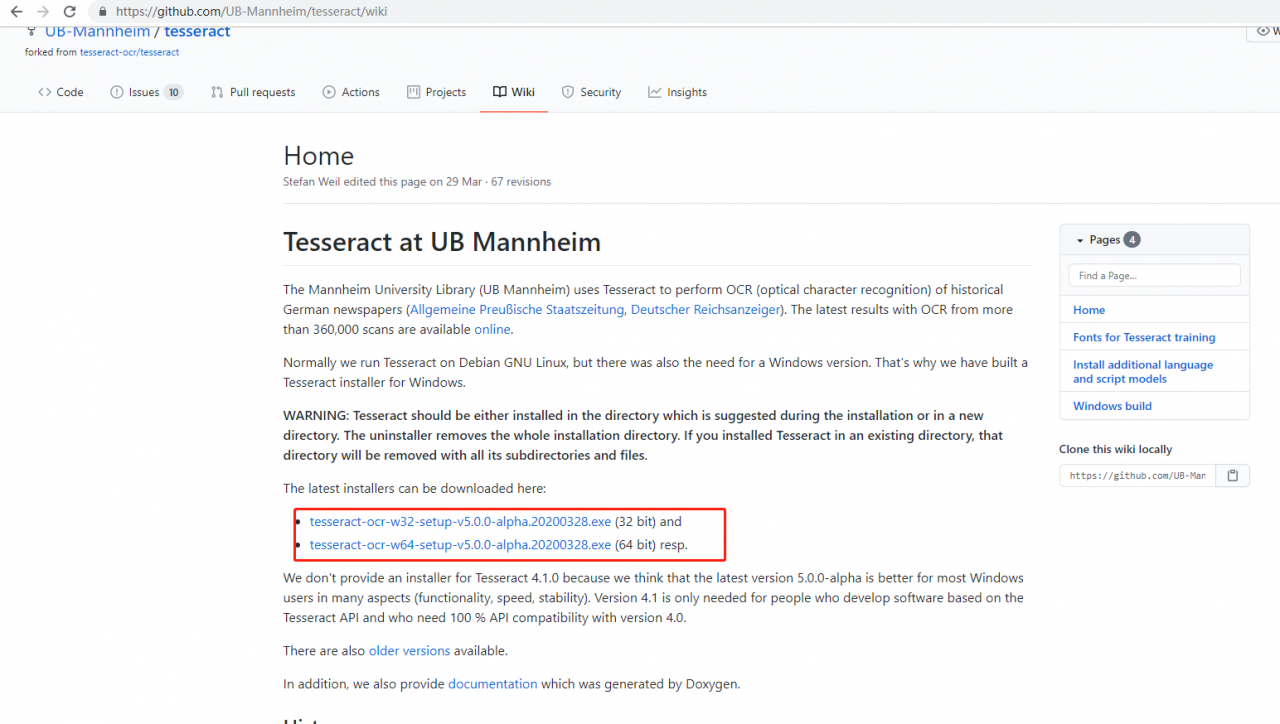
download the tesseract_ocr file from https://github.com/UB-Mannheim/tesseract/wiki, install:
remember the path to install because it will be used later.


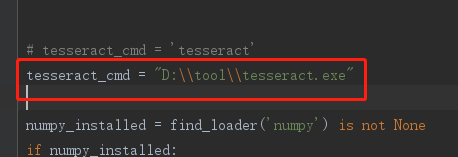
then, open found an error, open the pytesseract. Py files, Find tesseract_cmd, comment out the original, and add a new one: tesseract_cMD = “path /tesseract.exe”. Then execute the code, and it will execute successfully.

Python 3 uses the relative path import module

directory structure

.
├ ─ ─ apt_root. Py
├ ─ ─ just set p y
├ ─ ─ mod/
└ ─ ─ test. Py
└ ─ ─ just set p y
└ ─ ─ sub/
└ ─ ─ test. Py
└ ─ ─ just set p y

task 1: import apt_root.py

from the parent directory in mod/test.py

task 2: import the sub/test.py

from the parent directory in mod/test.py

if

. Why does the title restrict the import of python3?

because all the peps you can find on the web are python2. Such as PEP328. But as far as I can see, python2 and python3 have different import rules.

absolute path is not good, why restrict to relative path import module?

refers to the module through the absolute path, which can easily cause a lot of work when the code structure is changed later, or when the file is renamed. Relative paths don’t have this problem


Analytical

one of the starting points of this article is that I found import is not easy, at least it caused a lot of confusion for me, so I share it here, hoping that the above two tasks can cover all the difficult cases. The first is the confusion of executing test.py in different ways, where the import is found to correspond to the module.

in the python form of test.py

in this case, python mod/test.py,

are executed in the root directory

or enter the mod subdirectory and execute python test.py with the same effect.

:

:

from . import apt_root
# 或者
from .. import apt_root
# 或者
from ..apt_root import *

I tested the successful way of writing:

import sys

sys.path.append(".")
import app_root

therefore, there should be one ‘.’ for the next level, and two ‘.’ for the next level. This means to add the previous directory to the search path.

in python-m test mode

, if my import is

import app_root

(as opposed to direct python xxx.py) runs in different directories and has different effects!

1: in the root directory: python-m mod. Test — run successfully

two: enter mod subdirectory first, then python -m test – run failure

if you want it to run successfully, it should look like this:

sys.path.append("..")
import app_root

(another confusing example) python-m XXX, to add the parent directory to the search path, use “..” , unlike python xxx.py, which USES “.” to represent the parent directory!

because python-m adds the path of the current command to sys.path. See python: The Python-m parameter?

therefore, in this method, it is necessary to combine the path of the current command running + the search path in the default sys.path + the newly added path in the code sys.path.append to determine whether the import can be successful.

summary

where it can be confusing:

1. Relative path cannot be used from.. To import XX, use sys.path.append(“..” )

2. Python-m XXX and python xx.py are different in the representation of the parent directory of import, the former USES two dots, the latter USES one;

3. The import search path in python-m XXX is related to the directory where the command is currently executing;

Python xxx.py is independent of the directory in which the command is currently executing


[welcome to follow my WeChat official number: artificial intelligence Beta]

Solution to unbalanced load of multiple cards (GPU’s 0 card is too high) in Python model training (simple and effective)

this paper mainly solves the problem that zero card of pytorch GPU occupies more video memory than other CARDS during model training. As shown in the figure below: the native GPU card is TITAN RTX, video memory is 24220M, batch_size = 9, and three CARDS are used. The 0th card video memory occupies 24207M. At this time, it just starts to run, and only a small amount of data is transferred to the video card. If the data is in multiple points, the video memory of the 0 card must burst. The reason why 0 card has higher video memory: During the back propagation of the network, the calculated gradient of loss is calculated on 0 card by default. So will be more than other graphics card some video memory, how much more specific, mainly to see the structure of the network.
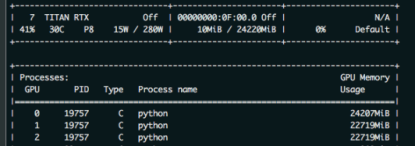
as a result, in order to prevent training was interrupted due to out of memory. The foolhardy option is to set batch_size to 6, or 2 pieces of data per card.
batch_size = 6, the other the same, as shown in the figure below
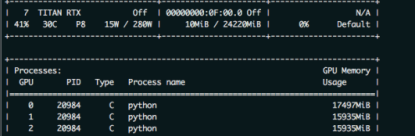
have found the problem?Video memory USES only 1,2 CARDS and less than 16 gigabytes of memory. The batch_size is sacrificed because the 0 card might exceed a little bit of video memory.
so there’s no more elegant way?The answer is yes. That is borrowed from the transformer – xl BalancedDataParallel used in the class. The code is as follows (source) :

import torch
from torch.nn.parallel.data_parallel import DataParallel
from torch.nn.parallel.parallel_apply import parallel_apply
from torch.nn.parallel._functions import Scatter


def scatter(inputs, target_gpus, chunk_sizes, dim=0):
    r"""
    Slices tensors into approximately equal chunks and
    distributes them across given GPUs. Duplicates
    references to objects that are not tensors.
    """

    def scatter_map(obj):
        if isinstance(obj, torch.Tensor):
            try:
                return Scatter.apply(target_gpus, chunk_sizes, dim, obj)
            except Exception:
                print('obj', obj.size())
                print('dim', dim)
                print('chunk_sizes', chunk_sizes)
                quit()
        if isinstance(obj, tuple) and len(obj) > 0:
            return list(zip(*map(scatter_map, obj)))
        if isinstance(obj, list) and len(obj) > 0:
            return list(map(list, zip(*map(scatter_map, obj))))
        if isinstance(obj, dict) and len(obj) > 0:
            return list(map(type(obj), zip(*map(scatter_map, obj.items()))))
        return [obj for targets in target_gpus]

    # After scatter_map is called, a scatter_map cell will exist. This cell
    # has a reference to the actual function scatter_map, which has references
    # to a closure that has a reference to the scatter_map cell (because the
    # fn is recursive). To avoid this reference cycle, we set the function to
    # None, clearing the cell
    try:
        return scatter_map(inputs)
    finally:
        scatter_map = None


def scatter_kwargs(inputs, kwargs, target_gpus, chunk_sizes, dim=0):
    """Scatter with support for kwargs dictionary"""
    inputs = scatter(inputs, target_gpus, chunk_sizes, dim) if inputs else []
    kwargs = scatter(kwargs, target_gpus, chunk_sizes, dim) if kwargs else []
    if len(inputs) < len(kwargs):
        inputs.extend([() for _ in range(len(kwargs) - len(inputs))])
    elif len(kwargs) < len(inputs):
        kwargs.extend([{} for _ in range(len(inputs) - len(kwargs))])
    inputs = tuple(inputs)
    kwargs = tuple(kwargs)
    return inputs, kwargs


class BalancedDataParallel(DataParallel):

    def __init__(self, gpu0_bsz, *args, **kwargs):
        self.gpu0_bsz = gpu0_bsz
        super().__init__(*args, **kwargs)

    def forward(self, *inputs, **kwargs):
        if not self.device_ids:
            return self.module(*inputs, **kwargs)
        if self.gpu0_bsz == 0:
            device_ids = self.device_ids[1:]
        else:
            device_ids = self.device_ids
        inputs, kwargs = self.scatter(inputs, kwargs, device_ids)
        if len(self.device_ids) == 1:
            return self.module(*inputs[0], **kwargs[0])
        replicas = self.replicate(self.module, self.device_ids)
        if self.gpu0_bsz == 0:
            replicas = replicas[1:]
        outputs = self.parallel_apply(replicas, device_ids, inputs, kwargs)
        return self.gather(outputs, self.output_device)

    def parallel_apply(self, replicas, device_ids, inputs, kwargs):
        return parallel_apply(replicas, inputs, kwargs, device_ids)

    def scatter(self, inputs, kwargs, device_ids):
        bsz = inputs[0].size(self.dim)
        num_dev = len(self.device_ids)
        gpu0_bsz = self.gpu0_bsz
        bsz_unit = (bsz - gpu0_bsz) // (num_dev - 1)
        if gpu0_bsz < bsz_unit:
            chunk_sizes = [gpu0_bsz] + [bsz_unit] * (num_dev - 1)
            delta = bsz - sum(chunk_sizes)
            for i in range(delta):
                chunk_sizes[i + 1] += 1
            if gpu0_bsz == 0:
                chunk_sizes = chunk_sizes[1:]
        else:
            return super().scatter(inputs, kwargs, device_ids)
        return scatter_kwargs(inputs, kwargs, device_ids, chunk_sizes, dim=self.dim)

you can see, in the code BalancedDataParallel inherited the torch. The nn. DataParallel, through the custom after 0, the size of the card batch_size gpu0_bsz, namely 0 card a bit less data. Balance the memory usage of 0 CARDS with other CARDS. The invocation code is as follows:

import BalancedDataParallel

 if n_gpu > 1:
    model = BalancedDataParallel(gpu0_bsz=2, model, dim=0).to(device)
    # model = torch.nn.DataParallel(model)

gpu0_bsz: 0 card batch_size of GPU;
model: model;
dim: batch dimension

as a result, we might as well just batch_size set to 8, namely gpu0_bsz = 2 try, the results are as follows:
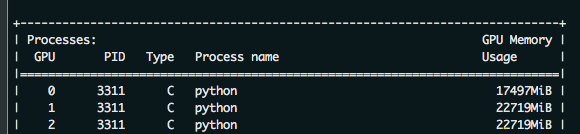
the batch_size from 6 to 8 of success, because 0 put a batch less, therefore, will be smaller than the other CARDS. But sacrificing the video memory of one card to the video memory of others, eventually increasing the batch_size, is still available. The advantages of this method are even more obvious when the number of CARDS is large.
Python openpyxl excel open zipfile error resolution: zipfile.BadZipFile: File is not a zip file

Error description

The immediate cause of the error is trying to open a table file that was not previously closed. This error could be caused by:

In the process before

  • the workbook that was opened did not have a normal close, resulting in additional temporary files, and errors occurred when trying to open these temporary files; The workbook before
  • did not overwrite the existing files when saving.

can also be other errors, but it doesn’t matter, look at the solution, you can from the root to avoid this kind of error about load/save .

solution

open and exit excel files in a safe way, you can avoid the above type of load/save error. When opening a file, open excel in the following ways: if the original file already exists, just load it directly; If it doesn’t exist, create a new workbook and prepare the last save.

import os
from openpyxl import Workbook
from openpyxl import load_workbook
if os.path.exists(new_filename):
    new_wb = load_workbook(new_filename)
else:
    new_wb = Workbook()

is safely saved as excel

  • first, remember to exit as soon as you run out of files. Second, when exiting a file, for all workbooks, if you need to save, if you don’t need to save (read-only), be sure to close
wb.save(filename) # For workbooks that need to save written content
wb.close() # Read-only workbook for the program

[How to Fix] NameError: name ‘requests‘ is not defined & NameError: name ‘request‘ is not defined

NameError: name ‘requests‘ is not defined is lack of package import requests;
NameError: name ‘request’ is not defined because of lack of package from flask import request.
these two look too much alike, but they don’t work the same way. “Requests” is for getting GET, POST requests, etc., such as

 r = requests.get('https://api.github.com/user', auth=('user', 'pass'))

“request” is used to get form data such as

request.form.get("value")

, or the front-end request method, etc. For more details, please refer to request

in flask

reference:
Requests: let HTTP service humans
NameError: name ‘request’ is not defined

[Python] error in installing jupyter: defaulting to user installation because normal Requirement already satisfied

when installing jupyter, it appears as

Defaulting to user installation because normal site-packages is not writeable
Requirement already satisfied: jupyter in c:\users\shebin xu\appdata\roaming\python\python37\site-packages (1.0.0)
Requirement already satisfied: ipywidgets in c:\users\shebin xu\appdata\roaming\python\python37\site-packages (from jupyter) (7.5.1)
Requirement already satisfied: notebook in c:\users\shebin xu\appdata\roaming\python\python37\site-packages (from jupyter) (6.1.4)
Requirement already satisfied: nbconvert in c:\users\shebin xu\appdata\roaming\python\python37\site-packages (from jupyter) (6.0.4)
Requirement already satisfied: ipykernel in c:\users\shebin xu\appdata\roaming\python\python37\site-packages (from jupyter) (5.3.4)
Requirement already satisfied: qtconsole in c:\users\shebin xu\appdata\roaming\python\python37\site-packages (from jupyter) (4.7.7)
Requirement already satisfied: jupyter-console in c:\users\shebin xu\appdata\roaming\python\python37\site-packages (from jupyter) (6.2.0)
Requirement already satisfied: nbformat>=4.2.0 in c:\users\shebin xu\appdata\roaming\python\python37\site-packages (from ipywidgets->jupyter) (5.0.7)
Requirement already satisfied: traitlets>=4.3.1 in c:\users\shebin xu\appdata\roaming\python\python37\site-packages (from ipywidgets->jupyter) (5.0.4)
Requirement already satisfied: ipython>=4.0.0; python_version >= "3.3" in c:\users\shebin xu\appdata\roaming\python\python37\site-packages (from ipywidgets->jupyter) (7.18.1)
Requirement already satisfied: widgetsnbextension~=3.5.0 in c:\users\shebin xu\appdata\roaming\python\python37\site-packages (from ipywidgets->jupyter) (3.5.1)
Requirement already satisfied: jupyter-core>=4.6.1 in c:\users\shebin xu\appdata\roaming\python\python37\site-packages (from notebook->jupyter) (4.6.3)
Requirement already satisfied: prometheus-client in c:\users\shebin xu\appdata\roaming\python\python37\site-packages (from notebook->jupyter) (0.8.0)
Requirement already satisfied: terminado>=0.8.3 in c:\users\shebin xu\appdata\roaming\python\python37\site-packages (from notebook->jupyter) (0.9.1)
Requirement already satisfied: argon2-cffi in c:\users\shebin xu\appdata\roaming\python\python37\site-packages (from notebook->jupyter) (20.1.0)
Requirement already satisfied: ipython-genutils in c:\users\shebin xu\appdata\roaming\python\python37\site-packages (from notebook->jupyter) (0.2.0)
Requirement already satisfied: jupyter-client>=5.3.4 in c:\users\shebin xu\appdata\roaming\python\python37\site-packages (from notebook->jupyter) (6.1.7)
Requirement already satisfied: tornado>=5.0 in c:\users\shebin xu\appdata\roaming\python\python37\site-packages (from notebook->jupyter) (6.0.4)
Requirement already satisfied: jinja2 in c:\users\shebin xu\appdata\roaming\python\python37\site-packages (from notebook->jupyter) (2.11.2)
Requirement already satisfied: Send2Trash in c:\users\shebin xu\appdata\roaming\python\python37\site-packages (from notebook->jupyter) (1.5.0)
Requirement already satisfied: pyzmq>=17 in c:\users\shebin xu\appdata\roaming\python\python37\site-packages (from notebook->jupyter) (19.0.2)
Requirement already satisfied: bleach in c:\users\shebin xu\appdata\roaming\python\python37\site-packages (from nbconvert->jupyter) (3.2.1)
Requirement already satisfied: pygments>=2.4.1 in c:\users\shebin xu\appdata\roaming\python\python37\site-packages (from nbconvert->jupyter) (2.7.1)
Requirement already satisfied: jupyterlab-pygments in c:\users\shebin xu\appdata\roaming\python\python37\site-packages (from nbconvert->jupyter) (0.1.1)
Requirement already satisfied: pandocfilters>=1.4.1 in c:\users\shebin xu\appdata\roaming\python\python37\site-packages (from nbconvert->jupyter) (1.4.2)
Requirement already satisfied: entrypoints>=0.2.2 in c:\users\shebin xu\appdata\roaming\python\python37\site-packages (from nbconvert->jupyter) (0.3)
Requirement already satisfied: nbclient<0.6.0,>=0.5.0 in c:\users\shebin xu\appdata\roaming\python\python37\site-packages (from nbconvert->jupyter) (0.5.0)
Requirement already satisfied: mistune<2,>=0.8.1 in c:\users\shebin xu\appdata\roaming\python\python37\site-packages (from nbconvert->jupyter) (0.8.4)
Requirement already satisfied: testpath in c:\users\shebin xu\appdata\roaming\python\python37\site-packages (from nbconvert->jupyter) (0.4.4)
Requirement already satisfied: defusedxml in c:\users\shebin xu\appdata\roaming\python\python37\site-packages (from nbconvert->jupyter) (0.6.0)
Requirement already satisfied: qtpy in c:\users\shebin xu\appdata\roaming\python\python37\site-packages (from qtconsole->jupyter) (1.9.0)
Requirement already satisfied: prompt-toolkit!=3.0.0,!=3.0.1,<3.1.0,>=2.0.0 in c:\users\shebin xu\appdata\roaming\python\python37\site-packages (from jupyter-console->jupyter) (3.0.7)
Requirement already satisfied: jsonschema!=2.5.0,>=2.4 in c:\users\shebin xu\appdata\roaming\python\python37\site-packages (from nbformat>=4.2.0->ipywidgets->jupyter) (3.2.0)
Requirement already satisfied: colorama; sys_platform == "win32" in c:\users\shebin xu\appdata\roaming\python\python37\site-packages (from ipython>=4.0.0; python_version >= "3.3"->ipywidgets->jupyter) (0.4.3)
Requirement already satisfied: pickleshare in c:\users\shebin xu\appdata\roaming\python\python37\site-packages (from ipython>=4.0.0; python_version >= "3.3"->ipywidgets->jupyter) (0.7.5)
Requirement already satisfied: jedi>=0.10 in c:\users\shebin xu\appdata\roaming\python\python37\site-packages (from ipython>=4.0.0; python_version >= "3.3"->ipywidgets->jupyter) (0.17.2)
Requirement already satisfied: backcall in c:\users\shebin xu\appdata\roaming\python\python37\site-packages (from ipython>=4.0.0; python_version >= "3.3"->ipywidgets->jupyter) (0.2.0)
Requirement already satisfied: decorator in c:\users\shebin xu\appdata\roaming\python\python37\site-packages (from ipython>=4.0.0; python_version >= "3.3"->ipywidgets->jupyter) (4.4.2)
Requirement already satisfied: setuptools>=18.5 in c:\program files (x86)\microsoft visual studio\shared\python37_64\lib\site-packages (from ipython>=4.0.0; python_version >= "3.3"->ipywidgets->jupyter) (40.8.0)
Requirement already satisfied: pywin32>=1.0; sys_platform == "win32" in c:\users\shebin xu\appdata\roaming\python\python37\site-packages (from jupyter-core>=4.6.1->notebook->jupyter) (228)
Requirement already satisfied: pywinpty>=0.5; os_name == "nt" in c:\users\shebin xu\appdata\roaming\python\python37\site-packages (from terminado>=0.8.3->notebook->jupyter) (0.5.7)
Requirement already satisfied: cffi>=1.0.0 in c:\users\shebin xu\appdata\roaming\python\python37\site-packages (from argon2-cffi->notebook->jupyter) (1.14.2)
Requirement already satisfied: six in c:\program files (x86)\microsoft visual studio\shared\python37_64\lib\site-packages (from argon2-cffi->notebook->jupyter) (1.15.0)
Requirement already satisfied: python-dateutil>=2.1 in c:\program files (x86)\microsoft visual studio\shared\python37_64\lib\site-packages (from jupyter-client>=5.3.4->notebook->jupyter) (2.8.1)
Requirement already satisfied: MarkupSafe>=0.23 in c:\users\shebin xu\appdata\roaming\python\python37\site-packages (from jinja2->notebook->jupyter) (1.1.1)
Requirement already satisfied: packaging in c:\users\shebin xu\appdata\roaming\python\python37\site-packages (from bleach->nbconvert->jupyter) (20.4)
Requirement already satisfied: webencodings in c:\users\shebin xu\appdata\roaming\python\python37\site-packages (from bleach->nbconvert->jupyter) (0.5.1)
Requirement already satisfied: nest-asyncio in c:\users\shebin xu\appdata\roaming\python\python37\site-packages (from nbclient<0.6.0,>=0.5.0->nbconvert->jupyter) (1.4.0)
Requirement already satisfied: async-generator in c:\users\shebin xu\appdata\roaming\python\python37\site-packages (from nbclient<0.6.0,>=0.5.0->nbconvert->jupyter) (1.10)
Requirement already satisfied: wcwidth in c:\users\shebin xu\appdata\roaming\python\python37\site-packages (from prompt-toolkit!=3.0.0,!=3.0.1,<3.1.0,>=2.0.0->jupyter-console->jupyter) (0.2.5)
Requirement already satisfied: pyrsistent>=0.14.0 in c:\users\shebin xu\appdata\roaming\python\python37\site-packages (from jsonschema!=2.5.0,>=2.4->nbformat>=4.2.0->ipywidgets->jupyter) (0.17.3)
Requirement already satisfied: attrs>=17.4.0 in c:\users\shebin xu\appdata\roaming\python\python37\site-packages (from jsonschema!=2.5.0,>=2.4->nbformat>=4.2.0->ipywidgets->jupyter) (20.2.0)
Requirement already satisfied: importlib-metadata; python_version < "3.8" in c:\users\shebin xu\appdata\roaming\python\python37\site-packages (from jsonschema!=2.5.0,>=2.4->nbformat>=4.2.0->ipywidgets->jupyter) (1.7.0)
Requirement already satisfied: parso<0.8.0,>=0.7.0 in c:\users\shebin xu\appdata\roaming\python\python37\site-packages (from jedi>=0.10->ipython>=4.0.0; python_version >= "3.3"->ipywidgets->jupyter) (0.7.1)
Requirement already satisfied: pycparser in c:\users\shebin xu\appdata\roaming\python\python37\site-packages (from cffi>=1.0.0->argon2-cffi->notebook->jupyter) (2.20)
Requirement already satisfied: pyparsing>=2.0.2 in c:\program files (x86)\microsoft visual studio\shared\python37_64\lib\site-packages (from packaging->bleach->nbconvert->jupyter) (2.4.7)
Requirement already satisfied: zipp>=0.5 in c:\users\shebin xu\appdata\roaming\python\python37\site-packages (from importlib-metadata; python_version < "3.8"->jsonschema!=2.5.0,>=2.4->nbformat>=4.2.0->ipywidgets->jupyter) (3.1.0)

according to the way on the Internet, can’t solve
later find jupyter in the user -> appdata-> … -> Python_37 and PIP is in a different folder because it was originally installed in Visual Code and CMD calls in the Visual Code installation directory.

solution:
1, according to the requirement already following the address to find the jupyter installation directory, double-click jupyter-notebook. Exe
2, or directly copy jupyter related files to the original directory, it can be called in the CMD.

FileNotFoundError: [Errno 2] No such file or directory: ‘./mnist_image_label/mnist_train_jpg_6000028

FileNotFoundError: [Errno 2] No such file or directory: ‘./mnist_image_label/mnist_train_jpg_6000028755_0.jpg ‘

error in reading file

in tensorflow

Traceback (most recent call last):
  File "Tensorflow/Test/9-26 mnist_train_ex1.py", line 43, in <module>
    x_train,y_train = generateds(train_path,train_txt)
  File "Tensorflow/Test/9-26 mnist_train_ex1.py", line 25, in generateds
    img = Image.open(img_path) #读入图片
  File "\envs\tf2.0-gpu\lib\site-packages\PIL\Image.py", line 2878, in open
    fp = builtins.open(filename, "rb")
FileNotFoundError: [Errno 2] No such file or directory: './mnist_image_label/mnist_train_jpg_6000028755_0.jpg'

locates to line 25

img = Image.open(img_path) #读入图片

error reading image
view path

train_path = './mnist_image_label/mnist_train_jpg_60000'

found is missing “\”

reflect on the foundation and summarize

here

here is what’s under the file, so backslash

I am a small white, welcome to communicate

python ValueError: source code string cannot contain null bytes

pytest executes test cases with the following error

(python) D:\study\python\BasicKnowledgePoints\s5_frame\f01_pytest\f004_conftest>pytest test_01.py
ImportError while loading conftest 'D:\study\python\BasicKnowledgePoints\s5_frame\f01_pytest\f004_conftest\conftest.py'.
ValueError: source code string cannot contain null bytes

the reason is that my D:\study\python\BasicKnowledgePoints\s5_frame\f01_pytest\ init

CentOS solves the problem of modulenotfounderror when salt calls python3 script remotely, and solves the problem that PIP3 module cannot be shared by different users

to describe the scenario, a function on the company’s Jboss server needs to call a python script on a centos7.3 machine with salt mode. Python version is 3.7, and the script will call back an HTTP interface to feedback the execution result. In the test environment, I had Linux machine root privileges, installed Python and dependent modules, and tested that the local execution of the PY script was normal and the JBoss Salt calls were normal. After publishing production, it was found that there were no callbacks after the call was issued, and the problem was located.

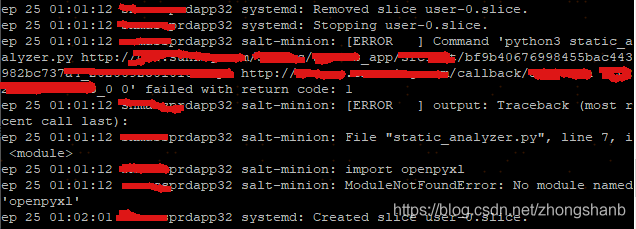
production environment configuration, the python script has been manually executed, confirm that the script can execute properly. First confirm that the command was actually sent to the Linux server. Listen to the /var/log/messages log and see the failed salt call:

there is an error reason: salt-minion: ModuleNotFoundError: No module named ‘openpyxl’, which is very strange. It is executed directly on the machine, and all the dependencies are there. Why does salt call fail?Therefore, I started to search various baidu sites, and found that there were a lot of materials in this field but not many directly related ones. Either it was a method to solve the installation of Python modules, or the salt-related package missing problem occurred when salt stack called Python, which could not solve my problem.

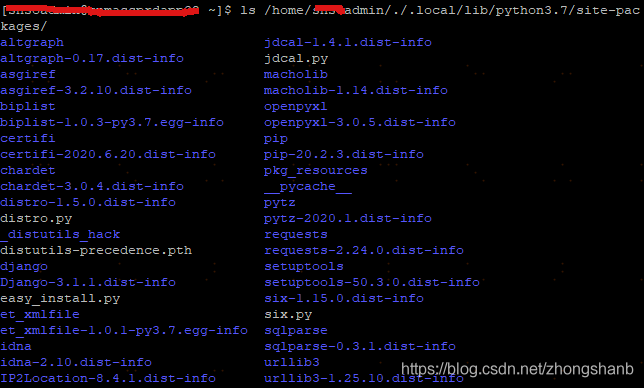
after communication with colleagues, colleagues suspected that it was caused by different paths of PIP installation modules for different users on the Linux machine. I had no root rights in the production environment, which was the most significant difference from the test environment. Based on this idea, I first inquired the path of the module installed in pip3:

modules were stored in the private path of the current user. Meanwhile, when I wanted sudo to execute the pip3 installation, I found that the system prompt command did not exist and the same error message appeared when I executed the python script as in the messages log:

$ sudo -H python3 static_analyzer.py

File "static_analyzer.py", line 7, i <module>
import openpyxl
ModuleNotFoundError: no module named 'openpyxl'


$ sudo -H pip3 install openpyxl -i http://mirrors.aliyun.com/pypi/simple/ --trusted-host mirrors.aliyun.com --user

sudo:pip3: command not found

is a good idea, so I looked for ways to share the PIP installation module by user, or at least make it Shared by root. According to the command that this does not exist, one of the blog posts suggests a simple solution, which is to hang the soft connection directly so that root users can find python3 and pip3:

#如下软连接是为了使命令在root用户下 也能正常使用
sudo ln -snf /usr/local/python3/bin/python3  /usr/bin/python3

sudo ln -snf /usr/local/python3/bin/pip3  /usr/bin/pip3

Sure enough, after a soft connection, sudo mode can use python3 and pip3 normally:

sudo -H pip3 install openpyxl -i http://mirrors.aliyun.com/pypi/simple/ --trusted-host mirrors.aliyun.com --user

With this in mind, let’s run the python script in sudo mode to verify that the current environment root user can execute properly:

sudo -H python3 python_script.py

is completely normal. Without the above soft connection, a ModuleNotFoundError in the Messages log would have appeared in the same command, and so far we have solved the problem that the root user of the PIP3 installed module cannot find.

at the end of the last, through the jboss production environment service page to submit the request, the whole process smoothly completed, perfect!

reference:

view the path to installing a python module using PIP install under Linux

solve pip3 command to install the installation package in the home. Local/lib/python3.5/dist – the problem of packages directory

python3: command not found

sudo used with python

Pytorch RuntimeError: Error(s) in loading state_ dict for Dat aParallel:.. function submit.py Solutions for reporting errors

after the Image Retrieval training run today, some errors appeared when running subs.py like this:

RuntimeError: the Error (s) in loading state_dict for DataParallel: </ strong>
Missing key (s) in state_dict: “Module. Backbone. 0. Weight”, “module. Backbone. 1. The weight”, “module. Backbone. 1. The bias”, “module. Backbone. 1. Running_mean”, “module. Backbone. 1. Running_var”, “module. Backbone. 4.0. Conv1. Weight”. “Module. Backbone. 4.0. Bn1. Weight”, “module. Backbone. 4.0. Bn1. Bias”, “module. Backbone. 4.0. Bn1. Running_mean”, “module. Backbone. 4.0. Bn1. Running_var”, “module. Backbone. 4.0. Conv2. Weight”. “Module. Backbone. 4.0. Bn2. Weight”, “module. Backbone. 4.0. Bn2. Bias”, “module. Backbone. 4.0. Bn2. Running_mean”, “module. Backbone. 4.0. Bn2. Running_var”, “module. Backbone. 4.0. Conv3. Weight”. “Module. Backbone. 4.0. Bn3. Weight”, “module. Backbone. 4.0. Bn3. Bias”, “module. Backbone. 4.0. Bn3. Running_mean”, “module. Backbone. 4.0. Bn3. Running_var”, “module. Backbone. 4.0. Downsample. 0. Weight”. “Module. Backbone. 4.0. The downsample. 1. The weight”, “module. Backbone. 4.0. The downsample. 1. The bias”, “module. Backbone. 4.0. The downsample. 1. Running_mean”, “module. Backbone. 4.0. The downsample. 1. Running_var”, “Module. Backbone. 4.1. Conv1. Weight”, “module. Backbone. 4.1. Bn1. Weight”, “layer4.2. Bn3. Running_var”, “layer4.2. Bn3. Weight”, “layer4.2. Bn3. Bias”, “fc. Weight”, “fc. Bias,”… And so on.

is incorrectly located to line 95 and traced back to a path not generated by the training. PTH file.

solution:

find their own training after the file path is ok.

</ p>