Tag Archives: python

Numpy error: oserror: failed to interpret file as a pickle

first understand the definition of pickle:

  • pickling: types and python data types used in python special conversion between
  • pickling provides four functions: dumps, dump, loads, the load
  • pickling can store all the python support of primitive types (Boolean, int, float, string, byte, none, etc.), made up of any native type lists and tuples, dictionaries, and collection, function, class, class instances.

so the error is essentially data file inconsistency, numpy difference between loadtxt() and load()

  • load() stands for saving data in Numpy’s proprietary binary format, which automatically processes information such as element types and shapes. Load usually reads.nPY or.npz files.
  • loadtxt() is mainly used to read TXT and other files

Following is the general use of loadtxt(), the most common is loadtxt(” filename. TXT “)

numpy.loadtxt(fname, dtype=, comments='#', delimiter=None, converters=None, skiprows=0, usecols=None, unpack=False, ndmin=0)

error is due to load() directly read the TXT file caused by unread. Use loadtxt() instead.

Python MAC installation mysqlclient package error “error: Command ‘clang’ failed with exit status 1” solution

Python Mac installation mysqlclient package error “error: command ‘clang’ failed with exit status 1” solution

install mysqlclient package on Mac today always report an error, facing baidu to solve the problem for a long time finally solved, so put down the solution


PIP installation command

pip install mysqlclient

error

Building wheels for collected packages: mysqlclient
  Building wheel for mysqlclient (setup.py) ... error
  ERROR: Complete output from command /Users/xxx/virtualSpaces/flask_info/bin/python3.7 -u -c 'import setuptools, tokenize;__file__='"'"'/private/var/folders/jg/_5c6yf2x2b721htvf0h3vvlm0000gn/T/pip-install-vke00caa/mysqlclient/setup.py'"'"';f=getattr(tokenize, '"'"'open'"'"', open)(__file__);code=f.read().replace('"'"'\r\n'"'"', '"'"'\n'"'"');f.close();exec(compile(code, __file__, '"'"'exec'"'"'))' bdist_wheel -d /private/var/folders/jg/_5c6yf2x2b721htvf0h3vvlm0000gn/T/pip-wheel-voixgzfs --python-tag cp37:
  ERROR: running bdist_wheel
  running build
  running build_py
  creating build
  creating build/lib.macosx-10.14-x86_64-3.7
  copying _mysql_exceptions.py -> build/lib.macosx-10.14-x86_64-3.7
  creating build/lib.macosx-10.14-x86_64-3.7/MySQLdb
  copying MySQLdb/__init__.py -> build/lib.macosx-10.14-x86_64-3.7/MySQLdb
  copying MySQLdb/compat.py -> build/lib.macosx-10.14-x86_64-3.7/MySQLdb
  copying MySQLdb/connections.py -> build/lib.macosx-10.14-x86_64-3.7/MySQLdb
  copying MySQLdb/converters.py -> build/lib.macosx-10.14-x86_64-3.7/MySQLdb
  copying MySQLdb/cursors.py -> build/lib.macosx-10.14-x86_64-3.7/MySQLdb
  copying MySQLdb/release.py -> build/lib.macosx-10.14-x86_64-3.7/MySQLdb
  copying MySQLdb/times.py -> build/lib.macosx-10.14-x86_64-3.7/MySQLdb
  creating build/lib.macosx-10.14-x86_64-3.7/MySQLdb/constants
  copying MySQLdb/constants/__init__.py -> build/lib.macosx-10.14-x86_64-3.7/MySQLdb/constants
  copying MySQLdb/constants/CLIENT.py -> build/lib.macosx-10.14-x86_64-3.7/MySQLdb/constants
  copying MySQLdb/constants/CR.py -> build/lib.macosx-10.14-x86_64-3.7/MySQLdb/constants
  copying MySQLdb/constants/ER.py -> build/lib.macosx-10.14-x86_64-3.7/MySQLdb/constants
  copying MySQLdb/constants/FIELD_TYPE.py -> build/lib.macosx-10.14-x86_64-3.7/MySQLdb/constants
  copying MySQLdb/constants/FLAG.py -> build/lib.macosx-10.14-x86_64-3.7/MySQLdb/constants
  copying MySQLdb/constants/REFRESH.py -> build/lib.macosx-10.14-x86_64-3.7/MySQLdb/constants
  running build_ext
  building '_mysql' extension
  creating build/temp.macosx-10.14-x86_64-3.7
  clang -Wno-unused-result -Wsign-compare -Wunreachable-code -fno-common -dynamic -DNDEBUG -g -fwrapv -O3 -Wall -I/Applications/Xcode.app/Contents/Developer/Platforms/MacOSX.platform/Developer/SDKs/MacOSX10.14.sdk/usr/include -I/Applications/Xcode.app/Contents/Developer/Platforms/MacOSX.platform/Developer/SDKs/MacOSX10.14.sdk/System/Library/Frameworks/Tk.framework/Versions/8.5/Headers -Dversion_info=(1,3,13,'final',0) -D__version__=1.3.13 -I/usr/local/include -I/usr/local/Cellar/python/3.7.2/Frameworks/Python.framework/Versions/3.7/include/python3.7m -c _mysql.c -o build/temp.macosx-10.14-x86_64-3.7/_mysql.o
  _mysql.c:257:6: warning: assigning to 'char *' from 'const char *' discards qualifiers [-Wincompatible-pointer-types-discards-qualifiers]
                          s = PyUnicode_AsUTF8(item);
                            ^ ~~~~~~~~~~~~~~~~~~~~~~
  _mysql.c:287:6: warning: assigning to 'char *' from 'const char *' discards qualifiers [-Wincompatible-pointer-types-discards-qualifiers]
                          s = PyUnicode_AsUTF8(item);
                            ^ ~~~~~~~~~~~~~~~~~~~~~~
  _mysql.c:564:3: warning: assigning to 'char *' from 'const char *' discards qualifiers [-Wincompatible-pointer-types-discards-qualifiers]
                  _stringsuck(ca, value, ssl);
                  ^~~~~~~~~~~~~~~~~~~~~~~~~~~
  _mysql.c:553:16: note: expanded from macro '_stringsuck'
          if(t){d=PyUnicode_AsUTF8(t);ssl_keepref[n_ssl_keepref++]=t;}\
                 ^~~~~~~~~~~~~~~~~~~~
  _mysql.c:565:3: warning: assigning to 'char *' from 'const char *' discards qualifiers [-Wincompatible-pointer-types-discards-qualifiers]
                  _stringsuck(capath, value, ssl);
                  ^~~~~~~~~~~~~~~~~~~~~~~~~~~~~~~
  _mysql.c:553:16: note: expanded from macro '_stringsuck'
          if(t){d=PyUnicode_AsUTF8(t);ssl_keepref[n_ssl_keepref++]=t;}\
                 ^~~~~~~~~~~~~~~~~~~~
  _mysql.c:566:3: warning: assigning to 'char *' from 'const char *' discards qualifiers [-Wincompatible-pointer-types-discards-qualifiers]
                  _stringsuck(cert, value, ssl);
                  ^~~~~~~~~~~~~~~~~~~~~~~~~~~~~
  _mysql.c:553:16: note: expanded from macro '_stringsuck'
          if(t){d=PyUnicode_AsUTF8(t);ssl_keepref[n_ssl_keepref++]=t;}\
                 ^~~~~~~~~~~~~~~~~~~~
  _mysql.c:567:3: warning: assigning to 'char *' from 'const char *' discards qualifiers [-Wincompatible-pointer-types-discards-qualifiers]
                  _stringsuck(key, value, ssl);
                  ^~~~~~~~~~~~~~~~~~~~~~~~~~~~
  _mysql.c:553:16: note: expanded from macro '_stringsuck'
          if(t){d=PyUnicode_AsUTF8(t);ssl_keepref[n_ssl_keepref++]=t;}\
                 ^~~~~~~~~~~~~~~~~~~~
  _mysql.c:568:3: warning: assigning to 'char *' from 'const char *' discards qualifiers [-Wincompatible-pointer-types-discards-qualifiers]
                  _stringsuck(cipher, value, ssl);
                  ^~~~~~~~~~~~~~~~~~~~~~~~~~~~~~~
  _mysql.c:553:16: note: expanded from macro '_stringsuck'
          if(t){d=PyUnicode_AsUTF8(t);ssl_keepref[n_ssl_keepref++]=t;}\
                 ^~~~~~~~~~~~~~~~~~~~
  _mysql.c:2530:8: warning: assigning to 'char *' from 'const char *' discards qualifiers [-Wincompatible-pointer-types-discards-qualifiers]
          cname = PyUnicode_AsUTF8(name);
                ^ ~~~~~~~~~~~~~~~~~~~~~~
  8 warnings generated.
  clang -bundle -undefined dynamic_lookup build/temp.macosx-10.14-x86_64-3.7/_mysql.o -L/usr/local/Cellar/mysql-connector-c/6.1.11/lib -lmysqlclient -lssl -lcrypto -o build/lib.macosx-10.14-x86_64-3.7/_mysql.cpython-37m-darwin.so
  ld: library not found for -lssl
  clang: error: linker command failed with exit code 1 (use -v to see invocation)
  error: command 'clang' failed with exit status 1
  ----------------------------------------
  ERROR: Failed building wheel for mysqlclient
  Running setup.py clean for mysqlclient
Failed to build mysqlclient
  Running setup.py install for mysqlclient ... error
    ERROR: Complete output from command /Users/xxx/virtualSpaces/flask_info/bin/python3.7 -u -c 'import setuptools, tokenize;__file__='"'"'/private/var/folders/jg/_5c6yf2x2b721htvf0h3vvlm0000gn/T/pip-install-vke00caa/mysqlclient/setup.py'"'"';f=getattr(tokenize, '"'"'open'"'"', open)(__file__);code=f.read().replace('"'"'\r\n'"'"', '"'"'\n'"'"');f.close();exec(compile(code, __file__, '"'"'exec'"'"'))' install --record /private/var/folders/jg/_5c6yf2x2b721htvf0h3vvlm0000gn/T/pip-record-nq6eazu6/install-record.txt --single-version-externally-managed --compile --install-headers /Users/xxx/virtualSpaces/flask_info/bin/../include/site/python3.7/mysqlclient:
    ERROR: running install
    running build
    running build_py
    creating build
    creating build/lib.macosx-10.14-x86_64-3.7
    copying _mysql_exceptions.py -> build/lib.macosx-10.14-x86_64-3.7
    creating build/lib.macosx-10.14-x86_64-3.7/MySQLdb
    copying MySQLdb/__init__.py -> build/lib.macosx-10.14-x86_64-3.7/MySQLdb
    copying MySQLdb/compat.py -> build/lib.macosx-10.14-x86_64-3.7/MySQLdb
    copying MySQLdb/connections.py -> build/lib.macosx-10.14-x86_64-3.7/MySQLdb
    copying MySQLdb/converters.py -> build/lib.macosx-10.14-x86_64-3.7/MySQLdb
    copying MySQLdb/cursors.py -> build/lib.macosx-10.14-x86_64-3.7/MySQLdb
    copying MySQLdb/release.py -> build/lib.macosx-10.14-x86_64-3.7/MySQLdb
    copying MySQLdb/times.py -> build/lib.macosx-10.14-x86_64-3.7/MySQLdb
    creating build/lib.macosx-10.14-x86_64-3.7/MySQLdb/constants
    copying MySQLdb/constants/__init__.py -> build/lib.macosx-10.14-x86_64-3.7/MySQLdb/constants
    copying MySQLdb/constants/CLIENT.py -> build/lib.macosx-10.14-x86_64-3.7/MySQLdb/constants
    copying MySQLdb/constants/CR.py -> build/lib.macosx-10.14-x86_64-3.7/MySQLdb/constants
    copying MySQLdb/constants/ER.py -> build/lib.macosx-10.14-x86_64-3.7/MySQLdb/constants
    copying MySQLdb/constants/FIELD_TYPE.py -> build/lib.macosx-10.14-x86_64-3.7/MySQLdb/constants
    copying MySQLdb/constants/FLAG.py -> build/lib.macosx-10.14-x86_64-3.7/MySQLdb/constants
    copying MySQLdb/constants/REFRESH.py -> build/lib.macosx-10.14-x86_64-3.7/MySQLdb/constants
    running build_ext
    building '_mysql' extension
    creating build/temp.macosx-10.14-x86_64-3.7
    clang -Wno-unused-result -Wsign-compare -Wunreachable-code -fno-common -dynamic -DNDEBUG -g -fwrapv -O3 -Wall -I/Applications/Xcode.app/Contents/Developer/Platforms/MacOSX.platform/Developer/SDKs/MacOSX10.14.sdk/usr/include -I/Applications/Xcode.app/Contents/Developer/Platforms/MacOSX.platform/Developer/SDKs/MacOSX10.14.sdk/System/Library/Frameworks/Tk.framework/Versions/8.5/Headers -Dversion_info=(1,3,13,'final',0) -D__version__=1.3.13 -I/usr/local/include -I/usr/local/Cellar/python/3.7.2/Frameworks/Python.framework/Versions/3.7/include/python3.7m -c _mysql.c -o build/temp.macosx-10.14-x86_64-3.7/_mysql.o
    _mysql.c:257:6: warning: assigning to 'char *' from 'const char *' discards qualifiers [-Wincompatible-pointer-types-discards-qualifiers]
                            s = PyUnicode_AsUTF8(item);
                              ^ ~~~~~~~~~~~~~~~~~~~~~~
    _mysql.c:287:6: warning: assigning to 'char *' from 'const char *' discards qualifiers [-Wincompatible-pointer-types-discards-qualifiers]
                            s = PyUnicode_AsUTF8(item);
                              ^ ~~~~~~~~~~~~~~~~~~~~~~
    _mysql.c:564:3: warning: assigning to 'char *' from 'const char *' discards qualifiers [-Wincompatible-pointer-types-discards-qualifiers]
                    _stringsuck(ca, value, ssl);
                    ^~~~~~~~~~~~~~~~~~~~~~~~~~~
    _mysql.c:553:16: note: expanded from macro '_stringsuck'
            if(t){d=PyUnicode_AsUTF8(t);ssl_keepref[n_ssl_keepref++]=t;}\
                   ^~~~~~~~~~~~~~~~~~~~
    _mysql.c:565:3: warning: assigning to 'char *' from 'const char *' discards qualifiers [-Wincompatible-pointer-types-discards-qualifiers]
                    _stringsuck(capath, value, ssl);
                    ^~~~~~~~~~~~~~~~~~~~~~~~~~~~~~~
    _mysql.c:553:16: note: expanded from macro '_stringsuck'
            if(t){d=PyUnicode_AsUTF8(t);ssl_keepref[n_ssl_keepref++]=t;}\
                   ^~~~~~~~~~~~~~~~~~~~
    _mysql.c:566:3: warning: assigning to 'char *' from 'const char *' discards qualifiers [-Wincompatible-pointer-types-discards-qualifiers]
                    _stringsuck(cert, value, ssl);
                    ^~~~~~~~~~~~~~~~~~~~~~~~~~~~~
    _mysql.c:553:16: note: expanded from macro '_stringsuck'
            if(t){d=PyUnicode_AsUTF8(t);ssl_keepref[n_ssl_keepref++]=t;}\
                   ^~~~~~~~~~~~~~~~~~~~
    _mysql.c:567:3: warning: assigning to 'char *' from 'const char *' discards qualifiers [-Wincompatible-pointer-types-discards-qualifiers]
                    _stringsuck(key, value, ssl);
                    ^~~~~~~~~~~~~~~~~~~~~~~~~~~~
    _mysql.c:553:16: note: expanded from macro '_stringsuck'
            if(t){d=PyUnicode_AsUTF8(t);ssl_keepref[n_ssl_keepref++]=t;}\
                   ^~~~~~~~~~~~~~~~~~~~
    _mysql.c:568:3: warning: assigning to 'char *' from 'const char *' discards qualifiers [-Wincompatible-pointer-types-discards-qualifiers]
                    _stringsuck(cipher, value, ssl);
                    ^~~~~~~~~~~~~~~~~~~~~~~~~~~~~~~
    _mysql.c:553:16: note: expanded from macro '_stringsuck'
            if(t){d=PyUnicode_AsUTF8(t);ssl_keepref[n_ssl_keepref++]=t;}\
                   ^~~~~~~~~~~~~~~~~~~~
    _mysql.c:2530:8: warning: assigning to 'char *' from 'const char *' discards qualifiers [-Wincompatible-pointer-types-discards-qualifiers]
            cname = PyUnicode_AsUTF8(name);
                  ^ ~~~~~~~~~~~~~~~~~~~~~~
    8 warnings generated.
    clang -bundle -undefined dynamic_lookup build/temp.macosx-10.14-x86_64-3.7/_mysql.o -L/usr/local/Cellar/mysql-connector-c/6.1.11/lib -lmysqlclient -lssl -lcrypto -o build/lib.macosx-10.14-x86_64-3.7/_mysql.cpython-37m-darwin.so
    ld: library not found for -lssl
    clang: error: linker command failed with exit code 1 (use -v to see invocation)
    error: command 'clang' failed with exit status 1
    ----------------------------------------
ERROR: Command "/Users/xxx/virtualSpaces/flask_info/bin/python3.7 -u -c 'import setuptools, tokenize;__file__='"'"'/private/var/folders/jg/_5c6yf2x2b721htvf0h3vvlm0000gn/T/pip-install-vke00caa/mysqlclient/setup.py'"'"';f=getattr(tokenize, '"'"'open'"'"', open)(__file__);code=f.read().replace('"'"'\r\n'"'"', '"'"'\n'"'"');f.close();exec(compile(code, __file__, '"'"'exec'"'"'))' install --record /private/var/folders/jg/_5c6yf2x2b721htvf0h3vvlm0000gn/T/pip-record-nq6eazu6/install-record.txt --single-version-externally-managed --compile --install-headers /Users/xxx/virtualSpaces/flask_info/bin/../include/site/python3.7/mysqlclient" failed with error code 1 in /private/var/folders/jg/_5c6yf2x2b721htvf0h3vvlm0000gn/T/pip-install-vke00caa/mysqlclient/

solution

Github gives brew info openssl explanation:
solves the problem by adding environment variables:

export LDFLAGS="-L/usr/local/opt/openssl/lib"
export CPPFLAGS="-I/usr/local/opt/openssl/include"

After

, execute the installation command again to

pip install mysqlclient

I installed the reset.txt file directly on my side, but with little difference.


official making related issue solution:

reference: https://github.com/PyMySQL/mysqlclient-python/issues/169 https://www.jianshu.com/p/d4a349a7e7f5

Install Python C extension compiler environment under windows (solve “error: command” cl.exe ‘ failed: No such file or directory”)

following a blog post resolved in python2: Debugger speedups using cython not found.

was found to have the same problem in python3.5. The original python required VC++ Compiler to compile and install (MInGW can also be used, is generally not recommended, is generally not recommended to use PIP to install some third-party python libraries under Windows, many use C to write some extensions, and need VC++ Compiler to compile and install, otherwise “error: The command ‘cl. Exe’ failed: “. The most common compiler for is Visual Studio C ++.

like Python2.7 requires VS2008 C++ compiler, whereas python3 to 3.4 is compiled in VS2010, and python3.5 is compiled in VS2015.

however, anyone who has ever installed VS this huge bloated IDE knows that it comes bundled with a bunch of Microsoft plug-ins, takes up a lot of C disk space, and starts slowly,
if the computer configuration is general, the computer will be very stuck, generally do not do related development, there is no need to install the whole VS.

for Python 2.7, the Microsoft Visual C++ Compiler for Python 2.7 is available for download and installation.
http://www.microsoft.com/en-us/download/details.aspx?id=44266

for python3.5 the compiler provided by Microsoft is installed – Visual C++ Build Tools

Download address:

http://landinghub.visualstudio.com/visual-cpp-build-tools
to install, remember to choose the Windows SDK 8.1 and Windows SDK 10 , so don’t pack VS2015 can also compiled a package of C code in the PIP.

Simple Python crawler exercise: News crawling on sohu.com

python crawler: sohu news crawler

python crawler exercise: sohu news crawl

helped a friend write a course design to get the title, time, and body content of the news page.
write very simple, not very complicated knowledge, should be easy to understand.
is the first step to import the libraries we need, including requests for third-party libraries. Remember to install

with PIP


    import requests
    import re
    import os


first get all the HTML code you need from the sohu home page


# 获得搜狐页面的内容
def get_all_url(url):
    try:
        # 获取总的html内容
        html = getHTMLText(url)
        return html
    except:
        print("failed connect")


# 获得html内容,套路内容
def getHTMLText(url):
    try:
        # requests爬虫的正常操作,访问获得返回
        r = requests.get(url)
        # 判断是否成功?
        r.raise_for_status()
        # 改变编码方式,转为UTF-8
        r.encoding = r.apparent_encoding
        # 返回html正文内容
        return r.text
    except:
        return ''


and then we need to parse out all the hyperlinks in the HTML, so we need to call the re library here.
if you don’t know regular expressions, learn them yourself, and I won’t go into that.
note that all url links are obtained here without analyzing whether the url is a news url. And, of course, there’s the judgment


# 分析内容,获得我需要的链接们
def parsePage(html):
    plt = []
    try:
        # findall函数的意思:(pattern, string),将所有匹配项组成一个列表,并返回该列表
        # 匹配符合url链接格式的所有内容
        plt = re.findall('http://www\.sohu\.com(?:[a-zA-Z]|[0-9]|[$-_@.&+]|[!*\(\),]|(?:%[0-9a-fA-F][0-9a-fA-F]))+', html)

    except:
        print("介个地方出错了")
    print(plt)
    return plt


here also USES re library to analyze the news title, sending time and news body content. Note that different websites have different HTML idioms. When writing a crawler, it must take some time to analyze the page. Press F12 to view all the HTML code.
since I’m not sure if pictures and the like count as text, I just put in a big chunk of text.


# 正则分析获得时间与标题,嘻嘻
def title_and_time(html):
    tat = []
    try:
        # findall函数的意思:(pattern, string),将所有匹配项组成一个列表,并返回该列表
        # 获得时间,若无法匹配就返回空列表
        time = re.findall('dateUpdate" content="(.*)" />', html)
        # 获得标题,若无法匹配就返回空列表
        title = re.findall("title>(.*)</title", html)
        # 文章正文内容,若无法匹配就返回空列表
        article = re.findall('<article class="article" id="mp-editor">([\s\S]*)</article>', html)
        # 三者组成一个列表,传回去嘻嘻
        # 若其中有的为空列表,则不占用位置
        # 因此如果是正规的新闻页面,tat的长度len应该是3
        tat = title + time + article
    except:
        print("捏个地方出错了")
    return tat


and that’s all we need, so I’m going to put all the code out here for your reference.

# code="utf-8"
# 人生苦短,我用python
# 转行不易,请多鼓励


import requests
import re
import os


# 刚过完61儿童节的二十多岁的小朋友们上车啦,here we go


# 获得搜狐页面的内容
def get_all_url(url):
    try:
        # 获取总的html内容
        html = getHTMLText(url)
        return html
    except:
        print("failed connect")


# 获得html内容,套路内容
def getHTMLText(url):
    try:
        # requests爬虫的正常操作,访问获得返回
        r = requests.get(url)
        # 判断是否成功?
        r.raise_for_status()
        # 改变编码方式,转为UTF-8
        r.encoding = r.apparent_encoding
        # 返回html正文内容
        return r.text
    except:
        return ''

# 分析内容,获得我需要的链接们
def parsePage(html):
    plt = []
    try:
        # findall函数的意思:(pattern, string),将所有匹配项组成一个列表,并返回该列表
        # 匹配符合url链接格式的所有内容
        plt = re.findall('http://www\.sohu\.com(?:[a-zA-Z]|[0-9]|[$-_@.&+]|[!*\(\),]|(?:%[0-9a-fA-F][0-9a-fA-F]))+', html)

    except:
        print("介个地方出错了")
    print(plt)
    return plt


# 正则分析获得时间与标题,嘻嘻
def title_and_time(html):
    tat = []
    try:
        # findall函数的意思:(pattern, string),将所有匹配项组成一个列表,并返回该列表
        # 获得时间,若无法匹配就返回空列表
        time = re.findall('dateUpdate" content="(.*)" />', html)
        # 获得标题,若无法匹配就返回空列表
        title = re.findall("title>(.*)</title", html)
        # 文章正文内容,若无法匹配就返回空列表
        article = re.findall('<article class="article" id="mp-editor">([\s\S]*)</article>', html)
        # 三者组成一个列表,传回去嘻嘻
        # 若其中有的为空列表,则不占用位置
        # 因此如果是正规的新闻页面,tat的长度len应该是3
        tat = title + time + article
    except:
        print("捏个地方出错了")
    return tat


# 以下是正式开始操作主函数

def main():
    # 开始访问搜狐网,并获得对应html代码
    html = get_all_url("http://www.sohu.com/")
    # 正则表达式分析取出新闻url链接
    sp_url = parsePage(html)
    # 设置一个列表,用于存储新闻标题以及时间
    answer = []

    # 判断保存的路径存在不 不存在就创建一个呗嘻嘻嘻嘻
    path = "新闻//"
    # 如果路径存在则返回True,否则返回false
    isExists = os.path.exists(path)

    # 判断结果
    if not isExists:
        # 如果不存在则创建目录
        # 创建目录操作函数
        os.makedirs(path)

        print(path + ' 创建成功')
    else:
        # 如果目录存在则不创建,并提示目录已存在
        print(path + ' 目录已存在')

    # 遍历每一个新闻url链接
    for url in sp_url:
        # 获得每个新闻页面的html代码
        html_sp = get_all_url(url)
        # 获得每个页面的标题以及时间
        title_time = title_and_time(html_sp)

        # 设置一个临时变量
        tt=0
        # 如果是正常新闻的话,则len==3,即可对tt重新赋值
        if(len(title_time) == 3):
            tt = title_time[0] + "\n" + title_time[1] + "\n" + title_time[2] + "\n"

        # 判断一下是正常新闻,即可写入answer
        if tt != 0:
            print(tt)  # 程序运行期间随便输出点东西,不然就很无聊
            answer.append(tt)   # 将这个新闻作为一个字符串element添加到answer最后


            # 写入文件
            try:
                # 每个新闻的题目自动生成一个txt文件
                with open("新闻//" + title_time[0] + ".txt", "w+") as f:
                    # 参数为列表,writelines可以将每一个元素写入txt
                    f.writelines(answer)
                    # 关闭文件,其实不写也一样的
                    f.close()
            except:
                pass


# 主程序运行
if __name__ == '__main__':
    main()


# 输出一句话,告诉我结束了
print("搜狐网新闻爬取已完成")

# 完工


because there is no Javascript dynamic generation content, so the whole code is very simple, and when I have a chance later, I will climb a js dynamic generation to show you.

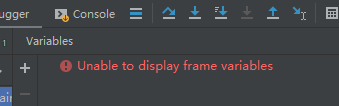
pycharm: Unable to display frame vriables

works fine when you use pycharm to connect to programs on a Linux server. But can not be debugged, debugging time is special card, and variable window variables can not load out

tried to expand the memory of pycharm, but failed.

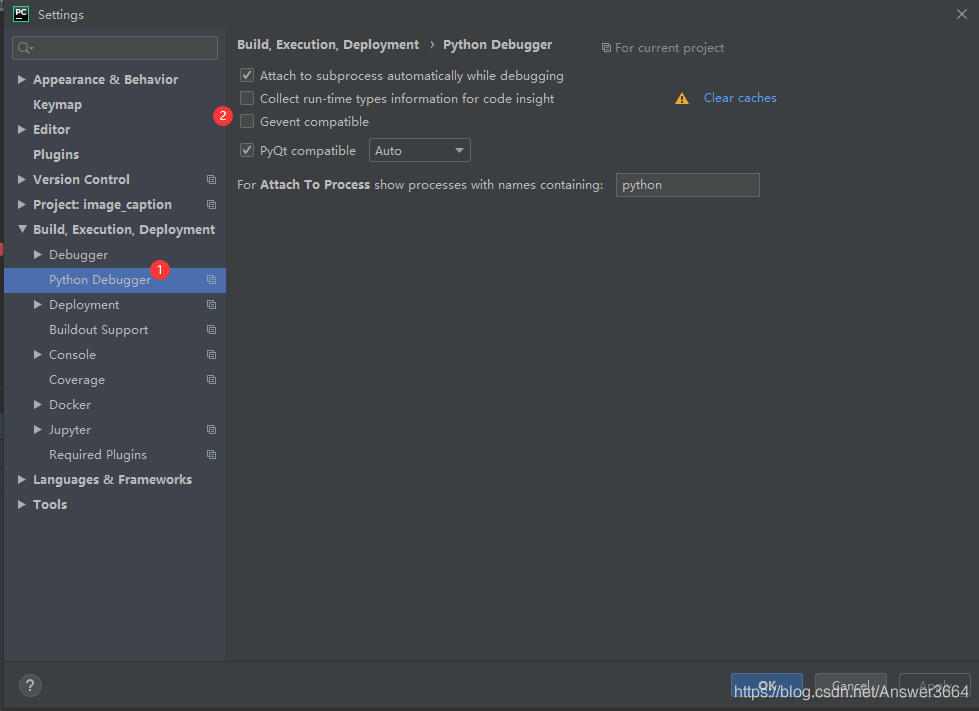
pycharm website for the solution of the method can effectively solve the: https://blog.jetbrains.com/pycharm/2012/08/gevent-debug-support/

is recorded here:

file-> setting-> python debugger

and then check the box in front of the Gevent compatible.

Python2 PicklingError: Can‘t pickle <type ‘instancemethod‘>: attribute lookup __builtin__.instanceme

PicklingError: Can ‘t pickling & lt; The type ‘instancemethod & gt; : attribute lookup builtin.instancemethod failed

The Python2
** library: **multiprocessing. Pool
problem description: use the method of the class to pool. Apply_async for parameter passing error
solution: cannot use the method of the class directly copy, call the method of the class through the intermediate function, and then use the intermediate function for apply_async for parameter passing.
complete code:

#coding=utf-8
import time
from multiprocessing import Pool

class Attack:
    def __init__(self):
        pass
    
    def run(self, data):
        print '[+] ' + data + "attack exploit."
        time.sleep(3)
        return {'data': data}

# + ---------------------------------下面是一起的--------------------------------------
attacker = Attack()
def conumers_wrapper(data):
    return attacker.run(data)

class Test:
    def __init__(self):
        pass

    def _save_result(self, data):
        try:
            print '[-] _save_result -> ', data
        except Exception as e:
            print e

    def main(self):
        name = 'aquaman'
        pool = Pool(processes=20)
        for _ in range(10): 
            #            func[, args=()[, kwds={}[, callback=None]]]
            pool.apply_async(conumers_wrapper, (name,), callback=self._save_result)

        pool.close()
        pool.join()

        print "[*] finished."

if __name__ == '__main__':
    Test().main()

When we crawl to the HTTPS website, the SSL certificate error is solved

SSL certificate error occurs when we crawl HTTPS sites

HTTPS in plain English is our HTTP + SSL (certificate), some small companies make their own SSL, so sometimes when we visit the website of some small companies it will remind us to download some SSL certificates, and the website that we don’t have to download has been CA certified

we are going to crawl an SSL certificate that is not a CA certified web address to verify.
when we climb to find the problem of error.

Jetson nano uses Python to read and parse GPS data (GPRMC, gpgga).

I am writing an article for the first time, mainly records the process of this code, the requirements of the teacher is on the nano version of reading to the GPS data from the python and parses the latitude and longitude, the rate and the number of satellite late by GUI graphical and less on the reading of the GPS in the nano tutorial, there are also the article use the GPS module but is not conducive to I work late, so their imitation has written a series of simple code.

first download and install cutecom to see if nano has read the GPS data. Use the command:

sudo apt-get install cutecom

is followed by Nano installation of pthon3-serial and pynmea2.

I remember using sudo apt-get intsall python3-serial last night, but PIP install pyserial

is also available online

as for which can try by itself, I think this process is not important, as long as pyserial is installed successfully, pyserial is understood to be python serial communication module, through which we can read the serial port tool.
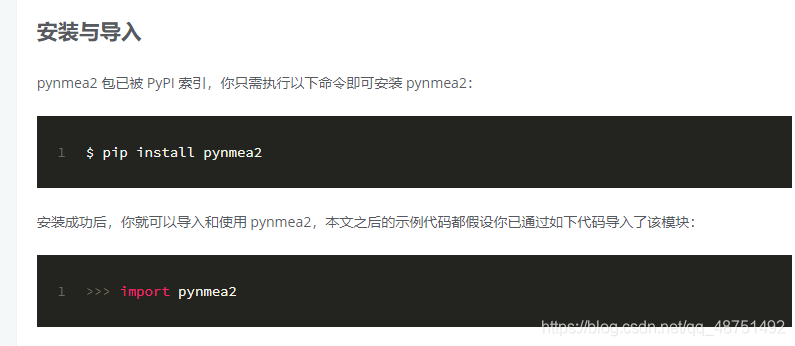
for installation of pynmea2

I want to mention that the file PIP is not found with PIP, but rather we use python3 and PIP should be called pip3 so that the installation is successful. Pynmea2 is understood as a third party module for handling the NMEA 0183 protocol. Used by us to resolve the NAME 0183 protocol. http://gnss.help/2018/03/01/pynmea2-readme/index.html this is my reference page. And then you write your own code.
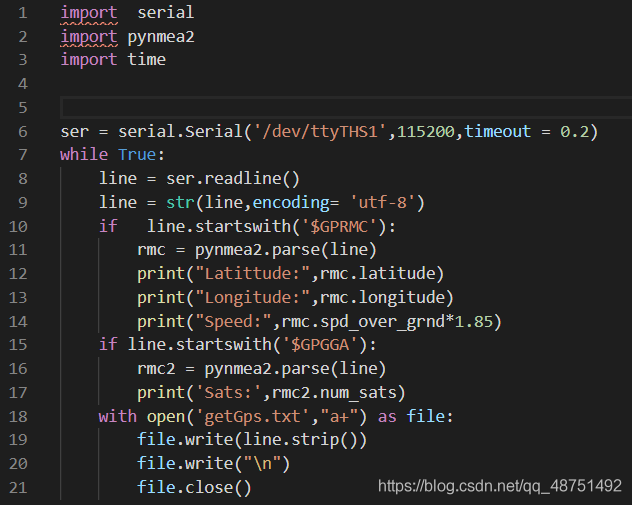
is first to import two downloaded modules, followed by import time module, I don’t know what is the use is to follow them to add.

the ser is a serial port assignment in ser (about this), the first one is behind your serial port of the serial port is usually ttyTHS1 USB is usually ttyUSB0 these names should be available through cutecom, the second is the baud rate I use the default 115200 online is a lot of the people followed 9600 change, the timeout I followed others change, I feel it doesn’t matter how much I feel OK. This is followed by a while statement. Line 8 USES pyserial to read the serial data and assign it to the line variable, line 9 because line reads bytes and then needs to be changed to a string (that’s about it), followed by the GPRMC in the two if statements. This is what you read using GPS, line 11 USES pynmea2.parse () to parse
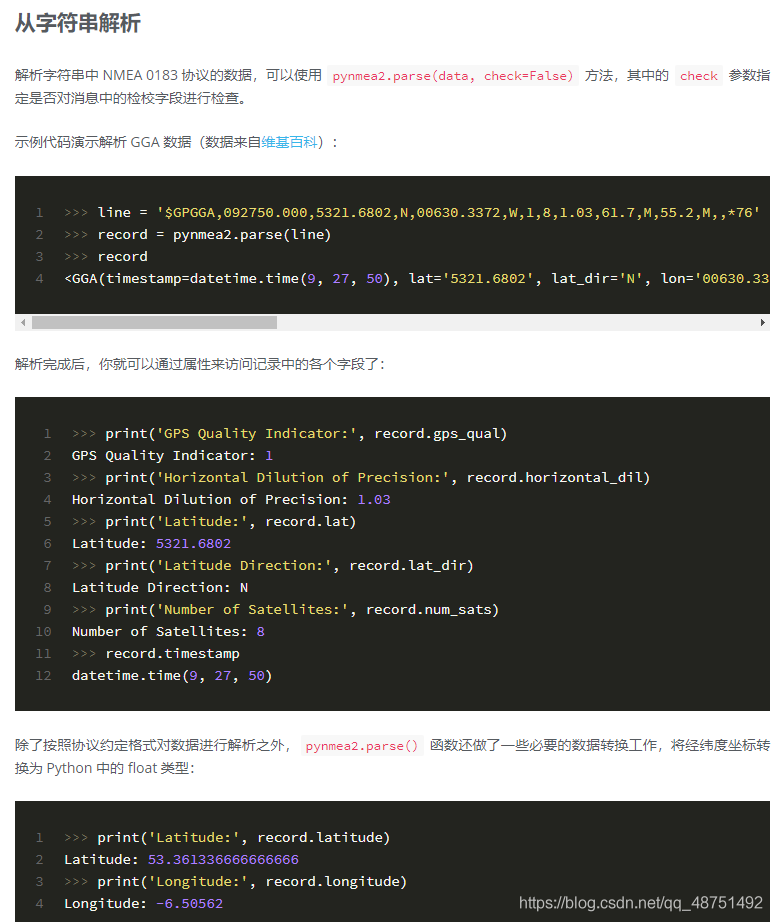
let me mention why I use this instead of using lists like many other tutorials on the web. The main reason is that I think GPS signals can be unstable and lead to parsing errors. This method is also very useful, but I just don’t know if it will go wrong. If you add a break at the end of the if statement, you can stop the loop, because there are two if statements here. We’d better add a break at the second if. If you add a break at the first if, it will make the second if unusable, then it will just exit the while statement.

18 is saved into TXT file at the beginning, mainly I have been written in a+ way, at the beginning I was using W or W+ to try to find TXT only GPGGA data after the interview. 19 changed to STR, because Python can only be a string, 20 is a blank line, 21 needs to be saved.

. Well, that’s about it. I won’t go into much detail. Don’t understand can go baidu once. First time write success, go to the next refueling!


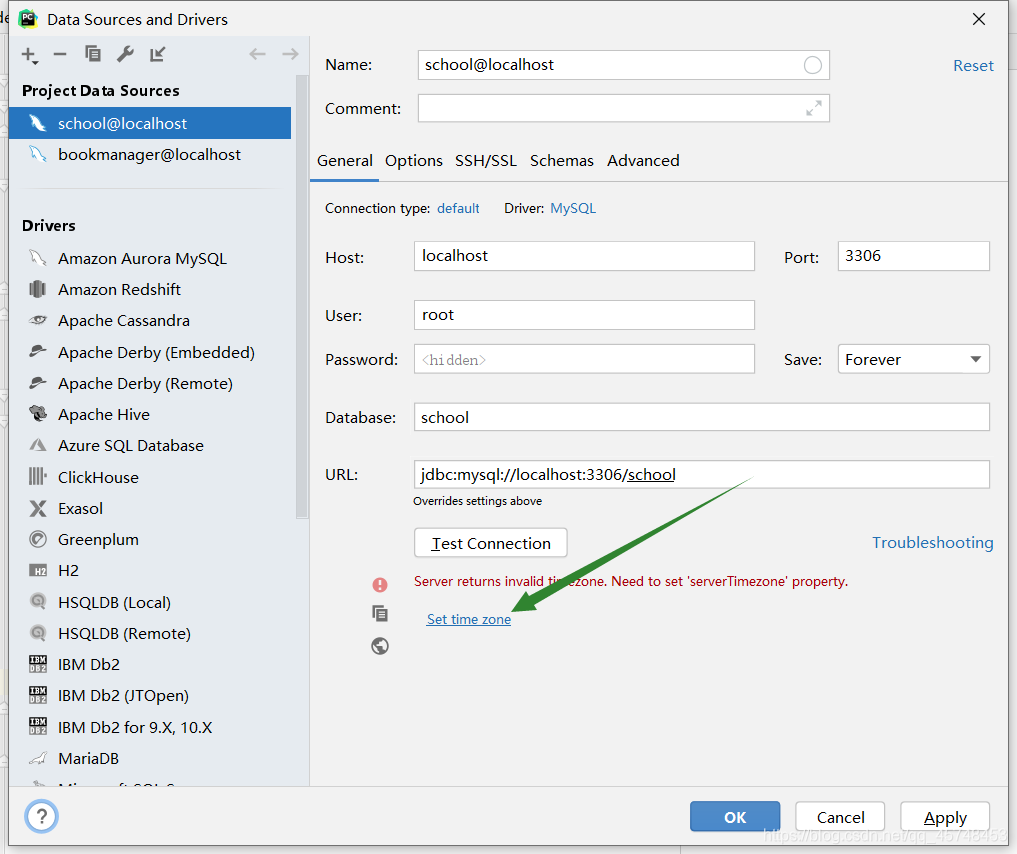
Error server returns invalid timezone. Need to set ‘servertimezone’ property

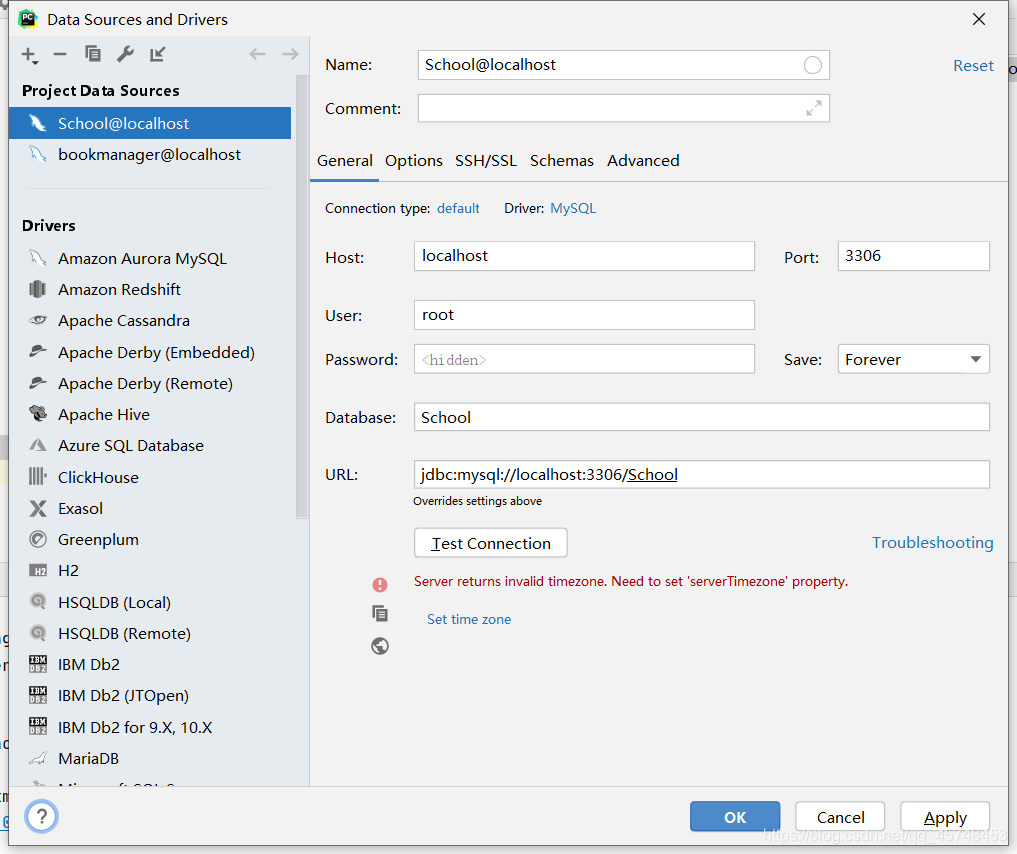
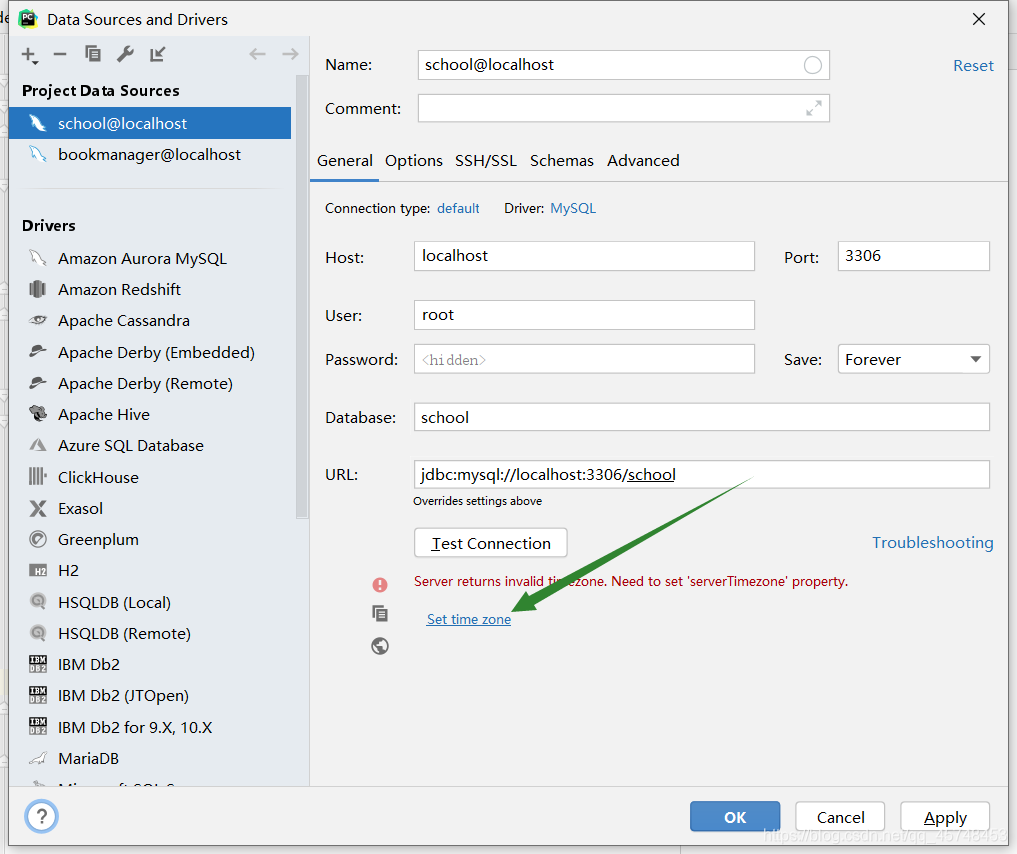
idea connect to database error Server returns invalid timezone. Need to set ‘serverTimezone’ property


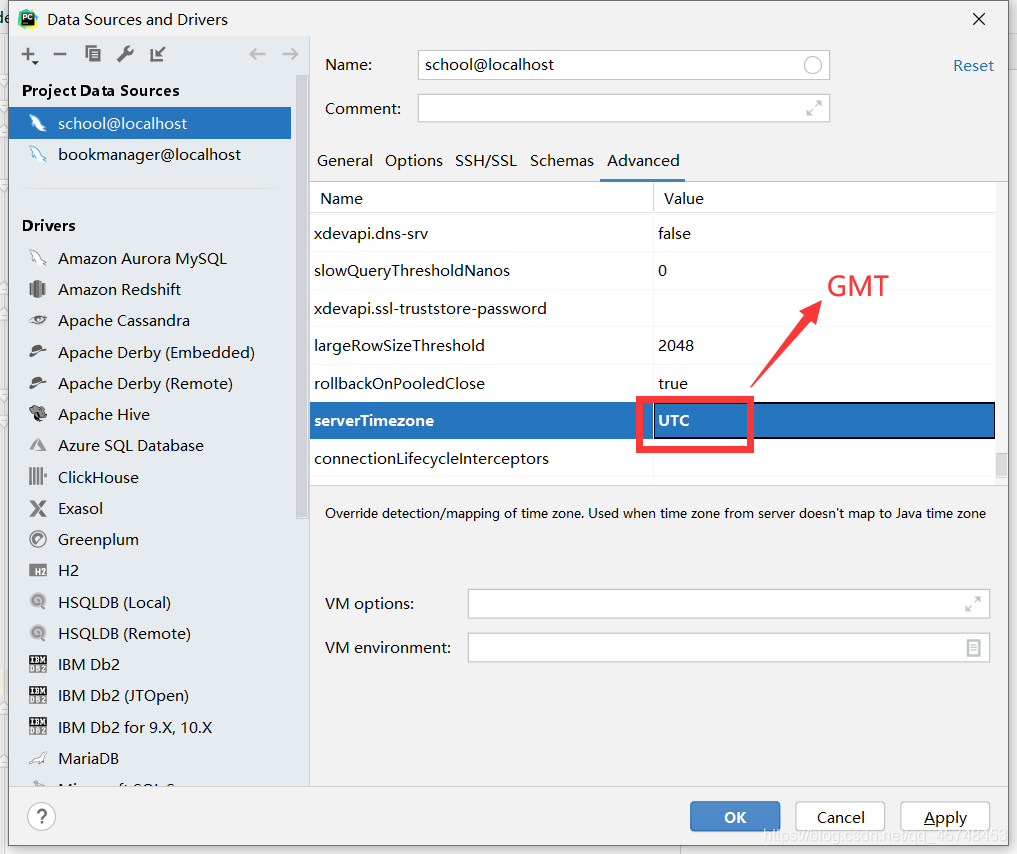
the reason is that the default time zone in MySQL driver is UTC, which is eight hours different from local time (China), so the link cannot be connected.

click on Set time zone

1. Fill in GMT in the box and save!
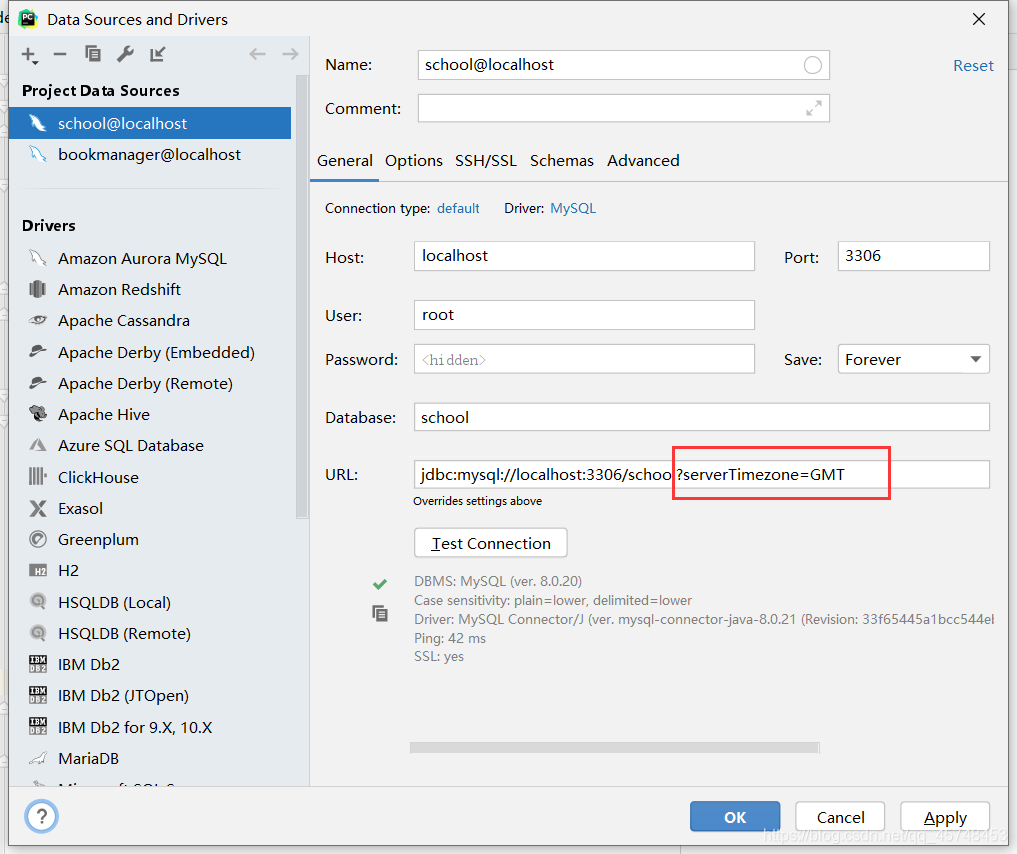
2. You can also add:?After the URL. serverTimezone=GMT

PS:
GMT (Greenwich Mean Time) : Greenwich Mean Time
UTC: world Standard Time
CST (China Standard Time) : China Standard Time

GMT + 8 = UTC + 8 = CST

Pytorch corresponding point multiplication and matrix multiplication

1, corresponding point multiplication, x.ul (y), that is, dot product operation, dot product does not sum operation, also known as Hadamard product; The dot product and the sum is the convolution

>>> a = torch.Tensor([[1,2], [3,4], [5, 6]])
>>> a
tensor([[1., 2.],
        [3., 4.],
        [5., 6.]])
>>> a.mul(a)
tensor([[ 1.,  4.],
        [ 9., 16.],
        [25., 36.]])

# a*a等价于a.mul(a)

2, matrix multiplication, x.m m (y), the matrix size to meet: (I, n) x (n, j)

>>> a
tensor([[1., 2.],
        [3., 4.],
        [5., 6.]])
>>> b = a.t()  # 转置
>>> b
tensor([[1., 3., 5.],
        [2., 4., 6.]])

>>> a.mm(b)
tensor([[ 5., 11., 17.],
        [11., 25., 39.],
        [17., 39., 61.]])