Tag Archives: python

Message: failed to decode response from marionette

is thrown because of an error in the title:

Message: Tried to run command without establishing a connection

interprets:

to start with my crawler architecture, I use firefox+selenium. The error above is caused by the fact that after the browser exits, the crawler needs the browser to execute some commands, so the error appears. The second problem comes:

Why does the

browser crash automatically?Generally speaking, it is because it is running out of resources. What resources?Memory resources, the browser is very occupied memory, and some crawlers in order to speed up the crawler will let the browser do cache,

this results in the browser taking up more memory

solution:

1. According to the resource occupied by the crawler, increase the memory

appropriately

2. Slow down the crawler speed and make the browser a little idle, especially in the crawler that starts multiple browsers

— — — — — — — — — — — — — — — — — — — — — — — — — — — — — — — — — the 2019-04-24 update — — — — — — — — — — — — — — — — — — — — — — — — — — — — — — — —

the above statement is not wrong, but some is not taken into account, the browser will actually the main reason for the collapse because the browser memory leaks, that is to say, because the default browser is open caching function,

as the crawler runs, the cache of the browser will become larger and larger, which will eventually lead to the memory leak of the browser ( premise is that the browser does not restart the crawler, if the browser restarts after a period of time, there will be no problem ),

as for how to disable browser cache in crawlers, this is mentioned in my other blog, but not

reproduced in: https://www.cnblogs.com/gunduzi/p/10600152.html

How to Fix nbconvert failed: Pandoc wasn’t found. Please check that pandoc is installed:

when you want to convert your Jupyte Notebook to PDF, this can appear:

solution:

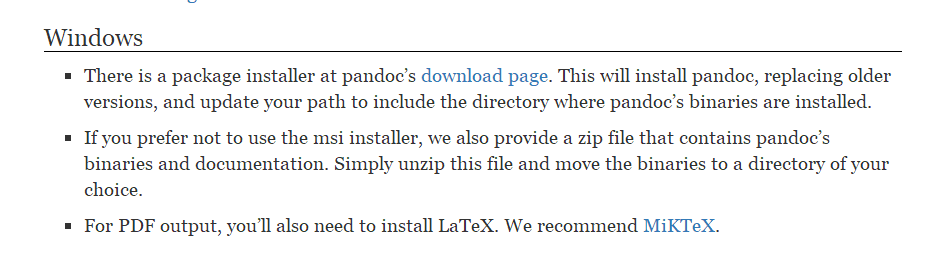
1 download pandoc library and install, download address: http://pandoc.org/installing.html#windows

ps: domestic didn’t over the wall of friends may not be able to download or slow download speed, CSDN download address: http://download.csdn.net/download/weixin_37029453/10161639

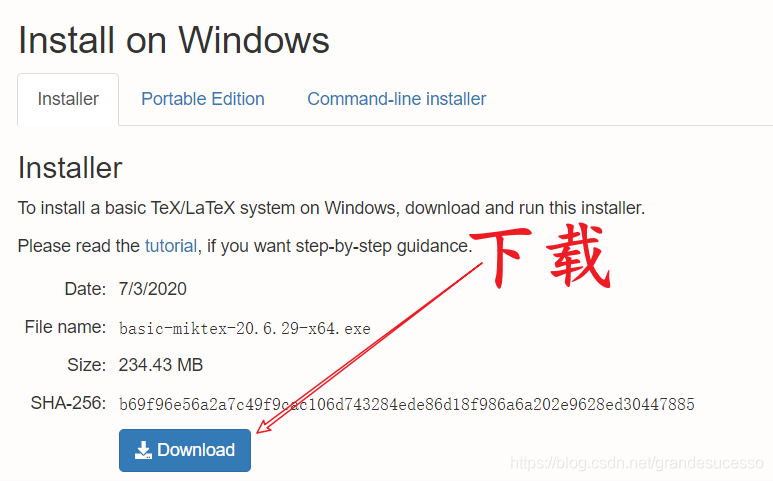
2 download and install MikTeX

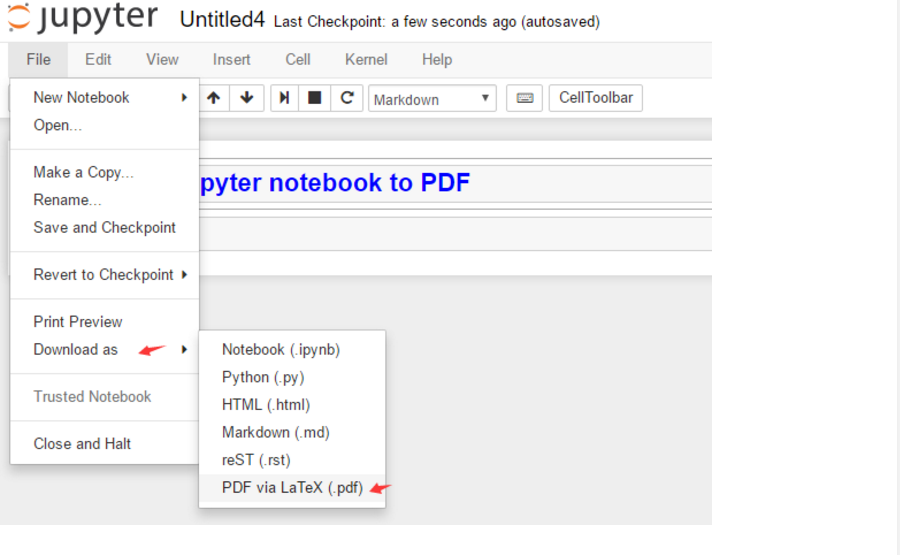
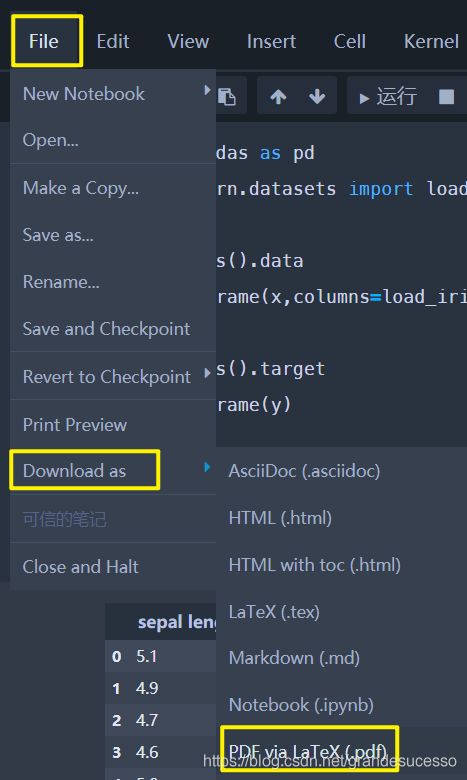
3 in Jupyter to PDF operation, as shown in the picture:


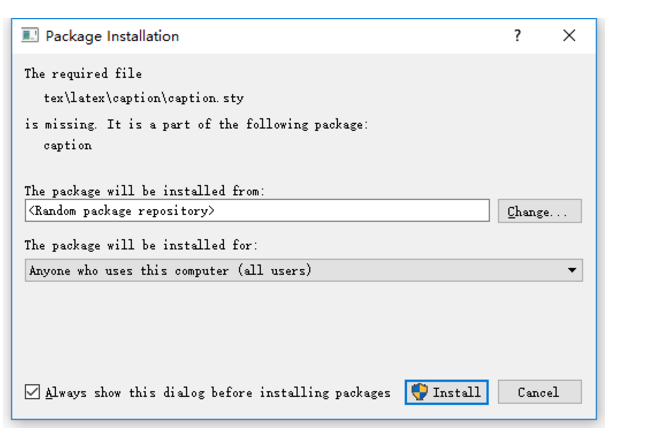
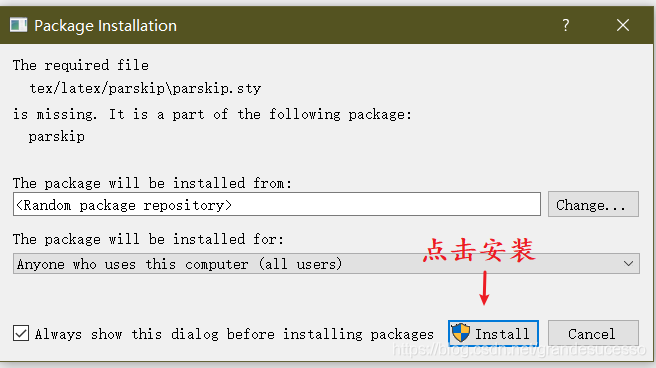
after the system will pop up the interface to let you install some toolkits, continue to click the installation, installation is done!

> /strong>

RuntimeError: cuDNN error: CUDNN_ STATUS_ EXECUTION_ Failed solutions

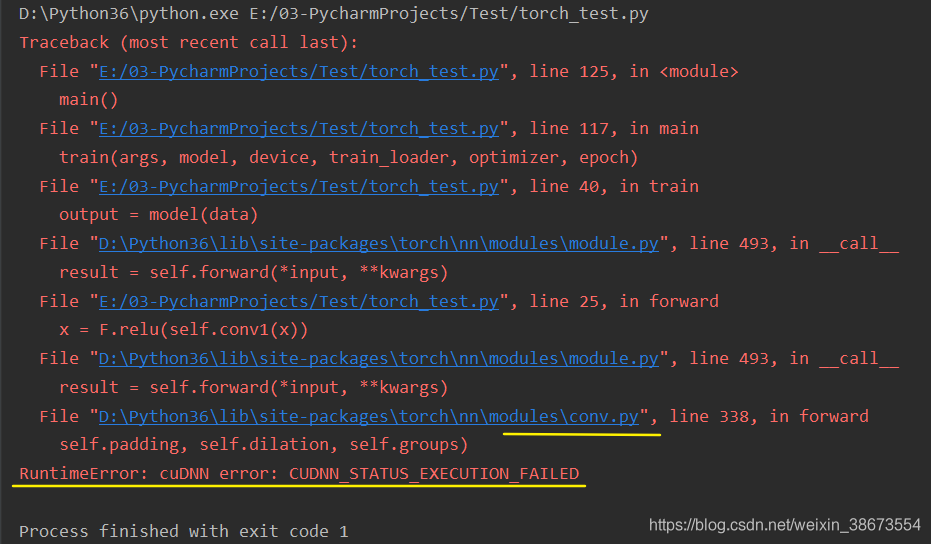
when running pytorch gpu, reported this error

many people on the Internet also encountered this problem, some said that CUDA and cudnn version matching problem, some said that need to reinstall pytorch, CUDA, cudnn. I have checked the official website, the version is the match, trying to reinstall does not work, and I according to the version of another system can not install.

you can see that every time the error is in the file conv.py, which is the error made when doing the CNN operation.

The

solution is to introduce the following statement

import torch
torch.backends.cudnn.enabled = False

means you don’t need cudnn acceleration anymore.

GPU, CUDA, cudnn relationship is:

  • CUDA is a parallel computing framework launched by NVIDIA for its own GPU. CUDA can only run on NVIDIA gpus, and can only play the role of CUDA when the computing problem to be solved can be massively parallel computing.
  • cuDNN is an acceleration library for deep neural networks built by NVIDIA, and is a GPU acceleration library for deep neural networks. CuDNN isn’t a must if you’re going to use GPU to train models, but it’s usually used with this accelerator library.

reference: GPU, CUDA, cuDNN understanding

cudnn will be used by default. Since the matching problem cannot be solved at present, it is not used for now. The GPU will still work, but probably not as fast as cudNN.

if any friends know how to solve possible version problems, welcome to exchange ~

add:

  • version: win10, python 3.6, pytorch 1.1.0, CUDA 9.0, cudnn 7.1.4
  • test case: pytorch github Example Basic MNIST

numpy.core.umath How to solve the problem of failed to import

install the gpu version of TensorFlow

encountered this problem when installing the gpu version of TensorFlow.

the solution is

  • at the command line:
pip install -U numpy -i https://pypi.tuna.tsinghua.edu.cn/simple/

and then it’s good ~

C:\Users\Sean>python
Python 3.6.6 (v3.6.6:4cf1f54eb7, Jun 27 2018, 03:37:03) [MSC v.1900 64 bit (AMD64)] on win32
Type "help", "copyright", "credits" or "license" for more information.
>>> import tensorflow as tf
>>>

Gunicorn reported error worker failed to boot

the following error no detailed information, don’t know what went wrong code

Traceback (most recent call last):
  File "/home/charleswu/.virtualenvs/process/lib/python3.6/site-packages/gunicorn/arbiter.py", line 203, in run
    self.manage_workers()
  File "/home/charleswu/.virtualenvs/process/lib/python3.6/site-packages/gunicorn/arbiter.py", line 545, in manage_workers
    self.spawn_workers()
  File "/home/charleswu/.virtualenvs/process/lib/python3.6/site-packages/gunicorn/arbiter.py", line 617, in spawn_workers
    time.sleep(0.1 * random.random())
  File "/home/charleswu/.virtualenvs/process/lib/python3.6/site-packages/gunicorn/arbiter.py", line 245, in handle_chld
    self.reap_workers()
  File "/home/charleswu/.virtualenvs/process/lib/python3.6/site-packages/gunicorn/arbiter.py", line 525, in reap_workers
    raise HaltServer(reason, self.WORKER_BOOT_ERROR)
gunicorn.errors.HaltServer: <HaltServer 'Worker failed to boot.' 3>

Just add the parameter — preload to the gunicorn command to see the detailed error message
. Add the parameter and the error message is:

Traceback (most recent call last):
  File "/home/charleswu/.virtualenvs/process/bin/gunicorn", line 11, in <module>
    sys.exit(run())
  File "/home/charleswu/.virtualenvs/process/lib/python3.6/site-packages/gunicorn/app/wsgiapp.py", line 61, in run
    WSGIApplication("%(prog)s [OPTIONS] [APP_MODULE]").run()
  File "/home/charleswu/.virtualenvs/process/lib/python3.6/site-packages/gunicorn/app/base.py", line 223, in run
    super(Application, self).run()
  File "/home/charleswu/.virtualenvs/process/lib/python3.6/site-packages/gunicorn/app/base.py", line 72, in run
    Arbiter(self).run()
  File "/home/charleswu/.virtualenvs/process/lib/python3.6/site-packages/gunicorn/arbiter.py", line 60, in __init__
    self.setup(app)
  File "/home/charleswu/.virtualenvs/process/lib/python3.6/site-packages/gunicorn/arbiter.py", line 120, in setup
    self.app.wsgi()
  File "/home/charleswu/.virtualenvs/process/lib/python3.6/site-packages/gunicorn/app/base.py", line 67, in wsgi
    self.callable = self.load()
  File "/home/charleswu/.virtualenvs/process/lib/python3.6/site-packages/gunicorn/app/wsgiapp.py", line 52, in load
    return self.load_wsgiapp()
  File "/home/charleswu/.virtualenvs/process/lib/python3.6/site-packages/gunicorn/app/wsgiapp.py", line 41, in load_wsgiapp
    return util.import_app(self.app_uri)
  File "/home/charleswu/.virtualenvs/process/lib/python3.6/site-packages/gunicorn/util.py", line 350, in import_app
    __import__(module)
  File "/home/charleswu/AiDoctor/process_bchao/app.py", line 44, in <module>
    app = create_application()
  File "/home/charleswu/AiDoctor/process_bchao/app.py", line 31, in create_application
    from webapi import image_api
  File "/home/charleswu/AiDoctor/process_bchao/webapi/__init__.py", line 3, in <module>
    from .upload_image import image_api
  File "/home/charleswu/AiDoctor/process_bchao/webapi/upload_image.py", line 9, in <module>
    from interface import get_b_result
  File "/home/charleswu/AiDoctor/process_bchao/interface.py", line 6, in <module>
    from structuration import Struct
  File "/home/charleswu/AiDoctor/process_bchao/structuration.py", line 7, in <module>
    from split_word import desc_list, diag_list
ModuleNotFoundError: No module named 'split_word'

done!!!


Error “nbconvert failed: xelatex not found on path…” Solutions

for without special configuration of Jupyter, when we export files as PDF often appear the following error:

nbconvert failed: xelatex not found on PATH, if you have not installed
xelatex you may need to do so. Find further instructions at
https://nbconvert.readthedocs.io/en/latest/install.html#installing-tex.

error cause: xelatex

is not installed

(note: in some cases, pandoc needs to be installed in addition to “xelatex”, but since pandoc is installed by default in anaconda2-5.0.1 and above, you only need to install “xelatex”)

solution:

Step 1: download and install “Miktex” software

download address: https://miktex.org/download

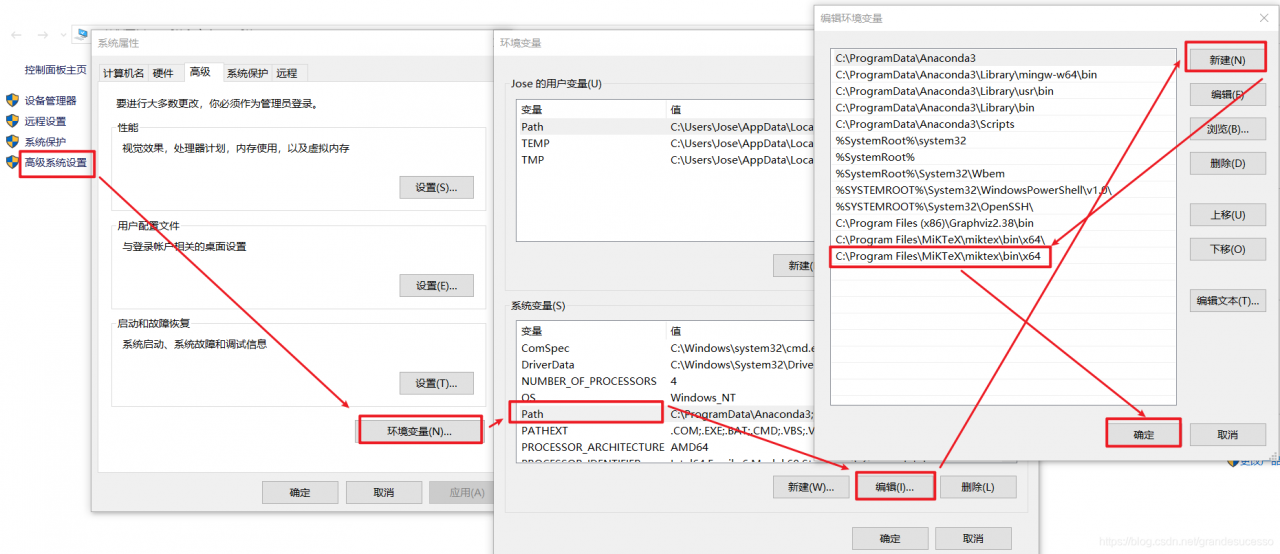
step 2: add the installation path of the Miktex installed in the previous step to the environment variable

Miktex installation path: C:\Program Files\ Miktex \ Miktex \bin\x64

step 3: restart Jupyter Notebook, open any “ipynb” file and click “Download as” – “PDF via LaTeX(.pdf)”

step 4: next, N (indeed N) packages will pop up. Click “Install” to Install each package until the menu no longer pops up

step 5: click Download as again – “PDF via LaTeX(.pdf)” to export the PDF file in the Download item of the current browser.

close failed in file object destructor: IOError: [Error 10] No child processes

this problem is really annoying, it took me half a day to solve. It turns out that the reason is a small problem, but it is usually ignored, looking for a long time on the Internet seems to be different from my situation

is timed to query the current port concurrency every 30 seconds and record it in the document

import os
from threading import Thread

def check_count():
def check_count():
MSG = os.popen(‘ netstat -nat |grep 9995 | wc-l ‘)
count = msg.read()
current_time = datetime. Datetime. Now (). Strftime (“%Y-%m-%d %H:% m :%S”)
with Open (‘ /home/opvis/transfer_server/log/ check_port.log ‘, ‘a’) as f:
f.write(current_time + ‘, current time concurrent visits are: ‘+ count)
time.sleep(30)
t= Thread(target=check_count)
t.daemon (True)
t.daemon ()

results will run normally, but at the terminal will always report the following error :

because the last os.popen execution object was not closed. The next time the loop executes os.popen, the error will appear
.

will no longer be displayed

def check_count():
def check_count():
MSG = os.popen(‘ netstat -nat |grep 9995 | wc-l ‘)
count = msg.read()
current_time = datetime. Datetime. Now (). Strftime (“%Y-%m-%d %H:% m :%S”)
with Open (‘ /home/opvis/transfer_server/log/ check_port.log ‘, ‘a’) as f:
f.write(current_time + ‘, current time concurrent visits are: ‘+ count)
MSG. Close ()
time.sleep(30)
t= Thread(target=check_count)
t.daemon (True)
t.daemon ()

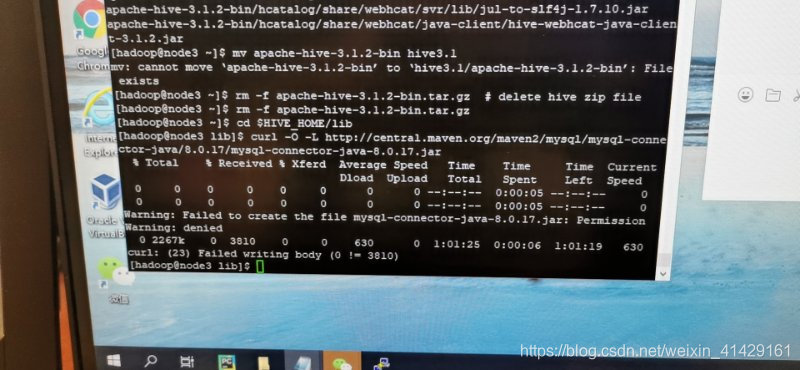
curl: (23)failed writing body(0!=3810)

directly on the error message

and then on to the solution steps
type curl “url” | tac | tac | grep-qs foo command

works:


if you’re still having problems, check to see if your virtual machine is running out of storage space.
use df-dh, this command is to let you know your disk usage, if the virtual machine space to expand their own space.

Error occurred when Python installed the pocketsphinx module (package): Command‘ swig.exe “Failed: no such file or directory

command ‘swig.exe’ failed: No such file or directory when installing pocket sphinx today. I found a lot of content on the Internet, and finally I succeeded.
first of all, my computer is Windows10 system, the method is only available for Windows system, other systems do not know.
error is due to the fact that swig is missing from your computer, so you need to download and install it. I download from the website of the latest package swig 4.0.2, website address is: http://www.swig.org/download.html.
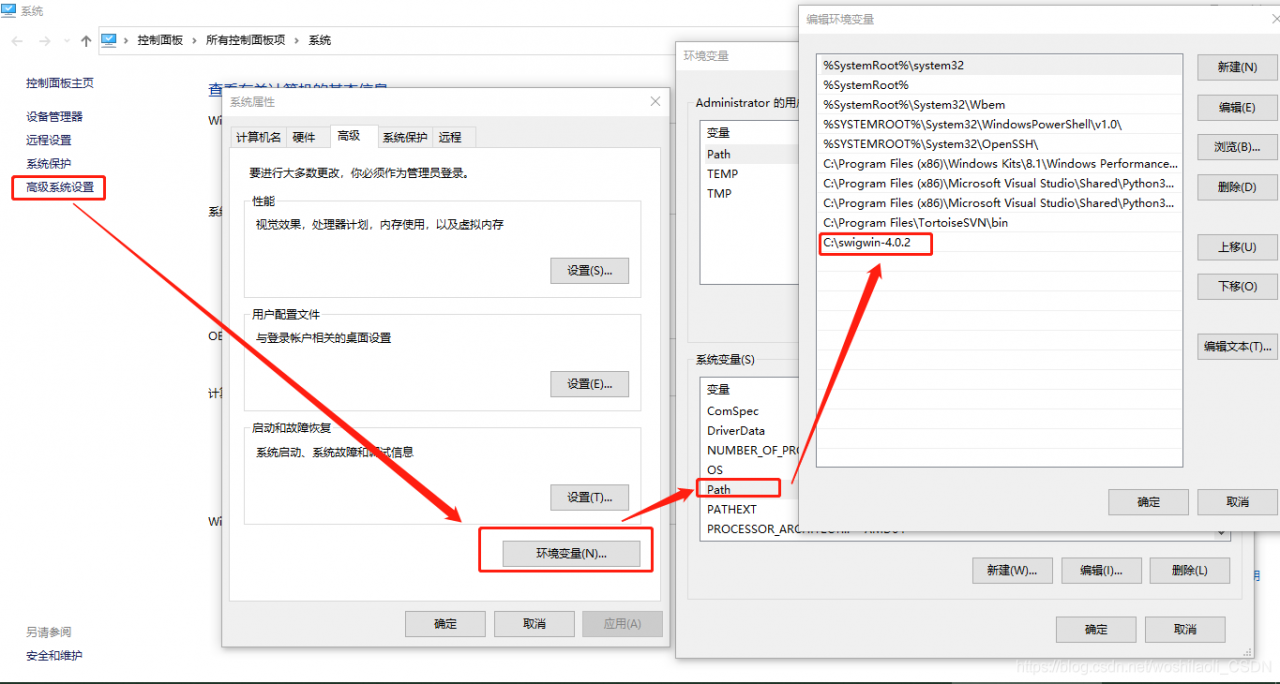
to unzip the downloaded files to C pan-gen directory. I want to emphasize the root directory here, because my previous attempts to put it in C:\Program Files (x86) still didn’t work (for unknown reasons). Finally, I just put it under C:\swigwin-4.0.2.
then add a new path path to the environment variable.

after the above steps are completed, then there is no problem with installing pocketsphinx.

[error reported] [Python] [Matplotlib] importerror: failed to import any QT binding

error message

ImportError: Failed to import any qt binding

complete error message:

Traceback (most recent call last):
  File "/home/xovee/Desktop/codes/www20/plot/cascade_plot.py", line 1, in <module>
    import matplotlib.pyplot as plt
  File "/home/xovee/miniconda3/envs/tf-2.0-a0/lib/python3.6/site-packages/matplotlib/pyplot.py", line 2355, in <module>
    switch_backend(rcParams["backend"])
  File "/home/xovee/miniconda3/envs/tf-2.0-a0/lib/python3.6/site-packages/matplotlib/pyplot.py", line 221, in switch_backend
    backend_mod = importlib.import_module(backend_name)
  File "/home/xovee/miniconda3/envs/tf-2.0-a0/lib/python3.6/importlib/__init__.py", line 126, in import_module
    return _bootstrap._gcd_import(name[level:], package, level)
  File "/home/xovee/miniconda3/envs/tf-2.0-a0/lib/python3.6/site-packages/matplotlib/backends/backend_qt4agg.py", line 5, in <module>
    from .backend_qt5agg import (
  File "/home/xovee/miniconda3/envs/tf-2.0-a0/lib/python3.6/site-packages/matplotlib/backends/backend_qt5agg.py", line 11, in <module>
    from .backend_qt5 import (
  File "/home/xovee/miniconda3/envs/tf-2.0-a0/lib/python3.6/site-packages/matplotlib/backends/backend_qt5.py", line 15, in <module>
    import matplotlib.backends.qt_editor.figureoptions as figureoptions
  File "/home/xovee/miniconda3/envs/tf-2.0-a0/lib/python3.6/site-packages/matplotlib/backends/qt_editor/figureoptions.py", line 13, in <module>
    from matplotlib.backends.qt_compat import QtGui
  File "/home/xovee/miniconda3/envs/tf-2.0-a0/lib/python3.6/site-packages/matplotlib/backends/qt_compat.py", line 158, in <module>
    raise ImportError("Failed to import any qt binding")
ImportError: Failed to import any qt binding

environment

  • Ubuntu 18.4 LTS
  • Python 3.6
  • Matplotlib 3.1.1

    solution

    pip install PyQt5
    

    <标题>引用

      <> Foad。(2018年11月22日)。导入任何qt绑定、Python – Tensorflow失败。李从https://stackoverflow.com/questions/52346254/importerror-failed-to-import-any-qt-binding-python-tensorflow获取

Solve runtimeerror: reduce failed to synchronize: device side assert triggered problem

first, the previous wave reported an error message:

/pytorch/aten/src/THC/THCTensorIndex.cu:362: void indexSelectLargeIndex(TensorInfo<T, IndexType>, TensorInfo<T, IndexType>, TensorInfo<long, IndexType>, int, int, IndexType, IndexType, long) [with T = float, IndexType = unsigned int, DstDim = 2, SrcDim = 2, IdxDim = -2, IndexIsMajor = true]: block: [35,0,0], thread: [96,0,0] Assertion `srcIndex < srcSelectDimSize` failed.
/pytorch/aten/src/THC/THCTensorIndex.cu:362: void indexSelectLargeIndex(TensorInfo<T, IndexType>, TensorInfo<T, IndexType>, TensorInfo<long, IndexType>, int, int, IndexType, IndexType, long) [with T = float, IndexType = unsigned int, DstDim = 2, SrcDim = 2, IdxDim = -2, IndexIsMajor = true]: block: [35,0,0], thread: [97,0,0] Assertion `srcIndex < srcSelectDimSize` failed.
/pytorch/aten/src/THC/THCTensorIndex.cu:362: void indexSelectLargeIndex(TensorInfo<T, IndexType>, TensorInfo<T, IndexType>, TensorInfo<long, IndexType>, int, int, IndexType, IndexType, long) [with T = float, IndexType = unsigned int, DstDim = 2, SrcDim = 2, IdxDim = -2, IndexIsMajor = true]: block: [35,0,0], thread: [98,0,0] Assertion `srcIndex < srcSelectDimSize` failed.
/pytorch/aten/src/THC/THCTensorIndex.cu:362: void indexSelectLargeIndex(TensorInfo<T, IndexType>, TensorInfo<T, IndexType>, TensorInfo<long, IndexType>, int, int, IndexType, IndexType, long) [with T = float, IndexType = unsigned int, DstDim = 2, SrcDim = 2, IdxDim = -2, IndexIsMajor = true]: block: [35,0,0], thread: [99,0,0] Assertion `srcIndex < srcSelectDimSize` failed.
/pytorch/aten/src/THC/THCTensorIndex.cu:362: void indexSelectLargeIndex(TensorInfo<T, IndexType>, TensorInfo<T, IndexType>, TensorInfo<long, IndexType>, int, int, IndexType, IndexType, long) [with T = float, IndexType = unsigned int, DstDim = 2, SrcDim = 2, IdxDim = -2, IndexIsMajor = true]: block: [35,0,0], thread: [100,0,0] Assertion `srcIndex < srcSelectDimSize` failed.
/pytorch/aten/src/THC/THCTensorIndex.cu:362: void indexSelectLargeIndex(TensorInfo<T, IndexType>, TensorInfo<T, IndexType>, TensorInfo<long, IndexType>, int, int, IndexType, IndexType, long) [with T = float, IndexType = unsigned int, DstDim = 2, SrcDim = 2, IdxDim = -2, IndexIsMajor = true]: block: [35,0,0], thread: [101,0,0] Assertion `srcIndex < srcSelectDimSize` failed.
/pytorch/aten/src/THC/THCTensorIndex.cu:362: void indexSelectLargeIndex(TensorInfo<T, IndexType>, TensorInfo<T, IndexType>, TensorInfo<long, IndexType>, int, int, IndexType, IndexType, long) [with T = float, IndexType = unsigned int, DstDim = 2, SrcDim = 2, IdxDim = -2, IndexIsMajor = true]: block: [35,0,0], thread: [102,0,0] Assertion `srcIndex < srcSelectDimSize` failed.
/pytorch/aten/src/THC/THCTensorIndex.cu:362: void indexSelectLargeIndex(TensorInfo<T, IndexType>, TensorInfo<T, IndexType>, TensorInfo<long, IndexType>, int, int, IndexType, IndexType, long) [with T = float, IndexType = unsigned int, DstDim = 2, SrcDim = 2, IdxDim = -2, IndexIsMajor = true]: block: [35,0,0], thread: [103,0,0] Assertion `srcIndex < srcSelectDimSize` failed.
/pytorch/aten/src/THC/THCTensorIndex.cu:362: void indexSelectLargeIndex(TensorInfo<T, IndexType>, TensorInfo<T, IndexType>, TensorInfo<long, IndexType>, int, int, IndexType, 
......
......
......
/pytorch/aten/src/THC/THCTensorIndex.cu:362: void indexSelectLargeIndex(TensorInfo<T, IndexType>, TensorInfo<T, IndexType>, TensorInfo<long, IndexType>, int, int, IndexType, IndexType, long) [with T = float, IndexType = unsigned int, DstDim = 2, SrcDim = 2, IdxDim = -2, IndexIsMajor = true]: block: [35,0,0], thread: [95,0,0] Assertion `srcIndex < srcSelectDimSize` failed.
Traceback (most recent call last):
  File "../paragrah_selector/para_sigmoid_train.py", line 533, in <module>
    main()
  File "../paragrah_selector/para_sigmoid_train.py", line 463, in main
    eval_loss = eval_model(model, eval_data, device)
  File "../paragrah_selector/para_sigmoid_train.py", line 419, in eval_model
    loss, logits = model(input_ids, segment_ids, input_mask, labels=label_ids)
  File "/home/lisen/.conda/envs/py36/lib/python3.6/site-packages/torch/nn/modules/module.py", line 489, in __call__
    result = self.forward(*input, **kwargs)
  File "/home/lisen/.conda/envs/py36/lib/python3.6/site-packages/torch/nn/parallel/data_parallel.py", line 143, in forward
    outputs = self.parallel_apply(replicas, inputs, kwargs)
  File "/home/lisen/.conda/envs/py36/lib/python3.6/site-packages/torch/nn/parallel/data_parallel.py", line 153, in parallel_apply
    return parallel_apply(replicas, inputs, kwargs, self.device_ids[:len(replicas)])
  File "/home/lisen/.conda/envs/py36/lib/python3.6/site-packages/torch/nn/parallel/parallel_apply.py", line 83, in parallel_apply
    raise output
  File "/home/lisen/.conda/envs/py36/lib/python3.6/site-packages/torch/nn/parallel/parallel_apply.py", line 59, in _worker
    output = module(*input, **kwargs)
  File "/home/lisen/.conda/envs/py36/lib/python3.6/site-packages/torch/nn/modules/module.py", line 489, in __call__
    result = self.forward(*input, **kwargs)
  File "/home/lisen/caiyun_projects/generative_mrc/paragrah_selector/modeling.py", line 1001, in forward
    loss = loss_fn(logits, labels)
  File "/home/lisen/.conda/envs/py36/lib/python3.6/site-packages/torch/nn/modules/module.py", line 489, in __call__
    result = self.forward(*input, **kwargs)
  File "/home/lisen/.conda/envs/py36/lib/python3.6/site-packages/torch/nn/modules/loss.py", line 504, in forward
    return F.binary_cross_entropy(input, target, weight=self.weight, reduction=self.reduction)
  File "/home/lisen/.conda/envs/py36/lib/python3.6/site-packages/torch/nn/functional.py", line 2027, in binary_cross_entropy
    input, target, weight, reduction_enum)
RuntimeError: reduce failed to synchronize: device-side assert triggered
terminate called after throwing an instance of 'c10::Error'
  what():  CUDA error: device-side assert triggered (insert_events at /pytorch/aten/src/THC/THCCachingAllocator.cpp:470)
frame #0: std::function<std::string ()>::operator()() const + 0x11 (0x7f0e52afc021 in /home/lisen/.conda/envs/py36/lib/python3.6/site-packages/torch/lib/libc10.so)
frame #1: c10::Error::Error(c10::SourceLocation, std::string const&) + 0x2a (0x7f0e52afb8ea in /home/lisen/.conda/envs/py36/lib/python3.6/site-packages/torch/lib/libc10.so)
frame #2: <unknown function> + 0x13dbd92 (0x7f0e5e065d92 in /home/lisen/.conda/envs/py36/lib/python3.6/site-packages/torch/lib/libcaffe2_gpu.so)
frame #3: at::TensorImpl::release_resources() + 0x50 (0x7f0e534c6440 in /home/lisen/.conda/envs/py36/lib/python3.6/site-packages/torch/lib/libcaffe2.so)
frame #4: <unknown function> + 0x2af03b (0x7f0e51bb703b in /home/lisen/.conda/envs/py36/lib/python3.6/site-packages/torch/lib/libtorch.so.1)
frame #5: torch::autograd::Variable::Impl::release_resources() + 0x17 (0x7f0e51e29d27 in /home/lisen/.conda/envs/py36/lib/python3.6/site-packages/torch/lib/libtorch.so.1)
frame #6: <unknown function> + 0x124cfb (0x7f0e8ce4ccfb in /home/lisen/.conda/envs/py36/lib/python3.6/site-packages/torch/lib/libtorch_python.so)
frame #7: <unknown function> + 0x3204af (0x7f0e8d0484af in /home/lisen/.conda/envs/py36/lib/python3.6/site-packages/torch/lib/libtorch_python.so)
frame #8: <unknown function> + 0x3204f1 (0x7f0e8d0484f1 in /home/lisen/.conda/envs/py36/lib/python3.6/site-packages/torch/lib/libtorch_python.so)
<omitting python frames>
frame #25: __libc_start_main + 0xf0 (0x7f0ecf782830 in /lib/x86_64-linux-gnu/libc.so.6)

Aborted (core dumped)
(py36) lisen@octa:~/caiyun_projects/generative_mrc/script$ sh para_sigmoid_train.sh

before heading off to New York next week, we appear under the heading of
before heading off to New York next week. We haven’t lost our labels before heading off to New York before heading off to New York next week. We haven’t lost our labels before heading off to New York next week. And so on. So check your labels carefully. 2. There is something wrong with your word vector, such as the position vector exceeding the preset length of the model, the word vector exceeding the size of the word table, etc.

And then, the point of this article, if you just say these two reasons, it might not be easy to figure out the problem. Let me show you a simple debug method, and you’ll see what the problem is. That is: put the model on the CPU and run . If it doesn’t fit, just turn down the batch size. For example, after I finished the adjustment, I reported the following error:

File "../paragrah_selector/para_sigmoid_train.py", line 533, in <module>
    main()
  File "../paragrah_selector/para_sigmoid_train.py", line 463, in main
    eval_loss = eval_model(model, eval_data, device)
  File "../paragrah_selector/para_sigmoid_train.py", line 419, in eval_model
    loss, logits = model(input_ids, segment_ids, input_mask, labels=label_ids)
  File "/home/lisen/.conda/envs/py36/lib/python3.6/site-packages/torch/nn/modules/module.py", line 489, in __call__
    result = self.forward(*input, **kwargs)
  File "/home/lisen/caiyun_projects/generative_mrc/paragrah_selector/modeling.py", line 987, in forward
    _, pooled_output = self.bert(input_ids, token_type_ids, attention_mask, output_all_encoded_layers=False)
  File "/home/lisen/.conda/envs/py36/lib/python3.6/site-packages/torch/nn/modules/module.py", line 489, in __call__
    result = self.forward(*input, **kwargs)
  File "/home/lisen/caiyun_projects/generative_mrc/paragrah_selector/modeling.py", line 705, in forward
    embedding_output = self.embeddings(input_ids, token_type_ids)
  File "/home/lisen/.conda/envs/py36/lib/python3.6/site-packages/torch/nn/modules/module.py", line 489, in __call__
    result = self.forward(*input, **kwargs)
  File "/home/lisen/caiyun_projects/generative_mrc/paragrah_selector/modeling.py", line 281, in forward
    position_embeddings = self.position_embeddings(position_ids)
  File "/home/lisen/.conda/envs/py36/lib/python3.6/site-packages/torch/nn/modules/module.py", line 489, in __call__
    result = self.forward(*input, **kwargs)
  File "/home/lisen/.conda/envs/py36/lib/python3.6/site-packages/torch/nn/modules/sparse.py", line 118, in forward
    self.norm_type, self.scale_grad_by_freq, self.sparse)
  File "/home/lisen/.conda/envs/py36/lib/python3.6/site-packages/torch/nn/functional.py", line 1454, in embedding
    return torch.embedding(weight, input, padding_idx, scale_grad_by_freq, sparse)
RuntimeError: index out of range at /pytorch/aten/src/TH/generic/THTensorEvenMoreMath.cpp:191

thorough analysis clearly shows that File “/home/lisen/caiyun_projects/generative_mrc/paragrah_selector/modeling. Py”, line 281, in forward
position_embeddings = self. Position_embeddings (position_ids) “, If the position vector exceeds the preset length value of the model, then I go back to check and find that the longer text is indeed not truncated to that length, leading to this problem.