1. Problem code
recently when conda installed the software package, the following problems have been occurring. I found a lot of solutions on the Internet but failed to solve my problem. See the link
Collecting package metadata (current_repodata.json): done
Solving environment: failed with current_repodata.json, will retry with next repodata source.
Collecting package metadata (repodata.json): done
Solving environment: failed
Initial quick solve with frozen env failed.  Unfreezing env and trying again.
Solving environment: failed
2. Cause found
when I later looked at the error message, it turned out that it was caused by two commands for using conda-forge. The culprit is the second sentence.
conda config --add channels conda-forge
conda config --set channel_priority strict
3. Solution
conda config --set channel_priority flexible
IntegrityError at ** NOT NULL constraint failed: learning_logs_topic.owner_id
in chapter 19 of python from introduction to practice, models add the user attribute of topic in learning_logs, that is, the topic created by the logged user, then the owner attribute of this topic is the logged user, code: Owner = model.foreignkey (User,on_delete= model.cascade), owner is the ForeignKey of User (pthon version 3.7.4, django version 2.2.6) and is coming up after makations:
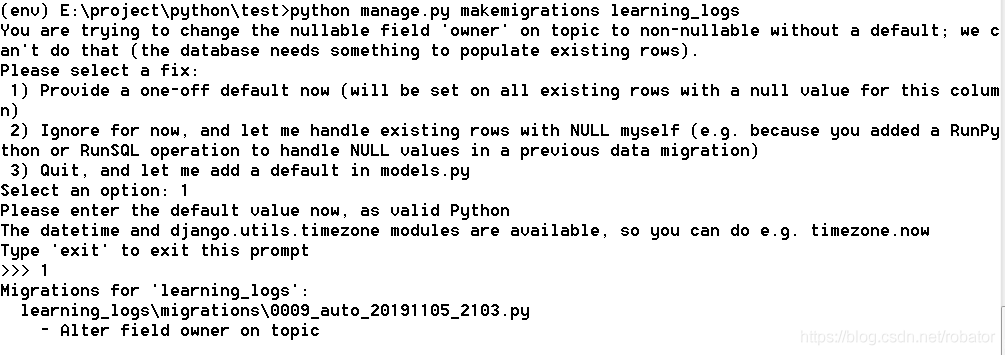
, then select the option of ‘1)’, then select the user ID of 1, namely ll_admin, then the attribution user ID of the original topic is 1, namely ll_admin. The following error occurs when executing new_topic:
IntegrityError at /new_topic/ NOT NULL constraint failed: learning_logs_top.owner_id, error site as follows:
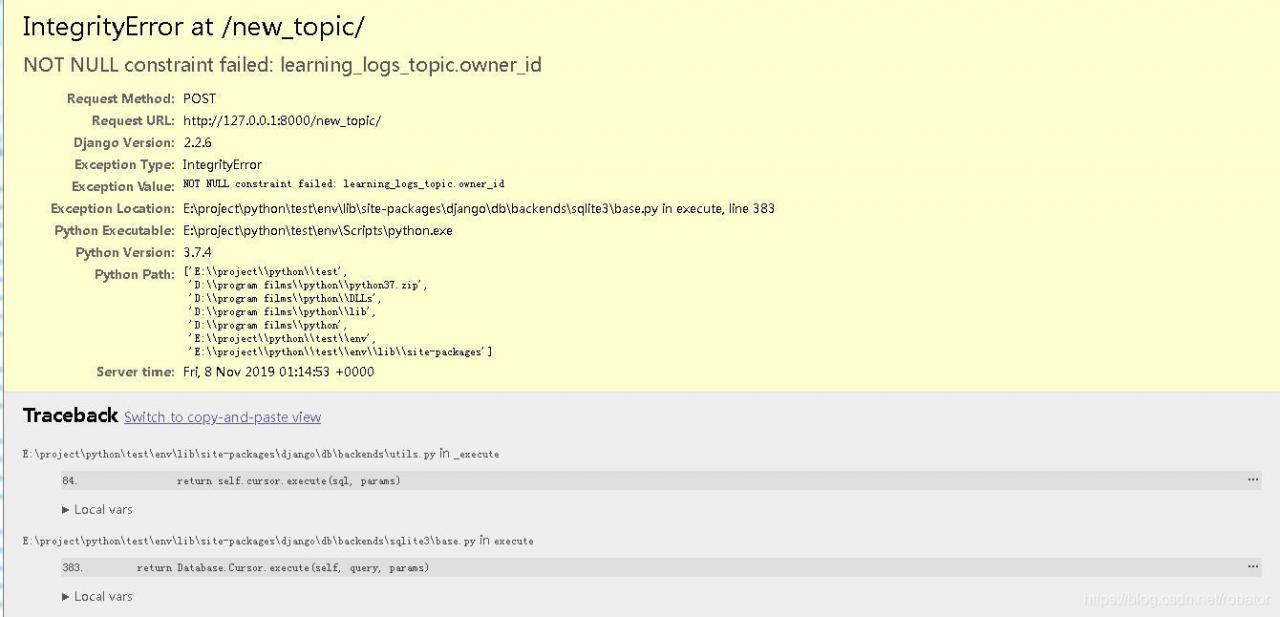
, of which topic model source code is as follows:
class Topic(models.model) :
text= model.charfield (max_length=200)
date_added= model.datetimefield (auto_now_add=True)
owner= model.foreignkey (User,on_delete= model.cascade)
def the __str__ (self) :
return self. The text
topicform source as follows:
class TopicForm (forms. ModelForm) :
class Meta:
model = Topic
fields = [‘ text ‘]
labels = {‘ text: “‘}
: new_topic under the learning_logs folder views. Py source code is as follows:
def new_topic(request) :
if request. Method! : = ‘POST’
form = TopicForm ()
the else:
form = TopicForm (request. POST).
if the form is_valid () :
form. The save ()
the return HttpResponseRedirect(‘learning_logs:topics’)
context={‘form’:form}
return render(request,’learning_logs/ new_top.html ‘,context)
this error shows null value limitation error: owner, owner is the attribute just added in models. Although the owner attribute is added in the existing topic, the newly added topic does not have an owner attribute, so an error is reported.
is solved as follows:
(1) add null=True to the models.py attribute, allowing this attribute to be empty
becomes owner= model.foreignkey after modification (User,on_delete= model.cascade, null=True). After modification, the error does not occur, but the owner of the newly added topic is null, and
is not intended by design
(2) adds the default value inside models.py.
modified owner= model.foreignkey (User,on_delete= model.cascade, default=1), and the modified error will not occur, but the owner of newly added topic is always the User with ID 1, and it is not the desired
(3) modify TopicForm and add owner field
modified TopicForm into the following:
class TopicForm (forms. ModelForm) :
class Meta:
model = Topic
fields = [‘ text, ‘the owner’]
labels = {‘ text ‘:’, ‘owner’ : ‘}
After
is modified, the user will select the owner of the new topic, as shown below:

although the current logged in user can choose the owner of this topic, the user can also choose other non-logged in users, which increases the risk of error
(4) in the views. Py new_topic view, get the current user with request.user and assign a value to form
is to add a line after if form.is_valid() :
form.instance.owner=request.user,
def new_topic(request) :
if request. Method! : = ‘POST’
form = TopicForm ()
the else:
form = TopicForm (request. POST).
if the form is_valid () :
form. The instance. The owner = request. User
Form. The save ()
return HttpResponseRedirect (reverse (‘ learning_logs: switchable viewer ‘))
the context = {‘ form: form}
the return render(request,’learning_logs/new_topic.html’,context)
USES the instance parameter of the Form to get the owner attribute and assigns the current user obtained by requset.user to the owner of the instance. After the modification, the program realizes the predetermined function
(5) also takes advantage of the instance parameter, but at the time of the generated Form, the modified new_topic view is as follows:
def new_topic(request) :
if request. Method! : = ‘POST’
form = TopicForm ()
the else:
form = TopicForm (request. POST)
topic = topic ()
topic. The owner = request. User
form = TopicForm (request. POST, the instance = topic).
if the form is_valid () :
form. The save ()
return HttpResponseRedirect (reverse (‘ learning_logs: switchable viewer ‘))
The context = {‘ form: form}
return render (request, ‘learning_logs/new_topic. HTML, context)
becomes a topic, then assign the value to the owner, and then assign the topic to the instance parameter, which costs a lot of space and time, but also achieves the predetermined function.
Pychar error: Error:failed to find libmagic. Check your installation
today, Pycharm reported this error while debugging the program.
use the command
PIP uninstall python-magic
PIP install python-magic-bin==0.4.14
solution 2:
uninstall python-magic
and download the corresponding 64-bit installation package on the official website. WHL
then use the command
PIP install python_magic_bin-0.4.14-py2. Py3-none-win_amd64. WHL
is now python-magic working.
joke, now this kind of domestic solution to the problem of the post is really not good, to stackoverflow, hit the key points…
Install apache2.4 on windows to solve the problem of the requested operation has failed
- double-click on \Apache\Apache24\bin\ ApacheMonitor. Exe to start, click start the requested operation has failed to report an error.
- at first thought it was port 80, changing port 80 won’t help.
- CMD open \Apache\Apache24\bin\, and enter httpd-t to display normally.
- CMD open \Apache\Apache24\bin\ and enter httpd. exe-w-n “apache2.4” -k start.
- shows not baidu experience https://jingyan.baidu.com/article/ceb9fb10d909c48cac2ba06c.html said OS 10013 problems, but OS 10048
- then find this article solve the problem of OS 10048,
https://blog.csdn.net/sun9979/article/details/102960811 Because there is a problem that 443 is occupied, we have modified the two files in \conf\extra\ and changed 443 to 442. - but then appeared a new problem, looked at the server. CRT file exists, {SRVROOT} has also been configured, close look is HTTPD -ahssl.conf file has a {SSRVROOT}, the default file actually has this error, delete an S, change to {SRVROOT}.
- and then start is successful.
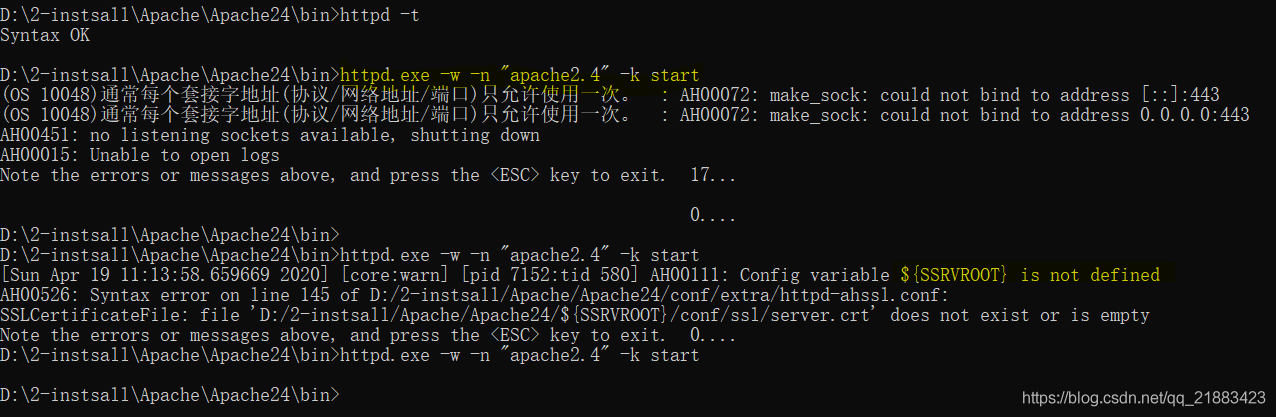
summary: change 443 port, ${SSRVROOT}.
Error: /usr/bin/python: Error while finding module specification for ‘virtualenvwrapper.hook_loader’
reasons: workon command fails, the Python version changes, is to use the previous python3.6 install Python virtual environment, relevant documents is in the/Library/Frameworks/Python framework Versions/3.6/bin
solution 1: to install a virtual environment in new python3.7 environment
$sudo pip3 install virtualenv virtualenvwrapper
$source .bashrc
the solution 2: will/Library/Frameworks/Python framework Versions/3.6/bin three files in the directory, copy it to/usr/local/bin directory in

$cd /Library/Frameworks/Python.framework/Versions/3.6/bin
$cp virtualenv-clone virtualenvwrapper.sh virtualenvwrapper_lazy.sh /usr/local/bin
Pandas read_ Error in json() valueerror: training data
has a json file as follows:
{
  "cover": "http://p2.music.126.net/wsPS7l8JZ3EAOvlaJPWW-w==/109951163393967421.jpg?param=140y140",
  "title": "2018上半年最热新歌TOP50",
  "author": "网易云音乐",
  "times": "1264万",
  "url": "https://music.163.com/playlist?id=2303649893",
  "id": "2303649893"
}
{
  "cover": "http://p2.music.126.net/wpahk9cQCDtdzJPE52EzJQ==/109951163271025942.jpg?param=140y140",
  "title": "你的青春里有没有属于你的一首歌?",
  "author": "mayuko然",
  "times": "4576万",
  "url": "https://music.163.com/playlist?id=2201879658",
  "id": "2201879658"
}
when I try to read the file with pd.read_json('data.json'), I get an error. The error part is as follows:
File "D:\python\lib\site-packages\pandas\io\json\json.py", line 853, in _parse_no_numpy
    loads(json, precise_float=self.precise_float), dtype=None)
ValueError: Trailing data
after a baidu found that it was a json format error, is the first time I know there is such a thing as jsonviewer. You need to save the dictionary in the file as an element in the list, modified as follows.
[{
  "cover": "http://p2.music.126.net/wsPS7l8JZ3EAOvlaJPWW-w==/109951163393967421.jpg?param=140y140",
  "title": "2018上半年最热新歌TOP50",
  "author": "网易云音乐",
  "times": "1264万",
  "url": "https://music.163.com/playlist?id=2303649893",
  "id": "2303649893"
},
{
  "cover": "http://p2.music.126.net/wpahk9cQCDtdzJPE52EzJQ==/109951163271025942.jpg?param=140y140",
  "title": "你的青春里有没有属于你的一首歌?",
  "author": "mayuko然",
  "times": "4576万",
  "url": "https://music.163.com/playlist?id=2201879658",
  "id": "2201879658"
}]
another method is to file each behavior of a complete dictionary, and then modify the parameters in the function pd. Read_json ('data.json',lines=True). lines default to False, set to True can read json objects according to the row. In the psor.read_json document, it is explained as follows:
lines: Boolean, default False. Read the file as a json object perline.new in version 0.19.0.
the modified json file is as follows:
{"cover": "http://p2.music.126.net/wsPS7l8JZ3EAOvlaJPWW-w==/109951163393967421.jpg?param=140y140","title": "2018上半年最热新歌TOP50","author": "网易云音乐","times": "1264万","url": "https://music.163.com/playlist?id=2303649893","id": "2303649893"}
{"cover": "http://p2.music.126.net/wpahk9cQCDtdzJPE52EzJQ==/109951163271025942.jpg?param=140y140","title": "你的青春里有没有属于你的一首歌?","author": "mayuko然","times": "4576万","url": "https://music.163.com/playlist?id=2201879658","id": "2201879658"}
[solved] Python: opencv: error: (- 215) size.width >0 && size.height >0 in function cv::imshow
when using cv2.imread(),
when this error occurs, please check the following information:
is spelling error
is this picture
is added suffix
is 0 absolute path 1
2 what system is this?Consider changing the single slash to and double slash . In general, a backslash
is already supported
image_data = cv2.imread('D:\\lab\\AgriculturalDisease_trainingset\\images\\00c5c908-fc25-4710-a109-db143da23112___RS_Erly.B 7778.JPG')
in Windows how to check the address is correct, especially in the loop
can be copied directly in the Windows window, to see if you can read and display the picture.
then checks the address of the program, prints it out, and compares whether the two are the same.
if you encounter Chinese name can’t read, please refer to this website: Chinese path error problem
simply, is to directly rewrite the cv2.imread function, replace it with another function cv_imread:
def cv_imread(filePath):
    cv_img=cv2.imdecode(np.fromfile(filePath,dtype=np.uint8),-1)
    return cv_img

# The main citation section is as follows: (img_path needs to be given by yourself)
image_data = cv_imread(img_path)ImportError: Importing the multiarray numpy extension module failed.
Numpy of
pycharm suddenly became unavailable. At first, I thought numpy version was a problem. Uninstall, reinstall, upgrade, and degrade were not allowed.
then I tested the numpy of anaconda and found that it could be used, but pycharm could not. However, I checked the setting repeatedly, and there was no problem.
finally put solution : system environment variable Path to the bin level C:\ProgramData\Anaconda3\Library\bin, and then restart the computer.
at first I just introduced Anaconda3, but before using numpy I had no problem, maybe I updated conda, the package is confused, so the environment variable introduced must be bin level.
Importing the multiarray numpy extension module failed
from matplotlib import pyplot as pyp
and then run the file with the following error message
....
....
ImportError:
Importing the multiarray numpy extension module failed.  Most
likely you are trying to import a failed build of numpy.
If you're working with a numpy git repo, try `git clean -xdf` (removes all
files not under version control).  Otherwise reinstall numpy.
the reason is that Aonconda’s numpy module has a problem
enters Aconconda’s Prompt on the command line to execute
(base) C:\Users\hfh>pip uninstall numpy
Uninstalling numpy-1.15.4:
  Would remove:
    e:\soft\anaconda\lib\site-packages\numpy-1.15.4.dist-info\*
    e:\soft\anaconda\lib\site-packages\numpy\*
    e:\soft\anaconda\scripts\f2py.py
Proceed (y/n)?y
  Successfully uninstalled numpy-1.15.4
execute
again
(base) C:\Users\hfh>pip install numpy
Collecting numpy
  Using cached https://files.pythonhosted.org/packages/00/0e/5a8c34adb97fc1cd6636d78050e575945e874c8516d501421d5a0f377a6c/numpy-1.15.4-cp37-none-win_amd64.whl
Installing collected packages: numpy
Successfully installed numpy-1.15.4
Solving environment: failed with initial frozen solve. Retrying with flexible solve.错误
error
error: PackagesNotFoundError: The following packages are not available from current channels:
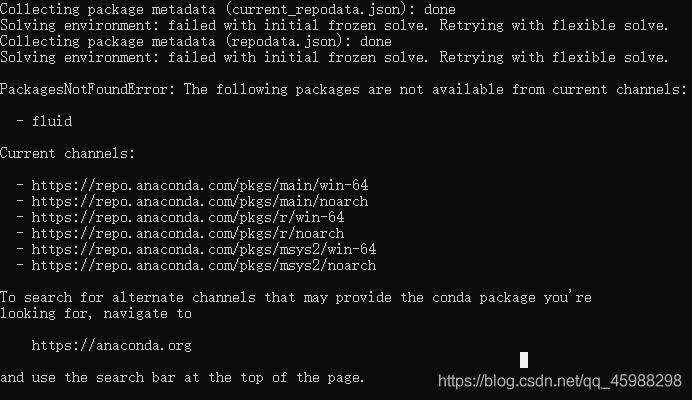
https://blog.csdn.net/The_Time_Runner/article/details/99848728, although not completely solve the problem, but you can use for a moment. But installing the version directly with PIP is problematic. I don’t have to do
as much as possible
The following packages are not available from current channels.
https://blog.csdn.net/Erice_s/article/details/80156191 appear above Solving environment: failed with initial frozen solve. Retrying with flexible solve. This error is due to the lack of a channel, which can then be used correctly.
The problem encountered in pyinstaller packaging “failed to execute script × *”
do a small tool, in the local execution OK, use pyinstaller packaging process, there are problems, in a variety of search on the Internet, can not find the specific problem point, it seems mainly because, in the process of the problem, the difference will be relatively big, so also need to analyze the specific problem.
local execution: python ******. Py
all normal, ready to use pyinstaller package to generate exe execution file;
package command: pyinstaller. Exe-dall *****. Py
execution will jump out of the command line black window and will execute normally.
package command: pyinstaller. Exe-w-dall *****. Py
execution occurs as follows:
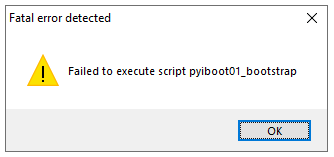

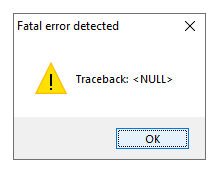
packaging command: pyinstaller. Exe-w *****. Py
Failed to execute script ******
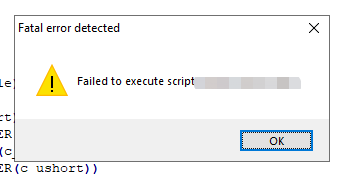
is later found because the log output is used in the following way:
import os
import io

class Logger(object):
    def __init__(self, filename="Default.log", path="./"):
        sys.stdout = io.TextIOWrapper(sys.stdout.buffer)
        self.terminal = sys.stdout
        # self.log = open(os.path.join(path, filename), "a", encoding='utf8')
        self.log = open(filename, "a")

    def write(self, message):
        self.terminal.write(message)
        self.log.write(message)

    def flush(self):
        pass


sys.stdout = Logger(create_detail_day() + '_grit.log', path='')#方式1
is changed as follows:
savedStdout = sys.stdout  #保存标准输出流 #方式2
file = open(create_detail_day()+ '_zh_finlock_license_gen_log.txt', 'wt')
sys.stdout = file  #标准输出重定向至文件
then package and use the command: pyinstaller. Exe-w *****. Py
will run normally.
The -f command is added below
to package the dependent libraries and files as a whole
package command to: pyinstaller. Exe – w – F – dall * * * * * * *. Py
generates exe executable, after which the following phenomenon occurs:
packaging command: pyinstaller. Exe-w-f *****. Py
generates exe executables, which can be executed normally.
come to an end!
MySQL error set: failed to start mysql.service : Unit mysql.service is masked.
2019 unicorn enterprise to recruit Python engineer standard > > > 
➜  /home/penelope systemctl unmask mysql.service
Removed /etc/systemd/system/mysql.service.
The cause of the
error has not been found yet.
reproduced in: https://my.oschina.net/u/3672057/blog/2934145