Nbconvert failed: Pandoc Wasn’t found resolved. Nbconvert Failed: PDFlatex Not Found on PATH resolved
Problem 1 Description
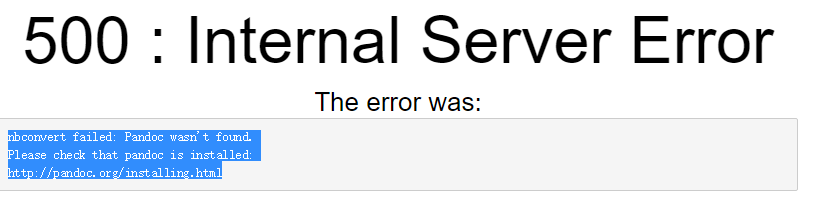
500: Internal Server Error
nbconvert failed: Pandoc wasn’t found.
Please check that Pandoc is installed:
Problem 2 Description
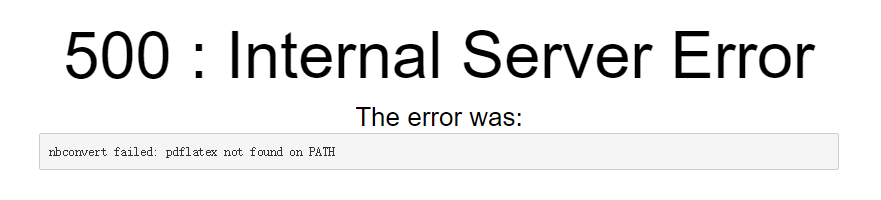
500 : Internal Server Error
nbconvert failed: pdflatex not found on PATH
http://pandoc.org/installing.html
Solutions:
1. Install pandoc
Download pandoc official download http://pandoc.org/installing.html
Other available CSDN resources download address
click to install directly, the default installation is ok, you can choose the installation location.
then configure the environment variable to configure the installation path to the system path. For example, I put E:\IDE\Pandoc into the PATH.
2. Install miktex
Click installation directly, the default installation can be selected, and the installation location can be selected.
(if the program does not automatically configure environment variables) requires manual configuration of environment variables to configure the installation path to the system path. If mine is put E:\IDE\MiKTeX 2.9\ MiKTeX \bin\x64 in path.

3. Install various macro packages
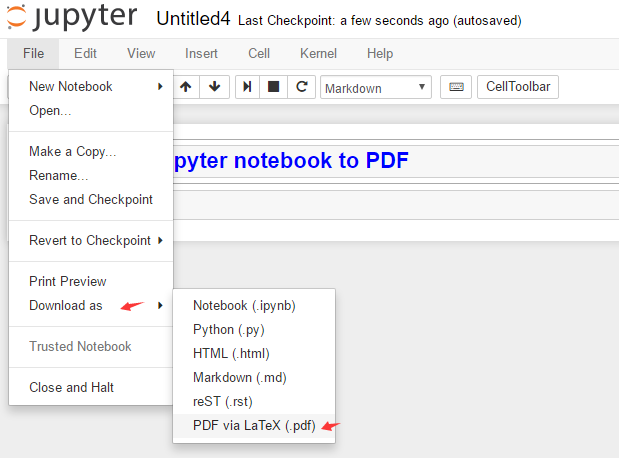
Select Convert PDF
Automatic prompt to install various macro packages can be directly click to install (install several times, until the installation is complete…)
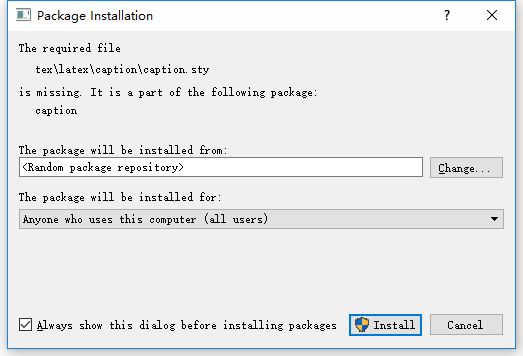
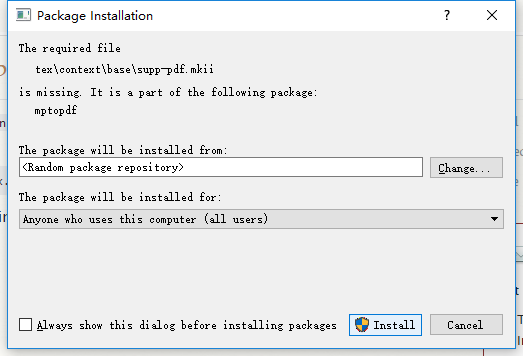
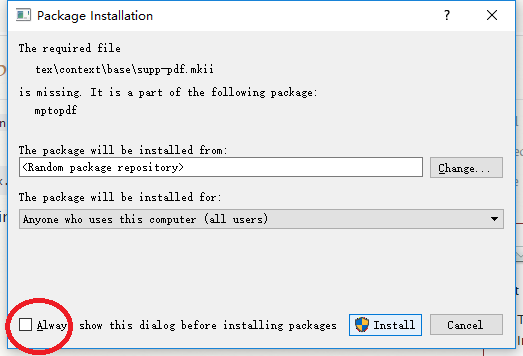
Can choose to remove the check box, each installation does not need popup, automatic installation, will be much faster, also save trouble.
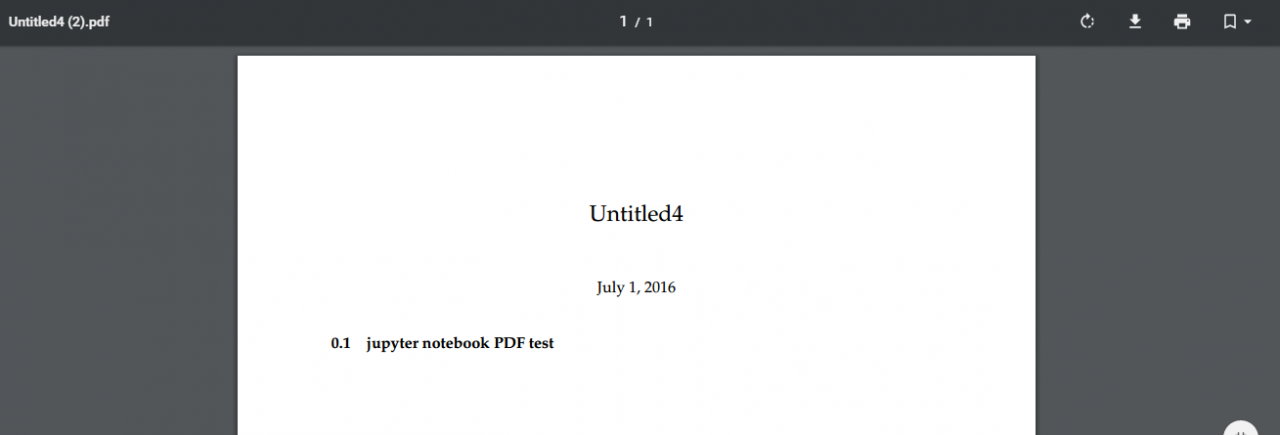
Completed, you can successfully convert English content, including images, code highlights, and so on.
Attention! , but if it contains Chinese content, it will report an error, and the Chinese cannot be converted.
To solve the problem of unable to convert the Chinese method, others did not test the time of the follow-up Chinese support problems, personally solved after updating the content of the blog.
Tag Archives: python
Mac install pycurl error: python setup.py egg_info" failed with error code 1”
(env3) [MrYang:Desktop]$ python3 -m pip install pycurl
Looking in indexes: http://mirrors.aliyun.com/pypi/simple/
Collecting pycurl
  Downloading http://mirrors.aliyun.com/pypi/packages/e8/e4/0dbb8735407189f00b33d84122b9be52c790c7c3b25286826f4e1bdb7bde/pycurl-7.43.0.2.tar.gz (214kB)
    100% |████████████████████████████████| 215kB 3.1MB/s
    Complete output from command python setup.py egg_info:
    Using curl-config (libcurl 7.43.0)
    Traceback (most recent call last):
      File "<string>", line 1, in <module>
      File "/private/var/folders/dx/m2t9qg010gg9pk5v8xzt4gxc0000gn/T/pip-install-bn546qog/pycurl/setup.py", line 913, in <module>
        ext = get_extension(sys.argv, split_extension_source=split_extension_source)
      File "/private/var/folders/dx/m2t9qg010gg9pk5v8xzt4gxc0000gn/T/pip-install-bn546qog/pycurl/setup.py", line 582, in get_extension
        ext_config = ExtensionConfiguration(argv)
      File "/private/var/folders/dx/m2t9qg010gg9pk5v8xzt4gxc0000gn/T/pip-install-bn546qog/pycurl/setup.py", line 99, in __init__
        self.configure()
      File "/private/var/folders/dx/m2t9qg010gg9pk5v8xzt4gxc0000gn/T/pip-install-bn546qog/pycurl/setup.py", line 316, in configure_unix
        specify the SSL backend manually.''')
    __main__.ConfigurationError: Curl is configured to use SSL, but we have not been able to determine which SSL backend it is using. Please see PycURL documentation for how to specify the SSL backend manually.

    ----------------------------------------
Command "python setup.py egg_info" failed with error code 1 in /private/var/folders/dx/m2t9qg010gg9pk5v8xzt4gxc0000gn/T/pip-install-bn546qog/pycurl/
The solution is as follows
# First upgrade PIP
Sudo Python-m PIP install — Upgrade — Force PIP
You can then specify the version number to install (the version number can be found in the error log)
Sudo PIP install pycurl = = 7.43.0
Forbidden (403) CSRF verification failed. Request aborted. – Django
How to solve the cross-domain problem of Django?
please see this article, very detailed: https://pypi.org/project/django-cors-headers/

The above is due to the CSRF problem, how to solve?
Two ways:
Top: comment out CsrfViewMiddleware as shown, but
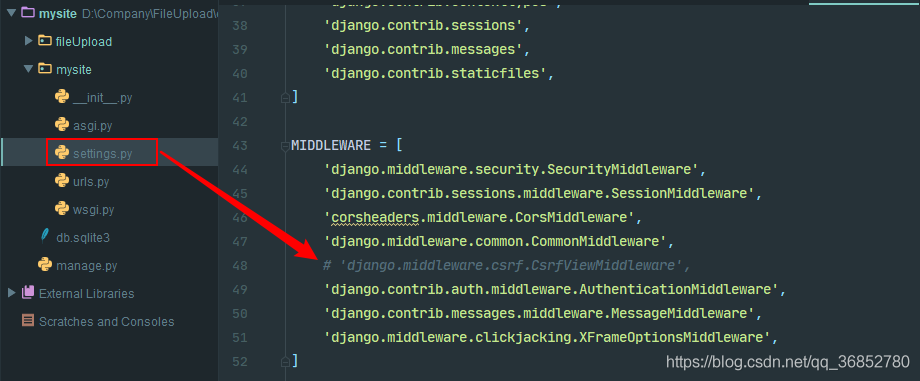 is not recommended
Second: add the annotation @csrf_exempt
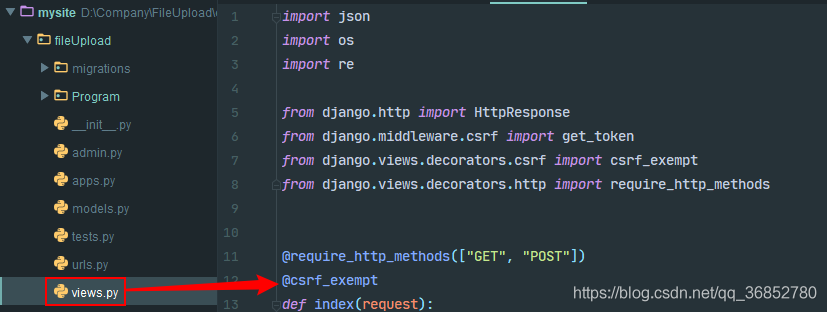 to the interface view
The above two methods do solve 403 errors.
However, according to a lot of information, the approach is that the front end first USES get request to specify the interface, and then the server generates get_token(request) to return to the front end. The front end carries csrftoken returned when requesting the interface, which will verify whether the cookie is consistent…
But they all tried in vain…
We can see the article: https://www.cnblogs.com/rgcLOVEyaya/p/RGC_LOVE_YAYA_692days_802_1.html
Failed to connect to non-global ctrl_ifname: (nil) error: No such file or directory (How to Fix)
The solution
This means that you must let wpa_supplicant run in the background.
run in the background
Reproduced in: https://www.cnblogs.com/eat-too-much/p/8301497.html
Compile “failed with error code 1 solution
1. PIP Install Mass
2, appear –record/TMP /pip-_6ys7mq9-record/install-record. TXT –single-version –compile” failed with error code 1 in…
3, this is due to the lack of virtual memory, my computer – advanced Settings – advanced – virtual memory, restart
2, appear –record/TMP /pip-_6ys7mq9-record/install-record. TXT –single-version –compile” failed with error code 1 in…
3, this is due to the lack of virtual memory, my computer – advanced Settings – advanced – virtual memory, restart
The Python PIP installation module prompts the error failed to create process
The Python PIP installation module prompts the error failed to create process
The Python PIP installation module prompts the error failed to create process
The Python PIP installation module prompts the error failed to create process
(venv) F:\cxm\venv\Scripts>pip install ipython
failed to create process.
The reason:
This error was reported because python’s directory name or location has changed.
Solutions:
1. Find the directory where Python is modified and open scripts directory, as shown in the figure below. The diagram below:

2. Find the pip-script.py file, open it, and replace the following code on the first line with the path to the python. Exe you have modified:
Old:

New:

#!F:\cxm\venv\Scripts\python.exe # 变动的路径
3. You can now use the PIP installation module
http://www.chenxm.cc/post/643.html
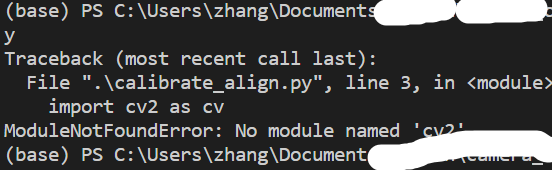
When VS code imported Cv2, an error ImportError: numpy.core.multiarray failed to import; There are no mistakes in using the Spyder
The following error occurs when programming in VsCode and using anaconda’s virtual environment as the interpreter to import Cv2
ImportError: numpy.core.multiarray failed to importAfter checking the trial, it was found that:
- I use on spyder without this error; Also used after trying to update numPY; And the python interpreter in the lower left corner is the right choice;
It turned out that the reason might be that vs Code was not started correctly and the Anaconda environment might not have been activated.
In the Anaconda Prompt, the following is executed in sequence
conda activate env_name
cd workDir
code .
So now it’s activated and the import is correct.
In addition, try to directly open VS Code, and then open python working directory in the File-Open folder.
Also note this error. The environment of Vscode is correct, but the terminal does not activate the environment. This can be determined by checking the contents of the prefix brackets.
A fatal error occurred: Failed to connect to ESP32: Timed out waiting for packet header
can’t burn the arduino burn esp32 module, the clock can’t burn the following prompts

The
search later finds a solution in the following connection:
https://github.com/espressif/esptool/issues/226
is as follows:
appears on the interface as
Connecting… Hold the “boot” button when the word appears, and then release
reproduced in: https://www.cnblogs.com/gtsup/p/9559770.html
Solution to the problem of installing lxml in Pip
1. The following error occurred while installing LXML using PIP:
& gt; > > pip install lxml
C:\Users\Chen>pip install lxml
Collecting lxml
  Using cached lxml-3.5.0.tar.gz
Installing collected packages: lxml
  Running setup.py install for lxml ... error
    Complete output from command "d:\program files\python\python.exe" -u -c "import setuptools, tokenize;__file__='C:\\Users\\CHENJU~1\\AppData\\Local\\Temp\\pip-build-id5180h6\\lxml\\setup.py';
    Building lxml version 3.5.0.
    Building without Cython.
    ERROR: b"'xslt-config' \xb2\xbb\xca\xc7\xc4\xda\xb2\xbf\xbb\xf2\xcd\xe2\xb2\xbf\xc3\xfc\xc1\xee\xa3\xac\xd2\xb2\xb2\xbb\xca\xc7\xbf\xc9\xd4\xcb\xd0\xd0\xb5\xc4\xb3\xcc\xd0\xf2\r\n\xbb\xf2\xc
    ** make sure the development packages of libxml2 and libxslt are installed **

    Using build configuration of libxslt
    running install
    running build
    running build_py
    creating build
    creating build\lib.win32-3.5
    creating build\lib.win32-3.5\lxml
    copying src\lxml\builder.py -> build\lib.win32-3.5\lxml
    copying src\lxml\cssselect.py -> build\lib.win32-3.5\lxml
    copying src\lxml\doctestcompare.py -> build\lib.win32-3.5\lxml
    copying src\lxml\ElementInclude.py -> build\lib.win32-3.5\lxml
    copying src\lxml\pyclasslookup.py -> build\lib.win32-3.5\lxml
    copying src\lxml\sax.py -> build\lib.win32-3.5\lxml
    copying src\lxml\usedoctest.py -> build\lib.win32-3.5\lxml
    copying src\lxml\_elementpath.py -> build\lib.win32-3.5\lxml
    copying src\lxml\__init__.py -> build\lib.win32-3.5\lxml
    creating build\lib.win32-3.5\lxml\includes
    copying src\lxml\includes\__init__.py -> build\lib.win32-3.5\lxml\includes
    creating build\lib.win32-3.5\lxml\html
    copying src\lxml\html\builder.py -> build\lib.win32-3.5\lxml\html
    copying src\lxml\html\clean.py -> build\lib.win32-3.5\lxml\html
    copying src\lxml\html\defs.py -> build\lib.win32-3.5\lxml\html
    copying src\lxml\html\diff.py -> build\lib.win32-3.5\lxml\html
    copying src\lxml\html\ElementSoup.py -> build\lib.win32-3.5\lxml\html
    copying src\lxml\html\formfill.py -> build\lib.win32-3.5\lxml\html
    copying src\lxml\html\html5parser.py -> build\lib.win32-3.5\lxml\html
    copying src\lxml\html\soupparser.py -> build\lib.win32-3.5\lxml\html
    copying src\lxml\html\usedoctest.py -> build\lib.win32-3.5\lxml\html
    copying src\lxml\html\_diffcommand.py -> build\lib.win32-3.5\lxml\html
    copying src\lxml\html\_html5builder.py -> build\lib.win32-3.5\lxml\html
    copying src\lxml\html\_setmixin.py -> build\lib.win32-3.5\lxml\html
    copying src\lxml\html\__init__.py -> build\lib.win32-3.5\lxml\html
    creating build\lib.win32-3.5\lxml\isoschematron
    copying src\lxml\isoschematron\__init__.py -> build\lib.win32-3.5\lxml\isoschematron
    copying src\lxml\lxml.etree.h -> build\lib.win32-3.5\lxml
    copying src\lxml\lxml.etree_api.h -> build\lib.win32-3.5\lxml
    copying src\lxml\includes\c14n.pxd -> build\lib.win32-3.5\lxml\includes
    copying src\lxml\includes\config.pxd -> build\lib.win32-3.5\lxml\includes
    copying src\lxml\includes\dtdvalid.pxd -> build\lib.win32-3.5\lxml\includes
    copying src\lxml\includes\etreepublic.pxd -> build\lib.win32-3.5\lxml\includes
    copying src\lxml\includes\htmlparser.pxd -> build\lib.win32-3.5\lxml\includes
    copying src\lxml\includes\relaxng.pxd -> build\lib.win32-3.5\lxml\includes
    copying src\lxml\includes\schematron.pxd -> build\lib.win32-3.5\lxml\includes
    copying src\lxml\includes\tree.pxd -> build\lib.win32-3.5\lxml\includes
    copying src\lxml\includes\uri.pxd -> build\lib.win32-3.5\lxml\includes
    copying src\lxml\includes\xinclude.pxd -> build\lib.win32-3.5\lxml\includes
    copying src\lxml\includes\xmlerror.pxd -> build\lib.win32-3.5\lxml\includes
    copying src\lxml\includes\xmlparser.pxd -> build\lib.win32-3.5\lxml\includes
    copying src\lxml\includes\xmlschema.pxd -> build\lib.win32-3.5\lxml\includes
    copying src\lxml\includes\xpath.pxd -> build\lib.win32-3.5\lxml\includes
    copying src\lxml\includes\xslt.pxd -> build\lib.win32-3.5\lxml\includes
    copying src\lxml\includes\etree_defs.h -> build\lib.win32-3.5\lxml\includes
    copying src\lxml\includes\lxml-version.h -> build\lib.win32-3.5\lxml\includes
    creating build\lib.win32-3.5\lxml\isoschematron\resources
    creating build\lib.win32-3.5\lxml\isoschematron\resources\rng
    copying src\lxml\isoschematron\resources\rng\iso-schematron.rng -> build\lib.win32-3.5\lxml\isoschematron\resources\rng
    creating build\lib.win32-3.5\lxml\isoschematron\resources\xsl
    copying src\lxml\isoschematron\resources\xsl\RNG2Schtrn.xsl -> build\lib.win32-3.5\lxml\isoschematron\resources\xsl
    copying src\lxml\isoschematron\resources\xsl\XSD2Schtrn.xsl -> build\lib.win32-3.5\lxml\isoschematron\resources\xsl
    creating build\lib.win32-3.5\lxml\isoschematron\resources\xsl\iso-schematron-xslt1
    copying src\lxml\isoschematron\resources\xsl\iso-schematron-xslt1\iso_abstract_expand.xsl -> build\lib.win32-3.5\lxml\isoschematron\resources\xsl\iso-schematron-xslt1
    copying src\lxml\isoschematron\resources\xsl\iso-schematron-xslt1\iso_dsdl_include.xsl -> build\lib.win32-3.5\lxml\isoschematron\resources\xsl\iso-schematron-xslt1
    copying src\lxml\isoschematron\resources\xsl\iso-schematron-xslt1\iso_schematron_message.xsl -> build\lib.win32-3.5\lxml\isoschematron\resources\xsl\iso-schematron-xslt1
    copying src\lxml\isoschematron\resources\xsl\iso-schematron-xslt1\iso_schematron_skeleton_for_xslt1.xsl -> build\lib.win32-3.5\lxml\isoschematron\resources\xsl\iso-schematron-xslt1
    copying src\lxml\isoschematron\resources\xsl\iso-schematron-xslt1\iso_svrl_for_xslt1.xsl -> build\lib.win32-3.5\lxml\isoschematron\resources\xsl\iso-schematron-xslt1
    copying src\lxml\isoschematron\resources\xsl\iso-schematron-xslt1\readme.txt -> build\lib.win32-3.5\lxml\isoschematron\resources\xsl\iso-schematron-xslt1
    running build_ext
    building 'lxml.etree' extension
    error: Unable to find vcvarsall.bat

    ----------------------------------------
2. Baidu to see how to solve the problem:
it turns out that this problem requires a separate operating system to handle. Nothing under window.
3. Linux system processing:
sudo apt-get install python-dev libxml2-dev libxslt1-dev zlib1g-devThe or yum install…
and then proceed with PIP install LXML
Error in installing cryptograph failed building wheel for cryptography
sudo apt-get install build-essential libssl-dev libffi-dev python3-dev
reference https://cryptography.io/en/latest/installation/#building-cryptography-on-linux
cl.exe Error resolution of ‘failed with exit status 2
occurs
error: Command ‘C:\Program Files (x86)\Microsoft Visual Studio\2019\Community\ Tools\MSVC\14.24.28314\bin\HostX86\x64\cl.exe’ failed with exit status 2
such an error, in addition to possible VS installation problems, could also be a problem with the running Program. For example: Python setup.py build_ext –inplace is required to install an algorithm framework, but it runs incorrectly, as shown in the figure below. 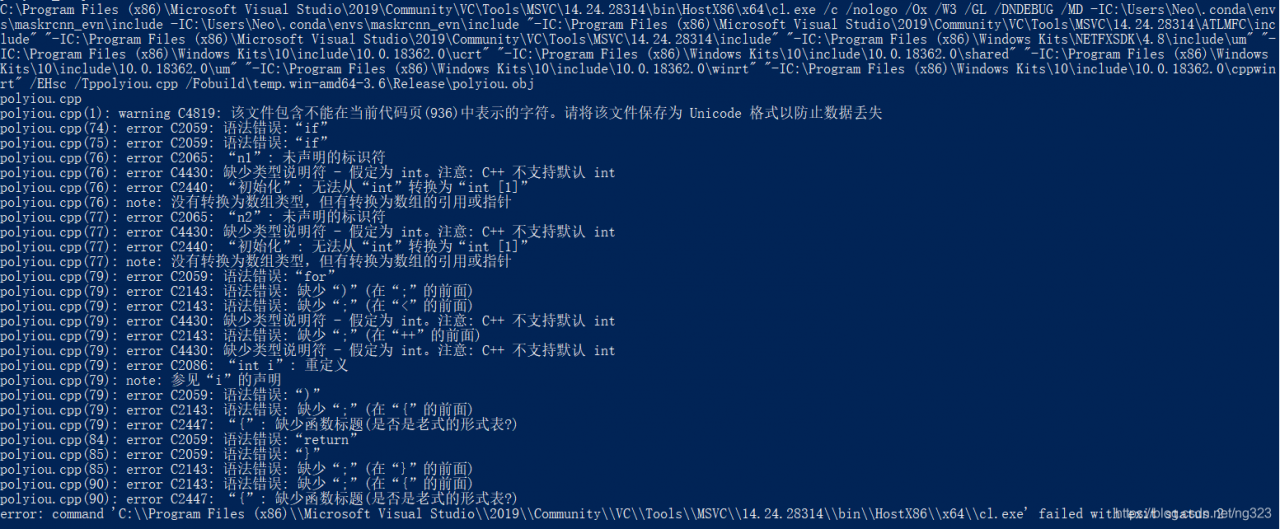
Ubuntu16.04 pip3 install PyAudio 出错:error: command ‘x86_64-linux-gnu-gcc’ failed with exit status 1
error message
Collecting pyaudio
  Using cached https://files.pythonhosted.org/packages/ab/42/b4f04721c5c5bfc196ce156b3c768998ef8c0ae3654ed29ea5020c749a6b/PyAudio-0.2.11.tar.gz
Building wheels for collected packages: pyaudio
  Running setup.py bdist_wheel for pyaudio ... error
  Complete output from command /usr/bin/python3.5 -u -c "import setuptools, tokenize;__file__='/tmp/pip-install-kg54s8cx/pyaudio/setup.py';f=getattr(tokenize, 'open', open)(__file__);code=f.read().replace('\r\n', '\n');f.close();exec(compile(code, __file__, 'exec'))" bdist_wheel -d /tmp/pip-wheel-nwzkkq3_ --python-tag cp35:
  running bdist_wheel
  running build
  running build_py
  creating build
  creating build/lib.linux-x86_64-3.5
  copying src/pyaudio.py -> build/lib.linux-x86_64-3.5
  running build_ext
  building '_portaudio' extension
  creating build/temp.linux-x86_64-3.5
  creating build/temp.linux-x86_64-3.5/src
  x86_64-linux-gnu-gcc -pthread -DNDEBUG -g -fwrapv -O2 -Wall -Wstrict-prototypes -g -fstack-protector-strong -Wformat -Werror=format-security -Wdate-time -D_FORTIFY_SOURCE=2 -fPIC -I/usr/include/python3.5m -c src/_portaudiomodule.c -o build/temp.linux-x86_64-3.5/src/_portaudiomodule.o
  src/_portaudiomodule.c:29:23: fatal error: portaudio.h: No such file or directory
  compilation terminated.
  error: command 'x86_64-linux-gnu-gcc' failed with exit status 1

  ----------------------------------------
  Failed building wheel for pyaudio
  Running setup.py clean for pyaudio
Failed to build pyaudio
Installing collected packages: pyaudio
  Running setup.py install for pyaudio ... error
    Complete output from command /usr/bin/python3.5 -u -c "import setuptools, tokenize;__file__='/tmp/pip-install-kg54s8cx/pyaudio/setup.py';f=getattr(tokenize, 'open', open)(__file__);code=f.read().replace('\r\n', '\n');f.close();exec(compile(code, __file__, 'exec'))" install --record /tmp/pip-record-1k4o92s5/install-record.txt --single-version-externally-managed --compile:
    running install
    running build
    running build_py
    creating build
    creating build/lib.linux-x86_64-3.5
    copying src/pyaudio.py -> build/lib.linux-x86_64-3.5
    running build_ext
    building '_portaudio' extension
    creating build/temp.linux-x86_64-3.5
    creating build/temp.linux-x86_64-3.5/src
    x86_64-linux-gnu-gcc -pthread -DNDEBUG -g -fwrapv -O2 -Wall -Wstrict-prototypes -g -fstack-protector-strong -Wformat -Werror=format-security -Wdate-time -D_FORTIFY_SOURCE=2 -fPIC -I/usr/include/python3.5m -c src/_portaudiomodule.c -o build/temp.linux-x86_64-3.5/src/_portaudiomodule.o
    src/_portaudiomodule.c:29:23: fatal error: portaudio.h: No such file or directory
    compilation terminated.
    error: command 'x86_64-linux-gnu-gcc' failed with exit status 1

    ----------------------------------------
Command "/usr/bin/python3.5 -u -c "import setuptools, tokenize;__file__='/tmp/pip-install-kg54s8cx/pyaudio/setup.py';f=getattr(tokenize, 'open', open)(__file__);code=f.read().replace('\r\n', '\n');f.close();exec(compile(code, __file__, 'exec'))" install --record /tmp/pip-record-1k4o92s5/install-record.txt --single-version-externally-managed --compile" failed with error code 1 in /tmp/pip-install-kg54s8cx/pyaudio/
Execute the following command:
root@robot:/home/liu# sudo apt-get install portaudio19-dev python-all-dev
Reading package lists... Done
Building dependency tree
Reading state information... Done
python-all-dev is already the newest version (2.7.12-1~16.04).
python-all-dev set to manually installed.
The following packages were automatically installed and are no longer required:
  fonts-lato libruby2.3 linux-headers-4.10.0-28
  linux-headers-4.10.0-28-generic linux-headers-4.13.0-36
  linux-headers-4.13.0-36-generic linux-headers-4.13.0-38
  linux-headers-4.13.0-38-generic linux-headers-4.4.0-124
  linux-headers-4.4.0-124-generic linux-image-4.10.0-28-generic
  linux-image-4.13.0-36-generic linux-image-4.13.0-38-generic
  linux-image-extra-4.10.0-28-generic linux-image-extra-4.13.0-36-generic
  linux-image-extra-4.13.0-38-generic rake ruby ruby-did-you-mean
  ruby-minitest ruby-net-telnet ruby-power-assert ruby-test-unit ruby2.3
  rubygems-integration
Use 'sudo apt autoremove' to remove them.
The following additional packages will be installed:
  libjack-dev libjack0 libportaudiocpp0
Suggested packages:
  jackd1 portaudio19-doc
The following packages will be REMOVED:
  libjack-jackd2-0
The following NEW packages will be installed:
  libjack-dev libjack0 libportaudiocpp0 portaudio19-dev
0 upgraded, 4 newly installed, 1 to remove and 546 not upgraded.
Need to get 359 kB of archives.
After this operation, 2,512 kB of additional disk space will be used.
Do you want to continue?[Y/n] y
Get:1 http://mirrors.sohu.com/ubuntu xenial/universe amd64 libjack0 amd64 1:0.124.1+20140122git5013bed0-3build2 [43.1 kB]
Get:2 http://mirrors.sohu.com/ubuntu xenial/universe amd64 libjack-dev amd64 1:0.124.1+20140122git5013bed0-3build2 [199 kB]
Get:3 http://mirrors.sohu.com/ubuntu xenial/main amd64 libportaudiocpp0 amd64 19+svn20140130-1build1 [15.4 kB]
Get:4 http://mirrors.sohu.com/ubuntu xenial/main amd64 portaudio19-dev amd64 19+svn20140130-1build1 [102 kB]
Fetched 359 kB in 2s (177 kB/s)
dpkg: libjack-jackd2-0:amd64: dependency problems, but removing anyway as you requested:
 simplescreenrecorder depends on libjack-jackd2-0 (>= 1.9.5~dfsg-14) | libjack-0.116; however:
  Package libjack-jackd2-0:amd64 is to be removed.
  Package libjack-0.116 is not installed.
  Package libjack-jackd2-0:amd64 which provides libjack-0.116 is to be removed.
 gstreamer1.0-plugins-good:amd64 depends on libjack-jackd2-0 (>= 1.9.5~dfsg-14) | libjack-0.116; however:
  Package libjack-jackd2-0:amd64 is to be removed.
  Package libjack-0.116 is not installed.
  Package libjack-jackd2-0:amd64 which provides libjack-0.116 is to be removed.
 libavdevice-ffmpeg56:amd64 depends on libjack-jackd2-0 (>= 1.9.5~dfsg-14) | libjack-0.116; however:
  Package libjack-jackd2-0:amd64 is to be removed.
  Package libjack-0.116 is not installed.
  Package libjack-jackd2-0:amd64 which provides libjack-0.116 is to be removed.
 libasound2-plugins:amd64 depends on libjack-jackd2-0 (>= 1.9.5~dfsg-14) | libjack-0.116; however:
  Package libjack-ja
(Reading database ... 494197 files and directories currently installed.)
Removing libjack-jackd2-0:amd64 (1.9.10+20150825git1ed50c92~dfsg-1ubuntu1) ...
Processing triggers for libc-bin (2.23-0ubuntu10) ...
Selecting previously unselected package libjack0:amd64.
(Reading database ... 494188 files and directories currently installed.)
Preparing to unpack .../libjack0_1%3a0.124.1+20140122git5013bed0-3build2_amd64.deb ...
Unpacking libjack0:amd64 (1:0.124.1+20140122git5013bed0-3build2) ...
Selecting previously unselected package libjack-dev.
Preparing to unpack .../libjack-dev_1%3a0.124.1+20140122git5013bed0-3build2_amd64.deb ...
Unpacking libjack-dev (1:0.124.1+20140122git5013bed0-3build2) ...
Selecting previously unselected package libportaudiocpp0:amd64.
Preparing to unpack .../libportaudiocpp0_19+svn20140130-1build1_amd64.deb ...
Unpacking libportaudiocpp0:amd64 (19+svn20140130-1build1) ...
Selecting previously unselected package portaudio19-dev.
Preparing to unpack .../portaudio19-dev_19+svn20140130-1build1_amd64.deb ...
Unpacking portaudio19-dev (19+svn20140130-1build1) ...
Processing triggers for doc-base (0.10.7) ...
Processing 1 added doc-base file...
Setting up libjack0:amd64 (1:0.124.1+20140122git5013bed0-3build2) ...
Setting up libjack-dev (1:0.124.1+20140122git5013bed0-3build2) ...
Setting up libportaudiocpp0:amd64 (19+svn20140130-1build1) ...
Setting up portaudio19-dev (19+svn20140130-1build1) ...
Processing triggers for libc-bin (2.23-0ubuntu10) ...
execute pip3 install PyAudio
again
root@robot:/home/liu# pip3 install pyaudio
Collecting pyaudio
  Using cached https://files.pythonhosted.org/packages/ab/42/b4f04721c5c5bfc196ce156b3c768998ef8c0ae3654ed29ea5020c749a6b/PyAudio-0.2.11.tar.gz
Building wheels for collected packages: pyaudio
  Running setup.py bdist_wheel for pyaudio ... done
  Stored in directory: /root/.cache/pip/wheels/f4/a8/a4/292214166c2917890f85b2f72a8e5f13e1ffa527c4200dcede
Successfully built pyaudio
Installing collected packages: pyaudio
Successfully installed pyaudio-0.2.11