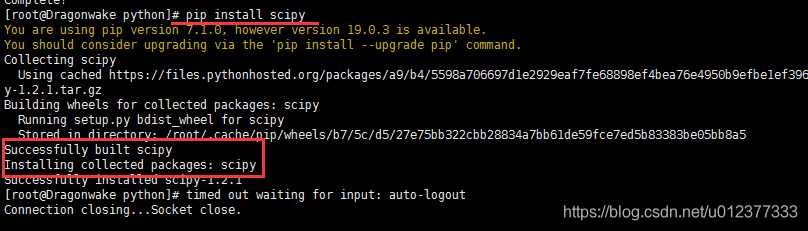
[root@Dragonwake python]# pip install scipy
You are using pip version 7.1.0, however version 19.0.3 is available.
You should consider upgrading via the 'pip install --upgrade pip' command.
Collecting scipy
  Using cached https://files.pythonhosted.org/packages/a9/b4/5598a706697d1e2929eaf7fe68898ef4bea76e4950b9efbe1ef396b8813a/scipy-1.2.1.tar.gz
Building wheels for collected packages: scipy
  Running setup.py bdist_wheel for scipy
  Complete output from command /usr/local/bin/python2.7 -c "import setuptools;__file__='/tmp/pip-build-5bcAZx/scipy/setup.py';exec(compile(open(__file__).read().replace('\r\n', '\n'), __file__, 'exec'))" bdist_wheel -d /tmp/tmptS4PsQpip-wheel-:
  Running from scipy source directory.
  lapack_opt_info:
  lapack_mkl_info:
  customize UnixCCompiler
    libraries mkl_rt not found in ['/usr/local/lib64', '/usr/local/lib', '/usr/lib64', '/usr/lib']
    NOT AVAILABLE

  openblas_lapack_info:
  customize UnixCCompiler
  customize UnixCCompiler
    libraries openblas not found in ['/usr/local/lib64', '/usr/local/lib', '/usr/lib64', '/usr/lib']
    NOT AVAILABLE

  openblas_clapack_info:
  customize UnixCCompiler
  customize UnixCCompiler
    libraries openblas,lapack not found in ['/usr/local/lib64', '/usr/local/lib', '/usr/lib64', '/usr/lib']
    NOT AVAILABLE

  atlas_3_10_threads_info:
  Setting PTATLAS=ATLAS
  customize UnixCCompiler
    libraries lapack_atlas not found in /usr/local/lib64
  customize UnixCCompiler
    libraries tatlas,tatlas not found in /usr/local/lib64
  customize UnixCCompiler
    libraries lapack_atlas not found in /usr/local/lib
  customize UnixCCompiler
    libraries tatlas,tatlas not found in /usr/local/lib
  customize UnixCCompiler
    libraries lapack_atlas not found in /usr/lib64/sse2
  customize UnixCCompiler
    libraries tatlas,tatlas not found in /usr/lib64/sse2
  customize UnixCCompiler
    libraries lapack_atlas not found in /usr/lib64
  customize UnixCCompiler
    libraries tatlas,tatlas not found in /usr/lib64
  customize UnixCCompiler
    libraries lapack_atlas not found in /usr/lib
  customize UnixCCompiler
    libraries tatlas,tatlas not found in /usr/lib
  <class 'numpy.distutils.system_info.atlas_3_10_threads_info'>
    NOT AVAILABLE

  atlas_3_10_info:
  customize UnixCCompiler
    libraries lapack_atlas not found in /usr/local/lib64
  customize UnixCCompiler
    libraries satlas,satlas not found in /usr/local/lib64
  customize UnixCCompiler
    libraries lapack_atlas not found in /usr/local/lib
  customize UnixCCompiler
    libraries satlas,satlas not found in /usr/local/lib
  customize UnixCCompiler
    libraries lapack_atlas not found in /usr/lib64/sse2
  customize UnixCCompiler
    libraries satlas,satlas not found in /usr/lib64/sse2
  customize UnixCCompiler
    libraries lapack_atlas not found in /usr/lib64
  customize UnixCCompiler
    libraries satlas,satlas not found in /usr/lib64
  customize UnixCCompiler
    libraries lapack_atlas not found in /usr/lib
  customize UnixCCompiler
    libraries satlas,satlas not found in /usr/lib
  <class 'numpy.distutils.system_info.atlas_3_10_info'>
    NOT AVAILABLE

  atlas_threads_info:
  Setting PTATLAS=ATLAS
  customize UnixCCompiler
    libraries lapack_atlas not found in /usr/local/lib64
  customize UnixCCompiler
    libraries ptf77blas,ptcblas,atlas not found in /usr/local/lib64
  customize UnixCCompiler
    libraries lapack_atlas not found in /usr/local/lib
  customize UnixCCompiler
    libraries ptf77blas,ptcblas,atlas not found in /usr/local/lib
  customize UnixCCompiler
    libraries lapack_atlas not found in /usr/lib64/sse2
  customize UnixCCompiler
    libraries ptf77blas,ptcblas,atlas not found in /usr/lib64/sse2
  customize UnixCCompiler
    libraries lapack_atlas not found in /usr/lib64
  customize UnixCCompiler
    libraries ptf77blas,ptcblas,atlas not found in /usr/lib64
  customize UnixCCompiler
    libraries lapack_atlas not found in /usr/lib
  customize UnixCCompiler
    libraries ptf77blas,ptcblas,atlas not found in /usr/lib
  <class 'numpy.distutils.system_info.atlas_threads_info'>
    NOT AVAILABLE

  atlas_info:
  customize UnixCCompiler
    libraries lapack_atlas not found in /usr/local/lib64
  customize UnixCCompiler
    libraries f77blas,cblas,atlas not found in /usr/local/lib64
  customize UnixCCompiler
    libraries lapack_atlas not found in /usr/local/lib
  customize UnixCCompiler
    libraries f77blas,cblas,atlas not found in /usr/local/lib
  customize UnixCCompiler
    libraries lapack_atlas not found in /usr/lib64/sse2
  customize UnixCCompiler
    libraries f77blas,cblas,atlas not found in /usr/lib64/sse2
  customize UnixCCompiler
    libraries lapack_atlas not found in /usr/lib64
  customize UnixCCompiler
    libraries f77blas,cblas,atlas not found in /usr/lib64
  customize UnixCCompiler
    libraries lapack_atlas not found in /usr/lib
  customize UnixCCompiler
    libraries f77blas,cblas,atlas not found in /usr/lib
  <class 'numpy.distutils.system_info.atlas_info'>
    NOT AVAILABLE

  accelerate_info:
    NOT AVAILABLE

  /usr/local/lib/python2.7/site-packages/numpy/distutils/system_info.py:638: UserWarning:
      Atlas (http://math-atlas.sourceforge.net/) libraries not found.
      Directories to search for the libraries can be specified in the
      numpy/distutils/site.cfg file (section [atlas]) or by setting
      the ATLAS environment variable.
    self.calc_info()
  lapack_info:
  customize UnixCCompiler
  customize UnixCCompiler
    FOUND:
      libraries = ['lapack', 'lapack']
      library_dirs = ['/usr/lib64']
      language = f77

  blas_info:
  customize UnixCCompiler
  customize UnixCCompiler
  C compiler: gcc -pthread -fno-strict-aliasing -g -O2 -DNDEBUG -g -fwrapv -O3 -Wall -Wstrict-prototypes -fPIC

  creating /tmp/tmp_D3_qJ/tmp
  creating /tmp/tmp_D3_qJ/tmp/tmp_D3_qJ
  compile options: '-I/usr/local/include -I/usr/include -c'
  gcc: /tmp/tmp_D3_qJ/source.c
  /tmp/tmp_D3_qJ/source.c:1:19: warning: cblas.h: No such file or directory
  /tmp/tmp_D3_qJ/source.c: In function ‘main’:
  /tmp/tmp_D3_qJ/source.c:6: warning: implicit declaration of function ‘cblas_ddot’
  gcc -pthread /tmp/tmp_D3_qJ/tmp/tmp_D3_qJ/source.o -L/usr/lib64 -lcblas -o /tmp/tmp_D3_qJ/a.out
  /usr/bin/ld: cannot find -lcblas
  collect2: ld returned 1 exit status
  gcc -pthread /tmp/tmp_D3_qJ/tmp/tmp_D3_qJ/source.o -L/usr/lib64 -lblas -o /tmp/tmp_D3_qJ/a.out
  /tmp/tmp_D3_qJ/tmp/tmp_D3_qJ/source.o: In function `main':
  /tmp/tmp_D3_qJ/source.c:6: undefined reference to `cblas_ddot'
  collect2: ld returned 1 exit status
  Traceback (most recent call last):
    File "<string>", line 1, in <module>
    File "/tmp/pip-build-5bcAZx/scipy/setup.py", line 492, in <module>
      setup_package()
    File "/tmp/pip-build-5bcAZx/scipy/setup.py", line 488, in setup_package
      setup(**metadata)
    File "/usr/local/lib/python2.7/site-packages/numpy/distutils/core.py", line 137, in setup
      config = configuration()
    File "/tmp/pip-build-5bcAZx/scipy/setup.py", line 388, in configuration
      lapack_opt = get_info('lapack_opt')
    File "/usr/local/lib/python2.7/site-packages/numpy/distutils/system_info.py", line 445, in get_info
      return cl().get_info(notfound_action)
    File "/usr/local/lib/python2.7/site-packages/numpy/distutils/system_info.py", line 638, in get_info
      self.calc_info()
    File "/usr/local/lib/python2.7/site-packages/numpy/distutils/system_info.py", line 1604, in calc_info
      blas_info = get_info('blas')
    File "/usr/local/lib/python2.7/site-packages/numpy/distutils/system_info.py", line 445, in get_info
      return cl().get_info(notfound_action)
    File "/usr/local/lib/python2.7/site-packages/numpy/distutils/system_info.py", line 638, in get_info
      self.calc_info()
    File "/usr/local/lib/python2.7/site-packages/numpy/distutils/system_info.py", line 1699, in calc_info
      lib = self.has_cblas(info)
    File "/usr/local/lib/python2.7/site-packages/numpy/distutils/system_info.py", line 1742, in has_cblas
      extra_postargs=info.get('extra_link_args', []))
    File "/usr/local/lib/python2.7/distutils/ccompiler.py", line 700, in link_executable
      debug, extra_preargs, extra_postargs, None, target_lang)
    File "/usr/local/lib/python2.7/distutils/unixccompiler.py", line 200, in link
      raise LinkError, msg
  distutils.errors.LinkError: Command "gcc -pthread /tmp/tmp_D3_qJ/tmp/tmp_D3_qJ/source.o -L/usr/lib64 -lblas -o /tmp/tmp_D3_qJ/a.out" failed with exit status 1

  ----------------------------------------
  Failed building wheel for scipy
Failed to build scipy
Installing collected packages: scipy
  Running setup.py install for scipy
    Complete output from command /usr/local/bin/python2.7 -c "import setuptools, tokenize;__file__='/tmp/pip-build-5bcAZx/scipy/setup.py';exec(compile(getattr(tokenize, 'open', open)(__file__).read().replace('\r\n', '\n'), __file__, 'exec'))" install --record /tmp/pip-gqE_Ie-record/install-record.txt --single-version-externally-managed --compile:
    Running from scipy source directory.

    Note: if you need reliable uninstall behavior, then install
    with pip instead of using `setup.py install`:

      - `pip install .`       (from a git repo or downloaded source
                               release)
      - `pip install scipy`   (last SciPy release on PyPI)


    lapack_opt_info:
    lapack_mkl_info:
    customize UnixCCompiler
      libraries mkl_rt not found in ['/usr/local/lib64', '/usr/local/lib', '/usr/lib64', '/usr/lib']
      NOT AVAILABLE

    openblas_lapack_info:
    customize UnixCCompiler
    customize UnixCCompiler
      libraries openblas not found in ['/usr/local/lib64', '/usr/local/lib', '/usr/lib64', '/usr/lib']
      NOT AVAILABLE

    openblas_clapack_info:
    customize UnixCCompiler
    customize UnixCCompiler
      libraries openblas,lapack not found in ['/usr/local/lib64', '/usr/local/lib', '/usr/lib64', '/usr/lib']
      NOT AVAILABLE

    atlas_3_10_threads_info:
    Setting PTATLAS=ATLAS
    customize UnixCCompiler
      libraries lapack_atlas not found in /usr/local/lib64
    customize UnixCCompiler
      libraries tatlas,tatlas not found in /usr/local/lib64
    customize UnixCCompiler
      libraries lapack_atlas not found in /usr/local/lib
    customize UnixCCompiler
      libraries tatlas,tatlas not found in /usr/local/lib
    customize UnixCCompiler
      libraries lapack_atlas not found in /usr/lib64/sse2
    customize UnixCCompiler
      libraries tatlas,tatlas not found in /usr/lib64/sse2
    customize UnixCCompiler
      libraries lapack_atlas not found in /usr/lib64
    customize UnixCCompiler
      libraries tatlas,tatlas not found in /usr/lib64
    customize UnixCCompiler
      libraries lapack_atlas not found in /usr/lib
    customize UnixCCompiler
      libraries tatlas,tatlas not found in /usr/lib
    <class 'numpy.distutils.system_info.atlas_3_10_threads_info'>
      NOT AVAILABLE

    atlas_3_10_info:
    customize UnixCCompiler
      libraries lapack_atlas not found in /usr/local/lib64
    customize UnixCCompiler
      libraries satlas,satlas not found in /usr/local/lib64
    customize UnixCCompiler
      libraries lapack_atlas not found in /usr/local/lib
    customize UnixCCompiler
      libraries satlas,satlas not found in /usr/local/lib
    customize UnixCCompiler
      libraries lapack_atlas not found in /usr/lib64/sse2
    customize UnixCCompiler
      libraries satlas,satlas not found in /usr/lib64/sse2
    customize UnixCCompiler
      libraries lapack_atlas not found in /usr/lib64
    customize UnixCCompiler
      libraries satlas,satlas not found in /usr/lib64
    customize UnixCCompiler
      libraries lapack_atlas not found in /usr/lib
    customize UnixCCompiler
      libraries satlas,satlas not found in /usr/lib
    <class 'numpy.distutils.system_info.atlas_3_10_info'>
      NOT AVAILABLE

    atlas_threads_info:
    Setting PTATLAS=ATLAS
    customize UnixCCompiler
      libraries lapack_atlas not found in /usr/local/lib64
    customize UnixCCompiler
      libraries ptf77blas,ptcblas,atlas not found in /usr/local/lib64
    customize UnixCCompiler
      libraries lapack_atlas not found in /usr/local/lib
    customize UnixCCompiler
      libraries ptf77blas,ptcblas,atlas not found in /usr/local/lib
    customize UnixCCompiler
      libraries lapack_atlas not found in /usr/lib64/sse2
    customize UnixCCompiler
      libraries ptf77blas,ptcblas,atlas not found in /usr/lib64/sse2
    customize UnixCCompiler
      libraries lapack_atlas not found in /usr/lib64
    customize UnixCCompiler
      libraries ptf77blas,ptcblas,atlas not found in /usr/lib64
    customize UnixCCompiler
      libraries lapack_atlas not found in /usr/lib
    customize UnixCCompiler
      libraries ptf77blas,ptcblas,atlas not found in /usr/lib
    <class 'numpy.distutils.system_info.atlas_threads_info'>
      NOT AVAILABLE

    atlas_info:
    customize UnixCCompiler
      libraries lapack_atlas not found in /usr/local/lib64
    customize UnixCCompiler
      libraries f77blas,cblas,atlas not found in /usr/local/lib64
    customize UnixCCompiler
      libraries lapack_atlas not found in /usr/local/lib
    customize UnixCCompiler
      libraries f77blas,cblas,atlas not found in /usr/local/lib
    customize UnixCCompiler
      libraries lapack_atlas not found in /usr/lib64/sse2
    customize UnixCCompiler
      libraries f77blas,cblas,atlas not found in /usr/lib64/sse2
    customize UnixCCompiler
      libraries lapack_atlas not found in /usr/lib64
    customize UnixCCompiler
      libraries f77blas,cblas,atlas not found in /usr/lib64
    customize UnixCCompiler
      libraries lapack_atlas not found in /usr/lib
    customize UnixCCompiler
      libraries f77blas,cblas,atlas not found in /usr/lib
    <class 'numpy.distutils.system_info.atlas_info'>
      NOT AVAILABLE

    accelerate_info:
      NOT AVAILABLE

    /usr/local/lib/python2.7/site-packages/numpy/distutils/system_info.py:638: UserWarning:
        Atlas (http://math-atlas.sourceforge.net/) libraries not found.
        Directories to search for the libraries can be specified in the
        numpy/distutils/site.cfg file (section [atlas]) or by setting
        the ATLAS environment variable.
      self.calc_info()
    lapack_info:
    customize UnixCCompiler
    customize UnixCCompiler
      FOUND:
        libraries = ['lapack', 'lapack']
        library_dirs = ['/usr/lib64']
        language = f77

    blas_info:
    customize UnixCCompiler
    customize UnixCCompiler
    C compiler: gcc -pthread -fno-strict-aliasing -g -O2 -DNDEBUG -g -fwrapv -O3 -Wall -Wstrict-prototypes -fPIC

    creating /tmp/tmpzUwJsa/tmp
    creating /tmp/tmpzUwJsa/tmp/tmpzUwJsa
    compile options: '-I/usr/local/include -I/usr/include -c'
    gcc: /tmp/tmpzUwJsa/source.c
    /tmp/tmpzUwJsa/source.c:1:19: warning: cblas.h: No such file or directory
    /tmp/tmpzUwJsa/source.c: In function ‘main’:
    /tmp/tmpzUwJsa/source.c:6: warning: implicit declaration of function ‘cblas_ddot’
    gcc -pthread /tmp/tmpzUwJsa/tmp/tmpzUwJsa/source.o -L/usr/lib64 -lcblas -o /tmp/tmpzUwJsa/a.out
    /usr/bin/ld: cannot find -lcblas
    collect2: ld returned 1 exit status
    gcc -pthread /tmp/tmpzUwJsa/tmp/tmpzUwJsa/source.o -L/usr/lib64 -lblas -o /tmp/tmpzUwJsa/a.out
    /tmp/tmpzUwJsa/tmp/tmpzUwJsa/source.o: In function `main':
    /tmp/tmpzUwJsa/source.c:6: undefined reference to `cblas_ddot'
    collect2: ld returned 1 exit status
    Traceback (most recent call last):
      File "<string>", line 1, in <module>
      File "/tmp/pip-build-5bcAZx/scipy/setup.py", line 492, in <module>
        setup_package()
      File "/tmp/pip-build-5bcAZx/scipy/setup.py", line 488, in setup_package
        setup(**metadata)
      File "/usr/local/lib/python2.7/site-packages/numpy/distutils/core.py", line 137, in setup
        config = configuration()
      File "/tmp/pip-build-5bcAZx/scipy/setup.py", line 388, in configuration
        lapack_opt = get_info('lapack_opt')
      File "/usr/local/lib/python2.7/site-packages/numpy/distutils/system_info.py", line 445, in get_info
        return cl().get_info(notfound_action)
      File "/usr/local/lib/python2.7/site-packages/numpy/distutils/system_info.py", line 638, in get_info
        self.calc_info()
      File "/usr/local/lib/python2.7/site-packages/numpy/distutils/system_info.py", line 1604, in calc_info
        blas_info = get_info('blas')
      File "/usr/local/lib/python2.7/site-packages/numpy/distutils/system_info.py", line 445, in get_info
        return cl().get_info(notfound_action)
      File "/usr/local/lib/python2.7/site-packages/numpy/distutils/system_info.py", line 638, in get_info
        self.calc_info()
      File "/usr/local/lib/python2.7/site-packages/numpy/distutils/system_info.py", line 1699, in calc_info
        lib = self.has_cblas(info)
      File "/usr/local/lib/python2.7/site-packages/numpy/distutils/system_info.py", line 1742, in has_cblas
        extra_postargs=info.get('extra_link_args', []))
      File "/usr/local/lib/python2.7/distutils/ccompiler.py", line 700, in link_executable
        debug, extra_preargs, extra_postargs, None, target_lang)
      File "/usr/local/lib/python2.7/distutils/unixccompiler.py", line 200, in link
        raise LinkError, msg
    distutils.errors.LinkError: Command "gcc -pthread /tmp/tmpzUwJsa/tmp/tmpzUwJsa/source.o -L/usr/lib64 -lblas -o /tmp/tmpzUwJsa/a.out" failed with exit status 1

    ----------------------------------------
Command "/usr/local/bin/python2.7 -c "import setuptools, tokenize;__file__='/tmp/pip-build-5bcAZx/scipy/setup.py';exec(compile(getattr(tokenize, 'open', open)(__file__).read().replace('\r\n', '\n'), __file__, 'exec'))" install --record /tmp/pip-gqE_Ie-record/install-record.txt --single-version-externally-managed --compile" failed with error code 1 in /tmp/pip-build-5bcAZx/scipy
The following error occurs:
distutils.errors.LinkError: Command "gcc -pthread /tmp/tmp2AUeGJ/tmp/tmp2AUeGJ/source.o -L/usr/lib64 -lblas -o /tmp/tmp2AUeGJ/a.out" failed with exit status 1
Refer to the address: https://stackoverflow.com/questions/53565726/failed-building-wheel-for-numpy-pandas
The installation
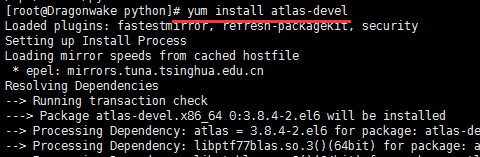
sudo yum install atlas-devel