Tag Archives: java

### The error may involve defaultParameterMap ### The error occurred while setting parameters

I encountered an error today. Running rankdao. Selectbyid (ID) directly reported an error to me. I didn’t understand it

Error message:

2021-09-22 10:40:58.824 ERROR 8364 --- [nio-8888-exec-4] o.a.c.c.C.[.[.[/].[dispatcherServlet]    : Servlet.service() for servlet [dispatcherServlet] in context with path [] threw exception [Request processing failed; nested exception is org.springframework.jdbc.BadSqlGrammarException: 
### Error querying database.  Cause: java.sql.SQLSyntaxErrorException: You have an error in your SQL syntax; check the manual that corresponds to your MySQL server version for the right syntax to use near 'rank WHERE id=1' at line 1
### The error may exist in com/brilliantZC/music/dao/MusicRankDao.java (best guess)
### The error may involve defaultParameterMap
### The error occurred while setting parameters
### SQL: SELECT id,song_list_id,consumer_id,score FROM rank WHERE id=?
### Cause: java.sql.SQLSyntaxErrorException: You have an error in your SQL syntax; check the manual that corresponds to your MySQL server version for the right syntax to use near 'rank WHERE id=1' at line 1
; bad SQL grammar []; nested exception is java.sql.SQLSyntaxErrorException: You have an error in your SQL syntax; check the manual that corresponds to your MySQL server version for the right syntax to use near 'rank WHERE id=1' at line 1] with root cause

At the beginning, Baidu has various methods, some say

    an error is reported when the value of the column in the created table is less than the actual value. The @ resource or @ Autowired annotation is forgotten on the service interface introduced by the controller layer. The method called by the controller layer is private, resulting in distribution failure. Check whether the mapper interface code conforms to the specification (automatically ignored by mybatis plus)

    I tried again, but I still couldn’t, so I took the wrong SQL statement and executed it

    SELECT id,song_list_id,consumer_id,score FROM rank WHERE id=1
    

    Still report an error

    music> SELECT id,song_list_id,consumer_id,score FROM rank WHERE id=1
    [2021-09-22 10:55:58] [42000][1064] You have an error in your SQL syntax; check the manual that corresponds to your MySQL server version for the right syntax to use near 'rank WHERE id=1' at line 1
    

    Then I was confused. Then I removed the query statement and still reported an error

    SELECT id,song_list_id,consumer_id,score FROM rank
    

    Then Baidu saw that because rank is a keyword, it can not be directly used as a non keyword. It needs to be used with `. It can be executed after replacement

    SELECT id,song_list_id,consumer_id,score FROM `rank`
    

    Then I modified the table name and solved the error!!!

Echarts Partially introduced error: TypeError: Cannot read property ‘findAxisModel’ of undefined

When introducing dependencies locally in echarts, if there are dependencies that need to be used, an error will be reported if they are not introduced. For example, when using histogram + polar coordinates to display a ring chart, if Ploar is not introduced, an error will be reported in the title. At this time, just introduce this dependency:

require("echarts/lib/component/polar")

Scala Flink Watermarker Error: Static Methods in interface require -target:jvm-1.8

explain

Gradle project + Scala 2.11 + java8 + Flink 1.12

Error code:

kafkaSource.assignTimestampsAndWatermarks(WatermarkStrategy
      .forBoundedOutOfOrderness[JSONObject](Duration.ofSeconds(10)))

Error message: static methods in interface require – target: jvm-1.8

From the perspective of error reporting, it is an error reported by Scala trying to call a static method in the java interface. However, JDK1.8 is used for compiling and packaging in the idea configuration

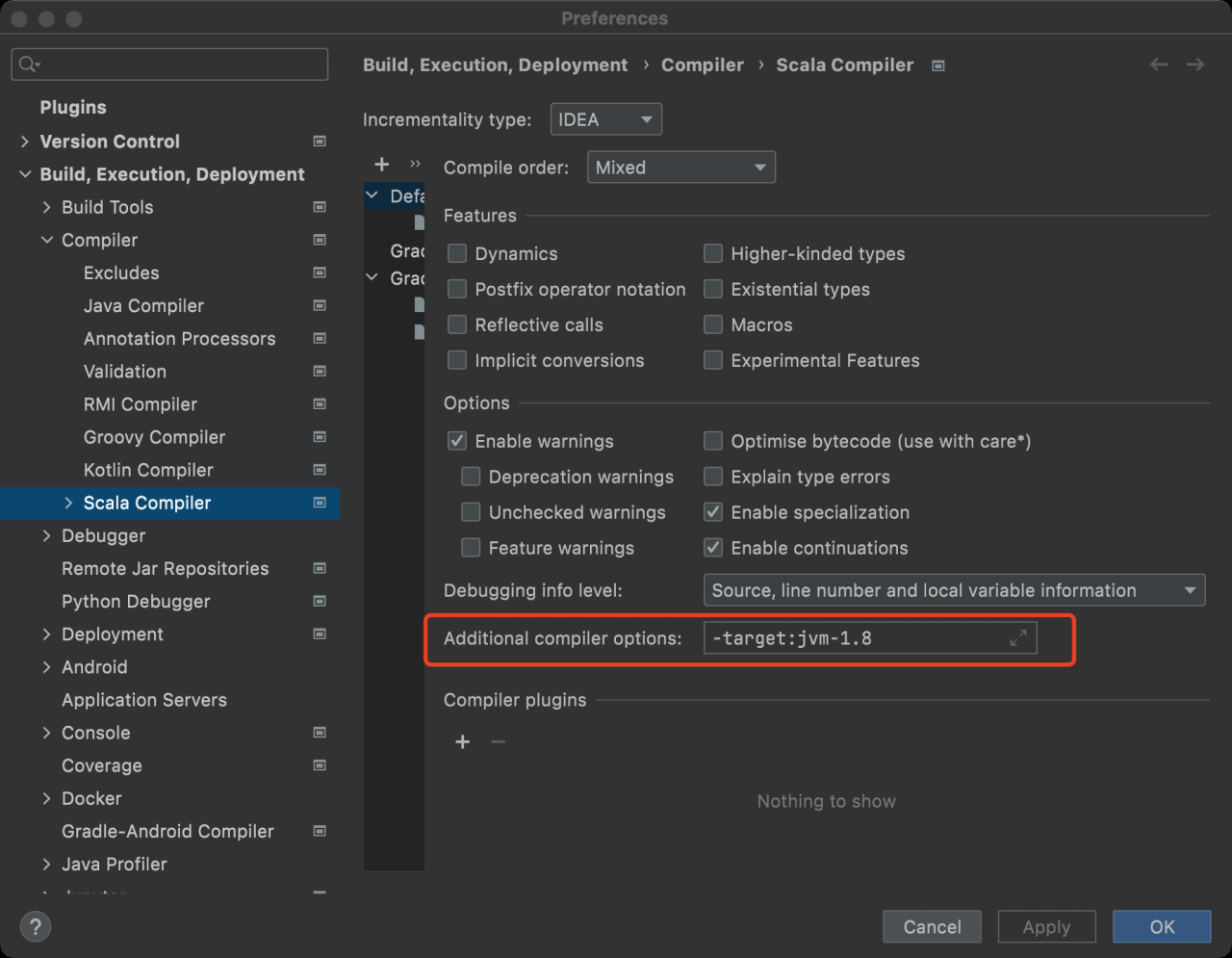
Modifying the following idea configuration is not valid:

So think about another breakthrough and add the following configuration to the build.gradle file to solve the problem.

project.tasks.compileScala.scalaCompileOptions.additionalParameters = ["-target:jvm-1.8"]
project.tasks.compileTestScala.scalaCompileOptions.additionalParameters = ["-target:jvm-1.8"]

Solution to the problem of failure to elect leaders when offline service is reported in Nacos

Problem description

When there are multiple instances of a micro service in the Nacos registry, click an instance to go offline and report an error

caused: errCode: 500, errMsg: do metadata operation failed ;
caused: com.alibaba.nacos.consistency.exception.ConsistencyException: com.alibaba.nacos.core.distributed.raft.exception.NoLeaderException: The Raft Group [naming_instance_metadata] did not find the Leader node;
caused: com.alibaba.nacos.core.distributed.raft.exception.NoLeaderException: The Raft Group [naming_instance_metadata] did not find the Leader node;

Solution

Nacos uses the raft algorithm to calculate the leader and will record the cluster address started last time. Therefore, when the IP address of our own server changes (especially the students started locally when we study, because sometimes our network environment will change… WiFi, so the IP address often changes), the cluster address recorded by raft will become invalid, If there is a problem with the selected leader, just delete the protocol folder under the data folder under the root directory of Nacos.

Android 10: How to Solve Systemui Error

1、 The following error is reported in the single compilation systemui:

eworks/base/packages/SystemUI/SystemUI-tests/android_common/javac/srcjars"
frameworks/base/packages/SystemUI/tests/src/com/android/systemui/statusbar/phone/KeyguardBouncerTest.java:382: Error: Symbol not found
        when(mUnlockMethodCache.isUnlockingWithFacePossible()).thenReturn(true);
                               ^
  Symbol: method isUnlockingWithFacePossible()
  Location: Variable of type UnlockMethodCache mUnlockMethodCache
frameworks/base/packages/SystemUI/tests/src/com/android/systemui/utils/leaks/FakeHotspotController.java:22: Error: FakeHotspotController is not abstract, and does not override the abstract method isHotspotEnabling() in HotspotController
public class FakeHotspotController extends BaseLeakChecker<Callback> implements HotspotController {
       ^
Note: Some input files use or override deprecated APIs.
Note: For more information, please recompile with -Xlint:deprecation.
Note: Some input files use unchecked or unsafe operations.
Note: For more information, please recompile with -Xlint:unchecked.
2 errors
16:19:16 ninja failed with: exit status 1

Reason:
the error in tests may be the reason why Google has not updated it, so the whole system will not prompt an error during compilation. This error does not affect the subsequent use of
solutions:
error 1: isunlockingwithfacepossible() directly modifies the place where the method is called to false
error 2: the method is not rewritten ishhotspotenabling()
fakehotspotcontroller rewrites the ishhotspotenabling() method in this class

 @Override
    public boolean isHotspotEnabling() {
        return false;
    }

How to Solve JDBC connection error in spring MVC integration

# Error Message:

### Error querying database.  Cause: org.springframework.jdbc.CannotGetJdbcConnectionException: Failed to obtain JDBC Connection; nested exception is java.sql.SQLException: Connections could not be acquired from the underlying database!
### The error may exist in com/dao/BookMapper.xml
### The error may involve com.dao.BookMapper.queryAllBook
### The error occurred while executing a query
### Cause: org.springframework.jdbc.CannotGetJdbcConnectionException: Failed to obtain JDBC Connection; nested exception is java.sql.SQLException: Connections could not be acquired from the underlying database!
	java.sql.SQLException: Access denied for user 'Charles'@'localhost' (using password: YES)
		at com.mysql.cj.jdbc.exceptions.SQLError.createSQLException(SQLError.java:129)
		at com.mysql.cj.jdbc.exceptions.SQLError.createSQLException(SQLError.java:97)
		at com.mysql.cj.jdbc.exceptions.SQLExceptionsMapping.translateException(SQLExceptionsMapping.java:122)
		at com.mysql.cj.jdbc.ConnectionImpl.createNewIO(ConnectionImpl.java:835)
		at com.mysql.cj.jdbc.ConnectionImpl.<init>(ConnectionImpl.java:455)
		at com.mysql.cj.jdbc.ConnectionImpl.getInstance(ConnectionImpl.java:240)
		at com.mysql.cj.jdbc.NonRegisteringDriver.connect(NonRegisteringDriver.java:207)
		at com.mchange.v2.c3p0.DriverManagerDataSource.getConnection(DriverManagerDataSource.java:175)
		at com.mchange.v2.c3p0.WrapperConnectionPoolDataSource.getPooledConnection(WrapperConnectionPoolDataSource.java:220)
		at com.mchange.v2.c3p0.WrapperConnectionPoolDataSource.getPooledConnection(WrapperConnectionPoolDataSource.java:206)
		at com.mchange.v2.c3p0.impl.C3P0PooledConnectionPool$1PooledConnectionResourcePoolManager.acquireResource(C3P0PooledConnectionPool.java:203)
		at com.mchange.v2.resourcepool.BasicResourcePool.doAcquire(BasicResourcePool.java:1138)
		at com.mchange.v2.resourcepool.BasicResourcePool.doAcquireAndDecrementPendingAcquiresWithinLockOnSuccess(BasicResourcePool.java:1125)
		at com.mchange.v2.resourcepool.BasicResourcePool.access$700(BasicResourcePool.java:44)
		at com.mchange.v2.resourcepool.BasicResourcePool$ScatteredAcquireTask.run(BasicResourcePool.java:1870)
		at com.mchange.v2.async.ThreadPoolAsynchronousRunner$PoolThread.run(ThreadPoolAsynchronousRunner.java:696)


Cause analysis:

    1. check the database.properties file, but there is no error </ OL>
driver = com.mysql.cj.jdbc.Driver
url = jdbc:mysql://localhost:3306/ssm?serverTimezone=UTC
username = root
password = admin
      1. the database used is mysql8.0, and the versions of database driver and database connection pool also match the database version </ OL>
<!-- https://mvnrepository.com/artifact/mysql/mysql-connector-java -->
        <dependency>
            <groupId>mysql</groupId>
            <artifactId>mysql-connector-java</artifactId>
            <version>8.0.13</version>
        </dependency>

        <!-- Database connection -->
        <dependency>
            <groupId>com.mchange</groupId>
            <artifactId>c3p0</artifactId>
            <version>0.9.5.2</version>
        </dependency>
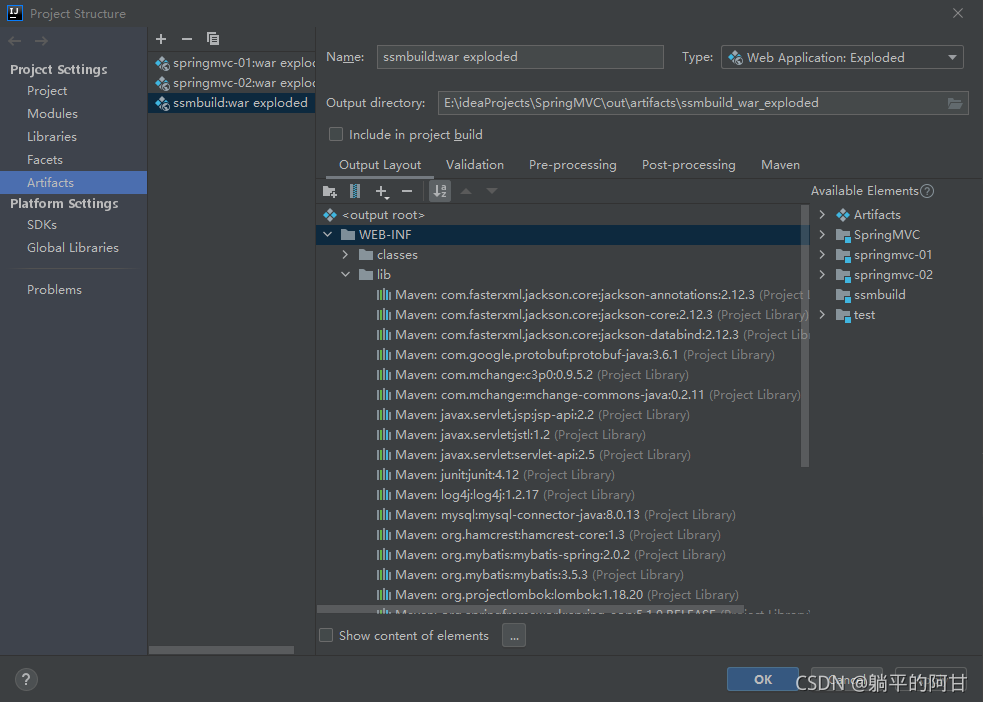
        1. related dependencies are also added to the artifacts in project structure

        1. . There is no mistake in the spring Dao configuration file. All reference paths are correct </ OL>
	<context:property-placeholder location="classpath:database.properties"/>

    <bean id="dataSource" class="com.mchange.v2.c3p0.ComboPooledDataSource">
        <property name="driverClass" value="${driver}"/>
        <property name="jdbcUrl" value="${url}"/>
        <property name="user" value="${username}"/>
        <property name="password" value="${password}"/>

        <property name="maxPoolSize" value="30"/>
        <property name="minPoolSize" value="10"/>

        <property name="autoCommitOnClose" value="false"/>
        <property name="checkoutTimeout" value="10000"/>
        <property name="acquireRetryAttempts" value="2"/>
    </bean>

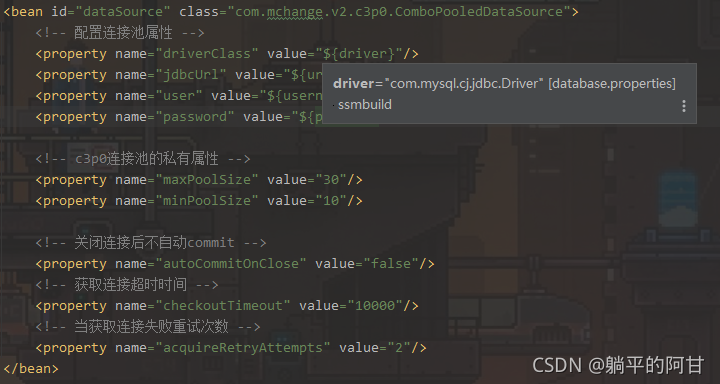
There is also a prompt when the cursor is placed on the value

online solutions have been tried and have not taken effect

Solution:

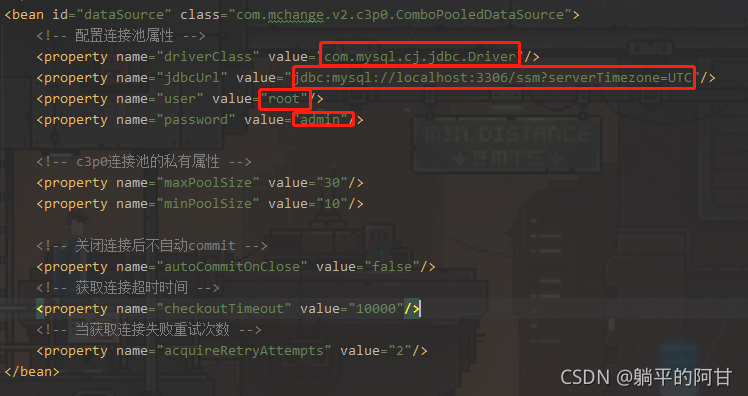
Finally, I accidentally tried to explicitly assign the attribute of the database connection pool, and the connection was successful

How to Solve No approve protocol error when running kettle on Linux

No appropriate protocol (protocol is disabled or cipher suites are inappropriate)

Deploy kettle on Linux, and then run the test script for sending e-mail. The error is as follows:

org.pentaho.di.core.exception.KettleException: 
Can not send mail!
Could not connect to SMTP host: smtp.exmail.qq.com, port: 465
	at org.pentaho.di.trans.steps.mail.Mail.processRow(Mail.java:510)
	at org.pentaho.di.trans.step.RunThread.run(RunThread.java:62)
	at java.lang.Thread.run(Thread.java:748)
Caused by: javax.mail.MessagingException: Could not connect to SMTP host: smtp.exmail.qq.com, port: 465;
  nested exception is:
	javax.net.ssl.SSLHandshakeException: No appropriate protocol (protocol is disabled or cipher suites are inappropriate)
	at com.sun.mail.smtp.SMTPTransport.openServer(SMTPTransport.java:1961)
	at com.sun.mail.smtp.SMTPTransport.protocolConnect(SMTPTransport.java:654)
	at javax.mail.Service.connect(Service.java:295)
	at org.pentaho.di.trans.steps.mail.Mail.sendMail(Mail.java:713)
	at org.pentaho.di.trans.steps.mail.Mail.processRow(Mail.java:493)
	... 2 more
Caused by: javax.net.ssl.SSLHandshakeException: No appropriate protocol (protocol is disabled or cipher suites are inappropriate)
	at sun.security.ssl.HandshakeContext.<init>(HandshakeContext.java:171)
	at sun.security.ssl.ClientHandshakeContext.<init>(ClientHandshakeContext.java:101)
	at sun.security.ssl.TransportContext.kickstart(TransportContext.java:238)
	at sun.security.ssl.SSLSocketImpl.startHandshake(SSLSocketImpl.java:394)
	at sun.security.ssl.SSLSocketImpl.startHandshake(SSLSocketImpl.java:373)
	at com.sun.mail.util.SocketFetcher.configureSSLSocket(SocketFetcher.java:549)
	at com.sun.mail.util.SocketFetcher.createSocket(SocketFetcher.java:354)
	at com.sun.mail.util.SocketFetcher.getSocket(SocketFetcher.java:237)
	at com.sun.mail.smtp.SMTPTransport.openServer(SMTPTransport.java:1927)
	... 6 more

The main error is: no approve protocol (protocol is disabled or cipher suits are inappropriate)

Solution:
find the folder where the JDK is installed
find the file:/jdk1.8.0_ 301/JRE/lib/security/Java. Security
find the configuration:

jdk.tls.disabledAlgorithms=SSLv3, TLSv1, TLSv1.1, RC4, DES, MD5withRSA, \
DH keySize < 1024, EC keySize < 224, 3DES_EDE_CBC, anon, NULL, \
include jdk.disabled.namedCurves

Remove the SSLv3, TLSv1, TLSv1.1,
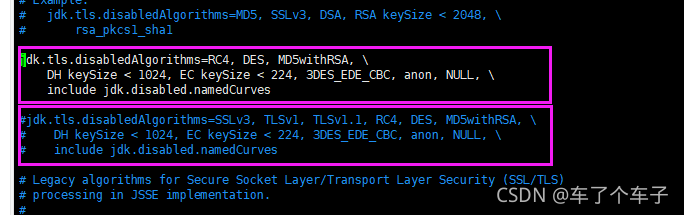
Restart kettle script can solve the error.
How to Solve classnotfoundexception error in spark without Hadoop runtime

Install spark-3.1.2-bin-without-hadoop.tgz
1.ClassNotFoundException: org.apache.log4j.spi.Filter
Launching a freshly downloaded spark reports the following error:

$ ./bin/spark-shell 
Error: A JNI error has occurred, please check your installation and try again
Exception in thread "main" java.lang.NoClassDefFoundError: org/apache/log4j/spi/Filter
        at java.lang.Class.getDeclaredMethods0(Native Method)
        at java.lang.Class.privateGetDeclaredMethods(Class.java:2701)
        at java.lang.Class.privateGetMethodRecursive(Class.java:3048)
        at java.lang.Class.getMethod0(Class.java:3018)
        at java.lang.Class.getMethod(Class.java:1784)
        at sun.launcher.LauncherHelper.validateMainClass(LauncherHelper.java:544)
        at sun.launcher.LauncherHelper.checkAndLoadMain(LauncherHelper.java:526)
Caused by: java.lang.ClassNotFoundException: org.apache.log4j.spi.Filter
        at java.net.URLClassLoader.findClass(URLClassLoader.java:382)
        at java.lang.ClassLoader.loadClass(ClassLoader.java:424)
        at sun.misc.Launcher$AppClassLoader.loadClass(Launcher.java:349)
        at java.lang.ClassLoader.loadClass(ClassLoader.java:357)
        ... 7 more

Solution:
Place log4j-1.2.17.jar in the jars directory of the spark you just downloaded.
2.ClassNotFoundException: org.apache.hadoop.fs.FSDataInputStream
Missing hadoop-common-xxx.jar dependency
3.ClassNotFoundException: org.slf4j.Logger
Missing slf4j-api-1.7.25.jardependency
4.ClassNotFoundException: org.slf4j.impl.StaticLoggerBinder
Missing log4j-slf4j-impl-2.12.1.jardependency
5.ClassNotFoundException: org.apache.logging.log4j.spi.AbstractLoggerAdapter
Missing log4j-api-2.12.1.jardependency

[Solved] The war package Error: The reason why the XSD file could not be found

I:

(1) Error reporting: org.xml.sax.saxparseexception; lineNumber: 18; columnNumber: 70; schema_ reference.4: Failed to read schema document ‘ http://code.alibabatech.com/schema/dubbo/dubbo.xsd ‘

(2) Reason: Generally speaking, the XSD file is backed up in the dependent jar package, so even if the link of the XSD file fails, it can still run. If the link fails and the XSD is not found, the jar package is not imported successfully.

(3) Solution:

<!--Use the maven-war-plugin plugin to specify the third-party jar package directory at compile time and introduce-->
			<plugin>
				<artifactId>maven-war-plugin</artifactId>
				<version>3.2.0</version>
				<configuration>
					<webResources>
						<resource>
							<directory>your_project_path/lib</directory>
							<targetPath>WEB-INF/lib</targetPath>
							<includes>
								<include>**/*.jar</include>
							</includes>
						</resource>
					</webResources>
				</configuration>
			</plugin>

[Solved] Mapped Statements collection does not contain value for xxx

Background: newcomers are learning to use PageHelper plug-in to realize back-end paging. This problem occurs when calling.

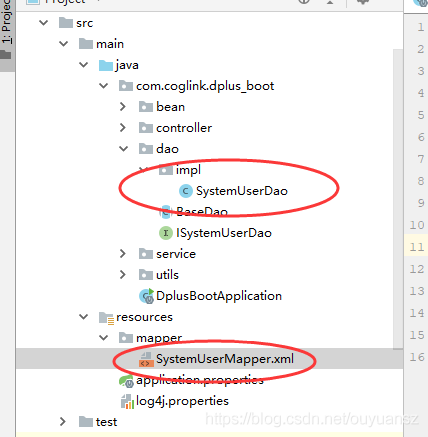
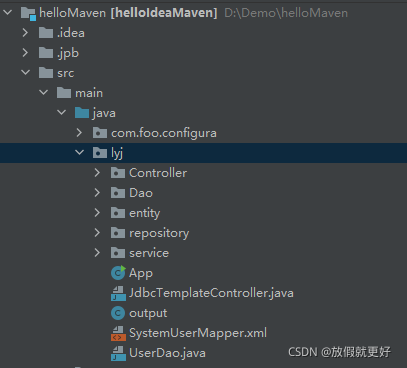
Solution: I searched many articles on the Internet and found that either the namespace setting in systemusermapper.xml file is wrong or the resulttype is wrong. It is still wrong to try these methods one by one. When viewing an article, I found that the project file directory on the left is different from mine. As shown below, the left is someone else’s and the right is mine:


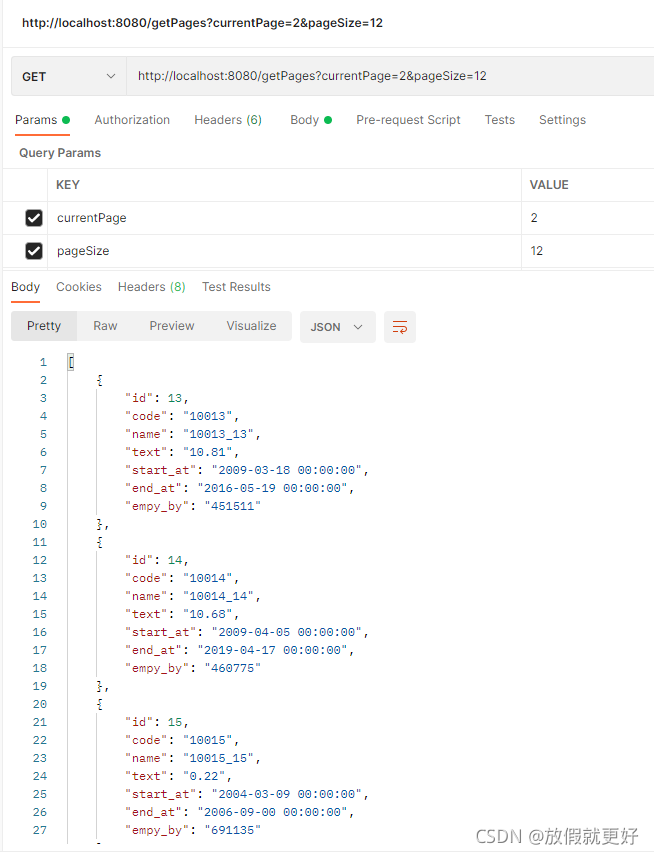
It can be clearly seen that my systemusermapper.xml is placed under lyj, which makes the method of writing this file unusable. As shown in the above figure on the left, systemusermapper.xml should be placed under the mapper package built by resource, so that no error will be reported. The postman test can accurately realize paging, as follows:

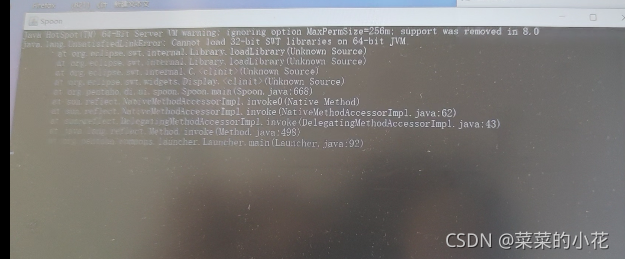
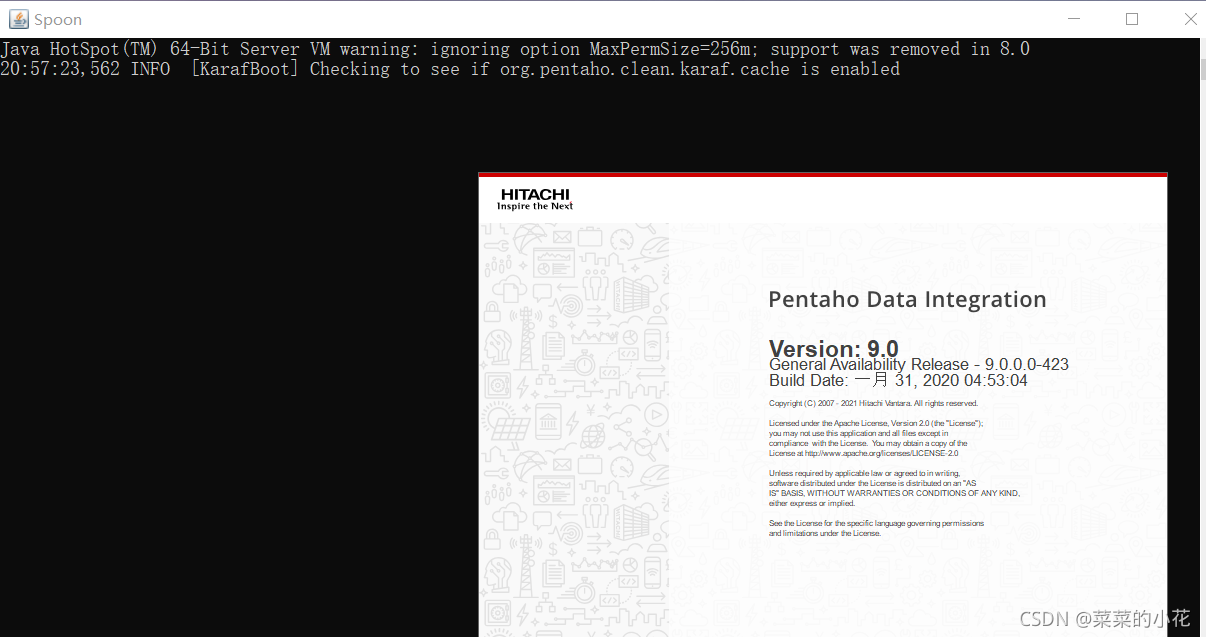
Kettle Flash Back Error:The graphical interface cannot be opened. There is an ETI installation problem

1. Install JDK (version 1.6 or above)

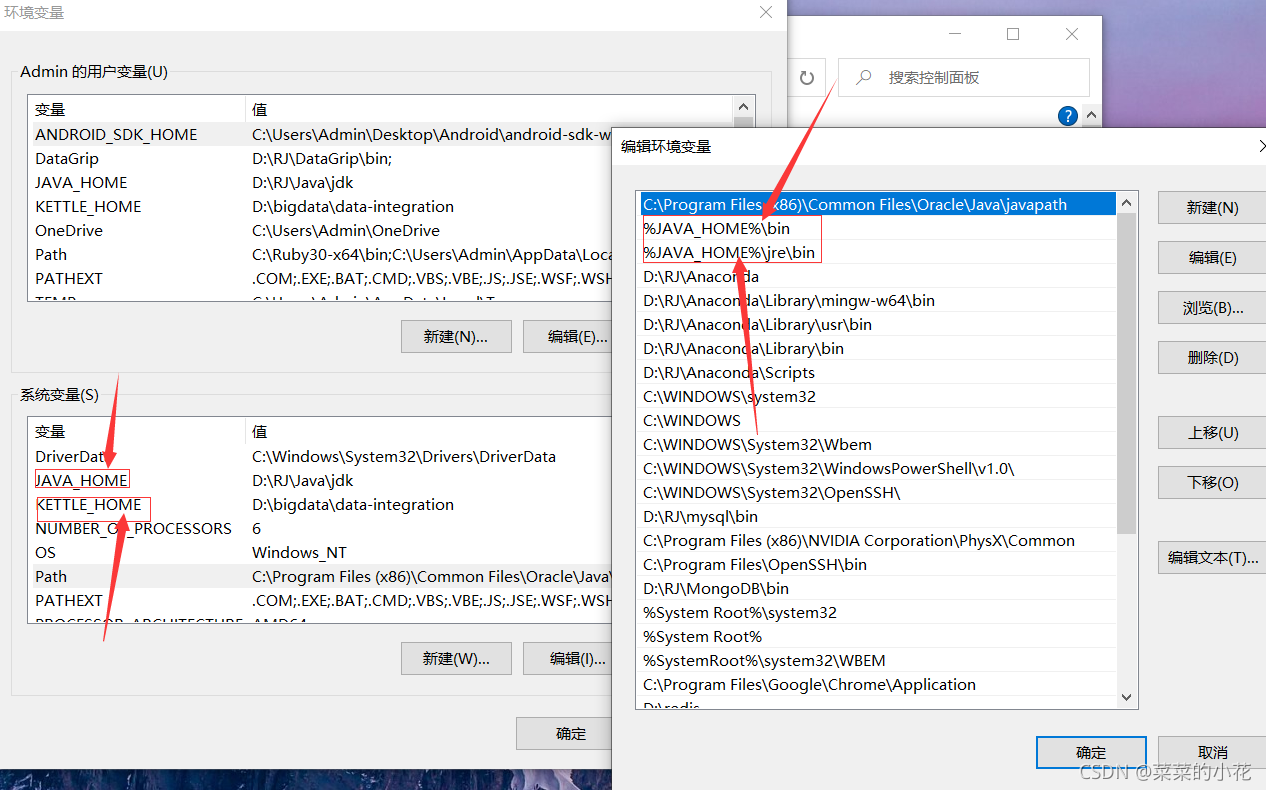
2. JDK environment variable configuration is shown in the figure (the following values are their own installation directory):

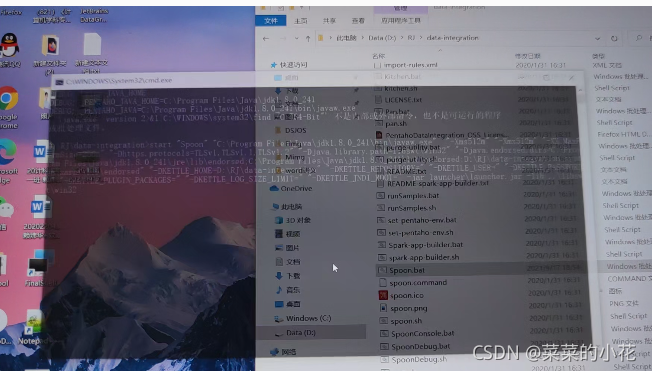
3. For the first error, directly flash back, find the spoon.bat in the data integration directory, right-click Notepad to edit, and find the following code to modify

if "%SPOON_CONSOLE%"=="1" set PENTAHO_JAVA=java.exe
if not "%SPOON_CONSOLE%"=="1" set PENTAHO_JAVA=javaw.exe

change to 

 if "%SPOON_CONSOLE%"=="1" set PENTAHO_JAVA=java.exe
if not "%SPOON_CONSOLE%"=="1" set PENTAHO_JAVA=java.exe

4. If you change the first error and then flash back (modify the memory configuration in spoon.bat)


 if "%PENTAHO_DI_JAVA_OPTIONS%"=="" set PENTAHO_DI_JAVA_OPTIONS="-Xms1024m" "-Xmx2048m" "-XX:MaxPermSize=256m"

change to

 if "%PENTAHO_DI_JAVA_OPTIONS%"=="" set PENTAHO_DI_JAVA_OPTIONS="-Xms512m" "-Xmx1024m" "-XX:MaxPermSize=256m"

5. If the above errors are corrected, the following occurs:

You need to modify the variable value in spoon.bat

pushd "%JAVA_HOME%\jre\bin"
if exist java.exe goto USEJAVAFROMPATH
goto USEJAVAFROMPATH
:USEJAVAFROMPENTAHOJAVAHOME
FOR /F %%a IN ('.\java.exe -version 2^>^&1^|%windir%\system32\find /C "64-Bit"') DO (SET /a IS64BITJAVA=%%a)
GOTO CHECK32VS64BITJAVA
:USEJAVAFROMPATH
FOR /F %%a IN ('java -version 2^>^&1^|%windir%\system32\find /C "64-Bit"') DO (SET /a IS64BITJAVA=%%a)
GOTO CHECK32VS64BITJAVA
:CHECK32VS64BITJAVA
IF %IS64BITJAVA% == 1 GOTO :USE64

add a line:(set IS64BITJAVA=1,make them all TRUE)

pushd "%JAVA_HOME%\jre\bin"
if exist java.exe goto USEJAVAFROMPATH
goto USEJAVAFROMPATH
:USEJAVAFROMPENTAHOJAVAHOME
FOR /F %%a IN ('.\java.exe -version 2^>^&1^|%windir%\system32\find /C "64-Bit"') DO (SET /a IS64BITJAVA=%%a)
GOTO CHECK32VS64BITJAVA
:USEJAVAFROMPATH
FOR /F %%a IN ('java -version 2^>^&1^|%windir%\system32\find /C "64-Bit"') DO (SET /a IS64BITJAVA=%%a)
GOTO CHECK32VS64BITJAVA
:CHECK32VS64BITJAVA
set IS64BITJAVA=1

IF %IS64BITJAVA% == 1 GOTO :USE64

7. After the modification is successful, the graphical interface can be opened after saving