No appropriate protocol (protocol is disabled or cipher suites are inappropriate)
Deploy kettle on Linux, and then run the test script for sending e-mail. The error is as follows:
org.pentaho.di.core.exception.KettleException:
Can not send mail!
Could not connect to SMTP host: smtp.exmail.qq.com, port: 465
	at org.pentaho.di.trans.steps.mail.Mail.processRow(Mail.java:510)
	at org.pentaho.di.trans.step.RunThread.run(RunThread.java:62)
	at java.lang.Thread.run(Thread.java:748)
Caused by: javax.mail.MessagingException: Could not connect to SMTP host: smtp.exmail.qq.com, port: 465;
  nested exception is:
	javax.net.ssl.SSLHandshakeException: No appropriate protocol (protocol is disabled or cipher suites are inappropriate)
	at com.sun.mail.smtp.SMTPTransport.openServer(SMTPTransport.java:1961)
	at com.sun.mail.smtp.SMTPTransport.protocolConnect(SMTPTransport.java:654)
	at javax.mail.Service.connect(Service.java:295)
	at org.pentaho.di.trans.steps.mail.Mail.sendMail(Mail.java:713)
	at org.pentaho.di.trans.steps.mail.Mail.processRow(Mail.java:493)
	... 2 more
Caused by: javax.net.ssl.SSLHandshakeException: No appropriate protocol (protocol is disabled or cipher suites are inappropriate)
	at sun.security.ssl.HandshakeContext.<init>(HandshakeContext.java:171)
	at sun.security.ssl.ClientHandshakeContext.<init>(ClientHandshakeContext.java:101)
	at sun.security.ssl.TransportContext.kickstart(TransportContext.java:238)
	at sun.security.ssl.SSLSocketImpl.startHandshake(SSLSocketImpl.java:394)
	at sun.security.ssl.SSLSocketImpl.startHandshake(SSLSocketImpl.java:373)
	at com.sun.mail.util.SocketFetcher.configureSSLSocket(SocketFetcher.java:549)
	at com.sun.mail.util.SocketFetcher.createSocket(SocketFetcher.java:354)
	at com.sun.mail.util.SocketFetcher.getSocket(SocketFetcher.java:237)
	at com.sun.mail.smtp.SMTPTransport.openServer(SMTPTransport.java:1927)
	... 6 more
The main error is: no approve protocol (protocol is disabled or cipher suits are inappropriate)
Solution:
find the folder where the JDK is installed
find the file:/jdk1.8.0_ 301/JRE/lib/security/Java. Security
find the configuration:
jdk.tls.disabledAlgorithms=SSLv3, TLSv1, TLSv1.1, RC4, DES, MD5withRSA, \
DH keySize < 1024, EC keySize < 224, 3DES_EDE_CBC, anon, NULL, \
include jdk.disabled.namedCurves
Remove the SSLv3, TLSv1, TLSv1.1,
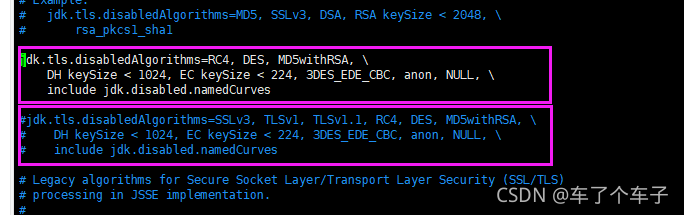
Restart kettle script can solve the error.
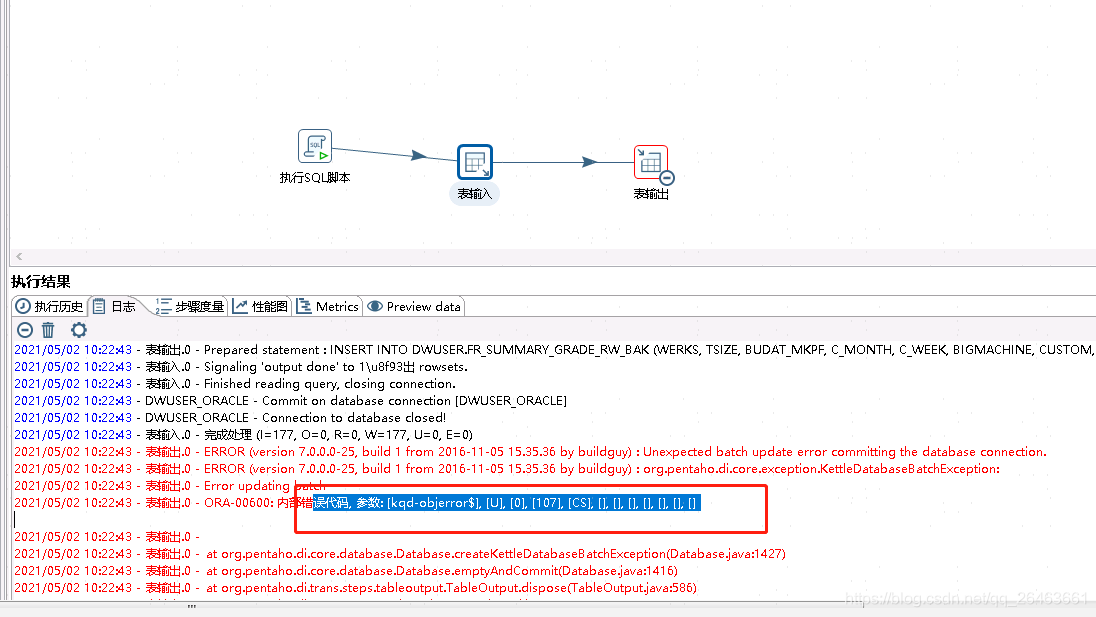 Check ORACLE data has a CS trigger compilation error, the problem is that the trigger state is invalid (invalid), but complie and can not pass, to drop and will report object invalid can not drop, so need to register him in sys.objerror$, in order to drop