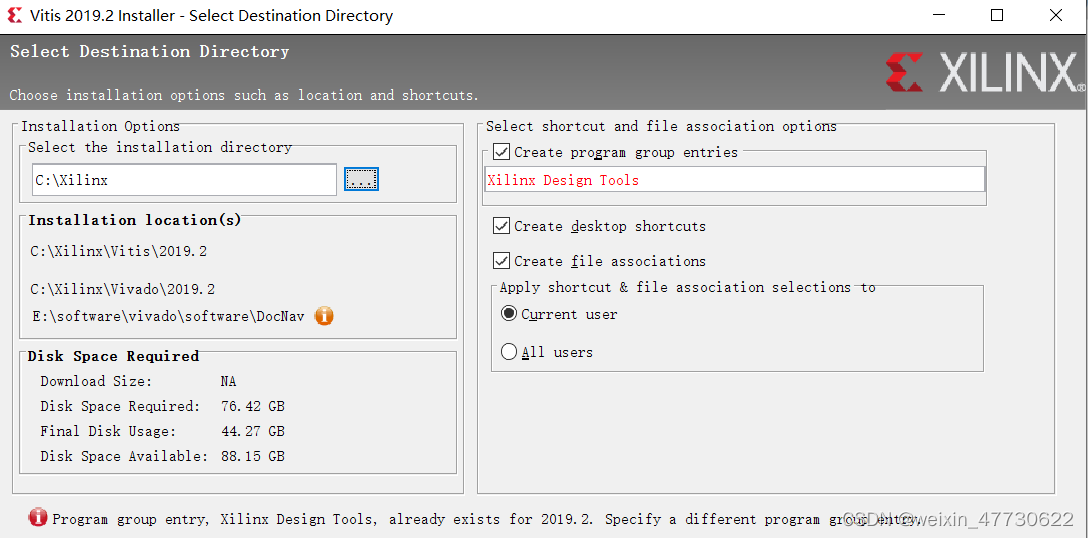
[Solved] vivado Install Error: Xilinx Design Tool Display in Red

Vivado installation error: Xilinx design tool, already exists for 2019.2, specify a different program program group entry

Reason for error: vivado has been installed, and Xilinx Design Tools folder already exists

Solution: find the “Xilinx Design Tools” folder and delete it
Xilinx Design Tools folder path: C:\USER\USERNAME\AppData\Roaming\Microsoft\Windows\Start Menu\Programs


Python3.7 Capture exception error: Too broad exception clause

In Pycharm, using try…exception will result in the Too broad exception clause… warning

The reason for this error is that the exceptions caught in the past are generalized and not to specific exceptions, which lack relevance and can be solved by specifying the exact exception type.
such as:

Baseexception: the base class of all exceptions
systemexit: the interpreter requests to exit
keyboardinterrupt: the user interrupts execution (usually input ^c)

error: base class of general error
stopiteration: the iterator has no more values
generatorexit: the generator has an exception to notify the exit
standarderror: base class of all built-in standard exceptions
arithmeticerror: base class of all numerical calculation errors
floatingpointerror: floating-point calculation error
overflowerror: numerical operation exceeds the maximum limit
zerodivisionerror: division (or modulo) Zero (all data types)
assertionerror: assertion statement failure
attributeerror: the object does not have this attribute
eofilter: there is no built-in input, Reaching EOF tag
environmenterror: base class of operating system error
ioerror: input/output operation failure
oserror: operating system error
windowserror: system call failure
importerror: import module/object failure
lookuperror: base class of invalid data query
indexerror: this index is not in the sequence
keyerror: this key is not in the mapping
memoryerror: memory overflow error (not fatal for Python interpreter)
nameerror: undeclared/initialized object (no attributes)
unboundlocalerror: accessing uninitialized local variables
referenceerror: weak reference Trying to access an object that has been garbage collected
runtimeerror: general runtime error
notimplementederror: unimplemented method
syntaxerror: Python syntax error
indentationerror: indentation error
taberror: mixed use of tab and space
systemerror: general interpreter system error
typeerror: invalid operation on type
valueerror: passing in invalid parameters
Unicode error: Unicode related Error of
Unicode decodeerror: error in Unicode decoding
Unicode encodeerror: error in Unicode encoding
Unicode translateerror: error in Unicode conversion
warning: base class of warning
deprecationwarning: warning about deprecated features
futurewarning: warning about future semantic changes in construction
overflowwarning: old warning about automatic promotion to long integer (long) Warning of
pendingdeprecationwarning: warning about feature will be discarded
runtimewarning: warning about suspicious runtime behavior
syntaxwarning: warning about suspicious syntax
userwarning: warning generated by user code

If you are not sure about the possible errors, or you need to use exception and pycharm is not allowed to complain, how should you solve it
Method 1: turn off the option to detect exceptions in code detection in the compiler
Method 2: add # noinspection PyBroadException before the try statement

# noinspection PyBroadException
try:
       pass
except Exception as e:
       pass

[Solved] docker skywalking error: no provider found for module storage

When I use docker to deploy skywalking, I always report an error: no provider found for module storage

Details are as follows:

Conditions:

  1. skywalking 9.1
  2. elasticsearch 7

Execute command:

docker run --name skywalking-oap --restart always -d \
-p 12800:12800 \
-p 11800:11800 \
--link es7:es7 \
-e SW_STORAGE=elasticsearch7 \
-e SW_STORAGE_ES_CLUSTER_NODES=es7:9200 \
skywalking-oap-server

report errors:

no provider found for module storage

Solution:

Modify

docker run --name skywalking-oap --restart always -d \
-p 12800:12800 \
-p 11800:11800 \
--link es7:es7 \
-e SW_STORAGE=elasticsearch7 \
-e SW_STORAGE_ES_CLUSTER_NODES=es7:9200 \
skywalking-oap-server

to

docker run --name skywalking-oap --restart always -d \
-p 12800:12800 \
-p 11800:11800 \
--link es7:es7 \
-e SW_STORAGE=elasticsearch \
-e SW_STORAGE_ES_CLUSTER_NODES=es7:9200 \
skywalking-oap-server

Modify sw_ Storage=elasticsearch7 to sw_ STORAGE=elasticsearch

Cause analysis:

  1. Before skywalking 8.8, it cannot automatically sense what the storage source is, and you need to manually specify whether it is es6 or 7;
  2. After 8.8, the version of the storage source can be automatically sensed, and there is no need to manually specify es6 or 7, just write es directly;


[Solved] Python Project Error: django.core.exceptions.ImproperlyConfigured: WSGI application ‘WebTool.wsgi.application

Problem Description: run Python project with pychart and report an error: django.core.exceptions.ImproperlyConfigured: WSGI application ‘WebTool.wsgi.application’ could not be loaded; Error importing module.

See the following for complete error reporting:

D:\Python\project\WebTool>python manage.py runserver 0.0.0.0:8080
Watching for file changes with StatReloader
Performing system checks...

System check identified no issues (0 silenced).
June 27, 2022 - 09:14:42
Django version 3.2.13, using settings 'WebTool.settings'
Starting development server at http://0.0.0.0:8080/
Quit the server with CTRL-BREAK.
Exception in thread django-main-thread:
Traceback (most recent call last):
  File "C:\Users\admin\AppData\Local\Programs\Python\Python37\lib\site-packages\django\core\servers\basehttp.py", line 45, in get_internal_wsgi_application
    return import_string(app_path)
  File "C:\Users\admin\AppData\Local\Programs\Python\Python37\lib\site-packages\django\utils\module_loading.py", line 17, in import_string
    module = import_module(module_path)
  File "C:\Users\admin\AppData\Local\Programs\Python\Python37\lib\importlib\__init__.py", line 127, in import_module
    return _bootstrap._gcd_import(name[level:], package, level)
  File "<frozen importlib._bootstrap>", line 1006, in _gcd_import
  File "<frozen importlib._bootstrap>", line 983, in _find_and_load
  File "<frozen importlib._bootstrap>", line 967, in _find_and_load_unlocked
  File "<frozen importlib._bootstrap>", line 677, in _load_unlocked
  File "<frozen importlib._bootstrap_external>", line 728, in exec_module
  File "<frozen importlib._bootstrap>", line 219, in _call_with_frames_removed
  File "D:\Python\project\WebTool\WebTool\wsgi.py", line 16, in <module>
    application = get_wsgi_application()
  File "C:\Users\admin\AppData\Local\Programs\Python\Python37\lib\site-packages\django\core\wsgi.py", line 13, in get_wsgi_application
    return WSGIHandler()
  File "C:\Users\admin\AppData\Local\Programs\Python\Python37\lib\site-packages\django\core\handlers\wsgi.py", line 127, in __init__
    self.load_middleware()
  File "C:\Users\admin\AppData\Local\Programs\Python\Python37\lib\site-packages\django\core\handlers\base.py", line 40, in load_middleware
    middleware = import_string(middleware_path)
  File "C:\Users\admin\AppData\Local\Programs\Python\Python37\lib\site-packages\django\utils\module_loading.py", line 17, in import_string
    module = import_module(module_path)
  File "C:\Users\admin\AppData\Local\Programs\Python\Python37\lib\importlib\__init__.py", line 127, in import_module
    return _bootstrap._gcd_import(name[level:], package, level)
  File "<frozen importlib._bootstrap>", line 1006, in _gcd_import
  File "<frozen importlib._bootstrap>", line 983, in _find_and_load
  File "<frozen importlib._bootstrap>", line 953, in _find_and_load_unlocked
  File "<frozen importlib._bootstrap>", line 219, in _call_with_frames_removed
  File "<frozen importlib._bootstrap>", line 1006, in _gcd_import
  File "<frozen importlib._bootstrap>", line 983, in _find_and_load
  File "<frozen importlib._bootstrap>", line 965, in _find_and_load_unlocked
ModuleNotFoundError: No module named 'corsheaders'

The above exception was the direct cause of the following exception:

Traceback (most recent call last):
  File "C:\Users\admin\AppData\Local\Programs\Python\Python37\lib\threading.py", line 926, in _bootstrap_inner
    self.run()
  File "C:\Users\admin\AppData\Local\Programs\Python\Python37\lib\threading.py", line 870, in run
    self._target(*self._args, **self._kwargs)
  File "C:\Users\admin\AppData\Local\Programs\Python\Python37\lib\site-packages\django\utils\autoreload.py", line 64, in wrapper
    fn(*args, **kwargs)
  File "C:\Users\admin\AppData\Local\Programs\Python\Python37\lib\site-packages\django\core\management\commands\runserver.py", line 138, in inner_run
    handler = self.get_handler(*args, **options)
  File "C:\Users\ext.azhang\AppData\Local\Programs\Python\Python37\lib\site-packages\django\contrib\staticfiles\management\commands\runserver.py", line 27, in get_handler
    handler = super().get_handler(*args, **options)
  File "C:\Users\admin\AppData\Local\Programs\Python\Python37\lib\site-packages\django\core\management\commands\runserver.py", line 65, in get_handler
    return get_internal_wsgi_application()
  File "C:\Users\admin\AppData\Local\Programs\Python\Python37\lib\site-packages\django\core\servers\basehttp.py", line 50, in get_internal_wsgi_application
    ) from err
django.core.exceptions.ImproperlyConfigured: WSGI application 'WebTool.wsgi.application' could not be loaded; Error importing module.

Solution: WSGI module needs to be installed

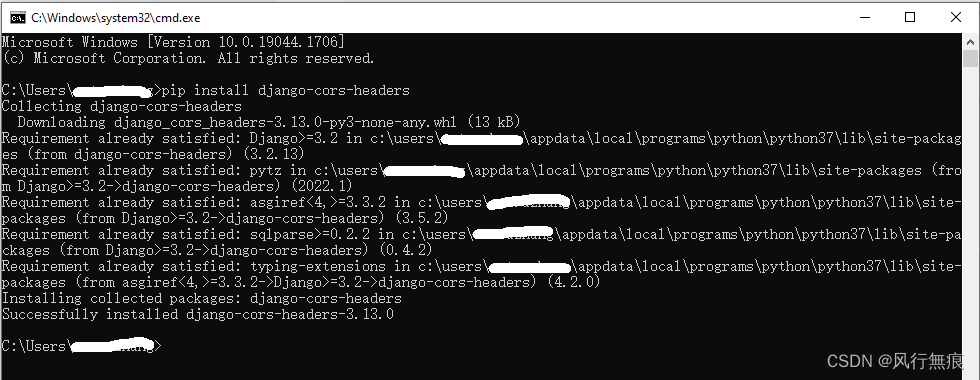
pip install django-cors-headers

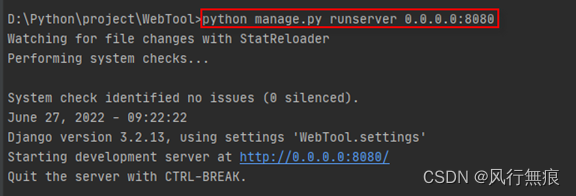
Reuse command python manage.py runserver 0.0.0.0:8080 to run the project after installation

After successful operation, see the figure below

[Solved] Git Error: fatal: refusing to merge unrelated histories

If you merge two different repositories for starting submission, you will find that the two repositories may not be the same in the new GIT. In order to prevent developers from uploading errors, you will give the following prompt

Git cannot pull warehouse refusing to merge unrelated histories

The problem is usually caused by the inconsistency between the local warehouse and the remote warehouse after the new warehouse is built,

Solution: add --allow-unrelated-histories after your operation command. Its original purpose is to remind you that these are two different libraries It’s time to merge.

If you are other command messages fatal: refusing to merge unrelated histories add – -allow unrelated histories in the same way, it is such a perfect solution!

H2 memory database Oracle mode page error: rg.springframework.dao.InvalidDataAccessResourceUsageException: could not prepar

I. Cause analysis:

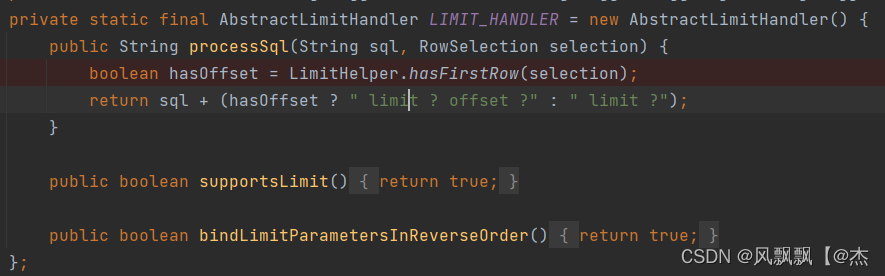
1:When we use hibernate’s NativeQuery for paging, the underlying will use limit or rownum, and which paging method is determined by the dialect of different databases, the following will explain the h2 oracle pattern using NativeQuery for paging when the problem is solved org. InvalidDataAccessResourceUsageException: could not prepare statement; SQL [SELECT * limit ?] SQLGrammarException: could not prepare statement
We will find that h2’s oracle schema uses the limit method for paging, but using limit for paging will report an error
2:h2 paging method
Open h2’s dialect class H2Dialect, we can find that h2’s paging method is using limit

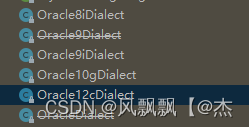
3: Oracle paging mode
open the dialect class of Oracle according to different Oracle versions

we will find that the bottom layer of Oracle is rownum for paging

II. Problem-solving
1: since we only solve the paging problem now, here we create a custom dialect class TestH2Dialect, Inherited from H2Dialect

2: because our custom dialect class inherits from H2Dialect, we don’t need to pay attention to other dialect problems. We just need to rewrite the paging method to solve the above problems. Here we have taken oracle12 as an example
Create TestH2Dialect to customize dialect

public class TestH2Dialect extends H2Dialect {

    private static final TestOracle12LimitHandler LIMIT_HANDLER = new TestOracle12LimitHandler() ;

    @Override
    public LimitHandler getLimitHandler() {
        return LIMIT_HANDLER;
    }

}

Create Oracle paging processing class

public class TestOracle12LimitHandler extends AbstractLimitHandler {
    public boolean bindLimitParametersInReverseOrder;
    public boolean useMaxForLimit;
    public static final TestOracle12LimitHandler INSTANCE = new TestOracle12LimitHandler();

    TestOracle12LimitHandler() {
    }

    @Override
    public String processSql(String sql, RowSelection selection) {
        boolean hasFirstRow = LimitHelper.hasFirstRow(selection);
        boolean hasMaxRows = LimitHelper.hasMaxRows(selection);
        return !hasMaxRows ?sql : this.processSql(sql, this.getForUpdateIndex(sql), hasFirstRow);
    }
    @Override
    public String processSql(String sql, QueryParameters queryParameters) {
        RowSelection selection = queryParameters.getRowSelection();
        boolean hasFirstRow = LimitHelper.hasFirstRow(selection);
        boolean hasMaxRows = LimitHelper.hasMaxRows(selection);
        if (!hasMaxRows) {
            return sql;
        } else {
            sql = sql.trim();
            LockOptions lockOptions = queryParameters.getLockOptions();
            if (lockOptions != null) {
                LockMode lockMode = lockOptions.getLockMode();
                switch(lockMode) {
                    case UPGRADE:
                    case PESSIMISTIC_READ:
                    case PESSIMISTIC_WRITE:
                    case UPGRADE_NOWAIT:
                    case FORCE:
                    case PESSIMISTIC_FORCE_INCREMENT:
                    case UPGRADE_SKIPLOCKED:
                        return this.processSql(sql, selection);
                    default:
                        return this.processSqlOffsetFetch(sql, hasFirstRow);
                }
            } else {
                return this.processSqlOffsetFetch(sql, hasFirstRow);
            }
        }
    }

    private String processSqlOffsetFetch(String sql, boolean hasFirstRow) {
        int forUpdateLastIndex = this.getForUpdateIndex(sql);
        if (forUpdateLastIndex > -1) {
            return this.processSql(sql, forUpdateLastIndex, hasFirstRow);
        } else {
            this.bindLimitParametersInReverseOrder = false;
            this.useMaxForLimit = false;
            String offsetFetchString;
            if (hasFirstRow) {
                offsetFetchString = " offset ?rows fetch next ?rows only";
            } else {
                offsetFetchString = " fetch first ?rows only";
            }

            int offsetFetchLength = sql.length() + offsetFetchString.length();
            return (new StringBuilder(offsetFetchLength)).append(sql).append(offsetFetchString).toString();
        }
    }

    private String processSql(String sql, int forUpdateIndex, boolean hasFirstRow) {
        this.bindLimitParametersInReverseOrder = true;
        this.useMaxForLimit = true;
        String forUpdateClause = null;
        boolean isForUpdate = false;
        if (forUpdateIndex > -1) {
            forUpdateClause = sql.substring(forUpdateIndex);
            sql = sql.substring(0, forUpdateIndex - 1);
            isForUpdate = true;
        }

        int forUpdateClauseLength;
        if (forUpdateClause == null) {
            forUpdateClauseLength = 0;
        } else {
            forUpdateClauseLength = forUpdateClause.length() + 1;
        }

        StringBuilder pagingSelect;
        if (hasFirstRow) {
            pagingSelect = new StringBuilder(sql.length() + forUpdateClauseLength + 98);
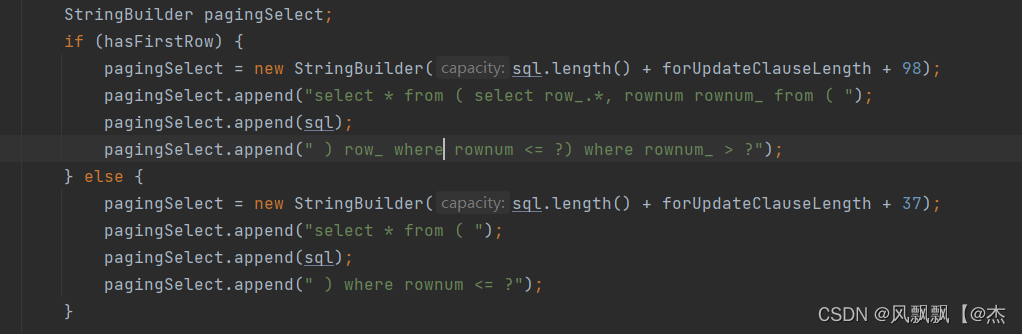
            pagingSelect.append("select * from ( select row_.*, rownum rownum_ from ( ");
            pagingSelect.append(sql);
            pagingSelect.append(" ) row_ where rownum <= ?) where rownum_ > ?");
        } else {
            pagingSelect = new StringBuilder(sql.length() + forUpdateClauseLength + 37);
            pagingSelect.append("select * from ( ");
            pagingSelect.append(sql);
            pagingSelect.append(" ) where rownum <= ?");
        }

        if (isForUpdate) {
            pagingSelect.append(" ");
            pagingSelect.append(forUpdateClause);
        }

        return pagingSelect.toString();
    }

    private int getForUpdateIndex(String sql) {
        int forUpdateLastIndex = sql.toLowerCase(Locale.ROOT).lastIndexOf("for update");
        int lastIndexOfQuote = sql.lastIndexOf("'");
        if (forUpdateLastIndex > -1) {
            if (lastIndexOfQuote == -1) {
                return forUpdateLastIndex;
            } else {
                return lastIndexOfQuote > forUpdateLastIndex ?-1 : forUpdateLastIndex;
            }
        } else {
            return forUpdateLastIndex;
        }
    }
    @Override
    public final boolean supportsLimit() {
        return true;
    }
    @Override
    public boolean bindLimitParametersInReverseOrder() {
        return this.bindLimitParametersInReverseOrder;
    }
    @Override
    public boolean useMaxForLimit() {
        return this.useMaxForLimit;
    }
}

3. Modify the dialect class used in the configuration file

to

III. summary
if you encounter other dialect problems later, you can use the same method to solve them

[Solved] el-tree setCheckedNodes Error: undefined (reading setCheckedNodes)

Summary:

Today, there is a requirement to write an EL tree in the sub-component (pop-up window) because it needs to be echoed, that is, once you click in, there will be the last checked one.

By checking the document, I think setcheckednodes are the most suitable. Then I click in and show it. My first reaction is to call the following method when mounting

setCheckedNodes() {
    this.$nextTick(() => {
        this.$refs.tree.setCheckedNodes(this.selectedAssign);
    });
},

Codes to report errors:

(spring window subassembly)

<template>
  <div class="dialog">
    <el-dialog
      title="权限分配"
      :visible.sync="dialogVisible"
      width="45%"
      top="8vh"
      ref="tk"
      :before-close="dialogClose"
    >
      <div class="dialog-mid">        
        <div class="online-detail">
          
          <div class="od-content">
            <div class="select-box">
              <div class="all-select">
                <div class="all-tit"><span></span></div>
                <div class="all-con">
                  <el-tree
                    :data="assignData"
                    show-checkbox
                    default-expand-all
                    node-key="id"
                    ref="tree"
                    :highlight-current="true"
                    :props="defaultProps"
                    @check-change="checkChange"
                  >
                  </el-tree>
                </div>
              </div>
            </div>            
          </div>
        </div>
        <div class="foot-botton">
          <el-button type="primary" @click="open">提交修改</el-button>
          <el-button @click="dialogClose">取消</el-button>
        </div>
      </div>
    </el-dialog>
  </div>
</template>

<script>
export default {
  props: ["dialogVisible"],
  data() {
    return {      
      assignData: [
        {
          id: 1,
          label: "1",
          children: [
            {
              id: 101,
              label: "101",
            },
            {
              id: 102,
              label: "102",
            },
          ],
        },
        {
          id: 2,
          label: "2",
          children: [
            {
              id: 201,
              label: "201",
            },
            {
              id: 202,
              label: "202",
            },
            {
              id: 203,
              label: "203",
            },
            {
              id: 204,
              label: "204",
            },
            {
              id: 205,
              label: "205",
            },
          ],
        },
        {
          id: 3,
          label: "3",
          children: [
            {
              id: 301,
              label: "301",
            },
          ],
        },
      ],
      defaultProps: {
        children: "children",
        label: "label",
      },
      selectedAssigns: [
         {
           id: 1,
           label: "1"
         },
         {
           id: 101,
           label: "101",
         },
         {
           id: 102,
           label: "102",
         },
      ],
    };
  },
  methods: {
    dialogSure() {
      this.$emit("dialogSure");
    },
    dialogClose() {
      this.$parent.dialogClose();
    },
    open() {
      this.$confirm("This action will change the privileges of this user, do you want to continue?" , "prompt", {
        confirmButtonText: "YES",
        cancelButtonText: "NO",
        type: "warning",
      })
        .then(() => {
          // this.dialogVisible = false;
          this.dialogSure();
        })
        .catch(() => {
          this.$message({
            type: "info",
            message: "Modified Canceled",
          });
        });
    },


    setCheckedNodes() {    
      this.$nextTick(() => {
          console.log(this.$refs.tree,"this.$refs.tree");
          this.$refs.tree.setCheckedNodes(this.selectedAssigns);
      });
    },

    resetChecked() {
      this.$refs.tree.setCheckedKeys([]);
    },
  },
  mounted() {
    // Set the screen height to 90%
    this.$refs.tk.$el.firstChild.style.height = "70%";
    this.setCheckedNodes(); // ready to be called at the time of the popup mount will be able to click in and have a display back, but there is an error, 148 print out the result is undefined
    // this.$nextTick(() => { // Go online and check what others have written and say to use this.$nextTick when mounting.
    //   this.setCheckedNodes();
    // });
  },
};
</script>

<style scoped>

</style>

I thought I could call it when the pop-up window was mounted, and there was an echo when I clicked it, but there was an error, and the result printed out by 148 was undefined.

The error information is shown in the figure:
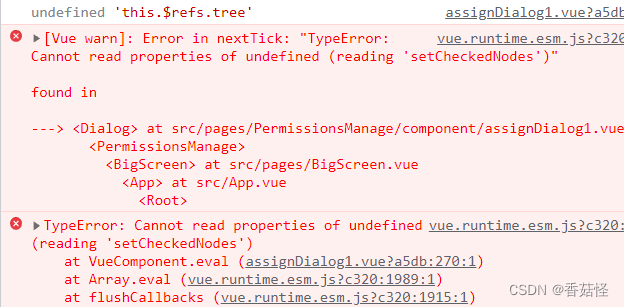
Seeing such error reporting experience tells me that when I execute this method, the dom of the pop-up window has not been created, and I can’t find this tree, but it’s strange that I clearly wrote this in this method$ Nexttick (this.$nexttick function can make the methods in it run after the DOM is created), and any operations are in this$ Nexttick.

Check others’ writing methods on the Internet and say you want to use this$ Nexttick is written when it is mounted. Then there is the section of code commented out in the mount, but it still reports an error, and the same error is reported.

I guessed that the DOM of the popup window was created after clicking to open the popup window, so I opened the popup window in the parent component in the method this.dialogVisible = true; and then went to call the setCheckedNodes method

How to call it? There is a very simple way to write the method of the parent component calling the child component, which is to give a ref= “dialog” on the child component

For example:

<Dialog :dialogVisible="dialogVisible" @dialogSure="dialogSure" ref="dialog"></Dialog>

Then call the method of the sub component in the method of opening this pop-up window: //selectedAssign is the starting array, which can be passed from the parent component

handleAssign(row,selectedAssign) {
    //selectedAssign is the starting array, which can be passed from the parent component
      this.dialogVisible = true;
      this.$refs.dialog.setCheckedNodes(selectedAssign);
},

Finally, save, refresh and re run, there will be no error, and there will be starting data.
[Solved] Failed to allocate graph: MYRIAD device is not opened.

Error reporting prompt:

Failed to allocate graph: MYRIAD device is not opened.

Solution:
please check whether the device is properly connected. Please execute: lsusb | grep 03e7. If it is connected, you will see the following similar results:

$ lsusb | grep 03e7
Bus 001 Device 120: ID 03e7:2485 Intel Movidius MyriadX

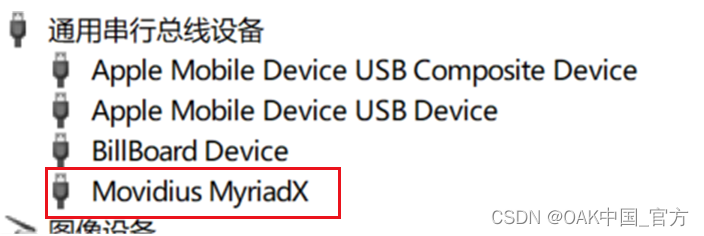
Check the device manager on windows to see if the device manager has the last device.

After the equipment is correctly connected, the following model conversion operations can be carried out.


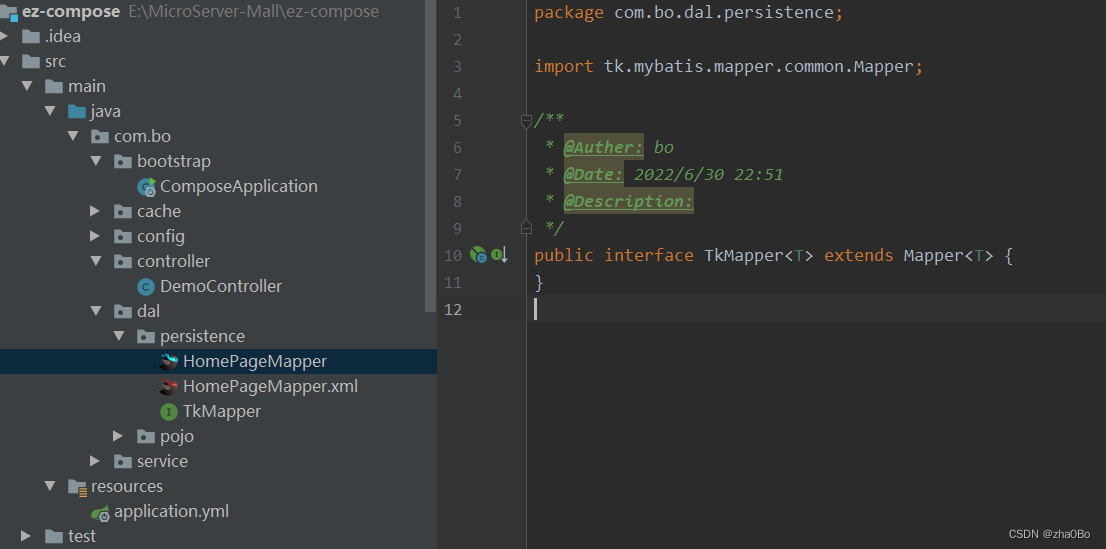
[Solved] Tk-Mybatis Error: tk.mybatis.mapper.MapperException:

java.lang.ClassCastException: sun.reflect.generics.r

org.springframework.beans.factory.BeanCreationException: Error creating bean with name 'tkMapper' defined in file [E:\MicroServer-Mall\ez-compose\target\classes\com\bo\dal\persistence\TkMapper.class]: Invocation of init method failed; nested exception is tk.mybatis.mapper.MapperException: tk.mybatis.mapper.MapperException: java.lang.ClassCastException: sun.reflect.generics.reflectiveObjects.TypeVariableImpl cannot be cast to java.lang.Class
	at org.springframework.beans.factory.support.AbstractAutowireCapableBeanFactory.initializeBean(AbstractAutowireCapableBeanFactory.java:1769) ~[spring-beans-5.1.18.RELEASE.jar:5.1.18.RELEASE]
	at org.springframework.beans.factory.support.AbstractAutowireCapableBeanFactory.doCreateBean(AbstractAutowireCapableBeanFactory.java:592) ~[spring-beans-5.1.18.RELEASE.jar:5.1.18.RELEASE]
	at org.springframework.beans.factory.support.AbstractAutowireCapableBeanFactory.createBean(AbstractAutowireCapableBeanFactory.java:514) ~[spring-beans-5.1.18.RELEASE.jar:5.1.18.RELEASE]
	at org.springframework.beans.factory.support.AbstractBeanFactory.lambda$doGetBean$0(AbstractBeanFactory.java:321) ~[spring-beans-5.1.18.RELEASE.jar:5.1.18.RELEASE]
	at org.springframework.beans.factory.support.DefaultSingletonBeanRegistry.getSingleton(DefaultSingletonBeanRegistry.java:234) ~[spring-beans-5.1.18.RELEASE.jar:5.1.18.RELEASE]
	at org.springframework.beans.factory.support.AbstractBeanFactory.doGetBean(AbstractBeanFactory.java:319) ~[spring-beans-5.1.18.RELEASE.jar:5.1.18.RELEASE]
	at org.springframework.beans.factory.support.AbstractBeanFactory.getBean(AbstractBeanFactory.java:199) ~[spring-beans-5.1.18.RELEASE.jar:5.1.18.RELEASE]
	at org.springframework.beans.factory.support.DefaultListableBeanFactory.preInstantiateSingletons(DefaultListableBeanFactory.java:847) ~[spring-beans-5.1.18.RELEASE.jar:5.1.18.RELEASE]
	at org.springframework.context.support.AbstractApplicationContext.finishBeanFactoryInitialization(AbstractApplicationContext.java:878) ~[spring-context-5.1.18.RELEASE.jar:5.1.18.RELEASE]
	at org.springframework.context.support.AbstractApplicationContext.refresh(AbstractApplicationContext.java:550) ~[spring-context-5.1.18.RELEASE.jar:5.1.18.RELEASE]
	at org.springframework.boot.web.servlet.context.ServletWebServerApplicationContext.refresh(ServletWebServerApplicationContext.java:141) ~[spring-boot-2.1.17.RELEASE.jar:2.1.17.RELEASE]
	at org.springframework.boot.SpringApplication.refresh(SpringApplication.java:744) [spring-boot-2.1.17.RELEASE.jar:2.1.17.RELEASE]
	at org.springframework.boot.SpringApplication.refreshContext(SpringApplication.java:391) [spring-boot-2.1.17.RELEASE.jar:2.1.17.RELEASE]
	at org.springframework.boot.SpringApplication.run(SpringApplication.java:312) [spring-boot-2.1.17.RELEASE.jar:2.1.17.RELEASE]
	at org.springframework.boot.SpringApplication.run(SpringApplication.java:1215) [spring-boot-2.1.17.RELEASE.jar:2.1.17.RELEASE]
	at org.springframework.boot.SpringApplication.run(SpringApplication.java:1204) [spring-boot-2.1.17.RELEASE.jar:2.1.17.RELEASE]
	at com.bo.bootstrap.ComposeApplication.main(ComposeApplication.java:16) [classes/:na]
Caused by: tk.mybatis.mapper.MapperException: tk.mybatis.mapper.MapperException: java.lang.ClassCastException: sun.reflect.generics.reflectiveObjects.TypeVariableImpl cannot be cast to java.lang.Class
	at tk.mybatis.mapper.mapperhelper.MapperHelper.setSqlSource(MapperHelper.java:378) ~[mapper-core-1.1.5.jar:na]
	at tk.mybatis.mapper.mapperhelper.MapperHelper.processMappedStatement(MapperHelper.java:297) ~[mapper-core-1.1.5.jar:na]
	at tk.mybatis.mapper.mapperhelper.MapperHelper.processConfiguration(MapperHelper.java:283) ~[mapper-core-1.1.5.jar:na]
	at tk.mybatis.spring.mapper.MapperFactoryBean.checkDaoConfig(MapperFactoryBean.java:93) ~[mapper-spring-1.1.5.jar:na]
	at org.springframework.dao.support.DaoSupport.afterPropertiesSet(DaoSupport.java:44) ~[spring-tx-5.1.18.RELEASE.jar:5.1.18.RELEASE]
	at org.springframework.beans.factory.support.AbstractAutowireCapableBeanFactory.invokeInitMethods(AbstractAutowireCapableBeanFactory.java:1828) ~[spring-beans-5.1.18.RELEASE.jar:5.1.18.RELEASE]
	at org.springframework.beans.factory.support.AbstractAutowireCapableBeanFactory.initializeBean(AbstractAutowireCapableBeanFactory.java:1765) ~[spring-beans-5.1.18.RELEASE.jar:5.1.18.RELEASE]
	... 16 common frames omitted
Caused by: tk.mybatis.mapper.MapperException: java.lang.ClassCastException: sun.reflect.generics.reflectiveObjects.TypeVariableImpl cannot be cast to java.lang.Class
	at tk.mybatis.mapper.mapperhelper.MapperTemplate.setSqlSource(MapperTemplate.java:256) ~[mapper-core-1.1.5.jar:na]
	at tk.mybatis.mapper.mapperhelper.MapperHelper.setSqlSource(MapperHelper.java:375) ~[mapper-core-1.1.5.jar:na]
	... 22 common frames omitted
Caused by: java.lang.ClassCastException: sun.reflect.generics.reflectiveObjects.TypeVariableImpl cannot be cast to java.lang.Class
	at tk.mybatis.mapper.mapperhelper.MapperTemplate.getEntityClass(MapperTemplate.java:170) ~[mapper-core-1.1.5.jar:na]
	at tk.mybatis.mapper.provider.base.BaseInsertProvider.insertSelective(BaseInsertProvider.java:84) ~[mapper-base-1.1.5.jar:na]
	at sun.reflect.NativeMethodAccessorImpl.invoke0(Native Method) ~[na:1.8.0_111]
	at sun.reflect.NativeMethodAccessorImpl.invoke(NativeMethodAccessorImpl.java:62) ~[na:1.8.0_111]
	at sun.reflect.DelegatingMethodAccessorImpl.invoke(DelegatingMethodAccessorImpl.java:43) ~[na:1.8.0_111]
	at java.lang.reflect.Method.invoke(Method.java:498) ~[na:1.8.0_111]
	at tk.mybatis.mapper.mapperhelper.MapperTemplate.setSqlSource(MapperTemplate.java:246) ~[mapper-core-1.1.5.jar:na]
	... 23 common frames omitted

The error information is as above, and the reason is as follows:

Customized HomePageMapper inherits TkMapper, TkMapper inherits Mapper, and an error is reported.

Delete TkMapper and let the customized HomePageMapper inherit Mapper directly. I haven’t figured out the cause of the problem yet.

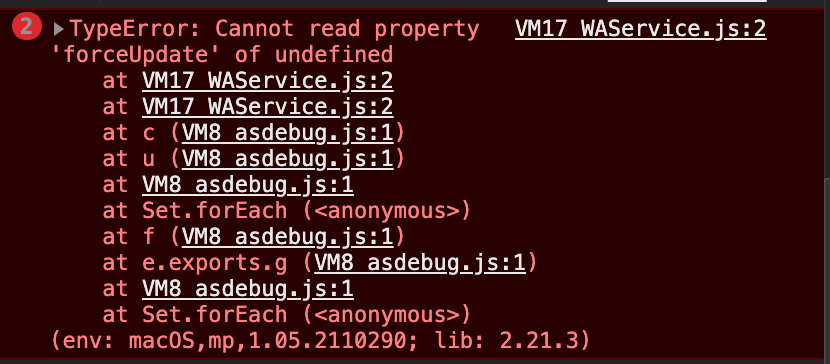
[Solved] HBuilder Error: Cannot read property ‘forceUpdate‘ of undefined

Using the project developed by HBuilderX, WeChat develop tool report an error:

Cannot read property ‘forceUpdate’ of undefined

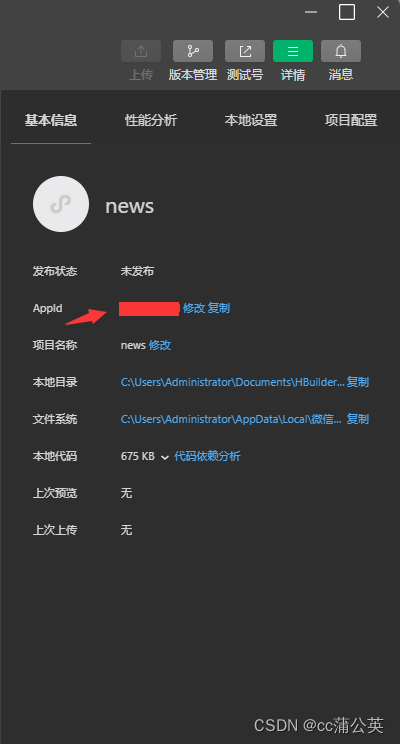
The solution is shown in the figure:

In the project directory, find manifest.json – WeChat applet configuration – configure “WeChat applet AppID”

Open the developer tool, view the corresponding appid, fill in the upper part, and refresh the developer tool.

If you continue to report this error, restart hbuildx and wechat developer tools after configuration, and re run the project.


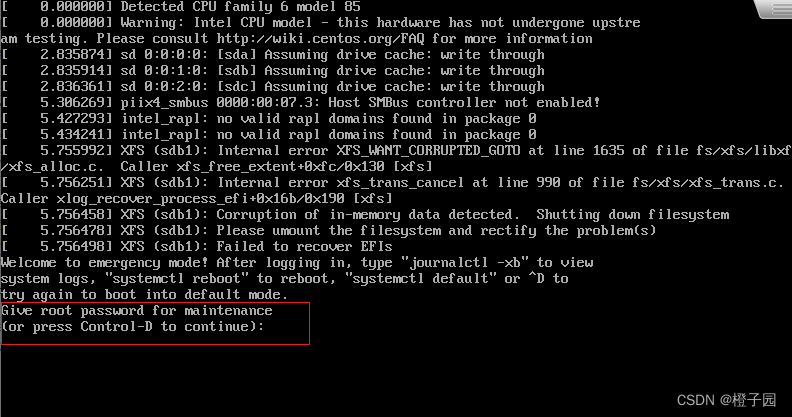
[Solved] Internal error XFS_WANT_CORRUPTED_GOTO at line 1635 of file fs/xfs/libxfs/xfs_alloc.c.

Error Messages:

Internal error XFS_WANT_CORRUPTED_GOTO at line 1635 of file fs/xfs/libxfs/xfs_alloc.c. Caller xfs_free_extent

Internal error xfs_trans_cancel at line 990 of flie fs/xfs/xfs_trans.c.

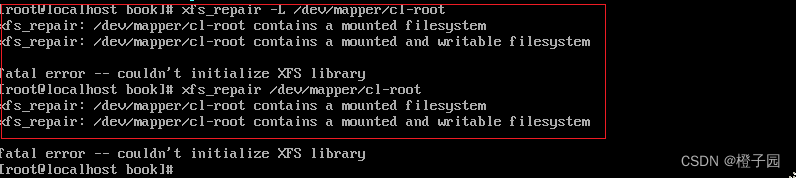
xfs_repair: /dev/mapper/cl-root contains a mounted filesystem
xfs_repair: /dev/mapper/cl-root contains a mounted writable filesystem
fatal error – couldn’t initialize XFS library


Reason description:

I found that most of the solutions found on the Internet do not explain why, so we don’t know why, but just follow them. Some people may actually solve the problem of the partition of the system directory mount, while some people can’t solve the problem because it’s not the directory of the system mount.

The above error is mainly due to the problem of the file in the disk partition, so it needs to be repaired. But please check which partition of the attached directory has a problem first, and then repair the corresponding disk partition.


Solution:

1. First, after reporting the following errors, please check the information in the red box

You can see that you are asked to enter the root password, and then press enter to see that you have entered the root user, and you can enter the command

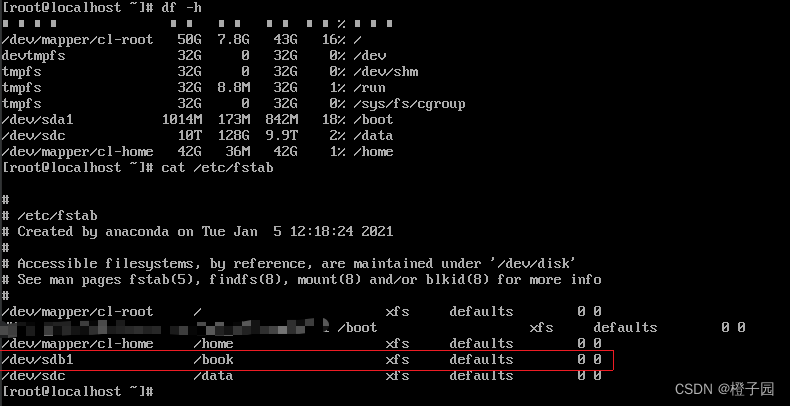
First, enter the following command first. df is to view the partition of the mounted directory, and cat /etc/fstab is to view the directory information of the previously persistent mounted partition. It can be seen (in the red box) that the directory attached to /book is gone, so it can be inferred that the partition /dev/sdb1 has a problem and needs to be repaired.

df -h
cat /etc/fstab

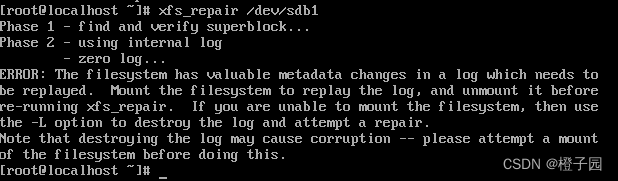
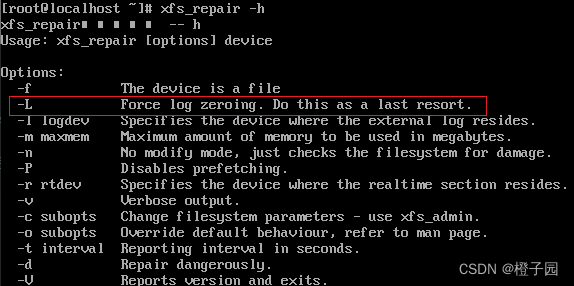
2. Next, you can repair it. Use the following command to repair it. If you do not add the L parameter, the following error will be reported:

Function of L parameter:

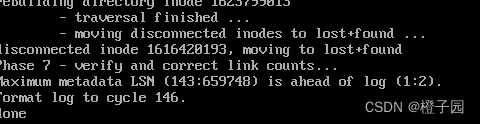
Add the L parameter to complete the execution

xfs_repair -L /dev/sdb1

Finally, restart with the following command to solve the problem

 init 6

Note: if you repair some partitions that are not damaged, the following error will be reported, so be sure to find the damaged partition that you need to repair, and then go to XFS_ repair