Syntax error: unexpected token in uni app project compilation

Syntax error: unexpected token in uni app project compilation

Contents of articles

Syntax error: unexpected token error content error reason solution for uni app project compilation

Error content

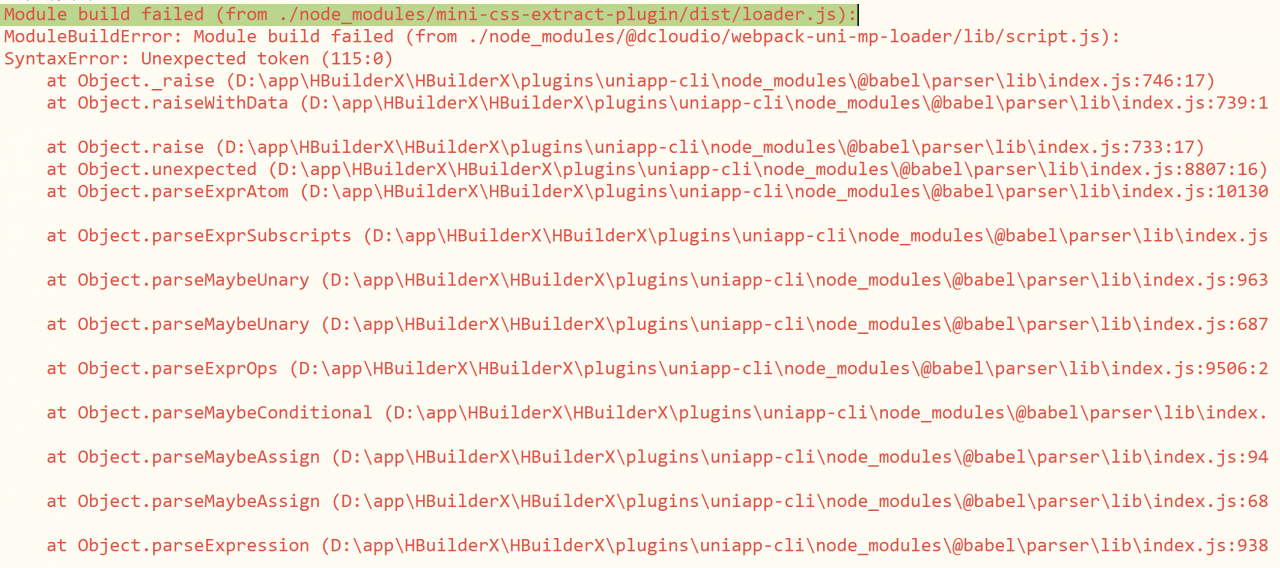
Originally, it could run well. When it was pulled down and then run to wechat applet, it would report an error, but the web side could run normally~

Module build failed (from ./node_ modules/mini-css-extract-plugin/dist/ loader.js ):

The details are as follows:
Cause of error

None of the solutions found in the search work.

After a careful examination of the code, it is found that the & lt; script & gt; tag appears twice in a newly modified Vue file. The new one is used to describe the style,

Solution

The problem is solved by merging the content in the new & lt; script & gt; into the & lt; style & gt; tag

Note that there can only be three top-level tags in uni app!!

The root of the problem is that the team didn't communicate well, so there was a problem.. But uni app really has a lot of holes!!!!
Prompt error: rpmdb open failed using yum

On the CentOS system, an error is reported when using the yum command to install the package

rpmdb: Thread/process 6539/140448388269824 failed: Thread died in Berkeley DB library
error: db3 error(-30974) from dbenv->failchk: DB_RUNRECOVERY: Fatal error, run database recovery
error: cannot open Packages index using db3 -  (-30974)
error: cannot open Packages database in /var/lib/rpm
CRITICAL:yum.main:

The reason is that the RPM database is damaged

Restore to normal after rebuilding the database:

cd /var/lib/rpm/
for i in `ls | grep 'db.'`;do mv $i $i.bak;done
rpm --rebuilddb
yum clean all


Error loading password’s fault file (MySQL for Excel)

Recently, error loading password’s fault file is always reported when opening excel, which is puzzling. However, xlsx file can still be opened, and I didn’t care about it.

However, it is not enough to import xlsx file as data.

Then, after carefully reading the error information, we found that it was MySQL for Excel. What the hell?How did excel get into MySQL.

So find out what’s wrong with MySQL, and then go online.

Finally, I found that when MySQL was installed, there was a component named MySQL for Excel.

Since there is a problem with MySQL for Excel and it can’t be used now, it’s time to unload it.

So, open MySQL installer, check MySQL for Excel (pay attention not to check other, otherwise it’s not good to unload MySQL), and choose Remove. It’s really a good thing.

OK, open excel and never report this error again

mysql error 1062

Duplicate entry ‘1’ for key ‘PRIMARY’

Error reason: primary key conflict, primary key value is unique
solution: the value of ‘primary’ primary key cannot be the same

Example:

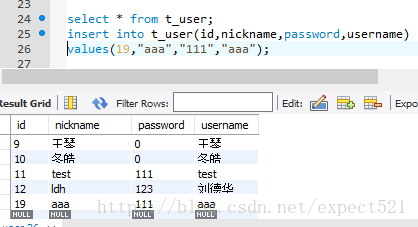
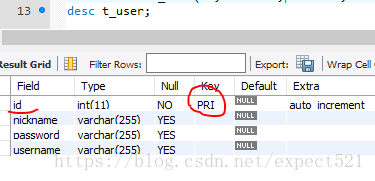
1. View the table structure

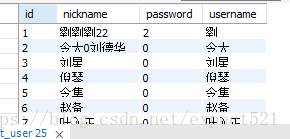
2. View data

3. Add data, add id = 1, and an error will be reported, because ID is the primary key with uniqueness

Solution: if the value of ID is modified, the addition is successful

Use keil software to report syntax error near ‘;

Using keil software to report syntax error near ‘; ”

This is the first time through CSDN upload their own learning situation, novice report.

Today, when using keil to write C, I used a piece of such code

    ?Define uint unsigned int; void delay (uint MS) { uint a; while (MS --)// software delay module for (a = 0; a & lt; 114; a + +); }

    When compiling, a syntax error near ';' was given, and the following MS and a both reported an error that no identifier was defined.
    From the code above, it can be seen that there is an obvious error with the ";" sign after define, but I found that the line with syntax error near ';' error is void delay (uint MS).
    I was hoodwinked at that time, looking for a long time, I found that there was an extra "; to commemorate this stupid operation.

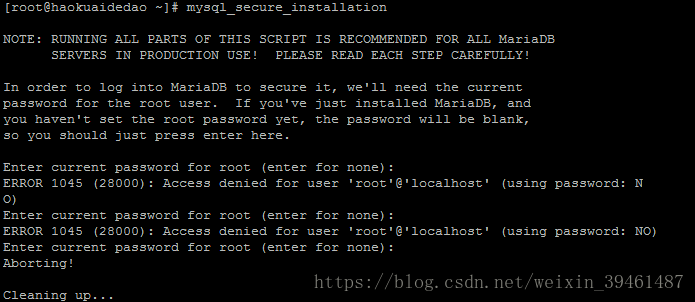
Error 1045 (28000): access denied for user ‘root’ @’localhost ‘(using password: no)

Error 1045 (28000): access denied for user ‘root’ @’localhost ‘(using password: no)

The solution steps are as follows:

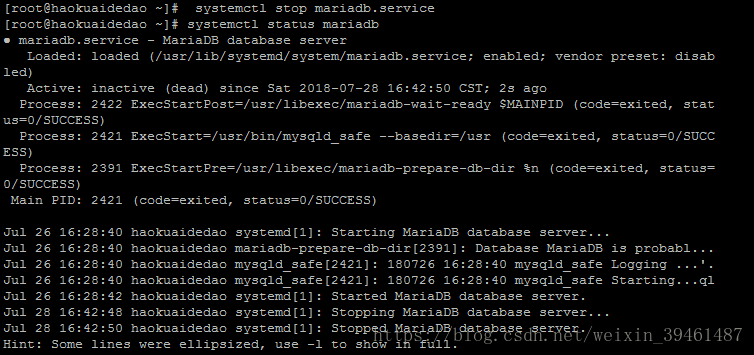
1. First stop the database service: systemctl stop mariadb.service

2. Use mysqld_ Safe to start mysqld server: mysqld_ safe –user=mysql –skip-grant-tables –skip-networking &

Display: exit Ctrl + C

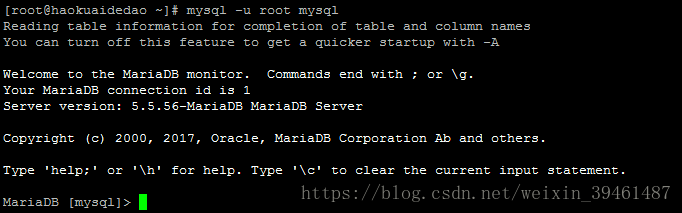
3. Login: MySQL – U root mysql

4. Modify the password of the root user: update user set password = password (‘newpassword ‘) where user’s root’;

5. Use the modified root user and new password to log in to the database: MySQL – uroot – P


The MariaDB server is running with the –skip-grant-tables option so it cannot execute this statement

An error occurred when creating a user. The execution statement is:

GRANT ALL PRIVILEGES ON *.* TO helei IDENTIFIED BY ‘MANAGER’ WITH GRANT OPTION;

Solution: MySQL & gt; flush privileges;

Reference: MariaDB initial login error 1045 (28000) solution

https://blog.csdn.net/carry9148/article/details/52252780

The solution of the error code is 2503 in Python installation


Copyright notice

Original author: brother Gu’s younger brother author blog address: http://blog.csdn.net/lfdfhl


Problem description

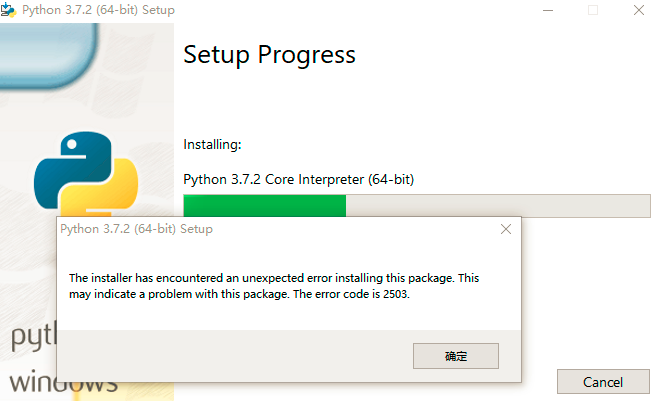
When installing Python 3.7.2 in win10 device, an error is reported: the error code is 2503, as shown in the figure below:

Solution

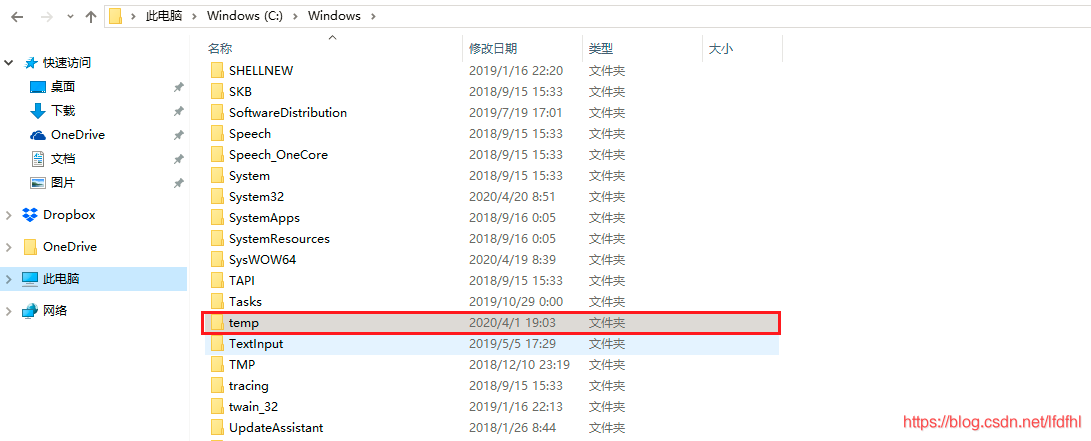
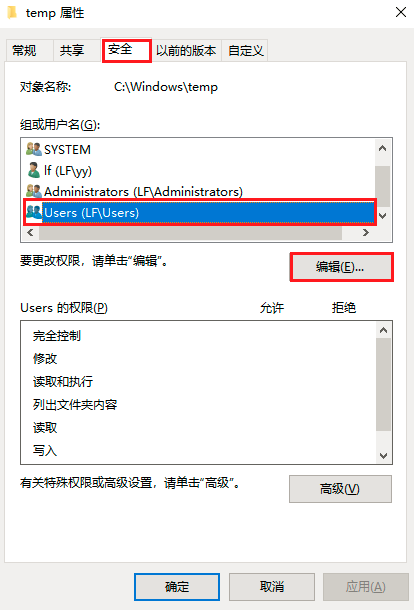
Just modify the permissions of the folder C: Windows: temp.

The first step: find the folder C: Windows: temp

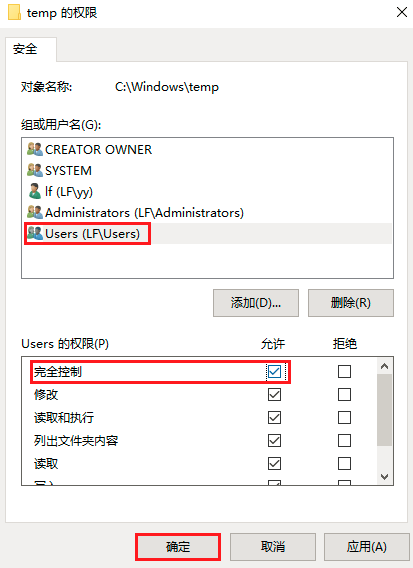
Step 2: open the temp folder and edit its permissions

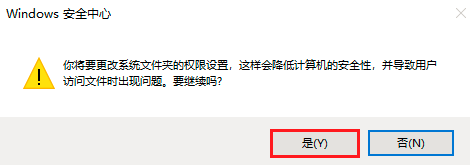
Step 3: change its permissions to full control

Error configuring application listener of class jdbc.ContextListener [One of the solutions]

Error configuring application listener of class jdbc.ContextListener One of the solutions

In the process of developing with MyEclipse + Tomcat 5.5 these two days, this error message suddenly appeared when starting the project. The previous two days have been good. How can this problem suddenly appear?I still doubt whether the computer is poisoned.

The error message is as follows


2011-4-26 14:39:52 org.apache.catalina.loader.WebappClassLoader validateJarFile
Message: validateJarFile(E:\java\Tomcat5\webapps\pmis-center\WEB-INF\lib\servlet-api.jar) - jar not loaded. See Servlet Spec 2.3, section 9.7.2. Offending class: javax/servlet/Servlet.class
2011-04-26 14:39:53,843 ERROR [org.apache.catalina.core.ContainerBase.[Catalina].[localhost].[/center]] - <Error configuring application listener of class jdbc.ContextListener>
java.lang.Error: Unresolved compilation problems: 
	The hierarchy of the type ContextListener is inconsistent
	Implicit super constructor Object() is undefined for default constructor. Must define an explicit constructor
	The type java.util.EventListener cannot be resolved. It is indirectly referenced from required .class files

	at jdbc.ContextListener.<init>(ContextListener.java:4)
	at sun.reflect.NativeConstructorAccessorImpl.newInstance0(Native Method)
	at sun.reflect.NativeConstructorAccessorImpl.newInstance(NativeConstructorAccessorImpl.java:39)
	at sun.reflect.DelegatingConstructorAccessorImpl.newInstance(DelegatingConstructorAccessorImpl.java:27)
	at java.lang.reflect.Constructor.newInstance(Constructor.java:513)
	at java.lang.Class.newInstance0(Class.java:355)
	at java.lang.Class.newInstance(Class.java:308)


Before that, we also reported WEB-INF/lib/servlet- api.jar Error in not loaded. See servlet spec 2.3, section 9.7.2

Before looking for a long time on the Internet, there is a problem servlet- api.jar Later, all the methods were tried, even the system was reinstalled, but it didn’t work. Finally, I calm down and take a look at the JRE package content in the running environment of MyEclipse. I found that all the jar packages are JDK jars. Change the jar package and recompile it. The result is good.

Remind yourself of this problem. The problem is often in the most trivial place. If you find the problem, you will get something if you think about what changes you have made before.


NPM Run Build ERROR in static/js/balabala.js from UglifyJs

NPM run build error in static/JS/ balabala.js from UglifyJs

The project added a small requirement, and an error was reported when it was ready to be deployed to the developer for testing.

ERROR in static/js/1.e54ac17.js from UglifyJs
Unexpected token: name (FusionClass) [static/js/1.e54ac17.js:55,6]

ERROR in static/js/vendor.bd8bfa0.js from UglifyJs
Unexpected token: name (ret) [static/js/vendor.bd8bfa0.js:11551,6]

From the error message, we can see that the syntax of ES6 in JS has not been converted to Es5. I think a new dependency has been added. It may be that part of the syntax of ES6 is used in the dependency, but there is no escape.

{
    test: /\.js$/,
    loader: 'babel-loader',
    options: {
        presets: ['es2015']
    },
    include: [resolve('src'), resolve('test')]
}

The above is the configuration of webpack. It can be found that the ES6 conversion in the dependency file is not supported, so we can write in the new dependency.

{
    test: /\.js$/,
    loader: 'babel-loader',
    options: {
        presets: ['es2015']
    },
    include: [resolve('src'), resolve('test'), resolve('/node_modules/your package')]
}

Just repack it.

MAC: Brew upgrade Error [How to Fix]

rm -rf /usr/local/etc/bash_completion.d/brew
rm -rf /usr/local/share/zsh/site-functions/_brew
rm -rf /usr/local/share/man/man1/brew.1
rm -rf /usr/local/share/doc/homebrew
brew update


ymdeMacBook-Pro:~ ym$ brew updateAlready up-to-date. 
brew update          # Update Homebrew's information
brew outdated # See which software can be upgraded
brew upgrade <xxx> # If you don't want to upgrade all of them, then upgrade the specified ones like this

brew upgrade; brew cleanup # If you want to upgrade them all, just upgrade them and clean them up


Error Report of Yarn Create UMI

There is a project that needs to use UMI, so it is decided to use the scaffolding method of UMI to create the project, which can save a lot of things, although it should not be advocated. But there is the problem of line and surface

PS F:\data-train> yarn create umi
yarn create v1.21.1
[1/4] Resolving packages...
[2/4] Fetching packages...
error An unexpected error occurred: "C:\\Users\\num\\AppData\\Local\\Yarn\\Cache\\v6\\npm-doctrine-2.1.0-5cd01fc101621b42c4cd7f5d1a66243716d3f39d-integrity\\node_modules\\doctrine\\.yarn-metadata.json: Unexpected end of JSON input".
info If you think this is a bug, please open a bug report with the information provided in "C:\\Users\\num\\AppData\\Local\\Yarn\\Data\\global\\yarn-error.log".
info Visit https://yarnpkg.com/en/docs/cli/create for documentation about this command.
PS F:\data-train> npm create umi
npm ERR! code ENOLOCAL
npm ERR! Could not install from "Data\npm-cache\_npx\13476" as it does not contain a package.json file.

npm ERR! A complete log of this run can be found in:
npm ERR!     d:\user\工号\Application Data\npm-cache\_logs\2019-12-21T09_22_57_009Z-debug.log
install create-umi@latest error, error code:1

The error an unexpected error occurred: "C:\\users\\job number\\appdata\\local\\yarn\\cache\\ V6\\npm-document-2.1.0-5cd01fc101621b42c4cd7f5d1a66243716d3f39d integrity\\node_ modules\\doctrine\\.yarn- metadata.json : unexpected end of JSON input "." yarn "is found after changing the\\in to \- metadata.json Delete this file and re execute yarn create UMI to install it