Clion new method shows undefined reference to solution

Clion new method shows undefined reference to solution

Problem solving

problem

"D:\cSoftware\CLion 2019.1.4\bin\cmake\win\bin\cmake.exe" --build D:\site\c\sm2\cmake-build-debug --target sm2 -- -j 4
-- Configuring done
-- Generating done
-- Build files have been written to: D:/site/c/sm2/cmake-build-debug
Scanning dependencies of target sm2
[ 50%] Linking C executable sm2.exe
d:/csoftware/mingw/mingw/bin/../lib/gcc/x86_64-w64-mingw32/9.2.0/../../../../x86_64-w64-mingw32/bin/ld.exe: CMakeFiles\sm2.dir/objects.a(main.c.obj): in function `main':
D:/site/c/sm2/main.c:6: undefined reference to `add'
collect2.exe: error: ld returned 1 exit status
mingw32-make.exe[3]: *** [CMakeFiles\sm2.dir\build.make:85: sm2.exe] Error 1
mingw32-make.exe[2]: *** [CMakeFiles\Makefile2:72: CMakeFiles/sm2.dir/all] Error 2
mingw32-make.exe[1]: *** [CMakeFiles\Makefile2:84: CMakeFiles/sm2.dir/rule] Error 2
mingw32-make.exe: *** [Makefile:130: sm2] Error 2

File addfunction. H

#include <stdio.h>
int add(int a,int b);

File addfunction. C

#include <stdio.h>
#include "addfunction.h"

int add(int a,int b){
    return a+b;
}

main.c

#include <stdio.h>
#include "addfunction.h"

int main() {
    int a = 1,b =2;
    int c = add(a,b);   //Here is a call to the add function in function.c
    printf("c=%d",c);
    return 0;
}

terms of settlement

Modify cmakelists.txt
and add_ Library and target_ link_ libraries

cmake_minimum_required(VERSION 3.14)
project(sm2 C)

set(CMAKE_C_STANDARD 99)

add_library(sm2lib addfunction.h addfunction.c)
add_executable(sm2 main.c)
target_link_libraries(sm2 sm2lib)
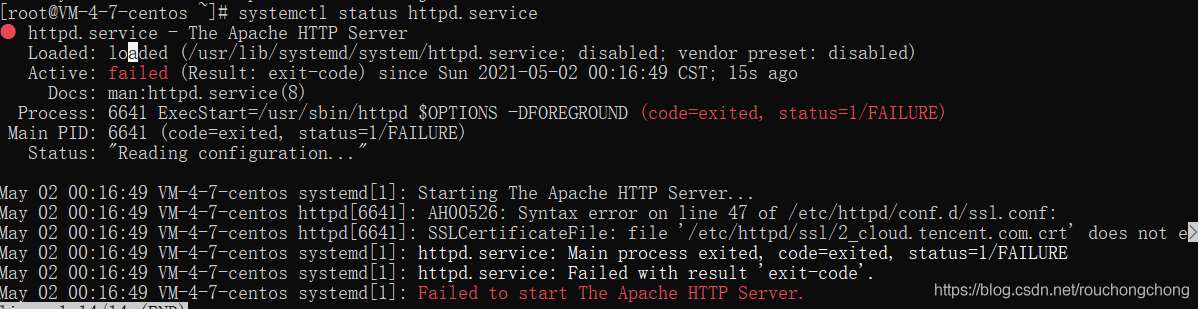
httpd Run Error: Job for httpd.service failed because the control process exited with error code.

Job for httpd.service failed because the control process exited with error code.
See “systemctl status httpd.service” and “journalctl -xe” for details.

When opening the httpd service, the error as shown in the title appears


# systemctl start httpd.service

Job for httpd.service failed because the control process exited with error code.
See "systemctl status httpd.service" and "journalctl -xe" for details.

View the startup log through systemctl status

Check whether port 80 is occupied

netstat -antlp | grep 80

Killing process with kill instruction

Input the httpd start command again, and the error still exists.

Finally, it is found that the & lt; Directory/> It is found that the access permission of the/usr directory is readable by anyone but not executable. Therefore, the access permission of the/usr directory is changed

chmod -R o+x /usr

Try to open the service again, success!

to update:

Configuration of httpd.conf

g++: internal compiler error: Killed (program cc1plus) Please submit a full bug report, with preprocess

In./build.py   When I met a mistake:


G + +: internal compiler error: program cc1plus please submit a full bug report, with preprocessed source if appropriate

See < file:///usr/share/doc/gcc-7/README.Bugs> for instructions.   Waf: Leaving directory `/home/d/tarballs/ns-allinone-3.28/ns-3.28/build’


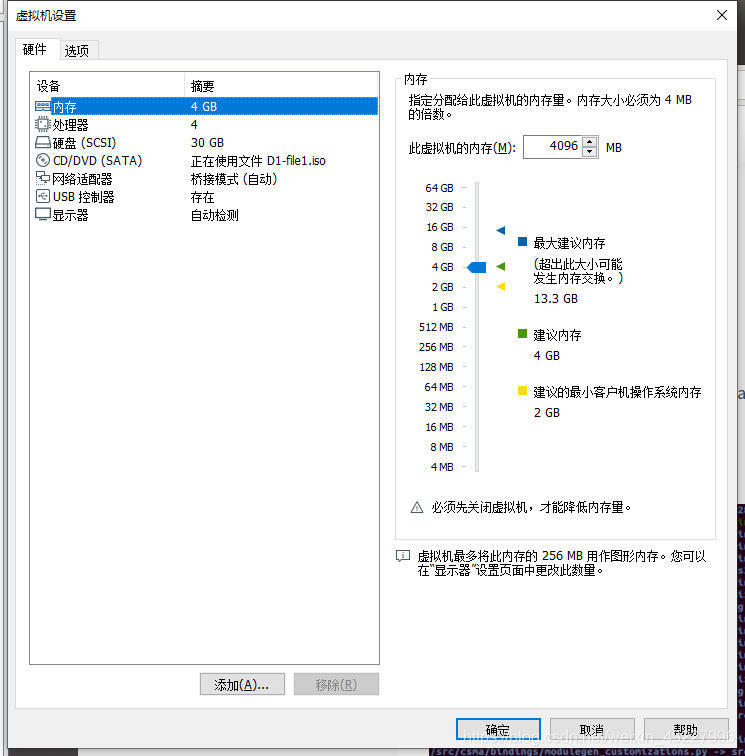
The reason is that there is not enough memory. After reading many problems solved by inputting the command line, we failed to solve them. Later, we found that it is OK to directly expand the memory outside the virtual machine

1. Open virtual machine settings

2. This virtual machine needs more memory

3. Then open the virtual machine build

AAPT: error: ‘null‘ is incompatible with attribute button (attr) reference.

Problem description

When using radio button, I want to cancel the small circle he brought with me. Use the following code

 android:button="null"

It’s just an error caused by the @ sign in front of null. According to the error message, you can see error: “null”   I haven’t found any other bloggers for a long time. This family is all caused by font size or color. At the beginning, they thought that their error message was null, and no one made such a small mistake for an hour  

AAPT: error: 'null' is incompatible with attribute button (attr) reference.

Solution:

Note that the correct code is here·········

 android:button="@null"


The solution of duplicate entry ‘for key’ primary ‘when inserting data in MySQL

The problem is the key duplication encountered in inserting data table.
solution:
1. Using ignore, if there are duplicate values in the inserted record, the record row with duplicate values will be ignored, and the insertion of other rows will not be affected.

INSERT IGNORE INTO Table_name(…..) VALUES(1,1),(2,2),(3,3);

2. Use replace to delete the duplicate record row in the table before inserting when the inserted record encounters primary key or unique duplicate

REPLACE INTO Table_name() VALUES(1,1),(2,2),(3,3)

3. Using values after on duplicate key update refers to the value of the inserted record, while not using values refers to the value of the table itself. The record of the subsequent update is the ID of the duplicate primary key or unique key where.

NSERT TO Table_name() VALUES(1,1),(1,2) ON DUPLICATE KEY UPDATE NAME1=NAME1+1;

Download: https://blog.csdn.net/zhangyr_student/article/details/80119238

Springboot startup error: error starting ApplicationContext

Error starting ApplicationContext. To display the auto-configuration report re-run your application with 'debug' enabled.
2017-11-16 15:32:12.994 ERROR 2668 --- [           main] o.s.b.d.LoggingFailureAnalysisReporter   : 

***************************
APPLICATION FAILED TO START
***************************

Description:

Cannot determine embedded database driver class for database type NONE

Action:

If you want an embedded database please put a supported one on the classpath. If you have database settings to be loaded from a particular profile you may need to active it (no profiles are currently active).

The reason is: when springboot starts, it will automatically inject data source and configure JPA
solution: exclude its injection in @ springbootapplication
@ springbootapplication (exclude = {datasourceautoconfiguration. Class, hibernatejpaautoconfiguration. Class})

//@SpringBootApplication
@SpringBootApplication(exclude={DataSourceAutoConfiguration.class,HibernateJpaAutoConfiguration.class})
public class CreditApplication {
    public static void main(String[] args) {
        SpringApplication.run(CreditApplication.class, args);
    }
}

Add the above configuration.

Uncaught (in promise) Error: timeout of 5000ms exceeded

solve

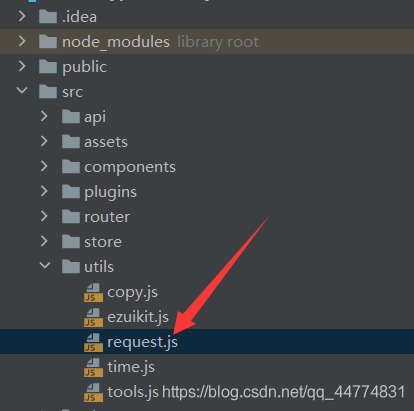
Method 1: set Axios in main.js method 2: if Axios is encapsulated into request

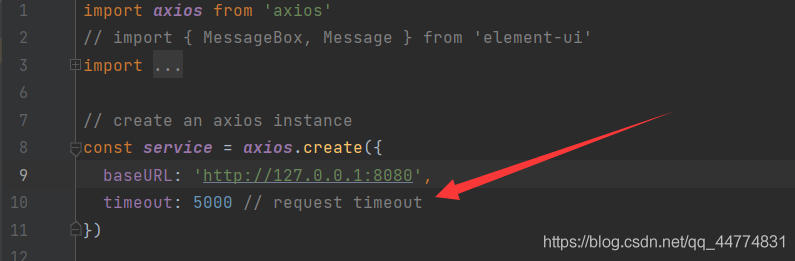
In the process of doing the project, due to the large amount of data requested, the request timed out, so this error was reported. The timeout time of 5000ms was set when Axios was configured. We can solve this error by changing this setting

Method 1: set Axios in main.js

Set the timeout of Axios in main.js, but it is generally not available. You need to set it yourself. Then main.js can be found under SRC of your project, and add Axios. Default. Timeout = 50000 in it, which means that setting the timeout to 50 seconds should be enough

Method 2: if Axios is encapsulated into request

If the first method is not used at all, you can change it in another setting:

here