The following error suddenly appears on a query page:
Uncaught SyntaxError: Invalid or unexpected token,
Translated into Chinese:
the captured query is invalid or unexpected
what is this?Careful query code logic completely no problem, a face muddled force, do not know what happened.
Since there is no problem with the code logic, it is a data problem. After checking all the data to be displayed on the page, we found some doubtful points, such as single quotation marks and double quotation marks.
In fact, this error prompt tells us that the data has special characters; The data has special characters; The data has special characters
onnx-tensorrt/builtin_op_importers.cpp:766:12: error: ‘class nvinfer1::IDeconvolutionLayer’ has no m
When compiling the onnxruntime source code, an error is reported:
/home/zxq/cxx/onnxruntime/cmake/external/onnx-tensorrt/builtin_op_importers.cpp:766:12: error: ‘class nvinfer1::IDeconvolutionLayer’ has no member named ‘setDilationNd’
     layer->setDilationNd(dilations);
            ^~~~~~~~~~~~~
/home/zxq/cxx/onnxruntime/cmake/external/onnx-tensorrt/builtin_op_importers.cpp: In function ‘onnx2trt::NodeImportResult onnx2trt::{anonymous}::importGemm(onnx2trt::IImporterContext*, const onnx::NodeProto&, std::vector<onnx2trt::TensorOrWeights>&)’:
/home/zxq/cxx/onnxruntime/cmake/external/onnx-tensorrt/builtin_op_importers.cpp:1250:18: error: ‘class nvinfer1::IShuffleLayer’ has no member named ‘setZeroIsPlaceholder’
         squeeze->setZeroIsPlaceholder(false);
                  ^~~~~~~~~~~~~~~~~~~~
/home/zxq/cxx/onnxruntime/cmake/external/onnx-tensorrt/builtin_op_importers.cpp: In function ‘onnx2trt::NodeImportResult onnx2trt::{anonymous}::importGRU(onnx2trt::IImporterContext*, const onnx::NodeProto&, std::vector<onnx2trt::TensorOrWeights>&)’:
/home/zxq/cxx/onnxruntime/cmake/external/onnx-tensorrt/builtin_op_importers.cpp:1536:20: error: ‘class nvinfer1::IShuffleLayer’ has no member named ‘setZeroIsPlaceholder’
         unsqueeze->setZeroIsPlaceholder(false);
                    ^~~~~~~~~~~~~~~~~~~~
/home/zxq/cxx/onnxruntime/cmake/external/onnx-tensorrt/builtin_op_importers.cpp: In function ‘onnx2trt::NodeImportResult onnx2trt::{anonymous}::importLSTM(onnx2trt::IImporterContext*, const onnx::NodeProto&, std::vector<onnx2trt::TensorOrWeights>&)’:
/home/zxq/cxx/onnxruntime/cmake/external/onnx-tensorrt/builtin_op_importers.cpp:2051:22: error: ‘class nvinfer1::IShuffleLayer’ has no member named ‘setZeroIsPlaceholder’
         reshapeBias->setZeroIsPlaceholder(false);
                      ^~~~~~~~~~~~~~~~~~~~
/home/zxq/cxx/onnxruntime/cmake/external/onnx-tensorrt/builtin_op_importers.cpp: In function ‘onnx2trt::NodeImportResult onnx2trt::{anonymous}::importRNN(onnx2trt::IImporterContext*, const onnx::NodeProto&, std::vector<onnx2trt::TensorOrWeights>&)’:
/home/zxq/cxx/onnxruntime/cmake/external/onnx-tensorrt/builtin_op_importers.cpp:3202:22: error: ‘class nvinfer1::IShuffleLayer’ has no member named ‘setZeroIsPlaceholder’
         reshapeBias->setZeroIsPlaceholder(false);
                      ^~~~~~~~~~~~~~~~~~~~
/home/zxq/cxx/onnxruntime/cmake/external/onnx-tensorrt/builtin_op_importers.cpp: In function ‘onnx2trt::NodeImportResult onnx2trt::{anonymous}::importTRT_Shuffle(onnx2trt::IImporterContext*, const onnx::NodeProto&, std::vector<onnx2trt::TensorOrWeights>&)’:
/home/zxq/cxx/onnxruntime/cmake/external/onnx-tensorrt/builtin_op_importers.cpp:4219:12: error: ‘class nvinfer1::IShuffleLayer’ has no member named ‘setZeroIsPlaceholder’
     layer->setZeroIsPlaceholder(zeroIsPlaceholder);
            ^~~~~~~~~~~~~~~~~~~~
external/onnx-tensorrt/CMakeFiles/nvonnxparser_static.dir/build.make:103: recipe for target 'external/onnx-tensorrt/CMakeFiles/nvonnxparser_static.dir/builtin_op_importers.cpp.o' failed
make[2]: *** [external/onnx-tensorrt/CMakeFiles/nvonnxparser_static.dir/builtin_op_importers.cpp.o] Error 1
CMakeFiles/Makefile2:2581: recipe for target 'external/onnx-tensorrt/CMakeFiles/nvonnxparser_static.dir/all' failed
make[1]: *** [external/onnx-tensorrt/CMakeFiles/nvonnxparser_static.dir/all] Error 2
Makefile:165: recipe for target 'all' failed
make: *** [all] Error 2
Traceback (most recent call last):
  File "/home/zxq/cxx/onnxruntime/tools/ci_build/build.py", line 1986, in <module>
    sys.exit(main())
  File "/home/zxq/cxx/onnxruntime/tools/ci_build/build.py", line 1921, in main
    build_targets(args, cmake_path, build_dir, configs, num_parallel_jobs, args.target)
  File "/home/zxq/cxx/onnxruntime/tools/ci_build/build.py", line 1007, in build_targets
    run_subprocess(cmd_args, env=env)
  File "/home/zxq/cxx/onnxruntime/tools/ci_build/build.py", line 528, in run_subprocess
    return run(*args, cwd=cwd, capture_stdout=capture_stdout, shell=shell, env=my_env)
  File "/home/zxq/cxx/onnxruntime/tools/python/util/run.py", line 41, in run
    completed_process = subprocess.run(
  File "/home/zxq/anaconda3/lib/python3.8/subprocess.py", line 512, in run
    raise CalledProcessError(retcode, process.args,
subprocess.CalledProcessError: Command '['/usr/local/bin/cmake', '--build', '/home/zxq/cxx/onnxruntime/build/Linux/Release', '--config', 'Release']' returned non-zero exit status 2.
reason:
From the error message, we can see that it is related to the third-party package external/onnx tensorrt of oonnxruntime, and then we can see that
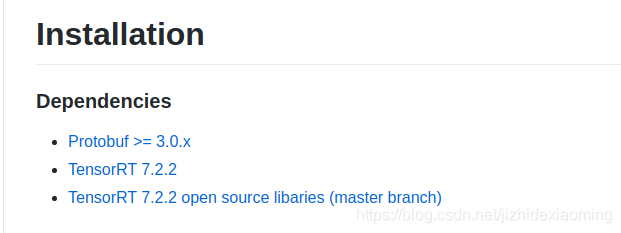
Onnx runtime – rel-1.7.2 is the third-party package onnx tensorrt. This package depends on tensorrt version 7.2.2, but I installed 7.0.0, which is too low.
The reason why I installed 7.0.0 is that I installed CUDA 10.0 before, and CUDA 10.0 supports tensorrt 7.0.0 at most.
terms of settlement:
(1) Download the appropriate version of onnxruntime again. The download is too slow and the time cost is too high.
(2) Update CUDA 11.0, CUDA 11.0 can support the latest tensorrt 7.2.3, re install CUDA and tensorrt reference tutorial.
GitHub upload failed: git push error: failed to push some refs to exception handling
reason
When GitHub created the project, the code was uploaded and the readme.md file was manually added to GitHub, but the local warehouse did not update the readme.md file.
resolvent
First, pull the files from the remote code base to the local code base, and then push the new code to the GitHub code base
Use the command to pull: git pull -- rebase origin master
and then upload: git push - U origin master
Module not founderror: no module named ‘nets.ssd‘
In the nets folder, create a new one__ init__. Py, which solves the problem.
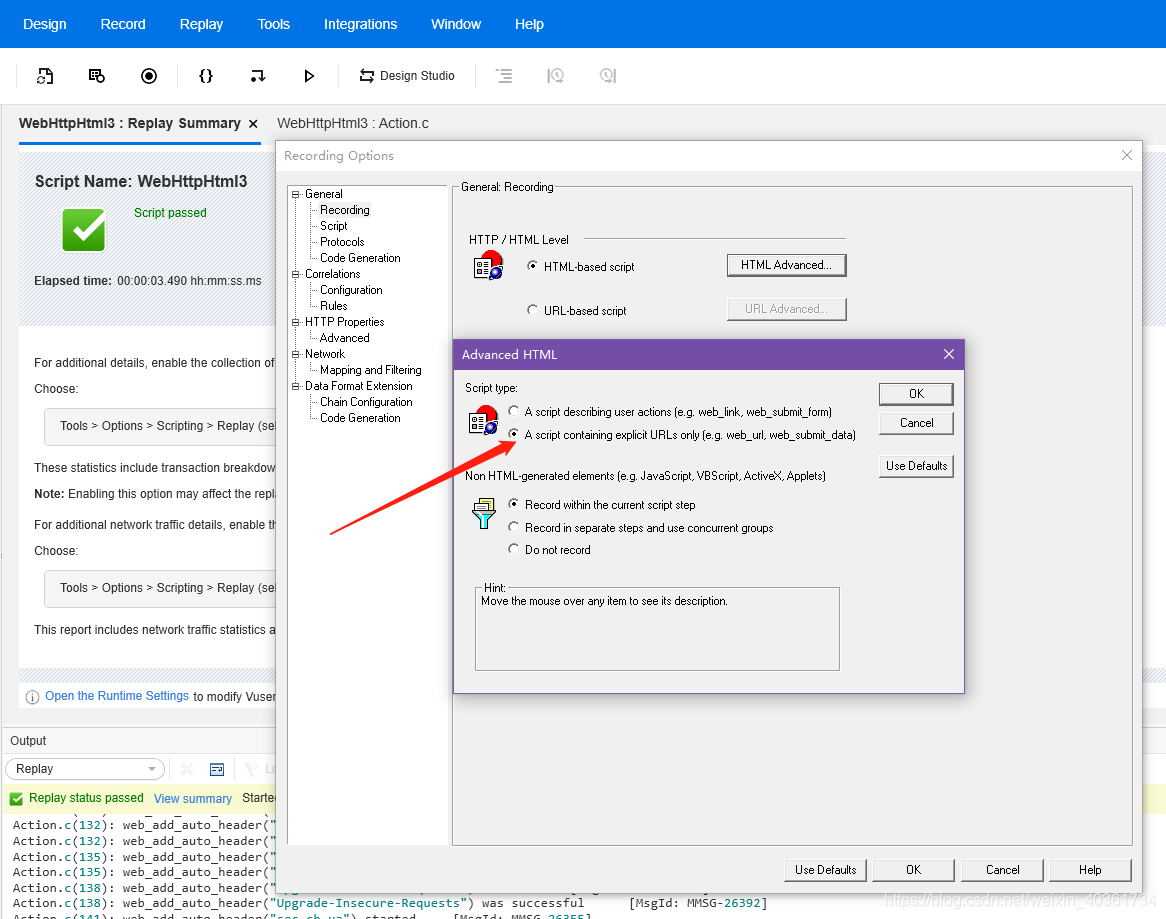
LoadRunnercatalog refund: Action.c(121): Error -27987: Requested image not found [MsgId: MERR-27987]
LoadRunner24405;- 21046;- Web Tours27880;- 20876;- 25253;- 38169Action.c(121): Error -27987: Requested image not found [MsgId: MERR-27987]
209151;
Successfully solved runtimeerror: CUDA runtime error (30)
RuntimeError: cuda runtime error (30)
I have been puzzled by this inexplicable error before. When I was ready to re install the driver and CUDA, I suddenly realized the root cause of this problem
the thing is, every time I want to run a program and go back to have a rest, I come back the next day to check. I’m disappointed that the program reported this error after running for a short time. Moreover, running the program after this error does not work. Only a simple and rude computer restart can solve the problem temporarily. But later found that if I have been using the computer during the day, the program will naturally run to the end, will not report such errors
so! It’s really CUDA, GPU’s problem, but it’s not because they have bugs, but because they are not playing a role in the rest, resulting in program errors! The fundamental reason is that my computer set a fixed time after the lock screen and automatically hang, so it is not CUDA. So there are such errors
If I set “don’t hang up” later, no such error will occur
write down your experience for the first time. I hope it can help you!
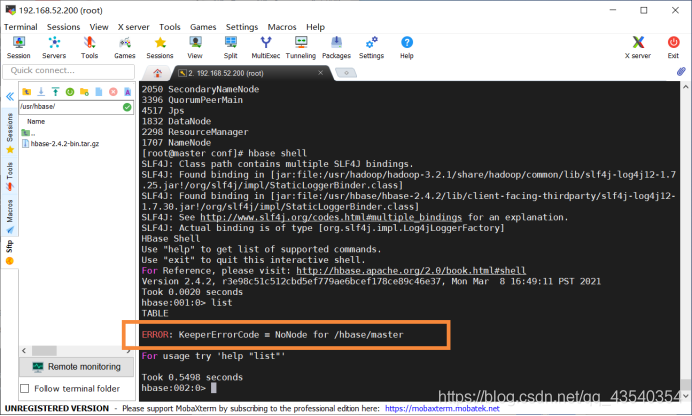
ERROR: KeeperErrorCode = NoNode for /hbase/master
Error: keepererrorcode = nonode for/HBase/master error occurred when inputting command in HBase shell
Error screenshot:
solution:
solution 1: close zookeeper, delete the version-2 folder under your own dataDir path, and then restart (used)
solution 2: add a paragraph in hbase-site.xml
<property>
	<name>hbase.unsafe.stream.capability.enforce</name>
	<value>false</value>
</property>
The method can be used for the purpose of applying a tube, and for the purpose of this problem, I would like to say that there are three things: Core site HDFS site HBase site HBase. Rootdir . Plan 5: we have a large amount of disambiguation ( *) cause: namede on namespaceid and datanode It was found that the number of nodes under the nodal de nodal de nodal de paceme was not significant. The first language resolution method is: dfs.datanode. Data. Dir in dandoop Hadoop S>
The second edition disambiguation method: clusterid in data under current/current versioning.
[Solved] IO exception: NL exception was generated
Could not get JDBC Connection; nested exception is org.apache.commons.dbcp.SQLNestedException: Cannot create PoolableConnectionFactory (Io Exceptions: NL Exception was generated)
org.springframework.jdbc.CannotGetJdbcConnectionException: Could not get JDBC Connection; nested exception is org.apache.commons.dbcp.SQLNestedException: Cannot create PoolableConnectionFactory (Io Exceptions: NL Exception was generated)
Because the program has been running normally for a long time, so the basic rule out code logic problems, check the configuration found that the JDBC connection string problem;
The original URL was written as:
jdbc:oracle:thin:@(DESCRIPTION =(DESCRIPTION =(ADDRESS_LIST =(ADDRESS = (PROTOCOL = TCP)(HOST = 127.0.0.1)(PORT = 1521))(ADDRESS = (PROTOCOL = TCP)(HOST = 127.0.0.1)(PORT = 1521))(LOAD_BALANCE = yes))(CONNECT_DATA =(SERVER = DEDICATED)(SERVICE_NAME = orcl)(FAILOVER_MODE =(TYPE = SELECT)(METHOD = BASIC)(RETRIES = 180)(DELAY = 5))))Where, DESCRIPTION appears twice, which is incorrect, and the correct connection string should be:
jdbc:oracle:thin:@(DESCRIPTION =(ADDRESS_LIST =(ADDRESS = (PROTOCOL = TCP)(HOST = 127.0.0.1)(PORT = 1521))(ADDRESS = (PROTOCOL = TCP)(HOST = 127.0.0.1)(PORT = 1521))(LOAD_BALANCE = yes))(CONNECT_DATA =(SERVER = DEDICATED)(SERVICE_NAME = orcl)(FAILOVER_MODE =(TYPE = SELECT)(METHOD = BASIC)(RETRIES = 180)(DELAY = 5))))Conclusion:
A JDBC connection string syntax error may result in Io exceptions: NL Exception was generated.
subprocess installed post-installation script returned error exit status 1
dpkg:error handling util-linux (-configure):
Script returned error exit status 1 after subprocess install
An error was encountered while processing:
util-linux
E:Subprocess /usr/bin/dpkg returned error code (1)
Go to /var/lib/dpkg/info directory
Delete the stuck package file
apt-get autoclean
apt-get autoremove
apt-get update
apt-get upgrade
How to Solve Error: Module did not self-register
1. Error description
[scss/sass] 14:56:38.373 internal/modules/cjs/loader.js:717
[scss/sass] 14:56:38.373   return process.dlopen(module, path.toNamespacedPath(filename));
[scss/sass] 14:56:38.373                  ^
[scss/sass] 14:56:38.373 Error: Module did not self-register.
[scss/sass] 14:56:38.373     at Object.Module._extensions..node (internal/modules/cjs/loader.js:717:18)
[scss/sass] 14:56:38.373     at Module.load (internal/modules/cjs/loader.js:598:32)
[scss/sass] 14:56:38.373     at tryModuleLoad (internal/modules/cjs/loader.js:537:12)
[scss/sass] 14:56:38.373     at Function.Module._load (internal/modules/cjs/loader.js:529:3)
[scss/sass] 14:56:38.373     at Module.require (internal/modules/cjs/loader.js:636:17)
[scss/sass] 14:56:38.373     at require (internal/modules/cjs/helpers.js:20:18)
[scss/sass] 14:56:38.373     at module.exports (G:\HBuilderX\plugins\compile-node-sass\node_modules\node-sass-china\lib\binding.js:19:10)
[scss/sass] 14:56:38.373     at Object.<anonymous> (G:\HBuilderX\plugins\compile-node-sass\node_modules\node-sass-china\lib\index.js:14:35)
[scss/sass] 14:56:38.373     at Module._compile (internal/modules/cjs/loader.js:688:30)
[scss/sass] 14:56:38.373     at Object.Module._extensions..js (internal/modules/cjs/loader.js:699:10)
2. Error reason
The error message is that the module is not registered and installed with NPM Install, but the result is still an error, indicating that the module has not been successfully installed
G:\HBuilderX\plugins\compile-node-sass\node_modules\node-sass-china\vendor\win32
-x64-64>npm install

> [email protected] install G:\HBuilderX\plugins\compile-node-sass\node_modu
les\node-sass-china
> node scripts/install.js

node-sass build Binary found at G:\HBuilderX\plugins\compile-node-sass\node_modu
les\node-sass-china\vendor\win32-x64-64\binding.node

> [email protected] postinstall G:\HBuilderX\plugins\compile-node-sass\node_
modules\node-sass-china
> node scripts/build.js

Binary found at G:\HBuilderX\plugins\compile-node-sass\node_modules\node-sass-ch
ina\vendor\win32-x64-64\binding.node
Testing binary
Binary has a problem: Error: \\?\G:\HBuilderX\plugins\compile-node-sass\node_mod
ules\node-sass-china\vendor\win32-x64-64\binding.node is not a valid Win32 appli
cation.
\\?\G:\HBuilderX\plugins\compile-node-sass\node_modules\node-sass-china\vendor\w
in32-x64-64\binding.node
    at Object.Module._extensions..node (internal/modules/cjs/loader.js:717:18)
    at Module.load (internal/modules/cjs/loader.js:598:32)
    at tryModuleLoad (internal/modules/cjs/loader.js:537:12)
    at Function.Module._load (internal/modules/cjs/loader.js:529:3)
    at Module.require (internal/modules/cjs/loader.js:636:17)
    at require (internal/modules/cjs/helpers.js:20:18)
    at module.exports (G:\HBuilderX\plugins\compile-node-sass\node_modules\node-
sass-china\lib\binding.js:19:10)
    at Object.<anonymous> (G:\HBuilderX\plugins\compile-node-sass\node_modules\n
ode-sass-china\lib\index.js:14:35)
    at Module._compile (internal/modules/cjs/loader.js:688:30)
    at Object.Module._extensions..js (internal/modules/cjs/loader.js:699:10)
Building the binary locally
Building: F:\nodejs\node.exe G:\HBuilderX\plugins\compile-node-sass\node_modules
\node-sass-china\node_modules\node-gyp\bin\node-gyp.js rebuild --verbose --libsa
ss_ext= --libsass_cflags= --libsass_ldflags= --libsass_library=
gyp info it worked if it ends with ok
gyp verb cli [ 'F:\\nodejs\\node.exe',
gyp verb cli   'G:\\HBuilderX\\plugins\\compile-node-sass\\node_modules\\node-sa
ss-china\\node_modules\\node-gyp\\bin\\node-gyp.js',
gyp verb cli   'rebuild',
gyp verb cli   '--verbose',
gyp verb cli   '--libsass_ext=',
gyp verb cli   '--libsass_cflags=',
gyp verb cli   '--libsass_ldflags=',
gyp verb cli   '--libsass_library=' ]
gyp info using [email protected]
gyp info using [email protected] | win32 | x64
gyp verb command rebuild []
gyp verb command clean []
gyp verb clean removing "build" directory
gyp verb command configure []
gyp verb check python checking for Python executable "python2" in the PATH
gyp verb `which` failed Error: not found: python2
gyp verb `which` failed     at getNotFoundError (G:\HBuilderX\plugins\compile-no
de-sass\node_modules\node-sass-china\node_modules\which\which.js:13:12)
gyp verb `which` failed     at F (G:\HBuilderX\plugins\compile-node-sass\node_mo
dules\node-sass-china\node_modules\which\which.js:68:19)
gyp verb `which` failed     at E (G:\HBuilderX\plugins\compile-node-sass\node_mo
dules\node-sass-china\node_modules\which\which.js:80:29)
gyp verb `which` failed     at G:\HBuilderX\plugins\compile-node-sass\node_modul
es\node-sass-china\node_modules\which\which.js:89:16
gyp verb `which` failed     at G:\HBuilderX\plugins\compile-node-sass\node_modul
es\node-sass-china\node_modules\isexe\index.js:42:5
gyp verb `which` failed     at G:\HBuilderX\plugins\compile-node-sass\node_modul
es\node-sass-china\node_modules\isexe\windows.js:36:5
gyp verb `which` failed     at FSReqWrap.oncomplete (fs.js:154:21)
gyp verb `which` failed  python2 { Error: not found: python2
gyp verb `which` failed     at getNotFoundError (G:\HBuilderX\plugins\compile-no
de-sass\node_modules\node-sass-china\node_modules\which\which.js:13:12)
gyp verb `which` failed     at F (G:\HBuilderX\plugins\compile-node-sass\node_mo
dules\node-sass-china\node_modules\which\which.js:68:19)
gyp verb `which` failed     at E (G:\HBuilderX\plugins\compile-node-sass\node_mo
dules\node-sass-china\node_modules\which\which.js:80:29)
gyp verb `which` failed     at G:\HBuilderX\plugins\compile-node-sass\node_modul
es\node-sass-china\node_modules\which\which.js:89:16
gyp verb `which` failed     at G:\HBuilderX\plugins\compile-node-sass\node_modul
es\node-sass-china\node_modules\isexe\index.js:42:5
gyp verb `which` failed     at G:\HBuilderX\plugins\compile-node-sass\node_modul
es\node-sass-china\node_modules\isexe\windows.js:36:5
gyp verb `which` failed     at FSReqWrap.oncomplete (fs.js:154:21)
gyp verb `which` failed   stack:
gyp verb `which` failed    'Error: not found: python2\n    at getNotFoundError (
G:\\HBuilderX\\plugins\\compile-node-sass\\node_modules\\node-sass-china\\node_m
odules\\which\\which.js:13:12)\n    at F (G:\\HBuilderX\\plugins\\compile-node-s
ass\\node_modules\\node-sass-china\\node_modules\\which\\which.js:68:19)\n    at
 E (G:\\HBuilderX\\plugins\\compile-node-sass\\node_modules\\node-sass-china\\no
de_modules\\which\\which.js:80:29)\n    at G:\\HBuilderX\\plugins\\compile-node-
sass\\node_modules\\node-sass-china\\node_modules\\which\\which.js:89:16\n    at
 G:\\HBuilderX\\plugins\\compile-node-sass\\node_modules\\node-sass-china\\node_
modules\\isexe\\index.js:42:5\n    at G:\\HBuilderX\\plugins\\compile-node-sass\
\node_modules\\node-sass-china\\node_modules\\isexe\\windows.js:36:5\n    at FSR
eqWrap.oncomplete (fs.js:154:21)',
gyp verb `which` failed   code: 'ENOENT' }
gyp verb check python checking for Python executable "python" in the PATH
gyp verb `which` succeeded python E:\Python\Python36\python.EXE
gyp ERR! configure error
gyp ERR! stack Error: Command failed: E:\Python\Python36\python.EXE -c import sy
s; print "%s.%s.%s" % sys.version_info[:3];
gyp ERR! stack   File "<string>", line 1
gyp ERR! stack     import sys; print "%s.%s.%s" % sys.version_info[:3];
gyp ERR! stack                                ^
gyp ERR! stack SyntaxError: invalid syntax
gyp ERR! stack
gyp ERR! stack     at ChildProcess.exithandler (child_process.js:289:12)
gyp ERR! stack     at ChildProcess.emit (events.js:182:13)
gyp ERR! stack     at maybeClose (internal/child_process.js:962:16)
gyp ERR! stack     at Socket.stream.socket.on (internal/child_process.js:381:11)

gyp ERR! stack     at Socket.emit (events.js:182:13)
gyp ERR! stack     at Pipe._handle.close (net.js:606:12)
gyp ERR! System Windows_NT 6.1.7601
gyp ERR! command "F:\\nodejs\\node.exe" "G:\\HBuilderX\\plugins\\compile-node-sa
ss\\node_modules\\node-sass-china\\node_modules\\node-gyp\\bin\\node-gyp.js" "re
build" "--verbose" "--libsass_ext=" "--libsass_cflags=" "--libsass_ldflags=" "--
libsass_library="
gyp ERR! cwd G:\HBuilderX\plugins\compile-node-sass\node_modules\node-sass-china

gyp ERR! node -v v10.13.0
gyp ERR! node-gyp -v v3.8.0
gyp ERR! not ok
Build failed with error code: 1
npm ERR! code ELIFECYCLE
npm ERR! errno 1
npm ERR! [email protected] postinstall: `node scripts/build.js`
npm ERR! Exit status 1
npm ERR!
npm ERR! Failed at the [email protected] postinstall script.
npm ERR! This is probably not a problem with npm. There is likely additional log
ging output above.

npm ERR! A complete log of this run can be found in:
npm ERR!     F:\nodejs\node_cache\_logs\2019-01-10T07_40_54_700Z-debug.log

G:\HBuilderX\plugins\compile-node-sass\node_modules\node-sass-china\vendor\win32
-x64-64>
3. Solutions
Uninstall and reinstall Sass related modules
C:\Users\Administrator.USER-0GUONPPBHK>npm uninstall node-sass -D
npm WARN Administrator.USER-0GUONPPBHK No repository field.
npm WARN Administrator.USER-0GUONPPBHK No license field.
npm WARN optional SKIPPING OPTIONAL DEPENDENCY: [email protected] (node_modules\fse
vents):
npm WARN notsup SKIPPING OPTIONAL DEPENDENCY: Unsupported platform for fsevents@
1.2.4: wanted {"os":"darwin","arch":"any"} (current: {"os":"win32","arch":"x64"}
)

added 33 packages from 16 contributors, removed 22 packages and updated 340 pack
ages in 26.067s

C:\Users\Administrator.USER-0GUONPPBHK>npm install node-sass -D

> [email protected] install C:\Users\Administrator.USER-0GUONPPBHK\node_modules\n
ode-sass
> node scripts/install.js

Cached binary found at F:\nodejs\node_cache\node-sass\4.11.0\win32-x64-64_bindin
g.node

> [email protected] postinstall C:\Users\Administrator.USER-0GUONPPBHK\node_modul
es\node-sass
> node scripts/build.js

Binary found at C:\Users\Administrator.USER-0GUONPPBHK\node_modules\node-sass\ve
ndor\win32-x64-64\binding.node
Testing binary
Binary is fine
npm WARN [email protected] requires a peer of vue@^2.5.2 but none is installed. Y
ou must install peer dependencies yourself.
npm WARN [email protected] requires a peer of vue@^2.5.0 but none is installed.
 You must install peer dependencies yourself.
npm WARN Administrator.USER-0GUONPPBHK No repository field.
npm WARN Administrator.USER-0GUONPPBHK No license field.
npm WARN optional SKIPPING OPTIONAL DEPENDENCY: [email protected] (node_modules\fse
vents):
npm WARN notsup SKIPPING OPTIONAL DEPENDENCY: Unsupported platform for fsevents@
1.2.4: wanted {"os":"darwin","arch":"any"} (current: {"os":"win32","arch":"x64"}
)

+ [email protected]
added 110 packages from 118 contributors in 26.774s

C:\Users\Administrator.USER-0GUONPPBHK>
Node.js operation mysql error Cannot enqueue Handshake after invoking quit
Error Background:
When the database operation is performed for the first time, it is successful. The second time a database operation is performed, an error is reported as shown in the title.
The reason:
This is because after we close the connection with the.end() method, we need to re-call createConnection to recreate a connection.
Solutions:
For example, the following encapsulates a method that operates on database queries and additions. Each time a new connection is created using mysql.createconnection () before the database operation is performed, instead of putting it directly to the outermost layer.
var mysql  = require('mysql');
exports.find=function(findSql,callback){
    var connection = mysql.createConnection({
        host     : 'localhost',
        user     : 'root',
        password : '123456',
        port: '3306',
        database: 'namesharing',
    });
    connection.connect();
    connection.query(findSql,function (err, result) {
        if(err){
          console.log('[SELECT ERROR] - ',err.message);
          return;
        }
        connection.end();
        callback(result)
    });
}


exports.insert=function(addSql,addSqlParams,callback){
    var connection = mysql.createConnection({
        host     : 'localhost',
        user     : 'root',
        password : '123456',
        port: '3306',
        database: 'namesharing',
    });
    connection.connect();
    connection.query(addSql,addSqlParams,function (err, result) {
        if(err){
            console.log('[INSERT ERROR] - ',err.message);
            return;
        }
        connection.end();
        // console.log('INSERT ID:',result);
        callback(result)
    });
}
How to open X Display on the server side (locally operable remote interface)
The problem is this:
processes some photos on the server, and sometimes you want to look directly at the images on the server. But the server is Ubuntu Server, with no graphical interface. If we use feH, or cv2.imshow(), the error will be reported as follows:
Feh ERROR: Can’t open X display. It is running, yeah?
Solutions:
It should be in the server side ~/.bashrc file
export DISPLAY=localhost=10.0
On the server side the /etc/ssh/ssh_config file should be set to :
Host *
ForwardX11 yes
Use the following parameters when sshing to the server.
ssh -CAXY your-server-name@your-server-ip