[Solved] Springboot project Create to start Error: APPLICATION FAILED TO START


Description:
Failed to configure a DataSource: ‘url’ attribute is not specified and no embedded datasource could be configured.
Reason: Failed to determine a suitable driver class
Action:
Consider the following:
If you want an embedded database (H2, HSQL or Derby), please put it on the classpath.
If you have database settings to be loaded from a particular profile you may need to activate it (no profiles are currently active).
Process finished with exit code 1

Reason:
Spring boot loads the org.springframework.boot.autoconfigure.jdbc.DataSourceAutoConfiguration class by default, after introducing mybatis-spring-boot-starter in the pom. DataSourceAutoConfiguration class uses the @Configuration annotation to inject the dataSource bean into spring because there is no configuration information about the dataSource in the project, so when spring creates the dataSource bean due to the lack of relevant information it will report an error.

Solution:
Add attribute @SpringBootApplication(exclude = DataSourceAutoConfiguration.class) to the Spring boot boot boot class to prevent Spring boot from automatically injecting the dataSource


[Solved] Python Pandas Read Error: OSError: initializing from file failed

Problem Description:

error when loading CSV format data in pandas

B = pd.read_csv("C:/Users/hp/Desktop/Hands-On Data Analysis/Unit 1 Project Collection/train.csv")
B.head(3)

report errors:

OSError: Initializing from file failed

Cause analysis:

When calling the read_csv() method of pandas, the C engine is used as the parser engine by default, and when the file name contains Chinese, using the C engine will be wrong in some cases.


Solution:

Specify the engine as Python when calling the read_csv() method

B = pd.read_csv("C:/Users/hp/Desktop/Hands-On-Data-Analysis/Unit-1-Project-Collection/train.csv",engine='python')
B.head(3)

Rancher application service error: request entity too large

When request entity too large occurs, it is because the transport stream exceeds 1m.

1. It is necessary to set parameters in ingress of rancher.

Configuration note: nginx.ingress.kubernetes.io/proxy-body-size

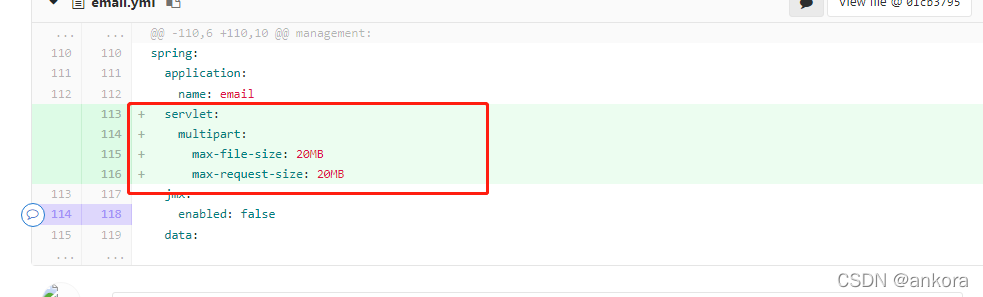
2. Springboot 2.0 adds configuration to the configuration file

spring.servlet.multipart.max-file-size=1024MB
spring.servlet.multipart.max-request-size=1024MB

[Solved] Error: condahtterror: http 404 not found for URL

There is a problem when CONDA creates a new environment:

Solving environment: failed
CondaHTTPError: HTTP 404 NOT FOUND for url https://mirrors.tuna.tsinghua.edu.cn/anaconda/pkgs/noarch/repodata.json 26

Solution:

conda config --remove-key channels
conda config --append channels conda-forge --append channels bioconda --append channels defaults

[Solved] Springboot Error: swagger-UI/index.html Access Error 404

Springboot solves swagger UI/index HTML Access Error 404

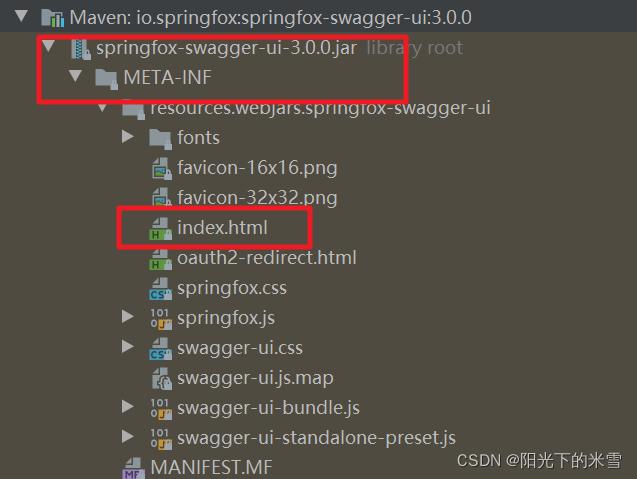
Recently, I was working on a project to adopt swagger 3.0. After the project is started, access the swagger path: http://localhost:8880/vdmpess -web/swagger-ui/index. HTML reports 404 because webmvcconfig inherits webmvcconfigurationsupport. After inheriting this class, the relevant contents configured in the configuration file will become invalid and the static resource needs to be re specified
the swagger static resource needs to be re specified.

Swagger address in project

Solution:

Adds the address of the specified static resource

@Configuration
public class WebMvcConfig extends WebMvcConfigurationSupport {

    @Override
    public void addResourceHandlers(ResourceHandlerRegistry registry) {
        registry.
                addResourceHandler("/swagger-ui/**")
                .addResourceLocations("classpath:/META-INF/resources/webjars/springfox-swagger-ui/")
                .resourceChain(false);
    }
}

[Solved] ClickHouse Start Error: Run under ‘sudo -u clickhouse‘

Question:

Use command

clickhouse-server --config-file=/etc/clickhouse-server/config.xml

Start ClickHouse error:
Effective user of the process (root) does not match the owner of the data (clickhouse)
or
2022.01.13 00:32:46.999337 [ 3088 ] {} <Error> Application: DB::Exception: Effective user of the process (root) does not match the owner of the data (clickhouse). Run under 'sudo -u clickhouse'.

Solution:

Use the following commands:

# Satart ClickHouse
sudo systemctl start clickhouse-server

# Close ClickHouse
sudo systemctl stop clickhouse-server

# Check the status of ClickHouse
sudo systemctl status clickhouse-server

[Solved] spingboot Error: I/O error on POST request for “9411/api/v2/spans“: connect timed out

Springboot error I/O error on post request for“ http://10.10.195.199:9411/api/v2/spans “: connect timed out; nested exception is java.net.SocketTimeoutException: connect timed out

Problem background solution experience Lyric: a sack of love and happiness

Problem background

When using Zipkin, the following error occurs when accessing the URL

2022-01-11 11:22:35.554  WARN [service-one,,,] 40592 --- [ender@131ff6fa}] z.r.AsyncReporter$BoundedAsyncReporter   : Spans were dropped due to exceptions. All subsequent errors will be logged at FINE level.
2022-01-11 11:22:35.557  WARN [service-one,,,] 40592 --- [ender@131ff6fa}] z.r.AsyncReporter$BoundedAsyncReporter   : Dropped 1 spans due to ResourceAccessException(I/O error on POST request for "http://10.10.195.199:9411/api/v2/spans": connect timed out; nested exception is java.net.SocketTimeoutException: connect timed out)

org.springframework.web.client.ResourceAccessException: I/O error on POST request for "http://10.10.195.199:9411/api/v2/spans": connect timed out; nested exception is java.net.SocketTimeoutException: connect timed out
	at org.springframework.web.client.RestTemplate.doExecute(RestTemplate.java:751) ~[spring-web-5.2.1.RELEASE.jar:5.2.1.RELEASE]
	at org.springframework.cloud.sleuth.zipkin2.sender.ZipkinRestTemplateWrapper.doExecute(ZipkinRestTemplateSenderConfiguration.java:228) ~[spring-cloud-sleuth-zipkin-2.2.0.RELEASE.jar:2.2.0.RELEASE]
	at org.springframework.web.client.RestTemplate.exchange(RestTemplate.java:644) ~[spring-web-5.2.1.RELEASE.jar:5.2.1.RELEASE]
	at org.springframework.cloud.sleuth.zipkin2.sender.RestTemplateSender.post(RestTemplateSender.java:129) ~[spring-cloud-sleuth-zipkin-2.2.0.RELEASE.jar:2.2.0.RELEASE]
	at org.springframework.cloud.sleuth.zipkin2.sender.RestTemplateSender$HttpPostCall.doExecute(RestTemplateSender.java:142) ~[spring-cloud-sleuth-zipkin-2.2.0.RELEASE.jar:2.2.0.RELEASE]
	at org.springframework.cloud.sleuth.zipkin2.sender.RestTemplateSender$HttpPostCall.doExecute(RestTemplateSender.java:132) ~[spring-cloud-sleuth-zipkin-2.2.0.RELEASE.jar:2.2.0.RELEASE]
	at zipkin2.Call$Base.execute(Call.java:380) ~[zipkin-2.19.0.jar:na]
	at zipkin2.reporter.AsyncReporter$BoundedAsyncReporter.flush(AsyncReporter.java:285) ~[zipkin-reporter-2.11.0.jar:na]
	at zipkin2.reporter.AsyncReporter$Flusher.run(AsyncReporter.java:354) [zipkin-reporter-2.11.0.jar:na]
	at java.lang.Thread.run(Thread.java:748) [na:1.8.0_172]
Caused by: java.net.SocketTimeoutException: connect timed out
	at java.net.DualStackPlainSocketImpl.waitForConnect(Native Method) ~[na:1.8.0_172]
	at java.net.DualStackPlainSocketImpl.socketConnect(DualStackPlainSocketImpl.java:85) ~[na:1.8.0_172]
	at java.net.AbstractPlainSocketImpl.doConnect(AbstractPlainSocketImpl.java:350) ~[na:1.8.0_172]
	at java.net.AbstractPlainSocketImpl.connectToAddress(AbstractPlainSocketImpl.java:206) ~[na:1.8.0_172]
	at java.net.AbstractPlainSocketImpl.connect(AbstractPlainSocketImpl.java:188) ~[na:1.8.0_172]
	at java.net.PlainSocketImpl.connect(PlainSocketImpl.java:172) ~[na:1.8.0_172]
	at java.net.SocksSocketImpl.connect(SocksSocketImpl.java:392) ~[na:1.8.0_172]
	at java.net.Socket.connect(Socket.java:589) ~[na:1.8.0_172]
	at sun.net.NetworkClient.doConnect(NetworkClient.java:175) ~[na:1.8.0_172]
	at sun.net.www.http.HttpClient.openServer(HttpClient.java:463) ~[na:1.8.0_172]
	at sun.net.www.http.HttpClient.openServer(HttpClient.java:558) ~[na:1.8.0_172]
	at sun.net.www.http.HttpClient.<init>(HttpClient.java:242) ~[na:1.8.0_172]
	at sun.net.www.http.HttpClient.New(HttpClient.java:339) ~[na:1.8.0_172]
	at sun.net.www.http.HttpClient.New(HttpClient.java:357) ~[na:1.8.0_172]
	at sun.net.www.protocol.http.HttpURLConnection.getNewHttpClient(HttpURLConnection.java:1220) ~[na:1.8.0_172]
	at sun.net.www.protocol.http.HttpURLConnection.plainConnect0(HttpURLConnection.java:1156) ~[na:1.8.0_172]
	at sun.net.www.protocol.http.HttpURLConnection.plainConnect(HttpURLConnection.java:1050) ~[na:1.8.0_172]
	at sun.net.www.protocol.http.HttpURLConnection.connect(HttpURLConnection.java:984) ~[na:1.8.0_172]
	at org.springframework.http.client.SimpleBufferingClientHttpRequest.executeInternal(SimpleBufferingClientHttpRequest.java:76) ~[spring-web-5.2.1.RELEASE.jar:5.2.1.RELEASE]
	at org.springframework.http.client.AbstractBufferingClientHttpRequest.executeInternal(AbstractBufferingClientHttpRequest.java:48) ~[spring-web-5.2.1.RELEASE.jar:5.2.1.RELEASE]
	at org.springframework.http.client.AbstractClientHttpRequest.execute(AbstractClientHttpRequest.java:53) ~[spring-web-5.2.1.RELEASE.jar:5.2.1.RELEASE]
	at org.springframework.web.client.RestTemplate.doExecute(RestTemplate.java:742) ~[spring-web-5.2.1.RELEASE.jar:5.2.1.RELEASE]
	... 9 common frames omitted

Solution

1. The firewall is not turned off

systemctl stop firewalld

Experience

1. I was tired of finding the problem. Another time, I just introduced Zipkin dependency, which was not used, and a similar error occurred.

[Solved] QuotaExceededError the quota has been exceeded — Firefox

QuotaExceededError the quota has been exceeded — Firefox
Firefox Error:

QuotaExceededError the quota has been exceeded

1. Enter about:config in the Firefox address bar

2. Search DOM.storage.default.Quto in the advanced settings interface.

3. Set its value to 102400 or greater.


Solution:

rewrite the method of Localstorage (getitem, setitem, removeitem…)
the following record can be written:

function getStorage() {

    var storageImpl;

     try { 
        localStorage.setItem("storage", ""); 
        localStorage.removeItem("storage");
        storageImpl = localStorage;
     }
     catch (err) { 
         storageImpl = new LocalStorageAlternative();
     }

    return storageImpl;

}

function LocalStorageAlternative() {

    var structureLocalStorage = {};

    this.setItem = function (key, value) {
        structureLocalStorage[key] = value;
    }

    this.getItem = function (key) {
        if(typeof structureLocalStorage[key] != 'undefined' ) {
            return structureLocalStorage[key];
        }
        else {
            return null;
        }
    }

    this.removeItem = function (key) {
        structureLocalStorage[key] = undefined;
    }
}

cusSto = getStorage();

[Solved] NRM Error: error code: ‘err’_INVALID_ARG_Type ‘

Commandnpm install nrm -g to install nrm 1.2.1 error:

[TypeError [ERR_INVALID_ARG_TYPE]: The "path" argument must be of type string. Received undefined
  at validateString (internal/validators.js:122:11)
  at Object.join (path.js:375:7)
  at Object.<anonymous> (C:\Users\liyin\AppData\Roaming\npm\node_modules\nrm\cli.js:17:20)
  at Module._compile (internal/modules/cjs/loader.js:1076:30)
  at Object.Module._extensions..js (internal/modules/cjs/loader.js:1097:10)
  at Module.load (internal/modules/cjs/loader.js:941:32)
  at Function.Module._load (internal/modules/cjs/loader.js:782:14)
  at Function.executeUserEntryPoint [as runMain] (internal/modules/run_main.js:72:12)
  at internal/main/run_main_module.js:17:47

] {
  code: 'ERR_INVALID_ARG_TYPE'
}

Locate the NRM directory (error line 4)

Open cli.js line 17 is modified to

//const NRMRC = path.join(process.env.HOME, '.nrmrc'); (DELETE)
const NRMRC = path.join(process.env[(process.platform == 'win32') ?'USERPROFILE' : 'HOME'], '.nrmrc');

After saving, reopen the command line to run the NRM LS command normally

C:\Windows\system32>nrm ls
  npm -------- [https://registry.npmjs.org/](https://registry.npmjs.org/)
  yarn ------- [https://registry.yarnpkg.com/](https://registry.yarnpkg.com/)
  cnpm ------- [http://r.cnpmjs.org/](http://r.cnpmjs.org/)
- taobao ----- [https://registry.npm.taobao.org/](https://registry.npm.taobao.org/)
  nj --------- [https://registry.nodejitsu.com/](https://registry.nodejitsu.com/)
  npmMirror -- [https://skimdb.npmjs.com/registry/](https://skimdb.npmjs.com/registry/)
  edunpm ----- [http://registry.enpmjs.org/](http://registry.enpmjs.org/)
  [TypeError [ERR_INVALID_ARG_TYPE]: The "path" argument must be of type string. Received undefined
    at validateString (internal/validators.js:122:11)
    at Object.join (path.js:375:7)
    at Object.<anonymous> (C:\Users\liyin\AppData\Roaming\npm\node_modules\nrm\cli.js:17:20)
    at Module._compile (internal/modules/cjs/loader.js:1076:30)
    at Object.Module._extensions..js (internal/modules/cjs/loader.js:1097:10)
    at Module.load (internal/modules/cjs/loader.js:941:32)
    at Function.Module._load (internal/modules/cjs/loader.js:782:14)
    at Function.executeUserEntryPoint [as runMain] (internal/modules/run_main.js:72:12)
    at internal/main/run_main_module.js:17:47
  ] {
    code: 'ERR_INVALID_ARG_TYPE'
  }

[Solved] npm install sass@~1.32 sass-loader deepmerge -D Install Error

npm install sass@~1.32 sass-loader deepmerge -D install error:

PS E:\dome\automated-test-platform-vue2> npm install sass@~1.32 sass-loader deepmerge -D
npm ERR! code ERESOLVE
npm ERR! ERESOLVE unable to resolve dependency tree
npm ERR! 
npm ERR! While resolving: [email protected]
npm ERR! Found: [email protected]
npm ERR! node_modules/webpack
npm ERR!   dev webpack@"^3.6.0" from the root project
npm ERR!
npm ERR! peer webpack@"^5.0.0" from [email protected]
npm ERR! node_modules/sass-loader
npm ERR!   dev sass-loader@"*" from the root project
npm ERR!
npm ERR! Fix the upstream dependency conflict, or retry
npm ERR! this command with --force, or --legacy-peer-deps
npm ERR! to accept an incorrect (and potentially broken) dependency resolution.
npm ERR!
npm ERR! See C:\Users\shenyf\AppData\Local\npm-cache\eresolve-report.txt for a full report.

npm ERR! A complete log of this run can be found in:
npm ERR!     C:\Users\shenyf\AppData\Local\npm-cache\_logs\2022-01-13T03_11_17_119Z-debug.log

Solution:

PS E:\dome\automated-test-platform-vue2> npm install sass@~1.32 sass-loader@7 deepmerge -D

added 7 packages, and audited 1277 packages in 8s
63 packages are looking for funding
  run `npm fund` for details

86 vulnerabilities (2 low, 69 moderate, 15 high)

To address issues that do not require attention, run:
  npm audit fix

To address all issues (including breaking changes), run:
  npm audit fix --force

Run `npm audit` for details.