VScode vue3 Project vetur Error [How to Solve]

The plug-in supported by vue3 should be volar. There was an old vue2 project plug-in vetur before, so an error will be reported
solution: create a new .vscode in the project and create a new file settings.json, which reads as follows:

{
    "vetur.validation.template": false,
    "vetur.validation.script": false,
    "vetur.validation.style": false,
}

Finally, restart vscode to solve the problem

R language Use setwd() function Error [How to Solve]

When using R language, an error may appear: unable to set the working directory

At this time, you can manually switch in rstudio:

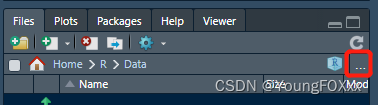
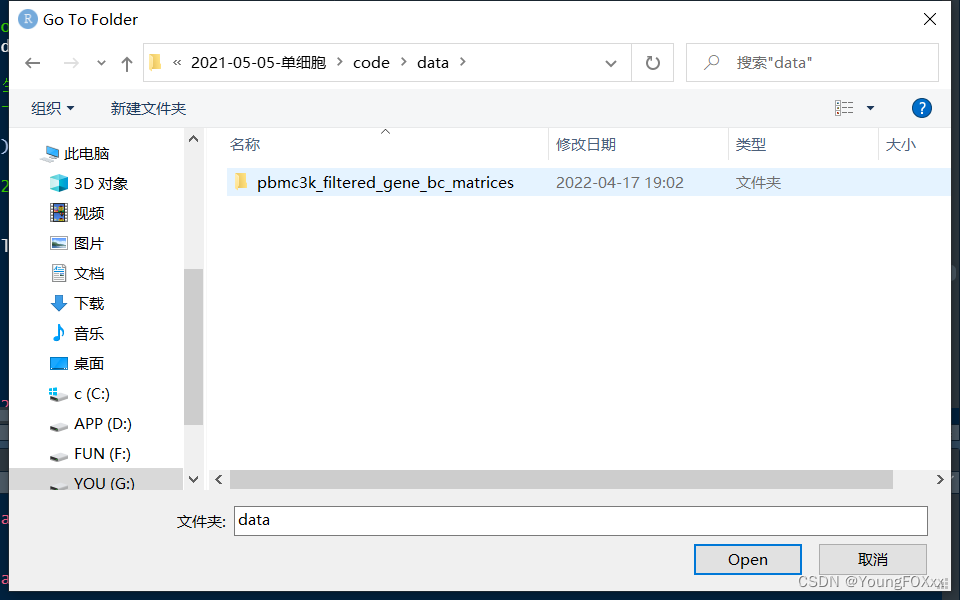
Workspace window, files → three dots, click; The folder window will appear. At this time, manually switch to the working directory you want to go to:

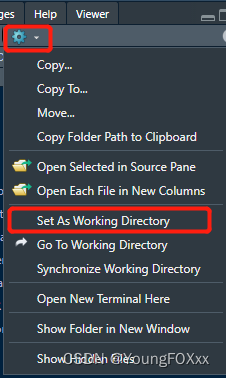
Click the setting icon and select “set as working directory” to set the working directory:

At this time, the working directory is detected and the switching is successful

getwd()
[1] ".../Documents/R/Data"

[Solved] SpringBoot Create Project and Failed to Access localhost:8080 Error

1. Error prompt

java.lang.NoSuchMethodError: javax.servlet.http.HttpServletRequest.getHttpServletMapping()Ljavax/servlet/http/HttpServletMapping;


2. The reason is that the Tomcat version is incompatible with springboot

I use

<parent>
    <groupId>org.springframework.boot</groupId>
    <artifactId>spring-boot-starter-parent</artifactId>
    <version>2.3.10.RELEASE</version>
</parent>

2. The solution is to modify the below codes in pom.xml

<parent>
    <groupId>org.springframework.boot</groupId>
    <artifactId>spring-boot-starter-parent</artifactId>
    <version>2.3.10.RELEASE</version>
</parent>

to:

<parent>
    <groupId>org.springframework.boot</groupId>
    <artifactId>spring-boot-starter-parent</artifactId>
    <version>2.0.5.RELEASE</version>
</parent>

Problem-solving

Idea2022 automatic generate poji error [How to Solve]

Error Messages:
Generate POJOs. groovy: org.codehaus.groovy.control.MultipleCompilationErrorsException: startup failed: Script6. groovy: 29: unable to resolve class FileDemo @ line 29, column 3.  new FileDemo(dir, className + ".java"). withPrintWriter { out -> generate(out, className,  fields) } ^ 1 error at org.codehaus.groovy.control.ErrorCollector.failIfErrors(ErrorCollector.java:295) at org.codehaus.groovy.control.CompilationUnit$ISourceUnitOperation.doPhaseOperation(CompilationUnit.java:914) at org.codehaus.groovy.control.CompilationUnit.compile(CompilationUnit.java:627) at  groovy.lang.GroovyClassLoader.doParseClass(GroovyClassLoader.java:389) at groovy.lang.GroovyClassLoader.lambda$parseClass$3(GroovyClassLoader.java:332) at org.codehaus.groovy.runtime.memoize.StampedCommonCache.compute(StampedCommonCache.java:163) at org.codehaus.groovy.runtime.memoize.StampedCommonCache.getAndPut(StampedCommonCache.java:154) at  groovy.lang.GroovyClassLoader.parseClass(GroovyClassLoader.java:330) at groovy.lang.GroovyClassLoader.parseClass(GroovyClassLoader.java:314) at groovy.lang.GroovyClassLoader.parseClass(GroovyClassLoader.java:257) at org.codehaus.groovy.jsr223.GroovyScriptEngineImpl.getScriptClass(GroovyScriptEngineImpl.java:336) at  org.codehaus.groovy.jsr223.GroovyScriptEngineImpl.eval(GroovyScriptEngineImpl.java:153) at java.scripting/javax.script.AbstractScriptEngine.eval(AbstractScriptEngine.java:264) in IdeScriptEngineManagerImpl$EngineImpl.lambda$eval$1(IdeScriptEngineManagerImpl.java:246)


Solution: Delete the old script and create a new one as below:
import com.intellij.database.model.DasTable
import com.intellij.database.util.Case
import com.intellij.database.util.DasUtil

/*
 * Available context bindings:
 *   SELECTION   Iterable<DasObject>
 *   PROJECT     project
 *   FILES       files helper
 */

packageName = "com.sample;"
typeMapping = [
  (~/(?i)int/)                      : "long",
  (~/(?i)float|double|decimal|real/): "double",
  (~/(?i)datetime|timestamp/)       : "java.sql.Timestamp",
  (~/(?i)date/)                     : "java.sql.Date",
  (~/(?i)time/)                     : "java.sql.Time",
  (~/(?i)/)                         : "String"
]

FILES.chooseDirectoryAndSave("Choose directory", "Choose where to store generated files") { dir ->
  SELECTION.filter { it instanceof DasTable }.each { generate(it, dir) }
}

def generate(table, dir) {
  def className = javaName(table.getName(), true)
  def fields = calcFields(table)
  new File(dir, className + ".java").withPrintWriter { out -> generate(out, className, fields) }
}

def generate(out, className, fields) {
  out.println "package $packageName"
  out.println ""
  out.println ""
  out.println "public class $className {"
  out.println ""
  fields.each() {
    if (it.annos != "") out.println "  ${it.annos}"
    out.println "  private ${it.type} ${it.name};"
  }
  out.println ""
  fields.each() {
    out.println ""
    out.println "  public ${it.type} get${it.name.capitalize()}() {"
    out.println "    return ${it.name};"
    out.println "  }"
    out.println ""
    out.println "  public void set${it.name.capitalize()}(${it.type} ${it.name}) {"
    out.println "    this.${it.name} = ${it.name};"
    out.println "  }"
    out.println ""
  }
  out.println "}"
}

def calcFields(table) {
  DasUtil.getColumns(table).reduce([]) { fields, col ->
    def spec = Case.LOWER.apply(col.getDataType().getSpecification())
    def typeStr = typeMapping.find { p, t -> p.matcher(spec).find() }.value
    fields += [[
                 name : javaName(col.getName(), false),
                 type : typeStr,
                 annos: ""]]
  }
}

def javaName(str, capitalize) {
  def s = com.intellij.psi.codeStyle.NameUtil.splitNameIntoWords(str)
    .collect { Case.LOWER.apply(it).capitalize() }
    .join("")
    .replaceAll(/[^\p{javaJavaIdentifierPart}[_]]/, "_")
  capitalize || s.length() == 1? s : Case.LOWER.apply(s[0]) + s[1..-1]
}

[Solved] IDEA springboot Startup Error: java.lang.UnsatisfiedLinkError: no tcnative-1 in java.library.path

IDEA springboot startup error:

java.lang.UnsatisfiedLinkError: no tcnative-1 in java.library.path: [D:\Java\bin, C:\Windows\Sun\Java\bin, C:\Windows\system32, C:\Windows, C:\Program Files\Common Files\Oracle\Java\javapath, C:\Windows\system32, C:\Windows, C:\Windows\System32\Wbem, C:\Windows\System32\WindowsPowerShell\v1.0\, C:\Windows\System32\OpenSSH\, D:\java\bin, ;D:\tomcat\apache-tomcat-10.0.14\bin;D:\tomcat\apache-tomcat-10.0.14\lib, D:\apache-maven-3.8.4\bin, D:\Xshell\, D:\5.1, D:\5.1\clibs, C:\Users\cqb\AppData\Local\Microsoft\WindowsApps, ., .]
    at java.base/java.lang.ClassLoader.loadLibrary(ClassLoader.java:2660) ~[na:na]
    at java.base/java.lang.Runtime.loadLibrary0(Runtime.java:827) ~[na:na]
    at java.base/java.lang.System.loadLibrary(System.java:1871) ~[na:na]
    at org.apache.tomcat.jni.Library.<init>(Library.java:69) ~[tomcat-embed-core-9.0.46.jar:9.0.46]
    at org.apache.tomcat.jni.Library.initialize(Library.java:206) ~[tomcat-embed-core-9.0.46.jar:9.0.46]
    at org.apache.catalina.core.AprLifecycleListener.init(AprLifecycleListener.java:193) ~[tomcat-embed-core-9.0.46.jar:9.0.46]
    at org.apache.catalina.core.AprLifecycleListener.isAprAvailable(AprLifecycleListener.java:102) ~[tomcat-embed-core-9.0.46.jar:9.0.46]
    at org.springframework.boot.web.embedded.tomcat.TomcatServletWebServerFactory.getDefaultLifecycleListeners(TomcatServletWebServerFactory.java:173) ~[spring-boot-2.5.1.jar:2.5.1]
    at org.springframework.boot.web.embedded.tomcat.TomcatServletWebServerFactory.<init>(TomcatServletWebServerFactory.java:120) ~[spring-boot-2.5.1.jar:2.5.1]
    at org.springframework.boot.autoconfigure.web.servlet.ServletWebServerFactoryConfiguration$EmbeddedTomcat.tomcatServletWebServerFactory(ServletWebServerFactoryConfiguration.java:76) ~[spring-boot-autoconfigure-2.5.1.jar:2.5.1]
    at java.base/jdk.internal.reflect.NativeMethodAccessorImpl.invoke0(Native Method) ~[na:na]
    at java.base/jdk.internal.reflect.NativeMethodAccessorImpl.invoke(NativeMethodAccessorImpl.java:62) ~[na:na]
    at java.base/jdk.internal.reflect.DelegatingMethodAccessorImpl.invoke(DelegatingMethodAccessorImpl.java:43) ~[na:na]
    at java.base/java.lang.reflect.Method.invoke(Method.java:566) ~[na:na]
    at org.springframework.beans.factory.support.SimpleInstantiationStrategy.instantiate(SimpleInstantiationStrategy.java:154) ~[spring-beans-5.3.8.jar:5.3.8]
    at org.springframework.beans.factory.support.ConstructorResolver.instantiate(ConstructorResolver.java:653) ~[spring-beans-5.3.8.jar:5.3.8]
    at org.springframework.beans.factory.support.ConstructorResolver.instantiateUsingFactoryMethod(ConstructorResolver.java:638) ~[spring-beans-5.3.8.jar:5.3.8]
    at org.springframework.beans.factory.support.AbstractAutowireCapableBeanFactory.instantiateUsingFactoryMethod(AbstractAutowireCapableBeanFactory.java:1334) ~[spring-beans-5.3.8.jar:5.3.8]
    at org.springframework.beans.factory.support.AbstractAutowireCapableBeanFactory.createBeanInstance(AbstractAutowireCapableBeanFactory.java:1177) ~[spring-beans-5.3.8.jar:5.3.8]
    at org.springframework.beans.factory.support.AbstractAutowireCapableBeanFactory.doCreateBean(AbstractAutowireCapableBeanFactory.java:564) ~[spring-beans-5.3.8.jar:5.3.8]
    at org.springframework.beans.factory.support.AbstractAutowireCapableBeanFactory.createBean(AbstractAutowireCapableBeanFactory.java:524) ~[spring-beans-5.3.8.jar:5.3.8]
    at org.springframework.beans.factory.support.AbstractBeanFactory.lambda$doGetBean$0(AbstractBeanFactory.java:335) ~[spring-beans-5.3.8.jar:5.3.8]
    at org.springframework.beans.factory.support.DefaultSingletonBeanRegistry.getSingleton(DefaultSingletonBeanRegistry.java:234) ~[spring-beans-5.3.8.jar:5.3.8]
    at org.springframework.beans.factory.support.AbstractBeanFactory.doGetBean(AbstractBeanFactory.java:333) ~[spring-beans-5.3.8.jar:5.3.8]
    at org.springframework.beans.factory.support.AbstractBeanFactory.getBean(AbstractBeanFactory.java:213) ~[spring-beans-5.3.8.jar:5.3.8]
    at org.springframework.boot.web.servlet.context.ServletWebServerApplicationContext.getWebServerFactory(ServletWebServerApplicationContext.java:217) ~[spring-boot-2.5.1.jar:2.5.1]
    at org.springframework.boot.web.servlet.context.ServletWebServerApplicationContext.createWebServer(ServletWebServerApplicationContext.java:180) ~[spring-boot-2.5.1.jar:2.5.1]
    at org.springframework.boot.web.servlet.context.ServletWebServerApplicationContext.onRefresh(ServletWebServerApplicationContext.java:160) ~[spring-boot-2.5.1.jar:2.5.1]
    at org.springframework.context.support.AbstractApplicationContext.refresh(AbstractApplicationContext.java:577) ~[spring-context-5.3.8.jar:5.3.8]
    at org.springframework.boot.web.servlet.context.ServletWebServerApplicationContext.refresh(ServletWebServerApplicationContext.java:145) ~[spring-boot-2.5.1.jar:2.5.1]
    at org.springframework.boot.SpringApplication.refresh(SpringApplication.java:754) ~[spring-boot-2.5.1.jar:2.5.1]
    at org.springframework.boot.SpringApplication.refreshContext(SpringApplication.java:434) ~[spring-boot-2.5.1.jar:2.5.1]
    at org.springframework.boot.SpringApplication.run(SpringApplication.java:338) ~[spring-boot-2.5.1.jar:2.5.1]
    at org.springframework.boot.SpringApplication.run(SpringApplication.java:1343) ~[spring-boot-2.5.1.jar:2.5.1]
    at org.springframework.boot.SpringApplication.run(SpringApplication.java:1332) ~[spring-boot-2.5.1.jar:2.5.1]
    at cn.com.buba.SpringbootDemoApplication.main(SpringbootDemoApplication.java:10) ~[classes/:na]
2022-05-03 14:45:28.909  INFO 6716 --- [           main] o.s.b.w.embedded.tomcat.TomcatWebServer  : Tomcat initialized with port(s): 8080 (http)
2022-05-03 14:45:28.916  INFO 6716 --- [           main] o.apache.catalina.core.StandardService   : Starting service [Tomcat]
2022-05-03 14:45:28.916  INFO 6716 --- [           main] org.apache.catalina.core.StandardEngine  : Starting Servlet engine: [Apache Tomcat/9.0.46]
2022-05-03 14:45:28.973  INFO 6716 --- [           main] o.a.c.c.C.[Tomcat].[localhost].[/]       : Initializing Spring embedded WebApplicationContext
2022-05-03 14:45:28.973  INFO 6716 --- [           main] w.s.c.ServletWebServerApplicationContext : Root WebApplicationContext: initialization completed in 575 ms
2022-05-03 14:45:29.193  INFO 6716 --- [           main] o.s.b.w.embedded.tomcat.TomcatWebServer  : Tomcat started on port(s): 8080 (http) with context path ''
2022-05-03 14:45:29.200  INFO 6716 --- [           main] cn.com.buba.SpringbootDemoApplication    : Started SpringbootDemoApplication in 1.1 seconds (JVM running for 1.953)


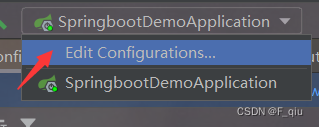
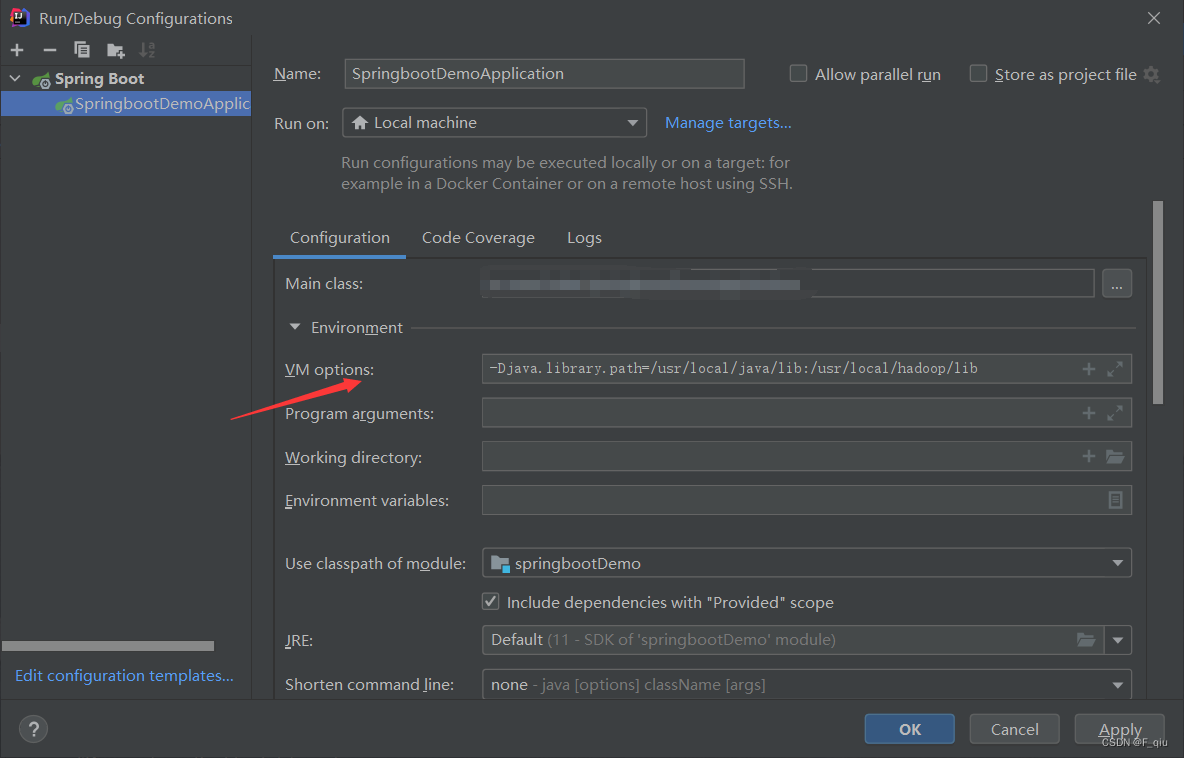
Solution:


-Djava.library.path=/usr/local/java/lib:/usr/local/hadoop/lib

[Solved] Elasticsearch Error: received plaintext http traffic on an https channel, closing connection…

Elasticsearch reports an error: received plaintext http traffic on an https channel, closing connection Netty4HttpChannel.

After elasticsearch is started, enter the address in the browser http://localhost:9200/

An error reporting:

received plaintext http traffic on an https channel, closing connection Netty4HttpChannel{localAddress=/[0:0:0:0:0:0:0:1]:9200

As shown in the figure:

The reason is that Elasticsearch has started the security authentication under windows. Although it was started successfully, it can not be accessed http://localhost:9200/

Failed.

Solution:

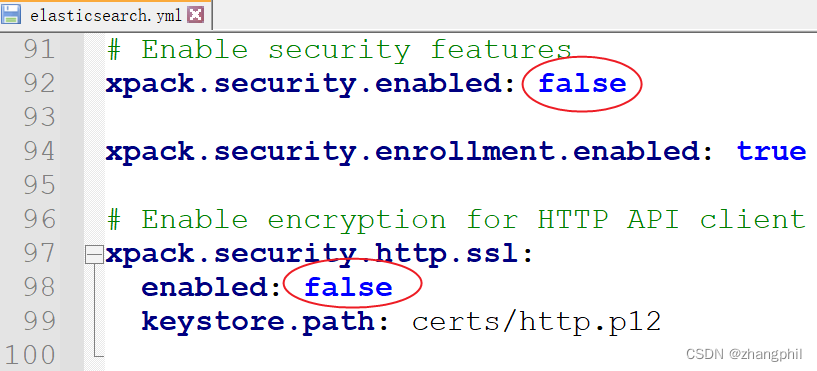
Locate the elasticsearch.yml configuration file under the config/ directory, change the security authentication switch from true to false to achieve password-free access, after modifying both to false.

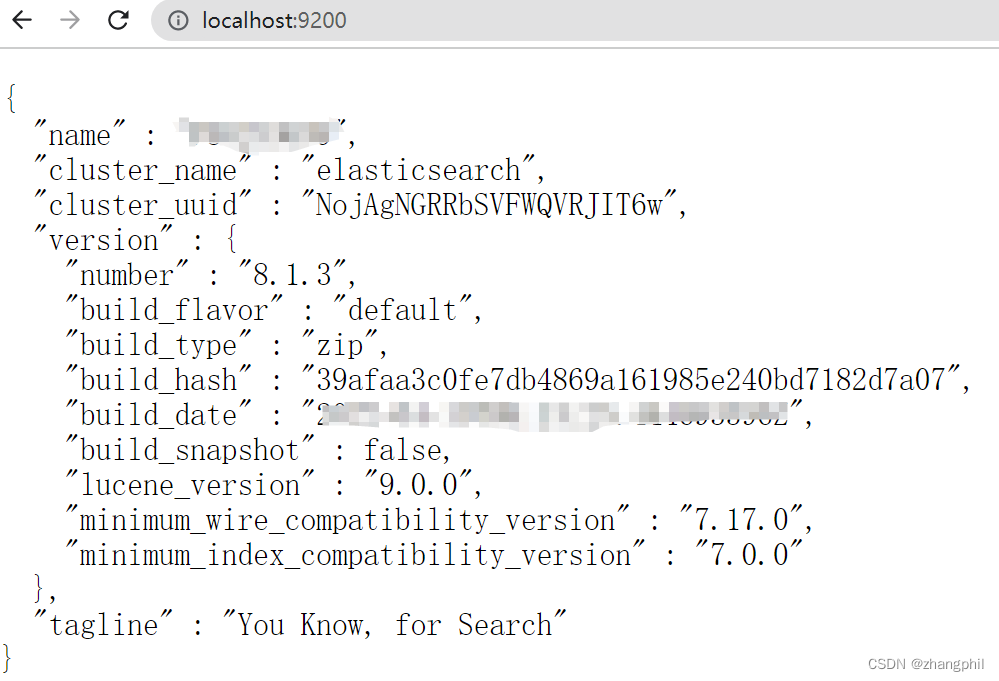
You can solve the problem and open it again http://localhost:9200/

The content is displayed normally:

[Solved] spdlog reports an error After updating Ubuntu 22.04

After updating Ubuntu 22, spdlog and FMT report errors, mainly due to some unclear problems in the FMT library

Solution:

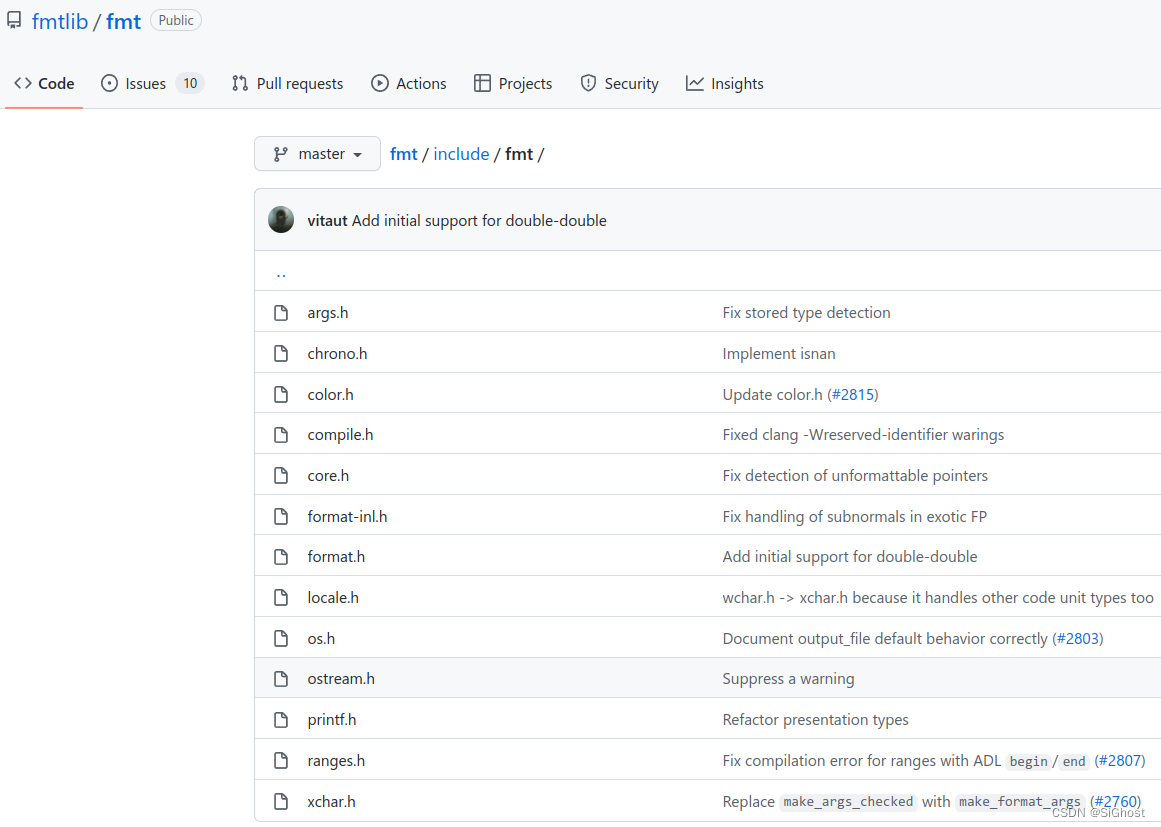
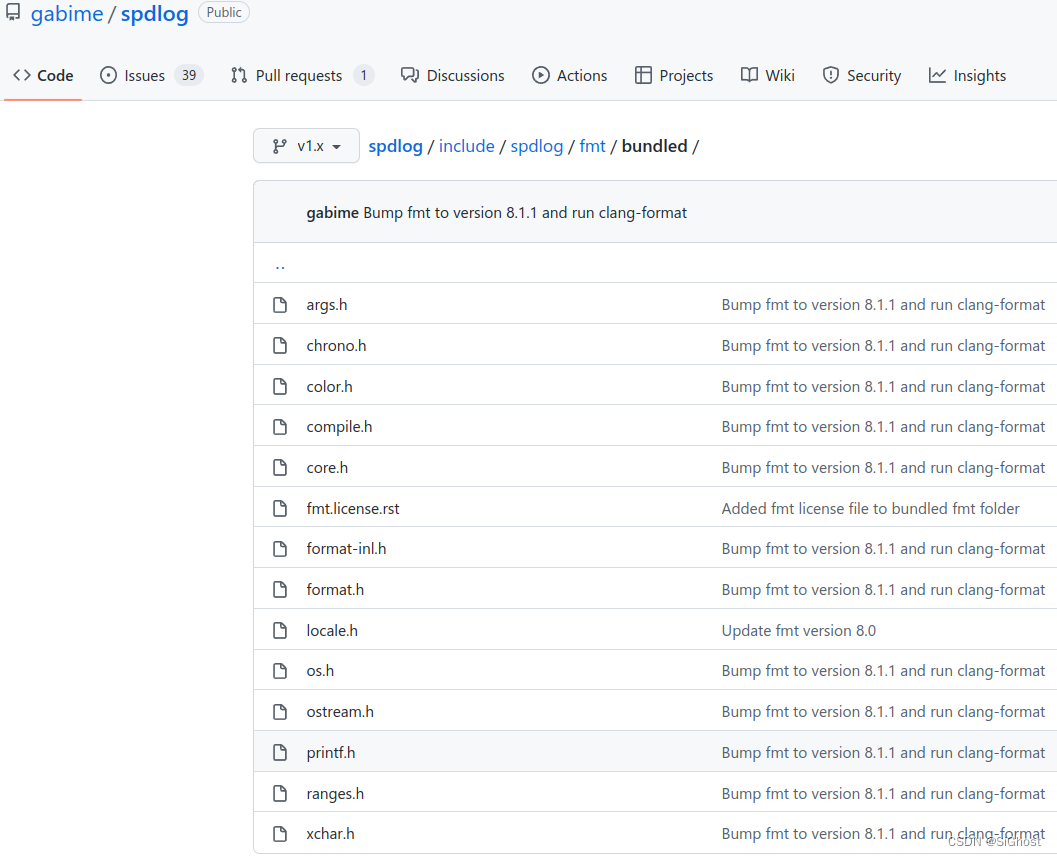
1. Copy the header file under include/FMT of FMT Library

to this directory

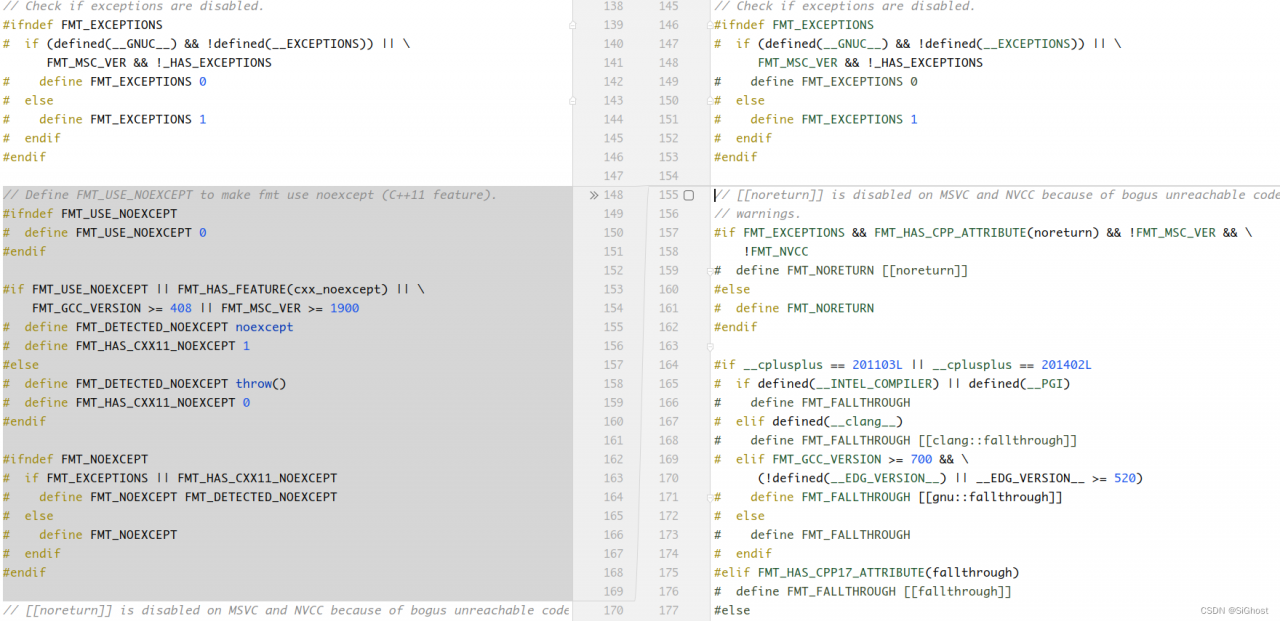
2. In spdlog/include/spdlog/fmt/bundled/core.h add a macro definition of FMT_NOEXCEPT near line 154, which is the following code

// Define FMT_USE_NOEXCEPT to make fmt use noexcept (C++11 feature).
#ifndef FMT_USE_NOEXCEPT
#  define FMT_USE_NOEXCEPT 0
#endif

#if FMT_USE_NOEXCEPT || FMT_HAS_FEATURE(cxx_noexcept) || \
    FMT_GCC_VERSION >= 408 || FMT_MSC_VER >= 1900
#  define FMT_DETECTED_NOEXCEPT noexcept
#  define FMT_HAS_CXX11_NOEXCEPT 1
#else
#  define FMT_DETECTED_NOEXCEPT throw()
#  define FMT_HAS_CXX11_NOEXCEPT 0
#endif

#ifndef FMT_NOEXCEPT
#  if FMT_EXCEPTIONS || FMT_HAS_CXX11_NOEXCEPT
#    define FMT_NOEXCEPT FMT_DETECTED_NOEXCEPT
#  else
#    define FMT_NOEXCEPT
#  endif
#endif

3. Recompile and install spdlog Library

cmake -S spdlog -B /tmp/build/
cd /tmp/build && make
sudo make install

Python pyqt5 ui Generate .py File Error [How to Solve]

Anaconda has been configured several times before, and there are similar problems: record it here for later viewing.

 from PyQt5 import QtCore
ImportError: DLL load failed: the specified module cannot be found.


Traceback (most recent call last):
  File "D:\Anaconda3\lib\runpy.py", line 193, in _run_module_as_main
    "__main__", mod_spec)
  File "D:\Anaconda3\lib\runpy.py", line 85, in _run_code
    exec(code, run_globals)
  File "D:\Anaconda3\lib\site-packages\PyQt5\uic\pyuic.py", line 26, in <module>
    from PyQt5 import QtCore
ImportError: DLL load failed: the specified module cannot be found.

The configuration is as follows:
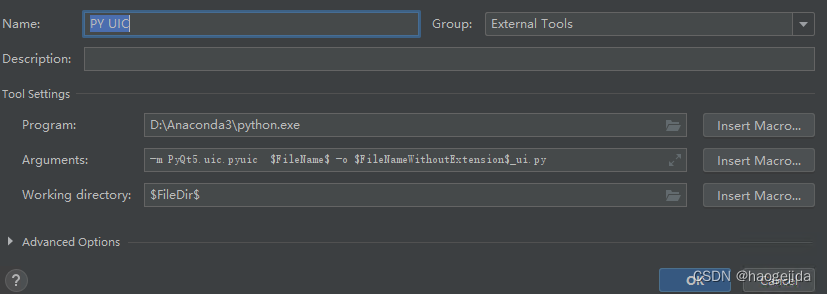
The problem is that the module cannot be found, but pyqt itself can run. Then I looked at the installed library and found that pyqt is 5.92, not pyqt5. That’s why.

Uninstall pyqt first:
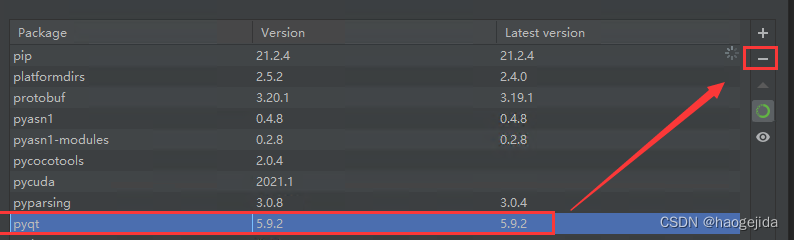
Or use PIP uninstall pyqt;

Then install pyqt5. Use pip to install here. Pycharm’s installation tool is not found.

Installation command:

pip install PyQt5

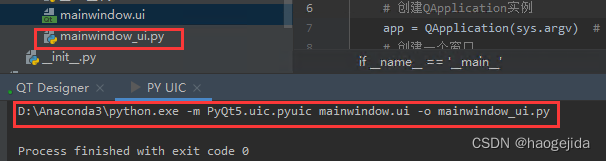
Run again, OK!
[Solved] Jupyter Notebook Error: IOPub data rate exceeded

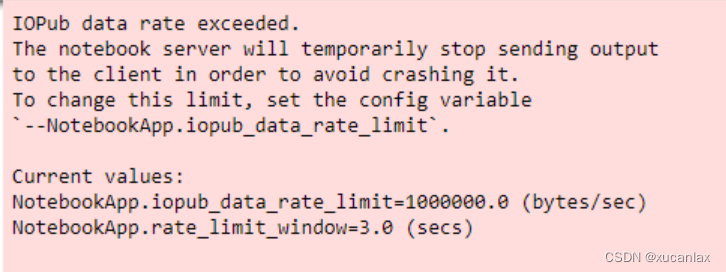
When writing code with jupyter notebook, there is no output result in print, as shown in the following figure

Don’t panic. This is not a code error, but the IOPub data rate is limited, that is, jupyter limits the output

resolvent

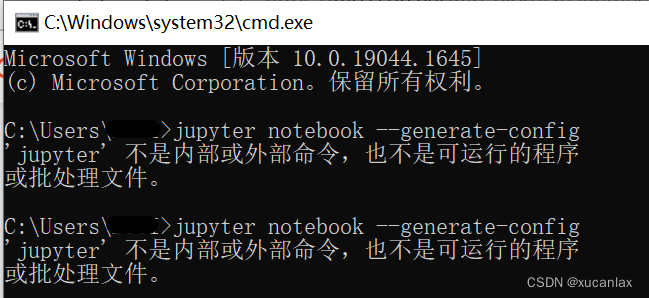
1. CMD open the command line window and enter: jupyter notebook –generate-config (there is a space after the notebook)

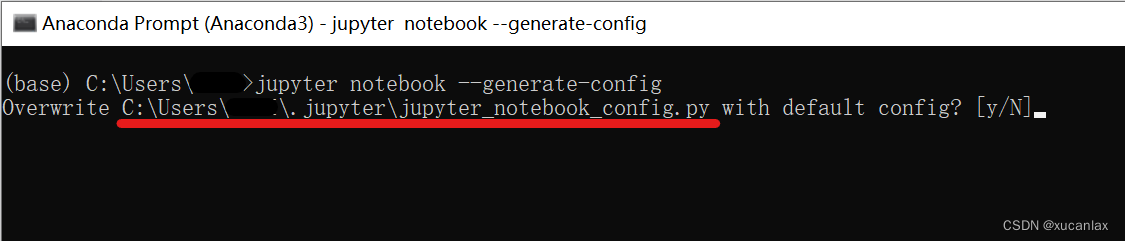
If this happens, enter jupyter notebook –generate-config in Anaconda Prompt instead

2. The configuration file path of jupyter appears. Don’t enter it. Just find jupyter_notebook_config.py file according to this path.

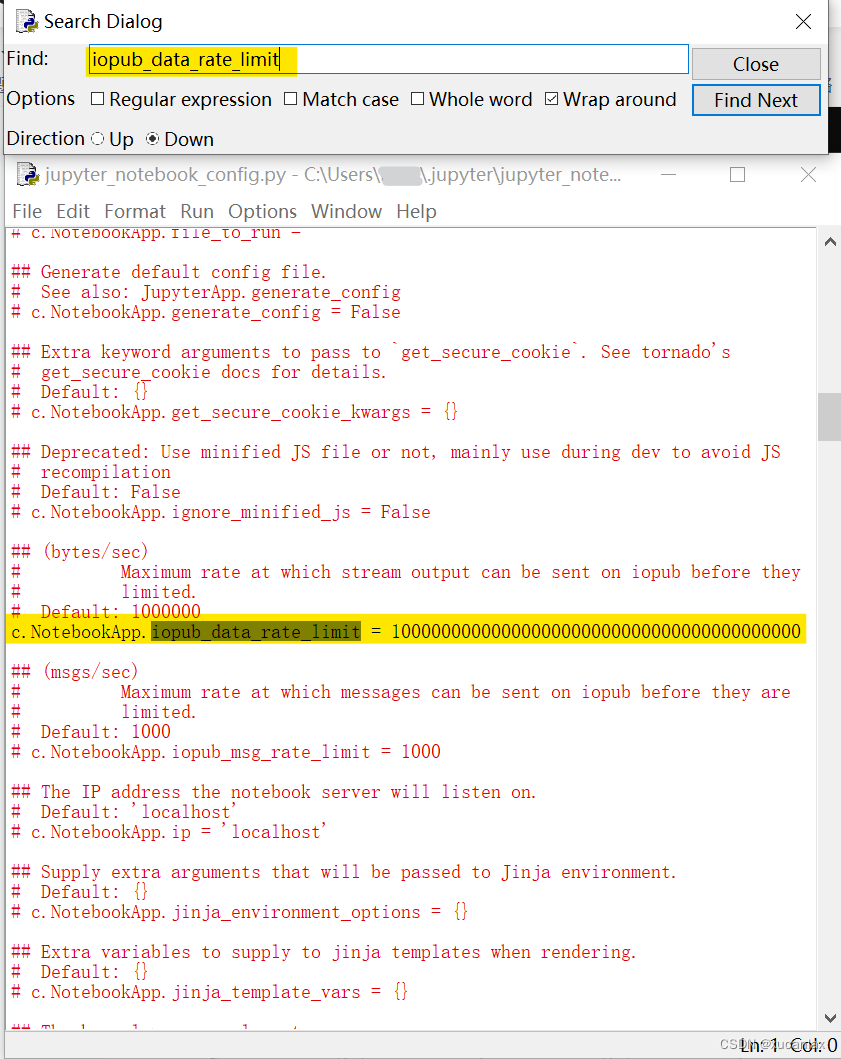
3. Open the file with Notepad or python, open the search window with Ctrl + F, and enter iopub_data_rate_limit.

Find a specific line, uncomment, and add many 0

4. Restart the Jupiter notebook and the display is normal

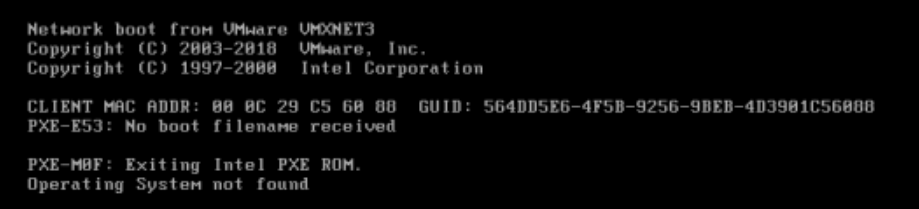
[Solved] Linux virtual machine startup error: operating system not found

This error indicates that the boot code on the hard disk is missing

Experimental preparation steps

1) Preparation: dd if=/dev/zero of=/dev/nvme0n1 bs=446 count=1

2) Screenshot of system startup error report

The repair steps are as follows

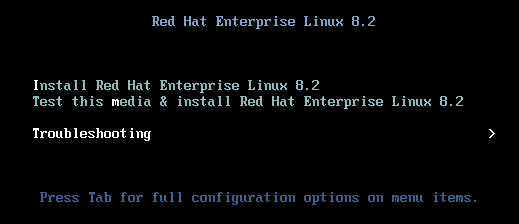
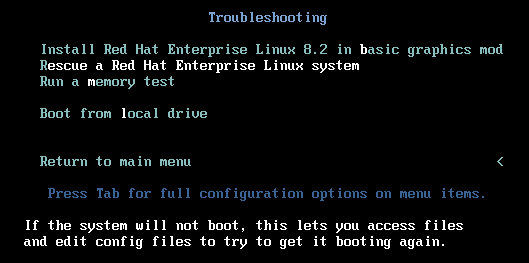
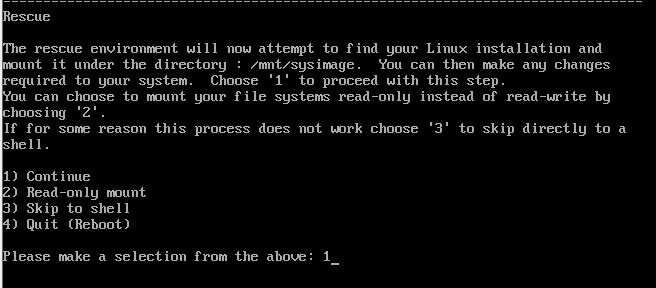
Step 1: select boot from CD to enter rescue mode

Select the third

Select the second

Select 1) continue

Enter directly

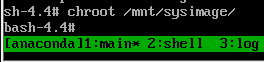
Step 2: switch to the real root file system

chroot /mnt/sysimage

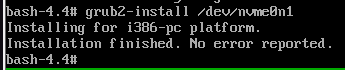
Step 3: repair the boot program

grub2-install /dev/nvme0n1

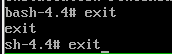
Step 4: exit twice, restart the test, and choose to start from the local disk

It has been repaired successfully