1. Problem environment
virtual machine: VMware 16
Windows system: Windows 10
linux system: CentOS 7.6
interactive software: SecureCRT 8.7
2. Prompt

3. Solution
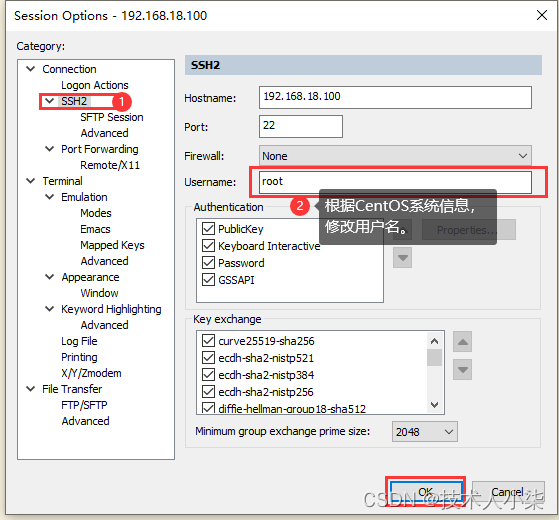
click “options”, select “session options”, as shown in the figure below, click “SSH2”, then modify “username”, and click “OK”
4. reconnect
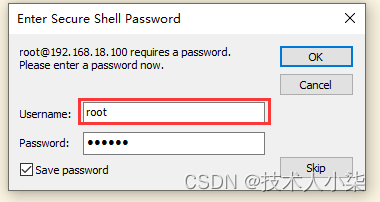
connect successfully

[Solved] A-LOAM Ceres Compile Error: error: ‘integer_sequence’ is not a member of ‘std‘
The reason may be that Ceres did not specify the C + + version, but a-loam did. So make a-loam consistent with Ceres
Add the following code to cmakelists of a-loam
# Set the C++ version (must be >= C++14) when compiling Ceres.
#
# Reflect a user-specified (via -D) CMAKE_CXX_STANDARD if present, otherwise
# default to C++14.
set(DEFAULT_CXX_STANDARD ${CMAKE_CXX_STANDARD})
if (NOT DEFAULT_CXX_STANDARD)
  set(DEFAULT_CXX_STANDARD 14)
endif()
set(CMAKE_CXX_STANDARD ${DEFAULT_CXX_STANDARD} CACHE STRING
  "C++ standard (minimum 14)" FORCE)
# Restrict CMAKE_CXX_STANDARD to the valid versions permitted and ensure that
# if one was forced via -D that it is in the valid set.
set(ALLOWED_CXX_STANDARDS 14 17 20)
set_property(CACHE CMAKE_CXX_STANDARD PROPERTY STRINGS ${ALLOWED_CXX_STANDARDS})
list(FIND ALLOWED_CXX_STANDARDS ${CMAKE_CXX_STANDARD} POSITION)
if (POSITION LESS 0)
  message(FATAL_ERROR "Invalid CMAKE_CXX_STANDARD: ${CMAKE_CXX_STANDARD}. "
    "Must be one of: ${ALLOWED_CXX_STANDARDS}")
endif()
# Specify the standard as a hard requirement, otherwise CMAKE_CXX_STANDARD is
# interpreted as a suggestion that can decay *back* to lower versions.
set(CMAKE_CXX_STANDARD_REQUIRED ON CACHE BOOL "")
mark_as_advanced(CMAKE_CXX_STANDARD_REQUIRED)
There are other methods as follows, but I didn’t try
Modifying cmake: set the C + + standard:
set(CMAKE_CXX_FLAGS "-std=c++11")Change to
set(CMAKE_CXX_STANDARD 11)[Solved] Linux Compile Error: error: ‘for’ loop initial declarations are only allowed in C99 mode
1. Problem description
During the development of embedded Linux, compile and report the following errors
src/util/Vector.c:94:9: error: ‘for’ loop initial declarations are only allowed in C99 mode
         for (int j = V->length++; j > i; j--)
         ^
src/util/Vector.c:94:9: note: use option -std=c99 or -std=gnu99 to compile your code
src/util/Vector.c: In function ‘Vector_remove’:
src/util/Vector.c:123:9: error: ‘for’ loop initial declarations are only allowed in C99 mode
         for (int j = i; j < V->length; j++)
         ^
2. Problem analysis
GCC compilation is based on compilation lower than C99 standard. Defining variables within a for loop is not allowed in standards lower than C99.
3. Solution
Method 1
Modify code
int j;
for (j = i; j < V->length; j++)
Method 2
GCC specifies compiling using the C99 standard
gcc -std=c99Method 3
Specify the C99 standard for compilation in makefile
CFLAGS += -std=c99[Solved] Layui 404 Error: Static resources cannot load layui.js and layui. css
Static resources cannot load layui.js and layui. css
Solution:
Add the following contents to the web.xml configuration file
<servlet-mapping>
    <servlet-name>default</servlet-name>
    <url-pattern>*.js</url-pattern>
</servlet-mapping>
<servlet-mapping>
    <servlet-name>default</servlet-name>
    <url-pattern>*.css</url-pattern>
</servlet-mapping>
Springboot integrates Redis annotation and access error: java.io.NotSerializableException: com.demo.entity.MemberEntity
Problem Description.
SpringBoot integration with Redis annotations, requesting an error:
java.io.NotSerializableException: com.demo.entity.MemberEntity at
java.io.ObjectOutputStream.writeObject0(ObjectOutputStream.java:1184)
~[na:1.8.0_191] at
java.io.ObjectOutputStream.writeObject(ObjectOutputStream.java:348)
~[na:1.8.0_191] at
java.util.ArrayList.writeObject(ArrayList.java:766) ~[na:1.8.0_191]
at sun.reflect.NativeMethodAccessorImpl.invoke0(Native Method)
~[na:1.8.0_191] at
sun.reflect.NativeMethodAccessorImpl.invoke(NativeMethodAccessorImpl.java:62)
~[na:1.8.0_191] at
sun.reflect.DelegatingMethodAccessorImpl.invoke(DelegatingMethodAccessorImpl.java:43)
~[na:1.8.0_191] at java.lang.reflect.Method.invoke(Method.java:498)
~[na:1.8.0_191] at
java.io.ObjectStreamClass.invokeWriteObject(ObjectStreamClass.java:1140)
~[na:1.8.0_191] at
java.io.ObjectOutputStream.writeSerialData(ObjectOutputStream.java:1496)
~[na:1.8.0_191] at
java.io.ObjectOutputStream.writeOrdinaryObject(ObjectOutputStream.java:1432)
~[na:1.8.0_191] at
java.io.ObjectOutputStream.writeObject0(ObjectOutputStream.java:1178)
~[na:1.8.0_191] at
java.io.ObjectOutputStream.writeObject(ObjectOutputStream.java:348)
~[na:1.8.0_191]
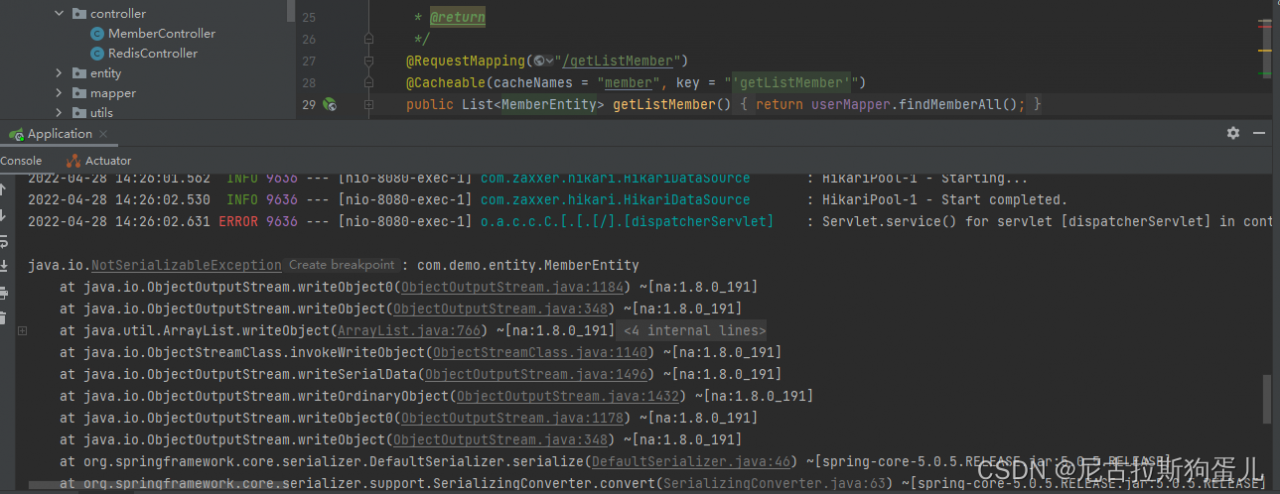
Problem: Serialization is not performed in the entity class
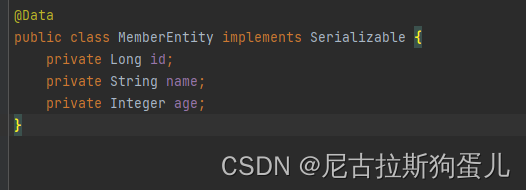
Solution: Serializable interface is implemented in the entity class
SpringBoot IntegratenRedis Annotations and access error: EL1008E: Property or field ‘getListMember‘ cannot be found on object of type
Problem Description.
Springboot integration redis annotations, request access with the following error:
org.springframework.expression.spel.SpelEvaluationException: EL1008E:
Property or field ‘getListMember’ cannot be found on object of type
‘org.springframework.cache.interceptor.CacheExpressionRootObject’ –
maybe not public or not valid?
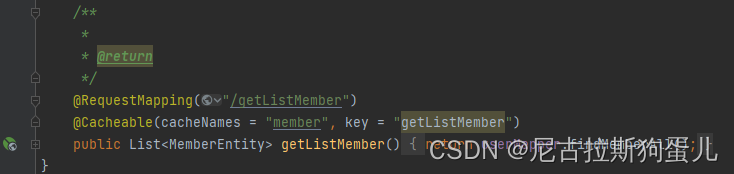
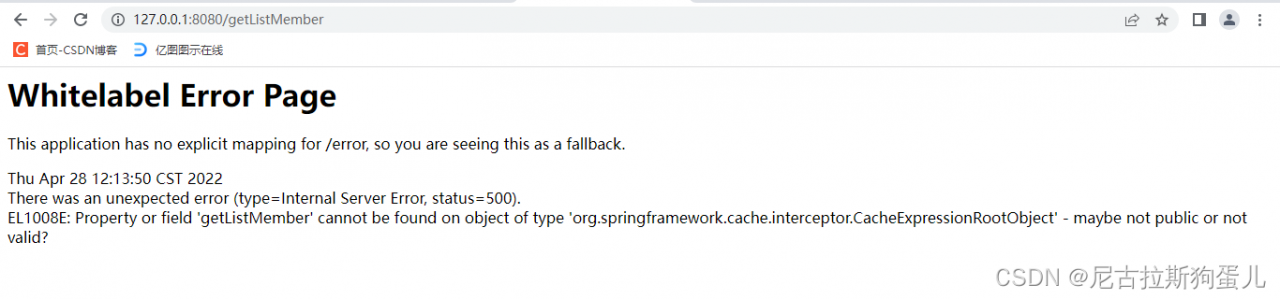
Reason: missing single quotes in redis tag
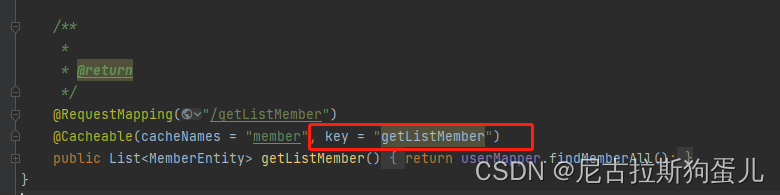
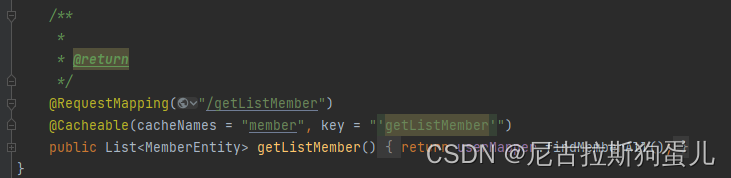
Solution:
Add single quotes to the redis tag
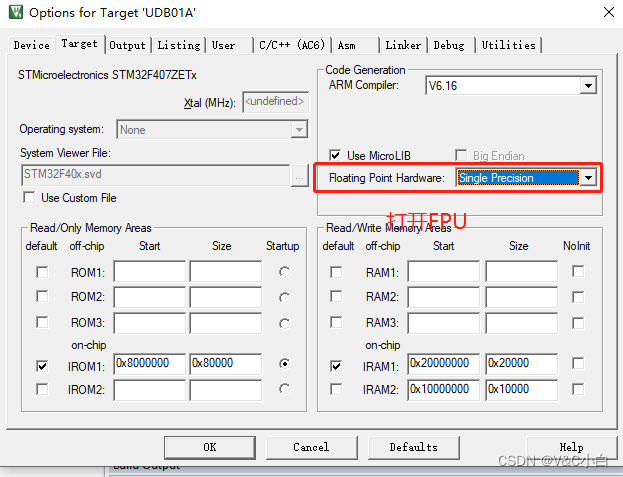
[Solved] RT-Thread Transplant Error: Error: A1854E: Unknown opcode ‘VSTMFDEQ’, maybe wrong target CPU?
Transplant RT thread error
Error reporting information
"..\D_RTOS\rt-thread\libcpu\arm\cortex-m4\context_rvds.S", line 112: Error: A1854E: Unknown opcode 'VSTMFDEQ', maybe wrong target CPU?
  112 0000004e     VSTMFDEQ r1!, {d8 - d15} ; push FPU register s16~s31
Solution:
[Solved] SpringBoot Project Startup Error: Field userMapper in com.demo.controller.MemberController required a bean of type ‘c
Error:
SpringBoot Project Startup Error: ‘com.xxx.mapper.XxxxMapper’ that could not be found
*************************** APPLICATION FAILED TO START
Description:
Field userMapper in com.demo.controller.MemberController required a
bean of type ‘com.demo.mapper.UserMapper’ that could not be found.
Action:
Consider defining a bean of type ‘com.demo.mapper.UserMapper’ in your
configuration.
Process finished with exit code 1
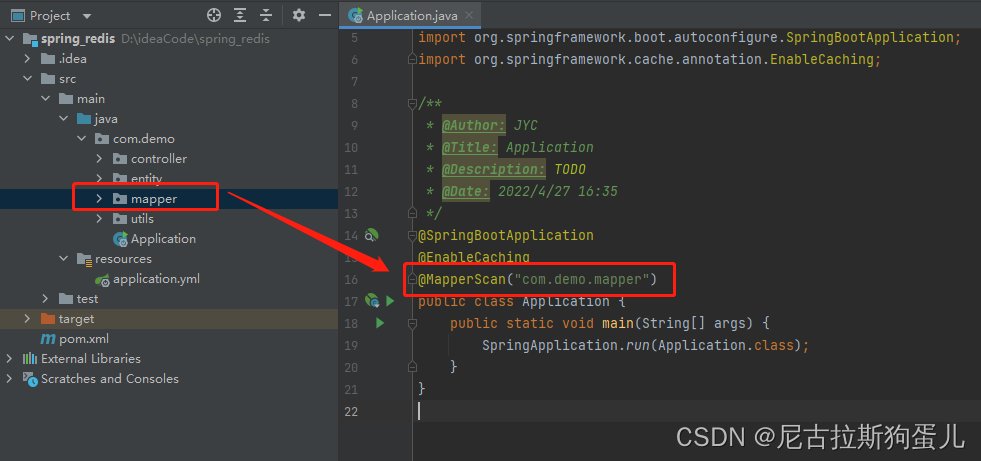
Reason: Cound not scan to find the mapper
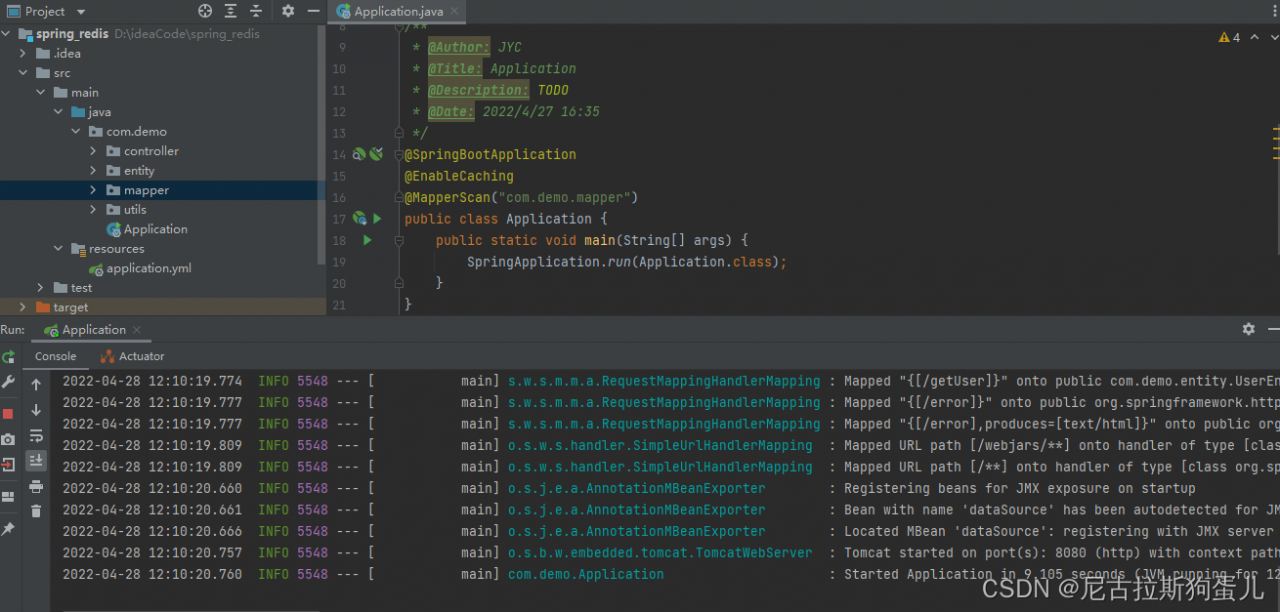
Solution: Add @MapperScan("com.demo.mapper") in startup
[Solved] IDA Start Error: Unexcepted fatal error while intitailizing Python runtime…
When I opened IDA today, It suddenly appeared:
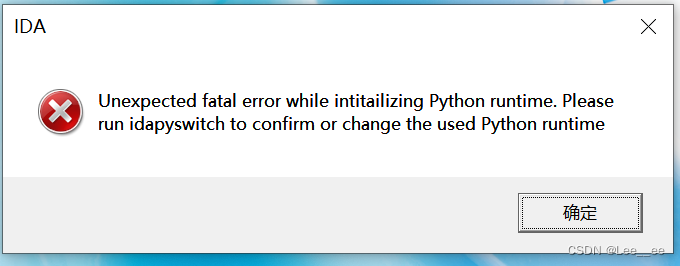
it startled me. What’s going on? Calm down and analyze it. I’m going to open it in the same directory as IDA. See what error reports:
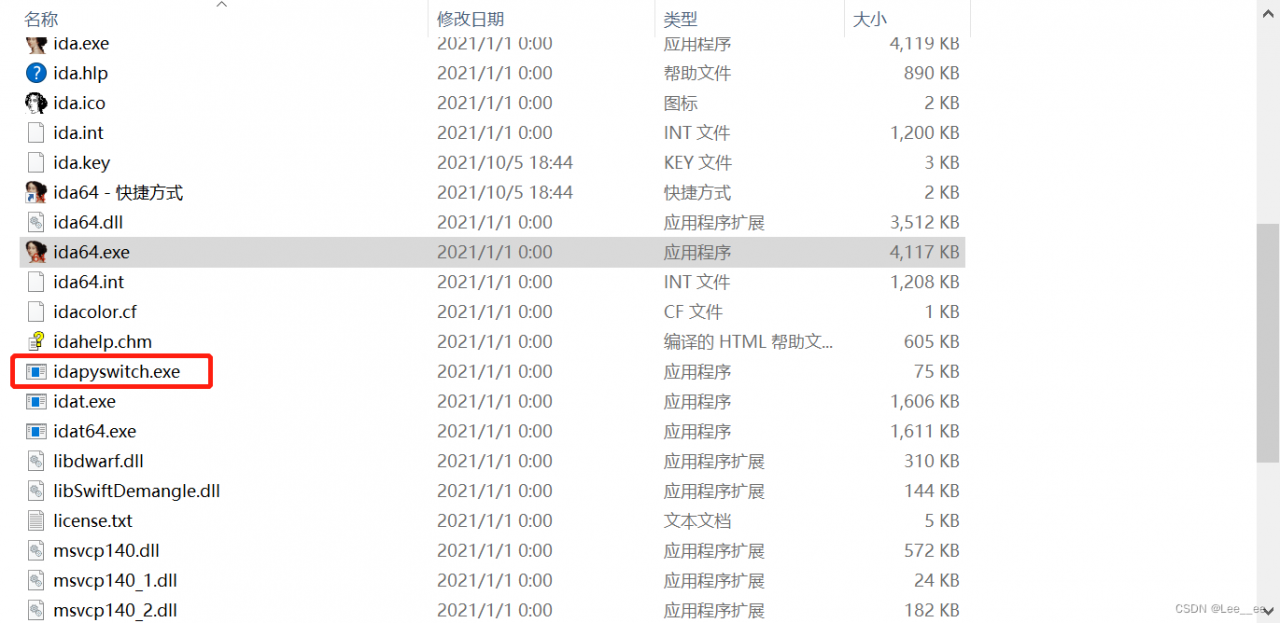
the result can’t be opened, and then I directly open idat64.exe,
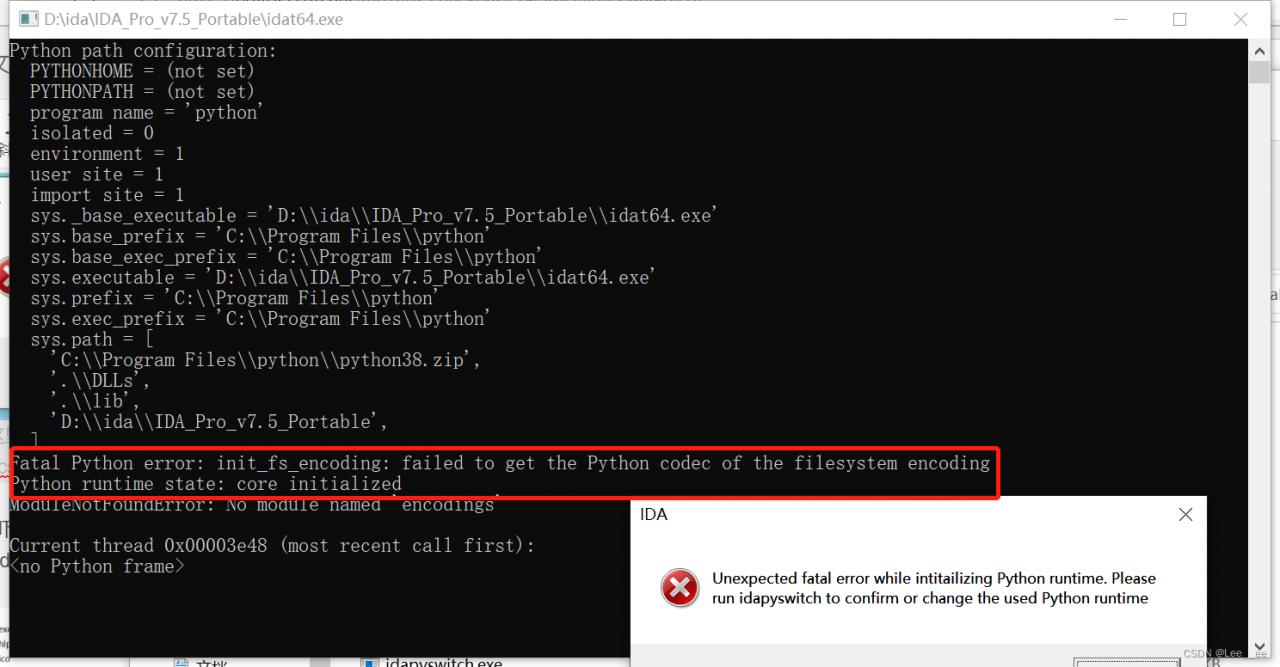
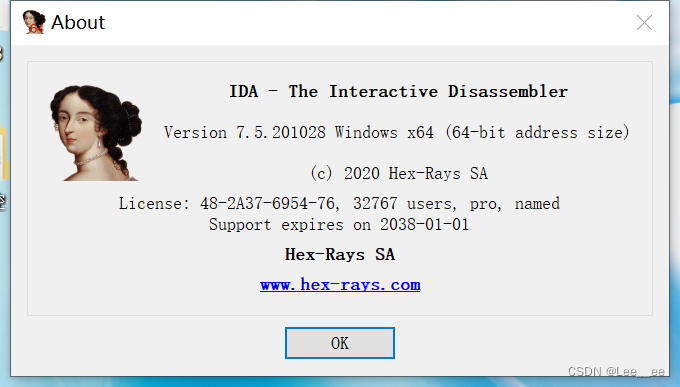
there should be a problem with the python path. Open the environment variable and add the following to the user environment variable:
PYTHONHOME  #EVI PATH
C:/Program File/python  #PATH
Then save and open IDA to use
[Solved] seata Error: io.seata.rm.datasource.exec.LockConflictException: get global lock fail, xid:xxx, lockKeys:xxx
io.seata.rm.datasource.exec.LockConflictException: get global lock fail, xid:xxx, lockKeys:xxx
the error here shows that the global lock acquisition failed
in fact, it may not be the problem of global lock. Here, you can directly check the detailed error in the log file of Seata server

determine the error information
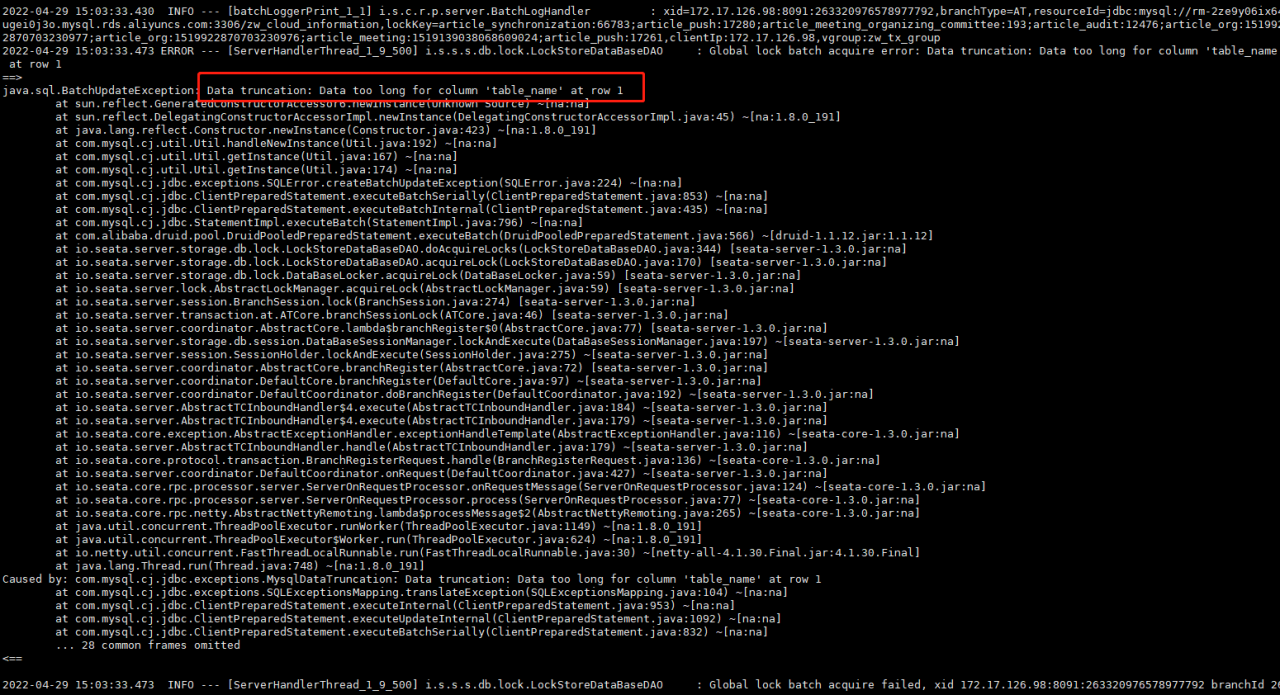
the error of Seata here is because the table field of Seata database is smaller by default and longer_ the table_name will be OK.
[Solved] kubeflow pipeline visualization component Error: WARNING: Running pip as the ‘root’ user can result in broken permissions and conflicting behaviour with the system package manager…
Problem description
time="2022-05-03T16:20:34.622Z" level=info msg="capturing logs" argo=true
WARNING: Running pip as the 'root' user can result in broken permissions and conflicting behaviour with the system package manager. It is recommended to use a virtual environment instead:
https://pip.pypa.io/warnings/venv
[KFP Executor 2022-05-03 16:20:36,372 INFO]: Looking for component `markdown_vis` in --component_module_path `/tmp/tmp.b0lqT6V169/ephemeral_component.py`
[KFP Executor 2022-05-03 16:20:36,372 INFO]: Loading KFP component "markdown_vis" from /tmp/tmp.b0lqT6V169/ephemeral_component.py (directory "/tmp/tmp.b0lqT6V169" and module name "ephemeral_component")
Traceback (most recent call last):
  File "/usr/local/lib/python3.8/runpy.py", line 194, in _run_module_as_main
    return _run_code(code, main_globals, None,
  File "/usr/local/lib/python3.8/runpy.py", line 87, in _run_code
    exec(code, run_globals)
  File "/usr/local/lib/python3.8/site-packages/kfp/v2/components/executor_main.py", line 104, in <module>
    executor_main()
  File "/usr/local/lib/python3.8/site-packages/kfp/v2/components/executor_main.py", line 94, in executor_main
    executor_input = json.loads(args.executor_input)
  File "/usr/local/lib/python3.8/json/__init__.py", line 357, in loads
    return _default_decoder.decode(s)
  File "/usr/local/lib/python3.8/json/decoder.py", line 337, in decode
    obj, end = self.raw_decode(s, idx=_w(s, 0).end())
  File "/usr/local/lib/python3.8/json/decoder.py", line 353, in raw_decode
    obj, end = self.scan_once(s, idx)
json.decoder.JSONDecodeError: Expecting property name enclosed in double quotes: line 1 column 2 (char 1)
time="2022-05-03T16:20:36.460Z" level=error msg="cannot save artifact /tmp/outputs/mlpipeline_ui_metadata_path/data" argo=true error="stat /tmp/outputs/mlpipeline_ui_metadata_path/data: no such file or directory"
Error: exit status 1
Solution:
The component in version of client V1 is incompatible with the version of client V2, so the mode parameter is added when the client submits the task
kfp.Client().create_run_from_pipeline_func(markdown_pipeline, mode=kfp.dsl.PipelineExecutionMode.V2_COMPATIBLE,arguments={})
DM backup database Error: [-7169]:bakres failed to communicate with DMAP message.
[error reporting]
SQL> backup database backupset 'dm3bak01';
backup database backupset 'dm3bak01';
[-7169]:bakres failed to communicate with DMAP message.
Used time: 00:00:10.033. execution number:0.
[log content]
2022-04-27 09:08:01 [CMD] database P0000048762 PPID4294967295  backup database backupset 'dm3bak01';


2022-04-27 09:08:01 [CMD] database P0000048762 PPID4294967295  BACKUP DATABASE [dm03]
2022-04-27 09:08:01 [INFO] database P0000048762  PPID4294967295  CMD START....
2022-04-27 09:08:01 [INFO] database P0000048762  PPID4294967295  BACKUP DATABASE [dm03],execute......
2022-04-27 09:08:01 [INFO] database P0000048762  PPID4294967295  check limits of huge data
2022-04-27 09:08:01 [INFO] database P0000048762  PPID4294967295  CMD CHECK LSN ......
2022-04-27 09:08:01 [INFO] database P0000048762  PPID4294967295  adjust checkpoint lsn to maximal apply lsn 0
2022-04-27 09:08:11 [INFO] database P0000048762  PPID4294967295  connect to dmap with portnum[4236], tsk_num: [4], code: [-7169].
2022-04-27 09:08:11 [WARNING] database P0000048762  PPID4294967295  CMD END.CODE:[-7169], DESC:[bakres fails to communicate with DMAP messages], COST:[00:00:10]
[reason for error reporting]
because dmapservice is not started or there is a problem with dmapservice
[problem handling]
[pwd:/u01/dm8/dmdbms/bin]$ ./DmAPService start
DmAPService (pid 101899) is running.    # I find it is started

[pwd:/u01/dm8/dmdbms/bin]$ ./DmAPService restart    # try to restart
Stopping DmAPService:                                      [ OK ]
Starting DmAPService:                                      [ OK ]

[pwd:/u01/dm8/dmdbms/bin]$ !disql
SQL> backup database backupset 'dm3bak01';      # backup successfully
The operation has been executed
Time used: 00:00:03.660. Execution number: 55700.