Category Archives: JavaScript

React error boundary (What You Should Know & How to Solve)

  1. What is the error boundary?

Error boundary is a kind of react component. This component can capture JavaScript errors anywhere in its sub component tree, print these errors, and display the degraded UI , without rendering those sub-component trees that crash. Error boundaries catch errors during rendering, in the lifecycle method, and in the constructor of the entire component tree.

Note: the error boundary cannot capture the errors generated in the following scenarios

    event handling asynchronous code (such as setTimeout or requestanimationframe callback function) the server renders the errors thrown by itself (not its sub components)

If anyone (or both) of the two lifecycle methods static getderivedstatefromerror() or componentdidcatch() is defined in a class component, it becomes an error boundary. When an error is thrown, please use static getderivedstatefromerror() to render the alternate UI and componentdidcatch() to print the error message.

class ErrorBoundary extends React.Component {
  constructor(props) {
    super(props);
    this.state = { hasError: false };
  }

  static getDerivedStateFromError(error) {
    return { hasError: true };
  }

  componentDidCatch(error, errorInfo) {
    logErrorToMyService(error, errorInfo);
  }

  render() {
    if (this.state.hasError) {
      return <h1>Something went wrong.</h1>;
    }

    return this.props.children; 
  }
}

You can then use it as a regular component:

<ErrorBoundary>
  <MyWidget />
</ErrorBoundary>

The working mode of the error boundary is similar to the catch {} of JavaScript, except that the error boundary is only for the react component. Only the class component can be an error boundary component. In most cases, you only need to declare the error boundary component once and use it throughout the application.

Note that the error boundary can only catch the errors of its subcomponents, it cannot catch its own errors. If an error boundary cannot render the error message, the error will bubble to the nearest upper error boundary, which is also similar to the working mechanism of catch {} in JavaScript.

2. React error boundary

https://github.com/bvaughn/react-error-boundary
https://www.npmjs.com/package/react-error-boundary
The above address is the error boundary wheel encapsulated by the boss, which can be used directly. Please check the relevant documents for details

[Solved] Vue unit test syntax error: unexpected token ‘export‘

Paste error information to facilitate search engines to find similar errors

Jest encountered an unexpected token

    This usually means that you are trying to import a file which Jest cannot parse, e.g. it's not plain JavaScript.

    By default, if Jest sees a Babel config, it will use that to transform your files, ignoring "node_modules".

    Here's what you can do:
     • To have some of your "node_modules" files transformed, you can specify a custom "transformIgnorePatterns" in your config.
     • If you need a custom transformation specify a "transform" option in your config.
     • If you simply want to mock your non-JS modules (e.g. binary assets) you can stub them out with the "moduleNameMapper" config option.

    You'll find more details and examples of these config options in the docs:
    https://jestjs.io/docs/en/configuration.html

    Details:

    D:\123\vue3-pro\h5-editor\node_modules\[email protected]@lodash-es\lodash.js:10
    export { default as add } from './add.js';
    ^^^^^^

    SyntaxError: Unexpected token 'export'

Solution

After checking online for a long time, I finally found the only way to solve my problem. If the common methods on the Internet are useless, friends can try

According to the reply to the question, you can configure the following in jest. Config. JS

"transformIgnorePatterns": [
  "<rootDir>/node_modules/(?!lodash-es)"
]

[Solved] Vuex state Error: [vuex] do not mutate vuex store state outside mutation handlers.

Vuex Error: [vuex] do not mutate vuex store state outside mutation handlers.

Error: [vuex] do not mutate vuex store state outside mutation handlers.

Error reason: the only way to change the status in vuex’s store is to submit mutation.

Vuex also provides a strict mode to control whether to prompt non-standard store value modification. After the strict mode is turned on, if the value is modified outside the mutation, it can also be dynamically rendered to the page, but Vue will have a warning prompt.

My usage scenario:

Vuex saves the data requested by the interface uniformly, and I call the interface in mutation to assign data to state.

solution:

The following reference official documents:

Mixing asynchronous calls in mutation will make your program difficult to debug. For example, when you call two mutation with asynchronous callbacks to change the state, how do you know when to call back and which to call back first?That’s why we have to distinguish between these two concepts. In vuex, mutation is a synchronous transaction

Asynchronous requests cannot be made in mutation. Asynchronous requests are placed in actions. Mutation must be a synchronous function!!

The test.js code example in the store file is as follows:

import * as types from './mutation-types';
import api from '../apis/orderList';
export const state = () => ({
  test: '111',
  defeatList: []
});

export const getters = {};

export const actions = {
  changeNum ({ commit }, Num) {
    commit('change_num', Num);
  },
  getDefeatList ({ commit }, params) {
    api.getDefeatList(params).then(res => {
      if (res && res.data) {
        let List = res.data;
        commit(types.GET_DEFEATLIST, List);
      }
    });
  }
};

export const mutations = {
  change_num (state, Num) {
    state.test = Num;
  },
  [types.GET_DEFEATLIST] (state, List) {
    state.defeatList = List;
  }
};

Component invocation:

<template>
	<a-table
		:columns="columns"
		:row-selection="{ selectedRowKeys: selectedRowKeys, onChange: onSelectChange }"
		:data-source="defeatList"
		:scroll="{ x: 1500 }"
		:pagination="paginationProps"
		:row-key="record => record.carNumber"
	 ></a-table>
</template>
computed: {
    test () {
      return this.$store.state.orderlist.test;
    },
    defeatList () {
      return this.$store.state.orderlist.defeatList;
    }
 },
methods: {
	initList () {
      let params = {
        pageNum: 1,
        ...this.form
      };
      this.$store.dispatch("test/getDefeatList", params); 
    },
}

[Vue warn]: Error in render: “TypeError: Cannot read properties of undefined


e.g.

<div>{{obj.name}}</div>
<div>{{obj.info.access_control}}</div>

data(){
	return {
		obj:{}
	}
}

The data format of template rendering is obj.name or obj.info.access_ Control, why does obj.name not report the above dislocation and obj.info.access_ The above error will appear in control. Because obj data has not been requested from the back end to assign its value, the obj object is still an empty object. Without the attribute info, obj.info is naturally undefined, and then undefined.access_ Control will naturally report the above error.

Solution: add info null object in obj object

data(){
	return {
		obj:{
			info:{}
		}
	}
}

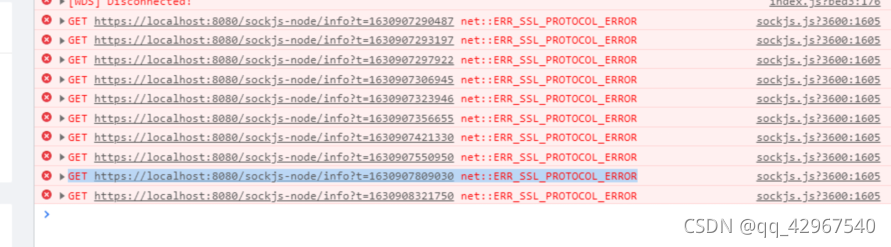
[Solved] /sockjs-node/info?t= net::ERR_SSL_PROTOCOL_ERROR

  Error: as shown in the following figure

After many ideological struggles, he began to solve the problem after admitting that it was his own problem:

{
  "apiUrl": "http://192.168.56.101:5000/",
  "port":  "8080",
  "host": "127.0.0.1",
  "socketHost": "172.16.0.26:443"//Add this line to the json file to configure public (no comments can be written in the json)
}

In reference https://github.com/vuejs/vue-cli/issues/1472

After the discussion, the following solutions are found:

webpack.dev.conf.js file:

Import

const URL = require('../static/config.json');
const socketHost = URL.socketHost;

Add content in devServer: {}:

public: socketHost,
disableHostCheck: true

Fortunately, the problem is solved!

Interface request error 504 gateway time out [How to Solve]

This article mainly introduces the solution of page 504 gateway time-out

1. 504 gateway time out reason?

Because of the browser access interface request, the default timeout event is 1 minute. When the 504 interface timeout is encountered, first we need to see whether the Ajax interface request is set   Timeout. Next, check whether nginx has set the agent timeout.

2. Inspection procedure

1. Front end Ajax settings

$.ajax({
  url: '',
  type: 'post',
  data: postData,
  timeout: 1000*60*10,
  success: function(data){
    console.log(data)
  },
  complete:function(XHR,TextStatus){
    if(TextStatus=='timeout'){ 
      console.log("Timeout");
    }
  }
})

2. Nginx agent timeout setting

proxy_connect_timeout    600;
proxy_read_timeout       600;
proxy_send_timeout       600;
proxy_buffering    off;
proxy_buffer_size  128k;
proxy_buffers 100  128k;

3、 Problem extension (native JS encapsulates Ajax requests)

At that time, the Ajax request of jQuery was used, and the datatype: JSON was uniformly defined by the interface. Due to the file flow returned by the interface, the successful callback was not triggered and did not want to modify the datatype. Therefore, the Ajax request was encapsulated with native JS.

getAjax(url,callback){
    var timeoutFlag=null;
    var xhr=new XMLHttpRequest();
    var url=""//request path, get request can spell the parameters into the address
    xhr.open(type,url,async);//type request type url address async whether asynchronous request 
    xhr.responseType='blob';//If the return data is a file stream, you can set it to blob type
    xhr.timeout=1000*60*60;//timeout time This is set to one hour
    xhr.setRequestHeader('token',token);//set header token
    xhr.onreadystatechange=function(){
        if(xhr.readyState==4){
            window.clearTimeout(timeoutFlag);
            if(xhr.status==200 || xhr.status==304){
                callback(xhr.response);
            }
        }
    }
    xhr.send(data);
    timeoutFlag=window.setTimeout(function(){
        window.clearTimeout(timeoutFlag);
        xhr.abort();
    },xhr.timeout);
}
getAjax('URL',function(res){
})


[Solved] Vue uses webpack to package error: Createapp is not a function

Error message

_node_modules_vue_dist_vue_global_ js__WEBPACK_IMPORTED_MODULE_1___ default().createApp   is   not   a   function

There is a problem with the way Vue is introduced

The correct introduction method is

import { createApp } from 'vue';

var App = {
	data() {
		return {
			images: [{
					Picture: "img"
				},
				{
					Picture: "img2"
				}
			],
		}
	}
}
const app = createApp(App); // 将数据添加到Vue数据绑定上
const vm = app.mount("#app"); // 将数据绑定到指定id上

Document.querySelector(‘video‘).playbackRate [How to Solve]

The reason why I send this article is because I am used to playing at 1.75 times the speed, but station B has only 1.5 and 2, which makes me a headache. I originally had a plug-in that can speed up playback by 1.75 times, but I can’t use it recently. I don’t know why. So I searched for any way to modify the video playback speed of station B. Then there is the following.

The way to find out

Press F12 to enter the following code in the console

document.querySelector("video").playbackRate="16"

It is said that this method can modify the double speed.

report errors

I reported a mistake after using it. What’s the reason?Others open the source code, which is labeled by video. I don’t have it. So it must be wrong.

Others:

mine:

Solution:

As can be seen from the screenshot above, I right-click to add an ID attribute a to it
then enter the following code in the console,

			var video= document.getElementById('a');
			video.playbackRate=1.75

Done.

[Solved] Less Install Error: TypeError: this.getOptions is not a function

Project scenario:

use less development file


Problem Description:

less installation error

 Failed to compile with 1 error 
 Syntax Error: TypeError: this.getOptions is not a function

Cause analysis:

the current version does not match the less and less loader versions, and the less loader version needs to be replaced </ font>


Solution:

Install less version 4.1.1 and less loader version 7.3.0

<style scoped lang="less">
.wrapper{
	.header{...}
	.content{...}
}
</style>

[Solved] Temporary error: Error: spawn E:\vue3-vite\my-app\node_modules\esbuild\esbuild.exe ENOENT

PS E:\vue3-vite\my-app> npm run dev

> [email protected] dev
> vite

events.js:292
      throw er; // Unhandled 'error' event
      ^

Error: spawn E:\vue3-vite\my-app\node_modules\esbuild\esbuild.exe ENOENT
    at Process.ChildProcess._handle.onexit (internal/child_process.js:267:19)
    at onErrorNT (internal/child_process.js:469:16)
    at processTicksAndRejections (internal/process/task_queues.js:84:21)
Emitted 'error' event on ChildProcess instance at:
    at Process.ChildProcess._handle.onexit (internal/child_process.js:273:12)
    at onErrorNT (internal/child_process.js:469:16)
    at processTicksAndRejections (internal/process/task_queues.js:84:21) {
  errno: 'ENOENT',
  code: 'ENOENT',
  syscall: 'spawn E:\\vue3-vite\\my-app\\node_modules\\esbuild\\esbuild.exe',
  path: 'E:\\vue3-vite\\my-app\\node_modules\\esbuild\\esbuild.exe',
  spawnargs: [ '--service=0.12.22', '--ping' ]
}
npm ERR! code 1
npm ERR! path E:\vue3-vite\my-app
npm ERR! command failed
npm ERR! command C:\Windows\system32\cmd.exe /d /s /c vite

npm ERR! A complete log of this run can be found in:
npm ERR!     D:\node\node_cache\_logs\2021-08-26T02_24_14_376Z-debug.log

Solution: node node_modules/esbuild/install.js

PS E:\vue3-vite\my-app> node node_modules/esbuild/install.js
PS E:\vue3-vite\my-app> npm run dev

> [email protected] dev
> vite

Pre-bundling dependencies:
  vue
(this will be run only when your dependencies or config have changed)

  vite v2.5.1 dev server running at:

  > Local: http://localhost:3000/
  > Network: use `--host` to expose

  ready in 1645ms.