Category Archives: How to Fix

Android network request framework okhttputils reports an error (okhttp3 cannot be found)

preface

        Okhttputils has always been used in network requests. Recently, gradle was upgraded from 3.2.1 to 4.2.0. The running project reported an error (call could not be found).

         Android studio usage:

                 implementation ‘com.zhy:okhttputils:2.6.2’

Before upgrade

         Android Studio:4.2.0
         Gradle plug-in version: 3.2.1
         Required version of gradle: 4.8.1

After upgrade

         Android Studio:4.2.0
         Gradle plug-in version: 4.2.0
         Required version of gradle: 6.7.1

Operation results

        Error: package okhttp3 does not exist
        import okhttp3.Call;

solve

         New: implementation ‘com. Squareup. Okhttp3: okhttp: 4.9.1’

         I don’t know if there will be problems later. I feel that I still need to change a set of framework. After all, Hongshen has stopped maintenance.

Vscode remote connection server reports an error: could not establish connection to “XXXXXX” [resolved]

Suppose you have made the following configuration and try

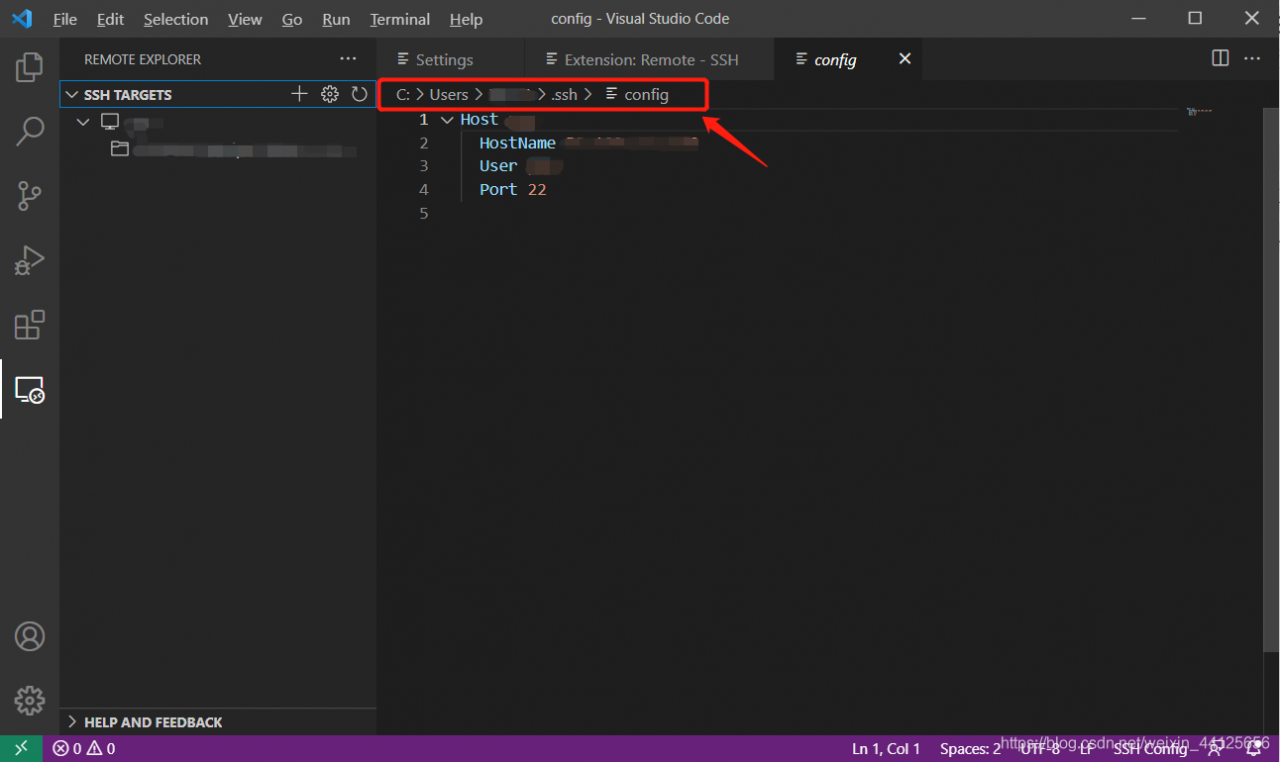
    install remote SSH in the extensions, add the IP address of the server you want to access, and have a config file (as shown in the figure below)
    please remember the path of this config file, which is generally “C: \ users \ user”_ Name \. SSH \ config “
    so you start trying to connect to the server. After selecting Linux/windows from the top drop-down menu, you unfortunately fail

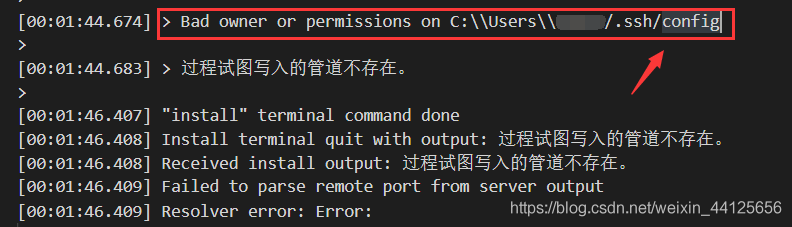
    Error message:

    After the popup window of could not establish connection to “XXX” appears, check the error information below. If the error information contains:

    resolvent:

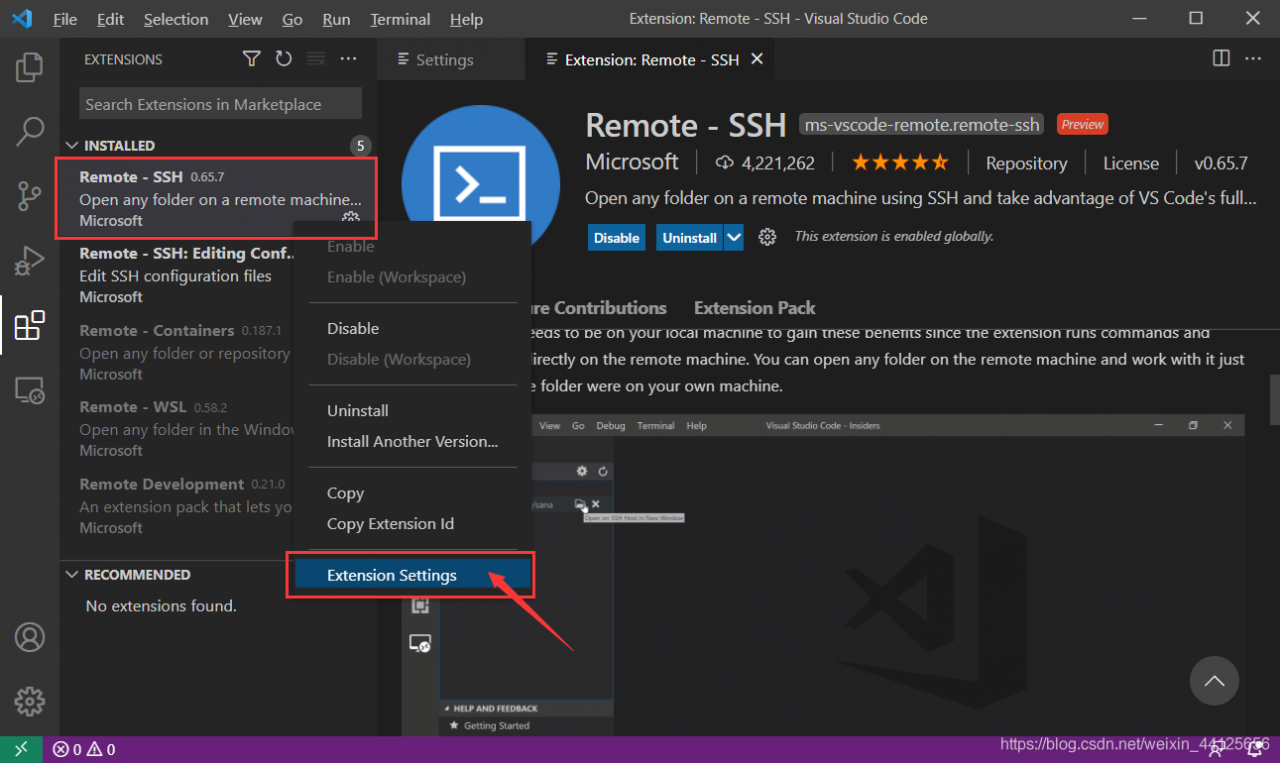
      Open extensions in the left column, find the installed remote SSH, right-click, select “extension settings”
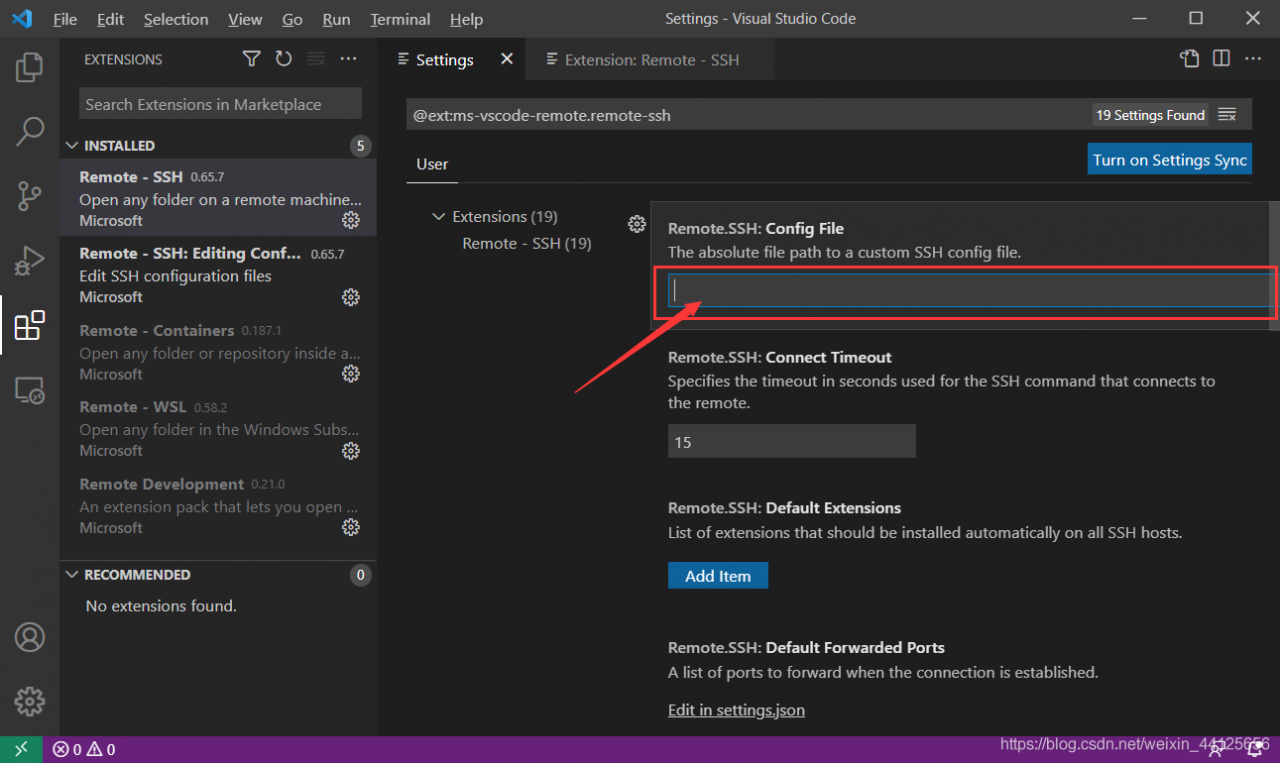
      , enter the config file path in config file, and try to connect again. It is found that the connection is successful

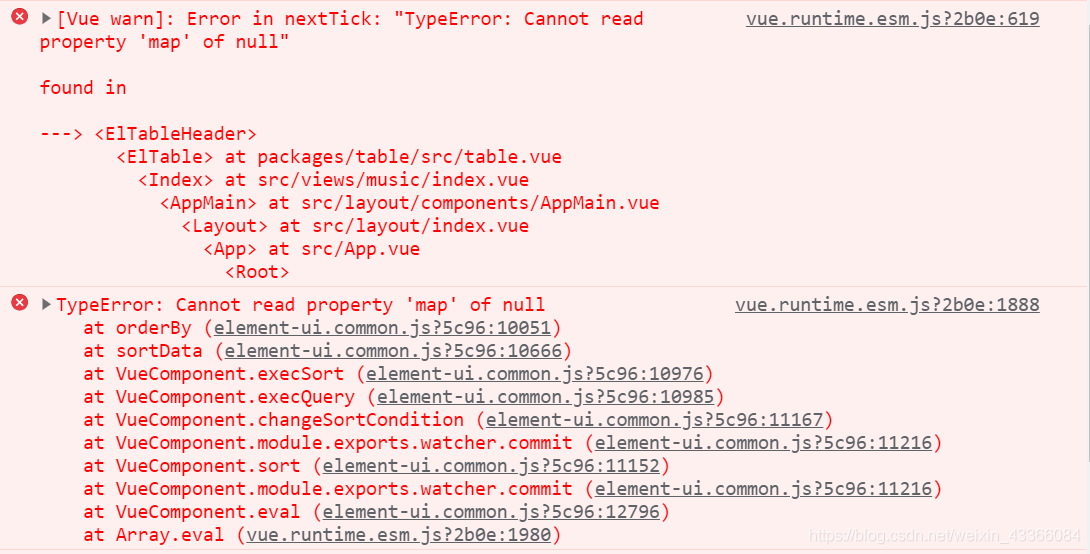
[Vue warn]: Error in nextTick: “TypeError: Cannot read property ‘map‘ of null“

When using element UI in Vue project, an error is reported: [Vue warn]: error in nexttick: "typeerror: cannot read property 'map' of null"

The error message is as follows:

It’s ridiculous. I studied it myself and recorded it. It’s all the fault of carelessness:

The reason is that the data source of El table is initially set to null. When the default sort attribute is used, the table will map the data source by default and report an error
change currentpagedata: null to currentpagedata: [] .

Resolution process:

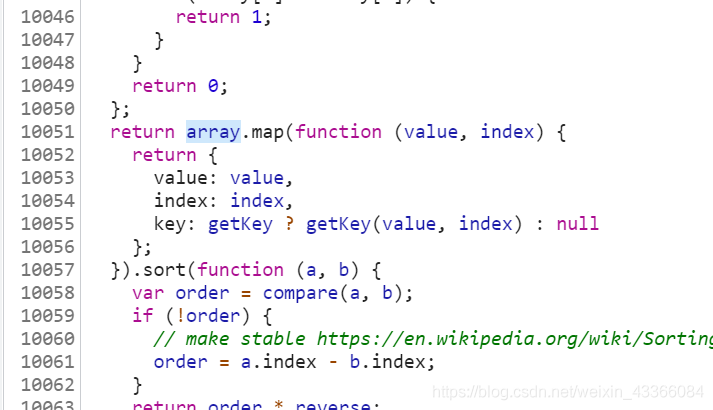
Locate the error location 10051 line according to the error information:

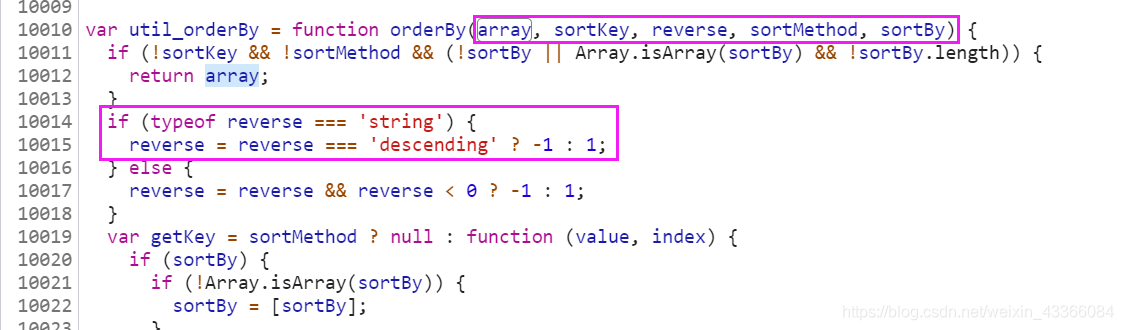
array.map reports the error as null, and then locate the array up:

according to the parameters and contents of this method, it is basically determined that the error information is caused by the default sort attribute of El table, that is, the data source array of El table during compilation and sorting is null
looking back at the data source, I found that the data source was initially assigned null. No wonder
change the initial value of the data source array to [] empty array.

Itself is a very simple mistake, but I didn’t expect it.

[Solved] Error while trying to use the following icon from the Manifest

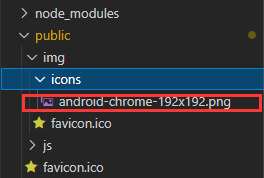
Error while trying to use the following icon from the manifest: http://localhost:8080/img/icons/android -chrome-192×192.png (Download error or resource isn’t a valid image)

The main reason for this error is that the android-chrome-192×192.png image in the icons folder under img under public is deleted by mistake
my solution: re create the same folder and file (if you find a picture, you won’t report an error!)

Unable to read workspace file ‘D:\angular.json‘: Invalid JSON character: “ “ at

Question:

Unable to read workspace file 'D:\font-end\antd\angular.json': Invalid JSON character: " " at 36:71.`Insert code snippet here`

Step 1: introduce the notes of the angular ecarts.min.js
you have a problem with the angular ecarts.min.js, but if the notes are started, the following error will be reported:

Error: The target entry-point "ngx-echarts" has missing 

Inconsistency between adapter data and UI data after dragging recyclerview (data disorder)

Firstly, the function of dragging and sliding is added on the basis of recyclerview. It is written directly according to the official document as follows

 ItemTouchHelper(object : ItemTouchHelper.Callback() {
            override fun getMovementFlags(
                recyclerView: RecyclerView,
                viewHolder: RecyclerView.ViewHolder,
            ): Int {
                //item dragging direction
                var dragflag =
                    ItemTouchHelper.UP or ItemTouchHelper.DOWN or ItemTouchHelper.LEFT or ItemTouchHelper.RIGHT
                return makeMovementFlags(dragflag, 0)
            }

            override fun onMove(
                recyclerView: RecyclerView,
                viewHolder: RecyclerView.ViewHolder,
                target: RecyclerView.ViewHolder,
            ): Boolean {
                myAdapter.notifyItemMoved(viewHolder.layoutPosition, target.layoutPosition)
                return true
            }


            override fun onSwiped(viewHolder: RecyclerView.ViewHolder, direction: Int) {}

            override fun canDropOver(
                recyclerView: RecyclerView,
                current: RecyclerView.ViewHolder,
                target: RecyclerView.ViewHolder,
            ): Boolean {
                //The current ViewHolder can be placed on the target ViewHolder
                return true
            }

            override fun isLongPressDragEnabled(): Boolean {
                //Turn on long press drag
                return true
            }

        }).attachToRecyclerView(binding.myRV)//add to RecyclerView

After running, it is found that the UI is normal, but when obtaining adapter.items, it is found that the data has not changed, so perform data exchange and sorting in onmove:

ItemTouchHelper(object : ItemTouchHelper.Callback() {
            override fun getMovementFlags(
                recyclerView: RecyclerView,
                viewHolder: RecyclerView.ViewHolder,
            ): Int {
                var dragflag =
                    ItemTouchHelper.UP or ItemTouchHelper.DOWN or ItemTouchHelper.LEFT or ItemTouchHelper.RIGHT
                return makeMovementFlags(dragflag, 0)
            }

            override fun onMove(
                recyclerView: RecyclerView,
                viewHolder: RecyclerView.ViewHolder,
                target: RecyclerView.ViewHolder,
            ): Boolean {
                if (viewHolder.layoutPosition < target.layoutPosition) {
                    for (i in viewHolder.layoutPosition until target.layoutPosition) {
                        Collections.swap(myAdapter.items, i, i + 1) 
                    }
                } else {
                    for (i in viewHolder.layoutPosition downTo target.layoutPosition + 1) {
                        Collections.swap(myAdapter.items, i, i - 1) 
                    }

                }
                myAdapter.notifyItemMoved(viewHolder.layoutPosition, target.layoutPosition)
                myAdapter.notifyItemChanged(target.layoutPosition)
                return true
            }


            override fun onSwiped(viewHolder: RecyclerView.ViewHolder, direction: Int) {}

            override fun canDropOver(
                recyclerView: RecyclerView,
                current: RecyclerView.ViewHolder,
                target: RecyclerView.ViewHolder,
            ): Boolean {
                return true
            }

            override fun isLongPressDragEnabled(): Boolean {
                return true
            }

        }).attachToRecyclerView(binding.myRV)

If you want to listen to the end of drag, you can override the Clearview method to listen

Unrecognized option: –add-opens=jdk.compiler/com.sun.tools.javac.code=ALL-UNNAMED

Upgrade to IntelliJ idea 2021.2 and start the project with an error

Unrecognized option: –add-opens=jdk.compiler/com.sun.tools.javac.code=ALL-UNNAMED

Solution: delete the. Idea folder and re import the project.

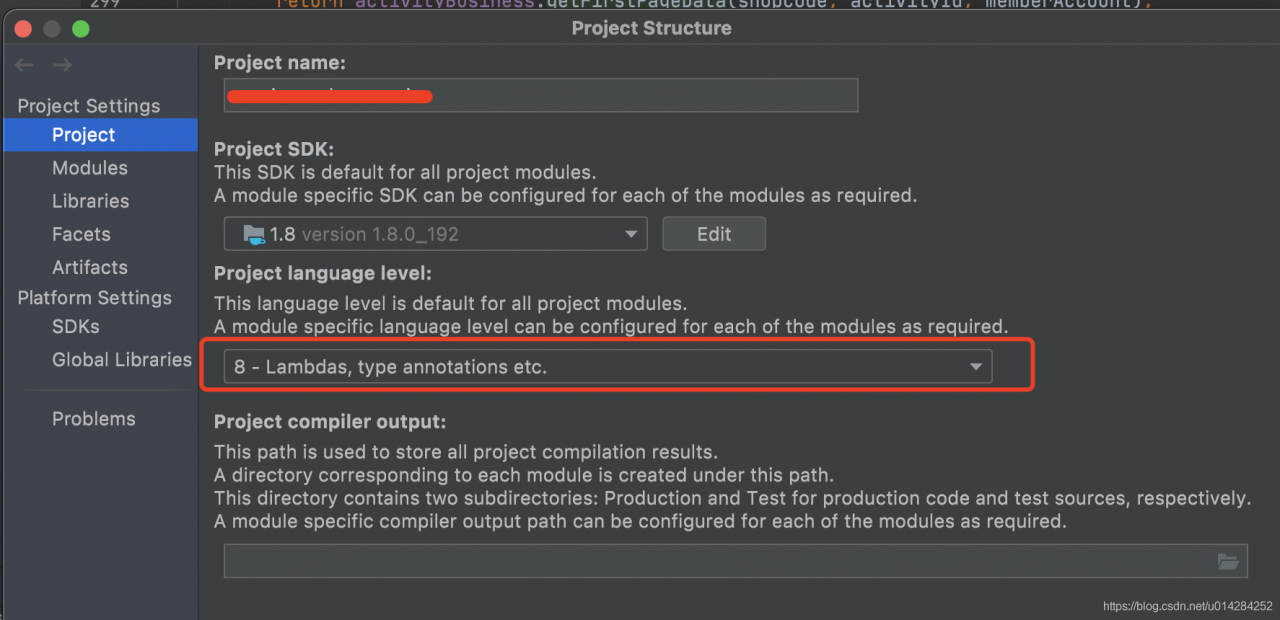
Recommended solution:

Change the red box to your JDK version. Mine is 1.8, so check 8. If this problem cannot be solved, use the above solution again.


Redis reports an error when integrating springsecurity: could not read JSON: unrecognized field “enabled”“

When springboot integrates springsecurity, an error occurs:
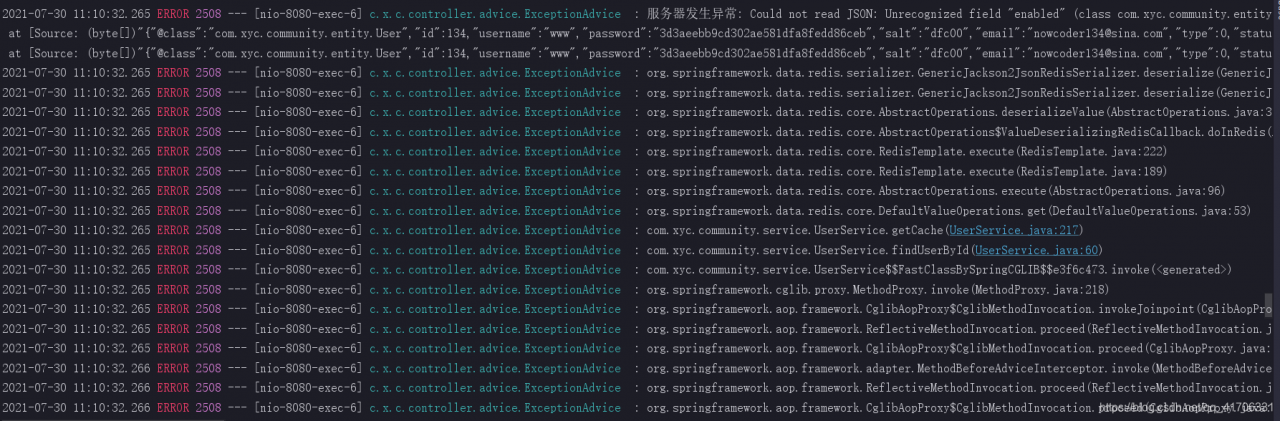
  By viewing the error reporting information, it is found that the errors are reported where redis is used. In the project, redis is used as a cache to store user information. Everything is normal when spring security is not integrated, but there is a problem after the integration. I checked several blogs on the Internet and found that there is a problem when redis serializes and stores user objects.

Key error messages:

Could not read JSON: Unrecognized field "enabled" (class com.xyc.community.entity.User), not marked as ignorable (11 known properties: "authorities", "status", "activationCode", "username", "createTime", "type", "id", "email", "headerUrl", "salt", "password"])
 at [Source: (byte[])"{"@class":"com.xyc.community.entity.User","id":134,"username":"www","password":"3d3aeebb9cd302ae581dfa8fedd86ceb","salt":"dfc00","email":"[email protected]","type":0,"status":1,"activationCode":null,"headerUrl":"http://images.nowcoder.com/head/134t.png","createTime":["java.util.Date",1555668837000],"enabled":true,"accountNonExpired":true,"accountNonLocked":true,"credentialsNonExpired":true}"; line: 1, column: 318] (through reference chain: com.xyc.community.entity.User["enabled"]); nested exception is com.fasterxml.jackson.databind.exc.UnrecognizedPropertyException: Unrecognized field "enabled" (class com.xyc.community.entity.User), not marked as ignorable (11 known properties: "authorities", "status", "activationCode", "username", "createTime", "type", "id", "email", "headerUrl", "salt", "password"])
 at [Source: (byte[])"{"@class":"com.xyc.community.entity.User","id":134,"username":"www","password":"3d3aeebb9cd302ae581dfa8fedd86ceb","salt":"dfc00","email":"[email protected]","type":0,"status":1,"activationCode":null,"headerUrl":"http://images.nowcoder.com/head/134t.png","createTime":["java.util.Date",1555668837000],"enabled":true,"accountNonExpired":true,"accountNonLocked":true,"credentialsNonExpired":true}"; line: 1, column: 318] (through reference chain: com.xyc.community.entity.User["enabled"])

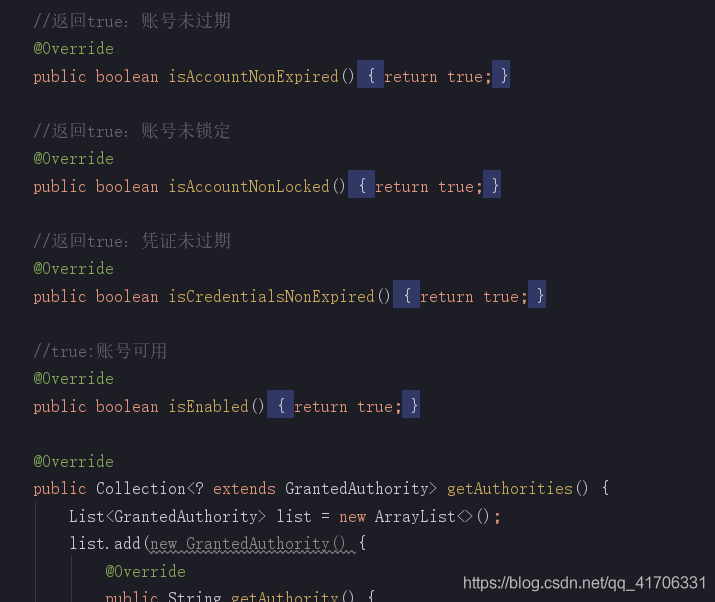
You can see that several fields are added during serialization because the userdetails interface is implemented in the user class in order to integrate springsecurity. These methods have been rewritten
  terms of settlement:

Using the @ jsonignoreproperties annotation, you can ignore these fields when the user object is serialized

Add before user class:

@JsonIgnoreProperties({"enabled","accountNonExpired", "accountNonLocked", "credentialsNonExpired", "authorities"})