Category Archives: How to Fix

View the error report after Android APK confusion

It is not convenient for APK to view the log after confusion, and the class and method names are shortened
you can view the corresponding class names and method names before and after confusion in the mapping.txt file generated during confusion
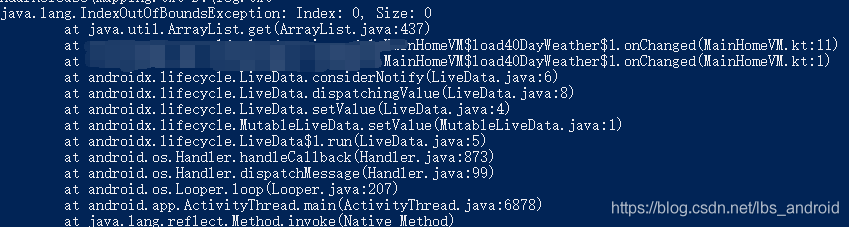
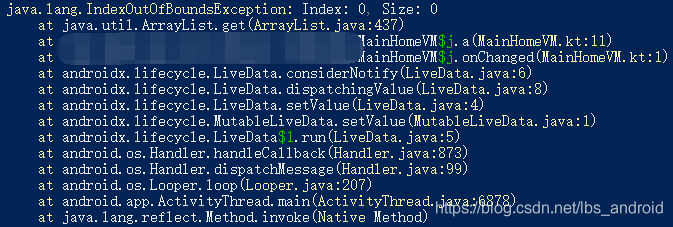
you can also use the retract in the SDK \ tools \ Proguard \ bin path to recover the original class name and method name. First copy the error log to a TXT file, such as log.txt. You can then use the command:

Trace mapping file path log file path, such as

retrace D:\mapping.txt D:\log.txt

Before treatment

After treatment

The web project removal server reports an error, and the web project in eclipse cannot be automatically deployed to Tomcat

1. In the servers view at the bottom of eclipse, remove all deployed projects, as shown in the figure:

two   On the server, right-click and select open, or press F3 in the blank space, or double-click to open the following page:

three   Select “use Tomcat installation” in “server locations”, and you can clearly see that the default is “use”   Workspace metadata “, that is, the directory mentioned above. Then write webapps at the path of deploy, as shown in the following figure:

After modification, save it. In this way, future projects will be published to webapps under Tomcat.

Note: 1. In eclipse, publishing a web project in this way will divide the conf folder of the original server into a backup folder, and create a new folder to configure the web project published by eclipse. So you still need to write a Java Web project using MyEclipse

2. Sometimes, nothing can be selected under the server locations project. You can delete the server, add the Tomcat server again, and then right-click to open it and modify it.

Reference website:

If JavaScript exceeds the length of the array, no error will be reported

If JavaScript exceeds the length of the array, no error will be reported

Today, I encountered such a problem when I was doing the problem

 while (sum < target) {
 	right++;
	sum += nums[right];
}

Here, the while loop does not add the limit when the right index exceeds the length of the array, but there is still no error. The program can run normally.

The following reasons are checked here. It is found that when right exceeds the range, the output of num [right] is undefined

console.log(nums[nums.length]) //undefined

When undefined is added to the number, it becomes Nan

console.log(10+nums[nums.length]) // NaN

In the judgment conditions of the while loop, comparing Nan with the number will directly return false, so you can exit the loop without affecting the result.

console.log(NaN>10) //false

Title: 209. Minimum length subarray
https://leetcode-cn.com/problems/minimum-size-subarray-sum/


When trying to abbreviate it as suffix increment, I forgot to change the initial value of right from – 1 to 0. JavaScript cannot traverse the array through the negative index and will directly return undefined. Therefore, combined with the above example, it will directly exit the first small while loop. Right remains unchanged and will fall into an endless loop.

Error demonstration:

var minSubArrayLen = function(target, nums) {
    let left = 0, right = -1;
    let sum = 0;
    let res = nums.length+1;
    while (right<nums.length) {
        while (sum < target) {
            // right++;
            sum += nums[++right];
        }
        while (sum>=target) {
            res = (res>right-left+1)?right-left+1 : res;
            sum -= nums[left];
            left ++;
            
        }
    }
    return res>nums.length ?0 : res; 
}
Mongo connection remote address error

The remote address is clearly configured, but it is still connected to the localhost

Error log:

[localhost:27017] org.mongodb.driver.cluster               : Exception in monitor thread while connecting to server localhost:27017

com.mongodb.MongoSocketOpenException: Exception opening socket

terms of settlement:

1. Springboot startup class, remove these two configuration classes

@SpringBootApplication(exclude = {MongoAutoConfiguration.class, MongoDataAutoConfiguration.class})

2. Add mongoconfiguration.java configuration class, and then you can connect it. Next, enjoy mongotemplate

@Configuration
public class MongoConfiguration {
    @Value("${spring.data.mongodb.uri}")
    private String mongodbUri;

    @Value("${spring.data.mongodb.option.min-connection-per-host}")
    private Integer minConnectionPerHost;

    @Value("${spring.data.mongodb.option.max-connection-per-host}")
    private Integer maxConnectionPerHost;

    @Bean
    public MongoTemplate mongoTemplate() throws Exception {
        MongoClientOptions.Builder builder = new Builder();
        builder.minConnectionsPerHost(minConnectionPerHost);
        builder.connectionsPerHost(maxConnectionPerHost);
        final SimpleMongoDbFactory simpleMongoDbFactory = new SimpleMongoDbFactory(new MongoClientURI(mongodbUri, builder));
        MongoTemplate mongoTemplate = new MongoTemplate(simpleMongoDbFactory);
        return mongoTemplate;
    }
}

Troubleshooting of Ubuntu wrk installation error

Installation Preferences

https://blog.csdn.net/qq_41030861/article/details/90553510

git clone https://github.com/wg/wrk.git 

cd mrk
make
ln -s /xxx/mrk/mrk  /usr/local/bin

be careful

The compilation environment
needs to be installed, including C, C + +
related C libraries, Lua, etc

report errors

echo LuaJIT-2.1
LuaJIT-2.1
make: unzip: Command not found
Makefile:81: recipe for target ‘obj/LuaJIT-2.1’ failed
make: *** [obj/LuaJIT-2.1] Error 127

Error reporting solution

Linux system does not have its own compression and decompression tools; We need to install it ourselves; When Zip or unzip is used, unzip: command not found or zip: command not found will appear if it is not installed; This happens because unzip and zip are not installed;

sudo apt-get install zip

Introduce vuex error reporting solution

This error is always reported when using vuex: error in created hook: “typeerror: cannot read property ‘commit’ of undefined”

It was found that the global store was not introduced in main.js

import store from ‘store/store.js’

const app = new Vue({ …App, store })

Record it here and remind yourself to remember  

Eslint error reporting and resolution

1. ‘trailing spaces not allowed’ indicates that there are redundant spaces at the end of the line. Just delete them

2. The variable declared by ‘xxx’ is assigned a value but never used ‘is not used

3. ‘string must use singlequote’ just change double quotation marks into single quotation marks

4. There is a semicolon at the end of the ‘extra semicolon’ line (the default eslint configuration does not use semicolons)

5. There is a comma at the end of the ‘unexpected trailing comma’ line

6. ‘unexpected template string expression’ uses unnecessary template string expression

7. ‘xxx’ is never reassigned. Use ‘const’ variables declared with let are not reassigned later, and const is used instead

8. ‘Expected space(s) after “if”‘

  ‘Missing space before function parentheses’

     ‘ Missing space before opening brace’

     ‘ Expected space or tab after ‘/ /’ in comment ‘these are missing spaces

9. The error ‘unexpected side effect in “submitparames” calculated property’ is because I assigned values to other property values in the calculated property. It would be better to replace it with watch. It should be that the calculated property only performs simple operations, which is not good for changing the property value directly

10. ‘Identifier ‘col_ Names’ is not in camel case ‘

11. ‘unnecessary use of conditional expression for default assignment’ is because a ternary expression is used for the initialization of a value

12. ‘closing curry brace does not appear on the same line as the subsequence block’ braces are not on the same line as subsequent code blocks, for example, if… Else… Statements, else statements wrap

The file server reports an error of 413, and the file uploaded by nginx reports an error of 413 request entity too large

Please confirm the following parameters of php.ini file first

file_ uploads = on       // Whether to allow file upload via http. The default is on, that is, on

upload_ tmp_ dir         // The file is uploaded to the place where the temporary file is stored on the server. If it is not specified, the system default temporary folder will be used

upload_ max_ filesize = 10m       // That is, the maximum file size allowed to upload. The default is 2m

post_ max_ size = 10m    // It refers to the maximum value that can be received by PHP through form post, including all values in the form. The default is 8m

Generally, after setting the above four parameters, upload & lt= 10m files are not a problem under normal network conditions. But if you want to upload & gt; 10m large volume files, only setting the above four items may not work.

Further configure the following parameters

max_ execution_ time = 600     // The maximum running time of each PHP page (seconds), which is 30 seconds by default

max_ input_ time = 600     // The maximum time required for each PHP page to receive data is 60 seconds by default

memory_ limit = 128m      // The maximum memory consumed by each PHP page is 8m by default

If all the above settings are set and still cannot be uploaded, add a: client in the ngnix.conf configuration file of the website_ max_ body_ size 200m;

Ajax error reporting cross domain, AJAX cross domain access error 501 solution

Problem: Ajax cross domain access error 501

Running the following code will report error 501

$.ajax({

type: “POST”,

url: ” http://192.168.1.202/sensordata.php “,

contentType:’application/json; charset=utf-8′,

data: JSON.stringify(ajaxPostData),

dataType:’json’,

success: function(data){

//On ajax success do this

console.info(“success.”);

if (data[“status”] == “ok”){

alert(“Settings is Ok. The Machine is rebooting.”);

}

},

error: function(xhr, ajaxOptions, thrownError) {

//On error do this

console.info(“error.”);

if (xhr.status == 200) {

alert(ajaxOptions);

}

else {

alert(xhr.status);

alert(thrownError);

}

}

});

resolvent:

Remove contenttype: ‘application/JSON; charset=utf-8’

reason:

1. When cross domain, the browser will be triggered to send a request with the method options first, except that the contenttype is application/x-www-form-urlencoded, multipart/form data or text/plain.

2 for example, your original request is the post method. If the allow attribute in the header of the result returned by the first request does not have the post method,

3 then the second request will not be sent. At this time, the browser console will report an error and tell you that the post method is not supported by the server.

The above is the whole content of this article. I hope it will help you in your study. I also hope you can support us to find the tutorial network.

PyTorch Error: RuntimeError: CUDA error: CUBLAS_STATUS_INVALID_VALUE when calling cublasSgemm()

Complete error reporting information

RuntimeError: CUDA error: CUBLAS_STATUS_INVALID_VALUE when 
calling `cublasSgemm( handle, opa, opb, m, n, k, &alpha, a, 
lda, b, ldb, &beta, c, ldc)`

Error causes and solutions

Usually linear layer

n

n

.

L

i

n

e

a

r

\rm nn.Linear

NN. When defining linear, the data dimension parameter does not match the actual data dimension, so it needs to be checked and modified.

RuntimeError: ‘lengths’ argument should be a 1D CPU int64 tensor, but got 1D cuda:0 Long tensor

Pytorch use error

Cause analysis and solution of error content

Error content

RuntimeError: ‘lengths’ argument should be a 1D CPU int64 tensor, but got 1D cuda:0 Long tensor

Cause analysis

Because I use a higher version of torch 1.7.1, this error is caused by the upgrade of torch 1.5 or above bilstm.

Solution

    go to the CPU to run the code and no error will be reported! Convert the error location parameter lengths to CPU type:

    lengths.to("cpu")
    

    It can be solved!

    Reference: link