Category Archives: How to Fix

RCurl error-fatal error: curl/curl.h: No such file or directory

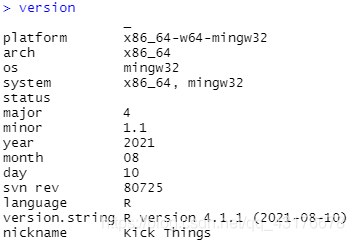
# R version 4.1.1 (2021-08-10)
install.packages("E:/R/R-4.1.1/library/RCurl_1.98-1.4.tar.gz", repos = NULL, type = "source")

The operation process is as follows:

* installing *source* package 'RCurl' ...
** package 'RCurl' successfully unpacked and MD5 sums checked
** using staged installation
** libs

*** arch - i386
"E:/R/rtools40/mingw32/bin/"gcc  -I"E:/R/R-41~1.1/include" -DNDEBUG -I/include -DHAVE_LIBIDN_FIELD=1 -DHAVE_CURLOPT_URL=1 -DHAVE_CURLINFO_EFFECTIVE_URL=1 -DHAVE_CURLINFO_RESPONSE_CODE=1 -DHAVE_CURLINFO_TOTAL_TIME=1 -DHAVE_CURLINFO_NAMELOOKUP_TIME=1 -DHAVE_CURLINFO_CONNECT_TIME=1 -DHAVE_CURLINFO_PRETRANSFER_TIME=1 -DHAVE_CURLINFO_SIZE_UPLOAD=1 -DHAVE_CURLINFO_SIZE_DOWNLOAD=1 -DHAVE_CURLINFO_SPEED_DOWNLOAD=1 -DHAVE_CURLINFO_SPEED_UPLOAD=1 -DHAVE_CURLINFO_HEADER_SIZE=1 -DHAVE_CURLINFO_REQUEST_SIZE=1 -DHAVE_CURLINFO_SSL_VERIFYRESULT=1 -DHAVE_CURLINFO_FILETIME=1 -DHAVE_CURLINFO_CONTENT_LENGTH_DOWNLOAD=1 -DHAVE_CURLINFO_CONTENT_LENGTH_UPLOAD=1 -DHAVE_CURLINFO_STARTTRANSFER_TIME=1 -DHAVE_CURLINFO_CONTENT_TYPE=1 -DHAVE_CURLINFO_REDIRECT_TIME=1 -DHAVE_CURLINFO_REDIRECT_COUNT=1 -DHAVE_CURLINFO_PRIVATE=1 -DHAVE_CURLINFO_HTTP_CONNECTCODE=1 -DHAVE_CURLINFO_HTTPAUTH_AVAIL=1 -DHAVE_CURLINFO_PROXYAUTH_AVAIL=1 -DHAVE_CURLINFO_OS_ERRNO=1 -DHAVE_CURLINFO_NUM_CONNECTS=1 -DHAVE_CURLINFO_SSL_ENGINES=1 -DHAVE_CURLINFO_COOKIELIST=1 -DHAVE_CURLINFO_LASTSOCKET=1 -DHAVE_CURLINFO_FTP_ENTRY_PATH=1 -DHAVE_CURLINFO_REDIRECT_URL=1 -DHAVE_CURLINFO_PRIMARY_IP=1 -DHAVE_CURLINFO_APPCONNECT_TIME=1 -DHAVE_CURLINFO_CERTINFO=1 -DHAVE_CURLINFO_CONDITION_UNMET=1 -DHAVE_CURLOPT_KEYPASSWD=1 -DHAVE_CURLOPT_DIRLISTONLY=1 -DHAVE_CURLOPT_APPEND=1 -DHAVE_CURLOPT_KRBLEVEL=1 -DHAVE_CURLOPT_USE_SSL=1 -DHAVE_CURLOPT_TIMEOUT_MS=1 -DHAVE_CURLOPT_CONNECTTIMEOUT_MS=1 -DHAVE_CURLOPT_HTTP_TRANSFER_DECODING=1 -DHAVE_CURLOPT_HTTP_CONTENT_DECODING=1 -DHAVE_CURLOPT_NEW_FILE_PERMS=1 -DHAVE_CURLOPT_NEW_DIRECTORY_PERMS=1 -DHAVE_CURLOPT_POSTREDIR=1 -DHAVE_CURLOPT_OPENSOCKETFUNCTION=1 -DHAVE_CURLOPT_OPENSOCKETDATA=1 -DHAVE_CURLOPT_COPYPOSTFIELDS=1 -DHAVE_CURLOPT_PROXY_TRANSFER_MODE=1 -DHAVE_CURLOPT_SEEKFUNCTION=1 -DHAVE_CURLOPT_SEEKDATA=1 -DHAVE_CURLOPT_CRLFILE=1 -DHAVE_CURLOPT_ISSUERCERT=1 -DHAVE_CURLOPT_ADDRESS_SCOPE=1 -DHAVE_CURLOPT_CERTINFO=1 -DHAVE_CURLOPT_USERNAME=1 -DHAVE_CURLOPT_PASSWORD=1 -DHAVE_CURLOPT_PROXYUSERNAME=1 -DHAVE_CURLOPT_PROXYPASSWORD=1 -DHAVE_CURLOPT_SSH_HOST_PUBLIC_KEY_MD5=1 -DHAVE_CURLOPT_NOPROXY=1 -DHAVE_CURLOPT_TFTP_BLKSIZE=1 -DHAVE_CURLOPT_SOCKS5_GSSAPI_SERVICE=1 -DHAVE_CURLOPT_SOCKS5_GSSAPI_NEC=1 -DHAVE_CURLOPT_PROTOCOLS=1 -DHAVE_CURLOPT_REDIR_PROTOCOLS=1 -DHAVE_CURLOPT_SSH_AUTH_TYPES=1 -DHAVE_CURLOPT_SSH_PUBLIC_KEYFILE=1 -DHAVE_CURLOPT_SSH_PRIVATE_KEYFILE=1 -DHAVE_CURLOPT_FTP_SSL_CCC=1 -DHAVE_CURLOPT_COOKIELIST=1 -DHAVE_CURLOPT_IGNORE_CONTENT_LENGTH=1 -DHAVE_CURLOPT_FTP_SKIP_PASV_IP=1 -DHAVE_CURLOPT_FTP_FILEMETHOD=1 -DHAVE_CURLOPT_LOCALPORT=1 -DHAVE_CURLOPT_LOCALPORTRANGE=1 -DHAVE_CURLOPT_CONNECT_ONLY=1 -DHAVE_CURLOPT_CONV_FROM_NETWORK_FUNCTION=1 -DHAVE_CURLOPT_CONV_TO_NETWORK_FUNCTION=1 -DHAVE_CURLOPT_CONV_FROM_UTF8_FUNCTION=1 -DHAVE_CURLOPT_MAX_SEND_SPEED_LARGE=1 -DHAVE_CURLOPT_MAX_RECV_SPEED_LARGE=1 -DHAVE_CURLOPT_FTP_ALTERNATIVE_TO_USER=1 -DHAVE_CURLOPT_SOCKOPTFUNCTION=1 -DHAVE_CURLOPT_SOCKOPTDATA=1 -DHAVE_CURLOPT_SSL_SESSIONID_CACHE=1 -DHAVE_CURLOPT_WRITEDATA=1 -DCURL_STATICLIB         -O2 -Wall  -std=gnu99 -mfpmath=sse -msse2 -mstackrealign  -c base64.c -o base64.o
In file included from base64.c:1:
Rcurl.h:4:10: fatal error: curl/curl.h: No such file or directory
 #include <curl/curl.h>
          ^~~~~~~~~~~~~
compilation terminated.
make: *** [E:/R/R-41~1.1/etc/i386/Makeconf:238: base64.o] Error 1
ERROR: compilation failed for package 'RCurl'
* removing 'E:/R/R-4.1.1/library/RCurl'
* restoring previous 'E:/R/R-4.1.1/library/RCurl'
Warning in install.packages :
  installation of package ‘E:/R/R-4.1.1/library/RCurl_1.98-1.4.tar.gz’ had non-zero exit status

Computer R version:
error: RPC failed; curl 56 GnuTLS recv error (-9): A TLS packet with unexpected length was

If an error is reported in a large project of GIT clone, the data query should be caused by the insufficient default cache size of GIT clone
the solution is to increase the cache space:
git config — global http.postbuffer 1048576000
then an error is reported:
error: RPC failed; Curl 56 gnutls recv error (- 54): error in the pull function.
solution:
change HTTPS protocol to SSH
about to

git clone --branch v0.8.1 https://github.com/pytorch/vision torchvision

Change to

git clone --branch v0.8.1 git://github.com/pytorch/vision torchvision

A cross-origin error was thrown. React doesn‘t have access to the actual error object in development

A cross origin error was throw. React doesn’t have access to the actual error object in development

I ran the react project in the morning. I read the reason on the Internet and learned that there was a problem with the package, which led me to delete the package several times without solving it. Finally, delete the package and then clear the cache of the package with the instruction. The package downloaded with the yarn instruction solves this problem

ERROR: ../tSafe/coreReadArchive.cpp (38) – Serialization Error in verifyHeader: 0 (Version tag does

Tenserrt TRT reports an error when using engine infer

Question

An error occurred in building the yoov5s model and trying to use the TRT inference service

[TensorRT] ERROR: ../rtSafe/coreReadArchive.cpp (38) - Serialization Error in verifyHeader: 0 (Version tag does not match)
[TensorRT] ERROR: INVALID_STATE: std::exception
[TensorRT] ERROR: INVALID_CONFIG: Deserialize the cuda engine failed.

[the external chain image transfer fails. The source station may have an anti-theft chain mechanism. It is recommended to save the image and upload it directly (img-z24zz5ve-1629281553325) (C: \ users \ dell-3020 \ appdata \ roaming \ typora user images \ image-20210818142817754. PNG)]

Error reporting reason:

The version of tensorrt used when compiling engine is inconsistent with the version of tensorrt used when TRT reasoning is used. It needs to be consistent

terms of settlement

Confirm the tensorrt version of each link to ensure consistency; Look at the dynamic link library of Yolo compiled files

ldd yolo

After modification, it runs normally and the speed becomes very fast

reference resources

https://forums.developer.nvidia.com/t/tensorrt-error-rtsafe-corereadarchive-cpp-31-serialization-error-in-verifyheader-0-magic-tag-does-not-match/81872/3https://github.com/wang -xinyu/tensorrtx.git

RuntimeError:An attempt has been made to start a new process before the……

Key errors are as follows:

RuntimeError:
        An attempt has been made to start a new process before the
        current process has finished its bootstrapping phase.

        This probably means that you are not using fork to start your
        child processes and you have forgotten to use the proper idiom
        in the main module:

            if __name__ == '__main__':
                freeze_support()
                ...

        The "freeze_support()" line can be omitted if the program
        is not going to be frozen to produce an executable.

All error prompts are as follows:

// 
Traceback (most recent call last):
  File "main.py", line 19, in <module>
  File "<string>", line 1, in <module>
    t.train()
  File "c:\Paper Code\RCAN-master-Real\RCAN_TrainCode\code\trainer.py", line 45, in train
  File "C:\Anaconda3\envs\pytorch0.4.0\lib\multiprocessing\spawn.py", line 105, in spawn_main
    for batch, (lr, hr, _, idx_scale) in enumerate(self.loader_train):
  File "c:\Paper Code\RCAN-master-Real\RCAN_TrainCode\code\dataloader.py", line 144, in __iter__
    exitcode = _main(fd)
  File "C:\Anaconda3\envs\pytorch0.4.0\lib\multiprocessing\spawn.py", line 114, in _main
    prepare(preparation_data)
  File "C:\Anaconda3\envs\pytorch0.4.0\lib\multiprocessing\spawn.py", line 225, in prepare
    return _MSDataLoaderIter(self)
  File "c:\Paper Code\RCAN-master-Real\RCAN_TrainCode\code\dataloader.py", line 117, in __init__
    _fixup_main_from_path(data['init_main_from_path'])
  File "C:\Anaconda3\envs\pytorch0.4.0\lib\multiprocessing\spawn.py", line 277, in _fixup_main_from_path
    w.start()
  File "C:\Anaconda3\envs\pytorch0.4.0\lib\multiprocessing\process.py", line 105, in start
    run_name="__mp_main__")
  File "C:\Anaconda3\envs\pytorch0.4.0\lib\runpy.py", line 263, in run_path
    self._popen = self._Popen(self)
  File "C:\Anaconda3\envs\pytorch0.4.0\lib\multiprocessing\context.py", line 223, in _Popen
    pkg_name=pkg_name, script_name=fname)
  File "C:\Anaconda3\envs\pytorch0.4.0\lib\runpy.py", line 96, in _run_module_code
    mod_name, mod_spec, pkg_name, script_name)
  File "C:\Anaconda3\envs\pytorch0.4.0\lib\runpy.py", line 85, in _run_code
    return _default_context.get_context().Process._Popen(process_obj)
  File "C:\Anaconda3\envs\pytorch0.4.0\lib\multiprocessing\context.py", line 322, in _Popen
    exec(code, run_globals)
  File "c:\Paper Code\RCAN-master-Real\RCAN_TrainCode\code\main.py", line 19, in <module>
    t.train()
    return Popen(process_obj)
  File "C:\Anaconda3\envs\pytorch0.4.0\lib\multiprocessing\popen_spawn_win32.py", line 65, in __init__
  File "c:\Paper Code\RCAN-master-Real\RCAN_TrainCode\code\trainer.py", line 45, in train
    for batch, (lr, hr, _, idx_scale) in enumerate(self.loader_train):
  File "c:\Paper Code\RCAN-master-Real\RCAN_TrainCode\code\dataloader.py", line 144, in __iter__
    reduction.dump(process_obj, to_child)
  File "C:\Anaconda3\envs\pytorch0.4.0\lib\multiprocessing\reduction.py", line 60, in dump
    return _MSDataLoaderIter(self)
  File "c:\Paper Code\RCAN-master-Real\RCAN_TrainCode\code\dataloader.py", line 117, in __init__
    w.start()
  File "C:\Anaconda3\envs\pytorch0.4.0\lib\multiprocessing\process.py", line 105, in start
    ForkingPickler(file, protocol).dump(obj)
    self._popen = self._Popen(self)
BrokenPipeError: [Errno 32] Broken pipe
  File "C:\Anaconda3\envs\pytorch0.4.0\lib\multiprocessing\context.py", line 223, in _Popen
    return _default_context.get_context().Process._Popen(process_obj)
  File "C:\Anaconda3\envs\pytorch0.4.0\lib\multiprocessing\context.py", line 322, in _Popen
    return Popen(process_obj)
  File "C:\Anaconda3\envs\pytorch0.4.0\lib\multiprocessing\popen_spawn_win32.py", line 33, in __init__
    prep_data = spawn.get_preparation_data(process_obj._name)
  File "C:\Anaconda3\envs\pytorch0.4.0\lib\multiprocessing\spawn.py", line 143, in get_preparation_data
    _check_not_importing_main()
  File "C:\Anaconda3\envs\pytorch0.4.0\lib\multiprocessing\spawn.py", line 136, in _check_not_importing_main
    is not going to be frozen to produce an executable.''')
RuntimeError:
        An attempt has been made to start a new process before the
        current process has finished its bootstrapping phase.

        This probably means that you are not using fork to start your
        child processes and you have forgotten to use the proper idiom
        in the main module:

            if __name__ == '__main__':
                freeze_support()
                ...

        The "freeze_support()" line can be omitted if the program
        is not going to be frozen to produce an executable.

Original code:


    torch.manual_seed(args.seed)
    checkpoint = utility.checkpoint(args)

    if checkpoint.ok:
        loader = data.Data(args)
        model = model.Model(args, checkpoint)
        loss = loss.Loss(args, checkpoint) if not args.test_only else None
        t = Trainer(args, loader, model, loss, checkpoint)
        while not t.terminate():
            t.train()
            t.test()

        checkpoint.done()

After modification:

if __name__ == '__main__':
    torch.manual_seed(args.seed)
    checkpoint = utility.checkpoint(args)

    if checkpoint.ok:
        loader = data.Data(args)
        model = model.Model(args, checkpoint)
        loss = loss.Loss(args, checkpoint) if not args.test_only else None
        t = Trainer(args, loader, model, loss, checkpoint)
        while not t.terminate():
            t.train()
            t.test()

        checkpoint.done()

Run~~

Study notes.

Error:Could not create the Java Virtical Machine. Error: A fatal exception has occurred. program

I’m in Android Studio – & gt; help–> After editing cost VM options modifies the configuration (because the word is misspelled), Android studio cannot be opened. It is useless to modify studio64.vmoptions in the bin directory, uninstall and reinstall, There are the following errors when opening the command line:
it is obvious that I misspelled the word class in the process of configuration

actually, it can’t be started because my android studio does not start the Android studio I re downloaded by default, but the residual file of the Android studio with incorrect configuration.
solution: find the directory: ~ /. Config/Google/androidstudio2020.3/studio.vmoptions, Replace the correct configuration and restart it

Pyinstall (Unicode error) ‘Unicode scape’ error handling

Syntax Error:

Enabled

old

The following means: pathex=[‘F:\wk\hangye\oracletab’],
& & & & & & & & & & & & & & & & binaries=[],
& & & & & & & & & & & xls=[(‘F:\wk\hangye\oracletab\\sql’,’sql’),(‘F:\wk\hangye\oracletab\\xls’,’xls’),(‘F:\wk\hangye\oracletab\\temp’,’temp’),(‘F:\wk\hangye\oracletab\\xls’,’xls’),(‘),(‘F:\wk\hangye\oracletab\\shell’,’shell’),(‘F:\wk\hangye\oracletab\\instantclient_11_2′,’.’), (‘F:\wk\hangye\oracletab\\moban’,’.’)],
         ➣ ➣ mports=[],

_Attributes

   pathex=[‘F:\\wk\\hangye\\xinyibaotab’],
             binaries=[],
             datas=[(‘F:\\wk\hangye\\xinyibaotab\\sql’,’sql’),(‘F:\\wk\\hangye\\xinyibaotab\\xls’,’xls’),(‘F:\\wk\\hangye\\xinyibaotab\\temp’,’temp’),(‘F:\\wk\\hangye\\xinyibaotab\\shell’,’shell’),(‘F:\\wk\\hangye\\xinyibaotab\\moban’,’.’)],
       hydrodenimports=[],

Regular error in UDF java.lang.stackoverflowerror

Errors are reported as follows:

Exception in thread "main" java.lang.StackOverflowError
	at java.util.regex.Pattern$Loop.match(Pattern.java:4779)
	at java.util.regex.Pattern$GroupTail.match(Pattern.java:4731)
	at java.util.regex.Pattern$Curly.match0(Pattern.java:4286)
	at java.util.regex.Pattern$Curly.match(Pattern.java:4248)
	at java.util.regex.Pattern$BmpCharProperty.match(Pattern.java:3812)
	at java.util.regex.Pattern$GroupHead.match(Pattern.java:4672)
	at java.util.regex.Pattern$Loop.match(Pattern.java:4799)
	at java.util.regex.Pattern$GroupTail.match(Pattern.java:4731)
	at java.util.regex.Pattern$Curly.match0(Pattern.java:4286)
	at java.util.regex.Pattern$Curly.match(Pattern.java:4248)
	at java.util.regex.Pattern$BmpCharProperty.match(Pattern.java:3812)
	at java.util.regex.Pattern$GroupHead.match(Pattern.java:4672)
	at java.util.regex.Pattern$Loop.match(Pattern.java:4799)
	at java.util.regex.Pattern$GroupTail.match(Pattern.java:4731)
	at java.util.regex.Pattern$Curly.match0(Pattern.java:4293)
	at java.util.regex.Pattern$Curly.match(Pattern.java:4248)
	at java.util.regex.Pattern$BmpCharProperty.match(Pattern.java:3812)
	at java.util.regex.Pattern$GroupHead.match(Pattern.java:4672)
......

Java.lang.stackoverflowerror error. Finally, it is positioned as regular expression stack overflow. It is found that the data of some rows are matched too much by regular expression
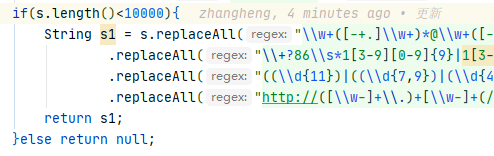
the final solution is to enter the matching when the length of this row is less than 10000, otherwise null is returned
add the following code