command ‘swig.exe’ failed: No such file or directory when installing pocket sphinx today. I found a lot of content on the Internet, and finally I succeeded.
first of all, my computer is Windows10 system, the method is only available for Windows system, other systems do not know.
error is due to the fact that swig is missing from your computer, so you need to download and install it. I download from the website of the latest package swig 4.0.2, website address is: http://www.swig.org/download.html.
to unzip the downloaded files to C pan-gen directory. I want to emphasize the root directory here, because my previous attempts to put it in C:\Program Files (x86) still didn’t work (for unknown reasons). Finally, I just put it under C:\swigwin-4.0.2.
then add a new path path to the environment variable.
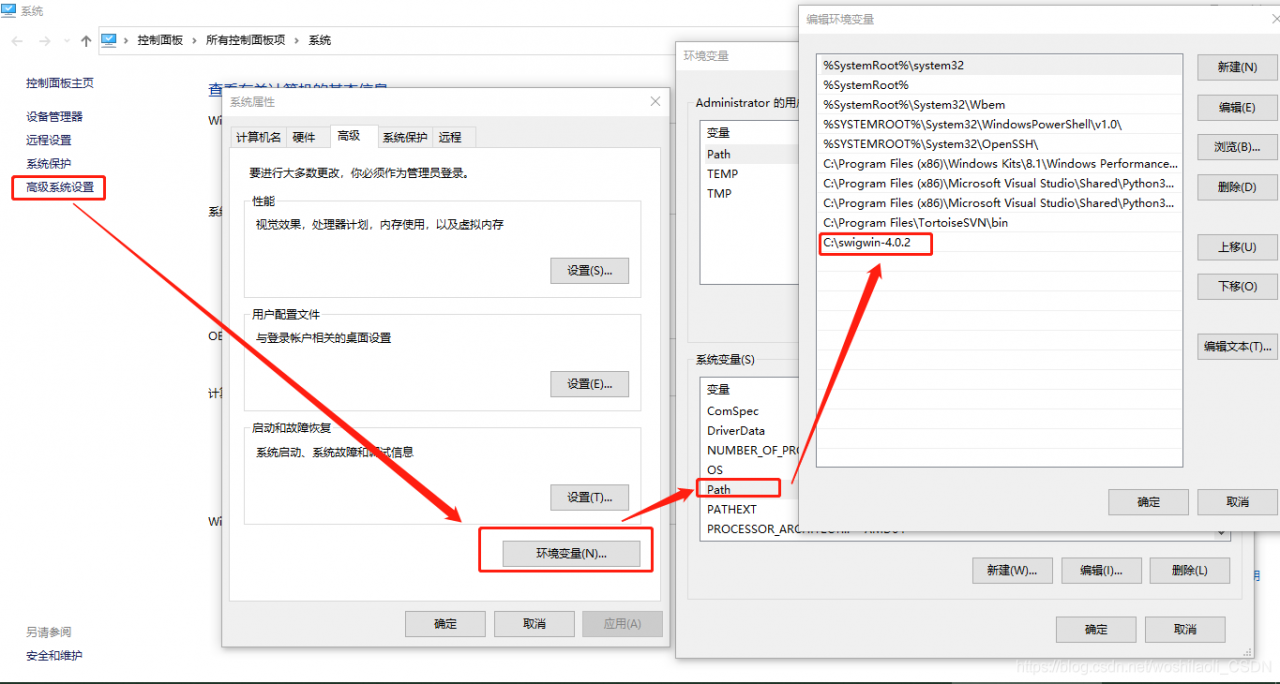
after the above steps are completed, then there is no problem with installing pocketsphinx.
Category Archives: How to Fix
kali Error: service metasploit start [How to Solve]
When service metasploit start is used in kali, an error is report:
Failed to start metasploit.service: Unit metasploit.service not found.
this is because the new version of kali has been updated.
The correct way to use is:
1. Start the postgresql:
service postgresql start
2. Initialize the metasploit postgresql database
msfdb init
3. Start msfconsole and verify whether the connection to the database is successful:
enter the command: msfconsole enter msf5
4. Enter db_status:

picamera.exc.PiCameraMMALError: Failed to enable connection: Out of resource
raspberry PI camera occupation problem and solution
when using Python and PiCamera to take a photo/video, if
is not in time
camera.close()
When
runs again, an error may occur:
picamera.exc.PiCameraMMALError: Failed to enable connection: Out of resource
solution:
just find and kill the process where the Camera is.
step1: ps -u
find the corresponding python PID, such as 14255
step2: kill 14255
step3: re-run, problem solved
[error reported] [Python] [Matplotlib] importerror: failed to import any QT binding
error message
ImportError: Failed to import any qt binding
complete error message:
Traceback (most recent call last):
  File "/home/xovee/Desktop/codes/www20/plot/cascade_plot.py", line 1, in <module>
    import matplotlib.pyplot as plt
  File "/home/xovee/miniconda3/envs/tf-2.0-a0/lib/python3.6/site-packages/matplotlib/pyplot.py", line 2355, in <module>
    switch_backend(rcParams["backend"])
  File "/home/xovee/miniconda3/envs/tf-2.0-a0/lib/python3.6/site-packages/matplotlib/pyplot.py", line 221, in switch_backend
    backend_mod = importlib.import_module(backend_name)
  File "/home/xovee/miniconda3/envs/tf-2.0-a0/lib/python3.6/importlib/__init__.py", line 126, in import_module
    return _bootstrap._gcd_import(name[level:], package, level)
  File "/home/xovee/miniconda3/envs/tf-2.0-a0/lib/python3.6/site-packages/matplotlib/backends/backend_qt4agg.py", line 5, in <module>
    from .backend_qt5agg import (
  File "/home/xovee/miniconda3/envs/tf-2.0-a0/lib/python3.6/site-packages/matplotlib/backends/backend_qt5agg.py", line 11, in <module>
    from .backend_qt5 import (
  File "/home/xovee/miniconda3/envs/tf-2.0-a0/lib/python3.6/site-packages/matplotlib/backends/backend_qt5.py", line 15, in <module>
    import matplotlib.backends.qt_editor.figureoptions as figureoptions
  File "/home/xovee/miniconda3/envs/tf-2.0-a0/lib/python3.6/site-packages/matplotlib/backends/qt_editor/figureoptions.py", line 13, in <module>
    from matplotlib.backends.qt_compat import QtGui
  File "/home/xovee/miniconda3/envs/tf-2.0-a0/lib/python3.6/site-packages/matplotlib/backends/qt_compat.py", line 158, in <module>
    raise ImportError("Failed to import any qt binding")
ImportError: Failed to import any qt binding
environment
- Ubuntu 18.4 LTS
- Python 3.6
- Matplotlib 3.1.1
solution
pip install PyQt5
<标题>引用
李
<> Foad。(2018年11月22日)。导入任何qt绑定、Python – Tensorflow失败。李从https://stackoverflow.com/questions/52346254/importerror-failed-to-import-any-qt-binding-python-tensorflow获取
solution
pip install PyQt5
<标题>引用
李
- <> Foad。(2018年11月22日)。导入任何qt绑定、Python – Tensorflow失败。李从https://stackoverflow.com/questions/52346254/importerror-failed-to-import-any-qt-binding-python-tensorflow获取
Vscode debug Java console input: evaluation failed because the thread is not suspended
use VS Code to debug Java program, need to use the console input, the results have been error, find a solution
error:
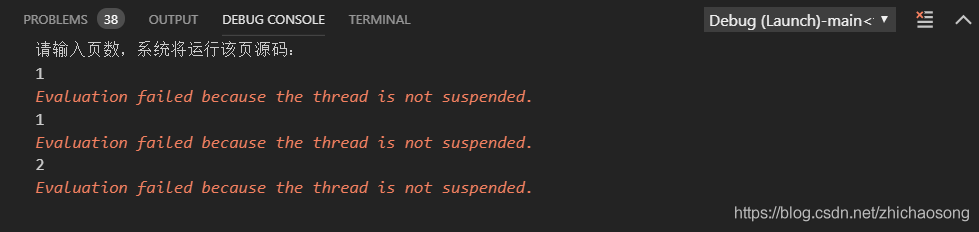
add a line "console": "externalTerminal" for
{
    // Use IntelliSense to learn about possible attributes.
    // Hover to view descriptions of existing attributes.
    // For more information, visit: https://go.microsoft.com/fwlink/?linkid=830387
    "version": "0.2.0",
    "configurations": [
        {
            "type": "java",
            "name": "Debug (Launch)-main<test>",
            "request": "launch",
            "mainClass": "main.main",
            "projectName": "test",
            "console": "externalTerminal"
        }
    ]
}
works as follows:
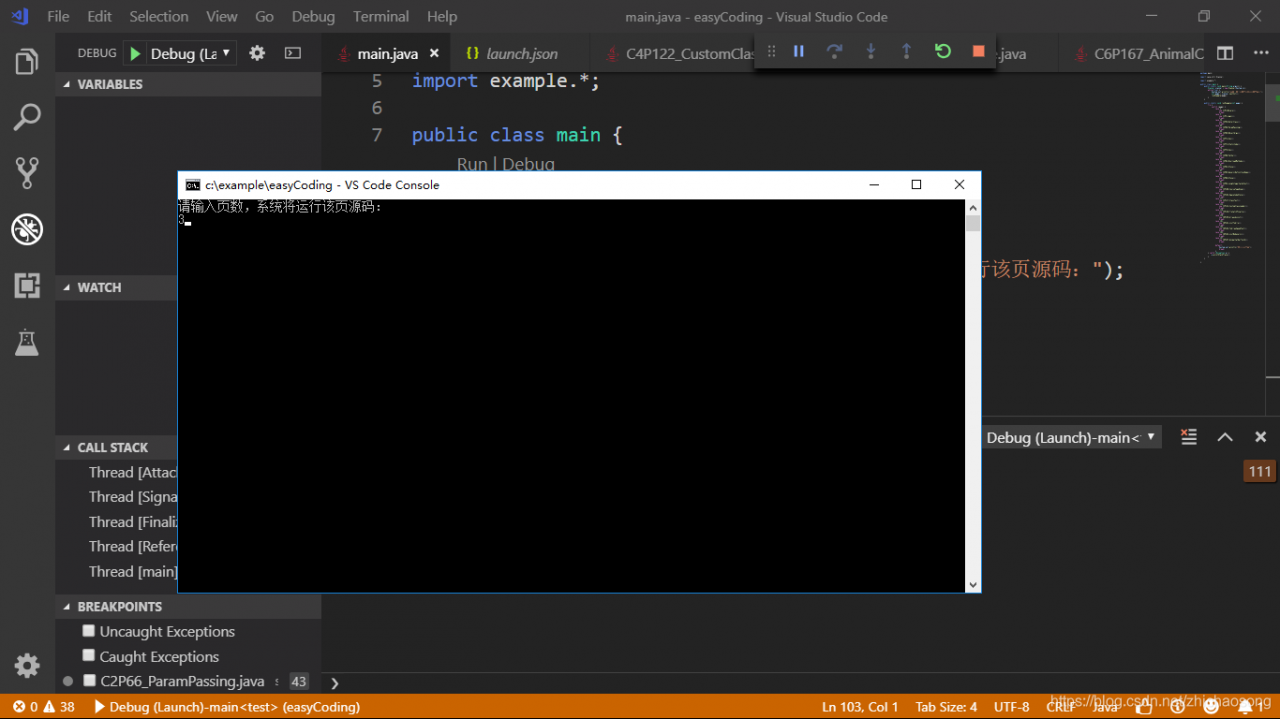
this error occurs because the built-in debugging console of VSCode does not support Java input. So you need to modify the debug console in the Debug configuration file, just change the console property to externalTerminal. External terminal.
Transport (VMDB) error -44: Message.
on May 4, 2016 23:47:43
Transport (VMDB) error-44: Message.
The VMware Authorization Service is not running.
note: virtual machine haven’t started, a service
solution: Window+R, open and run –> Services. MSC “enter
VMware Authorization Service will be
if you find VMware Authorization Service

Install Android SDK — stopping ADB server failed (code – 1)
Stopping ADB server failed (code-1).
> Stopping ADB server failed (code-1) when installing Android SDK
> configure Path environment variable
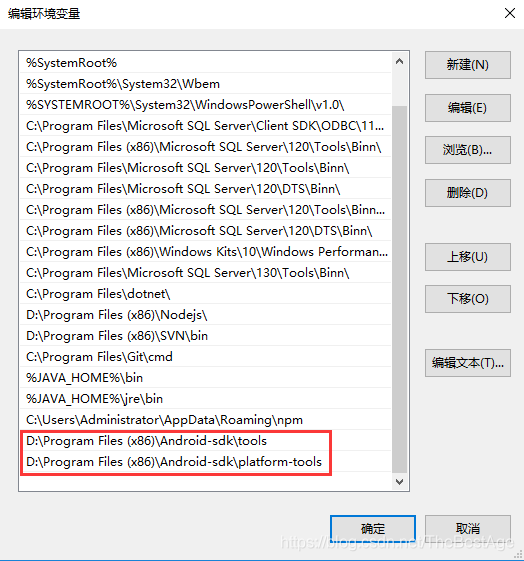
this computer – right click properties – advanced system Settings – environment variable – find Path, edit, add tools,platform-tools installation address, as shown in the figure below:
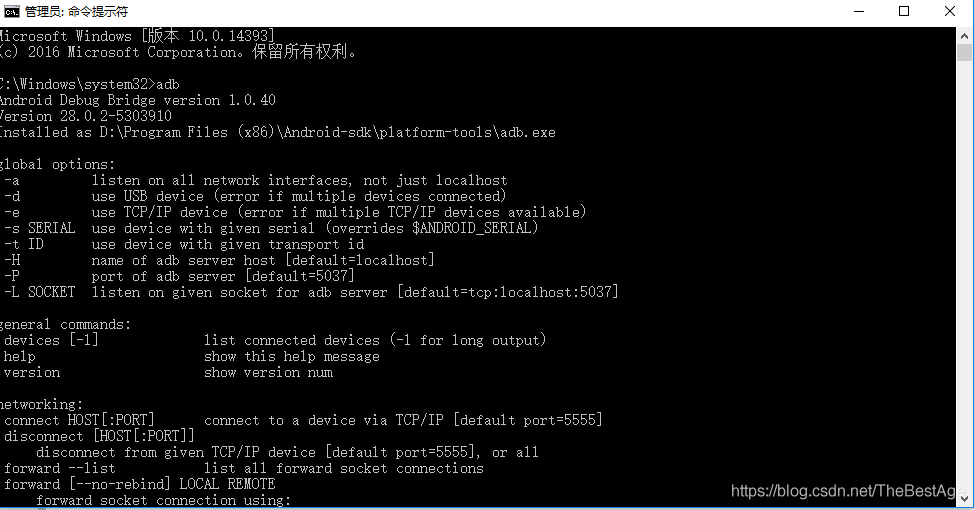
set, open the command window, type adb to run
Item exception: failed to get the required ADT version number from the SDK
Eclipse import project error :
failed to get the required adt version number from the sdkeclipse appears failed to get the required ADT version number from the SDK:… .\tools\traceview.bat error and unable to open SDK manager or connect to phone.
The connection to adb is down, and a severe error has occured.
You must restart adb and Eclipse.
Please ensure that adb is correctly located at
'D:\Users\Android\sdk\platform-tools\adb.exe' and can be executed.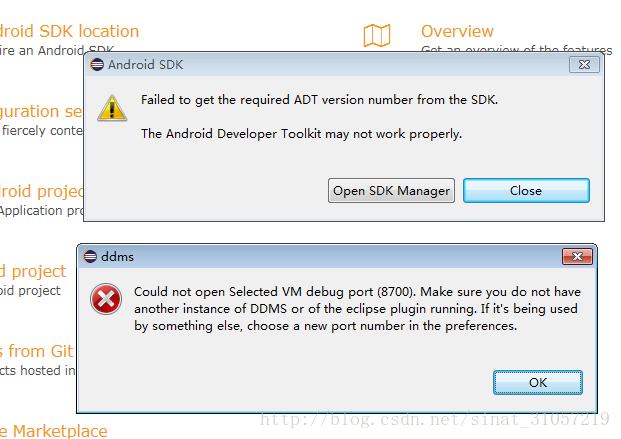
reason:
eclipse and Android studio SDK are separate and not Shared.
solution:
it would be nice if Android Studio and Eclispe introduced different SDK files respectively.
copy the SDK and reconfigure the SDK path for eclipse.
Xcode compilation error: failed to initiate service connection to simulator
Failed to initiate service connection to simulator Error returned in reply: connection invalid
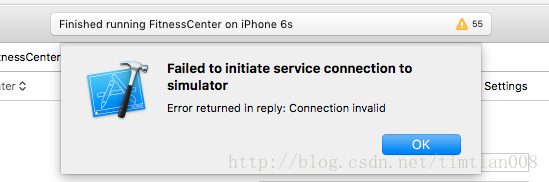
opened xcode and ran successfully. Then click on the simulator and there was no response. Reruns this prompt box and clear the cache.
solution: you need to close all the different versions of xcode and the emulator, and just reopen and run.
because multiple versions of xcode are open running
libdc1394 error: Failed to initialize libdc1394
resolves c error: libdc1394 error: Failed to initialize libdc1394
means no USB, execute the following command to solve
ln -s /dev/null /dev/raw1394
Failed to create agent because there is no valid NavMesh
error: unity Failed to create agent because there is no valid NavMesh
warning: Failed to create agent because there is no valid navigation mesh
problem analysis:
reported this error when directing a character to move with a mouse click, because there is no bake environment.
we achieve obstacle avoidance through navigation system. This error occurs when you call the Nav Mesh Agent component directly without a Bake environment.
solution:
open Navigation:
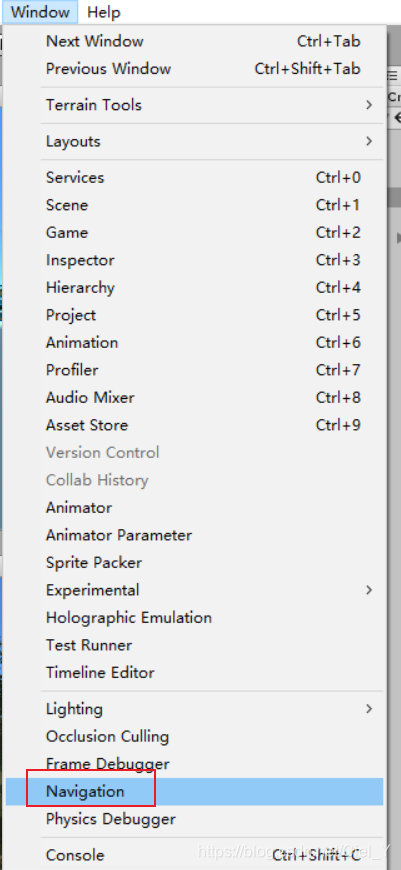
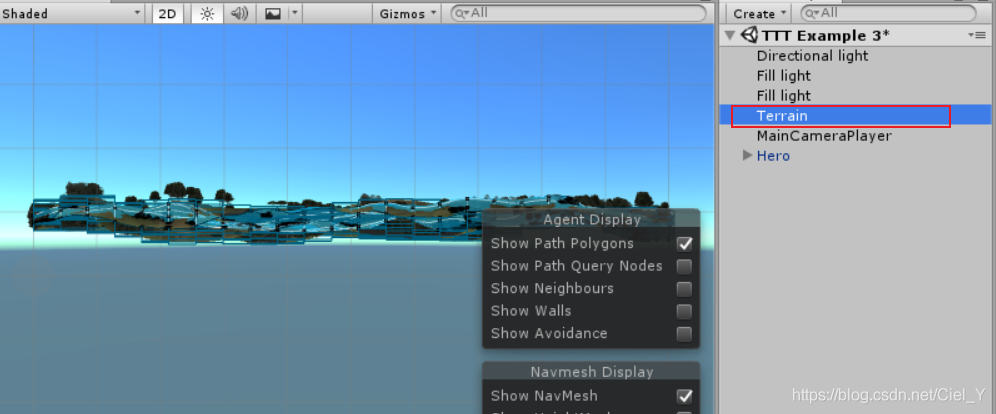
select the terrain we created ourselves:
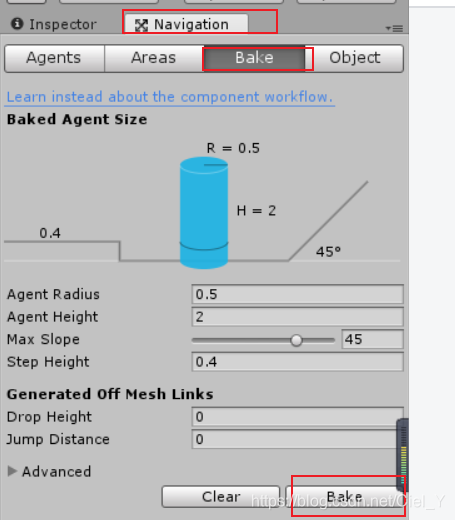
select Bake in Navigation and click Bake.
Failed to load platform rendering library
sometimes you create an Android project, in the layout, design of the Activity layout does not succeed, according to the above hints Failed to load platform rendering library, this page is for our development is undoubtedly a disturbance, we can’t see the current layout of the real-time situation, always can’t modify a get to run again, it is a waste of time.
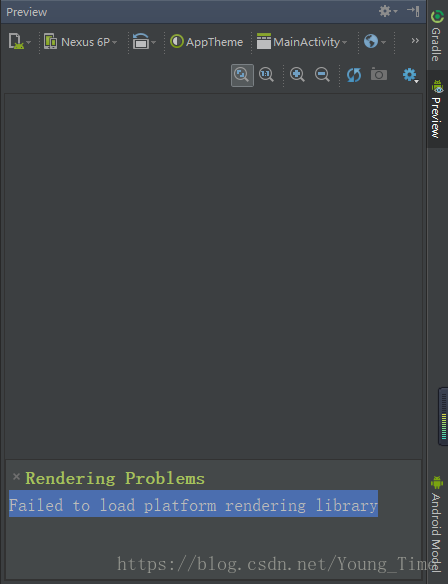
in fact, the reason is that your SDK version is not compatible due to update. Just choose the version with lower API
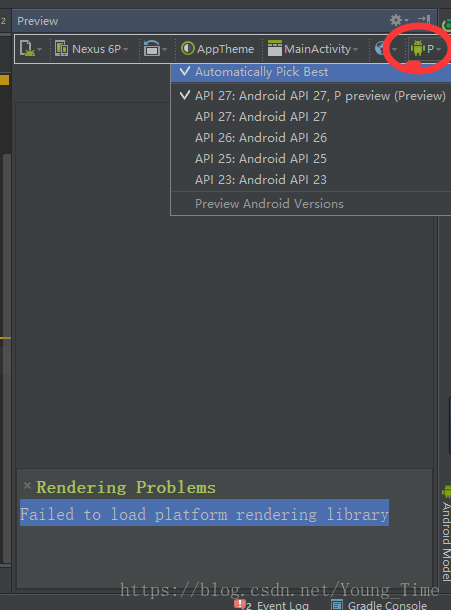
select the lower version, and then wait for