Category Archives: How to Fix

NPM error ‘cannot find module’ internal / util / types’ solution;

1. Uninstall node.js

2, delete C:\Users\Administrator\AppData\ cache under NPM, npm-cache (this step must have)

3. Reinstall node.js and enter node. v and npm-v in DOS again to see the corresponding version number

I played with node for a long time, unloaded and unloaded; The beginning did not carry on the second part, so ask not to do not work, the key is in the second step;

The errors dimensions of materials being qualified are not persistent


actually in matlab, we often encounter this problem, you have a look at the cause of the problem, you know what is the reason, but sometimes, pretty sure your program will be a problem, but the error, a run is a newspaper is very embarrassed, but it is not your program logic has a problem, mainly because the following error

Dimensions of matrices being concatenated are not consistent.


Cell2mat is matlab function is commonly used in a function, function is to convert the inside of the cell format digital into digital, in fact, when the inside of the cell number is expressed as a character to, such as’ 1 ‘, ‘2’, ‘3’ some of these characters, Cell2mat can also be converted characters into Numbers, but when these characters into ’10’, ’11’, ’12, the situation is complicated, the system will be an error, then say:

Error using cat

Dimensions of matrices being concatenated are not consistent.

Error in cell2mat (line 84)

m{n} = cat(1,c{:,n});

the solution to this problem is to use the function str2num to convert to number.


to solve this problem, a search on the Internet, are all conversion, but it seems that it is no use, I do not have time to find a solution to this problem, I will find a solution after busy with this topic research.

Error: /usr/bin/python: Error while finding module specification for ‘virtualenvwrapper.hook_loader’

reasons: workon command fails, the Python version changes, is to use the previous python3.6 install Python virtual environment, relevant documents is in the/Library/Frameworks/Python framework Versions/3.6/bin
solution 1: to install a virtual environment in new python3.7 environment

$sudo pip3 install virtualenv virtualenvwrapper
$source .bashrc

the solution 2: will/Library/Frameworks/Python framework Versions/3.6/bin three files in the directory, copy it to/usr/local/bin directory in

$cd /Library/Frameworks/Python.framework/Versions/3.6/bin
$cp virtualenv-clone virtualenvwrapper.sh virtualenvwrapper_lazy.sh /usr/local/bin

error: aggregate value used where an integer was expected

problem description:

casts struct struct type data into unsigned long

The reason why

cannot be converted is that the structural Type (including union) is not a Scalar Type; Conversion is only possible between quantitative types. Quantitative types include arithmetic types and pointer types, and arithmetic types include integer types and floating point types.

even if it’s

struct in_addr type:

struct in_addr
 {
    in_addr_t s_addr;
};
in_addr_t 一般为 32位的unsigned int,其字节顺序为网络顺序(network byte ordered),即该无符号整数采用大端字节序。

这里即使内存中是unsigned int 类型的,也不能实际使用成unsigned int,因为整体类型不一样,c语言禁止强制转换,强制转换是'低级类型',转'高级类型';
但是可以使用指针强制将这段内存解释成unsigned int类型的数据。

即unsigned int a1 =  *(unsigned int *)&((struct in_addr) a2);


Shell script: syntax error: bad for loop variable error resolution

A simple shell script is written in Linux Mint, using for.. do.. Done 1+2+3…… +100 value, the result of “SH-n XXx. sh” syntax detection is always wrong, but can run normally on PC;

Script:

#!/bin/bash
#information
 
PATH=/bin:/sbin:/usr/bin:/usr/sbin:/usr/local/bin:/usr/local/sbin:~/bin
export PATH
 
read -p "Please input a num " num
sum=0
for ((a=0; a<=$num; a++))
do 
sum=$(($sum + $a))
done
echo "the sum is ==> $sum"
exit 0

The errors are as follows:

Syntax error: Bad for loop variable

Analysis:
Since ubuntu 6.10, ubuntu has replaced the previous default bash shell with the dash shell; This appears as the /bin/sh link inverted /bin/dash instead of the traditional /bin/bash.

allen@allen-lql ~/workspace/script $ ls -l /bin/sh
lrwxrwxrwx 1 root root 4 Aug 12 14:29 /bin/sh -> dash

So when using SH to perform the detection, dash is actually used, and DASH does not support this C-format for loop writing.

Solutions:
1, change the default shell to bash. (Bash supports for loop in C format)

sudo dpkg-reconfigure dash

choose No

2. Use bash detection directly:

bash -n xxx.sh

3. To ensure the portability of shell scripts, directly change shell scripts and use the for loop format supported by the shell:

for a in `seq $num`


java.lang.VerifyError : inconsistent stackmap frames at branch target

exception information

ava.lang.VerifyError: Inconsistent stackmap frames at branch target 293
Exception Details:
  Location:
    com/foodsafety/controller/UserController.UpdateImg(Ljavax/servlet/http/HttpServletRequest;)Ljava/lang/String; @293: goto
  Reason:
    Type top (current frame, locals[7]) is not assignable to integer (stack map, locals[7])
  Current Frame:
    bci: @139
    flags: { }
    locals: { 'com/foodsafety/controller/UserController', 'javax/servlet/http/HttpServletRequest', 'com/foodsafety/commons/result/Result', 'java/lang/String', 'java/lang/Integer', 'java/lang/Integer', 'com/foodsafety/model/User' }
    stack: { integer }
  Stackmap Frame:
    bci: @293
    flags: { }
    locals: { 'com/foodsafety/controller/UserController', 'javax/servlet/http/HttpServletRequest', 'com/foodsafety/commons/result/Result', 'java/lang/String', 'java/lang/Integer', 'java/lang/Integer', 'com/foodsafety/model/User', integer }
    stack: { }
  Bytecode:
    0000000: bb00 1b59 b700 1d4d 2b12 64b9 0020 0200
    0000010: c700 0701 a700 0e2b 1264 b900 2002 00b6
    0000020: 0026 4e2b 1266 b900 2002 00c7 0007 01a7
    0000030: 0014 2b12 66b9 0020 0200 b600 26b8 0068
    0000040: b800 6e3a 042b 1272 b900 2002 00c7 0007
    0000050: 01a7 0014 2b12 72b9 0020 0200 b600 26b8
    0000060: 0068 b800 6e3a 05bb 0060 59b7 0074 3a06
    0000070: 1906 2b12 66b9 0020 0200 b600 26b8 0075
    0000080: b800 7bb6 007e 1905 b600 82aa 0000 009a
    0000090: 0000 0001 0000 0004 0000 001d 0000 003d
    00000a0: 0000 005d 0000 007d 1906 2db6 0086 2ab4
    00000b0: 0030 1906 b900 8902 0036 0715 079e 0076
    00000c0: 2c04 b600 38a7 006e 1906 2db6 008d 2ab4
    00000d0: 0030 1906 b900 8902 0036 0715 079e 0056
    00000e0: 2c04 b600 38a7 004e 1906 2db6 0090 2ab4
    00000f0: 0030 1906 b900 8902 0036 0715 079e 0036
    0000100: 2c04 b600 38a7 002e 1906 2db6 0093 2ab4
    0000110: 0030 1906 b900 8902 0036 0715 079e 0016
    0000120: 2c04 b600 38a7 000e 4e2c 03b6 0038 2cb8
    0000130: 0042 b02c b800 42b0                    
  Exception Handler Table:
    bci [8, 293] => handler: 296
  Stackmap Table:
    append_frame(@23,Object[#27])
    same_locals_1_stack_item_frame(@34,Object[#39])
    append_frame(@50,Object[#39])
    same_locals_1_stack_item_frame(@67,Object[#105])
    append_frame(@84,Object[#105])
    same_locals_1_stack_item_frame(@101,Object[#105])
    append_frame(@168,Object[#105],Object[#96])
    append_frame(@197,Integer)
    chop_frame(@200,1)
    append_frame(@229,Integer)
    chop_frame(@232,1)
    append_frame(@261,Integer)
    chop_frame(@264,1)
    append_frame(@293,Integer)
    full_frame(@296,{Object[#1],Object[#33],Object[#27]},{Object[#84]})
    same_frame(@307)

    at java.lang.Class.getDeclaredMethods0(Native Method)
    at java.lang.Class.privateGetDeclaredMethods(Unknown Source)
    at java.lang.Class.getDeclaredMethods(Unknown Source)
    at org.springframework.util.ReflectionUtils.getDeclaredMethods(ReflectionUtils.java:612)
    at org.springframework.util.ReflectionUtils.doWithMethods(ReflectionUtils.java:524)
    at org.springframework.util.ReflectionUtils.doWithMethods(ReflectionUtils.java:510)
    at org.springframework.beans.factory.annotation.AutowiredAnnotationBeanPostProcessor.determineCandidateConstructors(AutowiredAnnotationBeanPostProcessor.java:241)
    at org.springframework.beans.factory.support.AbstractAutowireCapableBeanFactory.determineConstructorsFromBeanPostProcessors(AbstractAutowireCapableBeanFactory.java:1069)
    at org.springframework.beans.factory.support.AbstractAutowireCapableBeanFactory.createBeanInstance(AbstractAutowireCapableBeanFactory.java:1042)
    at org.springframework.beans.factory.support.AbstractAutowireCapableBeanFactory.doCreateBean(AbstractAutowireCapableBeanFactory.java:510)
    at org.springframework.beans.factory.support.AbstractAutowireCapableBeanFactory.createBean(AbstractAutowireCapableBeanFactory.java:482)
    at org.springframework.beans.factory.support.AbstractBeanFactory$1.getObject(AbstractBeanFactory.java:306)
    at org.springframework.beans.factory.support.DefaultSingletonBeanRegistry.getSingleton(DefaultSingletonBeanRegistry.java:230)
    at org.springframework.beans.factory.support.AbstractBeanFactory.doGetBean(AbstractBeanFactory.java:302)
    at org.springframework.beans.factory.support.AbstractBeanFactory.getBean(AbstractBeanFactory.java:197)
    at org.springframework.beans.factory.support.DefaultListableBeanFactory.preInstantiateSingletons(DefaultListableBeanFactory.java:772)
    at org.springframework.context.support.AbstractApplicationContext.finishBeanFactoryInitialization(AbstractApplicationContext.java:839)
    at org.springframework.context.support.AbstractApplicationContext.refresh(AbstractApplicationContext.java:538)
    at org.springframework.web.servlet.FrameworkServlet.configureAndRefreshWebApplicationContext(FrameworkServlet.java:666)
    at org.springframework.web.servlet.FrameworkServlet.createWebApplicationContext(FrameworkServlet.java:632)
    at org.springframework.web.servlet.FrameworkServlet.createWebApplicationContext(FrameworkServlet.java:680)
    at org.springframework.web.servlet.FrameworkServlet.initWebApplicationContext(FrameworkServlet.java:551)
    at org.springframework.web.servlet.FrameworkServlet.initServletBean(FrameworkServlet.java:492)
    at org.springframework.web.servlet.HttpServletBean.init(HttpServletBean.java:136)
    at javax.servlet.GenericServlet.init(GenericServlet.java:158)
    at org.apache.catalina.core.StandardWrapper.initServlet(StandardWrapper.java:1284)
    at org.apache.catalina.core.StandardWrapper.loadServlet(StandardWrapper.java:1197)
    at org.apache.catalina.core.StandardWrapper.load(StandardWrapper.java:1087)
    at org.apache.catalina.core.StandardContext.loadOnStartup(StandardContext.java:5253)
    at org.apache.catalina.core.StandardContext.startInternal(StandardContext.java:5543)
    at org.apache.catalina.util.LifecycleBase.start(LifecycleBase.java:150)
    at org.apache.catalina.core.ContainerBase.addChildInternal(ContainerBase.java:901)
    at org.apache.catalina.core.ContainerBase.addChild(ContainerBase.java:877)
    at org.apache.catalina.core.StandardHost.addChild(StandardHost.java:652)
    at org.apache.catalina.startup.HostConfig.deployDirectory(HostConfig.java:1263)
    at org.apache.catalina.startup.HostConfig$DeployDirectory.run(HostConfig.java:1978)
    at java.util.concurrent.Executors$RunnableAdapter.call(Unknown Source)
    at java.util.concurrent.FutureTask.run(Unknown Source)
    at java.util.concurrent.ThreadPoolExecutor.runWorker(Unknown Source)
    at java.util.concurrent.ThreadPoolExecutor$Worker.run(Unknown Source)
    at java.lang.Thread.run(Unknown Source)

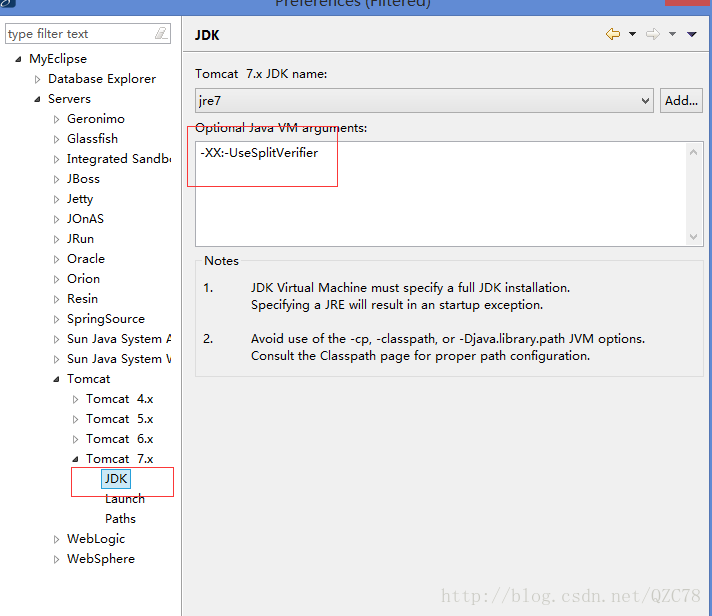
solution: configure -xx: -usesplitverifier

in the JVM

specific parsing may refer to: http://blog.csdn.net/taiyangdao/article/details/53002570

Error 3002: Problem in mapping fragments | c# linq to entities

error display:

Error 3002: Problem in mapping fragments run at line 1330:Potential runtime activity of table FTPRuns’s keys (FTPRuns.ID):

Error 3002: Problem in line 1330:Potential runtime activity of table FTPRuns’s keys (FTPRuns.ID): Columns (ftpruns. ID) are mapped to EntitySet FTPRuns’s properties (ftpruns. ID) on the conceptual side but they do not form the EntitySet’s key properties (ftpruns. ID, ftpruns. LastRun)

reason analysis:

Your entity model has the combination of the two properties FTPRuns.ID and FTPRuns.LastRun as entity key while your table has only the column FTPRuns.ID as primary key. So in your model you specify that the combination of FTPRuns.ID and FTPRuns.LastRun must be unique while your database has the stronger requirement that FTPRuns.ID alone must be unique.

Just exclude the property FTPRuns.LastRun from the entity key. Maybe this happened accidentally or the Entity Framework could not get primary key information from the database and had to infer the entity key. For example views have no primary key and the Entity Framework will infer the entity key as the combination of all non-nullable columns.

entity is the compound primary key of two attributes ftpruns. ID and ftpruns. LastRun, while the database table only has one ftpruns. ID as the primary key. All your entities must specify a composite primary key for two properties, whereas the database requires only ftPRUNs. ID to be unique.

excludes the ftpruns. LastRun attribute from the entity primary key, which may happen accidentally, or EF cannot get the primary key information from the database and must notify the entity primary key. For example, if you look at a table that has no primary key, EF will tell the entity to use all columns that are not empty as its primary key

Pandas read_ Error in json() valueerror: training data

has a json file as follows:

{
  "cover": "http://p2.music.126.net/wsPS7l8JZ3EAOvlaJPWW-w==/109951163393967421.jpg?param=140y140",
  "title": "2018上半年最热新歌TOP50",
  "author": "网易云音乐",
  "times": "1264万",
  "url": "https://music.163.com/playlist?id=2303649893",
  "id": "2303649893"
}
{
  "cover": "http://p2.music.126.net/wpahk9cQCDtdzJPE52EzJQ==/109951163271025942.jpg?param=140y140",
  "title": "你的青春里有没有属于你的一首歌?",
  "author": "mayuko然",
  "times": "4576万",
  "url": "https://music.163.com/playlist?id=2201879658",
  "id": "2201879658"
}

when I try to read the file with pd.read_json('data.json'), I get an error. The error part is as follows:

File "D:\python\lib\site-packages\pandas\io\json\json.py", line 853, in _parse_no_numpy
    loads(json, precise_float=self.precise_float), dtype=None)
ValueError: Trailing data

after a baidu found that it was a json format error, is the first time I know there is such a thing as jsonviewer. You need to save the dictionary in the file as an element in the list, modified as follows.

[{
  "cover": "http://p2.music.126.net/wsPS7l8JZ3EAOvlaJPWW-w==/109951163393967421.jpg?param=140y140",
  "title": "2018上半年最热新歌TOP50",
  "author": "网易云音乐",
  "times": "1264万",
  "url": "https://music.163.com/playlist?id=2303649893",
  "id": "2303649893"
},
{
  "cover": "http://p2.music.126.net/wpahk9cQCDtdzJPE52EzJQ==/109951163271025942.jpg?param=140y140",
  "title": "你的青春里有没有属于你的一首歌?",
  "author": "mayuko然",
  "times": "4576万",
  "url": "https://music.163.com/playlist?id=2201879658",
  "id": "2201879658"
}]

another method is to file each behavior of a complete dictionary, and then modify the parameters in the function pd. Read_json ('data.json',lines=True). lines default to False, set to True can read json objects according to the row. In the psor.read_json document, it is explained as follows:

lines: Boolean, default False. Read the file as a json object perline.new in version 0.19.0.

the modified json file is as follows:

{"cover": "http://p2.music.126.net/wsPS7l8JZ3EAOvlaJPWW-w==/109951163393967421.jpg?param=140y140","title": "2018上半年最热新歌TOP50","author": "网易云音乐","times": "1264万","url": "https://music.163.com/playlist?id=2303649893","id": "2303649893"}
{"cover": "http://p2.music.126.net/wpahk9cQCDtdzJPE52EzJQ==/109951163271025942.jpg?param=140y140","title": "你的青春里有没有属于你的一首歌?","author": "mayuko然","times": "4576万","url": "https://music.163.com/playlist?id=2201879658","id": "2201879658"}

Module not found: Error: Can’t resolve ‘./$$_gendir/app/app.module.ngfactory’

introduction

error in packaging to generate dist file when creating angular project:

ERROR in ./src/main.ts
Module not found: Error: Can't resolve './$$_gendir/app/app.module.ngfactory' in 'D:\web\task\src'
 @ ./src/main.ts 3:0-74
 @ multi ./src/main.ts

solution:
replace ng build — prod with ng build — env=prod, and then compile successfully.
reason: this is not based on aot, ng build – env = prod: replace environment.prod.ts with environment.prod.ts, but it’s a simple ng build. Ng build — prod: replace the improved version with aot + environment.prod.ts (previously, it was ng build — prod — aot)

An error occurred trying to connect: get http: / / var / run/ docker.sock/v1 .21/containers/json?all

start the container error An error occurred trying to connect: Get http:///var/run/docker.sock/v1.21/containers/json?all

Internet search data three steps to solve:

  1. Stop docker daemon
  2. sudo rm/var/lib/docker/network/files/local – kv. Db
  3. Start docker daemon but failed to solve my problem.

    shows UUID when viewing dockre status:

    qian:/var/lib/docker/devicemapper/devicemapper # systemctl status docker -l
    docker.service - Docker Application Container Engine
       Loaded: loaded (/usr/lib/systemd/system/docker.service; disabled)
       Active: failed (Result: exit-code) since Fri 2017-03-31 10:15:21 EDT; 45s ago
         Docs: http://docs.docker.com
      Process: 34204 ExecStart=/usr/bin/docker daemon -H fd:// $DOCKER_OPTS (code=exited, status=1/FAILURE)
     Main PID: 34204 (code=exited, status=1/FAILURE)
    
    Mar 31 10:15:21 qian docker[34204]: time="2017-03-31T10:15:21.084102345-04:00" level=warning msg="devmapper: Usage of loopback devices is strongly discouraged for production use. Please use `--storage-opt dm.thinpooldev` or use `man docker` to refer to dm.thinpooldev section."
    Mar 31 10:15:21 qian docker[34204]: time="2017-03-31T10:15:21.098182020-04:00" level=error msg="[graphdriver] prior storage driver \"devicemapper\" failed: devmapper: Base Device UUID and Filesystem verification failed.devmapper: Current Base Device UUID: does not match with stored UUID:ecfee58a-4aef-41e5-888b-e1588b90f325. Possibly using a different thin pool than last invocation"
    Mar 31 10:15:21 qian docker[34204]: time="2017-03-31T10:15:21.098304502-04:00" level=fatal msg="Error starting daemon: error initializing graphdriver: devmapper: Base Device UUID and Filesystem verification failed.devmapper: Current Base Device UUID: does not match with stored UUID:ecfee58a-4aef-41e5-888b-e1588b90f325. Possibly using a different thin pool than last invocation"

    looking at the disk UUID found that there are fewer disks dm-0 or * than the normal container

    qian:/var/lib/docker/devicemapper/devicemapper # ls -al /dev/disk/by-uuid/
    total 0
    drwxr-xr-x 2 root root 100 Mar 30 19:13 .
    drwxr-xr-x 5 root root 100 Mar 14 09:56 ..
    lrwxrwxrwx 1 root root  10 Mar 14 09:56 ddaefbae-cc5e-4579-b2dc-24340323ccde -> ../../sda2
    lrwxrwxrwx 1 root root  10 Mar 14 09:56 eabdb089-f65f-4150-ac14-7e2deaca1d85 -> ../../sda1
    lrwxrwxrwx 1 root root  10 Mar 14 09:56 ecfee58a-4aef-41e5-888b-e1588b90f325 -> ../../sda3

    check the container device PID, found and normal is not the same, normal is UUID, my display as PTUUID

    qian:/var/lib/docker/devicemapper/devicemapper # blkid /dev/mapper/docker-8\:3-126130724-pool 
    /dev/mapper/docker-8:3-126130724-pool: PTUUID="d541fadc" PTTYPE="dos" 

    at this point there is no way to continue to search for the cause, and I can confirm that the disk UUID associated with the container was indeed not found on my node.

    view the docker uuid associated in/var/lib/docker/devicemapper/metadata/deviceset – metadata file.

    my final solution is to delete the docker related folder /etc/docker /var/lib/docker reinstall docker…

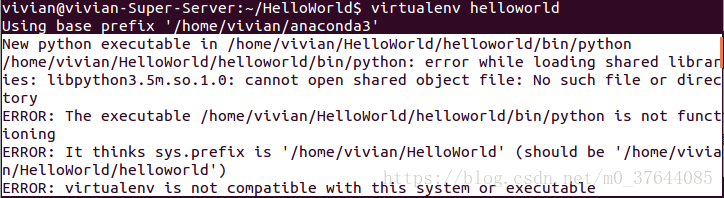
Virtual environment: error: virtualenv is not compatible with this system or executable

I install the python virtual environment

with the following command

pip install --user virtualenv
#不行的话用下一句命令安装virtualenv
#sudo apt-get install python-virtualenv

python virtual environment installation successful, I created a Virtualenv directory in my home directory. I’m going to put all the virtual environments in this directory. Then, go to this directory and I’ll use the following command to create a virtual environment (I’ll call this virtual environment flask-env)

virtualenv helloworld

, however, it reports the following error message

solution:

open. Bashrc

with the following command

sudo gedit ~/.bashrc

add the following information

on the last line of the open file

export LD_LIBRARY_PATH=$LD_LIBRARY_PATH:/home/helloworld/anaconda3/lib

note: cannot have Spaces, on either side of the equal sign “=”/home/helloworld/anaconda3/lib this part is the python lib address, to write this part according to your specific situation.

and then rerun

virtualenv helloworld

virtual environment is created successfully, and the activation command is as follows:

vivian@vivian-Super-Server:~/HelloWorld$ virtualenv helloworldUsing base prefix '/home/vivian/anaconda3'
New python executable in /home/vivian/HelloWorld/helloworld/bin/python
Installing setuptools, pip, wheel...done.
vivian@vivian-Super-Server:~/HelloWorld$ source helloworld/bin/activate

close virtual environment

deactivate

note: the path of the virtual environment cannot have Chinese, otherwise this problem will also occur