Category Archives: How to Fix

Cuban DCOM connection to programs Synsopose.exe failed

the solution available online is

1, eLicense folder contains programs that are blocked by security software

solution: https://tieba.baidu.com/p/6595004364
2. DCOM service does not start

solution:

https://helpcenter.steinberg.de/hc/en-us/articles/207332910-Error-message-DCOM-connection-to-program-Synsopos-exe-failed

basically means, in the Windows control panel, search for “management tools”, and then double-click “services”.

find the DCOM server process starter and make sure it is set to automatic, then start the service.

3. Heavy loading of eLicenser

is the

that I solved after reloading

Error 1396 (HY000): Operation create user failed for ‘xxx’ @’xxx ‘

create user ‘test’ @’ % ‘identified by’ test ‘;
create user ‘test’ @% ‘identified by’ test ‘;
display ERROR 1396 (HY000): Operation CREATE USER failed for ‘test’ @ ‘%’
check whether there is this USER
select USER from USER;
found no such user.
remember you deleted this user last time.
flush privileges may not be flush;
, ERROR 1396 (HY000): Operation CREATE USER failed for ‘test’ @ ‘%’
drop USER ‘test’ @ ‘%’;
failed for ‘test’ @ ‘%’;
drop USER ‘test’ @ ‘%’;
flush privileges;
create user ‘test’ @ ‘%’ identified by ‘test’;
success.
Assume the user is there, so drop the user
After deleting the user, there is need to flush the mysql privileges
Now create the user.

http://stackoverflow.com/questions/5555328/error-1396-hy000-operation-create-user-failed-for-jacklocalhost

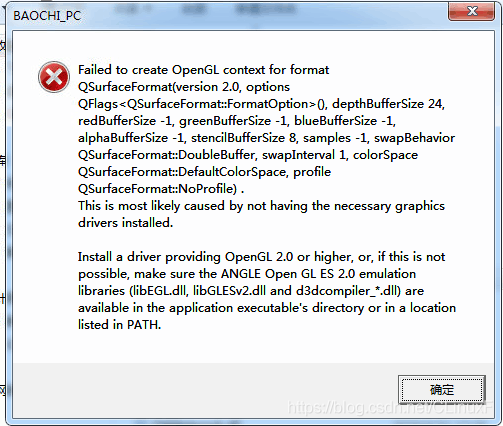
QT running prompt failed to create OpenGL context for format qsurfaceformat (version 2.0, options qflags() solution)

running on other computers today the Qt program I wrote reported the following error:

Failed to create OpenGL context for format QSurfaceFormat(version 2.0, options QFlags(), depthBufferSize 24, redbuffersize-1, greenbuffersize-1, bluebuffersize-1, depthbuffersize-1 alphaBufferSize 8, stencilBufferSize 8, samples -1, swapBehavior 2, swapInterval 1,
).
This is most likely to cause by not having the necessary graphics drivers installed.
Install a driver providing OpenGL 2.0 or higher, or, if This is not possible, Make sure the ANGLE Open GL ES 2.0 emulation software (libEGL. DLL, Libglesv2.dll and d3dcompiler_*. DLL) are available in the application executable’s directory or in a location listed in PATH.

baidu once no result, mostly is what driver problem or Qt reinstall problem

Spring configuration transaction, JUnit unit test error “failed to load ApplicationContext”

problem:

Junit unit test code is as follows:

package cn.muke.spring.demo2;

import javax.annotation.Resource;
import org.junit.Test;
import org.junit.runner.RunWith;
import org.springframework.test.context.ContextConfiguration;
import org.springframework.test.context.junit4.SpringJUnit4ClassRunner;

/**
 * Spring的声明式事务管理方式一的测试类
 * @author CX
 *
 */
@RunWith(SpringJUnit4ClassRunner.class)
@ContextConfiguration("classpath:applicationContext2.xml")
public class SpringDemo2 {
	
	/**
	 * 因为要测试业务层的实现类,所以引用业务层的接口
	 */
	@Resource(name="accountService")
	private AccountService accountService;	
	
    /**
	 * 转账案例:
	 */
	@Test
	public void demo1() {
		accountService.transfer("aaa", "bbb", 200d);
	}
}

Applicationcontext2.xml configuration is as follows :

<?xml version="1.0" encoding='UTF-8'?>
<beans xmlns="http://www.springframework.org/schema/beans"
	xmlns:xsi="http://www.w3.org/2001/XMLSchema-instance"
	xmlns:context="http://www.springframework.org/schema/context"
	xmlns:aop="http://www.springframework.org/schema/aop"
	xmlns:tx="http://www.springframework.org/schema/tx"
	xsi:schemaLocation="http://www.springframework.org/schema/beans
	http://www.springframework.org/schema/beans/spring-beans.xsd
	http://www.springframework.org/schema/context
	http://www.springframework.org/schema/context/spring-context.xsd
	http://www.springframework.org/schema/aop
	http://www.springframework.org/schema/aop/spring-aop.xsd
	http://www.springframework.org/schema/tx
	http://www.springframework.org/schema/tx/spring-tx.xsd">
		
	<!-- 引入外部的属性文件 -->
	<context:property-placeholder location="classpath:jdbc.properties"/>
	
	<!-- 配置c3p0连接池 -->
	<bean id="dataSource" class="com.mchange.v2.c3p0.ComboPooledDataSource">
		<property name="driverClass" value="${jdbc.driverClass}"/>
		<property name="jdbcUrl" value="${jdbc.url}"/>
		<property name="user" value="${jdbc.username}"/>
		<property name="password" value="${jdbc.password}"/>
	</bean>
		
	<!-- 配置业务层类 -->
	<bean id="accountService" class="cn.muke.spring.demo2.AccountServiceImpl">
		<!-- 业务层注入DAO方式 -->
		<property name="accoutDAO" ref="accountDAO"/>		
	</bean>
	
	<!-- 配置DAO类 -->
	<bean id="accountDAO" class="cn.muke.spring.demo2.AccountDAOImpl">
		<!-- 在XML中注入连接池 ,在DAO实现类中继承JdbcDaoSupport,两者都可以 -->
		<property name="dataSource" ref="dataSource"/>
	</bean>
		
</beans>

accountService and accountDao should be ok, that is, the DataSource is injected into the dao, and the dao error message is injected into the service as follows:

2018-12-29 15:44:21 INFO  org.springframework.beans.factory.xml.XmlBeanDefinitionReader  Loading XML bean definitions from class path resource [applicationContext2.xml]
2018-12-29 15:44:21 INFO  org.springframework.context.support.GenericApplicationContext  Refreshing org.springframework.context.support.GenericApplicationContext@6537cf78: startup date [Sat Dec 29 15:44:21 CST 2018]; root of context hierarchy
2018-12-29 15:44:21 ERROR org.springframework.test.context.TestContextManager  Caught exception while allowing TestExecutionListener [org.springframework.test.context.support.DependencyInjectionTestExecutionListener@40f08448] to prepare test instance [cn.muke.spring.demo2.SpringDemo2@6bf256fa]
java.lang.IllegalStateException: Failed to load ApplicationContext
	at org.springframework.test.context.TestContext.getApplicationContext(TestContext.java:157)
	at org.springframework.test.context.support.DependencyInjectionTestExecutionListener.injectDependencies(DependencyInjectionTestExecutionListener.java:109)
	at org.springframework.test.context.support.DependencyInjectionTestExecutionListener.prepareTestInstance(DependencyInjectionTestExecutionListener.java:75)
	at org.springframework.test.context.TestContextManager.prepareTestInstance(TestContextManager.java:313)
	at org.springframework.test.context.junit4.SpringJUnit4ClassRunner.createTest(SpringJUnit4ClassRunner.java:211)
	at org.springframework.test.context.junit4.SpringJUnit4ClassRunner$1.runReflectiveCall(SpringJUnit4ClassRunner.java:288)
	at org.junit.internal.runners.model.ReflectiveCallable.run(ReflectiveCallable.java:12)
	at org.springframework.test.context.junit4.SpringJUnit4ClassRunner.methodBlock(SpringJUnit4ClassRunner.java:284)
	at org.springframework.test.context.junit4.SpringJUnit4ClassRunner.runChild(SpringJUnit4ClassRunner.java:231)
	at org.springframework.test.context.junit4.SpringJUnit4ClassRunner.runChild(SpringJUnit4ClassRunner.java:88)
	at org.junit.runners.ParentRunner$3.run(ParentRunner.java:290)
	at org.junit.runners.ParentRunner$1.schedule(ParentRunner.java:71)
	at org.junit.runners.ParentRunner.runChildren(ParentRunner.java:288)
	at org.junit.runners.ParentRunner.access$000(ParentRunner.java:58)
	at org.junit.runners.ParentRunner$2.evaluate(ParentRunner.java:268)
	at org.springframework.test.context.junit4.statements.RunBeforeTestClassCallbacks.evaluate(RunBeforeTestClassCallbacks.java:61)
	at org.springframework.test.context.junit4.statements.RunAfterTestClassCallbacks.evaluate(RunAfterTestClassCallbacks.java:71)
	at org.junit.runners.ParentRunner.run(ParentRunner.java:363)
	at org.springframework.test.context.junit4.SpringJUnit4ClassRunner.run(SpringJUnit4ClassRunner.java:174)
	at org.eclipse.jdt.internal.junit4.runner.JUnit4TestReference.run(JUnit4TestReference.java:89)
	at org.eclipse.jdt.internal.junit.runner.TestExecution.run(TestExecution.java:41)
	at org.eclipse.jdt.internal.junit.runner.RemoteTestRunner.runTests(RemoteTestRunner.java:541)
	at org.eclipse.jdt.internal.junit.runner.RemoteTestRunner.runTests(RemoteTestRunner.java:763)
	at org.eclipse.jdt.internal.junit.runner.RemoteTestRunner.run(RemoteTestRunner.java:463)
	at org.eclipse.jdt.internal.junit.runner.RemoteTestRunner.main(RemoteTestRunner.java:209)
Caused by: java.lang.IllegalArgumentException
	at org.springframework.asm.ClassReader.<init>(Unknown Source)
	at org.springframework.asm.ClassReader.<init>(Unknown Source)
	at org.springframework.asm.ClassReader.<init>(Unknown Source)
	at org.springframework.core.type.classreading.SimpleMetadataReader.<init>(SimpleMetadataReader.java:52)
	at org.springframework.core.type.classreading.SimpleMetadataReaderFactory.getMetadataReader(SimpleMetadataReaderFactory.java:80)
	at org.springframework.core.type.classreading.CachingMetadataReaderFactory.getMetadataReader(CachingMetadataReaderFactory.java:101)
	at org.springframework.core.type.classreading.SimpleMetadataReaderFactory.getMetadataReader(SimpleMetadataReaderFactory.java:76)
	at org.springframework.context.annotation.ConfigurationClassUtils.checkConfigurationClassCandidate(ConfigurationClassUtils.java:70)
	at org.springframework.context.annotation.ConfigurationClassPostProcessor.processConfigBeanDefinitions(ConfigurationClassPostProcessor.java:253)
	at org.springframework.context.annotation.ConfigurationClassPostProcessor.postProcessBeanDefinitionRegistry(ConfigurationClassPostProcessor.java:223)
	at org.springframework.context.support.AbstractApplicationContext.invokeBeanFactoryPostProcessors(AbstractApplicationContext.java:630)
	at org.springframework.context.support.AbstractApplicationContext.refresh(AbstractApplicationContext.java:461)
	at org.springframework.test.context.support.AbstractGenericContextLoader.loadContext(AbstractGenericContextLoader.java:106)
	at org.springframework.test.context.support.AbstractGenericContextLoader.loadContext(AbstractGenericContextLoader.java:57)
	at org.springframework.test.context.support.AbstractDelegatingSmartContextLoader.delegateLoading(AbstractDelegatingSmartContextLoader.java:100)
	at org.springframework.test.context.support.AbstractDelegatingSmartContextLoader.loadContext(AbstractDelegatingSmartContextLoader.java:248)
	at org.springframework.test.context.TestContext.loadApplicationContext(TestContext.java:124)
	at org.springframework.test.context.TestContext.getApplicationContext(TestContext.java:148)
	... 24 more

solution:

this is because Spring is in conflict with the JDK version, Spring3.* is in conflict with JDK 1.8. So you need to change the JDK to 1.7 or upgrade to Spring4.*.

To solve the problem of failed to load: data in HTML5 game running rmmv locally/ actors.json problem

When running locally RMMV HTML 5 games Failed to load: data/actors. Json problem, discussed in the site has a http://steamcommunity.com/app/363890/discussions/1/483368526577568252/

originally belongs to the problems of cross-domain access, using the server is no problem, need not service for chrome seems to have ways of http://stackoverflow.com/questions/3102819/disable-same-origin-policy-in-chrome/3177718#3177718

in Windows:

using the following command “C:\.. \chrome.exe” –disable-web-security –user-agent=”Android” –user-data-dir=”C:/temp-chrome-eng” –app=”file:///C:/apps/index.html”


for me, use “C:\Program Files (x86)\Google\Chrome\Application\chrome.exe” –user-data-dir=”C:/Chrome dev session” –disable-web-security

after Path is added, simplify to chrome –user-data-dir=”C:/ chrome-dws-user-data -dir” –disable web-security

Open chrome with , and enter the file you want to access in the address bar of the page that says “you are using an unsupported command line tag.

file:///C:/Users/xxx/Documents/RMMVGames/Project1/index.html

where XXX is the user name

then encountered a Failed to load:GameFont error

I changed the return value of the function(name) function to true for rpg_core.js.

ERROR: JDWP Unable to get JNI 1.2 environment

failed to get JNI 1.2 environment, JVM ->

ERROR: JDWP is Unable to get JNI 1.2 environment, JVM -> The GetEnv () return code = – 2

the JDWP exit error AGENT_ERROR_NO_JNI_ENV (183) : [… /… /…/SRC/share/back/util. C: 820]

to find the reason for the error. Found a problem with redirecting the output.

is the following is the original network data

install jdk1.6, ha ha ~ I also met this problem. This is something I found on the Internet before. I hope it will be helpful to you.

ERROR: JDWP incapable to get JNI 1.2 environment, JVM -> The GetEnv () return code = – 2

the JDWP exit error AGENT_ERROR_NO_JNI_ENV (183) : [… /… /…/SRC/share/back/util. C: 820]

this is going on?Now Java SE 6 has reached the stage of RC, huh?

after I looked up the Java Doc carefully, I found that there is such a paragraph: http://download.java.net/jdk6/docs/api/java/io/Console.html

“been a virtual machine from a console is dependent upon the physicist platform and also upon the manner in which the virtual machine is invoked. If the virtual machine is started from an interactive command line without redirecting the standard input and
output streams then its console will exist and will typically be connected to the keyboard and display from which the virtual machine was launched. If the virtual machine is started automatically, for example by a background job scheduler, Then it will typically

1, use the command line to run, compile can use the integrated development environment. This completes standard output. 2. Redirect stdout in the program to another device or mode (such as writing to a text file), which can also be “inconvenient” to complete the function. 3. At the end of main function, add system.exit(0);

note:

return and system.exit() what is the difference between:

1. Return is the upper level of the program, system. Exit () is the top level of the program

2

How to Fix ERROR: Couldn’t connect to Docker daemon at http+docker://localhost – is it running?

centos8 using docker composer ERROR: fix ERROR: Couldn’t connect to docker daemon at HTTP +docker://localhost – is it running?

you can see the version number using docker-compose version, proving that the service is enabled. The reason is because it is not added to the Docker group.

execute command: sudo gpasswd-a ${USER} docker note: do not change the command, directly execute

after the execution of the user needs to switch: su root; su hyn

npm ERR! Error: CERT_ Untrusted problem solving

nodejs I will not introduce, IT is very hot technology recently, the function is very powerful. I also did some research. Error when installing a nodejs software project:

npm ERR! Error: CERT_UNTRUSTED
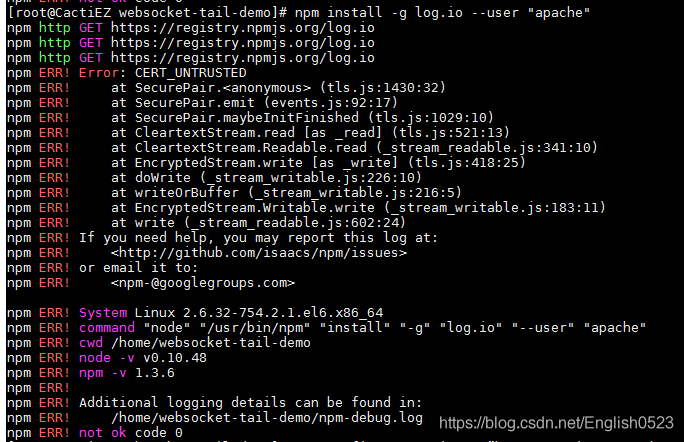
after careful screening and Google, turns out to be the SSL problem:

solution:

npm config set strict-ssl false

or

npm config set registry=”http://registry.npmjs.org/”

to continue error error-code-elifecycle, execute the following command:
NPM cache clear –force
NPM install -g NPM (upgrade)

solution: command prompt (run as an administrator) [run as a super administrator for Windows, Linux requires sudo]

note: please try to run this command again as root/Administrator.

sudo
sudo NPM install –save-dev grunt
but this may not work, you need to do this:

sudo NPM install –unsafe-perm=true –save-dev grunt
perhaps you will still encounter an error, try

sudo npm install –unsafe-perm=true –allow-root –save-dev grunt

background: after installing nodejs on Linux, I have been using the NPM install command to install project dependencies that have been denied permission undefined. I am root.

solution, need this command.

npm install –unsafe-perm=true –allow-root

Replace an NPM installation source as follows:

1, through the config command NPM config set registry https://registry.npm.taobao.org NPM info the underscore (if there could be strings configured properly this command response)

2, command line specifies the NPM – registry https://registry.npm.taobao.org info the underscore and then install it

and then rerun NPM install -g **** OK ~~~


a good habit in the project life cycle when installing a new dependent module NPM install XXX – save
NPM added – save dependent module version information will be written to the package.
in the json every time such in server deployment directly cp package files NPM install can be in accordance with the package. The information in the json (reduction) deployment as dependent on good operation environment

of course, the most important thing is that node version compatibility is the first

according to my understanding, this kind of node, is not only to indicate the dependent package version, but also indicate the other version dependencies, such as running environment version number and build tools version, operating system, database version, because the node changing fast (also different update quickly, ECS grammar)

node version is too low?

install n module: sudo NPM install -g n (node has a module called n, which is used to manage versions of node.js)

upgrade node.js to the latest stable version in the terminal input: n stable

you can check the node version installed successfully: node-v

shares several common NPM commands

npm-v # displays the version and checks to see if NPM is installed correctly.

NPM install express # express module

NPM install -g express # global install express module

NPM list # lists installed modules

NPM show express # display module details

NPM update # updates all modules of the project in the current directory

NPM update express # updates the specified module of the project in the current directory

NPM update-g express # upgrade globally installed express module

NPM uninstall express # remove the specified module
/usr/include/boost/type_traits/detail/has_binary_operator.hp:50: Parse error at “BOOST_JOIN”

qt-ros:

/usr/include/boost/type_traits/ has_binary_operation.hp :50: Parse error at “BOOST_JOIN” error

temporary solution:

modify /usr/include/boost/type_traits/detail/ has_binary_operation.hpp file

namespace BOOST_JOIN(BOOST_TT_TRAIT_NAME,_impl) {

..

}

to

#ifndef Q_MOC_RUN
namespace BOOST_JOIN(BOOST_TT_TRAIT_NAME,_impl) {
#endif

#ifndef Q_MOC_RUN
}
#endif


Solution to error opening trace file: no such file or directory (2) in Android

this error may occur frequently in android projects:

error opening trace file: No such file or directory (2)
combined with the Internet search and their own experience to give the following some solutions:

is usually a problem with the file androidmainfest.xml:

1. Check whether the version of android API is consistent with that of the emulator;

2, delete < USES – SDK android: minSdkVersion = “8” android: targetSdkVersion = “15”/& gt;
add & lt; USES – the permission of the android: name = “android. Permission. WRITE_EXTERNAL_STORAGE”/& gt;

3. Check whether tag tags appear in pairs in XML files;

4. Check the androidmainfest.xml file for missing the corresponding activity event. activity> Or change the class name in a Java file and forget to change it back in an XML file.

if this error occurs while testing with a physical machine, try shutting down the machine before restarting it.