Category Archives: How to Fix

Sina world of Warcraft 3.1.3 compressed package cannot be executed. Solution: failed to open archive interface.MPQ

this article only for wow. Exe execution “Failed to open archive interface.MPQ” prompt when the solution:

1. Create a new folder under wow. Exe and name it “Data”.

2. Move all.mpQ files in wow.exe folder to the “Data” folder;

3. Subfolder “eN??” in the folder where wow.exe resides. “(There are also MPQ files under this folder), move the entire folder under” Data “;

4. Execute wow. Exe, no more errors.

is because sina’s compression package is not volume compression, but a single separate compression, especially several large MPQ files separately compressed, changed the wow directory structure, as long as the structure can be restored to solve this problem.

but strange is, this method is not scientific, in addition after landing, will wow directory to see a strange account + number named file, after confirmation should be Trojan to log in the formation of the file. If in order to prevent security, we suggest that the client to disconnect the network strictly check the virus.

last word, sina is not kind!
Pychar error: Error:failed to find libmagic. Check your installation

today, Pycharm reported this error while debugging the program.


use the command
PIP uninstall python-magic
PIP install python-magic-bin==0.4.14

solution 2:
uninstall python-magic
and download the corresponding 64-bit installation package on the official website. WHL
then use the command
PIP install python_magic_bin-0.4.14-py2. Py3-none-win_amd64. WHL
is now python-magic working.

joke, now this kind of domestic solution to the problem of the post is really not good, to stackoverflow, hit the key points…

Install apache2.4 on windows to solve the problem of the requested operation has failed

  1. double-click on \Apache\Apache24\bin\ ApacheMonitor. Exe to start, click start the requested operation has failed to report an error.
  2. at first thought it was port 80, changing port 80 won’t help.
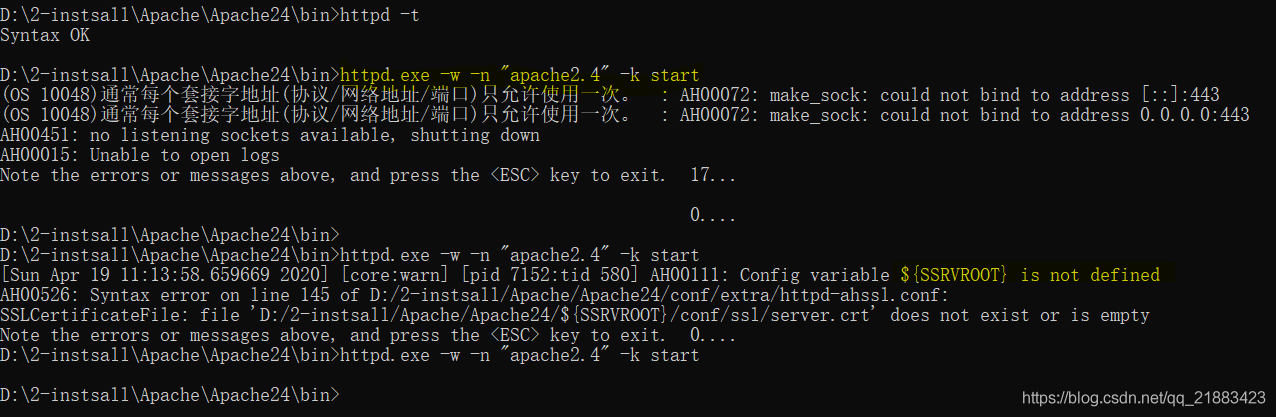
  3. CMD open \Apache\Apache24\bin\, and enter httpd-t to display normally.
  4. CMD open \Apache\Apache24\bin\ and enter httpd. exe-w-n “apache2.4” -k start.
  5. shows not baidu experience https://jingyan.baidu.com/article/ceb9fb10d909c48cac2ba06c.html said OS 10013 problems, but OS 10048
  6. then find this article solve the problem of OS 10048,
    https://blog.csdn.net/sun9979/article/details/102960811 Because there is a problem that 443 is occupied, we have modified the two files in \conf\extra\ and changed 443 to 442.
  7. but then appeared a new problem, looked at the server. CRT file exists, {SRVROOT} has also been configured, close look is HTTPD -ahssl.conf file has a {SSRVROOT}, the default file actually has this error, delete an S, change to {SRVROOT}.
  8. and then start is successful.
    summary: change 443 port, ${SSRVROOT}.

RTR3InitEx failed with rc=-1912 (rc=-1912)

main reason: having installed virtualbox before, there are multiple virtualboxes in the system. You can uninstall all virtualboxes first, and then install

again

. Uninstall all virtualbox:

sudo apt-get autoremove 'virtualbox*'

2. Reinstall:

sudo DPKG -i virtualbox – 5.2 _5. 2.6-120293 ~ Ubuntu ~ xenial_amd64. Deb

Uncaught TypeError: Failed to execute ‘removeChild’ on ‘Node’: parameter 1 is not of type ‘Node’.

VM9328 hbox.js:52 Uncaught TypeError: Failed to execute ‘removeChild’ on ‘Node’: Parameter 1 is not of type ‘Node’.
at object.remove (VM9328 hbox-js :52)
at hbox.fn. init._executive (VM9328 hbox.js:529)
at hbox.fn. init._closebox (VM9328 hbox.js:545)
At object.close (VM9328 hbox.js:570)
at VM9347 undefined:45

The

pop-up failed to close properly, because the external js is referenced once more, and the parent and child nodes are referenced once. Removing the external reference to the child node solves the problem.

PHP link database error PHP_ network_ getaddresses: getaddrinfo failed: Name or service not known

error:

SQLSTATE[HY000] [2002] php_network_getaddresses: getaddrinfo failed: Name or service not known

environment: thinkphp framework, Linux, ali cloud RDS database

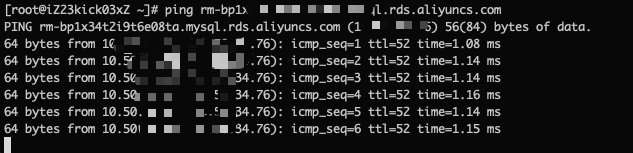
ping link address normal:

error reporting process: access the background address, most are normal access, refresh 10-20 times may appear 1-2 error, not continuous error

solution 1:

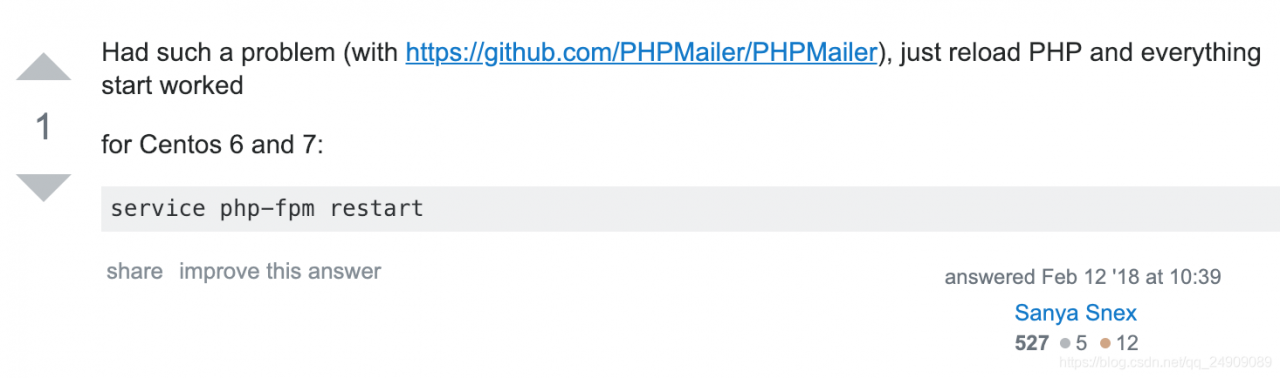
restart php-fpm service

service php-fpm restart 

the original view: https://stackoverflow.com/questions/2661546/php-network-getaddresses-getaddrinfo-failed-name-or-service-not-known

special thanks to: https://blog.csdn.net/qq_37500838/article/details/85008432#commentBox

solution 2:

configure DNS resolution to 114.114.114.114

check DNS configuration: cat /etc/resolv.conf

I use the first solution, the second solution is temporarily useless, configuration method can be found on the Internet

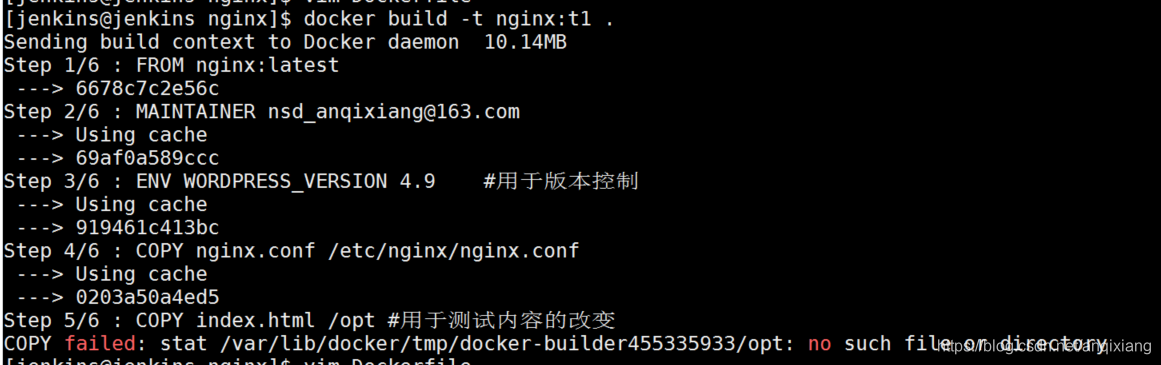
Solve the problem of copy failed: stat / var / lib / docker / TMP / docker builder 455335933 / opt: no such file or directory

1. Error reporting

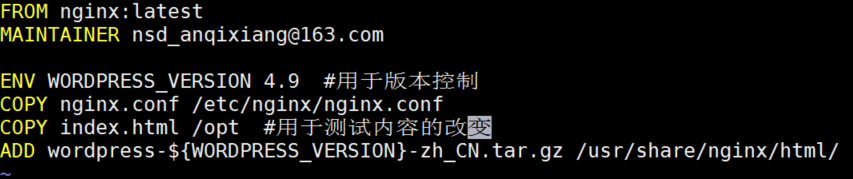
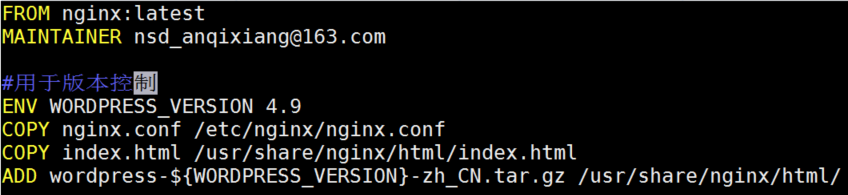
2. Dockerfile file

3. The reasons for

Dockerfile lines beginning with # are treated as comments. If a # comment is used after a valid instruction, it will be treated as a parameter, resulting in an error

4. Solution: just remove the comment, or put the comment on a separate line

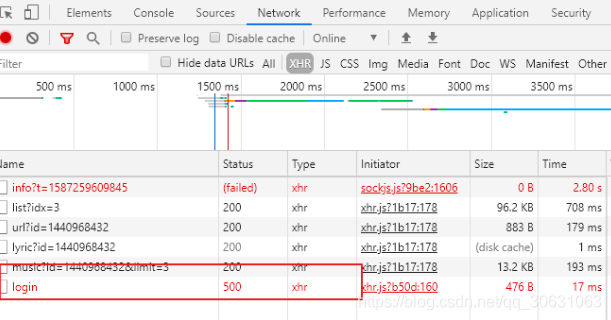
Error: request failed with status code 500

in projects where the front and back ends are separated

the front end USES a post request to send data to the back end, but an error occurs:

Error: Request failed with status code 500 Error

we need to know that 500 represents (server internal error) the server encountered an error and was unable to complete the request.

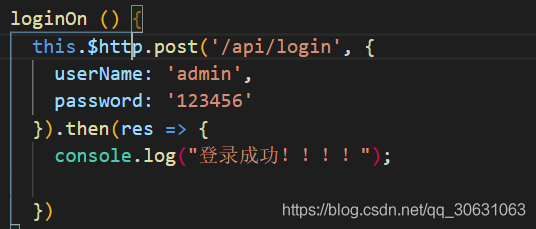
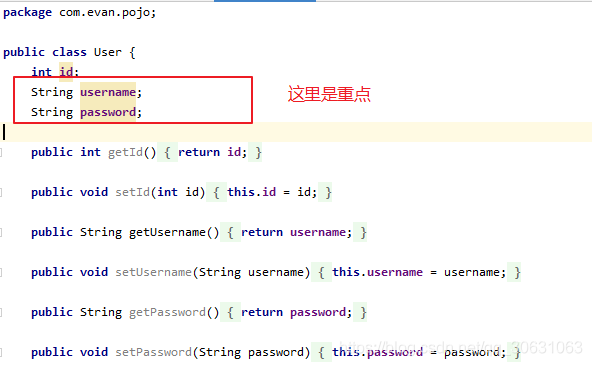
take a look at my original part of the code:

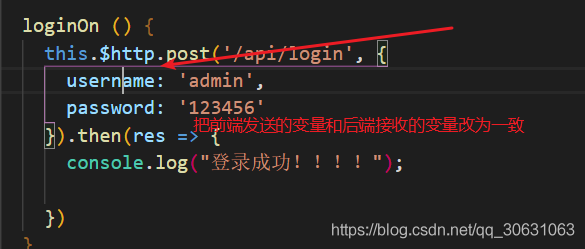
front-end request:

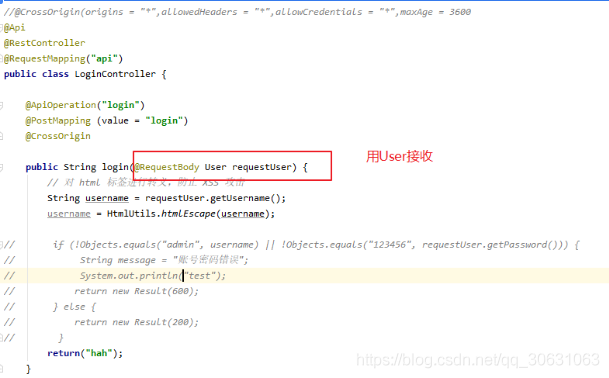
back-end receiving entity and control layer code:

if you look closely, you will see that the parameter names that my front end took when I sent the request were userName and password

but the back end used username and password to receive the parameters from the front end, so I changed the front end username — > username

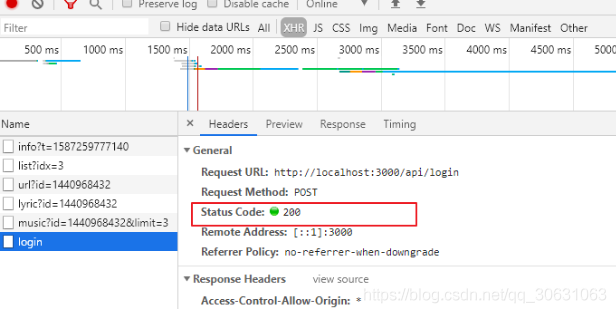
finally OK! If you have the same problem, check to see if the parameters you sent are the same as the parameters you received, otherwise the parameters will be empty

Failed to restart ssh.service: Unit not found.

1,

after modifying the sshd_config configuration file

vim /etc/ssh/sshd_config

2. Restart SSH

service ssh restart

3, the following error

Redirecting to /bin/systemctl restart ssh.service
Failed to restart ssh.service: Unit not found.

4, reason: the above command is centos6 inside the command, centos7 need to use

systemctl restart sshd

5, the problem is perfectly solved, nice

Unity-failed to update unity web player

“failed to update unity web player” error

may occur when using the browser to load the WebPlayer file

this is the error message to connect to the network

solution:

1. Uninstall UnityWebPlayer, use the control panel to uninstall

2. Download the UnityWebPlayer plugin :(this version makes

easier

link: https://pan.baidu.com/s/1f-6mfP8SJjsYe1tm8jSkLQ

extraction code: ht44

if the computer can not network then choose the following UnityWebPlayerFull plug-in

link: https://pan.baidu.com/s/1qHZb0j0LjvoemUreA0LFHQ

extraction code: 75qz


3. Re-enter the game and start the normal game

if you still have problems, try clearing the browser cache and retry

Finished with error: Gradle task assembleDebug failed with exit code 1

recently encountered the following bug during development with flutter :

during run,

Finished with error: Gradle task assembleDebug failed with exit code 1

at this point if you are in a hurry to pack for someone else, you can scan with flutter clean and then re-run. The first time always succeeds,

then, after the first run, the error will continue.

you can’t just flutter clean all the time and then run, that would be a waste of time, not a long-term solution.

———————————————–

according to the above line of error Google has encountered many similar situations, but the reasons for the error are different, and I did not see the possibility of

is the same reason that I’m in this situation,

———————

but the answer is that running the flutter run-v will give you more detailed information about the error, but still not much use.

the information obtained from the flutter run-v does not locate the cause of the error.

flutter as a new cross-platform solution is really a pitfall, but the problem will always be solved and the project will continue to be done,

————–

then began to think, until the day before yesterday off work or not this situation, yesterday since noon had this problem, so

Can

find clues in git’s commit records?

——————————–

then starts to look through the Git commit record of this period and finds a suspicious

import 'package:inin/features/searchpage/SearchUserPage.dart%20';

Is there an extra %20 after

?

————————

so delete this line, flutter clean, re-run, the problem finally does not appear.

solved the case…

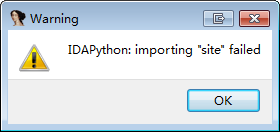
Idapython: the solution of importing “site” failed error

0 x00 background

suddenly one day IDA6.8 opens and prompt idapython error:
message:

0x01 problem cause

IDA website has an explanation for this problem:

This issue is usually caused by presence of non-standard python27.dll
in the PATH which uses its own set of modules (you should edit PATH in
this case). However, it may happen if your Python installation is
broken in some way. Reinstalling Python manually may fix it.

The general reason for

is that your host’s environment variable path contains the non-standard python27.dll, and, of course, it may also be due to an unexpected terminal during an installation. Manually reinstalling Python may fix this problem.

0x02 problem fix

official also kindly give detailed repair method:

  1. view python27. DLL location
    c:\>where python27.dll
    C:\Windows\System32\python27.dll
  1. view in the registry HKEY_LOCAL_MACHINE\SOFTWARE\Python 2.7\InstallPath the value is python2.7’s installation path
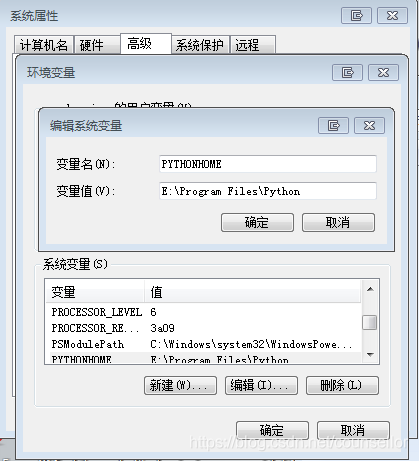
  2. adding an environment variable with the key PYTHONHOME and the value is Python’s installation path.
  3. if idapython was loaded normally but this error still exists, print sys.path to determine if it is as expected
Python>import sys
Python>sys.path
['C:\\Windows\\system32\\python27.zip', 'C:\\Python27-x64\\Lib', 'C:\\Python27-x64\\DLLs', 'C:\\Python27-x64\\Lib\\lib-tk', 'C:\\Program Files\\IDA 7.0\\python', 'C:\\Python27-x64', 'C:\\Python27-x64\\lib\\site-packages', 'C:\\Program Files\\IDA 7.0\\python\\lib\\python2.7\\lib-dynload\\ida_32', 'C:\\Program Files\\IDA 7.0\\python']
  1. tracks the loading process of IDAPython module. Set the environment variable PYTHONVERBOSE=1 before IDA runs, and the path path will be printed out (or add -l to the IDA run command to generate the log file).

0x03 problem solved

using the third step, creating an environment variable PYTHONHOME will solve my current problem.

is the pitfall of some blog that creates the environment variable %PYTHONHOME%. What the hell is that?

in the context of environment variables, %path% means that path is a defined call to an environment variable, equivalent to $path in Linux. The first time you define a variable, you don’t use %%.

0x04 reference

https://www.hexblog.com/?p=1132