This problem always occurs in the latest version of PHpmyamdin 4.80.1. I don’t know where the problem is. Later, I changed phpmyadmin_4.7.9 and reinstalled it without any problem
Category Archives: How to Fix
curl: (25) Failed FTP upload: 550 Solution
Problem description
Using curl to upload an FTP file today throws an error
Using curl to upload an FTP file today throws an error
sam@sam-hp-z238:~$ curl -T /home/sam/myinstall ftp://192.168.2.48/camera
  % Total    % Received % Xferd  Average Speed   Time    Time     Time  Current
                                 Dload  Upload   Total   Spent    Left  Speed
  0     0    0     0    0     0      0      0 --:--:-- --:--:-- --:--:--     0
curl: (25) Failed FTP upload: 550
The solution
Is important! The FTP address must end with /
For example: curl - T/home/Sam/myinstall ftp://192.168.2.48/camera/
Perfect test solution!
sam@sam-hp-z238:~$ curl -T /home/sam/myinstall ftp://192.168.2.48/camera/
  % Total    % Received % Xferd  Average Speed   Time    Time     Time  Current
                                 Dload  Upload   Total   Spent    Left  Speed
100  1612    0     0  100  1612      0  76761 --:--:-- --:--:-- --:--:-- 76761
Java uses ZipFile to decompress the zip file and runs normally under Windows. Linux reports an error
mmap failure at the end of CEN and zip files
Exception in the thread “main” java.util.zip. Error when opening a zip file
Solutions.
java -Dsun.zip. disableMemoryMapping = true XXXX
https://bugs.java.com/bugdatabase/view_bug.do?bug_id=7085890
[Memo] HTML5 Manifest file Application Cache Error event: Manifest fetch failed (-1) error
Many places on the Web say that the content type of the manifest file is incorrect, or that the file format is incorrect, etc. After debugging, it turns out that this error can also occur if the file is not accessible (e.g., the server is down).
Solution to (ERROR: Failed to build gem native extension.) encountered when updating pod
A normal update of the POD command
sudo gem install -n /usr/local/bin cocoapodsNormally, if you execute the command above, you can upgrade directly. If you upgrade successfully, everything will be fine.
On the contrary, encounter the following upgrade failed!
➜  Ruby: sudo gem install -n /usr/local/bin cocoapods
Building native extensions. This could take a while...
ERROR:  Error installing cocoapods:
	ERROR: Failed to build gem native extension.

    current directory: /Library/Ruby/Gems/2.3.0/gems/ffi-1.12.2/ext/ffi_c
/System/Library/Frameworks/Ruby.framework/Versions/2.3/usr/bin/ruby -r ./siteconf20200313-24412-3logr3.rb extconf.rb
mkmf.rb can't find header files for ruby at /System/Library/Frameworks/Ruby.framework/Versions/2.3/usr/lib/ruby/include/ruby.h

extconf failed, exit code 1

Gem files will remain installed in /Library/Ruby/Gems/2.3.0/gems/ffi-1.12.2 for inspection.
Results logged to /Library/Ruby/Gems/2.3.0/extensions/universal-darwin-18/2.3.0/ffi-1.12.2/gem_make.out
This upgrade problem has been plaguing for several days. It may be that the ruby version is incompatible with the latest POD version. Therefore, Ruby must be upgraded before pod can be successfully upgraded.
The method is found on StackOverflow, but of course there are some other exception issues that need to be resolved during installation (by default you have xcode-select installed)
1. Install RVM
curl -L https://get.rvm.io | bash -s stableIf the installation is successful and the following prompts appear, you can proceed directly to step 2
Upgrade of RVM in /Users/mengshun/.rvm/ is complete.

Thanks for installing RVM 🙏
Please consider donating to our open collective to help us maintain RVM.

👉  Donate: https://opencollective.com/rvm/donate
If it fails, appeared at the bottom of the error (error content curl: (7) Failed to connect to port 443 raw.githubusercontent.com: Operation timed out)
➜  Ruby: curl -L https://get.rvm.io | bash -s stable
  % Total    % Received % Xferd  Average Speed   Time    Time     Time  Current
                                 Dload  Upload   Total   Spent    Left  Speed
100   194  100   194    0     0    166      0  0:00:01  0:00:01 --:--:--   166
curl: (7) Failed to connect to raw.githubusercontent.com port 443: Connection refused
Execute the following instructions
sudo gem install redisThen proceed with the RVM installation command (curl -L https://get.rvm.io | basket-s stable)
If you still report 443 errors, wait for a while and try again (I tried 3 times myself).
2. Install Ruby 2.6
➜  Ruby: rvm install ruby-2.6
Searching for binary rubies, this might take some time.
No binary rubies available for: osx/10.14/x86_64/ruby-2.6.3.
Continuing with compilation. Please read 'rvm help mount' to get more information on binary rubies.
Checking requirements for osx.
Homebrew libs 'coreutils libyaml [email protected] readline' require update - skipping.
Skipping update of certificates bundle '/usr/local/etc/[email protected]/cert.pem', to force update run:
    rvm osx-ssl-certs update /usr/local/etc/[email protected]/cert.pem

Requirements installation successful.
Installing Ruby from source to: /Users/mengshun/.rvm/rubies/ruby-2.6.3, this may take a while depending on your cpu(s)...
ruby-2.6.3 - #downloading ruby-2.6.3, this may take a while depending on your connection...
  % Total    % Received % Xferd  Average Speed   Time    Time     Time  Current
                                 Dload  Upload   Total   Spent    Left  Speed
100 13.8M  100 13.8M    0     0   9172      0  0:26:21  0:26:21 --:--:-- 11855
ruby-2.6.3 - #extracting ruby-2.6.3 to /Users/mengshun/.rvm/src/ruby-2.6.3 - please wait
ruby-2.6.3 - #configuring - please wait
ruby-2.6.3 - #post-configuration - please wait
ruby-2.6.3 - #compiling - please wait
ruby-2.6.3 - #installing - please wait
ruby-2.6.3 - #making binaries executable - please wait
ruby-2.6.3 - #downloading rubygems-3.0.8
ruby-2.6.3 - #extracting rubygems-3.0.8 - please wait
ruby-2.6.3 - #removing old rubygems - please wait
ruby-2.6.3 - #installing rubygems-3.0.8 - please wait
ruby-2.6.3 - #gemset created /Users/mengshun/.rvm/gems/ruby-2.6.3@global
ruby-2.6.3 - #importing gemset /Users/mengshun/.rvm/gemsets/global.gems - please wait
ruby-2.6.3 - #generating global wrappers - please wait
ruby-2.6.3 - #gemset created /Users/mengshun/.rvm/gems/ruby-2.6.3
ruby-2.6.3 - #importing gemsetfile /Users/mengshun/.rvm/gemsets/default.gems evaluated to empty gem list
ruby-2.6.3 - #generating default wrappers - please wait
ruby-2.6.3 - #adjusting #shebangs for (gem irb erb ri rdoc testrb rake).
Install of ruby-2.6.3 - #complete
Ruby was built without documentation, to build it run: rvm docs generate-ri


➜  Ruby: ruby -v
ruby 2.6.3p62 (2019-04-16 revision 67580) [x86_64-darwin18]


➜  Ruby: rvm use ruby-2.6.3
Using /Users/mengshun/.rvm/gems/ruby-2.6.3


➜  Ruby: rvm --default use 2.6.3
Using /Users/mengshun/.rvm/gems/ruby-2.6.3
3. Complete and then directly execute the POD installation command
➜  Ruby: sudo gem install -n /usr/local/bin cocoapods
Password:
Fetching concurrent-ruby-1.1.6.gem
Fetching thread_safe-0.3.6.gem
Fetching activesupport-4.2.11.1.gem
Fetching nap-1.1.0.gem
Fetching tzinfo-1.2.6.gem
Fetching i18n-0.9.5.gem
Fetching fuzzy_match-2.0.4.gem
Fetching httpclient-2.8.3.gem
Fetching ffi-1.12.2.gem
Fetching algoliasearch-1.27.1.gem
Fetching ethon-0.12.0.gem
Fetching typhoeus-1.3.1.gem
Fetching netrc-0.11.0.gem
Fetching cocoapods-core-1.9.1.gem
Fetching claide-1.0.3.gem
Fetching cocoapods-deintegrate-1.0.4.gem
Fetching cocoapods-downloader-1.3.0.gem
Fetching cocoapods-plugins-1.0.0.gem
Fetching cocoapods-search-1.0.0.gem
Fetching cocoapods-stats-1.1.0.gem
Fetching cocoapods-trunk-1.4.1.gem
Fetching cocoapods-try-1.1.0.gem
Fetching molinillo-0.6.6.gem
Fetching atomos-0.1.3.gem
Fetching CFPropertyList-3.0.2.gem
Fetching escape-0.0.4.gem
Fetching gh_inspector-1.1.3.gem
Fetching colored2-3.1.2.gem
Fetching cocoapods-1.9.1.gem
Fetching nanaimo-0.2.6.gem
Fetching xcodeproj-1.15.0.gem
Fetching fourflusher-2.3.1.gem
Fetching ruby-macho-1.4.0.gem
Successfully installed thread_safe-0.3.6
Successfully installed tzinfo-1.2.6
Successfully installed concurrent-ruby-1.1.6
Successfully installed i18n-0.9.5
Successfully installed activesupport-4.2.11.1
Successfully installed nap-1.1.0
Successfully installed fuzzy_match-2.0.4
Successfully installed httpclient-2.8.3
Successfully installed algoliasearch-1.27.1
Building native extensions. This could take a while...
Successfully installed ffi-1.12.2
Successfully installed ethon-0.12.0
Successfully installed typhoeus-1.3.1
Successfully installed netrc-0.11.0
Successfully installed cocoapods-core-1.9.1
Successfully installed claide-1.0.3
Successfully installed cocoapods-deintegrate-1.0.4
Successfully installed cocoapods-downloader-1.3.0
Successfully installed cocoapods-plugins-1.0.0
Successfully installed cocoapods-search-1.0.0
Successfully installed cocoapods-stats-1.1.0
Successfully installed cocoapods-trunk-1.4.1
Successfully installed cocoapods-try-1.1.0
Successfully installed molinillo-0.6.6
Successfully installed atomos-0.1.3
Successfully installed CFPropertyList-3.0.2
Successfully installed colored2-3.1.2
Successfully installed nanaimo-0.2.6
Successfully installed xcodeproj-1.15.0
Successfully installed escape-0.0.4
Successfully installed fourflusher-2.3.1
Successfully installed gh_inspector-1.1.3
Successfully installed ruby-macho-1.4.0
Successfully installed cocoapods-1.9.1
Parsing documentation for thread_safe-0.3.6
Installing ri documentation for thread_safe-0.3.6
Parsing documentation for tzinfo-1.2.6
Installing ri documentation for tzinfo-1.2.6
Parsing documentation for concurrent-ruby-1.1.6
Installing ri documentation for concurrent-ruby-1.1.6
Parsing documentation for i18n-0.9.5
Installing ri documentation for i18n-0.9.5
Parsing documentation for activesupport-4.2.11.1
Installing ri documentation for activesupport-4.2.11.1
Parsing documentation for nap-1.1.0
Installing ri documentation for nap-1.1.0
Parsing documentation for fuzzy_match-2.0.4
Installing ri documentation for fuzzy_match-2.0.4
Parsing documentation for httpclient-2.8.3
Installing ri documentation for httpclient-2.8.3
Parsing documentation for algoliasearch-1.27.1
Installing ri documentation for algoliasearch-1.27.1
Parsing documentation for ffi-1.12.2
Installing ri documentation for ffi-1.12.2
Parsing documentation for ethon-0.12.0
Installing ri documentation for ethon-0.12.0
Parsing documentation for typhoeus-1.3.1
Installing ri documentation for typhoeus-1.3.1
Parsing documentation for netrc-0.11.0
Installing ri documentation for netrc-0.11.0
Parsing documentation for cocoapods-core-1.9.1
Installing ri documentation for cocoapods-core-1.9.1
Parsing documentation for claide-1.0.3
Installing ri documentation for claide-1.0.3
Parsing documentation for cocoapods-deintegrate-1.0.4
Installing ri documentation for cocoapods-deintegrate-1.0.4
Parsing documentation for cocoapods-downloader-1.3.0
Installing ri documentation for cocoapods-downloader-1.3.0
Parsing documentation for cocoapods-plugins-1.0.0
Installing ri documentation for cocoapods-plugins-1.0.0
Parsing documentation for cocoapods-search-1.0.0
Installing ri documentation for cocoapods-search-1.0.0
Parsing documentation for cocoapods-stats-1.1.0
Installing ri documentation for cocoapods-stats-1.1.0
Parsing documentation for cocoapods-trunk-1.4.1
Installing ri documentation for cocoapods-trunk-1.4.1
Parsing documentation for cocoapods-try-1.1.0
Installing ri documentation for cocoapods-try-1.1.0
Parsing documentation for molinillo-0.6.6
Installing ri documentation for molinillo-0.6.6
Parsing documentation for atomos-0.1.3
Installing ri documentation for atomos-0.1.3
Parsing documentation for CFPropertyList-3.0.2
Installing ri documentation for CFPropertyList-3.0.2
Parsing documentation for colored2-3.1.2
Installing ri documentation for colored2-3.1.2
Parsing documentation for nanaimo-0.2.6
Installing ri documentation for nanaimo-0.2.6
Parsing documentation for xcodeproj-1.15.0
Installing ri documentation for xcodeproj-1.15.0
Parsing documentation for escape-0.0.4
Installing ri documentation for escape-0.0.4
Parsing documentation for fourflusher-2.3.1
Installing ri documentation for fourflusher-2.3.1
Parsing documentation for gh_inspector-1.1.3
Installing ri documentation for gh_inspector-1.1.3
Parsing documentation for ruby-macho-1.4.0
Installing ri documentation for ruby-macho-1.4.0
Parsing documentation for cocoapods-1.9.1
Installing ri documentation for cocoapods-1.9.1
Done installing documentation for thread_safe, tzinfo, concurrent-ruby, i18n, activesupport, nap, fuzzy_match, httpclient, algoliasearch, ffi, ethon, typhoeus, netrc, cocoapods-core, claide, cocoapods-deintegrate, cocoapods-downloader, cocoapods-plugins, cocoapods-search, cocoapods-stats, cocoapods-trunk, cocoapods-try, molinillo, atomos, CFPropertyList, colored2, nanaimo, xcodeproj, escape, fourflusher, gh_inspector, ruby-macho, cocoapods after 145 seconds
33 gems installed


➜  Ruby: pod --version
1.9.1
Upgrade successful!
Failed to install ISKernel Files,make sure you have appropriate privileges on this machine
Failed to install ISKernel Files,make sure you have appropriate privileges on this machine
When installing the software, especially the program in MSI format, this error occurred. I used the Administrator account and said That I did not have the authority, which made me very upset
Because the system patch was updated before the installation, the patch was almost unloaded to try!
Later thought of the computer installed 360 security guards and antivirus, with a try attitude, quit the two software, smooth installation!
360 is really harmful ah, the system access is too big, what plug in a foot, despise…
When installing the software, especially the program in MSI format, this error occurred. I used the Administrator account and said That I did not have the authority, which made me very upset
Because the system patch was updated before the installation, the patch was almost unloaded to try!
Later thought of the computer installed 360 security guards and antivirus, with a try attitude, quit the two software, smooth installation!
360 is really harmful ah, the system access is too big, what plug in a foot, despise…
Failed to restart xxx.service: The name org.freedesktop.PolicyKit1 was not provided by any..
Centos, startup service failed, reported an error in the header. Try sudo before startup service command.
Forbidden (403) CSRF verification failed. Request aborted. – Django
How to solve the cross-domain problem of Django?
please see this article, very detailed: https://pypi.org/project/django-cors-headers/

The above is due to the CSRF problem, how to solve?
Two ways:
Top: comment out CsrfViewMiddleware as shown, but
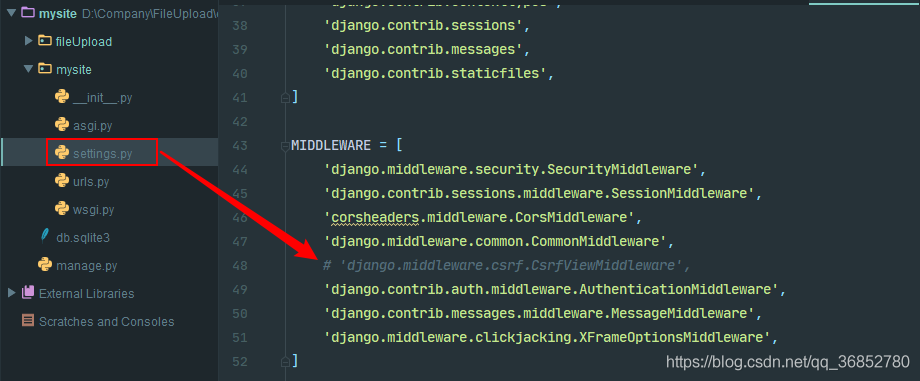 is not recommended
Second: add the annotation @csrf_exempt
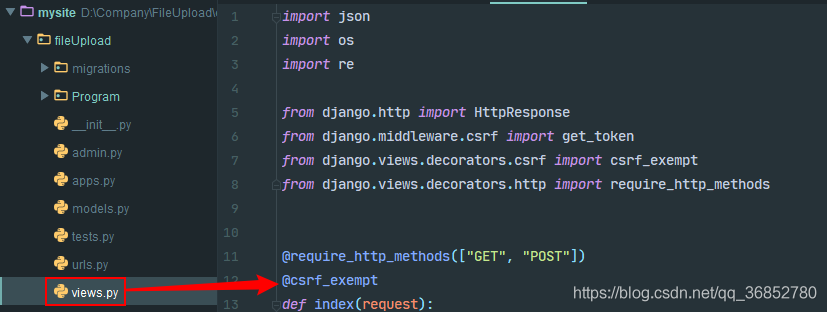 to the interface view
The above two methods do solve 403 errors.
However, according to a lot of information, the approach is that the front end first USES get request to specify the interface, and then the server generates get_token(request) to return to the front end. The front end carries csrftoken returned when requesting the interface, which will verify whether the cookie is consistent…
But they all tried in vain…
We can see the article: https://www.cnblogs.com/rgcLOVEyaya/p/RGC_LOVE_YAYA_692days_802_1.html
[Bug] Solve the problem that Acrobat cannot be opened: failed to connect to a DDE server
Open task Manager, and if You have Acrobat in it, terminate the program.
The few times I’ve had trouble opening it, it’s all the same problem.
The few times I’ve had trouble opening it, it’s all the same problem.
Unity running error: Fatal error in gc: GetThreadContext failed
Unity run error: Fatal Error in GC: GetThreadContext Failed
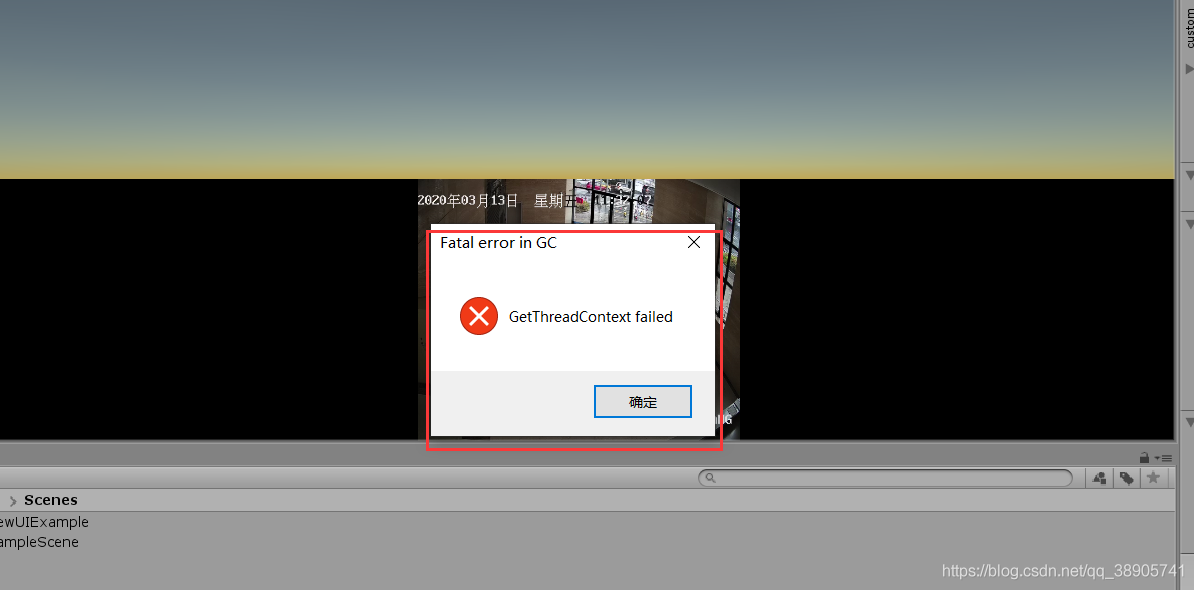 unity plays video streaming images
Cause: The running component is blocked by the computer’s anti-virus software, causing a thread error
Solution: Stop the security software
God take ~
Failed to connect to non-global ctrl_ifname: (nil) error: No such file or directory (How to Fix)
The solution
This means that you must let wpa_supplicant run in the background.
run in the background
Reproduced in: https://www.cnblogs.com/eat-too-much/p/8301497.html
VMware Workstation failed to start VMware Authorization Service
This is because VMware Authorization Service in Windows system Service has not started.
press the win+r shortcut key, enter services. MSC , click ok
Service list to find VMware Authorization Service, and double-click
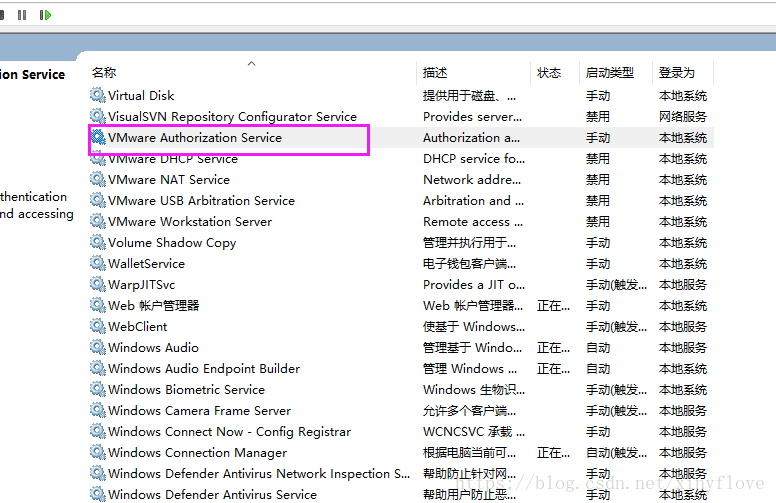
Modify the startup type to be automatic or manual. Click apply
and then click start. Wait for the startup to complete, then click ok to
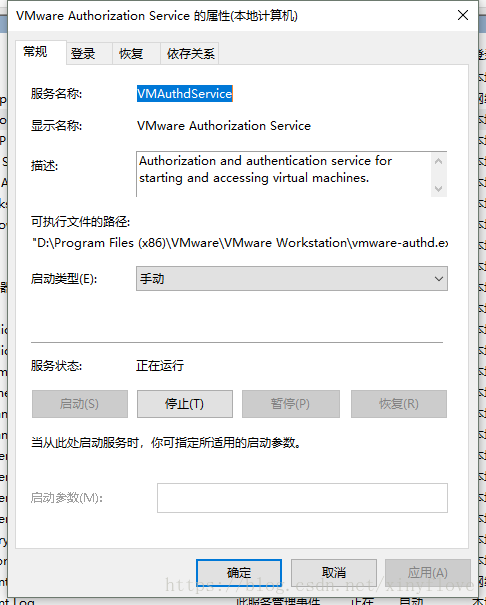
I don’t know if it is because of the system access. I don’t know if it is because of the system access. I’m sorry, we can’t solve this for the moment.