Category Archives: How to Fix

CentOS Liunx 7 uses rdesktop to remotely connect to the Alibaba Cloud server and it appears Failed to connect, CredSSP required by server.

CredSSP Required by Server fails to connect when Liunx connects to Window server.
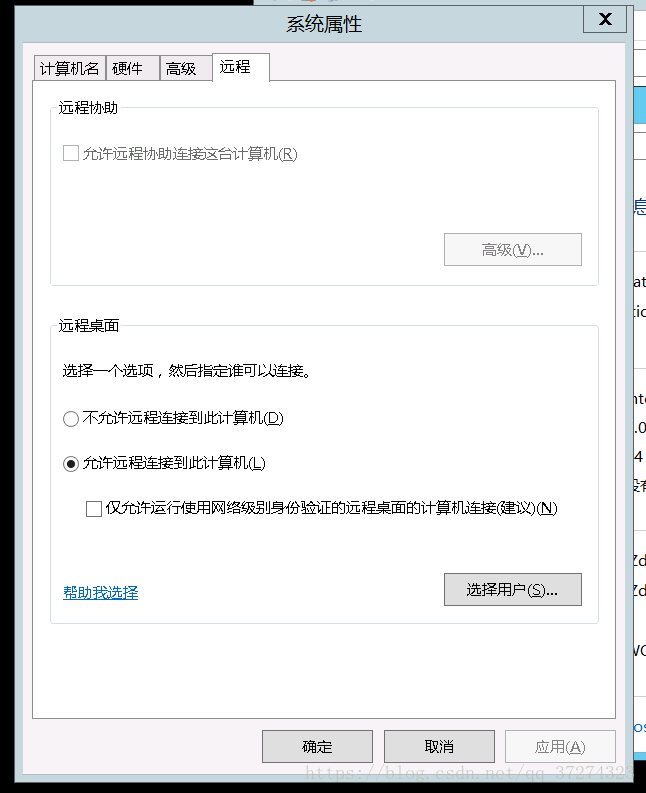
1. Connect to the server remotely on the web side. 2. Right click on my computer -> Property – & gt; Remote setting -& GT; 3. Uncheck computer connections that allow running remote desktops using network sector authentication only (recommended)(N)

The exact reason is not clear, but this operation successfully connected to the Aliyun server. Note: the image of ali cloud Server system is: Windows Server 2012 D2 Datacenter


Write in the last
I am a pure white, and the blog I write is also written because of the problems encountered in learning to use to find information and then solve the problem. If there are some mistakes, or involving infringement, please contact me.
QQ: 994961015
E-mail: [email protected]
WeChat: this can not be given.

SQLServerException: The server failed to resume the transaction. Desc:ab00000002

public void runSp(List<String> params, DataSource dataSource, String spName) throws SQLException {
  StringBuffer sb = new StringBuffer("{call " + spName + " (");
  for (int i = 0; i < params.size() - 1; i++) {
    sb.append("?,");
  }
  sb.append("?)}");
  String callString = sb.toString();
  LOGGER.info("[runSp] Running statement: " + callString);
  Connection conn = getConnection(dataSource);
  conn.setAutoCommit(false);
  CallableStatement cs = conn.prepareCall(callString);
  for (int i = 0; i < params.size(); i++) {
    cs.setString(i + 1, params.get(i));
  }
  try {
    cs.execute();
    conn.commit();
    LOGGER.info("sp completed successfully");
  } catch (Exception e) {
    LOGGER.info("sp failed", e);
    conn.rollback();
  } finally {
    cs.close();
    conn.close();
  }
}

This exception is thrown when the method is called while the program is running. The program needs to call SQL Server’s stored procedure during the run, but there is already a commit of the item in the store.
I also added Java code to Java code to throw out this one. After I tried to remove control from the Java code, there were no errors. The specific reasons are still in the learning process, I hope you can give me some advice.

How to Fix Pandoc wasn’t found.pdflatex not found on PATH

Nbconvert failed: Pandoc Wasn’t found resolved. Nbconvert Failed: PDFlatex Not Found on PATH resolved
Problem 1 Description
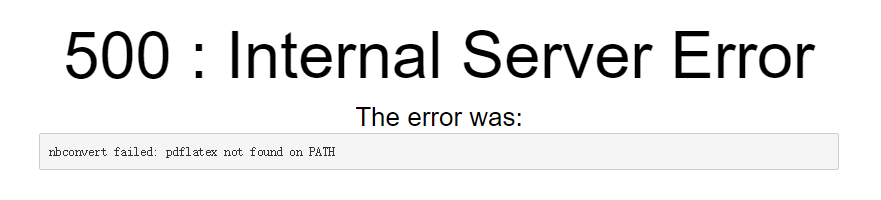
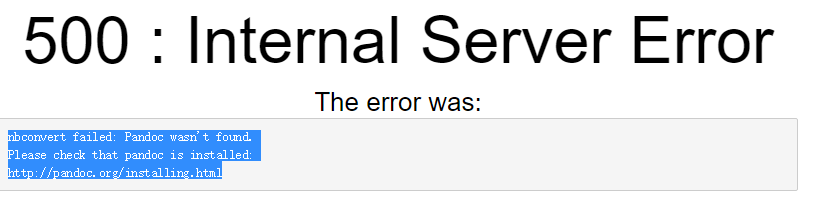
500: Internal Server Error
nbconvert failed: Pandoc wasn’t found.
Please check that Pandoc is installed:

Problem 2 Description
500 : Internal Server Error
nbconvert failed: pdflatex not found on PATH
http://pandoc.org/installing.html

Solutions:
1. Install pandoc
Download pandoc official download http://pandoc.org/installing.html
Other available CSDN resources download address
click to install directly, the default installation is ok, you can choose the installation location.
then configure the environment variable to configure the installation path to the system path. For example, I put E:\IDE\Pandoc into the PATH.
2. Install miktex
Click installation directly, the default installation can be selected, and the installation location can be selected.
(if the program does not automatically configure environment variables) requires manual configuration of environment variables to configure the installation path to the system path. If mine is put E:\IDE\MiKTeX 2.9\ MiKTeX \bin\x64 in path.

3. Install various macro packages
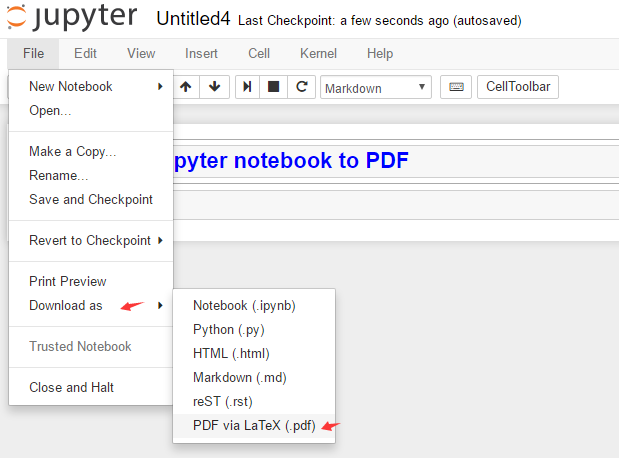
Select Convert PDF

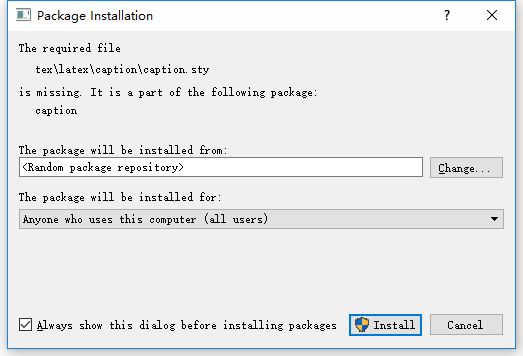
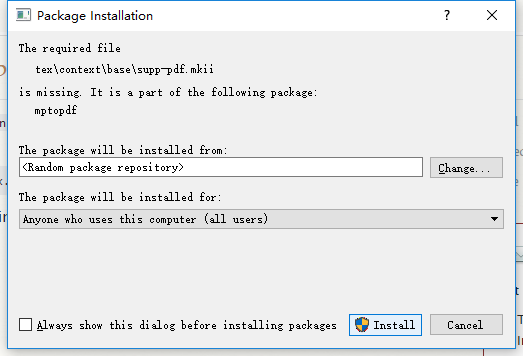
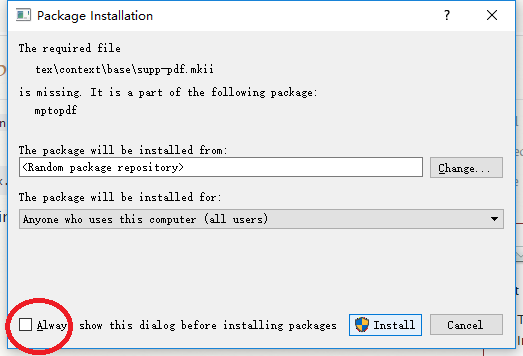
Automatic prompt to install various macro packages can be directly click to install (install several times, until the installation is complete…)


Can choose to remove the check box, each installation does not need popup, automatic installation, will be much faster, also save trouble.

Completed, you can successfully convert English content, including images, code highlights, and so on.

Attention! , but if it contains Chinese content, it will report an error, and the Chinese cannot be converted.
To solve the problem of unable to convert the Chinese method, others did not test the time of the follow-up Chinese support problems, personally solved after updating the content of the blog.

MongoNetworkError: failed to connect to server [localhost:27017]

MongoNetworkError: failed to connect to server [localhost:27017] on first connect [MongoNetworkError: connection 0 to localhost:27017 timed out
    at Socket.<anonymous> (D:\Desktop\node\mongodblearn\07_student_list\node_modules\mongodb\lib\core\connection\connection.js:355:7)     
    at Object.onceWrapper (events.js:427:28)
    at Socket.emit (events.js:321:20)
    at Socket._onTimeout (net.js:478:8)
    at listOnTimeout (internal/timers.js:549:17)
    at processTimers (internal/timers.js:492:7) {
  name: 'MongoNetworkError'
}]
    at Pool.<anonymous> (D:\Desktop\node\mongodblearn\07_student_list\node_modules\mongodb\lib\core\topologies\server.js:438:11)
    at Pool.emit (events.js:321:20)
    at D:\Desktop\node\mongodblearn\07_student_list\node_modules\mongodb\lib\core\connection\pool.js:562:14
    at D:\Desktop\node\mongodblearn\07_student_list\node_modules\mongodb\lib\core\connection\pool.js:995:11
    at callback (D:\Desktop\node\mongodblearn\07_student_list\node_modules\mongodb\lib\core\connection\connect.js:97:5)
    at D:\Desktop\node\mongodblearn\07_student_list\node_modules\mongodb\lib\core\connection\connect.js:124:7
    at _callback (D:\Desktop\node\mongodblearn\07_student_list\node_modules\mongodb\lib\core\connection\connect.js:349:5)
    at Connection.errorHandler (D:\Desktop\node\mongodblearn\07_student_list\node_modules\mongodb\lib\core\connection\connect.js:365:5)   
    at Object.onceWrapper (events.js:428:26)
    at Connection.emit (events.js:321:20) {
  name: 'MongoNetworkError'
}

The above error indicates that Mongodb is not started

InternalError: Failed to create session. Error and solution

InternalError: Failed to create session. Errors and solutions
Introduction Error message solution

preface
This error occurred at the beginning of training Keras (using the TensorFlow as Backend) model.
Python version: 3.5.2
Keras version: 2.1.3
TensorFlow version: 1.9.0
Error message

InternalErrorTraceback (most recent call last)
< ipython-input-4-d4cc2ca313a3> in < module>
10 model.compile(loss= ‘mse’, optimizer= ‘Adam’)
11 # fit network
— > 12 history = model.fit(X_train, y_train, epochs=3000, batch_size=16, validation_data=(x_test, y_test), verbose=2, shuffle=False)
13 #history = model.fit(X,y, epochs=3000, batch_size=16, Verbose = 2, shuffle = False)
14 # plot history
/usr/local/lib/python3.5/dist – packages/keras/models. Py fit in (self, x, y, batch_size, epochs, verbose, callbacks, validation_split, validation_data, shuffle, class_weight, sample_weight, initial_epoch, steps_per_epoch, validation_steps, **kwargs)
963 initial_epoch=initial_epoch,
964 steps_per_epoch=steps_per_epoch,
— > 965 validation_steps = validation_steps)

967 966 def the evaluate (self, x = None, y = None,
/usr/local/lib/python3.5/dist – packages/keras/engine/training. Py fit in (self, x, y, batch_size, epochs, verbose, callbacks, validation_split, validation_data, shuffle, class_weight, sample_weight, initial_epoch, steps_per_epoch, validation_steps, **kwargs)
1667 initial_epoch=initial_epoch,
1668 steps_per_epoch=steps_per_epoch,
-> 1669 validation_steps = validation_steps)

1671 1670 def the evaluate (self, x = None, y = None,
/usr/local/lib/python3.5/dist – packages/keras/engine/training. Py in _fit_loop (self, f, ins, out_labels, batch_size, epochs, verbose, callbacks, val_f, val_ins, shuffle, callback_metrics, initial_epoch, steps_per_epoch, validation_steps)
1204 ins_batch[i] = ins_batch[i].toarray()
1205
-> 1206 outs = f (ins_batch)
1207 if not isinstance (outs, a list) :
1208 outs = [outs]
/usr/local/lib/python3.5/dist – packages/keras/backend/tensorflow_backend py in the call (self, inputs)
2471 feed_dict[tensor] = value
2472 fetches = self.outputs + [self.updates_op] + self.fetches
-> 2473 session = get_session()
2474 updated = session.run(fetches=fetches, Feed_dict = feed_dict,
2475 * * self session_kwargs)
/usr/local/lib/python3.5/dist – packages/keras/backend/tensorflow_backend py in get_session ()
config = 174 Tf. ConfigProto (intra_op_parallelism_threads = num_thread,
175 allow_soft_placement = True)
– & gt; 176 _SESSION = tf. The Session (config = config)
177 Session = _SESSION 178 if not _MANUAL_VAR_INIT:

/usr/local/lib/python3.5/dist – packages/tensorflow/python/client/Session. Py in init (self, Target, graph, config)
1561
1562 “”
-& gt; 1563 super(Session, self).init(target, graph, config=config)
1564 # NOTE(mrry): Create these on first __enter__ to avoid a reference cycle.
1565 self._default_graph_context_manager = None
/usr/local/lib/python3.5/dist – packages/tensorflow/python/client/session. Py in init (self, target, graph, the config).
631 if self _created_with_new_api:
632 # pylint: Disable = protected – access
– & gt; 633 self._session = tf_session.TF_NewSession(self._graph._c_graph, opts)
634 # pylint: enable=protected-access
635 else:
InternalError: Failed to create session.
The solution


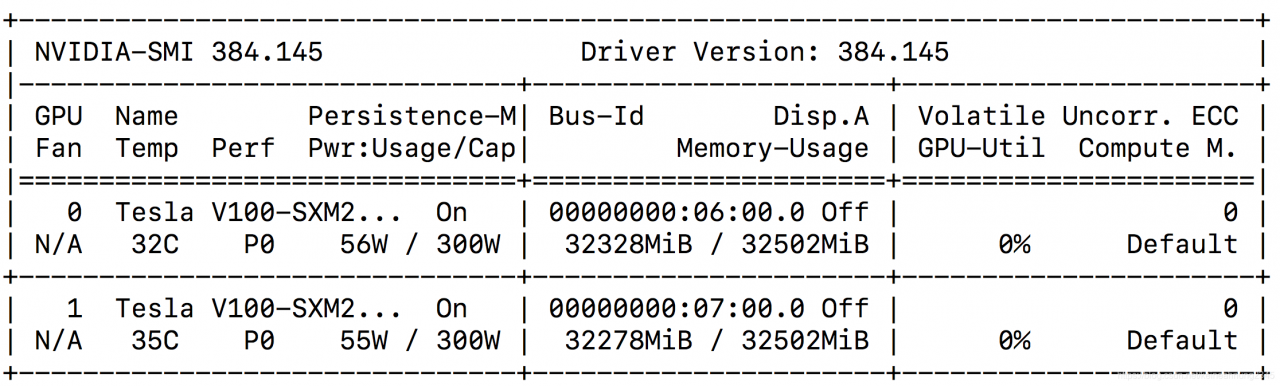
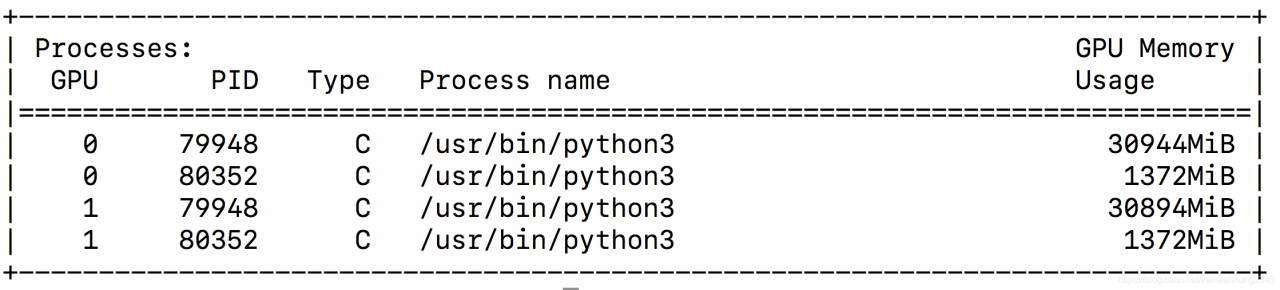
found that GPU memory has been occupied by other programs.
try to close these programs, then reruns the code (no need to restart kernel) and find the problem solved!

Solve ssh error: shell request failed on channel 0

Problem: When building Jenkins task, it was found that the target host could not be connected. After manually executing SSH command on the command line, an error was reported: Shell Request failed on channel 0
Cause: The number of system processes on the target host is too small to connect
Solution: need to modify the/etc/security/limits. D/20 – nproc. The values in the conf file, change the 4096 older, such as 65535

[zhangsan@note1 /]$ cat /etc/security/limits.d/20-nproc.conf

*          soft    nproc     4096
root       soft    nproc     unlimited

Re-ssh, and you are done.
 

ERR_CONTENT_DECODING_FAILED error occurs in PHP program, summary of solutions

The problem background
When a new project is deployed to a new server, colleagues can run on Windows without any problems, but when migrating to a Liinux server, they find the following error.
chrome prompt: ERR_CONTENT_DECODING_FAILED
as follows:

Screening method
Check whether the nginx.conf of Nginx opens gzip; if it opens gzip, close it and reload to check whether the zlib.output_compression is open; if it is not opened, use zlib.output_compression = On
The solution
In the php.ini configuration file, the following configuration is found to be off. Open it and restart PHP-FPM

; http://php.net/zlib.output-compression
zlib.output_compression = On


Reference links:
https://stackoverflow.com/questions/14039804/error-330-neterr-content-decoding-failed

The most complete solution for service network restart failure under CENTOS 7

Often, after changing the static IP under centOS 7, someone would find that the network service could not be restarted, so they searched the network, tried various methods and finally solved the problem.
is now a summary of various solutions, I hope to let you walk less crooked road.

First things first:
After executing the Service Network Restart command, the following error occurs:

Restarting network (via systemctl): Job for network. Service failed because the control process exited with error code.
See “systemctl status network. Service” and “journalctl-xe” for details.

After input systemctl status network. Service command, the following error message appears:

network.service - LSB: Bring up/down networking
   Loaded: loaded (/etc/rc.d/init.d/network; bad; vendor preset: disabled)
   Active: failed (Result: exit-code) since 三 2018-09-05 13:01:47 CST; 1min 16s ago
     Docs: man:systemd-sysv-generator(8)
  Process: 4681 ExecStart=/etc/rc.d/init.d/network start (code=exited, status=1/FAILURE)
   CGroup: /system.slice/network.service
           └─1192 /sbin/dhclient -H mini1 -1 -q -lf /var/lib/dhclient/dhclient--ens33.lease -pf /v...
9月 05 13:01:47 mini1 network[4681]: RTNETLINK answers: File exists
9月 05 13:01:47 mini1 systemd[1]: network.service: control process exited, code=exited status=1
9月 05 13:01:47 mini1 systemd[1]: Failed to start LSB: Bring up/down networking.
9月 05 13:01:47 mini1 systemd[1]: Unit network.service entered failed state.
9月 05 13:01:47 mini1 systemd[1]: network.service failed.

The network service cannot be started!! First of all, make sure that ifCFg-XXX (each machine is not the same) in /etc/sysconfig/network-scripts directory is free of errors (if you have made any changes), which refer to things like typing the wrong letters by hand during the change process.
The most common methods on the Internet are as follows:
1, and the NetworkManager service conflict, directly close the NetworkManager service, service NetworkManager stop, and forbid starting chkconfig NetworkManager off, finally restart it.
2. If it does not match the MAC address of the configuration file, use IP ADDR (or IFconfig) to check the MAC address

1: lo: <LOOPBACK,UP,LOWER_UP> mtu 65536 qdisc noqueue state UNKNOWN qlen 1
    link/loopback 00:00:00:00:00:00 brd 00:00:00:00:00:00
    inet 127.0.0.1/8 scope host lo
       valid_lft forever preferred_lft forever
    inet6 ::1/128 scope host 
       valid_lft forever preferred_lft forever
2: ens33: <BROADCAST,MULTICAST,UP,LOWER_UP> mtu 1500 qdisc pfifo_fast state UP qlen 1000
    link/ether 00:0c:29:b8:e7:21 brd ff:ff:ff:ff:ff:ff
    inet 192.168.65.141/24 brd 192.168.65.255 scope global dynamic ens33
       valid_lft 1193sec preferred_lft 1193sec
    inet6 fe80::cca2:d835:f93:e637/64 scope link 
       valid_lft forever preferred_lft forever

00:0 C :29:b8:e7:21 is the MAC address, change HWADDR in /etc/sysconfig/ net-scripts/ifCFg-XXX to this MAC address
3. Set up and start a service named networkmanager-waiting-online . The command is: systemctl enable networkmanager-waiting-online-service
4, see /etc/sysconfig/network - scripts , will the rest of the network card position papers all deleted, avoid unnecessary influence, is only a file, starting with ifcfg leave that one should use IP addr command to check the IP the second identical at the beginning of (see above for my ens33, I posted the IP addr command execution results), so I only left a ifcfg - ens33. (That's how two of my machines worked, because I made a backup before changing it, so just delete it...)
5. Comment out the DEVICE line in IFCFG-XXX file.
6. Change the NAME in IFCFG-XXX to be the same as the file NAME.
7. Change the network mode to bridge in VMWare edit-Virtual Network Editor.
8. Check whether the network adapter at the bottom right corner of VMWare is connected or not. If it is not connected, it will be connected.

(note: click the network adapter - Settings, and try to change the NAT mode to bridge. After I changed the bridge mode, I could restart the network service, but I could not connect to the network. After restarting,
and then change the bridge mode to NAT mode, and I found that I could both surf the Internet and restart the network service.)
9. Check to see if VMware DHCP Service and VMware NAT Service are disabled on your computer. If so, turn them on.
10. If you change to static IP don't forget to change BOOTPROTO to static.
11,, if the above is not resolved, there is a final move - restart to see if there is a miracle!! (A lot of times you just restart it.)
I have tried almost all of the above methods, some of which are useful or not useful for my machine, but some people have solved them with these methods, and recorded them together for future use

How to Fix gdb error: Failed to import the site module,No module named ‘_sysconfigdata_m’

GDB has been used recently and has been reporting errors:
Failed to import the site module
Traceback (the most recent call last) :
the File “/ usr/lib/python3.5/site. Py”, line 580, in & lt; module>

the main () the File “/ usr/lib/python3.5/site. Py”, line 566, in the main
known_paths = addusersitepackages (known_paths)
the File “/ usr/lib/python3.5/site. Py”, line 287, In addusersitepackages
user_site = getusersitepackages ()
the File “/ usr/lib/python3.5/site. Py”, line 263, In getusersitepackages
user_base = getuserbase # () this will also set user_base
the File “/ usr/lib/python3.5/site. Py”, line 253, In getuserbase
USER_BASE = get_config_var (‘ userbase)
the File “/ usr/lib/python3.5/sysconfig py”, line 595, In get_config_var
return get_config_vars () get (name)
the File “/ usr/lib/python3.5/sysconfig py”, line 538, In get_config_vars
_init_posix (_CONFIG_VARS)
the File “/ usr/lib/python3.5/sysconfig py”, line 410, In _init_posix
from _sysconfigdata import build_time_vars
File “/usr/lib/python3.5/_sysconfigdata.py”, line 6, in < module>
from _sysconfigdata_m import *
ImportError: No module named ‘_sysconfigdata_m’
I only searched the beginning one, which said it had to do with Python. Later, a colleague searched for the last sentence error and found a solution:

# cd /usr/lib/python3.4

# ln  -s /usr/lib/python3.4/plat-i386-linux-gnu/_sysconfigdata_m.py .


One of the configured repositories failed (Unknown), and yum doesn’t have enough cached data to cont

The Esaote installation dependency report error message is as follows
One of the configured repositories failed (unknown).
and yum doesn’t have enough cached data to continue. At this point, the only thing yum can do is
The safe thing to do is to fail. There are ways to “fix” this..:

 1. Contact the upstream for the repository and get them to fix the problem.

 2. Reconfigure the baseurl/etc. for the repository, to point to a working
    upstream. This is most often useful if you are using a newer
    distribution release than is supported by the repository (and the
    packages for the previous distribution release still work).

 3. Run the command with the repository temporarily disabled
        yum --disablerepo=<repoid> ...

 4. Disable the repository permanently, so yum won't use it by default. Yum
    will then just ignore the repository until you permanently enable it
    again or use --enablerepo for temporary usage:

        yum-config-manager --disable <repoid>
    or
        subscription-manager repos --disable=<repoid>

 5. Configure the failing repository to be skipped, if it is unavailable.
    Note that yum will try to contact the repo. when it runs most commands,
    so will have to try and fail each time (and thus. yum will be be much
    slower). If it is a very temporary problem though, this is often a nice
    compromise:

        yum-config-manager --save --setopt=<repoid>.skip_if_unavailable=true

Solution
can start by configuring yum sources

    1. is generally a network problem, check whether the network is unobvious. Secondly, if you use the company’s internal network, there will be restrictions, it is recommended to change the agent (there may be several agents in the company, but one happens to be limited, so you need to change the agent), you can ask colleagues to. Proxy parameter name error: yum’s proxy should use

proxy

    1. , instead of

http_proxy</code b> or https_proxy, but it is recommended to write all three, which must be correct.

For example: yum install-y XXX –proxy IP –http_proxy IP –https_proxy

Error:Execution failed for task’:app:processDebugResources’. Personally resolved

 
Personal problem scenario: While compiling the ListView list, R reported an error while initializing data in the main class, and the resource file could not be found
Personal problem: There is a problem with the image placed in the Drawable folder under the RES resource. (Goole took a look and realized that everyone has different questions.)
Drawable official document
 
Drawable Resources
SEE ALSO

    2D Graphics

A drawable resource is A general concept for A graphic that can be drawn to the screen and which you can retrieve with APIs such as getDrawable(int) or apply to another XML resource with Attributes such as android:drawable and android:icon. There are several different types of drawables:
 
Bitmap: the simplest Drawable, a PNG or JPEG image.Nine Patch: an extension to the PNG format allows it to specify information about how to stretch it and place things inside of it.Shape: contains simple drawing commands instead of a raw bitmap, allowing it to resize better in some cases.Layers: a compound drawable, which draws multiple underlying drawables on top of each other.States: a compound drawable that selects one of a set of drawables based on its state.Levels: a compound drawable that selects one of a set of drawables based on its level.Scale: a compound drawable with a single child drawable, whose overall size is modified based on the current level.
 
(1) person when writing code is in a hurry, there is no ready ahead of the corresponding image, to find the pictures of a few Zhang Xihuan in computer, copy and paste under the drawable, R resource file in your code, display, the introduction of resource R file error, an error found reasons: after examining locat drawable image size is too large;
(2) and remove the big picture, and try to find a few icon in the diagram, the result still R file Error, locat in display Error: Execution failed for task ‘: app: processDebugResources’. The official document was searched with the problem and it was finally found that the image resource file under the Drawable folder was incorrect. After the deletion, the program runs normally and the list shows success.
Error: Execution failed for task ‘: app: processDebugResources’ – the cause of the problem may be different, everyone for locat hints, in combination with the official API documentation, to find the corresponding solution.
 
Appendix summary of solutions to problems occurring in the build project (long-term update)
1) third-party dependency conflict the | dependency library version is inconsistent with the SDK version
Solution – Add to build.gradle:

android{
	configurations.all {
        resolutionStrategy.eachDependency { DependencyResolveDetails details ->
            def requested = details.requested
            if (requested.group == 'com.android.support') {
                if (requested.name.startsWith("appcompat-v7")) {
                    details.useVersion '25.3.0'
                }
                if (requested.name.startsWith("appcompat-v4")) {
                    details.useVersion '25.3.0'
                }

                if (requested.name.startsWith("recyclerview-v7")) {
                    details.useVersion '25.3.0'
                }
            }
        }
    }

}

Force all dependent libraries to use the same version without having to look up each one.
2) Mandatory version number
Sometimes a third-party Lib USES a higher version of support package, and there may be a problem with it. You don’t want to introduce a problem because of this Lib, and you don’t want to automatically upgrade the current support package because of it.
Gradle’s default mechanism, however, is to use the higher version if it has a higher version, which puts it in a dilemma: using the Lib will upgrade the Supprot package, but not using it will make it impossible to implement certain functions. Fortunately, Configations provides the ability to force a version specified.
First, configure a Task in root build.Gradle to view the current version information of the support library.

subprojects {
    task allDeps(type: DependencyReportTask) { }
}

Now force the version number of the Support library:

    configurations.all {
        // 指定某个库的版本
        resolutionStrategy.force "com.android.support:appcompat-v7:26.1.0"
    }

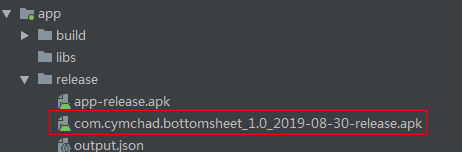
3) Change the name of the output APK

static def releaseTime() {
    return new Date().format("yyyy-MM-dd", TimeZone.getTimeZone("UTC"))
}
android {
        ... ...
    buildTypes {
        ... ...
    }
    android.applicationVariants.all { variant ->
        variant.outputs.all { output ->
            def outputFile = output.outputFile
            if (outputFile != null && outputFile.name.endsWith('.apk')) {
                def fileName = outputFile.name.replace("app",
                        "${defaultConfig.applicationId}_${defaultConfig.versionName}_${releaseTime()}" )
                outputFileName = fileName
            }
        }
    }

}

The Task above can name APK as “package name + version name + production time”.