Category Archives: How to Fix

Syntax error, annotations are only available if source level is 1.5 or greater.

Error:
1. Syntax Error, type parameters are only available if source level is 1.5 or greater. PageModel. Java. Java Problem
Syntax error. Type parameters are only available if the source level is 1.5 or greater.

2. Syntax error, Java compiler level does not match the version of the installed Java project facet. Project Problem (Java version Mismatch)
Syntax error, Java compiler level does not match the installed Java project version. Surface engineering problem (Java version mismatch)

3. Syntax error, annotations are only available if source level is 1.5 or greater
Syntax error. Comments are only available if the source level is greater than or equal to 1.5.

4. Syntax Error, Parameterized Types are only available if source level is 1.5 or greater. Java Problem
Syntax error. Parameterized types are only available at source level 1.5 or greater.

Reason: The Java compiler level does not match the Java project version installed
Solution: Project-& GT; Properties-> Java Compiler-> Compiler Compliance Level was selected for JDK version 5.0 or higher

In scan(file = file, what = what, sep = sep, quote = quote, dec = dec,  :   EOF within quoted string

When I read CSV files, such as SMs_raw < -read.csv (“E:/R/mlrdatasets/sms_spam. CSV “, stringsAsFactors = FALSE)
Warning message:
In scan(file = file, what = what, sep = sep, quote = quote, dec = dec, :
EOF within quoted string

method 1: call Sys. Setlocale (“LC_ALL”, “English”)
method 2: disable qutoe, set quote = “” “, change the statement to sms_raw < -read.csv (“E:/R/mlrdatasets/sms_spam. CSV “, stringsAsFactors = FALSE,quote = “”)

【ORA】Error 1031 received logging on to the standby

[ORA] Error 1031 Received logging on to the standby

Scene:
When building Windows Server 2008 R2 single-instance DG connected to Linux RAC (11.2.0.3), an error was reported on node 2:
Error 1031 received logging on to the standby

Solution:
The password file will be the same if you use Oracle as the password, but it turns out that you still need to recreate the password file, and the password file will be identical in all three places.

orapwd file=orapworcl password=oracle;
generated the password file; So just copy the password file from node 1 to node 2 and DG (change the file name to PWD instance name.ora, in this case pwdorcl.ora). If you check the alter log and it still gives an error, you need to redistribute and cancel the log application before starting the application log.
*** stop redo logging application
SQL> alter database recover managed standby database cancel;

*** open real-time logging application
SQL> alter database recover managed standby database using current logfile disconnect;

assigning to rvalue

Meet the vue has been an error assigning to rvalue solution, always thought that is a question of js code, look behind for a long time, were found in the HTML template v – model binding attribute is not defined in the data property. As follows:

<template>
    <div class="search-box">
        <div class="wrap">
            <input  v-model="searchText" class="search-input" type="text">
            <div class="search-botton"></div>
        </div>
    </div>
</template>

<script>
    export default {
        name: 'searchBox',
        data() {
            return {
            };
        }
    };
</script>

After modification:

<template>
    <div class="search-box">
        <div class="wrap">
            <input  v-model="searchText" class="search-input" type="text">
            <div class="search-botton"></div>
        </div>
    </div>
</template>

<script>
    export default {
        name: 'searchBox',
        data() {
            return {
                searchText: ''
            };
        }
    };
</script>

Solve problems.
The main thing to notice here is that in js code searchText is named in hump format, as well as in V-Model. Props being used in the template is not the same as wanting to convert the hump in JS to a short line. This is because the attributes in HTML are case-insensitive. However, v-Model is enclosed in quotation marks, so it is case sensitive, while short lines make an error. Detailed reference: https://blog.csdn.net/yuetingzhuying/article/details/49820689

win10 unable to start ssh-agent service, error :1058 solution

Reference [https://help.github.com/articles/generating-a-new-ssh-key-and-adding-it-to-the-ssh-agent/] set up SSH key, use the command SSH - add ~ /. SSH/id_rsa result Error
Error connecting to the agent: Unable to start ssh-agent: ssh-agent, error:
unable to start ssh-agent service, error :1058

win+R opens the service to see if the "OpenSSH Authentication Agent" service is enabled. If it is "disabled", set the service to "Automatic" and then open the service

eclipse cdt Program “make” not found in PATH

Before I talk about this, let me introduce the installation environment:
System environment: win7 x64
1. Download the JDK installation package to install and set system environment variables. Such as:
D: \ \ Program Files \ Java \ jdk1.8.0 _131 \ bin. D:\MinGW\bin;
Enter Java Javac validation on the CMD command line.
2. Download the Eclipse IDE for C/C++ Developers (CDT) installation package and open Eclipse directly after installation.
3. Download MinGW and select the C /C++ option to download. Then configure and select MinGW

Windows > > Preferences > > c/c++ > > New c/c++ Projects > > Exectable> > MinGW GCC&gt is selected for Empty Project; > Click apply & gt; > Ok // set MinGW as the default option
The eclipse CDT Program “make” not found in PATH problem can be solved in the following two points:

Right project & GT; > Preferences > > C\C++ Build > > Tool Chain Editor > > Change Current toolchain to MinGW GCC
Right project & GT; > Preferences > > C\C++ Build > > Tool Chain Editor > > Change Current builder to GNU Make builder

Shih:
You can change the builder (builder) from CDT Internal Builder to External make, change the builder type from Internal Builer to External Builder in builder Settings of C/C++ Build in project properties, and finally fill in the program name of make in Build command. For example, MinGW’s Mingw32-make. This can also be achieved by changing the Current Builder to Gnu Make Builder in C/C++ Build→Tool Chain Editor. The two are different interface displays of the same setting.
Build a hello c program first (CTRL +B), in run (CTRL +F11)

Mysql cannot allocate memory for the buffer pool solution

Further optimize the reference documentation for problem cause resolution

Cause of the problem
Last night, I modified the database and added a “FULLTEXT” index for the field. However, this morning, I found that the database could not be connected and could not be restarted. So I checked the log file:

cat /var/log/mysqld.log

The following error log was found:

130728  6:50:14 InnoDB: Initializing buffer pool, size = 128.0M
InnoDB: mmap(137363456 bytes) failed; errno 12
130728  6:50:14 InnoDB: Completed initialization of buffer pool
130728  6:50:14 InnoDB: Fatal error: cannot allocate memory for the buffer pool

The short answer is that there is no way to allocate 128M memory for mysql’s Buffer pool.
reason is obvious, the lack of memory, after looking up data found that the original parameter is mainly used to cache innodb table index, data, the buffer when inserting data. My server only has 1 gb of memory, so this parameter crashed mysql when it started allocating the cache for the index.
The solution
The configurations for mysql are inside /ect/ mysqlt.cnf (the Ubuntu directory is slightly different, where you can find it using whereis my.cnf).

vim /etc/my.cnf

You can see the fourth line:

#innodb_buffer_pool_size = 128M

The default configuration shown here is 128M, which is the annotation status. We just need to remove the annotation and change 128 to a smaller size (depending on your personal situation). I will change it to:

innodb_buffer_pool_size = 50M

That’s about it.
Further optimization
Generally appear this kind of problem students, the memory is certainly not large, so we can set swap partition, which is often said virtual memory.
is illustrated the role of the swap here won’t do, simply means can assist Mem points of memory.
direct code:

dd if=/dev/zero of=/swapfile bs=1M count=1024
mkswap /swapfile
swapon /swapfile

Finally, add the code /swapfile swap swap defaults 0 0 to the /etc/fstab file.

free

If you can see Mem and SWAP, it’s successful.
and finally restart mysql.
Reference documentation
http://hongjiang.info/aliyun-vps-mysql-aborting/

Solutions to Django is not importable in this environment

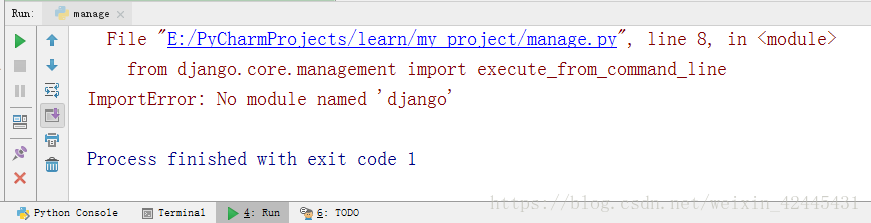
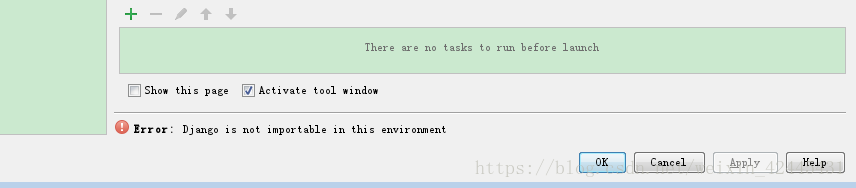
Django is not importable in this environment.
(1) the first thing to illustrate the point, now on the network all kinds of copy, about today I encountered this problem, didn’t find a good way to online, and open a, then open a, completely identical copy, was no, really is too sad, to solve the problem it took me 4 to 5 hours (I am a rookie!
If this article does not obtain my consent, do not reprint and plagiarism!
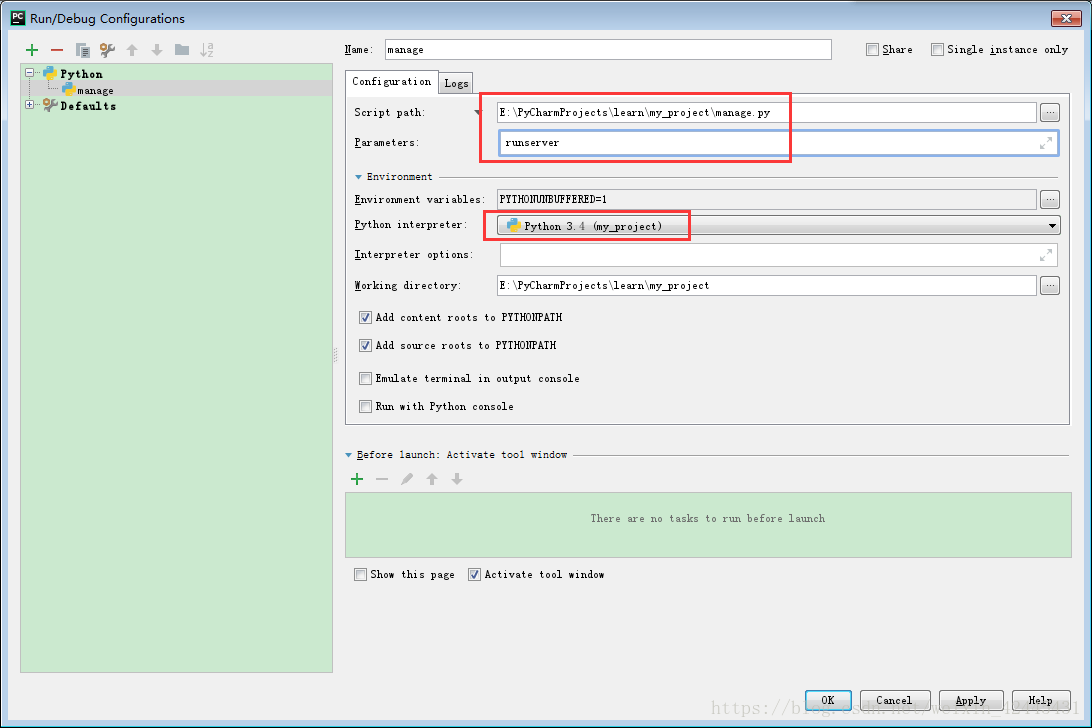
(2) PyCharm downloaded from the Internet or copied from other computers cannot be opened directly, and some Settings need to be made, which is very annoying! Of course, the main problem is to set up the interpreter, but there are other problems, such as Django is not importable in this environment. My software version is python3.4.3 and django 2.0.7
(3) Solutions to this problem:
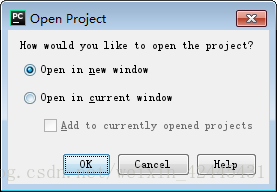
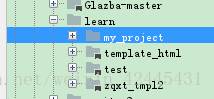
The file – & gt; Open, find your project file (project name), as follows, my project file is under the Learn folder, which has 4 projects

Then look at the following:
Select open in the new window to open a new window. Select another window to close the one you are currently open.

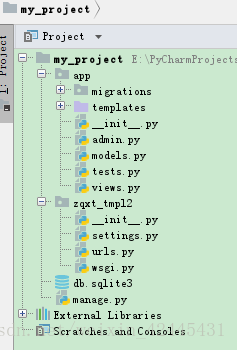
My entire project list is as follows:

It doesn’t matter that my project name is not the same as zaxt_tMP12 under the project.
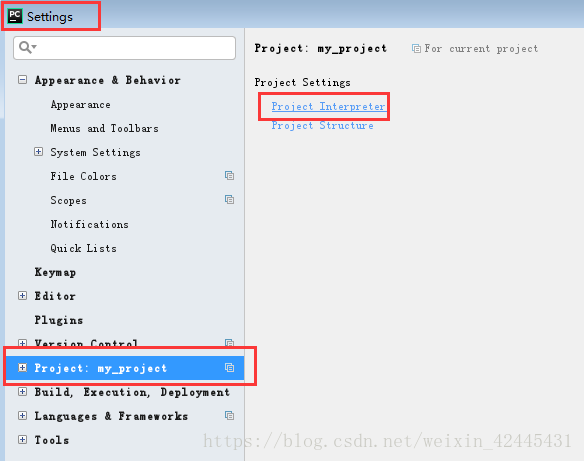
And then: file – & gt; Settings – & gt; Project Interpreter

Then, look at the picture:

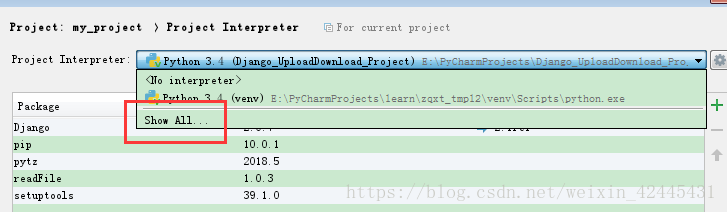
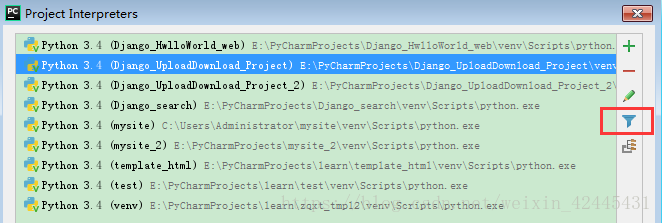
Hide interpreters that connect to other projects:

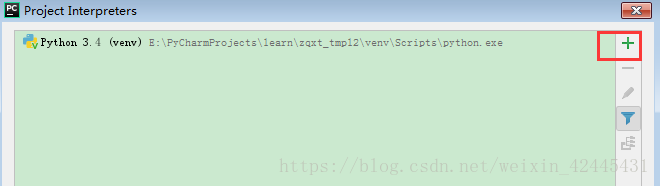
The effect is as follows, then green + :

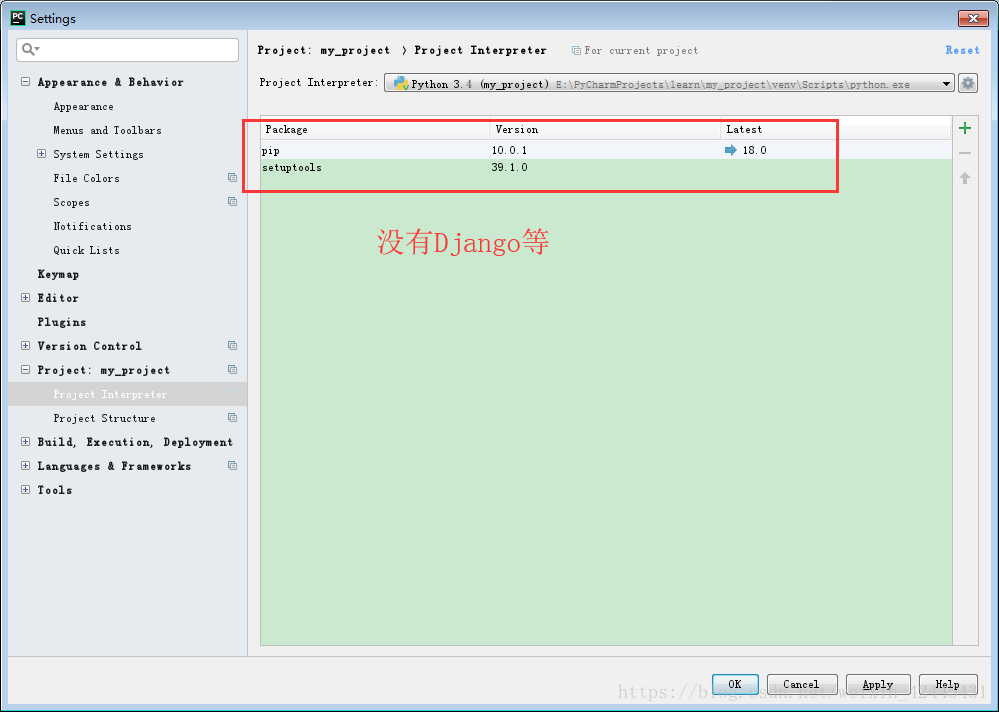
If it’s OK, the result is like this (don’t follow it here, I’m just showing you!! :

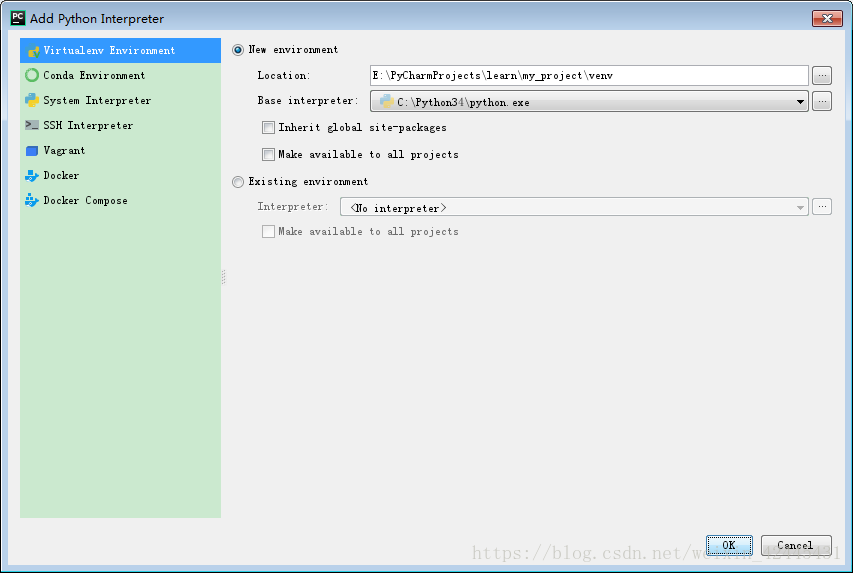
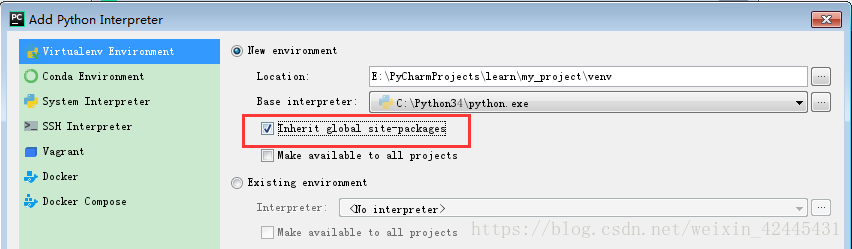
Django is not importable in this environment if you don’t grab Inherit global site-packages, you will get an error when you run.


Very distressed! ?You’ve been messing with me for a long time. In fact, here’s what you should do:

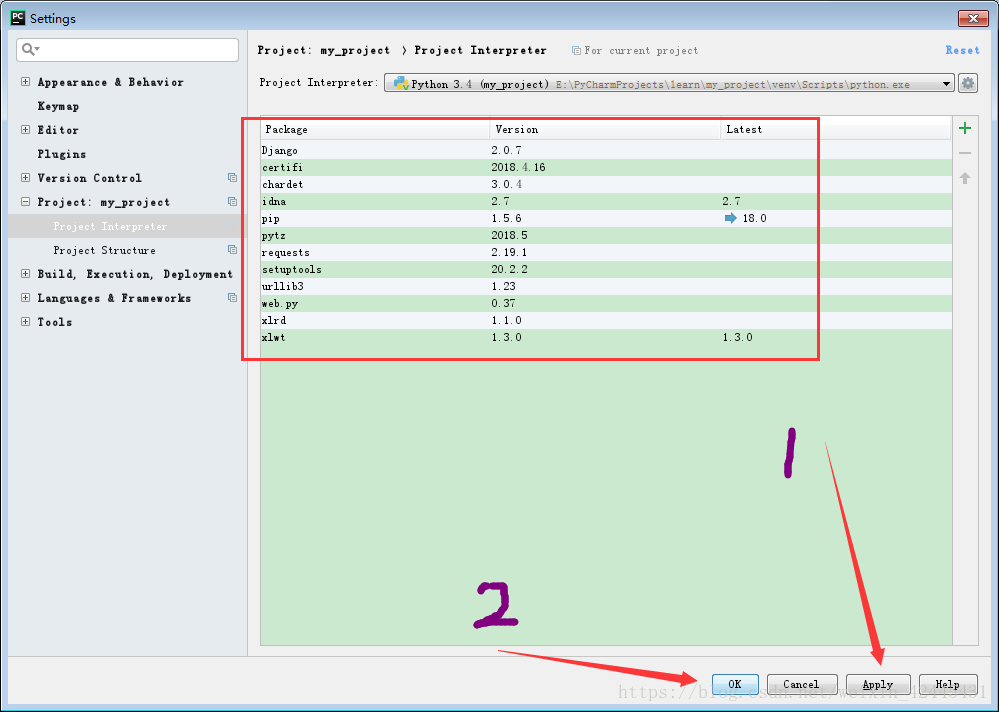
Then, apply – & gt; ok

Django is out!!
(4) Finally, add an interpreter:

Select the interpreter we set up in the previous step! And run manager.py Runserver. Click Run again and you’re ready to run!

It took quite a while to write the document, redid it and liked it if it helped.
If this article does not obtain my consent, do not reprint and plagiarism!

Bus error: 10

Recently, I wrote a small program with many analogisms. For the convenience of compilation, I wrote a Makefile specially for source code and test code.
In the process of debugging, a “Bus error: 10” suddenly appeared, which was quite unexpected. Why did such a spectacular problem occur?
The starting address of type int data must be a multiple of 4, otherwise it will cause the bus error mentioned above. With this in mind, I searched for a long time but couldn’t find any address misaligned.
When I compiled again, I found something fishy about the compilation process. The Makefile compiles the source file “.c/.cpp “into”.o “files (binaries), and then links these”.o “files to target files (executables, libraries, etc.). If some of these files are modified, the Makefile reduces compilation time by detecting the timestamp and compiling only the files that are modified later. So the question is, what happens if you change the header file?Examples are as follows:
Suppose you are going to modify two files, classA.h classa.cpp, add a member variable to the header file, and do the processing in the source file.
The two files classb.cpp classC.cpp will include the classA.h file. Because of the include type, the actual code in the file has been written to the source file and compiled into a “.o “file.
When the modification is completed, there is no change in classb. CPP classc. CPP, so when comparing the timestamp, determine that classb. CPP classc. CPP does not need to be compiled again. However, the header file classA.h of the classb. CPP classC.cpp file has really changed, so when the data is accessed, the address offset of its members will be greatly changed, no error can be found at compile time, but the execution will explode…
 
Solution: To sum up, it is not difficult to find the problem. The header files held before and after the code are scattered, resulting in running errors. It is only necessary to compile the classes of the modified header files that depend on, and the simple solution is to compile the current project after clean.
This blog is just for the sake of documenting a childish problem you’ve committed: if the header file changes, recompile it all or die…
The above!
 
So the question is, can the Makefile add dependencies on the source file’s head file?Detects the timestamp of the dependency header file and the “.o “file and compiles them. Make a note of it and study it later.