Category Archives: How to Fix

CFNetwork internal error (0xc01a:/BuildRoot/Library/Caches/com.apple.xbs/Sources/CFNetwork_Sim/CFNet

Bug description (Console warning message)
Reference: https://developer.apple.com/library/content/documentation/General/Reference/InfoPlistKeyReference/Articles/CocoaKeys.html
https://developer.apple.com/library/content/documentation/General/Reference/InfoPlistKeyReference/Articles/CocoaKeys.html#//apple_ref/doc/uid/TP40009251-SW33

CFNetwork internal error (0xc01a:/BuildRoot/Library/Caches/com.apple.xbs/Sources/CFNetwork/CFNetwork
 

1
1
Modify the info. The plist
NSExceptionDomains

    NSExceptionRequiresForwardSecrecy: NONSIncludesSubdomains: YESNSExceptionAllowInsecureHTTPLoads: YES

    Reason: Companies use HTTP rather than HTTPS requests

The problem of mobile hybrid development RN Android deployment appears Unsupported class file major version xx

  General error during semantic analysis: Unsupported class file major version 57
  
  java.lang.IllegalArgumentException: Unsupported class file major version 57
        at groovyjarjarasm.asm.ClassReader.<init>(ClassReader.java:184)
        at groovyjarjarasm.asm.ClassReader.<init>(ClassReader.java:166)
        at groovyjarjarasm.asm.ClassReader.<init>(ClassReader.java:152)
        at groovyjarjarasm.asm.ClassReader.<init>(ClassReader.java:273)

Appear this error is your JDK version is wrong, general RN ask JDK version is 1.8, recommends after installation, the project of the android/gradle. Add the following configuration properties
org. Gradle. Java. Home =/Volumes/Mac/Software/android \ Studio app/Contents/jre/JDK/Contents/home

13. R language: Error in match.names(clabs, names(xi)): The name is not relative to the original name

Problem description

Count_bind = rbind(count_left,count_right)
Error in match.names(clabs, names(xi)) : names are not relative to existing names

To explore the reason
This is a problem in the match.names function that occurs during rbind, for the simple reason that my first two objects to be rbind have different column names:


To solve the problem
Manually changing the column name can solve the problem:

colnames(count_left) <- c("AAA")

Use the above function to execute the two objects separately, and just change the column name.
Big mouth a
I’ve never really understood why data.frame cannot set the column name when declared but can set the row name. Below is the official usage, only for row row.

The data frame (… , row.names = NULL, check.rows = FALSE,
check.names = TRUE, fix.empty.names = TRUE,
stringsAsFactors = default.stringsAsFactors())

In this way, I often have to manually name the column names of the data box. Usually, the code I write is genetic data, so as to ensure the accuracy of the column names. However, it would be troublesome to write small codes for statistics
Welcome to communicate

swift stdlib tool error is reported after xcode upgrade xcode9 1

The computer was upgraded to 10.13.1, and Xcode was upgraded to Xcode9.1. But when the original operation was ok, swift Stdlib tool error was reported, and DerivedData was searched, re-Pod install, and deleted. The last time I saw a restart, another error occurred after the restart

baidu again, said to set the key string certificate to always trust, the result is still not believe

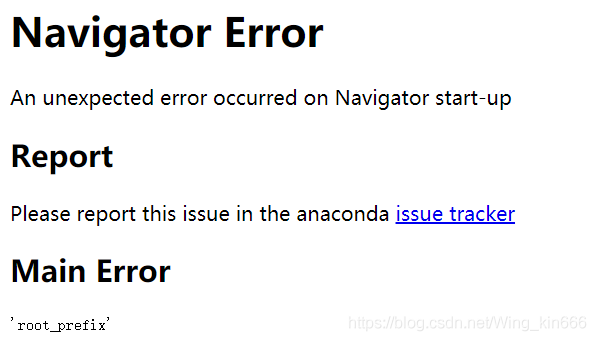
Anaconda opens Navigator to report an error and a web page appears Navigator Error An unexpected error occurred on Navigator start-up Report

Anaconda Navigator opens the following web page:

solution:
1. Run with the administrator: Anaconda Prompt
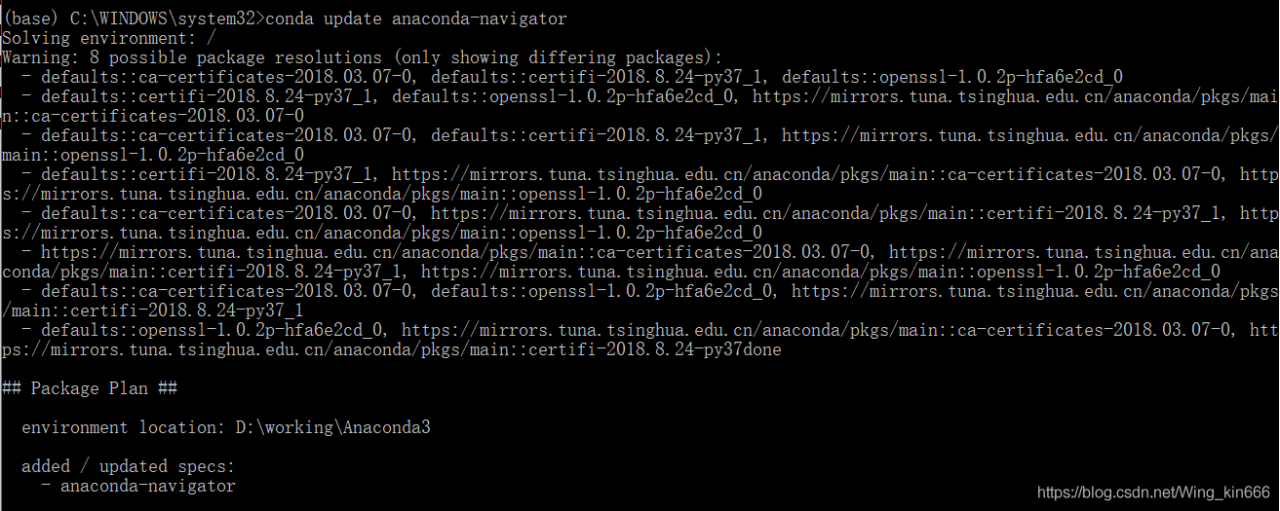
2. Conda update anaconda-navigator
this command may cause the following error:
InvalidTypeError: Parameter _channels = ‘- https://mirrors.tuna.tsinghua.edu.cn/anaconda/pkgs/main/ – https://mirrors.tuna.tsinghua.edu.cn/anaconda/cloud/bioconda/ declared in C: \ Users \ 12270 condarc has type STR.
Valid types:- tuple

Solution: Find the.condarc file under C:\Users\username folder and change it to the following:

channels:
  - https://mirrors.tuna.tsinghua.edu.cn/anaconda/pkgs/free/
  - https://mirrors.tuna.tsinghua.edu.cn/anaconda/pkgs/main/
  - https://mirrors.tuna.tsinghua.edu.cn/anaconda/pkgs/free/win-64
  - https://mirrors.tuna.tsinghua.edu.cn/anaconda/pkgs/free/noarch
  - https://mirrors.tuna.tsinghua.edu.cn/anaconda/pkgs/main/win-64
  - https://mirrors.tuna.tsinghua.edu.cn/anaconda/pkgs/main/noarch
show_channel_urls: true

3. Conda update anaconda-navigator

The Ethereum private chain is built, and the block information cannot be synchronized. The error is resolved: Node data write error err=”state node failed with all peers(1 tries, 1 peers)

In the afternoon, I tried to build a private ethereum chain, and then an error was reported when I joined the node. The error was reported as follows:

INFO [06-09|16:44:36.966] Block synchronisation started 
INFO [06-09|16:44:36.973] Imported new block headers               count=0 elapsed=2.059ms number=265 hash=436ce2…310d57 age=27m26s   ignored=63
WARN [06-09|16:44:36.975] Node data write error                    err="state node 80477e…d1c7e3 failed with all peers (1 tries, 1 peers)"
WARN [06-09|16:44:36.976] Synchronisation failed, retrying         err="state node 80477e…d1c7e3 failed with all peers (1 tries, 1 peers)"
INFO [06-09|16:44:46.970] Imported new block headers               count=0 elapsed=1.040ms number=265 hash=436ce2…310d57 age=27m36s   ignored=63
WARN [06-09|16:44:46.972] Node data write error                    err="state node 80477e…d1c7e3 failed with all peers (1 tries, 1 peers)"
WARN [06-09|16:44:46.973] Synchronisation failed, retrying         err="state node 80477e…d1c7e3 failed with all peers (1 tries, 1 peers)"
INFO [06-09|16:44:56.970] Imported new block headers               count=0 elapsed=1.040ms number=265 hash=436ce2…310d57 age=27m46s   ignored=63
WARN [06-09|16:44:56.971] Node data write error                    err="state node 80477e…d1c7e3 failed with all peers (1 tries, 1 peers)"
WARN [06-09|16:44:56.972] Synchronisation failed, retrying         err="state node 80477e…d1c7e3 failed with all peers (1 tries, 1 peers)"
INFO [06-09|16:45:06.971] Imported new block headers               count=0 elapsed=1.084ms number=265 hash=436ce2…310d57 age=27m56s   ignored=63
WARN [06-09|16:45:06.973] Node data write error                    err="state node 80477e…d1c7e3 failed with all peers (1 tries, 1 peers)"
WARN [06-09|16:45:06.973] Synchronisation failed, retrying         err="state node 80477e…d1c7e3 failed with all peers (1 tries, 1 peers)"
INFO [06-09|16:45:16.971] Imported new block headers               count=0 elapsed=1.020ms number=265 hash=436ce2…310d57 age=28m6s    ignored=63
WARN [06-09|16:45:16.972] Node data write error                    err="state node 80477e…d1c7e3 failed with all peers (1 tries, 1 peers)"

There was no solution on the error reporting network, and I tried to restart the chain to no avail.
My solution is that USES a non-root account to carry out the chain operation again. If it doesn’t work, delete all the chains and use ordinary users to carry out the operation, mainly because I saw the error of Node data write error, which I suspect is related to the root user's permission.
I did it once with a normal user and it worked...
PYTHON 3 crawler has the problem of

Python3 teaches by hand
Official Python Manual
The problem
When writing crawlers in Python, I encountered an error of Urlopen:

>>> url = """https://www.google.com.hk/search?newwindow=1&safe=strict&biw=960&bih=430&noj=1&q=django&oq=django
&gs_l=serp.3...664389.664389.0.664921.1.1.0.0.0.0.0.0..0.0....0...1c..64.serp
..1.0.0.cfHP0MSxtWU
"""
... ...
<urlopen error no host given>

There are many reasons for this problem. For example, in order to prevent program access, some websites need to add headers, etc., in order to access normally, otherwise this error will be reported.
The solution
In fact, careful friends will find me above the code for elegance, with “” “” “” to continue line, and with the return to the URL path to truncate. So here’s the problem — this is the same as introducing the ‘/n’ character into the original URL string, so the path is wrong, so it won’t open!
As long as you don’t press enter, you can resume the normal use of urllib.request-open.
(Question: But how do you achieve line wrapping in this case?Just use ‘a’ + ‘b’ + ‘c’ ~)