Category Archives: How to Fix

MySQL ERROR 1054 (42S22): Unknown column’password’ in’field list’ error

After MySQL login is successful, use the command

update user set password=password("1234") where user="root";

ERROR: ERROR 1054 (42S22) Unknown column ‘password’ in ‘field list’

D:\DevelopTools\mysql-5.7.10-winx64\bin>mysql -u root -p
Enter password:
Welcome to the MySQL monitor.  Commands end with ; or \g.
Your MySQL connection id is 2
Server version: 5.7.10 MySQL Community Server (GPL)

Copyright (c) 2000, 2015, Oracle and/or its affiliates. All rights reserved.

Oracle is a registered trademark of Oracle Corporation and/or its
affiliates. Other names may be trademarks of their respective
owners.

Type 'help;' or '\h' for help. Type '\c' to clear the current input statement.

mysql> use mysql
Database changed
mysql> update user set password=password("1234") where user="root";
ERROR 1054 (42S22): Unknown column 'password' in 'field list'

I checked the data and found that after MySQL5.7, the password field no longer exists, it turns into Authentication_string

update user set authentication_string=password("1234") where user="root";

The command to modify again is ok. Do not forget to flush MySQL privileges with the flush privileges command after the
modifications.

mysql> update user set authentication_string=password("1234") where user="root";
Query OK, 1 row affected, 1 warning (0.00 sec)
Rows matched: 1  Changed: 1  Warnings: 1

mysql> flush privileges;
Query OK, 0 rows affected (0.00 sec)

When does
mysql need “flush” privileges?The
flush privileges command essentially disconnects the user information/privilege Settings in the current user and privilige table from the mysql library (the built-in library of the mysql database) into memory. If MySQL user data and permissions have been modified and you want to take effect without restarting the MySQL service, you need to execute this command. After changing the Settings of the ROOT account in case you cannot log in again after restarting, flush directly to see if the permissions are valid. Without taking too much risk.
Resources:
https://blog.csdn.net/u014756827/article/details/53164926

Solve the error when installing apk after compiling Android Studio: Error while Installing APK

1. Error description
Today, when installing APK after compiling the application with Android Studio, an error was reported, as shown below:

The APK file build\outputs\apk\OYP_2.3.4_I2Base_6476_official_debug.apk does not exist on disk.
Error while Installing APK

1 2

as shown in the figure below
2. Solutions
1. Tried build-& GT; Clean Project recompiled, still invalid
2, try to restart Android Studio invalid
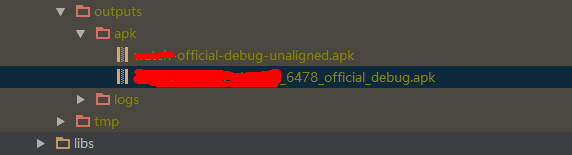
Then I went to open build\outputs\apk\ directory, and found that the apk file was compiled, but the file name was exactly:
oyp_2.3.4 _i2base_6478_official_debug.apk
looks like the following:

Therefore, the APK file compiled by Android Studio is
OYP_2. 3.4 _I2Base_6478_official_debug. Apk
And it wants to install the APK filename exactly
Oyp_2.3.4 _i2base_6476_official_debug.apk
will therefore report an error. Google checked the error, on the http://stackoverflow.com website has an article about the solution of the error, the link as shown below:
http://stackoverflow.com/questions/34039834/the-apk-file-does-not-exist-on-disk
Solution:
as shown in the following figure:
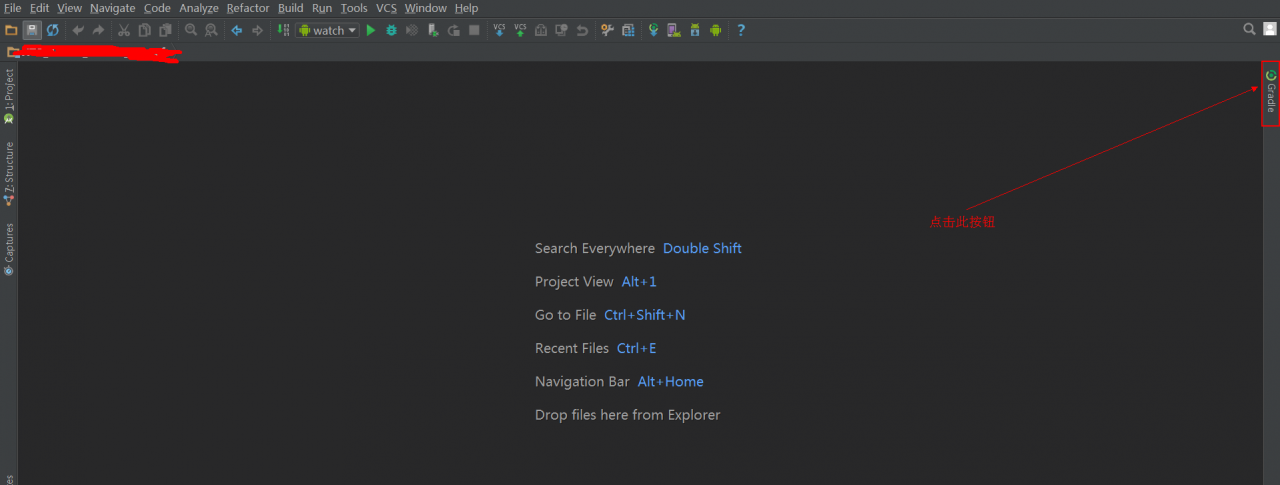
Step 1: Click the Gradle button in the Android Studio sidebar, as shown below

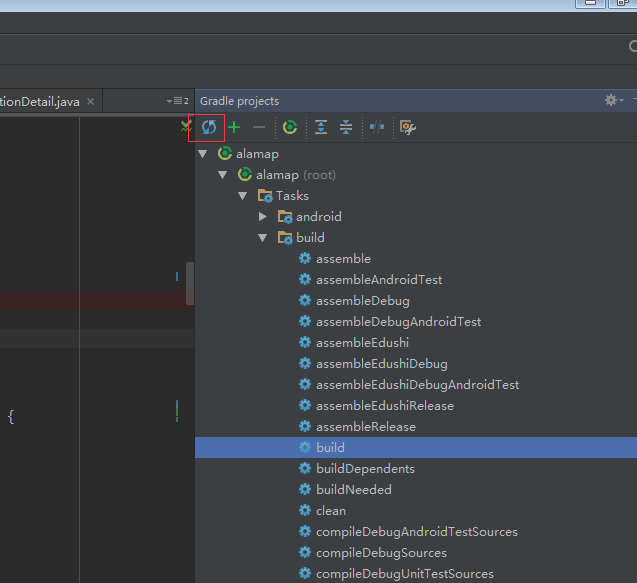
Step 2: Refresh the Gradle configuration

Step 3: Recompile can, will not report an error.

RAC Error is 16191 Error 1017 received logging on to the standby

Problem description:
Error 1017 received logging on to the standby————————————————————

Check that the primary and standby are using a password file

and remote_login_passwordfile is set to SHARED or EXCLUSIVE,

and that the SYS password is same in the password files.

returning error ORA – 16191

————————————————————

PING[ARC2]: Heartbeat failed to connect to standby ‘pandb_dg’. Error is 16191.
Solutions:
1. Change the password once for both RAC1 and RAC2 nodes.
SQL> Alter User sys identified by sys;
2. The rac1 and regenerate the password file:
orapwd file =/u01/app/oracle/product/11.2.0/db_1/DBS/orapwpandb password = sys force = y ignorecase = y
the password file copy to the standby server side, and rac2.
problem solving.

Installation and use of R language ggmap package

R language GGMap package installation and use
Ggmap is a map drawing package that calls the Google Maps API via the get_map function.
1 The first attempt went wrong
At the beginning, get_map was used to fetch the map data directly in R. However, an error occurred. The interface to display the function request refused our request (HTTP error code: 403).

library(ggmap)
map=get_map(location='San Fransico',maptype='roadmap',zoom=12)

URL:http://maps.googleapis.com/maps/api/staticmap?center=San+Fransico& zoom=12& size=640x640& scale=2& maptype=roadmap& language=en-EN& sensor=false
2 Baidu Discovery
From July 16, 2018, Google will limit the number of API requests, charge fees for exceeding the limit, and make it mandatory for all projects to use the official API Key. Without the API Key, the quality of the map may degrade or the map will not work. The API key must be associated with a credit card, and if the limit is exceeded, Google will start charging from the credit card. The search giant first offered users a $200 a month credit for free. Google slashed the number of free requests, from 25,000 per day to 28,000 per month, or about 1,000 per day, to a quarter of that. Google users who do not apply for a settlement account can only access the interface once a day.
3. Solving problems
So errors occur because of the lack of interface in the request URL key, to apply for a key in the Google maps developer platform:
https://developers.google.cn/maps/documentation/
We also found that we need to associate the credit card account, that is, the account that needs to be cleared by the Google map interface. After completing a series of applications, we found through the URL that to retrieve this function, we need to enable the staticmap interface. After enabling the interface, we got the KEY of the staticmap interface, but we found that the package we just downloaded directly in R could not add the KEY parameter to the URL. Later, it was found that someone on GitHub had updated the ggmap package. Then remove the ggmap package installed previously, install the latest ggmap package from GitHub, and directly enter the code in R to install:

if(!requireNamespace("devtools")) install.packages("devtools")
devtools::install_github("dkahle/ggmap", ref = "tidyup")
library(ggmap)
register_google(key=”your google map API key”)

Add the KEY parameter to register_google() and call the get_map() function to get the map data. If you get an error message that register_google is not register_google, you have not successfully installed the GGMap package from GitHub.
https://stackoverflow.com/questions/53275443/unable-to-use-register-google-in-r
When I call get_map(), I find an error prompting HTTP request to send REQUEST_DENIED. It was found on StackOverflow that Google map still needs to apply for Geocoding API interface. After applying for the interface, it should be ok to call get_map.
https://stackoverflow.com/questions/52565472/get-map-not-passing-the-api-key/52617929#52617929
Appendix:
1, ggmap packet address: https://github.com/dkahle/ggmap
2, methods other than Google maps, can also study the openstreetmap:
https://www.openstreetmap.org/user/jbelien/diary/44356

error: stray ‘\302’ in program

Q: What is the cause of this type of error: Error: Stray ‘\302’ in program?
Answer: this kind of error, the possibility program itself does not have syntax error, should be the code of each line space is wrong, just need to delete the program error line in front of the space, and then let the program go back to solve the problem!

When docker creates a container command: Error response from daemon: No command specified

Error Response from daemon: No Command Specified
[root@test3 containers]# docker run -itd –name=container4 ubuntu-ssh-20190622
docker: Error response from daemon: No command specified.
See ‘docker run –help’.
Try other images and find out whether you can create containers or not. The answer to the question is obvious:
[root @ test3 containers] # docker images
the REPOSITORY TAG IMAGE ID CREATED the SIZE
ubuntu – SSH – 20190622 latest af84d755fccd 37 Minutes line 240 MB
ubuntu – SSH – 20190622 ansible e91bf9461302 21 hours line 240 MB
ubuntu latest 4 c108a37151f 4 days a line 64.2 MB
busybox latest e4db68de4ff2 8 days line 1.22 MB
HTTPD latest e77c77f17b46 11 days line 140 MB
 
Without CMD command, use docker inspect [mirror name] to see if the create container image cannot be created, if the CMD inside is null, and if the other one exists. The solution is to add:
if my mirror name:
[root@test3 containers]# docker create ubuntu-ssh-20190622:ansible /bin/bash
163f0d4046c4282da375344ca871a83bf1cfe175b73acf178a58138c315a922a
 

ERROR 1148 (42000): The used command is not allowed with this MySQL version

Mysql database reported an error when loading file contents into the table:

mysql> LOAD DATA LOCAL INFILE '/path/pet.txt' INTO TABLE pet
       LINES TERMINATED BY '\r\n';

ERROR 1148: The used command is not allowed with this MySQL version
. If LOAD DATA LOCAL is disabled, either in the server or the client, a client that attempts to issue such a statement receives the following error message:
ERROR 1148: The used command is not allowed with this MySQL version
. For security reasons, The default is not allowed to load data remotely from client host.
Solution:
in two steps:

SET GLOBAL local_infile=1;

When connecting to the database

mysql -u Name -p --local-infile=1;

When using

  conn = pymysql.connect(host="localhost",
                           user="root",
                           password="111",
                           db="work2forecast",
                           charset="utf8mb4",
                           local_infile=1)

nodejs Error: Cannot find module ‘ejs‘

Error display:
Error: _resolveFilename (module.js:325:15)
at function.module._load (module.js:276:25)
at require (module.js:353:17)
at require
at new View (d:\WebClient\webstormSpace\ day6shuomodules \express\lib\view.js:78:30)
at eventemet.render (d: \ WebClient \ webstormSpace \ day6shuoshuo \ node_modules \ express \ lib \ application js: 569:12)
the at ServerResponse. Render (d:\WebClient\webstormSpace\ day6shuomodules \lib\ respons.js :961:7)
at exports. ShowIndex (d:\WebClient\webstormSpace\ day6shuoroutes.js :7:9)
at Layer. Handle [as handle_request] (d:\WebClient\webstormSpace\ day6shuomodules \express\lib\router\ pace.js: 93:5)
at next (d:\WebClient\webstormSpace\day6shuoshuo\node_modules\express\lib\router\route.js:131:13)Reason: EjS module is not installed
Solutions:
CMD goes to the project directory and installs EJS: NPM install –save EJS

install sql server 2016 Error code 0x84B20001

1.
Try running the following command at the command prompt (as an administrator) :
SFC/SCANNOW
2.
Fix a failed SQL Server installation from the installation center

    start the SQL Server installer (setup.exe) from the SQL Server installation media. After prerequisites and system validation, setup will display the SQL Server Installation Center page. Click Maintenance in the left navigation area, and then click Repair to start the repair operation.

    If the installation center is started using the Start menu, the location of the installation media needs to be provided at this point.
    Setup support rules and file routines will run to ensure that your system has the required software installed and that your computer has passed setup validation rules. Click OK or Install to continue. On the Select Instances page, select the instance that you want to fix, and then click Next to continue. The maintenance rules will run to verify the operation. To continue, click Next. The Ready to Fix page indicates that the operation is ready to proceed. To continue, click Fix. The fix progress page shows the status of the fix operation. The Finish page indicates that the action is complete.

Fix a failed INSTALLATION of SQL Server using the command prompt
Run the following command at the command prompt: setup.exe/Q /ACTION=Repair /INSTANCENAME= INSTANCENAME
3.
https://support.microsoft.com/en-gb/help/969052/how-to-restore-the-missing-windows-installer-cache-files-and-resolve-p?Wa = wsignin1.0

How to Fix distributed training report terminate called after throwing an instance of’std::length_error’

In conducting the training in a distributed fashion.
INFO: sensorflow:Reduce to /replica:0/task:0/device:CPU:0 then broadcast to (‘/replica:0/task:0/device:CPU:0’,)
I0408 04:01 41.507015 140706188736256 cross_device_ops. reduce to /replica:0/task:0/device:CPU:0 then broadcast to (‘/replica:0/task:0/device:CPU:0’ ,).
INFO: tensorflow:Create CheckpointSaverHook.
I0408 04:01 44.424420 140706188736256 basic_session_run_hooks. py: 541] to create CheckpointSaverHook.
Call termination after throwing the instance ‘std::length_error’
what(): basic_string::append
Fatal Python Error: Abort
I’ve spared a lot of troubleshooting, and by reducing the number of GPUs, I can run it normally!

BO error Error: RWI 00200 FWM 01014

I recently encountered (Error: RWI 00200) and (FWM 01014) when Working with BO reports using Java

The server cannot be found in {0} and cluster {1} with type NULL for the Webiserver service. All such servers may be shut down or disabled by an administrator. (FWM 01014)
Unable to find servers in CMS {0} and cluster {1} with kind {2} and service {3}. All such servers could be down or disabled by the administrator. (FWM 01014)
The error.
It was found that the reason for this error is that the service address is configured as the system IP, and there is no configuration mapping in the hosts file
The service address is: 192.168.2.90:2888
The system address is: ABC01:2898
Hosts file
192.168.2.92 abc01
The system address originally matched with the server address caused the problem
The above BO server is a cluster environment, the above problem must find the system administrator to clarify the service address and system address.
 

[Caffe] fatal error: hdf5.h: No such file or directory error solution

This error occurs when installing Caffe while compiling to source code if it is not in accordance with HDF5

sudo apt-get install libhdf5-dev

If an error is still reported after installation, open makefile.config, go to INCLUDE_DIRS and add /usr/include/hdf5/ Serial after it, as follows:

INCLUDE_DIRS := $(PYTHON_INCLUDE) /usr/local/include /usr/include/hdf5/serial 

LIBRARY_DIRS, then add /usr/lib/ x86_64-Linux-gnu /hdf5/serial, as follows:

LIBRARY_DIRS := $(PYTHON_LIB) /usr/local/lib /usr/lib /usr/lib/x86_64-linux-gnu/hdf5/serial

Re-execute make All.